Solved Security Prompts for Internet Shortcuts (in Favorites Folder)

My Computer My Computer

At a glance

W7 Pro SP1 64biti78GBIntel HD Graphics
Computer type
Laptop
Computer Manufacturer/Model Number
Employer provided Dell Latitude
OS
W7 Pro SP1 64bit
CPU
i7
Memory
8GB
Graphics Card(s)
Intel HD Graphics
Hard Drives
crappy SSD
Antivirus
Employer mandated Symantec Endpoint Protection
Browser
Pale Moon 64bit, IE11 64bit & Chrome 64bit
We are dealing with the Integrity Label-ed case of security prompts, clearly.

When a shortcut (.lnk) or .url file has a Low Mandatory Integrity Label, Windows will prompt consent from the user when the shortcut is invoked—as already observed.
It sounds like you have been seeing this prompt for a while now... even prior to the installation of KB3185319. It makes sense to see the security prompt, but I (and others) have not seen it in the past.


But as it turns out, none of the shortcuts in the Favorites folder themselves actually carry a Integrity Label. What’s happening is, they are inheriting a Low Mandatory Integrity Label from the Favorites folder. Because IE runs with low integrity, the files associated with it will also be of low integrity, and therefore if IE is to write these files to the Favorites folder the Favorites folder must also bear a Low Mandatory Integrity Label.
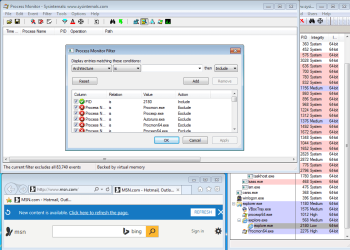
IE11's parent process is responsible for writing shortcut files to the Favorites folder (and sub-solders). Dragging/dropping the URL from IE11's address bar to the Favorites bar (the Links folder) indicated that IE's parent process (in this case, PID 568) created the URL shortcut. That parent process should be running at the Medium Integrity Level.

IE11-medium.PNG

I repeated the shortcut creation process with Process Monitor filtered to only show the file actions for IE11's child process (in this case, PID 2180) - I got no entries at all.

IE11-low.PNG
I brought up the filter after dragging/dropping the URL from IE11's address bar to the Favorites bar.


XLR8TX, the security prompt you see is ordinary behaviour and I recommend you don’t try and change it.
It seems like the correct behavior, but I assure you that it has not been happening ever since I started using W7. I have double clicked on various IE shortcuts from the Favorites folders within Windows (file) Explorer and I've not been seeing this prompt. This double click usually happens when I want to see a website in a non-default browser. After I drag/drop the shortcut to the non-default browser, I sometimes decide that I also want to see it within my default browser too (IE). This is accomplished via a regular double click on the shortcut file from within Windows (file) Explorer. I should have seen the security prompt during the drag/drop operation and the double click operation (based on what I think I know about Mandatory Labels)... but I don't see it.

None of the computers that I oversee at the office have KB3185319 installed (yet). None of the ones that I tested create the security prompt and I don't know/understand why that is.
 

My Computer My Computer

At a glance

W7 Pro SP1 64biti78GBIntel HD Graphics
Computer type
Laptop
Computer Manufacturer/Model Number
Employer provided Dell Latitude
OS
W7 Pro SP1 64bit
CPU
i7
Memory
8GB
Graphics Card(s)
Intel HD Graphics
Hard Drives
crappy SSD
Antivirus
Employer mandated Symantec Endpoint Protection
Browser
Pale Moon 64bit, IE11 64bit & Chrome 64bit
Welcome to the thread, UsernameIssues. That information you’ve provided is certainly useful for uncovering the nature of this KB3185319 hotfix (13 Sep 16)… I think I get the full picture now.

Although those command prompt screen captures reveal no dissimilarities between the shortcuts of Windows installs with and without hotfix KB3185319 applied, it asserts that the low integrity label on the shortcuts in the Favorites folder have always existed. Yet, it turns out, despite the integrity labels having always existed on them, those shortcuts in the Favorites folder have not always produced a security prompt. From my testing, it is indeed correct fact that KB3185319 has introduced these security prompts for shortcuts in the Favorites folder.

So, if the security warnings are caused by low integrity levels set on shortcuts, why weren’t they apparent before hotfix KB3185319? What’s changed?

I’ve seen security prompts appear on low integrity-ed shortcuts many times before, and have learned to associate low integrity levels and shortcuts with these prompts. I am right in this respect but applying this knowledge to this scenario is a mistake as we are not dealing with integrity levels and shortcuts (.lnk), we are dealing with integrity levels and internet shortcuts (.url).

Internet shortcuts would never present a security prompt before the hotfix. Now, however, it seems Microsoft have decided to use the security prompt for both shortcut and internet shortcuts.

I feel this is more of a bug fix rather than a significant security change.


We are dealing with the Integrity Label-ed case of security prompts, clearly.

When a shortcut (.lnk) or .url file has a Low Mandatory Integrity Label, Windows will prompt consent from the user when the shortcut is invoked—as already observed.
[...] It makes sense to see the security prompt, but I (and others) have not seen it in the past.
Don’t lie. I know you know as much as I do about these security prompts.


Do you know of any workaround for this?
XLR8TX, if you are so desperate to remove all security prompts from the Favorites folder, you may run the below command, but once this tweak is applied I cannot help you revert the change.
Code:
icacls "%userprofile%\Favorites" /setintegritylevel m

Edit: Probably don’t run that command. I have not tested it’s effects. IE may have trouble writing to this location if the command is applied, and if it is, theres no going back.
 
Last edited:

My Computer My Computer

At a glance

Windows 10, Windows 8.1 Pro, Windows 7 Profes...
Computer type
PC/Desktop
OS
Windows 10, Windows 8.1 Pro, Windows 7 Professional, OS X El Capitan
Hi,
I would usually delete the default folders in favorites and just use my own folders to save to or drag and drop too,
I haven't had any popups like this since.

I do this mostly because if I reset internet explorer my favorites are unaffected.
 

My Computer My Computer

At a glance

Win-7-Pro64bit 7-H-Prem-64biti7-5930K 2nd i9-9940x both water blocked VRM'...Trident-z 3200C14 2nd Trident-z 3600C16EVGA 1080ti ftw3 2nd Titan Xp both water blocked
Computer type
PC/Desktop
Computer Manufacturer/Model Number
Custom assembled by me :}
OS
Win-7-Pro64bit 7-H-Prem-64bit
CPU
i7-5930K 2nd i9-9940x both water blocked VRM's too
Motherboard
ASUS SABERTOOTH X99 2nd ASUS x299 Apex
Memory
Trident-z 3200C14 2nd Trident-z 3600C16
Graphics Card(s)
EVGA 1080ti ftw3 2nd Titan Xp both water blocked
Sound Card
Built-in Realtek
Monitor(s) Displays
1-AOC G2460PG 24"G-Sync 144Hz/ 2nd 1-ASUS VG248QE 24" 144Hz
Screen Resolution
1920 x 1080 144Hz
Hard Drives
2-Samsung M.2 Evo & Evo Plus
2-Samsung 850 EVO 500GB SSD's/ 3-2.5 W.D. Black 1tb-&3-1tb/3-3.5 WD Black 1tb hdd's
PSU
EVGA SuperNOVA 1000-P2 2nd 1200-P2
Case
2-Corsair Obsidian Series 450D Black ATX Mid Tower
Cooling
Custom water loops
Keyboard
Logitech G710+/ 2nd Logitech G910
Mouse
2-RedDragon M901 Perdition 16400 dpi Gaming mouse = wired
Internet Speed
Comcast Ping 19ms 89.31mbps download speed 6.12mbps upload
Antivirus
Malwarebytes Pro/ Superantispyware Pro
Browser
FireFox & Pale moon
Other Info
2nd ASUS X299 Apex/Intel i9-9940x with Custom water loop/7H-Prem-x64/Corsair 450D case/Ram Trident-z 3600C16 4x8gb / Samsung970Evo plus 500gb SSD/Dual ssd EZ swap evo/PSU EVGA SuperNova 1200w-P2 80+Platinum/GPU Titan Xp /8-ML-140 on push-pull on 2-280GTX rads
We are dealing with the Integrity Label-ed case of security prompts, clearly.

When a shortcut (.lnk) or .url file has a Low Mandatory Integrity Label, Windows will prompt consent from the user when the shortcut is invoked—as already observed.
[...] It makes sense to see the security prompt, but I (and others) have not seen it in the past.
Don’t lie. I know you know as much as I do about these security prompts.
In the context of this thread, this statement:
"It makes sense to see the security prompt, but I (and others) have not seen it in the past."
was meant to convey:
"It makes sense to see the security prompt, but I (and others) have not seen it in the past when double clicking on URL shortcuts from within the Favorites folder."

I've been double clicking on those URL shortcuts for years and I have not seen the security prompt in the past. I've started a discussion with the IT department at work concerning the security implications of changing the Mandatory Label on the Favorites folder (and each sub-folder?).
 

My Computer My Computer

At a glance

W7 Pro SP1 64biti78GBIntel HD Graphics
Computer type
Laptop
Computer Manufacturer/Model Number
Employer provided Dell Latitude
OS
W7 Pro SP1 64bit
CPU
i7
Memory
8GB
Graphics Card(s)
Intel HD Graphics
Hard Drives
crappy SSD
Antivirus
Employer mandated Symantec Endpoint Protection
Browser
Pale Moon 64bit, IE11 64bit & Chrome 64bit
Hi,
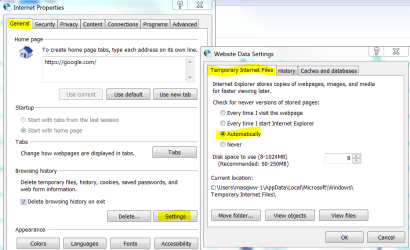
I believe the issue is because ie11 will always update the url's or gather from the site to preload faster
It's been an annoying setting that can not be set to anything else but Automatically :mad2:
ie11 annoying setting.PNG
 

My Computer My Computer

At a glance

Win-7-Pro64bit 7-H-Prem-64biti7-5930K 2nd i9-9940x both water blocked VRM'...Trident-z 3200C14 2nd Trident-z 3600C16EVGA 1080ti ftw3 2nd Titan Xp both water blocked
Computer type
PC/Desktop
Computer Manufacturer/Model Number
Custom assembled by me :}
OS
Win-7-Pro64bit 7-H-Prem-64bit
CPU
i7-5930K 2nd i9-9940x both water blocked VRM's too
Motherboard
ASUS SABERTOOTH X99 2nd ASUS x299 Apex
Memory
Trident-z 3200C14 2nd Trident-z 3600C16
Graphics Card(s)
EVGA 1080ti ftw3 2nd Titan Xp both water blocked
Sound Card
Built-in Realtek
Monitor(s) Displays
1-AOC G2460PG 24"G-Sync 144Hz/ 2nd 1-ASUS VG248QE 24" 144Hz
Screen Resolution
1920 x 1080 144Hz
Hard Drives
2-Samsung M.2 Evo & Evo Plus
2-Samsung 850 EVO 500GB SSD's/ 3-2.5 W.D. Black 1tb-&3-1tb/3-3.5 WD Black 1tb hdd's
PSU
EVGA SuperNOVA 1000-P2 2nd 1200-P2
Case
2-Corsair Obsidian Series 450D Black ATX Mid Tower
Cooling
Custom water loops
Keyboard
Logitech G710+/ 2nd Logitech G910
Mouse
2-RedDragon M901 Perdition 16400 dpi Gaming mouse = wired
Internet Speed
Comcast Ping 19ms 89.31mbps download speed 6.12mbps upload
Antivirus
Malwarebytes Pro/ Superantispyware Pro
Browser
FireFox & Pale moon
Other Info
2nd ASUS X299 Apex/Intel i9-9940x with Custom water loop/7H-Prem-x64/Corsair 450D case/Ram Trident-z 3600C16 4x8gb / Samsung970Evo plus 500gb SSD/Dual ssd EZ swap evo/PSU EVGA SuperNova 1200w-P2 80+Platinum/GPU Titan Xp /8-ML-140 on push-pull on 2-280GTX rads
I've been double clicking on those URL shortcuts for years and I have not seen the security prompt in the past. I've started a discussion with the IT department at work concerning the security implications of changing the Mandatory Label on the Favorites folder (and each sub-folder?).
See my edit, I doubt this is a good idea, IE may depend on it.

And I’m hesitant to test it out because I don’t know of any method of reapplying the integrity label once it’s lost. These things aren’t documented well, and it agonises me that there is a Windows setting I can’t manipulate. :(


@ThrashZone Interesting. A very convincing theory.
 

My Computer My Computer

At a glance

Windows 10, Windows 8.1 Pro, Windows 7 Profes...
Computer type
PC/Desktop
OS
Windows 10, Windows 8.1 Pro, Windows 7 Professional, OS X El Capitan
To further add to the confusion:

LNK shortcuts do not cause a security prompt when double clicked on from the Favorites Bar folder... even after installing KB3185319. I've not tested WEBSITE shortcut files yet.

edit: WEBSITE shorcuts do cause the security prompt after the installation of KB3185319 :-(

This makes no sense to me. I thought that I understood a bit about Mandatory Labels at the folder level and the file level. As noted above, I've been working with these labels for a while now. I've seen them many times - just not when double clicking on a URL shortcut in the Favorites folder via Windows (file) Explorer. I did not even know (or care) about the Mandatory Labels for that folder until this thread.
 

My Computer My Computer

At a glance

W7 Pro SP1 64biti78GBIntel HD Graphics
Computer type
Laptop
Computer Manufacturer/Model Number
Employer provided Dell Latitude
OS
W7 Pro SP1 64bit
CPU
i7
Memory
8GB
Graphics Card(s)
Intel HD Graphics
Hard Drives
crappy SSD
Antivirus
Employer mandated Symantec Endpoint Protection
Browser
Pale Moon 64bit, IE11 64bit & Chrome 64bit
UsernameIssues, Excellent Info.

After conversing with other users on several forums, I knew those prompts were not there before for most if not all users.

Do you know of any workaround for this?
Much to my surprise, dragging a URL shortcut from Windows (file) Explorer and dropping it into a browser's window does not cause the security prompt. Please test this and let us know if it is a good work around for you.
 

My Computer My Computer

At a glance

W7 Pro SP1 64biti78GBIntel HD Graphics
Computer type
Laptop
Computer Manufacturer/Model Number
Employer provided Dell Latitude
OS
W7 Pro SP1 64bit
CPU
i7
Memory
8GB
Graphics Card(s)
Intel HD Graphics
Hard Drives
crappy SSD
Antivirus
Employer mandated Symantec Endpoint Protection
Browser
Pale Moon 64bit, IE11 64bit & Chrome 64bit
Hi,
I believe the issue is because ie11 will always update the url's or gather from the site to preload faster
It's been an annoying setting that can not be set to anything else but Automatically :mad2:
View attachment 392000
The security prompt is generated before IE starts. It also happens if Chrome is the default browser. It is some strange change to the way the OS treats Mandatory Labels on URL and WEBSITE shortcuts after KB3185319 is installed. The behavior did not change for LNK shortcuts.

The behavior before installing KB3185319 confuses me. There should have been a security prompt* before installing KB3185319.The behavior after installing KB3185319 is not consistent (e.g.no prompts for LNK shortcuts).

*when double clicking on any shortcut in the Favorites folder (and its sub-folders) from within Windows (file) Explorer
 

My Computer My Computer

At a glance

W7 Pro SP1 64biti78GBIntel HD Graphics
Computer type
Laptop
Computer Manufacturer/Model Number
Employer provided Dell Latitude
OS
W7 Pro SP1 64bit
CPU
i7
Memory
8GB
Graphics Card(s)
Intel HD Graphics
Hard Drives
crappy SSD
Antivirus
Employer mandated Symantec Endpoint Protection
Browser
Pale Moon 64bit, IE11 64bit & Chrome 64bit
LNK shortcuts do not cause a security prompt when double clicked on from the Favorites Bar folder... even after installing KB3185319.
They do, and always have. But if you’ve created the .lnk in another folder, outside the Favorites hierarchy, and moved it into Favorites Bar folder, you’ll never get the prompt because it won’t get the low integrity label. This is due to integrity levels being part of a file’s SACL, with the auditing information. The rules of inheritance are slightly different for SACL entries compared to those of the DACL. SACL ACEs update less often, and tend not to update at all when the item is moved around.

My guess is that, both times (before and after installing the hotfix), you’ve created a shortcut outside Favorites Bar, moved it into Favorites Bar, invoked it and observed no prompt. While when testing internet shortcuts you created them within the Favorites folder hierarchy.

This behaviour is no different before and after hotfix KB3185319. Nothing has changed for shortcuts, only internet shortcuts.

Much to my surprise, dragging a URL shortcut from Windows (file) Explorer and dropping it into a browser's window does not cause the security prompt.
I also have an explanation for this. And you might realise this isn’t so surprising.

The security prompt is strictly related to Windows Explorer and has nothing to do with Internet Explorer or any other browser. When a user invokes a low integrity item from Windows Explorer, Explorer knows, and may decide to intervene in the operation; issue any prompt it likes. The security prompt is precisely part of Windows Explorer.

Applications never receive any warning when it comes to accessing low integrity items (unless they are some how running lower than the Low integrity level, in which case they are denied access from them) because they will either be running at a higher integrity, in which case access is granted, or it will also be running at a low integrity, in which case access is still granted.

When you invoke a shortcut from Windows Explorer, it is able to be confident that you are trying to open the shortcut (seeming assuming it is exposing the user to a security risk).

When you drag-drop a shortcut into an application’s window, the application receives a string of the path to the dropped it. In the case of browsers they will read in the shortcut file directly and carry out suitable actions from there.

Explorer cannot know for sure if the shortcut is being opened, and thus I conclude there’s no chance for a security prompt to occur then.

This makes no sense to me. I thought that I understood a bit about Mandatory Labels at the folder level and the file level. As noted above, I've been working with these labels for a while now.
Yes, I’m learning quite a bit from this discussion as well, UNI. Much more so than that… previous talk we’ve had.
 

My Computer My Computer

At a glance

Windows 10, Windows 8.1 Pro, Windows 7 Profes...
Computer type
PC/Desktop
OS
Windows 10, Windows 8.1 Pro, Windows 7 Professional, OS X El Capitan
I'm learning quite a bit as well!
UsernameIssues, Excellent Info.

After conversing with other users on several forums, I knew those prompts were not there before for most if not all users.

Do you know of any workaround for this?
Much to my surprise, dragging a URL shortcut from Windows (file) Explorer and dropping it into a browser's window does not cause the security prompt. Please test this and let us know if it is a good work around for you.
I only have IE11 and FF49.0.1 to work with UNI and I can drag and drop any URLs from windows file explorer: C:\Users\Anak\Favorites\Links\ and it acts like your experieance, I can drop the URL shortcut into any part of my two browsers and it goes to the URLs location with no warnings.

Something I'm having a hard time with though; I can't see how working with FIle Explorer Favorites is easier. Maybe XLR8TX can explain, To each his own, eh?
 

My Computer My Computer

At a glance

Originally Win 7 Hm Prem x64 Ver 6.1.7600 Bui...Intel i3 530 2.93GHz, 2933MHz 2 Cores 4 Logic...6GB of 1,333MHz DDR3 SDRAM32MB Intel Graphics Media Accelerator HD IGChip
Computer type
PC/Desktop
Computer Manufacturer/Model Number
Gateway DX4831-01e (Mid-Tower Desktop)
OS
Originally Win 7 Hm Prem x64 Ver 6.1.7600 Build 7601-SP1 | Upgraded to Windows 10 December 14, 2019
CPU
Intel i3 530 2.93GHz, 2933MHz 2 Cores 4 Logical Processors
Motherboard
Gateway H57M01 133 megahertz
Memory
6GB of 1,333MHz DDR3 SDRAM
Graphics Card(s)
32MB Intel Graphics Media Accelerator HD IGChip
Sound Card
Realtek High Definition Audio
Monitor(s) Displays
Gateway HX2000 20inch TFT active matrix TN
Screen Resolution
1600 x 900 x 59 hertz
Hard Drives
WDC WD10EADS-00M2B0 [HDD] (1000.20 GB) -- drive 0,
HL-DT-ST DVDRAM GH41N [CD-ROM dr]
Four card readers, and Four USB 2.0
PSU
300watts.
Case
Mid-Tower Desktop
Cooling
Stock from Gateway
Keyboard
Natural Ergonomic Keyboard 4000, see Other Info
Mouse
Orig. Gateway wore out now using Insignia USB wired optical
Internet Speed
Vz FIOS 10ms png 57.64Mbps down 65.53Mbps up Speedtest.org
Antivirus
Zamana Anti-logger with Anti-malware, MSE, Windows Firewall,
Browser
IE11.0.9600.19399-Upd ver11.0.135, Firefox 68.0.1 x64
Other Info
System Specs by Belarc.

BIOS: American Megatrends Inc. P01-A0 11/17/2009

Replaced the MS 'Natural' Standard PS/2 Enhanced 101-102 Keyboard with a new Natural Ergonomic Keyboard 4000 on August 1st 2014.

Canon Pixma MG3222 Printer.

Updated to IE11 on 12102015 | Fios Quantum Router g1100

Additional AV: SpywareBlaster, manual Mbam, SAS
LNK shortcuts do not cause a security prompt when double clicked on from the Favorites Bar folder... even after installing KB3185319.
They do, and always have.
The LNK files that I tested did not create the security prompt. Once the LNK shortcut is in the FAV folder, ICACLS shows the Mandatory Label (LOW) - no matter where the shortcut was created.

Create LNK on the desktop
ICACLS reports no label at all

Copy LNK to the FAV folder...
ICACLS reports "LOW"

Double click on the LNK while it is in the FAV folder...
...no security prompt.

The same is true if the LNK is cut from the desktop and pasted into the FAV folder.

Creating the LNK directly in the FAV folder changed nothing during my testing.

It took a while, but I think that I have figured out why we are not seeing the same thing. It depends on the what the LNK shortcut points to. Point the LNK to a TXT file and there should be no security warning. I was testing with real life LNK files that I keep in my FAV folder structure. Those LNK files point to AutoIt scripts that are not compiled (e.g. text files).

If the LNK file points to the EXE for Notepad, then you get a security prompt if the LNK is in the FAV folder.

A URL file is a text file in the INI file format:
Code:
[{000214A0-0000-0000-C000-000000000046}]
Prop3=19,11
[InternetShortcut]
URL=https://www.youtube-nocookie.com/v/
IDList=
website.PNG
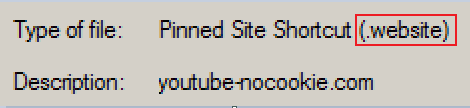
A WEBSITE file is a text file in the INI file format:
Code:
[{000214A0-0000-0000-C000-000000000046}]
Prop4=31,youtube-nocookie.com
Prop3=19,11
[{A7AF692E-098D-4C08-A225-D433CA835ED0}]
Prop5=3,0
Prop9=19,0
[InternetShortcut]
URL=https://www.youtube-nocookie.com/v/
IDList=
[{9F4C2855-9F79-4B39-A8D0-E1D42DE1D5F3}]
Prop5=8,Microsoft.Website.70569F39.3845F787
But these text files are dangerous?
And scripts aren't?


Much to my surprise, dragging a URL shortcut from Windows (file) Explorer and dropping it into a browser's window does not cause the security prompt.
I also have an explanation for this. And you might realise this isn’t so surprising.
Okay - I can see what you are saying about what Explorer does not know. I'm not disagreeing with you, but here are my observations:

Explorer does not know if the URL text file is going to be dropped...
...onto an empty spot on the desktop (e.g. move file) - no warning
...onto a browser's window (e.g. open file) - no warning
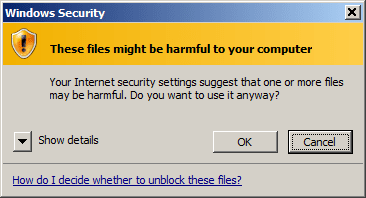
...onto a LNK file for a browser - you get a warning
drag-drop-warning.png
IE and Pale Moon went to the website.
Chrome showed the text inside the URL/INI file.

...onto a LNK file for notepad - same warning as shown above - but you can right click on the URL file and use Send to > Notepad. It opens without a warning.

Double click on an LNK file that points to Notepad's EXE and you'll get a warning. Double click on an LNK file that points to a TXT file and you can open Notepad without a warning. Explorer is the app that starts the EXE associated with TXT files. It knows what the default verb is for TXT files. It knows that the file is going to be opening Notepad.

Open the properties for a URL file via right click - no warning.
Select/highlight the URL file and...
...select Explorer's Organize menu, then Properties - warning
...turn on Explorer's detail pane - warning
...turn off Explorer's detail pane - warning

 

My Computer My Computer

At a glance

W7 Pro SP1 64biti78GBIntel HD Graphics
Computer type
Laptop
Computer Manufacturer/Model Number
Employer provided Dell Latitude
OS
W7 Pro SP1 64bit
CPU
i7
Memory
8GB
Graphics Card(s)
Intel HD Graphics
Hard Drives
crappy SSD
Antivirus
Employer mandated Symantec Endpoint Protection
Browser
Pale Moon 64bit, IE11 64bit & Chrome 64bit
I can't see how working with FIle Explorer Favorites is easier. Maybe XLR8TX can explain, To each his own, eh?
IE has the ability to pin the (ctrl-h) favorites pane to one side of the browser. If your favorites use a heavily nested folder structure, then it is nice to not have to mouse your way to the same folder over and over. Think of an Explorer window as a pop out version of IE's favorites pane. At least with Explorer, you can alt-tab between the browser window and the Explorer window.

I don't use Explorer to get to my favorites very often. It usually happens when I want to see the same website in multiple browsers. I can copy the URL in IE's address bar and paste it into the other browser for some websites, but not for others. Some websites change the URL based on the browser that was used to get there. It is best to let each browser render the website independently.

You can put an LNK shortcut to the FAV folder (or a sub-folder) right on IE's Favorites Bar. That will open Explorer to the folder of interest. If I'm researching a purchase, everything related to that research goes into one folder: favorites, PDFs, pictures... As far as I know, no other browser lets you open LNK shortcuts like that.
 
Last edited:

My Computer My Computer

At a glance

W7 Pro SP1 64biti78GBIntel HD Graphics
Computer type
Laptop
Computer Manufacturer/Model Number
Employer provided Dell Latitude
OS
W7 Pro SP1 64bit
CPU
i7
Memory
8GB
Graphics Card(s)
Intel HD Graphics
Hard Drives
crappy SSD
Antivirus
Employer mandated Symantec Endpoint Protection
Browser
Pale Moon 64bit, IE11 64bit & Chrome 64bit
Thank you for the explaination UNI!

Over the years I've shyed away from Internet Explorer and I don't ususally use IE unless required, but I keep up maintenance on it for the wife so I'm not as adepted at using it as some other folks might be.

I like that ctrl+h tip and will work on using all that you have explained.
 

My Computer My Computer

At a glance

Originally Win 7 Hm Prem x64 Ver 6.1.7600 Bui...Intel i3 530 2.93GHz, 2933MHz 2 Cores 4 Logic...6GB of 1,333MHz DDR3 SDRAM32MB Intel Graphics Media Accelerator HD IGChip
Computer type
PC/Desktop
Computer Manufacturer/Model Number
Gateway DX4831-01e (Mid-Tower Desktop)
OS
Originally Win 7 Hm Prem x64 Ver 6.1.7600 Build 7601-SP1 | Upgraded to Windows 10 December 14, 2019
CPU
Intel i3 530 2.93GHz, 2933MHz 2 Cores 4 Logical Processors
Motherboard
Gateway H57M01 133 megahertz
Memory
6GB of 1,333MHz DDR3 SDRAM
Graphics Card(s)
32MB Intel Graphics Media Accelerator HD IGChip
Sound Card
Realtek High Definition Audio
Monitor(s) Displays
Gateway HX2000 20inch TFT active matrix TN
Screen Resolution
1600 x 900 x 59 hertz
Hard Drives
WDC WD10EADS-00M2B0 [HDD] (1000.20 GB) -- drive 0,
HL-DT-ST DVDRAM GH41N [CD-ROM dr]
Four card readers, and Four USB 2.0
PSU
300watts.
Case
Mid-Tower Desktop
Cooling
Stock from Gateway
Keyboard
Natural Ergonomic Keyboard 4000, see Other Info
Mouse
Orig. Gateway wore out now using Insignia USB wired optical
Internet Speed
Vz FIOS 10ms png 57.64Mbps down 65.53Mbps up Speedtest.org
Antivirus
Zamana Anti-logger with Anti-malware, MSE, Windows Firewall,
Browser
IE11.0.9600.19399-Upd ver11.0.135, Firefox 68.0.1 x64
Other Info
System Specs by Belarc.

BIOS: American Megatrends Inc. P01-A0 11/17/2009

Replaced the MS 'Natural' Standard PS/2 Enhanced 101-102 Keyboard with a new Natural Ergonomic Keyboard 4000 on August 1st 2014.

Canon Pixma MG3222 Printer.

Updated to IE11 on 12102015 | Fios Quantum Router g1100

Additional AV: SpywareBlaster, manual Mbam, SAS
I have an issue with Windows 10 and IE 11 that maybe the result of his new patch.

When I double click on an URL file on my desktop, IE opens with a blank page.
 

My Computer My Computer

At a glance

Windows 10 x64Intel i5-3570KCrucial 16GBnVidia Geforce 660 GTX
Computer type
PC/Desktop
OS
Windows 10 x64
CPU
Intel i5-3570K
Motherboard
Asus Maximus V Gene
Memory
Crucial 16GB
Graphics Card(s)
nVidia Geforce 660 GTX
Sound Card
onboard
Monitor(s) Displays
NEC 2490WUXi2
Screen Resolution
1920x1200
Hard Drives
Crucial M4 256GB
PSU
Corsair 650TX
Case
Fractal Design - Define Mini
Keyboard
Filco Majestouch Tenkeyless Black MX
Mouse
Logitech MBJ58
Your issue might be associated with this solution found starting at post #8 of this different thread, it may be related like some solutions could span the OS's from vista to w8.1, but if you're using W10 you really should ask your question over at our sister forum: TenForums

At the very least, have you tried uninstalling the patch (windows update?) to see if your IE reverts to acceptable behaviour?


Related:
A search to look through for answers: IE opens with a blank page from a URL on my desktop
 

My Computer My Computer

At a glance

Originally Win 7 Hm Prem x64 Ver 6.1.7600 Bui...Intel i3 530 2.93GHz, 2933MHz 2 Cores 4 Logic...6GB of 1,333MHz DDR3 SDRAM32MB Intel Graphics Media Accelerator HD IGChip
Computer type
PC/Desktop
Computer Manufacturer/Model Number
Gateway DX4831-01e (Mid-Tower Desktop)
OS
Originally Win 7 Hm Prem x64 Ver 6.1.7600 Build 7601-SP1 | Upgraded to Windows 10 December 14, 2019
CPU
Intel i3 530 2.93GHz, 2933MHz 2 Cores 4 Logical Processors
Motherboard
Gateway H57M01 133 megahertz
Memory
6GB of 1,333MHz DDR3 SDRAM
Graphics Card(s)
32MB Intel Graphics Media Accelerator HD IGChip
Sound Card
Realtek High Definition Audio
Monitor(s) Displays
Gateway HX2000 20inch TFT active matrix TN
Screen Resolution
1600 x 900 x 59 hertz
Hard Drives
WDC WD10EADS-00M2B0 [HDD] (1000.20 GB) -- drive 0,
HL-DT-ST DVDRAM GH41N [CD-ROM dr]
Four card readers, and Four USB 2.0
PSU
300watts.
Case
Mid-Tower Desktop
Cooling
Stock from Gateway
Keyboard
Natural Ergonomic Keyboard 4000, see Other Info
Mouse
Orig. Gateway wore out now using Insignia USB wired optical
Internet Speed
Vz FIOS 10ms png 57.64Mbps down 65.53Mbps up Speedtest.org
Antivirus
Zamana Anti-logger with Anti-malware, MSE, Windows Firewall,
Browser
IE11.0.9600.19399-Upd ver11.0.135, Firefox 68.0.1 x64
Other Info
System Specs by Belarc.

BIOS: American Megatrends Inc. P01-A0 11/17/2009

Replaced the MS 'Natural' Standard PS/2 Enhanced 101-102 Keyboard with a new Natural Ergonomic Keyboard 4000 on August 1st 2014.

Canon Pixma MG3222 Printer.

Updated to IE11 on 12102015 | Fios Quantum Router g1100

Additional AV: SpywareBlaster, manual Mbam, SAS
I installed some new updates yesterday and the security prompts are now gone.
 

My Computer My Computer

At a glance

Windows 7 Home Premium 64bit
Computer type
Laptop
Computer Manufacturer/Model Number
Gateway
OS
Windows 7 Home Premium 64bit
:party: That's great news! :party: ... :thumbsup:
 

My Computer My Computer

At a glance

Originally Win 7 Hm Prem x64 Ver 6.1.7600 Bui...Intel i3 530 2.93GHz, 2933MHz 2 Cores 4 Logic...6GB of 1,333MHz DDR3 SDRAM32MB Intel Graphics Media Accelerator HD IGChip
Computer type
PC/Desktop
Computer Manufacturer/Model Number
Gateway DX4831-01e (Mid-Tower Desktop)
OS
Originally Win 7 Hm Prem x64 Ver 6.1.7600 Build 7601-SP1 | Upgraded to Windows 10 December 14, 2019
CPU
Intel i3 530 2.93GHz, 2933MHz 2 Cores 4 Logical Processors
Motherboard
Gateway H57M01 133 megahertz
Memory
6GB of 1,333MHz DDR3 SDRAM
Graphics Card(s)
32MB Intel Graphics Media Accelerator HD IGChip
Sound Card
Realtek High Definition Audio
Monitor(s) Displays
Gateway HX2000 20inch TFT active matrix TN
Screen Resolution
1600 x 900 x 59 hertz
Hard Drives
WDC WD10EADS-00M2B0 [HDD] (1000.20 GB) -- drive 0,
HL-DT-ST DVDRAM GH41N [CD-ROM dr]
Four card readers, and Four USB 2.0
PSU
300watts.
Case
Mid-Tower Desktop
Cooling
Stock from Gateway
Keyboard
Natural Ergonomic Keyboard 4000, see Other Info
Mouse
Orig. Gateway wore out now using Insignia USB wired optical
Internet Speed
Vz FIOS 10ms png 57.64Mbps down 65.53Mbps up Speedtest.org
Antivirus
Zamana Anti-logger with Anti-malware, MSE, Windows Firewall,
Browser
IE11.0.9600.19399-Upd ver11.0.135, Firefox 68.0.1 x64
Other Info
System Specs by Belarc.

BIOS: American Megatrends Inc. P01-A0 11/17/2009

Replaced the MS 'Natural' Standard PS/2 Enhanced 101-102 Keyboard with a new Natural Ergonomic Keyboard 4000 on August 1st 2014.

Canon Pixma MG3222 Printer.

Updated to IE11 on 12102015 | Fios Quantum Router g1100

Additional AV: SpywareBlaster, manual Mbam, SAS
Back
Top