Solved IE11 Favicons in Favorites Folder Overlapping

KLD2014

New member
Local time
6:04 PM
Messages
21
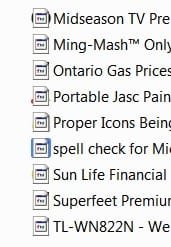
I am currently using IE11, and when I go to c:/users/name/Favorites, I have two icons overlapping. One "system icon" and the other the true icon from the web site. How do I fix this?
 

Attachments

  • Favorite Icons.jpg
    Favorite Icons.jpg
    10.4 KB · Views: 20

My Computer My Computer

At a glance

Windows 7 Home Premium 64-bit SP1AMD Athlon II X2 2404.00GB Dual-Channel DDR2 @ 399MHzAcer P205H (1360x765@60Hz)
Computer type
PC/Desktop
Computer Manufacturer/Model Number
Acer Aspire X1301
OS
Windows 7 Home Premium 64-bit SP1
CPU
AMD Athlon II X2 240
Motherboard
Acer WMCP78M (Socket AM2 )
Memory
4.00GB Dual-Channel DDR2 @ 399MHz
Graphics Card(s)
Acer P205H (1360x765@60Hz)
Hard Drives
596GB Western Digital WDC WD64 00AAKS-22A7B SCSI Disk Device (SATA)
Antivirus
AVG Free
Browser
Internet Explorer 11

My Computer My Computer

At a glance

Win7 Pro-64 Biti7-2600-3.4GHz8 GIG DDR3onboard
Computer Manufacturer/Model Number
Put together
OS
Win7 Pro-64 Bit
CPU
i7-2600-3.4GHz
Motherboard
ASRock Z68M
Memory
8 GIG DDR3
Graphics Card(s)
onboard
Sound Card
onboard
Hard Drives
Seagate 1TB 7200RPM
PSU
680 W
Case
black
Cooling
stock fans
Keyboard
Microsoft
Mouse
Microsoft optical
No, did not work, but thank you anyways. :)
 

My Computer My Computer

At a glance

Windows 7 Home Premium 64-bit SP1AMD Athlon II X2 2404.00GB Dual-Channel DDR2 @ 399MHzAcer P205H (1360x765@60Hz)
Computer type
PC/Desktop
Computer Manufacturer/Model Number
Acer Aspire X1301
OS
Windows 7 Home Premium 64-bit SP1
CPU
AMD Athlon II X2 240
Motherboard
Acer WMCP78M (Socket AM2 )
Memory
4.00GB Dual-Channel DDR2 @ 399MHz
Graphics Card(s)
Acer P205H (1360x765@60Hz)
Hard Drives
596GB Western Digital WDC WD64 00AAKS-22A7B SCSI Disk Device (SATA)
Antivirus
AVG Free
Browser
Internet Explorer 11

My Computer My Computer

At a glance

Windows 10 Home x64INTEL Core i5-750 Quad-Core 3.37GHzHyperX Fury Black Series 8GB (2 x 4GB) 1866MhzEVGA GeForce GTX 750 Superclocked 1GB 128-Bit...
Computer type
PC/Desktop
OS
Windows 10 Home x64
CPU
INTEL Core i5-750 Quad-Core 3.37GHz
Motherboard
ASUS P7P55D
Memory
HyperX Fury Black Series 8GB (2 x 4GB) 1866Mhz
Graphics Card(s)
EVGA GeForce GTX 750 Superclocked 1GB 128-Bit GDDR5
Monitor(s) Displays
LG 32MA68HY 32" IPS
Screen Resolution
1920 x 1080
Hard Drives
Samsung 840 Evo 120GB, SEAGATE 500GB Barracuda® 7200.12, SATA 3 Gb/s, 7200 RPM, 16MB cache
PSU
ANTEC TruePower New TP-550, 80 PLUS, 550W
Case
ANTEC Three Hundred Illusion
Cooling
COOLER MASTER Hyper 212 Plus, 4 x 120mm 1 x 140mm Noctua's
Internet Speed
85 + Mbps
Antivirus
Avast
Browser
Vivaldi
Tried all this, to no avail. It is a strange one, I'm sure. Thanks for your help though!! :)
 

My Computer My Computer

At a glance

Windows 7 Home Premium 64-bit SP1AMD Athlon II X2 2404.00GB Dual-Channel DDR2 @ 399MHzAcer P205H (1360x765@60Hz)
Computer type
PC/Desktop
Computer Manufacturer/Model Number
Acer Aspire X1301
OS
Windows 7 Home Premium 64-bit SP1
CPU
AMD Athlon II X2 240
Motherboard
Acer WMCP78M (Socket AM2 )
Memory
4.00GB Dual-Channel DDR2 @ 399MHz
Graphics Card(s)
Acer P205H (1360x765@60Hz)
Hard Drives
596GB Western Digital WDC WD64 00AAKS-22A7B SCSI Disk Device (SATA)
Antivirus
AVG Free
Browser
Internet Explorer 11
Hi,
What happens if you replace one of them ?
Will it return to showing the additional overlay :/

Try clean boot also.
Use Clean boot,
http://www.sevenforums.com/tutorials/179159-troubleshoot-application-conflicts-performing-clean-startup.html
Click Start and type in the search box,
msconfig
Click on the suggestion on top or hit the Enter key,
Go to the Startup section and take some screen shots for a complete list,
Go to the Services section and on the bottom left Check the box to Hide All Microsoft services,
Repeat the screen shots,
See the links above my signature on how to take and upload screen shots here,
Cheers.
 

My Computer My Computer

At a glance

Win-7-Pro64bit 7-H-Prem-64biti7-5930K 2nd i9-9940x both water blocked VRM'...Trident-z 3200C14 2nd Trident-z 3600C16EVGA 1080ti ftw3 2nd Titan Xp both water blocked
Computer type
PC/Desktop
Computer Manufacturer/Model Number
Custom assembled by me :}
OS
Win-7-Pro64bit 7-H-Prem-64bit
CPU
i7-5930K 2nd i9-9940x both water blocked VRM's too
Motherboard
ASUS SABERTOOTH X99 2nd ASUS x299 Apex
Memory
Trident-z 3200C14 2nd Trident-z 3600C16
Graphics Card(s)
EVGA 1080ti ftw3 2nd Titan Xp both water blocked
Sound Card
Built-in Realtek
Monitor(s) Displays
1-AOC G2460PG 24"G-Sync 144Hz/ 2nd 1-ASUS VG248QE 24" 144Hz
Screen Resolution
1920 x 1080 144Hz
Hard Drives
2-Samsung M.2 Evo & Evo Plus
2-Samsung 850 EVO 500GB SSD's/ 3-2.5 W.D. Black 1tb-&3-1tb/3-3.5 WD Black 1tb hdd's
PSU
EVGA SuperNOVA 1000-P2 2nd 1200-P2
Case
2-Corsair Obsidian Series 450D Black ATX Mid Tower
Cooling
Custom water loops
Keyboard
Logitech G710+/ 2nd Logitech G910
Mouse
2-RedDragon M901 Perdition 16400 dpi Gaming mouse = wired
Internet Speed
Comcast Ping 19ms 89.31mbps download speed 6.12mbps upload
Antivirus
Malwarebytes Pro/ Superantispyware Pro
Browser
FireFox & Pale moon
Other Info
2nd ASUS X299 Apex/Intel i9-9940x with Custom water loop/7H-Prem-x64/Corsair 450D case/Ram Trident-z 3600C16 4x8gb / Samsung970Evo plus 500gb SSD/Dual ssd EZ swap evo/PSU EVGA SuperNova 1200w-P2 80+Platinum/GPU Titan Xp /8-ML-140 on push-pull on 2-280GTX rads
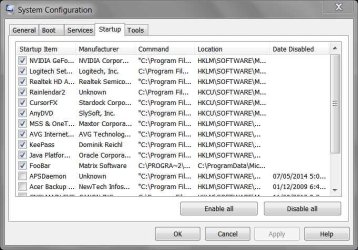
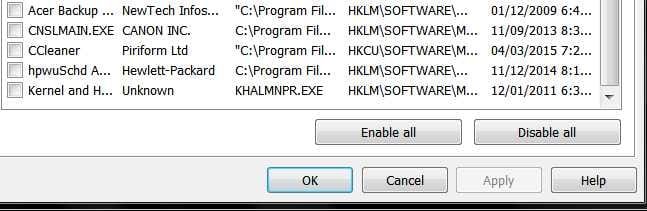
Tried the clean boot, several times, eliminating certain items. Nothing fixed my problem. Here are screenshots of what I have in startup. Even re-bookmarked them, but the icons is still overlapping.
 

Attachments

  • Start up 1.jpg
    Start up 1.jpg
    55.8 KB · Views: 14
  • Start up 2.jpg
    Start up 2.jpg
    25.5 KB · Views: 14

My Computer My Computer

At a glance

Windows 7 Home Premium 64-bit SP1AMD Athlon II X2 2404.00GB Dual-Channel DDR2 @ 399MHzAcer P205H (1360x765@60Hz)
Computer type
PC/Desktop
Computer Manufacturer/Model Number
Acer Aspire X1301
OS
Windows 7 Home Premium 64-bit SP1
CPU
AMD Athlon II X2 240
Motherboard
Acer WMCP78M (Socket AM2 )
Memory
4.00GB Dual-Channel DDR2 @ 399MHz
Graphics Card(s)
Acer P205H (1360x765@60Hz)
Hard Drives
596GB Western Digital WDC WD64 00AAKS-22A7B SCSI Disk Device (SATA)
Antivirus
AVG Free
Browser
Internet Explorer 11

My Computer My Computer

At a glance

Windows 10 Home x64INTEL Core i5-750 Quad-Core 3.37GHzHyperX Fury Black Series 8GB (2 x 4GB) 1866MhzEVGA GeForce GTX 750 Superclocked 1GB 128-Bit...
Computer type
PC/Desktop
OS
Windows 10 Home x64
CPU
INTEL Core i5-750 Quad-Core 3.37GHz
Motherboard
ASUS P7P55D
Memory
HyperX Fury Black Series 8GB (2 x 4GB) 1866Mhz
Graphics Card(s)
EVGA GeForce GTX 750 Superclocked 1GB 128-Bit GDDR5
Monitor(s) Displays
LG 32MA68HY 32" IPS
Screen Resolution
1920 x 1080
Hard Drives
Samsung 840 Evo 120GB, SEAGATE 500GB Barracuda® 7200.12, SATA 3 Gb/s, 7200 RPM, 16MB cache
PSU
ANTEC TruePower New TP-550, 80 PLUS, 550W
Case
ANTEC Three Hundred Illusion
Cooling
COOLER MASTER Hyper 212 Plus, 4 x 120mm 1 x 140mm Noctua's
Internet Speed
85 + Mbps
Antivirus
Avast
Browser
Vivaldi

My Computer My Computer

At a glance

Win7 Pro-64 Biti7-2600-3.4GHz8 GIG DDR3onboard
Computer Manufacturer/Model Number
Put together
OS
Win7 Pro-64 Bit
CPU
i7-2600-3.4GHz
Motherboard
ASRock Z68M
Memory
8 GIG DDR3
Graphics Card(s)
onboard
Sound Card
onboard
Hard Drives
Seagate 1TB 7200RPM
PSU
680 W
Case
black
Cooling
stock fans
Keyboard
Microsoft
Mouse
Microsoft optical
Fixed!! Finally.

Ok, after everyone's help (which I very much appreciated) I finally did some geek work on my own and figured out the "shortcut" arrow was corrupted, or missing, so it was defaulting to the system icon. I created an empty icon to replace the crappy arrow, changed it via Windows 7 Manager (Customization).

Thanks everyone for your input, advice, and experience. You guys (and gals) ROCK!!:)
 

Attachments

  • Icons Fixed.jpg
    Icons Fixed.jpg
    16 KB · Views: 11

My Computer My Computer

At a glance

Windows 7 Home Premium 64-bit SP1AMD Athlon II X2 2404.00GB Dual-Channel DDR2 @ 399MHzAcer P205H (1360x765@60Hz)
Computer type
PC/Desktop
Computer Manufacturer/Model Number
Acer Aspire X1301
OS
Windows 7 Home Premium 64-bit SP1
CPU
AMD Athlon II X2 240
Motherboard
Acer WMCP78M (Socket AM2 )
Memory
4.00GB Dual-Channel DDR2 @ 399MHz
Graphics Card(s)
Acer P205H (1360x765@60Hz)
Hard Drives
596GB Western Digital WDC WD64 00AAKS-22A7B SCSI Disk Device (SATA)
Antivirus
AVG Free
Browser
Internet Explorer 11
Ok, after everyone's help (which I very much appreciated) I finally did some geek work on my own and figured out the "shortcut" arrow was corrupted, or missing, so it was defaulting to the system icon. I created an empty icon to replace the crappy arrow, changed it via Windows 7 Manager (Customization).

Thanks everyone for your input, advice, and experience. You guys (and gals) ROCK!!:)
Good that it is sorted and thanks for letting us know how you got it sorted. :)
Cheers
 

My Computer My Computer

At a glance

Win7 Pro-64 Biti7-2600-3.4GHz8 GIG DDR3onboard
Computer Manufacturer/Model Number
Put together
OS
Win7 Pro-64 Bit
CPU
i7-2600-3.4GHz
Motherboard
ASRock Z68M
Memory
8 GIG DDR3
Graphics Card(s)
onboard
Sound Card
onboard
Hard Drives
Seagate 1TB 7200RPM
PSU
680 W
Case
black
Cooling
stock fans
Keyboard
Microsoft
Mouse
Microsoft optical

My Computer My Computer

At a glance

Windows 10 Home x64INTEL Core i5-750 Quad-Core 3.37GHzHyperX Fury Black Series 8GB (2 x 4GB) 1866MhzEVGA GeForce GTX 750 Superclocked 1GB 128-Bit...
Computer type
PC/Desktop
OS
Windows 10 Home x64
CPU
INTEL Core i5-750 Quad-Core 3.37GHz
Motherboard
ASUS P7P55D
Memory
HyperX Fury Black Series 8GB (2 x 4GB) 1866Mhz
Graphics Card(s)
EVGA GeForce GTX 750 Superclocked 1GB 128-Bit GDDR5
Monitor(s) Displays
LG 32MA68HY 32" IPS
Screen Resolution
1920 x 1080
Hard Drives
Samsung 840 Evo 120GB, SEAGATE 500GB Barracuda® 7200.12, SATA 3 Gb/s, 7200 RPM, 16MB cache
PSU
ANTEC TruePower New TP-550, 80 PLUS, 550W
Case
ANTEC Three Hundred Illusion
Cooling
COOLER MASTER Hyper 212 Plus, 4 x 120mm 1 x 140mm Noctua's
Internet Speed
85 + Mbps
Antivirus
Avast
Browser
Vivaldi
Back
Top