Windows uses a lot more pagefile that assigned.

Messerschmitt

New member
Member
Local time
5:10 AM
Messages
45
I have setup windows to only use 1024mb page file. I use a SSD and I have 16GB RAM so I don't want a lot of information to be kept written on the HDD. I know that completely disabling page file can create problems as windows for whatever reason "needs" some page file.

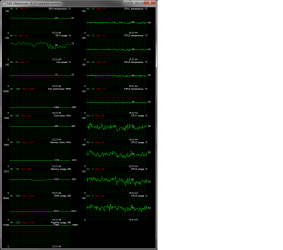
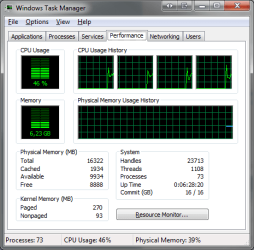
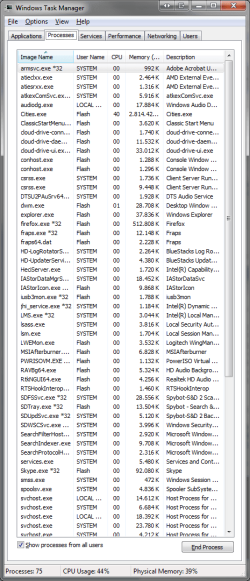
But as you can see, windows always uses more than 1024mb pagefile than I allocated. This screenshot is an extreme case. But most of the time is between 1-4GB higher than ram usage (where it should be capped to 1GB)
 

Attachments

  • Memory usage.png
    Memory usage.png
    28.7 KB · Views: 11
  • Memory usage 2.png
    Memory usage 2.png
    14.1 KB · Views: 62
  • Memory usage 3.png
    Memory usage 3.png
    33.6 KB · Views: 3

My Computer My Computer

At a glance

windows 7
OS
windows 7
We need to see what you have here.

As far as Windows needing a page file, I haven`t used a page file in over 3 years, but probably more like 5 years, with 16 or 32 GB

It`s certain programs that need a page file.

You could test your PC for a week with no page file.
 

Attachments

  • Capture.JPG
    Capture.JPG
    34.2 KB · Views: 60

My Computer My Computer

At a glance

Windows 10 Pro x64Intel Core i7 6700KGSkill TridentZ RGB 16GB 3600 16-16-16-36EVGA GTX 980 Ti SC x2
Computer type
PC/Desktop
Computer Manufacturer/Model Number
Skylake Special #666
OS
Windows 10 Pro x64
CPU
Intel Core i7 6700K
Motherboard
Asus Sabertooth Z170 Mark 1
Memory
GSkill TridentZ RGB 16GB 3600 16-16-16-36
Graphics Card(s)
EVGA GTX 980 Ti SC x2
Sound Card
Realtek High Definition
Monitor(s) Displays
AOC G2460PG
Screen Resolution
1920 x 1080 144Hz
Hard Drives
Samsung 860 Pro 256GB, Seagate Barracuda 4TB x2
PSU
EVGA 1000 P2, EVGA White Custom Braided Cables
Case
Corsair Vengeance C70 Gunmetal Black
Cooling
Corsair H100i v2, Corsair ML120 x2, Thermal Grizzly Kryonaut
Keyboard
Logitech G910 Orion Spectrum
Mouse
Logitech G700s
Internet Speed
Verizon Fios Quantum Gateway 75/75
Antivirus
Windows Defender, Malwarebytes Free 3.8.3
Browser
Chrome
Other Info
Corsair SP120 x4, LG Blu-ray Drive, Durabrand HT-395 100 Watt Dolby Digital Amp, Corsair H2100 Wireless 7.1 Headset
Have you checked that a glitch hasn't turned on the "System Managed" option again?
 

My Computer My Computer

At a glance

W7 Ultimate SP1, LM19.2 MATE, W10 Home 1703, ...AMD Phenom II x6 1100T, 3.3 GHz12GB DDR3 1333 G-Skill (4GB x 2), G-Skill (2G...NVIDIA GeForce GTX 660
Computer type
PC/Desktop
Computer Manufacturer/Model Number
n/a
OS
W7 Ultimate SP1, LM19.2 MATE, W10 Home 1703, W10 Pro 1703 VM, #All 64 bit
CPU
AMD Phenom II x6 1100T, 3.3 GHz
Motherboard
ASUS M4A88T-M/USB3 (AM3)
Memory
12GB DDR3 1333 G-Skill (4GB x 2), G-Skill (2GB x 2)
Graphics Card(s)
NVIDIA GeForce GTX 660
Sound Card
Realtek?
Monitor(s) Displays
Samsung S23B350
Screen Resolution
1920x1080
Hard Drives
WD Green 2TB (SATA), WD Green 3TB (SATA), WD Blue 4TB (SATA), WD Blue 6TB (SATA)
PSU
Cooler Master
Case
Antec GX300 Tower
Cooling
3x Antec TRICOOL 120mm Fans
Mouse
Wired Optical
Internet Speed
DSL
Antivirus
Avast
Browser
Pale Moon (64 bit)
Other Info
2018-12-27 Upgraded HDDs
2015-12-10 Upgraded case, graphics card, storage
2015-08-15 Upgraded motherboard & RAM
2015-07-15 Upgraded LM17.1 to LM17.2
There is a simple explanation. MSI Afterburner isn't showing pagefile usage at all but in reality the commit charge. There are other utilities that do this, including the XP Task manager. That caused a lot of confusion, even among computer professionals. It is the only explanation that fits the numbers. Nothing in the screenshots show pagefile usage but the numbers tend to show it as roughly 750 MB. I know that this is counter-intuitive but pagefile usage doesn't mean performance will be impaired. I don't have time to explain all of this.

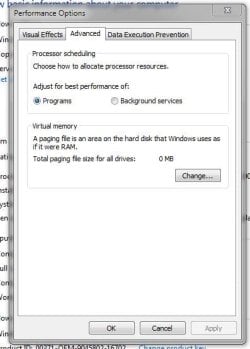
A screenshot of the pagefile configuration would be useful.

But there is something very disturbing in that the commit charge is very close to the commit limit. With the pagefile limited to 1 GB the commit limit could be as high as 17 GB but that is still dangerously close. Nothing in the screenshots even hint at a cause.

Edit: Actually the 750 MB number I quoted above would be the size of the pagefile at the time of the screenshot. Actual pagefile usage would be less and may well be zero. There is no way to even estimate actual pagefile usage from the numbers shown.
 

My Computer My Computer

At a glance

Windows 7 Pro 64 bitXeon W35208 GBNvidia Geforce 210
Computer type
PC/Desktop
Computer Manufacturer/Model Number
HP
OS
Windows 7 Pro 64 bit
CPU
Xeon W3520
Memory
8 GB
Graphics Card(s)
Nvidia Geforce 210
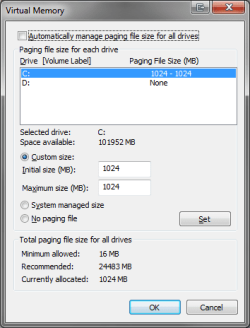
Here is what I have setup in the page file.

Maybe I'll give a shot and select no paging file, see how my programs behave. But I have heard that if it needs a pagefile, or if a program leaks memory, it will lead to a crash when all the RAM is full (BSOD?).
 

Attachments

  • pagefile.png
    pagefile.png
    10.9 KB · Views: 56

My Computer My Computer

At a glance

windows 7
OS
windows 7
Either use the standard pagefile size, system managed, or none at all.

Pagefile is on the permanent sectors of the hard drive, and cannot be erase, delete, etc.
Also it do not write all over the system partition, so there is no harm to have pagefile.

But there are plenty other 'small' size files that occupy and write all over the system partition.
Don't forget that there are files in C:\Windows\Temp and C:\Users\<account name>\AppData\Local\Temp folders.
Most of these files are of no use but it is a lot of small files size, which are occupying more storage space.
 

My Computer My Computer

At a glance

Windows 7 x64
Computer type
Laptop
Computer Manufacturer/Model Number
Toshiba L630 and L735
OS
Windows 7 x64
Hard Drives
240 GB SSD
Pagefile is on the permanent sectors of the hard drive, ...
Not sure what you are trying to say.

...
Also it do not write all over the system partition, so there is no harm to have pagefile.
The Pagefile can get split up into multiple sections.
This is irrelevant on SSDs, but it is a nuisance on HDDs.

The OP doesn't want a "System Managed" Pagefile on his SSD, as it uses too much space.

I have mine set to 2 GB and I moved it off of my SSD, as the amount of spare space affects the performance of SSDs.
Exploring the Relationship Between Spare Area and Performance Consistency in Modern SSDs - Print View

Also my Pagefile is constantly changing size (varying by a few MB every 1 or 2 seconds).
This is despite normally having ~10 GB of spare RAM, so I don't want it on my SSD.
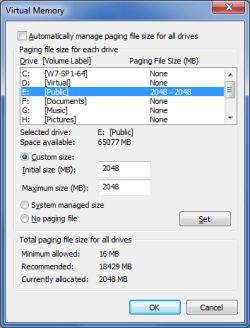
Pagefile 02.png
The real question is, why does Windows need so much Pagefile? :confused:

I created a 4 GB partition for Swap in Linux Mint and it usually uses 0 KB.
 

My Computer My Computer

At a glance

W7 Ultimate SP1, LM19.2 MATE, W10 Home 1703, ...AMD Phenom II x6 1100T, 3.3 GHz12GB DDR3 1333 G-Skill (4GB x 2), G-Skill (2G...NVIDIA GeForce GTX 660
Computer type
PC/Desktop
Computer Manufacturer/Model Number
n/a
OS
W7 Ultimate SP1, LM19.2 MATE, W10 Home 1703, W10 Pro 1703 VM, #All 64 bit
CPU
AMD Phenom II x6 1100T, 3.3 GHz
Motherboard
ASUS M4A88T-M/USB3 (AM3)
Memory
12GB DDR3 1333 G-Skill (4GB x 2), G-Skill (2GB x 2)
Graphics Card(s)
NVIDIA GeForce GTX 660
Sound Card
Realtek?
Monitor(s) Displays
Samsung S23B350
Screen Resolution
1920x1080
Hard Drives
WD Green 2TB (SATA), WD Green 3TB (SATA), WD Blue 4TB (SATA), WD Blue 6TB (SATA)
PSU
Cooler Master
Case
Antec GX300 Tower
Cooling
3x Antec TRICOOL 120mm Fans
Mouse
Wired Optical
Internet Speed
DSL
Antivirus
Avast
Browser
Pale Moon (64 bit)
Other Info
2018-12-27 Upgraded HDDs
2015-12-10 Upgraded case, graphics card, storage
2015-08-15 Upgraded motherboard & RAM
2015-07-15 Upgraded LM17.1 to LM17.2
Either use the standard pagefile size, system managed, or none at all.

Pagefile is on the permanent sectors of the hard drive, and cannot be erase, delete, etc.
Also it do not write all over the system partition, so there is no harm to have pagefile.

But there are plenty other 'small' size files that occupy and write all over the system partition.
Don't forget that there are files in C:\Windows\Temp and C:\Users\<account name>\AppData\Local\Temp folders.
Most of these files are of no use but it is a lot of small files size, which are occupying more storage space.

Also, I have moved the TMP and TEMP folders off the SSD into my HDD. So there is nothing written in AppData\Local\Temp folders.

Would be cool if I can also move the windows\temp folder. Anyone has any solutions? (getting off topic here)
 

My Computer My Computer

At a glance

windows 7
OS
windows 7
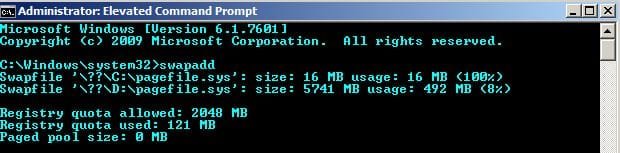
Here's my pagefiles and usage. (SATA)

PageFile.jpg

Here's another screenshot from ProcessHacker:

Process Hacker [PC_Chris]+.jpg

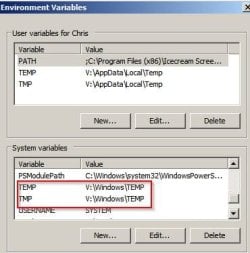
C:\Windows\Temp directory is always empty as files are only written to RAMDisk.

Environment Variables.jpg

On an SSD what's the issue with having a large page file?

You will get nothing but arguments on this. Some reading material:

How Big My Page File Should Be in Windows 7, 8.1 and 10 | Next of Windows
 

My Computer My Computer

At a glance

Microsoft Windows 7 Home Premium 64-bit 7601 ...AMD C-60 APU with Radeon(tm) HD Graphics4.00 GBAMD Radeon HD 6290 Graphics
Computer type
Laptop
Computer Manufacturer/Model Number
ASUS
OS
Microsoft Windows 7 Home Premium 64-bit 7601 Multiprocessor Free Service Pack 1
CPU
AMD C-60 APU with Radeon(tm) HD Graphics
Motherboard
ASUSTeK COMPUTER INC. X501U
Memory
4.00 GB
Graphics Card(s)
AMD Radeon HD 6290 Graphics
Sound Card
(1) AMD High Definition Audio Device (2) Realtek High Defi
Screen Resolution
1366 x 768 x 32 bits (4294967296 colors) @ 60 Hz
Hard Drives
Hitachi HTS545050A7E380 SATA Disk Device
Antivirus
Comodo CIS & FW, SecureAplus App Whitelisting, Threatfire
Browser
Cyberfox 64bit, Opera 64bit, Airfox
Other Info
Spy-The-Spy, HitmanPro.Alert, Norton Connect Safe, MJRegWatcher, BitDefender TrafficLight, Voodoo Shield, Zemana AntiMalware
On an SSD what's the issue with having a large page file?
It's an waste of fairly expensive storage.
Especially annoying if you have already forked out "big bucks" on even more expensive RAM, which isn't being used.

Depending on the SSD's total capacity, it could lower your performance, which (most likely) conflicts with why an SSD was installed in the first place (It's probably irrelevant on a large SSD).
Exploring the Relationship Between Spare Area and Performance Consistency in Modern SSDs - Print View

Aside:
On my W7-XP setup (a few years ago) I had 8GB of RAM.
Since XP was 32 bit, I used to spare RAM for a RAMDisk and put the Pagefile and Temp folders on it.
It ran very nicely. :)
 

My Computer My Computer

At a glance

W7 Ultimate SP1, LM19.2 MATE, W10 Home 1703, ...AMD Phenom II x6 1100T, 3.3 GHz12GB DDR3 1333 G-Skill (4GB x 2), G-Skill (2G...NVIDIA GeForce GTX 660
Computer type
PC/Desktop
Computer Manufacturer/Model Number
n/a
OS
W7 Ultimate SP1, LM19.2 MATE, W10 Home 1703, W10 Pro 1703 VM, #All 64 bit
CPU
AMD Phenom II x6 1100T, 3.3 GHz
Motherboard
ASUS M4A88T-M/USB3 (AM3)
Memory
12GB DDR3 1333 G-Skill (4GB x 2), G-Skill (2GB x 2)
Graphics Card(s)
NVIDIA GeForce GTX 660
Sound Card
Realtek?
Monitor(s) Displays
Samsung S23B350
Screen Resolution
1920x1080
Hard Drives
WD Green 2TB (SATA), WD Green 3TB (SATA), WD Blue 4TB (SATA), WD Blue 6TB (SATA)
PSU
Cooler Master
Case
Antec GX300 Tower
Cooling
3x Antec TRICOOL 120mm Fans
Mouse
Wired Optical
Internet Speed
DSL
Antivirus
Avast
Browser
Pale Moon (64 bit)
Other Info
2018-12-27 Upgraded HDDs
2015-12-10 Upgraded case, graphics card, storage
2015-08-15 Upgraded motherboard & RAM
2015-07-15 Upgraded LM17.1 to LM17.2
Basically I have 16GB RAM. In only one instance I remember it ever gets to 52-53% and that's when windows is installing updates and I also play games. 99% of the time I barely use 4GB.

I want Windows to stop wasting my SSD space and usage with files that it can very easily use the other 12GB of RAM to swap or whatever else windows needs to function.

C:\Windows\Temp directory is always empty as files are only written to RAMDisk.

Is drive V your RAMDisk?

I assume RAMDisk is one of these that do cost some money to use?

Guess I'll move the Windows\Temp folders on my HDD drive as well like I did with the Temp files in users.
 

My Computer My Computer

At a glance

windows 7
OS
windows 7

My Computer My Computer

At a glance

Windows 10 Pro x64Intel Core i7 6700KGSkill TridentZ RGB 16GB 3600 16-16-16-36EVGA GTX 980 Ti SC x2
Computer type
PC/Desktop
Computer Manufacturer/Model Number
Skylake Special #666
OS
Windows 10 Pro x64
CPU
Intel Core i7 6700K
Motherboard
Asus Sabertooth Z170 Mark 1
Memory
GSkill TridentZ RGB 16GB 3600 16-16-16-36
Graphics Card(s)
EVGA GTX 980 Ti SC x2
Sound Card
Realtek High Definition
Monitor(s) Displays
AOC G2460PG
Screen Resolution
1920 x 1080 144Hz
Hard Drives
Samsung 860 Pro 256GB, Seagate Barracuda 4TB x2
PSU
EVGA 1000 P2, EVGA White Custom Braided Cables
Case
Corsair Vengeance C70 Gunmetal Black
Cooling
Corsair H100i v2, Corsair ML120 x2, Thermal Grizzly Kryonaut
Keyboard
Logitech G910 Orion Spectrum
Mouse
Logitech G700s
Internet Speed
Verizon Fios Quantum Gateway 75/75
Antivirus
Windows Defender, Malwarebytes Free 3.8.3
Browser
Chrome
Other Info
Corsair SP120 x4, LG Blu-ray Drive, Durabrand HT-395 100 Watt Dolby Digital Amp, Corsair H2100 Wireless 7.1 Headset
Is drive V your RAMDisk?

I assume RAMDisk is one of these that do cost some money to use?

Guess I'll move the Windows\Temp folders on my HDD drive as well like I did with the Temp files in users.

Yes V Drive is a RAMdisk but there's little point in using one on SSD. I was just pointing out that you can specify locations for Windows Temp files to be written.

RE: Cost of a RAMdisk. I use a free product. In the past I also created my own RAMDisks with no limit on size using ImDisk Virtual Disk Driver.
 

My Computer My Computer

At a glance

Microsoft Windows 7 Home Premium 64-bit 7601 ...AMD C-60 APU with Radeon(tm) HD Graphics4.00 GBAMD Radeon HD 6290 Graphics
Computer type
Laptop
Computer Manufacturer/Model Number
ASUS
OS
Microsoft Windows 7 Home Premium 64-bit 7601 Multiprocessor Free Service Pack 1
CPU
AMD C-60 APU with Radeon(tm) HD Graphics
Motherboard
ASUSTeK COMPUTER INC. X501U
Memory
4.00 GB
Graphics Card(s)
AMD Radeon HD 6290 Graphics
Sound Card
(1) AMD High Definition Audio Device (2) Realtek High Defi
Screen Resolution
1366 x 768 x 32 bits (4294967296 colors) @ 60 Hz
Hard Drives
Hitachi HTS545050A7E380 SATA Disk Device
Antivirus
Comodo CIS & FW, SecureAplus App Whitelisting, Threatfire
Browser
Cyberfox 64bit, Opera 64bit, Airfox
Other Info
Spy-The-Spy, HitmanPro.Alert, Norton Connect Safe, MJRegWatcher, BitDefender TrafficLight, Voodoo Shield, Zemana AntiMalware
Someone pleas correct me if I'm not understanding correctly.

My understanding is Windows 7 when set to system manage will only use pagefile when needed. If it's not needed it doesn't use pagefile. I personally let Windows 7 use my system as it see fit. Window 7 knows what resources it need to be using and when.

That is one of the big improvement put into Windows 7 over XP. Us old time XP users asked for better memory management by the operating system and we got it with Windows 7.
When I first got Windows 7 I tried all the memory tricks use in XP and found it was a waste of time and a great operating system.
To the best of my 3 brain cell I can't find a flaw in Windows 7 management of memory when the system is allowed to manage the memory. All I had to do was take off my XP hat and put on my Windows 7 hat.
 

My Computer My Computer

At a glance

Windows 10 Pro. 64/ version 1709 Windows 7 Pr...Intel i7-6800K @ 4.3Corsair Platinum 16 gig @2400EVGA GTX 1070 OC
Computer type
PC/Desktop
Computer Manufacturer/Model Number
Home made Desktop
OS
Windows 10 Pro. 64/ version 1709 Windows 7 Pro/64
CPU
Intel i7-6800K @ 4.3
Motherboard
ASUS X-99 Deluxe II
Memory
Corsair Platinum 16 gig @2400
Graphics Card(s)
EVGA GTX 1070 OC
Monitor(s) Displays
Asus 27" LED LCD/VE278Q
Screen Resolution
1920-1080 or 1280-720 HDMI
Hard Drives
INTEL SSD 730-240 Gb Sata 3.0/
PSU
EVGA Platium 1200W
Case
Phanteks Luxe Tempered Glass 8 fans/ one radiator
Cooling
XSPC/ Water Cooled CPU
Keyboard
Das 4 Professional
Mouse
Logitech M705/MX Anywhere 2-S
Internet Speed
100 mbits
Antivirus
Microsoft Security Essentials/ Malwarebytes Premium 3.0/ SAS
Browser
I.E. 11 default/Firefox/ ISP Time Warner Cable/Spectrum
Other Info
LG BluRay Burner/
Sound system-KLipsch-THX/
Icy Dock ssd Hot Swap bays.
My understanding is Windows 7 when set to system manage will only use pagefile when needed. If it's not needed it doesn't use pagefile. I personally let Windows 7 use my system as it see fit. Window 7 knows what resources it need to be using and when.

That is one of the big improvement put into Windows 7 over XP. Us old time XP users asked for better memory management by the operating system and we got it with Windows 7.
When I first got Windows 7 I tried all the memory tricks use in XP and found it was a waste of time and a great operating system.
To the best of my 3 brain cell I can't find a flaw in Windows 7 management of memory when the system is allowed to manage the memory. All I had to do was take off my XP hat and put on my Windows 7 hat.

Well you are correct of course but personally I find the machine runs more smoothly/ responsively by swapping the page file to another partition and using a fixed size page file. Also a RAMDisk is used to signficantly speed up launching of programs and for programs that need to read or write a lot of data there's a big performance improvement. However configuration isn't easy and took me months to figure out properly.

The machine I use at work is left to it's own devices regarding pagefile and memory management. It's a high spec machine but it often seems slower than my low spec home based machine when data intensive apps are used.

The way I look at it is - I tweak something and if there's no obvious benefit/ perfomance improvement then I undo the tweak.
 

My Computer My Computer

At a glance

Microsoft Windows 7 Home Premium 64-bit 7601 ...AMD C-60 APU with Radeon(tm) HD Graphics4.00 GBAMD Radeon HD 6290 Graphics
Computer type
Laptop
Computer Manufacturer/Model Number
ASUS
OS
Microsoft Windows 7 Home Premium 64-bit 7601 Multiprocessor Free Service Pack 1
CPU
AMD C-60 APU with Radeon(tm) HD Graphics
Motherboard
ASUSTeK COMPUTER INC. X501U
Memory
4.00 GB
Graphics Card(s)
AMD Radeon HD 6290 Graphics
Sound Card
(1) AMD High Definition Audio Device (2) Realtek High Defi
Screen Resolution
1366 x 768 x 32 bits (4294967296 colors) @ 60 Hz
Hard Drives
Hitachi HTS545050A7E380 SATA Disk Device
Antivirus
Comodo CIS & FW, SecureAplus App Whitelisting, Threatfire
Browser
Cyberfox 64bit, Opera 64bit, Airfox
Other Info
Spy-The-Spy, HitmanPro.Alert, Norton Connect Safe, MJRegWatcher, BitDefender TrafficLight, Voodoo Shield, Zemana AntiMalware
It`s only an issue to people who are using a 128, 120 GB or smaller SSD, because the pagefile takes up valuable real estate on the ssd and if you have 16 or like me 32 GB, in my opinion you don`t even need a pagefile.

I`ve made some RamDisks in the past, the only problem for me is/was that I always shut my PC down when I`m done with it. (So bye bye RamDisk)

I`m not sure but I think Samsungs Rapid mode maybe does the same type thing. I leave it disabled.

http://www.samsung.com/semiconducto...ment/Samsung_SSD_Rapid_Mode_Whitepaper_EN.pdf


But the problem here is, according to the OP, the system is using a larger page file then he has allotted.

I suggest he go a week without a page file, see what happens.
 
Last edited:

My Computer My Computer

At a glance

Windows 10 Pro x64Intel Core i7 6700KGSkill TridentZ RGB 16GB 3600 16-16-16-36EVGA GTX 980 Ti SC x2
Computer type
PC/Desktop
Computer Manufacturer/Model Number
Skylake Special #666
OS
Windows 10 Pro x64
CPU
Intel Core i7 6700K
Motherboard
Asus Sabertooth Z170 Mark 1
Memory
GSkill TridentZ RGB 16GB 3600 16-16-16-36
Graphics Card(s)
EVGA GTX 980 Ti SC x2
Sound Card
Realtek High Definition
Monitor(s) Displays
AOC G2460PG
Screen Resolution
1920 x 1080 144Hz
Hard Drives
Samsung 860 Pro 256GB, Seagate Barracuda 4TB x2
PSU
EVGA 1000 P2, EVGA White Custom Braided Cables
Case
Corsair Vengeance C70 Gunmetal Black
Cooling
Corsair H100i v2, Corsair ML120 x2, Thermal Grizzly Kryonaut
Keyboard
Logitech G910 Orion Spectrum
Mouse
Logitech G700s
Internet Speed
Verizon Fios Quantum Gateway 75/75
Antivirus
Windows Defender, Malwarebytes Free 3.8.3
Browser
Chrome
Other Info
Corsair SP120 x4, LG Blu-ray Drive, Durabrand HT-395 100 Watt Dolby Digital Amp, Corsair H2100 Wireless 7.1 Headset
Do note that this is my view and opinion.

Frankly speaking, how each user uses the computer is different.
Hence, there are a lot of difference of opinion on about pagefile, on system SSD &or HDD &or RAM disk.

If one tend to use the computer for application that rely much resource, this is where pagefile &or RAM disk do play a part.
As for those who do not rely on such application, then it is different, as the system will seldom use pagefile.

For system managed on pagefile, upon first use, the system will create the pagefile is on one big sector, no gap.
As what i mean on this, is that the pagefile will not shrink the size.
This is different from normal files, such as application data, which may increase/shrink in size, accordingly.
Hence, the data is all over the Disk space - that is fragment.

Whereas, pagefile will always remain at 8GB as system managed.
It do not shrink and later increase in size.
In this way, it stay on that particular block sectors.
Windows 7 is said to improve on many features, which include how it manage pagefile.

Even if said that that block of sectors may damaged in the long run, it should not be any problem.
The system will take care of that.

If the pagefile is too small or move to the RAM, there would have some effect on performance.
The knock-on effect will be felt, when the application rely heavily on resource and unable to get, it may cause error.

But for user who do not do any application that required much resource, then a small pagefile on another drive is more than enough.

In the end, it is up to each user to consider on this pagefile size, convert some RAM to RAM disk, etc.

 

My Computer My Computer

At a glance

Windows 7 x64
Computer type
Laptop
Computer Manufacturer/Model Number
Toshiba L630 and L735
OS
Windows 7 x64
Hard Drives
240 GB SSD
Someone pleas correct me if I'm not understanding correctly.

My understanding is Windows 7 when set to system manage will only use pagefile when needed. If it's not needed it doesn't use pagefile. I personally let Windows 7 use my system as it see fit. Window 7 knows what resources it need to be using and when.

That is one of the big improvement put into Windows 7 over XP. Us old time XP users asked for better memory management by the operating system and we got it with Windows 7.
When I first got Windows 7 I tried all the memory tricks use in XP and found it was a waste of time and a great operating system.
To the best of my 3 brain cell I can't find a flaw in Windows 7 management of memory when the system is allowed to manage the memory. All I had to do was take off my XP hat and put on my Windows 7 hat.

Not sure how optimised Windows 7 really is with SSD usage since when it came out, consumer SSD's just started to make their appearance. Yes most likely there are patches for optimisation, but when core of Windows 7 was designed consumer SSD's were not really a thing

For me personally I hate seeing so much free RAM that I spent money on sit empty and unused while some page file is used on the SSD and takes up space for nothing really (empty RAM!)
 

My Computer My Computer

At a glance

windows 7
OS
windows 7
System File Checker

I`ve made some RamDisks in the past, the only problem for me is/was that I always shut my PC down when I`m done with it. (So bye bye RamDisk)
I considered that "auto-purge" to be a bonus on my system. :)

If you already have an SSD, I can't really see to much point installing programs to a RAMDisk though.

But the problem here is, according to the OP, the system is using a larger page file then he has allotted.
Maybe some system files have become corrupted.

Messerschmitt have you tried running sfc?

Open the Command Prompt (Use the "Run as administrator" option in the context menu).
Type:
sfc /scannow

Tutorial

SFC /SCANNOW Command - System File Checker
 
Last edited:

My Computer My Computer

At a glance

W7 Ultimate SP1, LM19.2 MATE, W10 Home 1703, ...AMD Phenom II x6 1100T, 3.3 GHz12GB DDR3 1333 G-Skill (4GB x 2), G-Skill (2G...NVIDIA GeForce GTX 660
Computer type
PC/Desktop
Computer Manufacturer/Model Number
n/a
OS
W7 Ultimate SP1, LM19.2 MATE, W10 Home 1703, W10 Pro 1703 VM, #All 64 bit
CPU
AMD Phenom II x6 1100T, 3.3 GHz
Motherboard
ASUS M4A88T-M/USB3 (AM3)
Memory
12GB DDR3 1333 G-Skill (4GB x 2), G-Skill (2GB x 2)
Graphics Card(s)
NVIDIA GeForce GTX 660
Sound Card
Realtek?
Monitor(s) Displays
Samsung S23B350
Screen Resolution
1920x1080
Hard Drives
WD Green 2TB (SATA), WD Green 3TB (SATA), WD Blue 4TB (SATA), WD Blue 6TB (SATA)
PSU
Cooler Master
Case
Antec GX300 Tower
Cooling
3x Antec TRICOOL 120mm Fans
Mouse
Wired Optical
Internet Speed
DSL
Antivirus
Avast
Browser
Pale Moon (64 bit)
Other Info
2018-12-27 Upgraded HDDs
2015-12-10 Upgraded case, graphics card, storage
2015-08-15 Upgraded motherboard & RAM
2015-07-15 Upgraded LM17.1 to LM17.2
But the problem here is, according to the OP, the system is using a larger page file then he has allotted.
I suggest he go a week without a page file, see what happens.

It is clear from the Task Manager screenshot that the pagefile usage is no where near as high as the MSI Afterburner screenshot would seem to indicate. The pagefile size would have to be at least the size of pagefile usage which would produce a commit limit of over 32 GB. The commit limit is equal to RAM size + pagefile size - a few MB. Task Manager shows a commit limit of only 16 GB but due to rounding it is likely closer to 17 GB. The most reasonable explanation is that MSI Afterburner is showing commit charge but misleadingly labeled as pagefile usage. This misleading labeling is actually quite common. XP Task Manager did just that.

From the information provided there is nothing to indicate that there is any pagefile usage at all.

But there is a problem in that the commit charge is very close to the commit limit. The commit limit cannot be exceeded. If the pagefile were disabled the limit would be lower than what is currently shown. Before that point were reached there would be out of memory errors. The fact that there is plenty of RAM is available is not at all relevant.

The situation regarding the high commit charge must be resolved before even considering disabling the pagefile.
 

My Computer My Computer

At a glance

Windows 7 Pro 64 bitXeon W35208 GBNvidia Geforce 210
Computer type
PC/Desktop
Computer Manufacturer/Model Number
HP
OS
Windows 7 Pro 64 bit
CPU
Xeon W3520
Memory
8 GB
Graphics Card(s)
Nvidia Geforce 210
Back
Top