External HDD died, need help recovering data for backup

TheM4dHatter

New member
Local time
7:34 AM
Messages
33
I've been getting ready for a disk replacement after 7 1/2 years but the disks arrived too late to avoid anything problematic.

My external HDD gave a cylindrical error while reading some data in a program so I knew this was going to be the end of it. I tried to avoid running chkdsk and suffer so I had time to backup but my harddrives won't come in the mail until tomorrow. I tried to navigate to the directory that gave the cylindrical error and half the files couldn't be found, as expected, going back the entire file tree containing couldn't be found either so I tried running chkdsk anyway and just go with it but it couldn't "load a RAW partition", so the boot sector of the drive failed, without thinking I shut off the drive and turned it back on.
Big mistake because now nothing loads at all.

I tried chkdsk /R, which did not work.

I downloaded testdisk and I'm running an analysis right now, its working, but extremely slowly (has been running for more then a day and is at 1%) and often gets stuck on a cylinder for several minutes to half an hour often resulting in a read error.

I have EasUS Partition Manager Pro 10.5 and HDD Regenerator as well if this does not help.

I'm not really familiar with testdisk, I never used it before, I did read the "manual" but that's only describes one scenario, mine already differs from whats on the site so I could use some help in how to fix this so I can access my data, copy and paste everything to the new HDD when it arrives and then zero out the old drive, hoping for the best and using it as "extra storage if needed for junk" or toss it.

So far the test results are as followed (many more read errors but can't paste them all), I know they're bad, I could use some help/instructions on how to best approach this with minimal to no data loss if possible. Thanks!

Code:
Drive I: - 4000 GB / 3726 GiB - CHS 60800 255 63, sector size=4096

Partition table type (auto): None
Drive I: - 4000 GB / 3726 GiB
Partition table type: Intel

Analyse Drive I: - 4000 GB / 3726 GiB - CHS 60800 255 63
Geometry from i386 MBR: head=117 sector=53
BAD_RS LBA=1970422794 5742108
check_part_i386 1 type 72: no test
BAD_RS LBA=1952803941 1051071
check_part_i386 2 type 6C: no test
BAD_RS LBA=543519776 5886830
check_part_i386 3 type 69: no test
BAD_RS LBA=2576089098 4327893
check_part_i386 4 type 0A: no test
Current partition structure:
1 * Sys=72 122653 37 19 244069 167 55 1950556267

Warning: Bad ending sector (CHS and LBA don't match)
2 * Sys=6C 121556 107 61 235842 24 32 1835999333

Bad relative sector.
3 * Novell 33832 138 3 153284 27 42 1918989427

Bad relative sector.
4 * OS/2 Boot Manager 160354 33 10 160357 71 25 50605

Bad relative sector.
Only one partition must be bootable
Space conflict between the following two partitions
3 * Novell 33832 138 3 153284 27 42 1918989427
2 * Sys=6C 121556 107 61 235842 24 32 1835999333
Space conflict between the following two partitions
2 * Sys=6C 121556 107 61 235842 24 32 1835999333
1 * Sys=72 122653 37 19 244069 167 55 1950556267
Space conflict between the following two partitions
1 * Sys=72 122653 37 19 244069 167 55 1950556267
4 * OS/2 Boot Manager 160354 33 10 160357 71 25 50605

search_part()
Drive I: - 4000 GB / 3726 GiB - CHS 60800 255 63
file_win32_pread(732,2,buffer,669440(41/171/3)) read err: read after end of file
file_win32_pread(732,1,buffer,669440(41/171/3)) read err: read after end of file
file_win32_pread(732,2,buffer,669440(41/171/3)) read err: read after end of file
file_win32_pread(732,1,buffer,669442(41/171/5)) read err: read after end of file
file_win32_pread(732,2,buffer,669447(41/171/10)) read err: read after end of file
file_win32_pread(732,2,buffer,669449(41/171/12)) read err: read after end of file
file_win32_pread(732,3,buffer,669455(41/171/18)) read err: read after end of file
file_win32_pread(732,1,buffer,669696(41/175/7)) read err: read after end of file
file_win32_pread(732,2,buffer,669696(41/175/7)) read err: read after end of file
file_win32_pread(732,1,buffer,669698(41/175/9)) read err: read after end of file
file_win32_pread(732,2,buffer,669703(41/175/14)) read err: read after end of file
file_win32_pread(732,2,buffer,669705(41/175/16)) read err: read after end of file
file_win32_pread(732,3,buffer,669711(41/175/22)) read err: read after end of file
file_win32_pread(732,2,buffer,671232(41/199/31)) read err: read after end of file
file_win32_pread(732,1,buffer,671232(41/199/31)) read err: read after end of file
file_win32_pread(732,2,buffer,671232(41/199/31)) read err: read after end of file
file_win32_pread(732,1,buffer,671234(41/199/33)) read err: read after end of file
file_win32_pread(732,2,buffer,671239(41/199/38)) read err: read after end of file
file_win32_pread(732,2,buffer,671241(41/199/40)) read err: read after end of file
file_win32_pread(732,3,buffer,671247(41/199/46)) read err: read after end of file
file_win32_pread(732,1,buffer,671488(41/203/35)) read err: read after end of file
file_win32_pread(732,2,buffer,671488(41/203/35)) read err: read after end of file
file_win32_pread(732,1,buffer,671490(41/203/37)) read err: read after end of file
file_win32_pread(732,2,buffer,671495(41/203/42)) read err: read after end of file
file_win32_pread(732,2,buffer,671497(41/203/44)) read err: read after end of file
file_win32_pread(732,3,buffer,671503(41/203/50)) read err: read after end of file
file_win32_pread(732,1,buffer,671744(41/207/39)) read err: read after end of file
file_win32_pread(732,2,buffer,671744(41/207/39)) read err: read after end of file
file_win32_pread(732,1,buffer,671746(41/207/41)) read err: read after end of file
file_win32_pread(732,2,buffer,671751(41/207/46)) read err: read after end of file
file_win32_pread(732,2,buffer,671753(41/207/48)) read err: read after end of file
file_win32_pread(732,3,buffer,671759(41/207/54)) read err: read after end of file
file_win32_pread(732,1,buffer,672000(41/211/43)) read err: read after end of file
file_win32_pread(732,2,buffer,672000(41/211/43)) read err: read after end of file
file_win32_pread(732,1,buffer,672002(41/211/45)) read err: read after end of file
file_win32_pread(732,2,buffer,672007(41/211/50)) read err: read after end of file
file_win32_pread(732,2,buffer,672009(41/211/52)) read err: read after end of file
file_win32_pread(732,3,buffer,672015(41/211/58)) read err: read after end of file
file_win32_pread(732,1,buffer,672256(41/215/47)) read err: read after end of file
file_win32_pread(732,2,buffer,672256(41/215/47)) read err: read after end of file
file_win32_pread(732,1,buffer,672258(41/215/49)) read err: read after end of file
file_win32_pread(732,2,buffer,672263(41/215/54)) read err: read after end of file
file_win32_pread(732,2,buffer,672265(41/215/56)) read err: read after end of file
file_win32_pread(732,3,buffer,672271(41/215/62)) read err: read after end of file
file_win32_pread(732,1,buffer,672512(41/219/51)) read err: read after end of file
file_win32_pread(732,2,buffer,672512(41/219/51)) read err: read after end of file
file_win32_pread(732,1,buffer,672514(41/219/53)) read err: read after end of file
file_win32_pread(732,2,buffer,672519(41/219/58)) read err: read after end of file
file_win32_pread(732,2,buffer,672521(41/219/60)) read err: read after end of file
file_win32_pread(732,3,buffer,672527(41/220/3)) read err: read after end of file
file_win32_pread(732,1,buffer,672768(41/223/55)) read err: read after end of file
file_win32_pread(732,2,buffer,672768(41/223/55)) read err: read after end of file
file_win32_pread(732,1,buffer,672770(41/223/57)) read err: read after end of file
file_win32_pread(732,2,buffer,672775(41/223/62)) read err: read after end of file
file_win32_pread(732,2,buffer,672777(41/224/1)) read err: read after end of file
file_win32_pread(732,3,buffer,672783(41/224/7)) read err: read after end of file
file_win32_pread(732,2,buffer,737280(45/227/55)) read err: read after end of file
file_win32_pread(732,1,buffer,737280(45/227/55)) read err: read after end of file
file_win32_pread(732,2,buffer,737280(45/227/55)) read err: read after end of file
file_win32_pread(732,1,buffer,737282(45/227/57)) read err: read after end of file
file_win32_pread(732,2,buffer,737287(45/227/62)) read err: read after end of file
file_win32_pread(732,2,buffer,737289(45/228/1)) read err: read after end of file
file_win32_pread(732,3,buffer,737295(45/228/7)) read err: read after end of file
file_win32_pread(732,1,buffer,737536(45/231/59)) read err: read after end of file
file_win32_pread(732,2,buffer,737536(45/231/59)) read err: read after end of file
file_win32_pread(732,1,buffer,737538(45/231/61)) read err: read after end of file
file_win32_pread(732,2,buffer,737543(45/232/3)) read err: read after end of file
file_win32_pread(732,2,buffer,737545(45/232/5)) read err: read after end of file
file_win32_pread(732,3,buffer,737551(45/232/11)) read err: read after end of file
file_win32_pread(732,1,buffer,737792(45/235/63)) read err: read after end of file
file_win32_pread(732,2,buffer,737792(45/235/63)) read err: read after end of file
file_win32_pread(732,1,buffer,737794(45/236/2)) read err: read after end of file
file_win32_pread(732,2,buffer,737799(45/236/7)) read err: read after end of file
file_win32_pread(732,2,buffer,737801(45/236/9)) read err: read after end of file
file_win32_pread(732,3,buffer,737807(45/236/15)) read err: read after end of file
file_win32_pread(732,1,buffer,738048(45/240/4)) read err: read after end of file
file_win32_pread(732,2,buffer,738048(45/240/4)) read err: read after end of file
file_win32_pread(732,1,buffer,738050(45/240/6)) read err: read after end of file
file_win32_pread(732,2,buffer,738055(45/240/11)) read err: read after end of file
file_win32_pread(732,2,buffer,738057(45/240/13)) read err: read after end of file
file_win32_pread(732,3,buffer,738063(45/240/19)) read err: read after end of file
file_win32_pread(732,1,buffer,738304(45/244/8)) read err: read after end of file
file_win32_pread(732,2,buffer,738304(45/244/8)) read err: read after end of file
file_win32_pread(732,1,buffer,738306(45/244/10)) read err: read after end of file
file_win32_pread(732,2,buffer,738311(45/244/15)) read err: read after end of file
file_win32_pread(732,2,buffer,738313(45/244/17)) read err: read after end of file
file_win32_pread(732,3,buffer,738319(45/244/23)) read err: read after end of file
file_win32_pread(732,1,buffer,738560(45/248/12)) read err: read after end of file
file_win32_pread(732,2,buffer,738560(45/248/12)) read err: read after end of file
file_win32_pread(732,1,buffer,738562(45/248/14)) read err: read after end of file

A lot more of that.but I reached the character limit.
 

My Computer My Computer

Computer type
PC/Desktop
Computer Manufacturer/Model Number
Alienware X51
OS
Win 7 x64
CPU
Intel core i7-2600 @3.40Ghz
Memory
8 GB
Graphics Card(s)
Nvidea Gforce GTX 555
Hard Drives
Seagate !TB ST31000524AS ATA
Antivirus
Comodo Internet Security
Browser
Firefox and Iron
External drive 4TB. Manufacturer/ Model Number/name ????????

My instinctive feeling is that you have lost the race. But 10% of the times my instinct can go wrong. Under that premise,

Stop Test Disk forthwith and safely remove your external drive. If safely remove icon is not there, shut down your PC and then plug out the faulty drive.

Download and install Partition Wizard Free Edition 9.1 from Free download Magic Partition Manager Software, partition magic alternative, free partition magic, partition magic Windows 7 and server partition software - Partition Wizard Online

Now plug in only your faulty external drive. No other USB storage/USB devices except your Keyboard and Mouse.

Take a screenshot of how your external drive looks like in Windows Disk Management. Save it. Close Windows Disk Management.

Run Partition Wizard and take a screenshot of the first screen of it as soon as you launch the program, again showing your external drive. Save it.

Safely remove or remove after shut down your external drive. ( Keep it running only for the minimal time required for the screenshots.)

Post the screenshots.

WDM :Disk Management - Post a Screen Capture Image
Snipping Tool How to Use the Snipping Tool in Vista
Upload to Seven Forums: Screenshots and Files - Upload and Post in Seven Forums
 

My Computer My Computer

OS
Windows 7 Home Premium 32 bit
It's a Lacie P'9230, windows picks that up just fine. It shows drive as local drive now which is inaccessible instead of its correct name LaCie because the boot cluster is screwed up (which testdisk already showed).

I tried to open WDM, it just stays stuck on loading VDS.

I tried opening EasUS Partition Manager 10.5 Pro, it says some programs are locking it out but I can't figure out which, I can't see anything running in ProcessHacker that could relate to the disk list....
Finally after manually terminating VDS it started but it takes forever to load as well. It's just stuck on the loading screen.

It seems like VDS (since EasUS works with VDS as well) has a hard time calculating this, even though I'm not getting errors.

Testdisk recognized it right away, with the right diskname and disk size.

I will just leave it running for a bit and see what happens.

Edit: Removing the disk makes it instantly load up, the disk also prevents my Comodo from starting which is most likely because of a Time Out waiting for VDS.
I reconnected the drive with partition manager already turned on and refreshed it, it's taking forever again but I'm not getting any errors.
 
Last edited:

My Computer My Computer

Computer type
PC/Desktop
Computer Manufacturer/Model Number
Alienware X51
OS
Win 7 x64
CPU
Intel core i7-2600 @3.40Ghz
Memory
8 GB
Graphics Card(s)
Nvidea Gforce GTX 555
Hard Drives
Seagate !TB ST31000524AS ATA
Antivirus
Comodo Internet Security
Browser
Firefox and Iron
I waited quite a while now but VBR (via disk manager and EasUS) simply isn't loading the disk.
It's weird because Testdisk has no problem with it.

Just to add, there are no clicking sounds (click of death) but the drive is flashing constantly like its reading.
 
Last edited:

My Computer My Computer

Computer type
PC/Desktop
Computer Manufacturer/Model Number
Alienware X51
OS
Win 7 x64
CPU
Intel core i7-2600 @3.40Ghz
Memory
8 GB
Graphics Card(s)
Nvidea Gforce GTX 555
Hard Drives
Seagate !TB ST31000524AS ATA
Antivirus
Comodo Internet Security
Browser
Firefox and Iron

My Computer My Computer

OS
Windows 7 Home Premium 32 bit
Already did.

It was "degrading" because of heat issues but nothing critical, no major amounts of corrupt sectors or unallocated sectors, until a few hours before I made this post, then the scans failed to produce any results.

I'm trying to run Hiren's boot right now but I can't seem to load the HDD in any of the DOS programs but there isn't much on it that could fix things in the windows version. Maybe partition magic? or Parted Magic in the linux distro.
 

My Computer My Computer

Computer type
PC/Desktop
Computer Manufacturer/Model Number
Alienware X51
OS
Win 7 x64
CPU
Intel core i7-2600 @3.40Ghz
Memory
8 GB
Graphics Card(s)
Nvidea Gforce GTX 555
Hard Drives
Seagate !TB ST31000524AS ATA
Antivirus
Comodo Internet Security
Browser
Firefox and Iron
ok it looks like i'm making minimal progress, but progress nonetheless.

I found testdisk in the linux distro as well, ran it, found my partition LaCie (spelled correctly) no problem, found the drive and correctly displayed the right model Seagate harddrive, blocks used, size and storage used etc..

I ran a quick test and it said that the file structure was ok, i'm trying to get more out of it and see what I can and can't fix.

Progress: I think its displaying a lot my files at the moment in testdisk
 

My Computer My Computer

Computer type
PC/Desktop
Computer Manufacturer/Model Number
Alienware X51
OS
Win 7 x64
CPU
Intel core i7-2600 @3.40Ghz
Memory
8 GB
Graphics Card(s)
Nvidea Gforce GTX 555
Hard Drives
Seagate !TB ST31000524AS ATA
Antivirus
Comodo Internet Security
Browser
Firefox and Iron
"...Progress: I think its displaying a lot my files at the moment in testdisk." I hope that means the data is recoverable. I found out that just because files are listed doesn't mean all those listed files will intact data within.
 

My Computer My Computer

Computer type
PC/Desktop
Computer Manufacturer/Model Number
Antec desktop; Acer Aspire laptops
OS
Windows 7 Professional 64-bit
CPU
Desktop i5; Acers i5 & i7
Memory
desktop 16GB; 1 Acer 8GB & 1 Acer 16GB
Hard Drives
1TB split into 2 equal partitions [OS and data] usable by RJS
Internet Speed
AT&T DSL
Browser
FF, GChrome, msIE
Other Info
Windows 7 Firewall, Emsisoft AM/AV, MSE [scan-only], SpywareBlaster, Ruiware/BillP combine
Very true.
I'm still deep scanning it, the last scan was just a quick one.
The main problem is that the cylinder that held both my partition table and my main MFT broke down so right now I'm recreating the partition table and recovering a backup MFT.
Once that is done i'm going to restore files not found through MFT then run forensic like programs to recover things left over in bad clusters, starting with PhotoRec and working my way up until my recovery is "good enough" or "as good as it gets".
Then I'm going to zero the disk, run a fschk/chkdsk and use it as junk storage.
It won't be reliable but it isn't dead, the parts that gave up where unfortunately the parts that both index the drive and make it recognizable for Windows. While Linux had no problem mounting it or reading it, go figure, disk checks still only show it as degrading not as imminent failure either.
I will update this every now and then, it might be helpful for others in the future if I find a way to recover things.
 

My Computer My Computer

Computer type
PC/Desktop
Computer Manufacturer/Model Number
Alienware X51
OS
Win 7 x64
CPU
Intel core i7-2600 @3.40Ghz
Memory
8 GB
Graphics Card(s)
Nvidea Gforce GTX 555
Hard Drives
Seagate !TB ST31000524AS ATA
Antivirus
Comodo Internet Security
Browser
Firefox and Iron
My two cents worth for saving your data before everything goes belly up are these
BOOTABLE UBUNTU
Make a bootable Ubuntu disk Download Ubuntu Desktop | Download | Ubuntu
Set the BIOS to boot from the optical when the machine boots it will show you a screen with TRY or INSTALL > select TRY not INSTALL
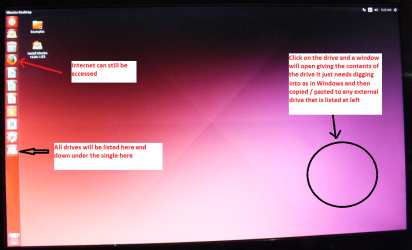
When it is finished - it takes very little time you will get a screen like in the pic .
Open the drive you want > User and dig down until you get to the data / settings you may be able to copy / paste the material you want to an external source or other installed drive doing this.
I am not sure if it will but I have recovered tons of data etc using this method both on "dead" or just plain drives that you cannot get data from using Windows.

or this Emergency Kit - save your files from a dead OS

I prefer my Ubuntu method a little bit quicker to use but the other can do the same thing
 

Attachments

  • UBUNTU SCREEN X2.PNG
    UBUNTU SCREEN X2.PNG
    272.7 KB · Views: 0

My Computer My Computer

Computer type
PC/Desktop
Computer Manufacturer/Model Number
Own build (new) Desk1 / Asus ROG Win 7 / Desk2 1st build
OS
Desk1 7 Home Prem / Desk2 10 Pro / Main lap Asus ROG 10 Pro 2 laptop Toshiba 7 Pro Asus P2520 7 & 10
CPU
Desk1 i5 3750K / Laptop i7 GTX 860M / Desk2 i5 2500
Motherboard
Desk1 Asus P877-V / Desk2 Gigabyte H67 UD3H / Laptop ?
Memory
Desk1 8GB (1866) / Desk2 16GB (1333) / Laptop 8Gb DDR3
Graphics Card(s)
Desk 1& 2NVidia GTX 650 & Laptops on board Intel
Sound Card
Desk 1 & 2 -XONAR DG Realtek High Def audio Laptop
Monitor(s) Displays
Desk 1 Benq HD 2450 / Desk2 Philips 24" / Laptop 17.5"
Screen Resolution
1920x1080 D1 & D2 & Laptop 1
Hard Drives
Desk1 Samsung 120GB 830 SSD
Asus ROG 256GB 850 Pro SSD
Desk2 Samsung 840 256 SSD
Toshiba 120GB EVO
PSU
Desk 1 Corsair HX 1050/ Laptop ? / Desk 2 Corsair HX 650
Case
Desk 1 Cooler HAF XM ? Toshiba laptop / Desk2 Coolermaster
Cooling
Fans on all Desk1 -2 Desk2 - all Coolermasters 5 Laptop ?
Keyboard
Desk 1 MS Sidewinder X6 Desk 2 MS Sidewinder X 4
Mouse
Desk 1&2 - Gigabyte MS 900 gamer - laptop - Logitec wireless
Internet Speed
ADSL2+
Other Info
One other Desktop (tester) and spare Toshba laptop both with SSD's
Running Kaspersky 2016 ISS on all machines config'd identically
Logitec audio stereo systems on each machine (x3)
Canon MG5250MFC
Router/modem TP-Link running WPA2SK
...... While Linux had no problem mounting it or reading it, .....

If Linux could mount your drive and can read it, why did you not copy the files to another drive.??????!!!!!!!!!

EDIT: You started off this thread saying "External HDD died" but now you say it is not dead yet :). Whatever, if indeed your HDD is riddled with bad sectors, taxing it the way you do now may hasten its ultimate death and then everything is lost. (If it isn't dead yet it is just your luck but that may run out anytime.:))

Since you keep experimenting on your own - with only a hazy knowledge about partition structure, VBR, MFT etc., - I may add further fuel :) by suggesting this thread for your reading Best method/tool for cloning a failing HDD for Data Recovery? Once you successfully clone your drive, - which in your case I presume will take days and weeks and assumimg that it will not die during this cloning phase - you can do all your experiments to your heart's content on the cloned drive without running the risk of losing your failing HDD anytime.
 
Last edited:

My Computer My Computer

OS
Windows 7 Home Premium 32 bit
I'm way beyond that point already ;) but thanks, Linux is definitely the way to go.. if gaming only got better on there I would say goodbye to windows forever.

At the moment I'm running in Hiren's Linux distribution already (I don't know what it's based on but it looks like Debian).
I'm checking each cylinder of the harddrive searching for partitions, hard links, soft links, backup MFT, backup NTFS boot sector and through that rebuilding the partition table.
Once that is done I'm going to check what is missing still, at that point I'm going to use programs to extract data from sectors no matter what they are, if they start with a series of Hex numbers it will recognize the filetype and reconstruct it as well as signature recovery. After that I will try to recover some broken sectors by applying different decibel levels next to each corrupted and/or bad sector in an attempt to restore it (seems to do a pretty good job in theory and research) then use something like unstoppable copier to copy the rest of the bunch after manually moving those things of real importance fist.
Last step will be zero out the drive, then I pretty much did what a forensic team would do based on the hours and hours of googling I've done haha.

It takes forever (it is trying to approach data in thousands of ways, sometimes a cylinder cluster fails but i've seen maybe 10 or so that really didn't respond to any of them so far), but hopefully a lot will be restored at the end of it.
After zero-ing the drive I might try a different algorithm because some drives (even the newer ones) still respond to a certain written string of non-psuedorandom data in hopes for extra recovery of the drive itself, once that is done and i'm satisfied with how much is repaired it will be my designated junk drive, if not functional enough to run as junk drive I'll open it up, degause, drill and throw away.
 

My Computer My Computer

Computer type
PC/Desktop
Computer Manufacturer/Model Number
Alienware X51
OS
Win 7 x64
CPU
Intel core i7-2600 @3.40Ghz
Memory
8 GB
Graphics Card(s)
Nvidea Gforce GTX 555
Hard Drives
Seagate !TB ST31000524AS ATA
Antivirus
Comodo Internet Security
Browser
Firefox and Iron
...... While Linux had no problem mounting it or reading it, .....

If Linux could mount your drive and can read it, why did you not copy the files to another drive.??????!!!!!!!!!

EDIT: You started off this thread saying "External HDD died" but now you say it is not dead yet :). Whatever, if indeed your HDD is riddled with bad sectors, taxing it the way you do now may hasten its ultimate death and then everything is lost. (If it isn't dead yet it is just your luck but that may run out anytime.:))

Since you keep experimenting on your own - with only a hazy knowledge about partition structure, VBR, MFT etc., - I may add further fuel :) by suggesting this thread for your reading Best method/tool for cloning a failing HDD for Data Recovery? Once you successfully clone your drive, - which in your case I presume will take days and weeks and assumimg that it will not die during this cloning phase - you can do all your experiments to your heart's content on the cloned drive without running the risk of losing your failing HDD anytime.

At the time I dove into this I had little knowledge about it indeed, the drive seemed dead, but it is not, it just has a corrupt sector which happens to be the MFT sector so I can't copy all my files because it recognizes it but it can't FIND everything because of the missing partition table and corrupt MFT sector which is being recovered..
I did a lot of reading afterwards. Cloning the drive is an option and I have thought about doing so but that is an option I will explore after "experimenting" with Testdisk like so many professional ITers seem to rave about. It's taking days, I didn't start anything else, this is what i've been doing, rebuilding the partition table so I can access the files, then other exploration will start as mentioned in the previous post ( I didn't see your post).
 

My Computer My Computer

Computer type
PC/Desktop
Computer Manufacturer/Model Number
Alienware X51
OS
Win 7 x64
CPU
Intel core i7-2600 @3.40Ghz
Memory
8 GB
Graphics Card(s)
Nvidea Gforce GTX 555
Hard Drives
Seagate !TB ST31000524AS ATA
Antivirus
Comodo Internet Security
Browser
Firefox and Iron
If as you assume it is only a file system corruption and not hardware fault like bad sectors, the Seatools for Windows short test and long test will give you a pass signal. This diagnostics only tests the integrity of your HDD irrespective of the filesystem.

If you are unable to run SeaTools from Windows you should use SeaTools for DOS and check the integrity of your drive.

If it fails the tests, it is certainly a hardware fault and your assumption that it is only a filesystem corruption and trying to repair it is a waste of time and effort.

Edit: If the filesystem corruption is due to bad sectors, TestDisk will not repair or recover it. That TestDisk is taking such a long time to scan the disk in itself is an indication of a faulty drive and in the beginning itself I advised you to stop TestDisk (my post#2 to take a different path).Worse, when TestDisk listed the files after a Quick Search, you failed to copy the files and went ahead with deep search. Perhaps at the end of the deep search you may be able to List the files hitting P and if that happens, atleast then copy the files immediately. ( You won't be able to recover the Partition table and write it or recover the backup bootsector to write the VBR at the beginning of the partition or rebuild/write a new BS or repair the MFT if those are corrupted due to bad sectors. If MFT was bad TestDisk wouldn't have listed the folders/files.)

Since you asked for help but never listened and prepared to be guided, and went on with your own assumptions and presumptions, I can only comment on what you are doing :D.

Good luck with your experiments.
 
Last edited:

My Computer My Computer

OS
Windows 7 Home Premium 32 bit

Attachments

  • MINI TOOL SURFACE 2.PNG
    MINI TOOL SURFACE 2.PNG
    62.3 KB · Views: 0

My Computer My Computer

Computer type
PC/Desktop
Computer Manufacturer/Model Number
Own build (new) Desk1 / Asus ROG Win 7 / Desk2 1st build
OS
Desk1 7 Home Prem / Desk2 10 Pro / Main lap Asus ROG 10 Pro 2 laptop Toshiba 7 Pro Asus P2520 7 & 10
CPU
Desk1 i5 3750K / Laptop i7 GTX 860M / Desk2 i5 2500
Motherboard
Desk1 Asus P877-V / Desk2 Gigabyte H67 UD3H / Laptop ?
Memory
Desk1 8GB (1866) / Desk2 16GB (1333) / Laptop 8Gb DDR3
Graphics Card(s)
Desk 1& 2NVidia GTX 650 & Laptops on board Intel
Sound Card
Desk 1 & 2 -XONAR DG Realtek High Def audio Laptop
Monitor(s) Displays
Desk 1 Benq HD 2450 / Desk2 Philips 24" / Laptop 17.5"
Screen Resolution
1920x1080 D1 & D2 & Laptop 1
Hard Drives
Desk1 Samsung 120GB 830 SSD
Asus ROG 256GB 850 Pro SSD
Desk2 Samsung 840 256 SSD
Toshiba 120GB EVO
PSU
Desk 1 Corsair HX 1050/ Laptop ? / Desk 2 Corsair HX 650
Case
Desk 1 Cooler HAF XM ? Toshiba laptop / Desk2 Coolermaster
Cooling
Fans on all Desk1 -2 Desk2 - all Coolermasters 5 Laptop ?
Keyboard
Desk 1 MS Sidewinder X6 Desk 2 MS Sidewinder X 4
Mouse
Desk 1&2 - Gigabyte MS 900 gamer - laptop - Logitec wireless
Internet Speed
ADSL2+
Other Info
One other Desktop (tester) and spare Toshba laptop both with SSD's
Running Kaspersky 2016 ISS on all machines config'd identically
Logitec audio stereo systems on each machine (x3)
Canon MG5250MFC
Router/modem TP-Link running WPA2SK
If as you assume it is only a file system corruption and not hardware fault like bad sectors, the Seatools for Windows short test and long test will give you a pass signal. This diagnostics only tests the integrity of your HDD irrespective of the filesystem.

If you are unable to run SeaTools from Windows you should use SeaTools for DOS and check the integrity of your drive.

If it fails the tests, it is certainly a hardware fault and your assumption that it is only a filesystem corruption and trying to repair it is a waste of time and effort.

Edit: If the filesystem corruption is due to bad sectors, TestDisk will not repair or recover it. That TestDisk is taking such a long time to scan the disk in itself is an indication of a faulty drive and in the beginning itself I advised you to stop TestDisk (my post#2 to take a different path).Worse, when TestDisk listed the files after a Quick Search, you failed to copy the files and went ahead with deep search. Perhaps at the end of the deep search you may be able to List the files hitting P and if that happens, atleast then copy the files immediately. ( You won't be able to recover the Partition table and write it or recover the backup bootsector to write the VBR at the beginning of the partition or rebuild/write a new BS or repair the MFT if those are corrupted due to bad sectors. If MFT was bad TestDisk wouldn't have listed the folders/files.)

Since you asked for help but never listened and prepared to be guided, and went on with your own assumptions and presumptions, I can only comment on what you are doing :D.

Good luck with your experiments.

Seagate tools said drive in perfect condition, smart test worked, short and long test worked, Arconis said degrading due to heat, I decreased the temperature by placing it in a different spot.
Testdisk took a long time with the quick scan IN WINDOWS, in Linux it finished in about 3 minutes.
The deep scan is taking forever but it's a deepscan for a reason, on a 4TB drive I can expect it to take a while.
I know how the program works I read the guide :)
I did copy what I found important after the quick scan but it wasn't nearly all of it, maybe 10%.
The disk still mounts in linux under the correct name etc., the partition sector is screwed however, its only one partition but it doesn't register well and doesn't mount in windows, it does find read errors on cylinders but that was to be expected else it would have been in working order.
So I did listen to advise I did pretty much everything you told me to, since it wasn't successful enough I had to move to "experimenting".

My two cents again maybe the drive has a physical fault with it and I would myself run a surface test with Partition Wizard Best Free Partition Manager for Windows | MiniTool Partition Free see my pic it tests the physical surface and to some extent the read/write arms within the drive - nothing to lose.

See my pic

Did that with a few other programs, it seems to work just fine in linux, in windows not so much, that's what I'm trying to restore now, accessibility in windows.
 

My Computer My Computer

Computer type
PC/Desktop
Computer Manufacturer/Model Number
Alienware X51
OS
Win 7 x64
CPU
Intel core i7-2600 @3.40Ghz
Memory
8 GB
Graphics Card(s)
Nvidea Gforce GTX 555
Hard Drives
Seagate !TB ST31000524AS ATA
Antivirus
Comodo Internet Security
Browser
Firefox and Iron
AUTOMATIC TRANSLATION via translate.google.com

Hello. Unfortunately I have very exactly the same problem with a 1TB Western Digital USB drive. Please what is the rest of the story ? Did you recover anything ?
Thanks


-----------------------------------------
Testdisk tells me:
Drive E: - 1000 GB / 931 GiB - CHS 121597 255 63, sector size = 512

Then:
Analyze Drive E: - 1000 GB / 931 GiB - CHS 121597 255 63
Geometry from i386 MBR: head = 115 sector = 50
BAD_RS LBA = 1920221984 5880424
Check_part_i386 1 type 74: no test
BAD_RS LBA = 1920298864 5994972
Check_part_i386 2 type 70: no test
BAD_RS LBA = 168624138 5950949
Check_part_i386 3 type 72: no test

Current partition structure:
1 * Sys = 74 119528 74 3 232582 38 44 1816210284

Bad relative sector.
2 * DiskSecure MB 119533 19 23 224380 65 21 1684369952

Bad relative sector.
3 * Sys = 72 10496 93 40 10496 93 39 0

Bad relative sector.
Only one partition must be bootable
Space conflict between the two partitions
1 * Sys = 74 119528 74 3 232582 38 44 1816210284
2 * DiskSecure MB 119533 19 23 224380 65 21 1684369952
 

My Computer My Computer

Computer type
PC/Desktop
OS
Windows XP sp3 (x32) + Windows 7 (x64)
Back
Top