Using Macrium Reflect - How to set up multiple backups?

xChase

New member
Member
VIP
Local time
5:03 PM
Messages
155
I've just got a new 1TB drive to back up my C drive in case of problems. I've created a clone of my disk to the 1TB drive, which has cloned the drive exactly as-is and thus reduced it down to the SSD's size. I want to be able to use the rest of the drive, should I have used the image function? How can I wipe the drive and use the image function if so?
 

My Computer

Computer type
PC/Desktop
OS
Microsoft Windows 7 Ultimate 64-bit 7600 Multiprocessor Free
CPU
Intel i5 6600
Motherboard
B150M-A
Memory
8.00 GB
Graphics Card(s)
GTX 1060 6GB
Yeah, imaging is likely the better solution if you want to continue using the rest of the drive.

There are Macrium imaging tutorials on this site.

You can wipe the backup drive in any normal manner---reformat it or delete all partitions.

Imaging creates a file. It's a big file, but that's all it is--a file. All you need is enough space to store it. The size will be roughly half the size of the occupied space of your C partition.

If C is 500 GB, with 100 occupied, the image file will be roughly 50 GB. Store it anywhere it will fit. Back it up just like any other valuable file.

You'll also need to image System Restore partition if you have one. Either a separate image or in the same image file as C.

Image files will be smaller if your personal data files are not on C. That's up to you. Imaging is on a per-partition basis. EVERYTHING on the partition will be included.

To use imaging, you'll need to make bootable "recovery" media from within Macrium to be able to boot your PC in case the current hard drive fails completely. You need to confirm that the recovery media will in fact boot your PC. If it won't, imaging is useless since you can't restore.

Make a new image periodically--weekly or monthly, something like that. Keep the most recent 2 or 3. Adjust according to your own preferences and available storage space.
 

My Computer

Computer type
PC/Desktop
Computer Manufacturer/Model Number
Ignatz Special; 4 speed manual gearbox; factory air conditioning; one of one
OS
Windows 7 Home Premium SP1, 64-bit
CPU
Intel Skylake i5-6600K, not overclocked
Motherboard
AsRock Z170M Extreme 4, micro ATX
Memory
8 GB HyperX DDR4-2666 (2 x 4 GB)
Graphics Card(s)
none; graphics are integrated on CPU
Sound Card
onboard: Realtek ALC1150; external: USB Behringer UF0-202
Monitor(s) Displays
Dell S2340M 23 inch IPS
Screen Resolution
1600 x 900
Hard Drives
System: Crucial MX100 series SSD, 128 GB;
Data: Samsung Spinpoint 103SJ, 1 TB;
Backup: WD Caviar Green WD30EZRX-00D8PB0, 3 TB
PSU
Rosewill SilentNight 500 watt fanless, semi-modular
Case
Antec Solo II
Cooling
Noctua NH-U12S; Noctua F12 intake, Noctua S12A exhaust
Keyboard
Microsoft 200 6JH-00001 USB
Mouse
Dell or Microsoft optical wired; USB
Antivirus
Microsoft Security Essentials and Malwarebytes Premium
Browser
Pale Moon
Other Info
All fans PWM; speeds at idle: CPU circa 500 rpm; intake circa 600 rpm; exhaust circa 600 rpm; CPU temps 27 idle and 47 C load in a warm room (27 C/81 F) when running Intel Extreme Tuning Utility stress test.
Yeah, imaging is likely the better solution if you want to continue using the rest of the drive.

There are Macrium imaging tutorials on this site.

You can wipe the backup drive in any normal manner---reformat it or delete all partitions.

Imaging creates a file. It's a big file, but that's all it is--a file. All you need is enough space to store it. The size will be roughly half the size of the occupied space of your C partition.

If C is 500 GB, with 100 occupied, the image file will be roughly 50 GB. Store it anywhere it will fit. Back it up just like any other valuable file.

You'll also need to image System Restore partition if you have one. Either a separate image or in the same image file as C.

Image files will be smaller if your personal data files are not on C. That's up to you. Imaging is on a per-partition basis. EVERYTHING on the partition will be included.

To use imaging, you'll need to make bootable "recovery" media from within Macrium to be able to boot your PC in case the current hard drive fails completely. You need to confirm that the recovery media will in fact boot your PC. If it won't, imaging is useless since you can't restore.

Make a new image periodically--weekly or monthly, something like that. Keep the most recent 2 or 3. Adjust according to your own preferences and available storage space.

Thanks for the response, I should explain the reason for backup is incase this machine is infected etc in the future, I don't expect the hard drive to fail any time soon since I bought it a month ago. I just want to be able to re-image from a previous back up if anything goes wrong. Do I still need to do the recovery CD in this case? For example let's say I get infected with a trojan and want to re-image from last weeks backup - would I need to put the drive with the backup file on it AND put the CD in to recover or does it only require the backup file?

Thanks again.
 

My Computer

Computer type
PC/Desktop
OS
Microsoft Windows 7 Ultimate 64-bit 7600 Multiprocessor Free
CPU
Intel i5 6600
Motherboard
B150M-A
Memory
8.00 GB
Graphics Card(s)
GTX 1060 6GB
see comments

Thanks for the response, I should explain the reason for backup is incase this machine is infected etc in the future, I don't expect the hard drive to fail any time soon since I bought it a month ago.

Your hard drive is as likely to fail in the next 60 seconds as it is to fail in any random 60 second period in the next X number of years. The correlation with age is not very strong. If anything, the tendency is to fail early in life or after 5 years or so---along what is called a "bathtub curve".

I just want to be able to re-image from a previous back up if anything goes wrong.

Terminology:

I assume you mean "restore an image" when you say "re-image". By itself, I would take the term "image" to mean "making an image", not "restoring an image".


Do I still need to do the recovery CD in this case?

If you want to restore an image, you need to be able to boot your PC and access the Macrium interface.

How do you propose to boot a PC when your hard drive drops dead? You need a boot method. What's your boot method if your hard drive is dead?


For example let's say I get infected with a trojan and want to re-image from last weeks backup - would I need to put the drive with the backup file on it AND put the CD in to recover or does it only require the backup file?

I'm not sure I understand that sentence. You need to be able to boot the PC, access Macrium, and access the previously made image file.

You would need to be able to do this:

If the boot hard drive is still bootable: boot from it, start Macrium, navigate in it's interface to your previously made image file. Direct Macrium to restore that image file to the infected drive. (Assuming the image file is not infected.)

If the boot hard drive is not bootable: boot from your recovery medium, navigate in it's interface to your previously made image file. Direct Macrium to restore that image file to the infected drive or it's replacement. (Assuming the image file is not infected.)

If the hard drive is still bootable, but you don't want to boot from an infected drive, then act as if it's dead and boot from the recovery medium as stated in the previous paragraph.

 
Last edited:

My Computer

Computer type
PC/Desktop
Computer Manufacturer/Model Number
Ignatz Special; 4 speed manual gearbox; factory air conditioning; one of one
OS
Windows 7 Home Premium SP1, 64-bit
CPU
Intel Skylake i5-6600K, not overclocked
Motherboard
AsRock Z170M Extreme 4, micro ATX
Memory
8 GB HyperX DDR4-2666 (2 x 4 GB)
Graphics Card(s)
none; graphics are integrated on CPU
Sound Card
onboard: Realtek ALC1150; external: USB Behringer UF0-202
Monitor(s) Displays
Dell S2340M 23 inch IPS
Screen Resolution
1600 x 900
Hard Drives
System: Crucial MX100 series SSD, 128 GB;
Data: Samsung Spinpoint 103SJ, 1 TB;
Backup: WD Caviar Green WD30EZRX-00D8PB0, 3 TB
PSU
Rosewill SilentNight 500 watt fanless, semi-modular
Case
Antec Solo II
Cooling
Noctua NH-U12S; Noctua F12 intake, Noctua S12A exhaust
Keyboard
Microsoft 200 6JH-00001 USB
Mouse
Dell or Microsoft optical wired; USB
Antivirus
Microsoft Security Essentials and Malwarebytes Premium
Browser
Pale Moon
Other Info
All fans PWM; speeds at idle: CPU circa 500 rpm; intake circa 600 rpm; exhaust circa 600 rpm; CPU temps 27 idle and 47 C load in a warm room (27 C/81 F) when running Intel Extreme Tuning Utility stress test.
... I want to be able to use the rest of the drive, should I have used the image function? How can I wipe the drive and use the image function if so?
You have received good comments but here is my bit.
1) Don't clone to a general 1TB backup drive.
2) You should be using system imaging and free or paid Macrium Reflect is excellent for the job. You can reimage back to your existing OS drive; restore to a new or even smaller drive (provided the original image data fits).
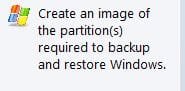
3) To backup/image your OS partition (plus the little system reserved partition if you have one) then you simply do this with Macrium:
Capture.JPG
You can make numerous images depending on the size of your OS partition. If your OS partition contains say 50GB then you can store 20+ system images and still have room left on a 1TB.
4) Don't store very large amounts of data on your OS partition.
5) Backup large data separately.
6) One backup drive is better than none but 2 is a good idea in case one fails.

To reformat your 1TB drive you can use the popular "Partition Wizard" (format as NTFS primary - NOT logical) or follow this Brink tutorial using Windows Disk Management.
Partition or Volume - Create New
There may be a better Brink tutorial but I couldn't find it - up to Brink.

Just make sure you are working on your 1TB external and not another important drive.
 

My Computer

Computer type
PC/Desktop
Computer Manufacturer/Model Number
Own build
OS
Windows 7x64 Home Premium SP1
CPU
Intel i7 2600k
Motherboard
ASUS P8Z68 Deluxe
Memory
G.Skill Ripjaws (DDR3-1600) 2x4GB
Graphics Card(s)
Nvidia GeForce GTS 450; Intel HD Graphics 3000(GT2+)
Monitor(s) Displays
Dell Ultrasharp IPS panel U2311H, Samsung SyncMaster P2350
Screen Resolution
1920x1080
Hard Drives
Samsung 850 Pro SSD 256GB, Samsung SSD 840 120GB, Seagates 1TB Barracuda ST31000528AS x2
PSU
Seasonic M12II 520W
Case
Lian Li Lancool PC-K60
Cooling
Case: 1x120mm, 3x140mm CPU: Hyper 212+
Keyboard
Logitech MK520 (wireless)
Mouse
Logitech MK520
Internet Speed
6-7 Mbps
Antivirus
Norton Security Premium, Malwarebytes on 2 (MSE on 3rd PC)
Browser
FireFox
Other Info
Audio: Logitech Z523 2.1
Thanks for the replies I'm understanding a bit more what's going on here now. Where you say to backup the OS partition, if I've checked that partition on the image file backup, will it be included? I want to be 100% sure I'm doing this correctly and that if anything fails I can go back to previous versions.
 

My Computer

Computer type
PC/Desktop
OS
Microsoft Windows 7 Ultimate 64-bit 7600 Multiprocessor Free
CPU
Intel i5 6600
Motherboard
B150M-A
Memory
8.00 GB
Graphics Card(s)
GTX 1060 6GB
If you perform a system image using the Macrium screenshot I posted (V5 but V6 is the same) then you can go back to previous versions. I have done this a large number of times and have many system images that go back 6 months.

I have never had a problem with a system image restore (to existing and new drives). I have said many times before no one will give you a 100% guarantee on a system image restore. If you can restore your image to a new low cost internal drive then that is as much comfort as you will get.
 

My Computer

Computer type
PC/Desktop
Computer Manufacturer/Model Number
Own build
OS
Windows 7x64 Home Premium SP1
CPU
Intel i7 2600k
Motherboard
ASUS P8Z68 Deluxe
Memory
G.Skill Ripjaws (DDR3-1600) 2x4GB
Graphics Card(s)
Nvidia GeForce GTS 450; Intel HD Graphics 3000(GT2+)
Monitor(s) Displays
Dell Ultrasharp IPS panel U2311H, Samsung SyncMaster P2350
Screen Resolution
1920x1080
Hard Drives
Samsung 850 Pro SSD 256GB, Samsung SSD 840 120GB, Seagates 1TB Barracuda ST31000528AS x2
PSU
Seasonic M12II 520W
Case
Lian Li Lancool PC-K60
Cooling
Case: 1x120mm, 3x140mm CPU: Hyper 212+
Keyboard
Logitech MK520 (wireless)
Mouse
Logitech MK520
Internet Speed
6-7 Mbps
Antivirus
Norton Security Premium, Malwarebytes on 2 (MSE on 3rd PC)
Browser
FireFox
Other Info
Audio: Logitech Z523 2.1
Ok, last question, I also have another internal HDD with files on it. If the system is infected and I restore the C drive image file, will the files from the internal HDD still work even if they have references on the C drive? (Ie I have some software installed to the internal drive but they have files on C drive that cannot be moved)
 

My Computer

Computer type
PC/Desktop
OS
Microsoft Windows 7 Ultimate 64-bit 7600 Multiprocessor Free
CPU
Intel i5 6600
Motherboard
B150M-A
Memory
8.00 GB
Graphics Card(s)
GTX 1060 6GB
Ok, last question, I also have another internal HDD with files on it. If the system is infected and I restore the C drive image file, will the files from the internal HDD still work even if they have references on the C drive? (Ie I have some software installed to the internal drive but they have files on C drive that cannot be moved)

They certainly should.

Restoration of an image of the OS partition effectively gives you a different C drive--but it's still a C.

Any reference to C on some other drive should still point to that new different C drive---and that new different C will be a mirror image of the previous C as of the date the image file was made.

You have full control over which partitions on any particular drive are included in your image file. If you make the choice shown by MJF in post 5 step 3, then Macrium will automatically select those partitions necessary to restore Windows---and only those partitions. Or you can choose those same partitions manually.

I don't use System Reserved, so I just manually choose C alone when I make a new image file--that's all I need to boot this PC. I make a new image file every month and keep the most recent 2. I periodically make a new "recovery media" and confirm it will boot the PC.

If possible, make an image and do an actual test restoration to some random spare drive to confirm you understand the menu choices and are familiar with the restoration procedure. Better to do that when the heat is off than to be faced with an unfamiliar procedure when you are in a bad situation and distressed.
 
Last edited:

My Computer

Computer type
PC/Desktop
Computer Manufacturer/Model Number
Ignatz Special; 4 speed manual gearbox; factory air conditioning; one of one
OS
Windows 7 Home Premium SP1, 64-bit
CPU
Intel Skylake i5-6600K, not overclocked
Motherboard
AsRock Z170M Extreme 4, micro ATX
Memory
8 GB HyperX DDR4-2666 (2 x 4 GB)
Graphics Card(s)
none; graphics are integrated on CPU
Sound Card
onboard: Realtek ALC1150; external: USB Behringer UF0-202
Monitor(s) Displays
Dell S2340M 23 inch IPS
Screen Resolution
1600 x 900
Hard Drives
System: Crucial MX100 series SSD, 128 GB;
Data: Samsung Spinpoint 103SJ, 1 TB;
Backup: WD Caviar Green WD30EZRX-00D8PB0, 3 TB
PSU
Rosewill SilentNight 500 watt fanless, semi-modular
Case
Antec Solo II
Cooling
Noctua NH-U12S; Noctua F12 intake, Noctua S12A exhaust
Keyboard
Microsoft 200 6JH-00001 USB
Mouse
Dell or Microsoft optical wired; USB
Antivirus
Microsoft Security Essentials and Malwarebytes Premium
Browser
Pale Moon
Other Info
All fans PWM; speeds at idle: CPU circa 500 rpm; intake circa 600 rpm; exhaust circa 600 rpm; CPU temps 27 idle and 47 C load in a warm room (27 C/81 F) when running Intel Extreme Tuning Utility stress test.
The last comments are correct. You can image whatever partitions you desire. You indicated in your initial post that you are working with an SSD. If you have a large SSD and have a non OS partition then you can select that partition and create a separate image for that or select all partitions and image the lot.
I still put my large data on lower cost spinners and reserve the OS SSD simply for that - a personal preference.
 

My Computer

Computer type
PC/Desktop
Computer Manufacturer/Model Number
Own build
OS
Windows 7x64 Home Premium SP1
CPU
Intel i7 2600k
Motherboard
ASUS P8Z68 Deluxe
Memory
G.Skill Ripjaws (DDR3-1600) 2x4GB
Graphics Card(s)
Nvidia GeForce GTS 450; Intel HD Graphics 3000(GT2+)
Monitor(s) Displays
Dell Ultrasharp IPS panel U2311H, Samsung SyncMaster P2350
Screen Resolution
1920x1080
Hard Drives
Samsung 850 Pro SSD 256GB, Samsung SSD 840 120GB, Seagates 1TB Barracuda ST31000528AS x2
PSU
Seasonic M12II 520W
Case
Lian Li Lancool PC-K60
Cooling
Case: 1x120mm, 3x140mm CPU: Hyper 212+
Keyboard
Logitech MK520 (wireless)
Mouse
Logitech MK520
Internet Speed
6-7 Mbps
Antivirus
Norton Security Premium, Malwarebytes on 2 (MSE on 3rd PC)
Browser
FireFox
Other Info
Audio: Logitech Z523 2.1
Back
Top