Windows 7 boots slowly with black screen after "Welcome"

My Computer My Computer

At a glance

Win-7-Pro64bit 7-H-Prem-64biti7-5930K 2nd i9-9940x both water blocked VRM'...Trident-z 3200C14 2nd Trident-z 3600C16EVGA 1080ti ftw3 2nd Titan Xp both water blocked
Computer type
PC/Desktop
Computer Manufacturer/Model Number
Custom assembled by me :}
OS
Win-7-Pro64bit 7-H-Prem-64bit
CPU
i7-5930K 2nd i9-9940x both water blocked VRM's too
Motherboard
ASUS SABERTOOTH X99 2nd ASUS x299 Apex
Memory
Trident-z 3200C14 2nd Trident-z 3600C16
Graphics Card(s)
EVGA 1080ti ftw3 2nd Titan Xp both water blocked
Sound Card
Built-in Realtek
Monitor(s) Displays
1-AOC G2460PG 24"G-Sync 144Hz/ 2nd 1-ASUS VG248QE 24" 144Hz
Screen Resolution
1920 x 1080 144Hz
Hard Drives
2-Samsung M.2 Evo & Evo Plus
2-Samsung 850 EVO 500GB SSD's/ 3-2.5 W.D. Black 1tb-&3-1tb/3-3.5 WD Black 1tb hdd's
PSU
EVGA SuperNOVA 1000-P2 2nd 1200-P2
Case
2-Corsair Obsidian Series 450D Black ATX Mid Tower
Cooling
Custom water loops
Keyboard
Logitech G710+/ 2nd Logitech G910
Mouse
2-RedDragon M901 Perdition 16400 dpi Gaming mouse = wired
Internet Speed
Comcast Ping 19ms 89.31mbps download speed 6.12mbps upload
Antivirus
Malwarebytes Pro/ Superantispyware Pro
Browser
FireFox & Pale moon
Other Info
2nd ASUS X299 Apex/Intel i9-9940x with Custom water loop/7H-Prem-x64/Corsair 450D case/Ram Trident-z 3600C16 4x8gb / Samsung970Evo plus 500gb SSD/Dual ssd EZ swap evo/PSU EVGA SuperNova 1200w-P2 80+Platinum/GPU Titan Xp /8-ML-140 on push-pull on 2-280GTX rads
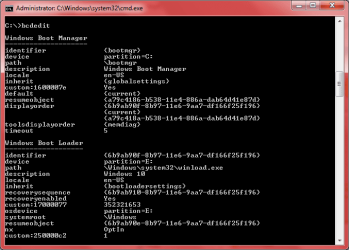
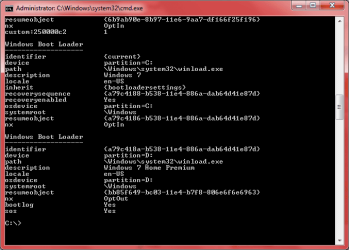
Totally I also feel crazy how I installed the first win 7 (for two years) without sysresv part or when I deleted this part. I just remember one time I use minitool partition to do something I cant remember, maybe this time I deleted this part. So that might be boot loader is on my C part? Buying some accessories is difficult for me in my country.
My installing OS procedure:
Install first Win 7
Install win 8
Install the second Win 7 (to test)
Reinstall the first Win 7
Install win 10 (format win 8)

I feel every booting seems normal, even on Win 10. Every OS works fine. Just only the first win 7 boot slowly with a black screen after welcome screen like the video, and this happened maybe after installing win 8.

Thinking about this problem makes me stressed. I can easily copy all my data to another drive and reinstall everything. But The first win 7 is 2 years and has many my own settings. Also it still do its job well, nothing worth an installing. So maybe i will accept the slow boot because it's not serious.
 

My Computer My Computer

At a glance

Windows 7 home premium 32 bit
Computer type
PC/Desktop
OS
Windows 7 home premium 32 bit
Hi,
Well in win-8 and now 10 it is highly recommended to disable hibernation along with fast start features
These features do no play well with other partitions/ drives...
In 10 you can use cmd and
powercfg -h off

Fast start is in power options that should be unchecked or completely disappear if cmd method is used :)
Fast Startup - Turn On or Off in Windows 10 - Windows 10 Forums
 

My Computer My Computer

At a glance

Win-7-Pro64bit 7-H-Prem-64biti7-5930K 2nd i9-9940x both water blocked VRM'...Trident-z 3200C14 2nd Trident-z 3600C16EVGA 1080ti ftw3 2nd Titan Xp both water blocked
Computer type
PC/Desktop
Computer Manufacturer/Model Number
Custom assembled by me :}
OS
Win-7-Pro64bit 7-H-Prem-64bit
CPU
i7-5930K 2nd i9-9940x both water blocked VRM's too
Motherboard
ASUS SABERTOOTH X99 2nd ASUS x299 Apex
Memory
Trident-z 3200C14 2nd Trident-z 3600C16
Graphics Card(s)
EVGA 1080ti ftw3 2nd Titan Xp both water blocked
Sound Card
Built-in Realtek
Monitor(s) Displays
1-AOC G2460PG 24"G-Sync 144Hz/ 2nd 1-ASUS VG248QE 24" 144Hz
Screen Resolution
1920 x 1080 144Hz
Hard Drives
2-Samsung M.2 Evo & Evo Plus
2-Samsung 850 EVO 500GB SSD's/ 3-2.5 W.D. Black 1tb-&3-1tb/3-3.5 WD Black 1tb hdd's
PSU
EVGA SuperNOVA 1000-P2 2nd 1200-P2
Case
2-Corsair Obsidian Series 450D Black ATX Mid Tower
Cooling
Custom water loops
Keyboard
Logitech G710+/ 2nd Logitech G910
Mouse
2-RedDragon M901 Perdition 16400 dpi Gaming mouse = wired
Internet Speed
Comcast Ping 19ms 89.31mbps download speed 6.12mbps upload
Antivirus
Malwarebytes Pro/ Superantispyware Pro
Browser
FireFox & Pale moon
Other Info
2nd ASUS X299 Apex/Intel i9-9940x with Custom water loop/7H-Prem-x64/Corsair 450D case/Ram Trident-z 3600C16 4x8gb / Samsung970Evo plus 500gb SSD/Dual ssd EZ swap evo/PSU EVGA SuperNova 1200w-P2 80+Platinum/GPU Titan Xp /8-ML-140 on push-pull on 2-280GTX rads
RE: Multi boot. Don't know much about that.

RE: Slow Boot:

Read this: Use Windows 7 Event Viewer to track down issues that cause slower boot times - TechRepublic

Since you suspect drivers - create the two custom views mentioned. Instructions for creating the second custom view are easy to miss. They are underneath "Figure C"

Once you have access to those log filters select Boot Degradation icustom view and check all Event ID 102 for driver issues.
 

My Computer My Computer

At a glance

Microsoft Windows 7 Home Premium 64-bit 7601 ...AMD C-60 APU with Radeon(tm) HD Graphics4.00 GBAMD Radeon HD 6290 Graphics
Computer type
Laptop
Computer Manufacturer/Model Number
ASUS
OS
Microsoft Windows 7 Home Premium 64-bit 7601 Multiprocessor Free Service Pack 1
CPU
AMD C-60 APU with Radeon(tm) HD Graphics
Motherboard
ASUSTeK COMPUTER INC. X501U
Memory
4.00 GB
Graphics Card(s)
AMD Radeon HD 6290 Graphics
Sound Card
(1) AMD High Definition Audio Device (2) Realtek High Defi
Screen Resolution
1366 x 768 x 32 bits (4294967296 colors) @ 60 Hz
Hard Drives
Hitachi HTS545050A7E380 SATA Disk Device
Antivirus
Comodo CIS & FW, SecureAplus App Whitelisting, Threatfire
Browser
Cyberfox 64bit, Opera 64bit, Airfox
Other Info
Spy-The-Spy, HitmanPro.Alert, Norton Connect Safe, MJRegWatcher, BitDefender TrafficLight, Voodoo Shield, Zemana AntiMalware
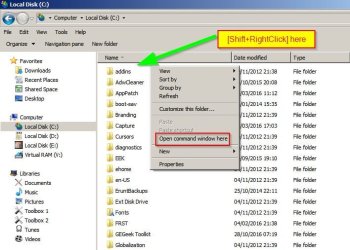
Also go to the drive where windows is installed and shift + right click a blank part of the window and open a command prompt.

Type bcdedit and press enter. Post a screenshot as someone else might spot if there are any issues to be found there.

Local Disk (C_).jpg
 

My Computer My Computer

At a glance

Microsoft Windows 7 Home Premium 64-bit 7601 ...AMD C-60 APU with Radeon(tm) HD Graphics4.00 GBAMD Radeon HD 6290 Graphics
Computer type
Laptop
Computer Manufacturer/Model Number
ASUS
OS
Microsoft Windows 7 Home Premium 64-bit 7601 Multiprocessor Free Service Pack 1
CPU
AMD C-60 APU with Radeon(tm) HD Graphics
Motherboard
ASUSTeK COMPUTER INC. X501U
Memory
4.00 GB
Graphics Card(s)
AMD Radeon HD 6290 Graphics
Sound Card
(1) AMD High Definition Audio Device (2) Realtek High Defi
Screen Resolution
1366 x 768 x 32 bits (4294967296 colors) @ 60 Hz
Hard Drives
Hitachi HTS545050A7E380 SATA Disk Device
Antivirus
Comodo CIS & FW, SecureAplus App Whitelisting, Threatfire
Browser
Cyberfox 64bit, Opera 64bit, Airfox
Other Info
Spy-The-Spy, HitmanPro.Alert, Norton Connect Safe, MJRegWatcher, BitDefender TrafficLight, Voodoo Shield, Zemana AntiMalware
RE: Multi boot. Don't know much about that.

RE: Slow Boot:

Read this: Use Windows 7 Event Viewer to track down issues that cause slower boot times - TechRepublic

Since you suspect drivers - create the two custom views mentioned. Instructions for creating the second custom view are easy to miss. They are underneath "Figure C"

Once you have access to those log filters select Boot Degradation icustom view and check all Event ID 102 for driver issues.
I have included the two custom views in the two attached txt file.
Removing some old drivers using pnputil command seems makes my OS boot faster and now the time can be acceptable, except some seconds of black screen. Maybe I should "live with it"
 

Attachments

  • bcd1.png
    bcd1.png
    15.7 KB · Views: 12
  • bcd2.png
    bcd2.png
    15.3 KB · Views: 12

My Computer My Computer

At a glance

Windows 7 home premium 32 bit
Computer type
PC/Desktop
OS
Windows 7 home premium 32 bit
I have included the two custom views in the two attached txt file.

I don't see them. Plus you'd need to check each Event ID 102 entry yourself and look for anything that takes an unusually long time to load.
 

My Computer My Computer

At a glance

Microsoft Windows 7 Home Premium 64-bit 7601 ...AMD C-60 APU with Radeon(tm) HD Graphics4.00 GBAMD Radeon HD 6290 Graphics
Computer type
Laptop
Computer Manufacturer/Model Number
ASUS
OS
Microsoft Windows 7 Home Premium 64-bit 7601 Multiprocessor Free Service Pack 1
CPU
AMD C-60 APU with Radeon(tm) HD Graphics
Motherboard
ASUSTeK COMPUTER INC. X501U
Memory
4.00 GB
Graphics Card(s)
AMD Radeon HD 6290 Graphics
Sound Card
(1) AMD High Definition Audio Device (2) Realtek High Defi
Screen Resolution
1366 x 768 x 32 bits (4294967296 colors) @ 60 Hz
Hard Drives
Hitachi HTS545050A7E380 SATA Disk Device
Antivirus
Comodo CIS & FW, SecureAplus App Whitelisting, Threatfire
Browser
Cyberfox 64bit, Opera 64bit, Airfox
Other Info
Spy-The-Spy, HitmanPro.Alert, Norton Connect Safe, MJRegWatcher, BitDefender TrafficLight, Voodoo Shield, Zemana AntiMalware
I have included the two custom views in the two attached txt file.

I don't see them. Plus you'd need to check each Event ID 102 entry yourself and look for anything that takes an unusually long time to load.

Custom view bootime is the file event1.txt, custom view boot degradation is the file event degra.txt. they are in the last post on page 1.
My Recent boot didn't have id 102, just 101. The last 102 is
Code:
- System 

  - Provider 

   [ Name]  Microsoft-Windows-Diagnostics-Performance 
   [ Guid]  {CFC18EC0-96B1-4EBA-961B-622CAEE05B0A} 
 
   EventID 102 
 
   Version 1 
 
   Level 2 
 
   Task 4002 
 
   Opcode 33 
 
   Keywords 0x8000000000010000 
 
  - TimeCreated 

   [ SystemTime]  2016-11-09T15:56:13.920729300Z 
 
   EventRecordID 3831 
 
  - Correlation 

   [ ActivityID]  {042B3C40-F800-0000-C5F8-B75CA13AD201} 
 
  - Execution 

   [ ProcessID]  1700 
   [ ThreadID]  1732 
 
   Channel Microsoft-Windows-Diagnostics-Performance/Operational 
 
   Computer My-PC 
 
  - Security 

   [ UserID]  S-1-5-19 
 

- EventData 

  StartTime 2016-11-09T15:53:06.687200400Z 
  NameLength 6 
  Name cdrom 
  FriendlyNameLength 19 
  FriendlyName SCSI CD-ROM Driver 
  VersionLength 38 
  Version 6.1.7600.16385 (win7_rtm.090713-1255) 
  TotalTime 46901 
  DegradationTime 45401 
  PathLength 38 
  Path C:\Windows\system32\DRIVERS\cdrom.sys 
  ProductNameLength 37 
  ProductName Microsoft® Windows® Operating System 
  CompanyNameLength 22 
  CompanyName Microsoft Corporation
 

My Computer My Computer

At a glance

Windows 7 home premium 32 bit
Computer type
PC/Desktop
OS
Windows 7 home premium 32 bit
Okay then you'd need to look at the rest of the ID's. Maybe check 101 and 103 and look for anything where the time in milliseconds is unusually long.
 

My Computer My Computer

At a glance

Microsoft Windows 7 Home Premium 64-bit 7601 ...AMD C-60 APU with Radeon(tm) HD Graphics4.00 GBAMD Radeon HD 6290 Graphics
Computer type
Laptop
Computer Manufacturer/Model Number
ASUS
OS
Microsoft Windows 7 Home Premium 64-bit 7601 Multiprocessor Free Service Pack 1
CPU
AMD C-60 APU with Radeon(tm) HD Graphics
Motherboard
ASUSTeK COMPUTER INC. X501U
Memory
4.00 GB
Graphics Card(s)
AMD Radeon HD 6290 Graphics
Sound Card
(1) AMD High Definition Audio Device (2) Realtek High Defi
Screen Resolution
1366 x 768 x 32 bits (4294967296 colors) @ 60 Hz
Hard Drives
Hitachi HTS545050A7E380 SATA Disk Device
Antivirus
Comodo CIS & FW, SecureAplus App Whitelisting, Threatfire
Browser
Cyberfox 64bit, Opera 64bit, Airfox
Other Info
Spy-The-Spy, HitmanPro.Alert, Norton Connect Safe, MJRegWatcher, BitDefender TrafficLight, Voodoo Shield, Zemana AntiMalware
Also let's check here:

Run msconfig and look at the boot tab. Experiment with "No GUI Boot" and a low numberr of timeout seconds. Mine is set to 4 seconds.
 

My Computer My Computer

At a glance

Microsoft Windows 7 Home Premium 64-bit 7601 ...AMD C-60 APU with Radeon(tm) HD Graphics4.00 GBAMD Radeon HD 6290 Graphics
Computer type
Laptop
Computer Manufacturer/Model Number
ASUS
OS
Microsoft Windows 7 Home Premium 64-bit 7601 Multiprocessor Free Service Pack 1
CPU
AMD C-60 APU with Radeon(tm) HD Graphics
Motherboard
ASUSTeK COMPUTER INC. X501U
Memory
4.00 GB
Graphics Card(s)
AMD Radeon HD 6290 Graphics
Sound Card
(1) AMD High Definition Audio Device (2) Realtek High Defi
Screen Resolution
1366 x 768 x 32 bits (4294967296 colors) @ 60 Hz
Hard Drives
Hitachi HTS545050A7E380 SATA Disk Device
Antivirus
Comodo CIS & FW, SecureAplus App Whitelisting, Threatfire
Browser
Cyberfox 64bit, Opera 64bit, Airfox
Other Info
Spy-The-Spy, HitmanPro.Alert, Norton Connect Safe, MJRegWatcher, BitDefender TrafficLight, Voodoo Shield, Zemana AntiMalware
Are both Win 7 64 bits?
How much memory?
How is the virtual memory set?

If you suspect that is a driver, you can update and then make it look at the Windows folder of the fast booting.
 

My Computers My Computers

  • At a glance

    Windows 7 HP 64i5 6600K - 800MHz to 4200MHz4+4G GSkill DDR4 3000IG - Intel 530
    Computer type
    PC/Desktop
    Computer Manufacturer/Model Number
    custom build
    OS
    Windows 7 HP 64
    CPU
    i5 6600K - 800MHz to 4200MHz
    Motherboard
    GA-Z170-HD3P
    Memory
    4+4G GSkill DDR4 3000
    Graphics Card(s)
    IG - Intel 530
    Monitor(s) Displays
    Samsung 226BW
    Screen Resolution
    1680x1050
    Hard Drives
    (1) -1 SM951 – 128GB M.2 AHCI PCIe SSD drive for Windows 7 and Lubuntu
    (2) -1 WD SATA 3 - 1T for Data
    (3) -1 WD SATA 3 - 1T for backup
    PSU
    Thermaltake 450W TR2 gold
    Keyboard
    Old and good Chicony mechanical keyboard
    Mouse
    Logitech mX performance - 9 buttons (had to disable some)
    Internet Speed
    500Mb/s
    Browser
    Firefox 64
    Other Info
    TinyWall firewall
  • At a glance

    Windows 7 Proi7-4500U 800MHz to 3.0GHz(4+4)G DDR3 1600IG intel 4400 + NVIDIA GeForce GT 745M
    Computer type
    Laptop
    System Manufacturer/Model Number
    Asus Q550LF
    OS
    Windows 7 Pro
    CPU
    i7-4500U 800MHz to 3.0GHz
    Motherboard
    Asus Q550LF
    Memory
    (4+4)G DDR3 1600
    Graphics Card(s)
    IG intel 4400 + NVIDIA GeForce GT 745M
    Sound Card
    Realtek
    Monitor(s) Displays
    LG Display LP156WF4-SPH1
    Screen Resolution
    1920 x 1080
    Hard Drives
    BX500 120G SSD for Windows and programs +
    1T HDD for data
    Internet Speed
    500 Mb/s
    Browser
    Firefox
    Other Info
    TinyWall firewall
Are both Win 7 64 bits?
How much memory?
How is the virtual memory set?


If you suspect that is a driver, you can update and then make it look at the Windows folder of the fast booting.
Hello
I have 4 Gb RAM, all OSs are 64bit
I use default setting for using virtual RAM, maybe I haven't used virtual RAM
I have thought it was drivers but now after re-installing and updating, drivers seems okay now. Boot log file doesn't have tons of lines "Did not load driver....".

Also let's check here:

Run msconfig and look at the boot tab. Experiment with "No GUI Boot" and a low numberr of timeout seconds. Mine is set to 4 seconds.
Hi, I have tested with no GUI boot with clean boot but it seems nothing different.
Code:
Windows has started up: 
     Boot Duration		:	85469ms
     IsDegradation		:	false
     Incident Time (UTC)	:	‎2016‎-‎11‎-‎14T15:13:42.702800400Z
+ System 

  - Provider 

   [ Name]  Microsoft-Windows-Diagnostics-Performance 
   [ Guid]  {CFC18EC0-96B1-4EBA-961B-622CAEE05B0A} 
 
   EventID 100 
 
   Version 2 
 
   Level 2 
 
   Task 4002 
 
   Opcode 34 
 
   Keywords 0x8000000000010000 
 
  - TimeCreated 

   [ SystemTime]  2016-11-14T15:15:45.161449900Z 
 
   EventRecordID 4031 
 
  - Correlation 

   [ ActivityID]  {03307C58-F800-0003-2554-BDAF893ED201} 
 
  - Execution 

   [ ProcessID]  1696 
   [ ThreadID]  2332 
 
   Channel Microsoft-Windows-Diagnostics-Performance/Operational 
 
   Computer My-PC 
 
  - Security 

   [ UserID]  S-1-5-19 
 

- EventData 

  BootTsVersion 2 
  BootStartTime 2016-11-14T15:13:42.702800400Z 
  BootEndTime 2016-11-14T15:15:43.024745800Z 
  SystemBootInstance 58 
  UserBootInstance 56 
  BootTime 85469 
  MainPathBootTime 40969 
  BootKernelInitTime 38 
  BootDriverInitTime 860 
  BootDevicesInitTime 1023 
  BootPrefetchInitTime 42179 
  BootPrefetchBytes 489218048 
  BootAutoChkTime 0 
  BootSmssInitTime 5336 
  BootCriticalServicesInitTime 507 
  BootUserProfileProcessingTime 1497 
  BootMachineProfileProcessingTime 327 
  BootExplorerInitTime 26498 
  BootNumStartupApps 1 
  BootPostBootTime 44500 
  BootIsRebootAfterInstall false 
  BootRootCauseStepImprovementBits 0 
  BootRootCauseGradualImprovementBits 0 
  BootRootCauseStepDegradationBits 0 
  BootRootCauseGradualDegradationBits 0 
  BootIsDegradation false 
  BootIsStepDegradation false 
  BootIsGradualDegradation false 
  BootImprovementDelta 0 
  BootDegradationDelta 0 
  BootIsRootCauseIdentified false 
  OSLoaderDuration 2223 
  BootPNPInitStartTimeMS 38 
  BootPNPInitDuration 1041 
  OtherKernelInitDuration 1518 
  SystemPNPInitStartTimeMS 2428 
  SystemPNPInitDuration 842 
  SessionInitStartTimeMS 3402 
  Session0InitDuration 1239 
  Session1InitDuration 151 
  SessionInitOtherDuration 3945 
  WinLogonStartTimeMS 8738 
  OtherLogonInitActivityDuration 3907 
  UserLogonWaitDuration 664
The time from booting logo to Welcome screen is very short, but the time from the welcome screen to desktop screen is long and not smooth
I have also run sfc.exe. It says Windows did not find any integrity violations
Then I use DriverView DriverView: Loaded Windows Drivers List to see drivers list on my slow booting OS. I see 3 drivers "dump_diskdump.sys, dump_dumpfve.sys, dump_iaStorA.sys", they have file type "unknown" and no information about them. But they might not cause problem.
Looking at Event Viewer I dont know why all boot times are level "Error" or at least "warning"?
 

Attachments

  • ntbtlog.txt
    ntbtlog.txt
    18.8 KB · Views: 2
  • unknown.PNG
    unknown.PNG
    6.3 KB · Views: 0
  • booting.PNG
    booting.PNG
    11.4 KB · Views: 0
Last edited:

My Computer My Computer

At a glance

Windows 7 home premium 32 bit
Computer type
PC/Desktop
OS
Windows 7 home premium 32 bit
Hi,
Do you load graphic's drivers from microsoft updates ?
 

My Computer My Computer

At a glance

Win-7-Pro64bit 7-H-Prem-64biti7-5930K 2nd i9-9940x both water blocked VRM'...Trident-z 3200C14 2nd Trident-z 3600C16EVGA 1080ti ftw3 2nd Titan Xp both water blocked
Computer type
PC/Desktop
Computer Manufacturer/Model Number
Custom assembled by me :}
OS
Win-7-Pro64bit 7-H-Prem-64bit
CPU
i7-5930K 2nd i9-9940x both water blocked VRM's too
Motherboard
ASUS SABERTOOTH X99 2nd ASUS x299 Apex
Memory
Trident-z 3200C14 2nd Trident-z 3600C16
Graphics Card(s)
EVGA 1080ti ftw3 2nd Titan Xp both water blocked
Sound Card
Built-in Realtek
Monitor(s) Displays
1-AOC G2460PG 24"G-Sync 144Hz/ 2nd 1-ASUS VG248QE 24" 144Hz
Screen Resolution
1920 x 1080 144Hz
Hard Drives
2-Samsung M.2 Evo & Evo Plus
2-Samsung 850 EVO 500GB SSD's/ 3-2.5 W.D. Black 1tb-&3-1tb/3-3.5 WD Black 1tb hdd's
PSU
EVGA SuperNOVA 1000-P2 2nd 1200-P2
Case
2-Corsair Obsidian Series 450D Black ATX Mid Tower
Cooling
Custom water loops
Keyboard
Logitech G710+/ 2nd Logitech G910
Mouse
2-RedDragon M901 Perdition 16400 dpi Gaming mouse = wired
Internet Speed
Comcast Ping 19ms 89.31mbps download speed 6.12mbps upload
Antivirus
Malwarebytes Pro/ Superantispyware Pro
Browser
FireFox & Pale moon
Other Info
2nd ASUS X299 Apex/Intel i9-9940x with Custom water loop/7H-Prem-x64/Corsair 450D case/Ram Trident-z 3600C16 4x8gb / Samsung970Evo plus 500gb SSD/Dual ssd EZ swap evo/PSU EVGA SuperNova 1200w-P2 80+Platinum/GPU Titan Xp /8-ML-140 on push-pull on 2-280GTX rads
Okay well boot time actually now looks okay to me. It's way faster than mine. However since I use a RAMdisk and the contents are loaded on boot my machine will take a few minutes to fully load everything.
Your boot: 85469ms
My Boot: 252712ms

The time from booting logo to Welcome screen is very short, but the time from the welcome screen to desktop screen is long and not smooth

Do you have a solid color desktop background or do you use an image?

See the thread here:

Slow login

There are a few tips but other than changing desktop background also try this one:

DelayedDesktopSwitchTimeout - slow login
 

My Computer My Computer

At a glance

Microsoft Windows 7 Home Premium 64-bit 7601 ...AMD C-60 APU with Radeon(tm) HD Graphics4.00 GBAMD Radeon HD 6290 Graphics
Computer type
Laptop
Computer Manufacturer/Model Number
ASUS
OS
Microsoft Windows 7 Home Premium 64-bit 7601 Multiprocessor Free Service Pack 1
CPU
AMD C-60 APU with Radeon(tm) HD Graphics
Motherboard
ASUSTeK COMPUTER INC. X501U
Memory
4.00 GB
Graphics Card(s)
AMD Radeon HD 6290 Graphics
Sound Card
(1) AMD High Definition Audio Device (2) Realtek High Defi
Screen Resolution
1366 x 768 x 32 bits (4294967296 colors) @ 60 Hz
Hard Drives
Hitachi HTS545050A7E380 SATA Disk Device
Antivirus
Comodo CIS & FW, SecureAplus App Whitelisting, Threatfire
Browser
Cyberfox 64bit, Opera 64bit, Airfox
Other Info
Spy-The-Spy, HitmanPro.Alert, Norton Connect Safe, MJRegWatcher, BitDefender TrafficLight, Voodoo Shield, Zemana AntiMalware
I just remembered this registry tweak:

Code:
Windows Registry Editor Version 5.00

# Windows will tell you exactly what it is doing when it is shutting down or is booting

[HKEY_LOCAL_MACHINE\SOFTWARE\Microsoft\Windows\CurrentVersion\policies\system]
"verbosestatus"=dword:00000001

It won't display specific details but will tell you "Preparing Desktop" and maybe a few other messages after you see the welcome screen. Let us know which message displays for the longest time.
 

My Computer My Computer

At a glance

Microsoft Windows 7 Home Premium 64-bit 7601 ...AMD C-60 APU with Radeon(tm) HD Graphics4.00 GBAMD Radeon HD 6290 Graphics
Computer type
Laptop
Computer Manufacturer/Model Number
ASUS
OS
Microsoft Windows 7 Home Premium 64-bit 7601 Multiprocessor Free Service Pack 1
CPU
AMD C-60 APU with Radeon(tm) HD Graphics
Motherboard
ASUSTeK COMPUTER INC. X501U
Memory
4.00 GB
Graphics Card(s)
AMD Radeon HD 6290 Graphics
Sound Card
(1) AMD High Definition Audio Device (2) Realtek High Defi
Screen Resolution
1366 x 768 x 32 bits (4294967296 colors) @ 60 Hz
Hard Drives
Hitachi HTS545050A7E380 SATA Disk Device
Antivirus
Comodo CIS & FW, SecureAplus App Whitelisting, Threatfire
Browser
Cyberfox 64bit, Opera 64bit, Airfox
Other Info
Spy-The-Spy, HitmanPro.Alert, Norton Connect Safe, MJRegWatcher, BitDefender TrafficLight, Voodoo Shield, Zemana AntiMalware
Hi,
Do you load graphic's drivers from microsoft updates ?
I use driver from Intel site. My GPU is intel HD 4000 with the lastest version
But I have uninstalled it to analyze booting.
I just remembered this registry tweak:

Code:
Windows Registry Editor Version 5.00

# Windows will tell you exactly what it is doing when it is shutting down or is booting

[HKEY_LOCAL_MACHINE\SOFTWARE\Microsoft\Windows\CurrentVersion\policies\system]
"verbosestatus"=dword:00000001

It won't display specific details but will tell you "Preparing Desktop" and maybe a few other messages after you see the welcome screen. Let us know which message displays for the longest time.
http://www.sevenforums.com/images/smilies/sad.gif
The longest is "preparing your desktop".
I use default themes in Windows. sometimes nature, sometimes architecture
I have read a post on microsoft community with one post says that using registry cleaning may cause serious problem that can only be fixed by re-installing OS. Some months ago I had tried to use Glary Ultilities and Ccleaner to clean registry. So can it cause that? :(
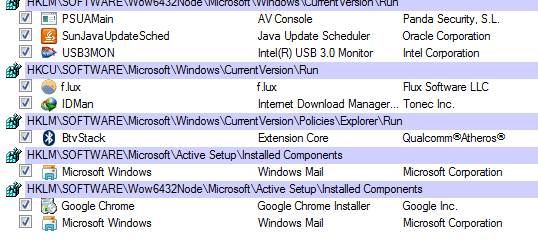
I also include process on login (using Autorun)
 

Attachments

  • logon.PNG
    logon.PNG
    9.9 KB · Views: 11
Last edited:

My Computer My Computer

At a glance

Windows 7 home premium 32 bit
Computer type
PC/Desktop
OS
Windows 7 home premium 32 bit
Try this:
- Boot on safe mode and see if it is fast.
- Run msconfig and disable all sevices but MS. Disable all Start up programs.
- If you get a fast boot, you will know that is some service or start up program.
- Enable 50%. If you get a fast boot, you will know that is some service or start up program on the other 50%.
- Enable 50% of the other 50%. Keep doing till you find the service or Start up program that is problematic.

Another reason my be a double safety: Dual firewall or dual antivirus program.
 

My Computers My Computers

  • At a glance

    Windows 7 HP 64i5 6600K - 800MHz to 4200MHz4+4G GSkill DDR4 3000IG - Intel 530
    Computer type
    PC/Desktop
    Computer Manufacturer/Model Number
    custom build
    OS
    Windows 7 HP 64
    CPU
    i5 6600K - 800MHz to 4200MHz
    Motherboard
    GA-Z170-HD3P
    Memory
    4+4G GSkill DDR4 3000
    Graphics Card(s)
    IG - Intel 530
    Monitor(s) Displays
    Samsung 226BW
    Screen Resolution
    1680x1050
    Hard Drives
    (1) -1 SM951 – 128GB M.2 AHCI PCIe SSD drive for Windows 7 and Lubuntu
    (2) -1 WD SATA 3 - 1T for Data
    (3) -1 WD SATA 3 - 1T for backup
    PSU
    Thermaltake 450W TR2 gold
    Keyboard
    Old and good Chicony mechanical keyboard
    Mouse
    Logitech mX performance - 9 buttons (had to disable some)
    Internet Speed
    500Mb/s
    Browser
    Firefox 64
    Other Info
    TinyWall firewall
  • At a glance

    Windows 7 Proi7-4500U 800MHz to 3.0GHz(4+4)G DDR3 1600IG intel 4400 + NVIDIA GeForce GT 745M
    Computer type
    Laptop
    System Manufacturer/Model Number
    Asus Q550LF
    OS
    Windows 7 Pro
    CPU
    i7-4500U 800MHz to 3.0GHz
    Motherboard
    Asus Q550LF
    Memory
    (4+4)G DDR3 1600
    Graphics Card(s)
    IG intel 4400 + NVIDIA GeForce GT 745M
    Sound Card
    Realtek
    Monitor(s) Displays
    LG Display LP156WF4-SPH1
    Screen Resolution
    1920 x 1080
    Hard Drives
    BX500 120G SSD for Windows and programs +
    1T HDD for data
    Internet Speed
    500 Mb/s
    Browser
    Firefox
    Other Info
    TinyWall firewall
Try this:
- Boot on safe mode and see if it is fast.
- Run msconfig and disable all sevices but MS. Disable all Start up programs.
- If you get a fast boot, you will know that is some service or start up program.
- Enable 50%. If you get a fast boot, you will know that is some service or start up program on the other 50%.
- Enable 50% of the other 50%. Keep doing till you find the service or Start up program that is problematic.

Another reason my be a double safety: Dual firewall or dual antivirus program.

Hello,
I have run clean boot but it happened even on clean boot. That means something wrong in my system. As I say the booting isn't too long, just longer than the normal time that is acceptable. I can choose to "live with slow" but the black screen after welcome screen is so annoying :confused:
So maybe I should stop trying now If it's true that registry cleanner causes that. Nothing more to do.
I also check that Windows defender and default firewall are turned off.
 

My Computer My Computer

At a glance

Windows 7 home premium 32 bit
Computer type
PC/Desktop
OS
Windows 7 home premium 32 bit
RE: Registry Cleaners. I stopped using them (even Ccleaner's reg cleanup) and my system works better with less problems. Having said that I do use a reg scanner where I can set keys to ignore from the scan results and manually select anything that actually needs to be deleted.

After uninstalling software I do a manual registry search and cleanup.

I reckon drivers and startup items are fine on your machine. I'm wondering how many folders and shortcuts are located in your desktop?

Possibly if you've got folders that contain video or image files try moving them onto an external drive and disconnect the drive before rebooting to see if there is any improvement. Also for shortcuts you can do the same. If there happens to be an improvement copy everything back in small batches until the problem re-appears.

Also when you finish using your machine for the day run this command then reboot:

chkdsk /r /f

It will run a full disk check and could take some time.

Then for good measure rebuild icon cache and reset notification area icons:


Don't close the window until you are asked if you want to reboot.
 

My Computer My Computer

At a glance

Microsoft Windows 7 Home Premium 64-bit 7601 ...AMD C-60 APU with Radeon(tm) HD Graphics4.00 GBAMD Radeon HD 6290 Graphics
Computer type
Laptop
Computer Manufacturer/Model Number
ASUS
OS
Microsoft Windows 7 Home Premium 64-bit 7601 Multiprocessor Free Service Pack 1
CPU
AMD C-60 APU with Radeon(tm) HD Graphics
Motherboard
ASUSTeK COMPUTER INC. X501U
Memory
4.00 GB
Graphics Card(s)
AMD Radeon HD 6290 Graphics
Sound Card
(1) AMD High Definition Audio Device (2) Realtek High Defi
Screen Resolution
1366 x 768 x 32 bits (4294967296 colors) @ 60 Hz
Hard Drives
Hitachi HTS545050A7E380 SATA Disk Device
Antivirus
Comodo CIS & FW, SecureAplus App Whitelisting, Threatfire
Browser
Cyberfox 64bit, Opera 64bit, Airfox
Other Info
Spy-The-Spy, HitmanPro.Alert, Norton Connect Safe, MJRegWatcher, BitDefender TrafficLight, Voodoo Shield, Zemana AntiMalware
Related thread here with some ideas in Post #11

Long delay after windows start screen

EDIT: Re the above idea in that thread:

Check this thread:

Driver cleanup

Forget the other tools mentioned but use GhostBuster to look for ghosted (non present) devices and cleanup.

It's not straightforward but you should be able to get an idea of how to use it from the screenshots.
 
Last edited:

My Computer My Computer

At a glance

Microsoft Windows 7 Home Premium 64-bit 7601 ...AMD C-60 APU with Radeon(tm) HD Graphics4.00 GBAMD Radeon HD 6290 Graphics
Computer type
Laptop
Computer Manufacturer/Model Number
ASUS
OS
Microsoft Windows 7 Home Premium 64-bit 7601 Multiprocessor Free Service Pack 1
CPU
AMD C-60 APU with Radeon(tm) HD Graphics
Motherboard
ASUSTeK COMPUTER INC. X501U
Memory
4.00 GB
Graphics Card(s)
AMD Radeon HD 6290 Graphics
Sound Card
(1) AMD High Definition Audio Device (2) Realtek High Defi
Screen Resolution
1366 x 768 x 32 bits (4294967296 colors) @ 60 Hz
Hard Drives
Hitachi HTS545050A7E380 SATA Disk Device
Antivirus
Comodo CIS & FW, SecureAplus App Whitelisting, Threatfire
Browser
Cyberfox 64bit, Opera 64bit, Airfox
Other Info
Spy-The-Spy, HitmanPro.Alert, Norton Connect Safe, MJRegWatcher, BitDefender TrafficLight, Voodoo Shield, Zemana AntiMalware
Back
Top