Built-in Administrator Account-enable elevated privileges

antioch

New member
Local time
8:55 AM
Messages
31
Hi to all
I have recently taken delivery of a new computer which has WIN7 Pro SP1 as the OS, and after downloading all critical/important security updates I tried to run a few commands only to discover I did not have full administrator rights/privileges.
After being somewhat led down the garden path elsewhere, I was directed to this forum. I have looked through the 'tutorials' and have found my solution. I would prefer to have the elevated rights to my computer rather than have to ask every time I want to do something or access certain files. I do not download or install rubbish. I have as yet not set a password - will add later - but I have removed the default nag UAC.
I have read through the tutorials and for my computer usage it looks like the below is what I need to follow - possibly all options - could this be confirmed?
http://www.sevenforums.com/tutorials/507-built-administrator-account-enable-disable.html?filter[2]=User%20Accounts
I am the sole user of this computer, now and in the future. I am not on any 'home group' nor likely to be. It was brought to my attention that after a reboot my desktop and display settings may be altered. I will be setting a manual checkpoint in system restore in case I do something wrong following the tutorial.
Rgds
Antioch
 

My Computer My Computer

Computer type
PC/Desktop
Computer Manufacturer/Model Number
Custom Built
OS
Windows 7 Professional SPI 64bit
CPU
Intel Core i5 Quad i5-6600 3.3Ghz
Motherboard
ASUS H110M-R
Memory
16GB Hyper X Fury
Graphics Card(s)
3GB Geforce GTX1060
Hard Drives
1TB SATA-III
1TB WD MyPassport Ultra
PSU
Corsair 550 VS Series
Case
Corsair 100R
Cooling
Noctua NH-U14S
Mouse
Microsoft wireless - plus cheap wired mouse for ext HD
Internet Speed
150MB
Antivirus
Avast Free
Browser
Firefox
I think you want to achieve something that isn't clear to me.
As you're the only user, your account is already with administrator privileges.
"I have removed the default nag UAC". Did you removed or disable it?
To get rid of the "are you really, really sure you want to delete ..." and have the elevated rights to your computer, just open Control Panel\All Control Panel Items\Action Center and change the User Account Control settings to Never Notify.
 

My Computers My Computers

System One System Two

  • Computer type
    PC/Desktop
    Computer Manufacturer/Model Number
    custom build
    OS
    Windows 7 HP 64
    CPU
    i5 6600K - 800MHz to 4200MHz
    Motherboard
    GA-Z170-HD3P
    Memory
    4+4G GSkill DDR4 3000
    Graphics Card(s)
    IG - Intel 530
    Monitor(s) Displays
    Samsung 226BW
    Screen Resolution
    1680x1050
    Hard Drives
    (1) -1 SM951 – 128GB M.2 AHCI PCIe SSD drive for Windows 7 and Lubuntu
    (2) -1 WD SATA 3 - 1T for Data
    (3) -1 WD SATA 3 - 1T for backup
    PSU
    Thermaltake 450W TR2 gold
    Keyboard
    Old and good Chicony mechanical keyboard
    Mouse
    Logitech mX performance - 9 buttons (had to disable some)
    Internet Speed
    500Mb/s
    Browser
    Firefox 64
    Other Info
    TinyWall firewall
  • Computer type
    Laptop
    System Manufacturer/Model Number
    Asus Q550LF
    OS
    Windows 7 Pro
    CPU
    i7-4500U 800MHz to 3.0GHz
    Motherboard
    Asus Q550LF
    Memory
    (4+4)G DDR3 1600
    Graphics Card(s)
    IG intel 4400 + NVIDIA GeForce GT 745M
    Sound Card
    Realtek
    Monitor(s) Displays
    LG Display LP156WF4-SPH1
    Screen Resolution
    1920 x 1080
    Hard Drives
    BX500 120G SSD for Windows and programs +
    1T HDD for data
    Internet Speed
    500 Mb/s
    Browser
    Firefox
    Other Info
    TinyWall firewall
Welcome to the forum.

Using the built in administrator account or any other with full time admin rights is not recommended for general use. It never has been. There was a time when this was justified but those times are past.

And even the built in Administrator account will not by default grant you access to everything. Doing that requires some very advanced methods and takes your computer back to the 20th century in terms of security.

Malicious software in all it's forms has become very sophisticated in recent years. Even some of the most trusted sites have been infected with malware, and you don't have to download anything to get infected. You can't trust anti-malware software to keep you safe. The authors of malware are experts in evading all forms of protection.

By default software runs with the rights of the account under which it runs. This is convenient. But it isn't very secure. If you accidentally run malicious software, and as mentioned this is very hard to avoid, it too will have full rights over your computer, no questions asked. That is bad.

With UAC enabled even a normal admin account runs with only the rights of a standard account. With limited rights malware will be severely handicapped and is often prevented from doing it's work. There are no guarantees but it helps.

There was a time when i believed as you did and routinely had UAC off. But no more. In 2016 the risks are too great.
 

My Computer My Computer

Computer type
PC/Desktop
Computer Manufacturer/Model Number
HP
OS
Windows 7 Pro 64 bit
CPU
Xeon W3520
Memory
8 GB
Graphics Card(s)
Nvidia Geforce 210
Hello Megahertz
Thank you for your reply - sorry if I have confused you.
Yes, I did disable - not removed it as far as the UAC.
I know I have admin privileges but not 'elevated' which allows the administrator to run all 'cmd' prompts.
I realise that there is a long way round to do this every time - Start - search box type cmd - in dropdown right click 'cmd' - select 'run as administrator' - type prompt.
As a sole user it would be far more convenient to just use the run box - type cmd and be able to immediately type in the appropriate prompt.
 

My Computer My Computer

Computer type
PC/Desktop
Computer Manufacturer/Model Number
Custom Built
OS
Windows 7 Professional SPI 64bit
CPU
Intel Core i5 Quad i5-6600 3.3Ghz
Motherboard
ASUS H110M-R
Memory
16GB Hyper X Fury
Graphics Card(s)
3GB Geforce GTX1060
Hard Drives
1TB SATA-III
1TB WD MyPassport Ultra
PSU
Corsair 550 VS Series
Case
Corsair 100R
Cooling
Noctua NH-U14S
Mouse
Microsoft wireless - plus cheap wired mouse for ext HD
Internet Speed
150MB
Antivirus
Avast Free
Browser
Firefox
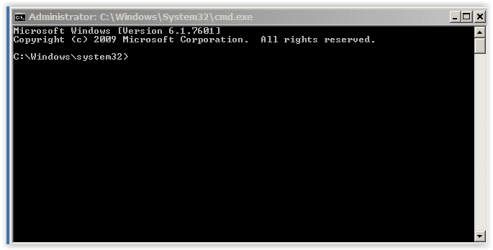
When I open CMD on the title it says Administrator: Command Prompt
 

Attachments

  • CMD.JPG
    CMD.JPG
    25.6 KB · Views: 5

My Computers My Computers

System One System Two

  • Computer type
    PC/Desktop
    Computer Manufacturer/Model Number
    custom build
    OS
    Windows 7 HP 64
    CPU
    i5 6600K - 800MHz to 4200MHz
    Motherboard
    GA-Z170-HD3P
    Memory
    4+4G GSkill DDR4 3000
    Graphics Card(s)
    IG - Intel 530
    Monitor(s) Displays
    Samsung 226BW
    Screen Resolution
    1680x1050
    Hard Drives
    (1) -1 SM951 – 128GB M.2 AHCI PCIe SSD drive for Windows 7 and Lubuntu
    (2) -1 WD SATA 3 - 1T for Data
    (3) -1 WD SATA 3 - 1T for backup
    PSU
    Thermaltake 450W TR2 gold
    Keyboard
    Old and good Chicony mechanical keyboard
    Mouse
    Logitech mX performance - 9 buttons (had to disable some)
    Internet Speed
    500Mb/s
    Browser
    Firefox 64
    Other Info
    TinyWall firewall
  • Computer type
    Laptop
    System Manufacturer/Model Number
    Asus Q550LF
    OS
    Windows 7 Pro
    CPU
    i7-4500U 800MHz to 3.0GHz
    Motherboard
    Asus Q550LF
    Memory
    (4+4)G DDR3 1600
    Graphics Card(s)
    IG intel 4400 + NVIDIA GeForce GT 745M
    Sound Card
    Realtek
    Monitor(s) Displays
    LG Display LP156WF4-SPH1
    Screen Resolution
    1920 x 1080
    Hard Drives
    BX500 120G SSD for Windows and programs +
    1T HDD for data
    Internet Speed
    500 Mb/s
    Browser
    Firefox
    Other Info
    TinyWall firewall
Hello LMiller7
Thank you for the welcome and your input is most welcome to my thread.
I appreciate your comments and have read similar in other forums.
My new computer was rather forced on me as I play flight sims - in particular MS sims - I would have upgraded my old computer running XP, but MS here in the UK would not give me an activation with a new MB and GPU. If a free OS had run flight sims I would have gone down that path, as my views and opinions of MS over the past 3 to 4 years have been one of disappointment and disgust at the way they are currently treating users. I dont think I am alone in that respect.
I am not in the habit of downloading any old ot new software unless it is an 'absolute need'. What little I do have has been well tested and approved and I have run for at least 5 years. But then, as you say, one never knows what site may get hacked.
I keep up to date with all the latest news etc via two computer mags and six forums. I have done so since the old days of newsgroups which over time became forums - I dont miss the trolls but do the freedom of the newsgroups.
I did no browsing, shopping etc on the old comp. and will not now. I do do banking though and have one personal email address for family and trusted friends. My ISP has a very good spam filter - it threw up this forum when I received the account activation request.
I have a laptop for all other uses - its currently running XP Pro, but will be 'levelled' later for a free OS.
With reference to UAC, I see this as just a prompt to do not to do an action that may effect the system - but like the extra do you want to or not delete delete a message in ones email. To download a piece of software one will do so with or without the UAC prompt. Perhaps I have misread its use?
But many thanks for reminding me of the pitfalls - perhaps the tutorial should have a 'health warning' attached if they are that dangerous?
 

My Computer My Computer

Computer type
PC/Desktop
Computer Manufacturer/Model Number
Custom Built
OS
Windows 7 Professional SPI 64bit
CPU
Intel Core i5 Quad i5-6600 3.3Ghz
Motherboard
ASUS H110M-R
Memory
16GB Hyper X Fury
Graphics Card(s)
3GB Geforce GTX1060
Hard Drives
1TB SATA-III
1TB WD MyPassport Ultra
PSU
Corsair 550 VS Series
Case
Corsair 100R
Cooling
Noctua NH-U14S
Mouse
Microsoft wireless - plus cheap wired mouse for ext HD
Internet Speed
150MB
Antivirus
Avast Free
Browser
Firefox
When I open CMD on the title it says Administrator: Command Prompt

If I go Start - in search bar type cmd - in dropdown right click on the cmd and click on Run as Adminstrator I get the below. Similar to yours and I can run a prompt. Strange?

Screen Shot 11-22-16 at 04.15 PM.PNG
 
Last edited:

My Computer My Computer

Computer type
PC/Desktop
Computer Manufacturer/Model Number
Custom Built
OS
Windows 7 Professional SPI 64bit
CPU
Intel Core i5 Quad i5-6600 3.3Ghz
Motherboard
ASUS H110M-R
Memory
16GB Hyper X Fury
Graphics Card(s)
3GB Geforce GTX1060
Hard Drives
1TB SATA-III
1TB WD MyPassport Ultra
PSU
Corsair 550 VS Series
Case
Corsair 100R
Cooling
Noctua NH-U14S
Mouse
Microsoft wireless - plus cheap wired mouse for ext HD
Internet Speed
150MB
Antivirus
Avast Free
Browser
Firefox
Back
Top