Changing user/administrator in Windows 7

pslane1

New member
Local time
1:49 PM
Messages
4
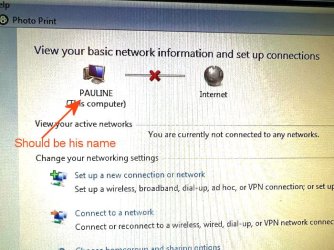
Hello, I gave my son an old computer of mine (Windows 7) and I created a new user (him) with admin rights, rebooted and chose the new user to open. Not sure if or how to delete old user but it seemed to be okay because it opened with his name.

Now when he got this computer, he tried to connect to the internet but when he opens up the network window all he can get is my name and a request for a password from me. Can you tell me how he can change this network connection from me to him? Thanks.
 

My Computers

System One System Two

  • OS
    10
  • Computer type
    PC/Desktop
What network window? You can take a screenshot of the computer using the Snipping Tool included with Windows. Then upload that screenshot here.

To get to the Snipping Tool simply type that name into search.
 

My Computer

Computer type
PC/Desktop
OS
Windows 7 Ultimate x64
The computer with Windows 7 is at my son's home now so I can't get a screen shot of it but he sent me this poor quality shot by iPhone. I am also posting the same window from my own computer which is Windows10. We are trying to get him connected to the internet and get my old connection deleted. Thank you.
 

Attachments

  • IMG_2793.jpeg
    IMG_2793.jpeg
    133.7 KB · Views: 4
  • Image1.jpg
    Image1.jpg
    75.2 KB · Views: 5

My Computers

System One System Two

  • OS
    10
  • Computer type
    PC/Desktop
That's nothing to worry about. It's just the computer name and doesn't affect Internet connectivity. If you would lke to change it read here.

As to why there's no Internet connection, that could be any number of things. Very hard to know what exactly without being there, but we can try one thing after another and see what's up.

You said he is presented with a password box? Where is that coming from exactly? A screenshot of that would be helpful. Is a router or modem connected to the computer? Is this DSL? What is the ISP name?
 

My Computer

Computer type
PC/Desktop
OS
Windows 7 Ultimate x64
I have no idea what password it wants unless it is for my router/modem that I used. He is Ethernet connected and using a modem, I think. I believe when he clicks on Set up a New Connection, that's when it's asking for a password. He may just have to get a new hard drive.
Thanks.
 

My Computers

System One System Two

  • OS
    10
  • Computer type
    PC/Desktop
No. It's not a hard drive issue. So don't waste money on that.

I can help with this, but I need as many details as possible and for you to answer the questions I ask. I have very little to go on here from what you provided and without actually being there it's anyone's guess as to what the issue is. Also, this is all third-party talk and I'm not speaking to the person who has the issue from the get-go. He might want to contact the ISP if it is an ISP related issue. But that might be a crapshoot. Tech support now-a-days is out the window.

I can tell you that if Windows is asking for a password to get Internet access something isn't right. It really shouldn't do that. You just plug in the modem to the computer, the modem leases the IP address to the computer and the way you go. But you want to make sure you're plugged into the right connector. Unless this is DSL, maybe that's what's wrong. I'm not too familiar with DSL, but I believe that form of ISP needs a password for Internet access. That's where contacting the ISP comes into play.

Asking for a password is also indicative of Windows file sharing. So of course that makes no sense as it pertains to getting Internet access.


Edit-

You actually don't even need to run that "setup new connection" facility.

Try the following, and this is just a huge shot in the dark since I really have no idea what that password thing is all about or what kind of Internet connection this is. Let alone if it's a router or modem.

Plug the Ethernet cable into the LAN connector in the modem or router. The other end to the computer.

Go to Windows search and enter cmd

Right click CMD (command prompt) and run that as administrator.

Type the following three commands one after another and hit enter to execute those commands. Notice the space before the forward slash /

ipconfig /flushdns

ipconfig /release

This command may not be necessary, but try anyway.

ipconfig /renew

 

My Computer

Computer type
PC/Desktop
OS
Windows 7 Ultimate x64
Back
Top