Solved how to remove a suspicous file that refuses admin and kill processes

D3X1K AXYZ

New member
Local time
3:12 AM
Messages
4
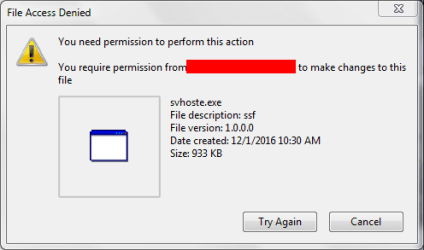
the file "C:\ProgramData\Client\Svhoste.exe" is definitely a malicious file, as it keeps taking over and erasing the data of other exe files while i am using them, leaving an empty .exe file behind. When i try to remove, replace, or rename the hollow exe file it tells me its in use by another program. Process explorer shows that svhoste.exe is using the file. when i try to kill the process it immediately opens an infinite number of svhoste processes. Both ASC 10 pro and mbam pro do not detect it and when i try to remove it manually, it says:

attachment.php

I require my permission to make changes. I can't seem to change anything about it even if i run programs as admin. What should I do? i have a feeling that it is only a matter of time before it messes with something vital to the computer.
 

Attachments
  • ScreenShot_20161204123506.png
    ScreenShot_20161204123506.png
    7.8 KB · Views: 66

My Computer My Computer

Computer type
Laptop
Computer Manufacturer/Model Number
HP Pavilion dv6-1355dx
OS
Windows 7 Home Premium x64
CPU
See Other Info
Memory
4 GB
Screen Resolution
1366 x 768
Antivirus
Iobit Advanced System Care pro Malwarebytes AntiMalware pro
Browser
Mozilla Firefox
Other Info
CPU Details:
Intel Core 2 Duo CPU T6600 @ 2.20GHz
Intel64 Family 6 Model 23 Stepping 10, GenuineIntel
AMD64 Architecture
Welcome to the forum. Is this encrypting your photos and videos it a form of ransom ware. You should be able to kill it in task manager and very quickly delete it if you can't do that the best way is to boot from a DVD rescue disk or free Linux DVD to delete it. If it's encrypting photos it's normally slow so getting files off fast is s good idea disconnect one drive or Google drive. The exe it creates if you run will reinfect you
 

My Computer My Computer

Computer type
PC/Desktop
OS
win 8 32 bit
Welcome to the forum.
Thank you. ^^
Is this encrypting your photos and videos it a form of ransom ware.
Svhoste is erasing exe file data leaving me an empty exe file. this is today's "casualty"

394190d1480878351-how-remove-suspicous-file-refuses-admin-kill-processes-screenshot_20161204140526.png


please note the red box in the picture
Edit: this is a scripting tool used for pokemon roms. I love programming ^^

You should be able to kill it in task manager and very quickly delete it
If i stop it, it immediately spawns an infinite number of individual svhoste processes.
 

Attachments

  • ScreenShot_20161204140526.png
    ScreenShot_20161204140526.png
    8.8 KB · Views: 62
Last edited:

My Computer My Computer

Computer type
Laptop
Computer Manufacturer/Model Number
HP Pavilion dv6-1355dx
OS
Windows 7 Home Premium x64
CPU
See Other Info
Memory
4 GB
Screen Resolution
1366 x 768
Antivirus
Iobit Advanced System Care pro Malwarebytes AntiMalware pro
Browser
Mozilla Firefox
Other Info
CPU Details:
Intel Core 2 Duo CPU T6600 @ 2.20GHz
Intel64 Family 6 Model 23 Stepping 10, GenuineIntel
AMD64 Architecture
Copy this into explorer address bar and post a screenshot:

%TEMP%

Also check here and do the same if found:

%PROGRAMFILES%\CLIENT

%PROGRAMFILES (x86)%\CLIENT

Also suggest downloading a fully functional (for 15 days) free trial of Zemana AntiMalware and running a scan with it.

Zemana Downloads – Security Software Free Trails
 

My Computer My Computer

Computer type
Laptop
Computer Manufacturer/Model Number
ASUS
OS
Microsoft Windows 7 Home Premium 64-bit 7601 Multiprocessor Free Service Pack 1
CPU
AMD C-60 APU with Radeon(tm) HD Graphics
Motherboard
ASUSTeK COMPUTER INC. X501U
Memory
4.00 GB
Graphics Card(s)
AMD Radeon HD 6290 Graphics
Sound Card
(1) AMD High Definition Audio Device (2) Realtek High Defi
Screen Resolution
1366 x 768 x 32 bits (4294967296 colors) @ 60 Hz
Hard Drives
Hitachi HTS545050A7E380 SATA Disk Device
Antivirus
Comodo CIS & FW, SecureAplus App Whitelisting, Threatfire
Browser
Cyberfox 64bit, Opera 64bit, Airfox
Other Info
Spy-The-Spy, HitmanPro.Alert, Norton Connect Safe, MJRegWatcher, BitDefender TrafficLight, Voodoo Shield, Zemana AntiMalware
Copy this into explorer address bar and post a screenshot:

%TEMP%

Also check here and do the same if found:

%PROGRAMFILES%\CLIENT

%PROGRAMFILES (x86)%\CLIENT

Also suggest downloading a fully functional (for 15 days) free trial of Zemana AntiMalware and running a scan with it.

Zemana Downloads – Security Software Free Trails

I will do that later as I have a few errands to run, but i found somethings that may be helpful.


according to windows dev center
the /a defines the windows installers Administrative installation option. Installs a product on the network.
as for the -a, i am not sure.

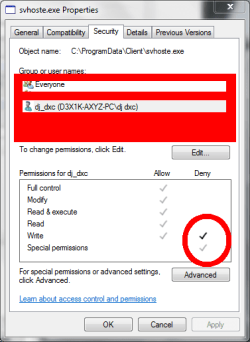
attachment.php


Note: denial overrides allowance
 

Attachments

  • ScreenShot_20161204152348.png
    ScreenShot_20161204152348.png
    1.6 KB · Views: 29
  • ScreenShot_20161204153006.png
    ScreenShot_20161204153006.png
    14 KB · Views: 55

My Computer My Computer

Computer type
Laptop
Computer Manufacturer/Model Number
HP Pavilion dv6-1355dx
OS
Windows 7 Home Premium x64
CPU
See Other Info
Memory
4 GB
Screen Resolution
1366 x 768
Antivirus
Iobit Advanced System Care pro Malwarebytes AntiMalware pro
Browser
Mozilla Firefox
Other Info
CPU Details:
Intel Core 2 Duo CPU T6600 @ 2.20GHz
Intel64 Family 6 Model 23 Stepping 10, GenuineIntel
AMD64 Architecture
As it's eating your files don't mess about get a bootable CD and delete it any free Linux live CD will do it then get s bootable anti virus CD and run that
 

My Computer My Computer

Computer type
PC/Desktop
OS
win 8 32 bit
It's clear at this point that you have a virus of some sort and it's wreaking havoc in your filesystem. Hopefully it only tampers with .exe files, but anyway, it could have already done anything to your system.

In this state, the only way to regain control over your system is a clean install. Stop using the system, backup your data to some other disk, then reinstall Windows from scratch. You can use a "live-CD" or something like that for that without compromising further any data.

Don't bother with antiviruses or any type of "clean". Once compromised, there is no way to ensure that a system is really clean.
 

My Computer My Computer

Computer type
Laptop
Computer Manufacturer/Model Number
Toshiba Sattelite A665-S6092
OS
Windows 7 Ultimate x64
CPU
Intel Core i7-740QM
Memory
8 GB DDR3
Graphics Card(s)
NVIDIA GeForce 330GT
Screen Resolution
1366x768
Hard Drives
Samsung 840 SSD 500GB
1TB USB3 external HD
Cooling
Coolermaster Notepal U3 notebook cooling pad
Internet Speed
3mbps ASDL
Antivirus
ClamWin 0.98.7
Browser
Opera 12.17 x86 (main), Firefox 38 (sec), IE11 (last resort)
Temporary solution to svhoste.exe (ssf virus)

While it seems as though I can't do much about it right now, I have found some information that i wish to pass on to anyone who may run into this problem. Get Sysinternals Process Explorer. Run Process explorer as Admin as soon as your desktop loads. Look for any program with the description ssf, as there may be more then one file causing this problem. In my case, I found a second one called "clientmanager.exe" which had the ssf file description. Using ProcExp, suspend the programs. Once suspended, you should be safe. If you lose an executable to this program, Suspending it will allow you to search the handles of this virus and remove the handle that holds the empty exe file "hostage." Then you should be able to delete the holo exe file. hope this helps.​
I wish to thank all of you who replied to my post here.​

Ps: if anyone has this same issue, any info on this issue, or any possible solutions to this problem, please let me know.​
 

My Computer My Computer

Computer type
Laptop
Computer Manufacturer/Model Number
HP Pavilion dv6-1355dx
OS
Windows 7 Home Premium x64
CPU
See Other Info
Memory
4 GB
Screen Resolution
1366 x 768
Antivirus
Iobit Advanced System Care pro Malwarebytes AntiMalware pro
Browser
Mozilla Firefox
Other Info
CPU Details:
Intel Core 2 Duo CPU T6600 @ 2.20GHz
Intel64 Family 6 Model 23 Stepping 10, GenuineIntel
AMD64 Architecture
Back
Top