I need some help recovering a hdd partition

reble

New member
Member
VIP
Local time
5:50 AM
Messages
326
Location
Kennewick, Wa
The OS is Win7 Home 64 bit on my laptop. I was using prog called Mini Tool Partition Wizard to wipe and reset the partition on a SD card back to 1 partition. I got careless and I didn't verify the drive letter that I was working on before wiping the partition. I ended up wiping the partition on my D hard drive in the external USB case. :( :o Nothing has been done to the D drive yet. nothing has been written to it. I have tried 5 that are supposed to be free recovery and restore prog's. They let you scan the drive but they catch you when it comes to doing the recovery it self. They want you to pay to do the recovery and 1 of those progs I think partly reset the D hard drive. The D hard drive is now coming up as D:\ otherwise blank on Windows Explorer. Does this meen that the D hard drive has been partitioned and re-formated? And have I lost all hope of recovering the files. I am getting my old tablet ready to sell because I got a new tablet in the packaged deal with my new cell phone. As a side note. I was about 2/3rds done on updating the D hard drive backup dvd's. When I started work on the tablet's SD card. Is there a totally free scan and recovery prog that can still recover the files with? or is it already to late to recover the files?

Steve
 

My Computer My Computer

At a glance

windows 7 home 32 bit, I just changed back fr...amc a6-6310, radon r4 graphics 1800mhz with 4...6.8gbnot sure off hand
Computer type
Laptop
Computer Manufacturer/Model Number
Dell Inspiron 3541
OS
windows 7 home 32 bit, I just changed back from 64 to 32bit
CPU
amc a6-6310, radon r4 graphics 1800mhz with 4 cores
Memory
6.8gb
Graphics Card(s)
not sure off hand
Sound Card
not shure off hand
Monitor(s) Displays
built in lcd
Screen Resolution
1366 x 768
Hard Drives
1 500gb sata internal HDD and 1 250 gb's sata HDD in a USB external USB case.
Keyboard
Wifi with attached wifi mouse
Internet Speed
don't know
Antivirus
Zone Alarm
Browser
Firefox
Other Info
The gateway laptop model MD2614U died because a voltage regulator on the motherboard went poof. The Gateway laptop has been scraped.

My Computers My Computers

  • At a glance

    Windows 7 HP 64i5 6600K - 800MHz to 4200MHz4+4G GSkill DDR4 3000IG - Intel 530
    Computer type
    PC/Desktop
    Computer Manufacturer/Model Number
    custom build
    OS
    Windows 7 HP 64
    CPU
    i5 6600K - 800MHz to 4200MHz
    Motherboard
    GA-Z170-HD3P
    Memory
    4+4G GSkill DDR4 3000
    Graphics Card(s)
    IG - Intel 530
    Monitor(s) Displays
    Samsung 226BW
    Screen Resolution
    1680x1050
    Hard Drives
    (1) -1 SM951 – 128GB M.2 AHCI PCIe SSD drive for Windows 7 and Lubuntu
    (2) -1 WD SATA 3 - 1T for Data
    (3) -1 WD SATA 3 - 1T for backup
    PSU
    Thermaltake 450W TR2 gold
    Keyboard
    Old and good Chicony mechanical keyboard
    Mouse
    Logitech mX performance - 9 buttons (had to disable some)
    Internet Speed
    500Mb/s
    Browser
    Firefox 64
    Other Info
    TinyWall firewall
  • At a glance

    Windows 7 Proi7-4500U 800MHz to 3.0GHz(4+4)G DDR3 1600IG intel 4400 + NVIDIA GeForce GT 745M
    Computer type
    Laptop
    System Manufacturer/Model Number
    Asus Q550LF
    OS
    Windows 7 Pro
    CPU
    i7-4500U 800MHz to 3.0GHz
    Motherboard
    Asus Q550LF
    Memory
    (4+4)G DDR3 1600
    Graphics Card(s)
    IG intel 4400 + NVIDIA GeForce GT 745M
    Sound Card
    Realtek
    Monitor(s) Displays
    LG Display LP156WF4-SPH1
    Screen Resolution
    1920 x 1080
    Hard Drives
    BX500 120G SSD for Windows and programs +
    1T HDD for data
    Internet Speed
    500 Mb/s
    Browser
    Firefox
    Other Info
    TinyWall firewall
The OS is Win7 Home 64 bit on my laptop. I was using prog called Mini Tool Partition Wizard to wipe and reset the partition on a SD card back to 1 partition. I got careless and I didn't verify the drive letter that I was working on before wiping the partition. I ended up wiping the partition on my D hard drive in the external USB case. :( :o Nothing has been done to the D drive yet. nothing has been written to it. I have tried 5 that are supposed to be free recovery and restore prog's. They let you scan the drive but they catch you when it comes to doing the recovery it self. They want you to pay to do the recovery and 1 of those progs I think partly reset the D hard drive. The D hard drive is now coming up as D:\ otherwise blank on Windows Explorer. Does this meen that the D hard drive has been partitioned and re-formated? And have I lost all hope of recovering the files. I am getting my old tablet ready to sell because I got a new tablet in the packaged deal with my new cell phone. As a side note. I was about 2/3rds done on updating the D hard drive backup dvd's. When I started work on the tablet's SD card. Is there a totally free scan and recovery prog that can still recover the files with? or is it already to late to recover the files?


Steve

It may be too late already. It's entirely possible one of the recovery programs you tried may have written over you data, in which case, goodbye data.I strongly recommend that people never attempt to recover data themselves since it is do easy to mess things up so, before you do anything else, consider using professional data recovery. Be aware it will be very expensive, easily thousands of dollars, with no guarantee of success.

While this coming too late to help you, to avoid this kind of data loss (or any other kind), I strongly urge you to invest in some external drives (or bare drives used in a dock)to use for backups. At least one onsite and one offsite backup drive for each drive in your computer is considered a bare minimum although only one backup drive per drive in the computer is better than nothing (in case money is tight; we've all been there). If you had all your data backed up, you could have easily and fairly quickly recovered from your current dilemma.
 

My Computer My Computer

At a glance

Win 7 Ultimate 64 bitIntel i7-3930KKingston HyperX Genesis 32GB Kit (8x4GB Modul...MSI R7850 Twin Frozr 2GD5/OC Radeon HD 7850 2...
Computer type
PC/Desktop
Computer Manufacturer/Model Number
Custom Build
OS
Win 7 Ultimate 64 bit
CPU
Intel i7-3930K
Motherboard
ASUS P9X79 WS
Memory
Kingston HyperX Genesis 32GB Kit (8x4GB Modules) 1600MHz DDR
Graphics Card(s)
MSI R7850 Twin Frozr 2GD5/OC Radeon HD 7850 2GB 256-bit GDDR
Sound Card
Asus Xonar Essence STX
Monitor(s) Displays
3x Asus VG248QE 24", Vizio 32" TV
Screen Resolution
1920 x 1080, ?
Hard Drives
Samsung 128GB 840 Pro SSD (1),
Samsung 4TB 850 EVO SSDs (4)
Samsung 4TB 850 EVO SSDs (16) external backup drives used in 2.5" hot swap bays in the computer.
PSU
Corsair HX750w
Case
Antec Two Hundred v2 (modified)
Cooling
Cooler Master GeminII S524 120mm (fan replaced with a 140mm)
Keyboard
Logitech G510s
Mouse
Logitech M525 (two in use)
Internet Speed
=< 32Mbps down, 8Mbps up
Antivirus
AVAST!, MBAM, SAS, Spybot S&D (all but MBAM free) Glary Util
Browser
IE11
Other Info
LSI 9211-8i HBA card (8 SATA III ports), 2.5" & 3.5" Hot Swap Bays, HooToo HT-CR001 PCI-E to USB 3.0 Internal Hub + 6 Slot Card Reader, and LG Model CH12LS28 BD-ROM Optical Drive. Also, ScanSnap S1500 ADF duplexing scanner, Canon 9000F flat bed scanner, Corsair SP2500 2.1 speakers, Samsung CLP 415nw laser color printer, Cyberpower PP2200SW UPS
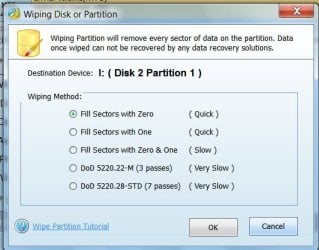
Did you really wipe the partition?

Did you get this screen to wipe?

08-12-2016 08-13-56.jpg

If you had wiped the partition as above, then there really is no chance of DIY data recovery.

If on the other hand, you had only deleted the partition/s ( calling it a wipe mistakenly- we all do :) ), then we may check to see whether data is still there and if it is, try to recover it.

Do this.

Install and run the trial version of GetDataback Simple https://www.runtime.org/data-recovery-software.htm Please read the how-to Guides and all other documentation in that webpage.

Scan your external drive which you have massacred. ( Please and for heaven's sake unplug all other external drives/storage devices when you try to do anything on a particular drive/storage device and make it a habit) Check whether it shows all your files. You can also open and preview the files.

Report.

( Do not worry. This program does not write anything to your drive/s. So you can play with it as you like to get a grip on how it works, try different levels. Nevertheless read all documentation on the website.)
 

My Computer My Computer

At a glance

Windows 7 Home Premium 32 bit
OS
Windows 7 Home Premium 32 bit
I can't afford professional data recovery. I live on SSDI disabillty. I was about a bit under half done doing the latest backup to DVD's. Again it was do to my own careleessnes and lack of attention to detail. I also don't believe in those off site storage things, like Cloud, because any system that is online all the time can be hacked, not that I have anything worth hacking anyways. What other sort of backup's are there that I can use at home besides DVD's?

Steve

It may be too late already. It's entirely possible one of the recovery programs you tried may have written over you data, in which case, goodbye data.I strongly recommend that people never attempt to recover data themselves since it is do easy to mess things up so, before you do anything else, consider using professional data recovery. Be aware it will be very expensive, easily thousands of dollars, with no guarantee of success.

While this coming too late to help you, to avoid this kind of data loss (or any other kind), I strongly urge you to invest in some external drives (or bare drives used in a dock)to use for backups. At least one onsite and one offsite backup drive for each drive in your computer is considered a bare minimum although only one backup drive per drive in the computer is better than nothing (in case money is tight; we've all been there). If you had all your data backed up, you could have easily and fairly quickly recovered from your current dilemma.
 

My Computer My Computer

At a glance

windows 7 home 32 bit, I just changed back fr...amc a6-6310, radon r4 graphics 1800mhz with 4...6.8gbnot sure off hand
Computer type
Laptop
Computer Manufacturer/Model Number
Dell Inspiron 3541
OS
windows 7 home 32 bit, I just changed back from 64 to 32bit
CPU
amc a6-6310, radon r4 graphics 1800mhz with 4 cores
Memory
6.8gb
Graphics Card(s)
not sure off hand
Sound Card
not shure off hand
Monitor(s) Displays
built in lcd
Screen Resolution
1366 x 768
Hard Drives
1 500gb sata internal HDD and 1 250 gb's sata HDD in a USB external USB case.
Keyboard
Wifi with attached wifi mouse
Internet Speed
don't know
Antivirus
Zone Alarm
Browser
Firefox
Other Info
The gateway laptop model MD2614U died because a voltage regulator on the motherboard went poof. The Gateway laptop has been scraped.
I can't afford professional data recovery. I live on SSDI disabillty. I was about a bit under half done doing the latest backup to DVD's. Again it was do to my own careleessnes and lack of attention to detail. I also don't believe in those off site storage things, like Cloud, because any system that is online all the time can be hacked, not that I have anything worth hacking anyways. What other sort of backup's are there that I can use at home besides DVD's?

Steve

It may be too late already. It's entirely possible one of the recovery programs you tried may have written over you data, in which case, goodbye data.I strongly recommend that people never attempt to recover data themselves since it is do easy to mess things up so, before you do anything else, consider using professional data recovery. Be aware it will be very expensive, easily thousands of dollars, with no guarantee of success.

While this coming too late to help you, to avoid this kind of data loss (or any other kind), I strongly urge you to invest in some external drives (or bare drives used in a dock)to use for backups. At least one onsite and one offsite backup drive for each drive in your computer is considered a bare minimum although only one backup drive per drive in the computer is better than nothing (in case money is tight; we've all been there). If you had all your data backed up, you could have easily and fairly quickly recovered from your current dilemma.

Good cloud backup services, such as Carbonite.com, Crashplan, and Backblaze have security measures in place to avoid infective files penetrating your system. However, I can understand your concern and it is still possible to safely backup your drives. As I mentioned before, you need to get at least one external drive or bare drive (two would be much, much better) that you put in a dock.

There are various programs you can use to backup your files to the external drive(s). Imaging is the best way to backup system files (OS and programs). It is best you have your data separated from your system files, such as using a separate boot drive for the system files or putting them on a separate partition of a drive with the rest of the drive having a data partition (the fewer partitions you have on a drive, the better; it is far more efficient to organize data with folders instead of partitions). For imaging, I highly recommend Macrium Reflect Free. Images should be stored on a backup drive (or, like I do, you can store them on a data drive or partition in the computer for convenience but that drive or partition must be backed up on an external drive).

For backing up data (not system files), I recommend FreeFileSync. Many people recommend SyncToy. FreeFileSync is a folder/file syncing program that compares the drive or partition being backed up with the backup drive. When set to Mirror (not the same as RAID 1), FreeFileSync will then copy to and delete files on the backup drive as needed to make the backup drive be essentially a clone of the data drive or partition. Folder/file syncing is far more efficient than other forms of backups because only files that have been added, changed or deleted since the previous backup update will be processed instead of processing all the data on the drive, saving a lot of time.
 

My Computer My Computer

At a glance

Win 7 Ultimate 64 bitIntel i7-3930KKingston HyperX Genesis 32GB Kit (8x4GB Modul...MSI R7850 Twin Frozr 2GD5/OC Radeon HD 7850 2...
Computer type
PC/Desktop
Computer Manufacturer/Model Number
Custom Build
OS
Win 7 Ultimate 64 bit
CPU
Intel i7-3930K
Motherboard
ASUS P9X79 WS
Memory
Kingston HyperX Genesis 32GB Kit (8x4GB Modules) 1600MHz DDR
Graphics Card(s)
MSI R7850 Twin Frozr 2GD5/OC Radeon HD 7850 2GB 256-bit GDDR
Sound Card
Asus Xonar Essence STX
Monitor(s) Displays
3x Asus VG248QE 24", Vizio 32" TV
Screen Resolution
1920 x 1080, ?
Hard Drives
Samsung 128GB 840 Pro SSD (1),
Samsung 4TB 850 EVO SSDs (4)
Samsung 4TB 850 EVO SSDs (16) external backup drives used in 2.5" hot swap bays in the computer.
PSU
Corsair HX750w
Case
Antec Two Hundred v2 (modified)
Cooling
Cooler Master GeminII S524 120mm (fan replaced with a 140mm)
Keyboard
Logitech G510s
Mouse
Logitech M525 (two in use)
Internet Speed
=< 32Mbps down, 8Mbps up
Antivirus
AVAST!, MBAM, SAS, Spybot S&D (all but MBAM free) Glary Util
Browser
IE11
Other Info
LSI 9211-8i HBA card (8 SATA III ports), 2.5" & 3.5" Hot Swap Bays, HooToo HT-CR001 PCI-E to USB 3.0 Internal Hub + 6 Slot Card Reader, and LG Model CH12LS28 BD-ROM Optical Drive. Also, ScanSnap S1500 ADF duplexing scanner, Canon 9000F flat bed scanner, Corsair SP2500 2.1 speakers, Samsung CLP 415nw laser color printer, Cyberpower PP2200SW UPS
I use the D HD in the USB case as storage to hold the prog and so on that I dowload. The 250 gb Sata HD that was in the USB case was getting old and giving me errors. Everything was fine after I copied everything off the 250 gb hd to the C drive and then I put in a good/used 500 gb Sata hd that I pulled from a laptop with a dead power charger/regulator. everything was fine until I wiped the wrong partition. Just to copy the D drive to a directory in the C drive took a good chunk of the night, about 5 hours.
I am using a Dell Inspiron 3541 laptop as my main computer. The D hd is in a USB external case. What is a "bare drive"? Right now I back up the D drive directory's to DVD's. There was only 2 directory's on the D drive that I didn't get a chance to backup to DVD's. There is no operating system files or dir's on the D drive and I don't keep data files on the C (system) drive. I just store the install or setup exe's for the prog's on the D drive and data. Is there a better way to store the backups at home rather then using DVD's?

] Good cloud backup services, such as Carbonite.com, Crashplan, and Backblaze have security measures in place to avoid infective files penetrating your system. However, I can understand your concern and it is still possible to safely backup your drives. As I mentioned before, you need to get at least one external drive or bare drive (two would be much, much better) that you put in a dock.

There are various programs you can use to backup your files to the external drive(s). Imaging is the best way to backup system files (OS and programs). It is best you have your data separated from your system files, such as using a separate boot drive for the system files or putting them on a separate partition of a drive with the rest of the drive having a data partition (the fewer partitions you have on a drive, the better; it is far more efficient to organize data with folders instead of partitions). For imaging, I highly recommend Macrium Reflect Free. Images should be stored on a backup drive (or, like I do, you can store them on a data drive or partition in the computer for convenience but that drive or partition must be backed up on an external drive).

For backing up data (not system files), I recommend FreeFileSync. Many people recommend SyncToy. FreeFileSync is a folder/file syncing program that compares the drive or partition being backed up with the backup drive. When set to Mirror (not the same as RAID 1), FreeFileSync will then copy to and delete files on the backup drive as needed to make the backup drive be essentially a clone of the data drive or partition. Folder/file syncing is far more efficient than other forms of backups because only files that have been added, changed or deleted since the previous backup update will be processed instead of processing all the data on the drive, saving a lot of time.
 

My Computer My Computer

At a glance

windows 7 home 32 bit, I just changed back fr...amc a6-6310, radon r4 graphics 1800mhz with 4...6.8gbnot sure off hand
Computer type
Laptop
Computer Manufacturer/Model Number
Dell Inspiron 3541
OS
windows 7 home 32 bit, I just changed back from 64 to 32bit
CPU
amc a6-6310, radon r4 graphics 1800mhz with 4 cores
Memory
6.8gb
Graphics Card(s)
not sure off hand
Sound Card
not shure off hand
Monitor(s) Displays
built in lcd
Screen Resolution
1366 x 768
Hard Drives
1 500gb sata internal HDD and 1 250 gb's sata HDD in a USB external USB case.
Keyboard
Wifi with attached wifi mouse
Internet Speed
don't know
Antivirus
Zone Alarm
Browser
Firefox
Other Info
The gateway laptop model MD2614U died because a voltage regulator on the motherboard went poof. The Gateway laptop has been scraped.
A bare drive is one that is sold without retail packaging (it is up to the seller to safely package it for shipping), cables, screws, or a software disk. In this case, I used the term to refer to an internal drive with the case and, in the case of 3.5" drives, the power supply of an external drive. Bare drives are usually significantly less expensive than retail packaged drives and, since they don't have an external drive's case, are lighter and takeup less room. They also tend to be better quality than the drives sold in external drive cases.

I prefer bare drives for my backup drives because I can get better quality drives, they take up far less room in storage, are easier, for me, to use, and they cost less. For backing up my notebooks, I have a couple of bare drives I put in my own enclosures to protect them when in my notebook case when on the road.
 

My Computer My Computer

At a glance

Win 7 Ultimate 64 bitIntel i7-3930KKingston HyperX Genesis 32GB Kit (8x4GB Modul...MSI R7850 Twin Frozr 2GD5/OC Radeon HD 7850 2...
Computer type
PC/Desktop
Computer Manufacturer/Model Number
Custom Build
OS
Win 7 Ultimate 64 bit
CPU
Intel i7-3930K
Motherboard
ASUS P9X79 WS
Memory
Kingston HyperX Genesis 32GB Kit (8x4GB Modules) 1600MHz DDR
Graphics Card(s)
MSI R7850 Twin Frozr 2GD5/OC Radeon HD 7850 2GB 256-bit GDDR
Sound Card
Asus Xonar Essence STX
Monitor(s) Displays
3x Asus VG248QE 24", Vizio 32" TV
Screen Resolution
1920 x 1080, ?
Hard Drives
Samsung 128GB 840 Pro SSD (1),
Samsung 4TB 850 EVO SSDs (4)
Samsung 4TB 850 EVO SSDs (16) external backup drives used in 2.5" hot swap bays in the computer.
PSU
Corsair HX750w
Case
Antec Two Hundred v2 (modified)
Cooling
Cooler Master GeminII S524 120mm (fan replaced with a 140mm)
Keyboard
Logitech G510s
Mouse
Logitech M525 (two in use)
Internet Speed
=< 32Mbps down, 8Mbps up
Antivirus
AVAST!, MBAM, SAS, Spybot S&D (all but MBAM free) Glary Util
Browser
IE11
Other Info
LSI 9211-8i HBA card (8 SATA III ports), 2.5" & 3.5" Hot Swap Bays, HooToo HT-CR001 PCI-E to USB 3.0 Internal Hub + 6 Slot Card Reader, and LG Model CH12LS28 BD-ROM Optical Drive. Also, ScanSnap S1500 ADF duplexing scanner, Canon 9000F flat bed scanner, Corsair SP2500 2.1 speakers, Samsung CLP 415nw laser color printer, Cyberpower PP2200SW UPS
Back
Top