Access is denied. Trying to format a flash drive (in cmd)

laufing

New member
Local time
5:15 AM
Messages
6
Hello everyone! :)

I've been trying to format a 32GB flash drive. I'm using DiskPart to format it, but still have no success. I've been trying and trying, but I always encounter the same error. "DiskPart has encountered an error: Access is denied. See the System Event Log for more information". I tried different commands to format it, but I still arrive at the same error. I am the admin, so I don't think that's the problem.

LIST DISK
SELECT DISK 1
CLEAN ALL
CONVERT MBR
CREATE PARTITION PRIMARY
SELECT PARTITION 1
ACTIVE
FORMAT FS=NTFS QUICK
(I did try FAT and FAT32, none of those worked)

Help me please! :cry:
Thank you and have a nice day! :)
 

My Computer My Computer

At a glance

Windows 7 Ultimate x64Intel Pentium G32588GB DDR3 1333MHzPalit GT 730 128-bit
Computer type
PC/Desktop
OS
Windows 7 Ultimate x64
CPU
Intel Pentium G3258
Memory
8GB DDR3 1333MHz
Graphics Card(s)
Palit GT 730 128-bit
Hello and welcome laufing mat why are you using DISKPART to format the drive?

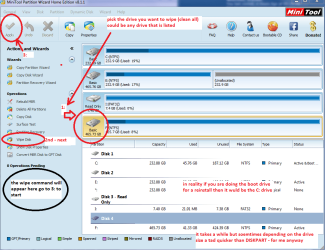
It would just as simple to go to Computer click on the drive and format it there unless you are trying to specifically clean all that drive. My suggestion would be to use this Best Free Partition Manager for Windows | MiniTool Partition Free > run the program and use the wipe function see pic

Oh and the program is a very useful tool for lots of things such as anything to do with partitioning wiping testing etc etc
 

Attachments

  • MINI TOOL WIPE.PNG
    MINI TOOL WIPE.PNG
    52.4 KB · Views: 3

My Computer My Computer

At a glance

Desk1 7 Home Prem / Desk2 10 Pro / Main lap A...Desk1 i5 3750K / Laptop i7 GTX 860M / Desk2 i...Desk1 8GB (1866) / Desk2 16GB (1333) / Laptop...Desk 1& 2NVidia GTX 650 & Laptops on board Intel
Computer type
PC/Desktop
Computer Manufacturer/Model Number
Own build (new) Desk1 / Asus ROG Win 7 / Desk2 1st build
OS
Desk1 7 Home Prem / Desk2 10 Pro / Main lap Asus ROG 10 Pro 2 laptop Toshiba 7 Pro Asus P2520 7 & 10
CPU
Desk1 i5 3750K / Laptop i7 GTX 860M / Desk2 i5 2500
Motherboard
Desk1 Asus P877-V / Desk2 Gigabyte H67 UD3H / Laptop ?
Memory
Desk1 8GB (1866) / Desk2 16GB (1333) / Laptop 8Gb DDR3
Graphics Card(s)
Desk 1& 2NVidia GTX 650 & Laptops on board Intel
Sound Card
Desk 1 & 2 -XONAR DG Realtek High Def audio Laptop
Monitor(s) Displays
Desk 1 Benq HD 2450 / Desk2 Philips 24" / Laptop 17.5"
Screen Resolution
1920x1080 D1 & D2 & Laptop 1
Hard Drives
Desk1 Samsung 120GB 830 SSD
Asus ROG 256GB 850 Pro SSD
Desk2 Samsung 840 256 SSD
Toshiba 120GB EVO
PSU
Desk 1 Corsair HX 1050/ Laptop ? / Desk 2 Corsair HX 650
Case
Desk 1 Cooler HAF XM ? Toshiba laptop / Desk2 Coolermaster
Cooling
Fans on all Desk1 -2 Desk2 - all Coolermasters 5 Laptop ?
Keyboard
Desk 1 MS Sidewinder X6 Desk 2 MS Sidewinder X 4
Mouse
Desk 1&2 - Gigabyte MS 900 gamer - laptop - Logitec wireless
Internet Speed
ADSL2+
Other Info
One other Desktop (tester) and spare Toshba laptop both with SSD's
Running Kaspersky 2016 ISS on all machines config'd identically
Logitec audio stereo systems on each machine (x3)
Canon MG5250MFC
Router/modem TP-Link running WPA2SK
Maybe it's write protected? You can get rid of this by:

1. Open up your start menu and click "Run"
2. Type "regedit" into the box.
3. Navigate to HKEY_LOCAL_MACHINE\SYSTEM\CurrentControlSet\Control\StorageDevicePolicies
4. Now double click the "WriteProtect" key and change the value to 0.

Hope this helped you.
 

My Computer My Computer

At a glance

Windows 7 Ultimate 32bit
Computer type
PC/Desktop
Computer Manufacturer/Model Number
Dell
OS
Windows 7 Ultimate 32bit
Antivirus
Avast
Maybe it's write protected? You can get rid of this by:

1. Open up your start menu and click "Run"
2. Type "regedit" into the box.
3. Navigate to HKEY_LOCAL_MACHINE\SYSTEM\CurrentControlSet\Control\StorageDevicePolicies
4. Now double click the "WriteProtect" key and change the value to 0.

Hope this helped you.

Thank you so much for your time! :) :) :) :) :)

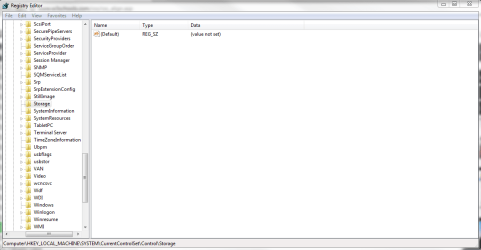
I tried this, but is it odd that my computer doesn't have that? I checked, but after I got to HKEY_LOCAL_MACHINE\SYSTEM\CurrentControlSet\Control there was no StorageDevicePolicies.
 

Attachments

  • sssda.PNG
    sssda.PNG
    24.7 KB · Views: 3

My Computer My Computer

At a glance

Windows 7 Ultimate x64Intel Pentium G32588GB DDR3 1333MHzPalit GT 730 128-bit
Computer type
PC/Desktop
OS
Windows 7 Ultimate x64
CPU
Intel Pentium G3258
Memory
8GB DDR3 1333MHz
Graphics Card(s)
Palit GT 730 128-bit
Hmm that is odd neither do I and I am running Pro and I would have thought that Ultimate would have had the policies setting.

Now did you try the Partition Wizard method of wiping that drive or formatting it because it is so simple. In fact if formatting is all you want to do is to do it through Windows > Computer > right click on the drive > choose Format ?? If it is write protected then it will balk at you doing that. Now some sticks come with the makers own software on it and it can be a nuisance when trying to clean or format the drive - I always get rid of that stuff through a wipe.
 

My Computer My Computer

At a glance

Desk1 7 Home Prem / Desk2 10 Pro / Main lap A...Desk1 i5 3750K / Laptop i7 GTX 860M / Desk2 i...Desk1 8GB (1866) / Desk2 16GB (1333) / Laptop...Desk 1& 2NVidia GTX 650 & Laptops on board Intel
Computer type
PC/Desktop
Computer Manufacturer/Model Number
Own build (new) Desk1 / Asus ROG Win 7 / Desk2 1st build
OS
Desk1 7 Home Prem / Desk2 10 Pro / Main lap Asus ROG 10 Pro 2 laptop Toshiba 7 Pro Asus P2520 7 & 10
CPU
Desk1 i5 3750K / Laptop i7 GTX 860M / Desk2 i5 2500
Motherboard
Desk1 Asus P877-V / Desk2 Gigabyte H67 UD3H / Laptop ?
Memory
Desk1 8GB (1866) / Desk2 16GB (1333) / Laptop 8Gb DDR3
Graphics Card(s)
Desk 1& 2NVidia GTX 650 & Laptops on board Intel
Sound Card
Desk 1 & 2 -XONAR DG Realtek High Def audio Laptop
Monitor(s) Displays
Desk 1 Benq HD 2450 / Desk2 Philips 24" / Laptop 17.5"
Screen Resolution
1920x1080 D1 & D2 & Laptop 1
Hard Drives
Desk1 Samsung 120GB 830 SSD
Asus ROG 256GB 850 Pro SSD
Desk2 Samsung 840 256 SSD
Toshiba 120GB EVO
PSU
Desk 1 Corsair HX 1050/ Laptop ? / Desk 2 Corsair HX 650
Case
Desk 1 Cooler HAF XM ? Toshiba laptop / Desk2 Coolermaster
Cooling
Fans on all Desk1 -2 Desk2 - all Coolermasters 5 Laptop ?
Keyboard
Desk 1 MS Sidewinder X6 Desk 2 MS Sidewinder X 4
Mouse
Desk 1&2 - Gigabyte MS 900 gamer - laptop - Logitec wireless
Internet Speed
ADSL2+
Other Info
One other Desktop (tester) and spare Toshba laptop both with SSD's
Running Kaspersky 2016 ISS on all machines config'd identically
Logitec audio stereo systems on each machine (x3)
Canon MG5250MFC
Router/modem TP-Link running WPA2SK
I'm currently trying your suggested software. I'm at 19%, I'll update you on what happened after it's done. :) :)

Thank you for your time! :) :)
 

My Computer My Computer

At a glance

Windows 7 Ultimate x64Intel Pentium G32588GB DDR3 1333MHzPalit GT 730 128-bit
Computer type
PC/Desktop
OS
Windows 7 Ultimate x64
CPU
Intel Pentium G3258
Memory
8GB DDR3 1333MHz
Graphics Card(s)
Palit GT 730 128-bit
I'm currently trying your suggested software. I'm at 19%, I'll update you on what happened after it's done. :) :)

Thank you for your time! :) :)

It's been two days. Did you get the software? If you did, did it work for you?
 

My Computer My Computer

At a glance

Windows 7 Ultimate 32bit
Computer type
PC/Desktop
Computer Manufacturer/Model Number
Dell
OS
Windows 7 Ultimate 32bit
Antivirus
Avast
Hello laufing mate as snickers has asked have you run that software yet because it should only take a half hour to run the wipe or did you try the other method I linked.
 

My Computer My Computer

At a glance

Desk1 7 Home Prem / Desk2 10 Pro / Main lap A...Desk1 i5 3750K / Laptop i7 GTX 860M / Desk2 i...Desk1 8GB (1866) / Desk2 16GB (1333) / Laptop...Desk 1& 2NVidia GTX 650 & Laptops on board Intel
Computer type
PC/Desktop
Computer Manufacturer/Model Number
Own build (new) Desk1 / Asus ROG Win 7 / Desk2 1st build
OS
Desk1 7 Home Prem / Desk2 10 Pro / Main lap Asus ROG 10 Pro 2 laptop Toshiba 7 Pro Asus P2520 7 & 10
CPU
Desk1 i5 3750K / Laptop i7 GTX 860M / Desk2 i5 2500
Motherboard
Desk1 Asus P877-V / Desk2 Gigabyte H67 UD3H / Laptop ?
Memory
Desk1 8GB (1866) / Desk2 16GB (1333) / Laptop 8Gb DDR3
Graphics Card(s)
Desk 1& 2NVidia GTX 650 & Laptops on board Intel
Sound Card
Desk 1 & 2 -XONAR DG Realtek High Def audio Laptop
Monitor(s) Displays
Desk 1 Benq HD 2450 / Desk2 Philips 24" / Laptop 17.5"
Screen Resolution
1920x1080 D1 & D2 & Laptop 1
Hard Drives
Desk1 Samsung 120GB 830 SSD
Asus ROG 256GB 850 Pro SSD
Desk2 Samsung 840 256 SSD
Toshiba 120GB EVO
PSU
Desk 1 Corsair HX 1050/ Laptop ? / Desk 2 Corsair HX 650
Case
Desk 1 Cooler HAF XM ? Toshiba laptop / Desk2 Coolermaster
Cooling
Fans on all Desk1 -2 Desk2 - all Coolermasters 5 Laptop ?
Keyboard
Desk 1 MS Sidewinder X6 Desk 2 MS Sidewinder X 4
Mouse
Desk 1&2 - Gigabyte MS 900 gamer - laptop - Logitec wireless
Internet Speed
ADSL2+
Other Info
One other Desktop (tester) and spare Toshba laptop both with SSD's
Running Kaspersky 2016 ISS on all machines config'd identically
Logitec audio stereo systems on each machine (x3)
Canon MG5250MFC
Router/modem TP-Link running WPA2SK
Sorry i had exams this week, I was able to try the software and finished wiping. After that I really don't what to do, so what I did was create a new partition and formatted it, then after formatting it says unformatted? Am I doing something wrong?

I forgot to mention that windows doesn't allow me to format that way. Right click on drive > Format. It says "Windows was unable to complete the format". That is why I use cmd. My other flash drive was unable to format that way and I used cmd then it was K.

Thank you so much :)
 

My Computer My Computer

At a glance

Windows 7 Ultimate x64Intel Pentium G32588GB DDR3 1333MHzPalit GT 730 128-bit
Computer type
PC/Desktop
OS
Windows 7 Ultimate x64
CPU
Intel Pentium G3258
Memory
8GB DDR3 1333MHz
Graphics Card(s)
Palit GT 730 128-bit
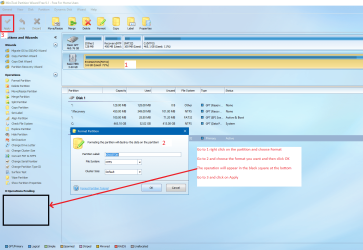
Ok mate now use that software I linked Partition Wizard and do as in the pic
 

Attachments

  • WIPE 2.PNG
    WIPE 2.PNG
    292.3 KB · Views: 5

My Computer My Computer

At a glance

Desk1 7 Home Prem / Desk2 10 Pro / Main lap A...Desk1 i5 3750K / Laptop i7 GTX 860M / Desk2 i...Desk1 8GB (1866) / Desk2 16GB (1333) / Laptop...Desk 1& 2NVidia GTX 650 & Laptops on board Intel
Computer type
PC/Desktop
Computer Manufacturer/Model Number
Own build (new) Desk1 / Asus ROG Win 7 / Desk2 1st build
OS
Desk1 7 Home Prem / Desk2 10 Pro / Main lap Asus ROG 10 Pro 2 laptop Toshiba 7 Pro Asus P2520 7 & 10
CPU
Desk1 i5 3750K / Laptop i7 GTX 860M / Desk2 i5 2500
Motherboard
Desk1 Asus P877-V / Desk2 Gigabyte H67 UD3H / Laptop ?
Memory
Desk1 8GB (1866) / Desk2 16GB (1333) / Laptop 8Gb DDR3
Graphics Card(s)
Desk 1& 2NVidia GTX 650 & Laptops on board Intel
Sound Card
Desk 1 & 2 -XONAR DG Realtek High Def audio Laptop
Monitor(s) Displays
Desk 1 Benq HD 2450 / Desk2 Philips 24" / Laptop 17.5"
Screen Resolution
1920x1080 D1 & D2 & Laptop 1
Hard Drives
Desk1 Samsung 120GB 830 SSD
Asus ROG 256GB 850 Pro SSD
Desk2 Samsung 840 256 SSD
Toshiba 120GB EVO
PSU
Desk 1 Corsair HX 1050/ Laptop ? / Desk 2 Corsair HX 650
Case
Desk 1 Cooler HAF XM ? Toshiba laptop / Desk2 Coolermaster
Cooling
Fans on all Desk1 -2 Desk2 - all Coolermasters 5 Laptop ?
Keyboard
Desk 1 MS Sidewinder X6 Desk 2 MS Sidewinder X 4
Mouse
Desk 1&2 - Gigabyte MS 900 gamer - laptop - Logitec wireless
Internet Speed
ADSL2+
Other Info
One other Desktop (tester) and spare Toshba laptop both with SSD's
Running Kaspersky 2016 ISS on all machines config'd identically
Logitec audio stereo systems on each machine (x3)
Canon MG5250MFC
Router/modem TP-Link running WPA2SK
The sequence I would do on 32GB flash drive with the Partition Wizard:
- Delete all partitions.
- Format
- Apply

It can be that the 32GB flash drive is damaged, that's why it doesn't format.
 

My Computers My Computers

  • At a glance

    Windows 7 HP 64i5 6600K - 800MHz to 4200MHz4+4G GSkill DDR4 3000IG - Intel 530
    Computer type
    PC/Desktop
    Computer Manufacturer/Model Number
    custom build
    OS
    Windows 7 HP 64
    CPU
    i5 6600K - 800MHz to 4200MHz
    Motherboard
    GA-Z170-HD3P
    Memory
    4+4G GSkill DDR4 3000
    Graphics Card(s)
    IG - Intel 530
    Monitor(s) Displays
    Samsung 226BW
    Screen Resolution
    1680x1050
    Hard Drives
    (1) -1 SM951 – 128GB M.2 AHCI PCIe SSD drive for Windows 7 and Lubuntu
    (2) -1 WD SATA 3 - 1T for Data
    (3) -1 WD SATA 3 - 1T for backup
    PSU
    Thermaltake 450W TR2 gold
    Keyboard
    Old and good Chicony mechanical keyboard
    Mouse
    Logitech mX performance - 9 buttons (had to disable some)
    Internet Speed
    500Mb/s
    Browser
    Firefox 64
    Other Info
    TinyWall firewall
  • At a glance

    Windows 7 Proi7-4500U 800MHz to 3.0GHz(4+4)G DDR3 1600IG intel 4400 + NVIDIA GeForce GT 745M
    Computer type
    Laptop
    System Manufacturer/Model Number
    Asus Q550LF
    OS
    Windows 7 Pro
    CPU
    i7-4500U 800MHz to 3.0GHz
    Motherboard
    Asus Q550LF
    Memory
    (4+4)G DDR3 1600
    Graphics Card(s)
    IG intel 4400 + NVIDIA GeForce GT 745M
    Sound Card
    Realtek
    Monitor(s) Displays
    LG Display LP156WF4-SPH1
    Screen Resolution
    1920 x 1080
    Hard Drives
    BX500 120G SSD for Windows and programs +
    1T HDD for data
    Internet Speed
    500 Mb/s
    Browser
    Firefox
    Other Info
    TinyWall firewall
Ok mate now use that software I linked Partition Wizard and do as in the pic

I tried it, but it still did not work. :shock:

I think this flash drive is just broken that's sad. :(
(It's an R2-D2 looked so amazing lol)
 

My Computer My Computer

At a glance

Windows 7 Ultimate x64Intel Pentium G32588GB DDR3 1333MHzPalit GT 730 128-bit
Computer type
PC/Desktop
OS
Windows 7 Ultimate x64
CPU
Intel Pentium G3258
Memory
8GB DDR3 1333MHz
Graphics Card(s)
Palit GT 730 128-bit
The sequence I would do on 32GB flash drive with the Partition Wizard:
- Delete all partitions.
- Format
- Apply

It can be that the 32GB flash drive is damaged, that's why it doesn't format.

I tried that also, but still nothing. :(

Now, I really think that this flash drive is damaged.

Thanks anyway :D
 

My Computer My Computer

At a glance

Windows 7 Ultimate x64Intel Pentium G32588GB DDR3 1333MHzPalit GT 730 128-bit
Computer type
PC/Desktop
OS
Windows 7 Ultimate x64
CPU
Intel Pentium G3258
Memory
8GB DDR3 1333MHz
Graphics Card(s)
Palit GT 730 128-bit

My Computer My Computer

At a glance

Desk1 7 Home Prem / Desk2 10 Pro / Main lap A...Desk1 i5 3750K / Laptop i7 GTX 860M / Desk2 i...Desk1 8GB (1866) / Desk2 16GB (1333) / Laptop...Desk 1& 2NVidia GTX 650 & Laptops on board Intel
Computer type
PC/Desktop
Computer Manufacturer/Model Number
Own build (new) Desk1 / Asus ROG Win 7 / Desk2 1st build
OS
Desk1 7 Home Prem / Desk2 10 Pro / Main lap Asus ROG 10 Pro 2 laptop Toshiba 7 Pro Asus P2520 7 & 10
CPU
Desk1 i5 3750K / Laptop i7 GTX 860M / Desk2 i5 2500
Motherboard
Desk1 Asus P877-V / Desk2 Gigabyte H67 UD3H / Laptop ?
Memory
Desk1 8GB (1866) / Desk2 16GB (1333) / Laptop 8Gb DDR3
Graphics Card(s)
Desk 1& 2NVidia GTX 650 & Laptops on board Intel
Sound Card
Desk 1 & 2 -XONAR DG Realtek High Def audio Laptop
Monitor(s) Displays
Desk 1 Benq HD 2450 / Desk2 Philips 24" / Laptop 17.5"
Screen Resolution
1920x1080 D1 & D2 & Laptop 1
Hard Drives
Desk1 Samsung 120GB 830 SSD
Asus ROG 256GB 850 Pro SSD
Desk2 Samsung 840 256 SSD
Toshiba 120GB EVO
PSU
Desk 1 Corsair HX 1050/ Laptop ? / Desk 2 Corsair HX 650
Case
Desk 1 Cooler HAF XM ? Toshiba laptop / Desk2 Coolermaster
Cooling
Fans on all Desk1 -2 Desk2 - all Coolermasters 5 Laptop ?
Keyboard
Desk 1 MS Sidewinder X6 Desk 2 MS Sidewinder X 4
Mouse
Desk 1&2 - Gigabyte MS 900 gamer - laptop - Logitec wireless
Internet Speed
ADSL2+
Other Info
One other Desktop (tester) and spare Toshba laptop both with SSD's
Running Kaspersky 2016 ISS on all machines config'd identically
Logitec audio stereo systems on each machine (x3)
Canon MG5250MFC
Router/modem TP-Link running WPA2SK
I realize that this thread is a few months old; i hope it's not too late to save R2D2 :)

No your drive may well be perfectly fine. I had all the same symptoms as you, exactly. (and thanks for the tip about minitool partition wizard, while waiting for the download I happened to find the solution).

Of course, I can't be certain that you have what I have, but every detail of your problem was identical to mine. And in the end, not only can i solve the problem, but I can also recreate it manually!! (and then solve it again -- this has to count as reflecting some underlying bug is diskpart or perhaps even a flaw in the whole disk/volume/partition design (which i never understood anyway).

Ok, the "problem" of the Unuseable disk is due to the fact that somehow the partition got deleted. And you can't format a disk that has no partition. So the solution is just to create a partition with diskpart:

-----------------------------
DISKPART> lis dis

Disk ### Status Size Free Dyn Gpt
-------- ------------- ------- ------- --- ---
Disk 0 Online 238 GB 0 B
Disk 1 Online 465 GB 201 MB
Disk 2 Online 410 GB 2048 KB
* Disk 3 Online 14 GB 14 GB *

DISKPART> lis par

There are no partitions on this disk to show.

DISKPART> lis vol

Volume ### Ltr Label Fs Type Size Status Info
---------- --- ----------- ----- ---------- ------- --------- --------
Volume 0 D Audio CD CDFS DVD-ROM 432 MB Healthy
Volume 1 J OnePlus Dri CDFS CD-ROM 18 MB Healthy
Volume 2 F SYSTEM FAT32 Partition 100 MB Healthy System
Volume 3 Partition 100 MB Healthy Offline
Volume 4 C NTFS Partition 237 GB Healthy Boot
Volume 5 RAW Partition 450 MB Healthy Hidden
Volume 6 G NTFS Partition 465 GB Healthy
Volume 7 E FUTURE SYS FAT32 Partition 99 MB Healthy
Volume 8 I HP-RAID NTFS Partition 409 GB Healthy
* Volume 9 K Removable 0 B Unusable

-------------------------------------------------------------------------------------------------
It's that Volume 9 (letter K) that is shown to be Unusable now. (Two comments: a few minutes ago, before I solved the problem, volume K had 14GB of data, not 0GB like it has now. And the disk 3, which is the usb flash drive containing K, was an MBR disk. I can't turn the clock back and show you a disk with data. But I did turn the clock back to make the disk unusable so that I could show you the above output).

It seems that with that pesky vol 9 around, and no partitions, I can't execute CLEAN:
-----------------------------------------------------------------------------------------------
DISKPART> clean

DiskPart has encountered an error: Access is denied.
See the System Event Log for more information.
----------------------------------------------------------------------------------------------

all i need to do is to create a primary partition, and then I can clean the disk:
-----------------------------------------------------------------------------------------------
DISKPART> cre par pri

DiskPart succeeded in creating the specified partition.

DISKPART> lis par

Partition ### Type Size Offset
------------- ---------------- ------- -------
* Partition 1 Primary 14 GB 1024 KB

DISKPART> lis vol

Volume ### Ltr Label Fs Type Size Status Info
---------- --- ----------- ----- ---------- ------- --------- --------
Volume 0 D Audio CD CDFS DVD-ROM 432 MB Healthy
Volume 1 J OnePlus Dri CDFS CD-ROM 18 MB Healthy
Volume 2 F SYSTEM FAT32 Partition 100 MB Healthy System
Volume 3 Partition 100 MB Healthy Offline
Volume 4 C NTFS Partition 237 GB Healthy Boot
Volume 5 RAW Partition 450 MB Healthy Hidden
Volume 6 G NTFS Partition 465 GB Healthy
Volume 7 E FUTURE SYS FAT32 Partition 99 MB Healthy
Volume 8 I HP-RAID NTFS Partition 409 GB Healthy
* Volume 9 K RAW Removable 14 GB Healthy

DISKPART> clean

DiskPart succeeded in cleaning the disk.

------------------------------------------------------------------------------------------------------
Isnt that bizaare? Now you'll notice that the volume K is now healthy but RAW. Before this mess happened, it was FAT32, and I can't tell you if file-recovery software will be able to return the files to me. I don't care myself, I've spent enough time recovering the usb key.
Unfortunately, despite the CLEAN, the usb key is still not entirely normal. The first "clean" in the output below is the same output as the successful clean a moment ago. Watch this:
----------------------------------------------------------------------------------------
DISKPART> clean

DiskPart succeeded in cleaning the disk.

DISKPART> lis par

There are no partitions on this disk to show.

DISKPART> lis vol

Volume ### Ltr Label Fs Type Size Status Info
---------- --- ----------- ----- ---------- ------- --------- --------
Volume 0 D Audio CD CDFS DVD-ROM 432 MB Healthy
Volume 1 J OnePlus Dri CDFS CD-ROM 18 MB Healthy
Volume 2 F SYSTEM FAT32 Partition 100 MB Healthy System
Volume 3 Partition 100 MB Healthy Offline
Volume 4 C NTFS Partition 237 GB Healthy Boot
Volume 5 RAW Partition 450 MB Healthy Hidden
Volume 6 G NTFS Partition 465 GB Healthy
Volume 7 E FUTURE SYS FAT32 Partition 99 MB Healthy
Volume 8 I HP-RAID NTFS Partition 409 GB Healthy
* Volume 9 K Removable 0 B Unusable

DISKPART> del vol

Virtual Disk Service error:
The object is not found.

--------------------------------------------------------------------------------------------------
So CLEAN did remove the partition, but left this zombie volume lying around. But I sensed that I was on a roll, so I tried to make some jam:) --If diskpart would only CLEAN the disk if it had a partition, perhaps it wuold only remove the volume under the same condition. And amazingly, that turned out to be true:
-------------------------------------------------------------------------------------------------------
DISKPART> lis vol

Volume ### Ltr Label Fs Type Size Status Info
---------- --- ----------- ----- ---------- ------- --------- --------
Volume 0 D Audio CD CDFS DVD-ROM 432 MB Healthy
Volume 1 J OnePlus Dri CDFS CD-ROM 18 MB Healthy
Volume 2 F SYSTEM FAT32 Partition 100 MB Healthy System
Volume 3 Partition 100 MB Healthy Offline
Volume 4 C NTFS Partition 237 GB Healthy Boot
Volume 5 RAW Partition 450 MB Healthy Hidden
Volume 6 G NTFS Partition 465 GB Healthy
Volume 7 E FUTURE SYS FAT32 Partition 99 MB Healthy
Volume 8 I HP-RAID NTFS Partition 409 GB Healthy
* Volume 9 K Removable 0 B Unusable

DISKPART> del vol

Virtual Disk Service error:
The object is not found.

DISKPART> cre par pri

DiskPart succeeded in creating the specified partition.

DISKPART> lis vol

Volume ### Ltr Label Fs Type Size Status Info
---------- --- ----------- ----- ---------- ------- --------- --------
Volume 0 D Audio CD CDFS DVD-ROM 432 MB Healthy
Volume 1 J OnePlus Dri CDFS CD-ROM 18 MB Healthy
Volume 2 F SYSTEM FAT32 Partition 100 MB Healthy System
Volume 3 Partition 100 MB Healthy Offline
Volume 4 C NTFS Partition 237 GB Healthy Boot
Volume 5 RAW Partition 450 MB Healthy Hidden
Volume 6 G NTFS Partition 465 GB Healthy
Volume 7 E FUTURE SYS FAT32 Partition 99 MB Healthy
Volume 8 I HP-RAID NTFS Partition 409 GB Healthy
* Volume 9 K RAW Removable 14 GB Healthy

DISKPART> del vol

DiskPart successfully deleted the volume.

DISKPART> LIS VOL

Volume ### Ltr Label Fs Type Size Status Info
---------- --- ----------- ----- ---------- ------- --------- --------
Volume 0 D Audio CD CDFS DVD-ROM 432 MB Healthy
Volume 1 J OnePlus Dri CDFS CD-ROM 18 MB Healthy
Volume 2 F SYSTEM FAT32 Partition 100 MB Healthy System
Volume 3 Partition 100 MB Healthy Offline
Volume 4 C NTFS Partition 237 GB Healthy Boot
Volume 5 RAW Partition 450 MB Healthy Hidden
Volume 6 G NTFS Partition 465 GB Healthy
Volume 7 E FUTURE SYS FAT32 Partition 99 MB Healthy
Volume 8 I HP-RAID NTFS Partition 409 GB Healthy
Volume 9 K Removable 0 B Unusable

----------------------------------------------------------------------------------------------------

I did not succeed in making volume k go away. But I did reduce it to 0B.
I am next going to turn this unuseable volume of 0B into a "healthy" on of 14GB just by adding a primary partition, and then I will use the Minitool to wipe the disk:
----------------------------------------------------------------------------------------------------

DISKPART> cre par pri

DiskPart succeeded in creating the specified partition.

DISKPART> lis vol

Volume ### Ltr Label Fs Type Size Status Info
---------- --- ----------- ----- ---------- ------- --------- --------
Volume 0 D Audio CD CDFS DVD-ROM 432 MB Healthy
Volume 2 F SYSTEM FAT32 Partition 100 MB Healthy System
Volume 3 Partition 100 MB Healthy Offline
Volume 4 C NTFS Partition 237 GB Healthy Boot
Volume 5 RAW Partition 450 MB Healthy Hidden
Volume 6 G NTFS Partition 465 GB Healthy
Volume 7 E FUTURE SYS FAT32 Partition 99 MB Healthy
Volume 8 I HP-RAID NTFS Partition 409 GB Healthy
* Volume 9 K RAW Removable 14 GB Healthy
---------------------------------------------------------------------------------------------------

Bottom line: if you get 'access denied' while trying to CLEAN a disk, check if you have no partition. If not, use create partition primary to make a partition, and then you can do CLEAN. But it might be better to make the primary partition, and then use a better tool (such as the minitool partition wizard) to wipe the disk.

 

My Computer My Computer

At a glance

Windows 7 Ultimate x86 (32bit)Intel Atom N455 1.66GHz2GBIntel GMA (Graphics Media Accelerator) 3150
Computer Manufacturer/Model Number
Dell Inspiron Mini 1018
OS
Windows 7 Ultimate x86 (32bit)
CPU
Intel Atom N455 1.66GHz
Memory
2GB
Graphics Card(s)
Intel GMA (Graphics Media Accelerator) 3150
Sound Card
RealTek High Definition Audio
Monitor(s) Displays
built-in laptop display
Hard Drives
ST9250315AS
Try shutdown / restart

USB drive had been formatted for Mac. Used disk part to "clean". Got this Access denied error after reformatting the drive. Ultimately what worked was doing a disk check with only Automatically fix file system errors selected, which may or may not have helped. After shutdown / restart I had no more trouble accessing the drive.
 

My Computer My Computer

At a glance

Windows 7, Windows 10, Windows XP3.40 gigahertz AMD Athlon II X2 2703840 MegabytesDisplay ATI Radeon HD 4200
Computer type
PC/Desktop
Computer Manufacturer/Model Number
HP
OS
Windows 7, Windows 10, Windows XP
CPU
3.40 gigahertz AMD Athlon II X2 270
Motherboard
FOXCONN 2AB1 1.00
Memory
3840 Megabytes
Graphics Card(s)
Display ATI Radeon HD 4200
Hard Drives
Hitachi HDS721075CLA332
TOSHIBA DT01ACA200
Antivirus
MSE
Browser
Firefox, Chrome
Am I misreading this thread? 19% completed was posted earlier. Does that mean OP did the nonQuick format on a USB flash drive? If so, would that operation shorten the usage-life of that USB flash drive? SSDs similar cause & effect, correct?
 

My Computer My Computer

At a glance

Windows 7 Professional 64-bitDesktop i5; Acers i5 & i7desktop 16GB; 1 Acer 8GB & 1 Acer 16GB
Computer type
PC/Desktop
Computer Manufacturer/Model Number
Antec desktop; Acer Aspire laptops
OS
Windows 7 Professional 64-bit
CPU
Desktop i5; Acers i5 & i7
Memory
desktop 16GB; 1 Acer 8GB & 1 Acer 16GB
Hard Drives
1TB split into 2 equal partitions [OS and data] usable by RJS
Internet Speed
AT&T DSL
Browser
FF, GChrome, msIE
Other Info
Windows 7 Firewall, Emsisoft AM/AV, MSE [scan-only], SpywareBlaster, Ruiware/BillP combine
Back
Top