I realize that this thread is a few months old; i hope it's not too late to save R2D2

No your drive may well be perfectly fine. I had all the same symptoms as you, exactly. (and thanks for the tip about minitool partition wizard, while waiting for the download I happened to find the solution).
Of course, I can't be certain that you have what I have, but every detail of your problem was identical to mine. And in the end, not only can i solve the problem, but I can also recreate it manually!! (and then solve it again -- this has to count as reflecting some underlying bug is diskpart or perhaps even a flaw in the whole disk/volume/partition design (which i never understood anyway).
Ok, the "problem" of the Unuseable disk is due to the fact that somehow the partition got deleted. And you can't format a disk that has no partition. So the solution is just to create a partition with diskpart:
-----------------------------
DISKPART> lis dis
Disk ### Status Size Free Dyn Gpt
-------- ------------- ------- ------- --- ---
Disk 0 Online 238 GB 0 B
Disk 1 Online 465 GB 201 MB
Disk 2 Online 410 GB 2048 KB
* Disk 3 Online 14 GB 14 GB *
DISKPART> lis par
There are no partitions on this disk to show.
DISKPART> lis vol
Volume ### Ltr Label Fs Type Size Status Info
---------- --- ----------- ----- ---------- ------- --------- --------
Volume 0 D Audio CD CDFS DVD-ROM 432 MB Healthy
Volume 1 J OnePlus Dri CDFS CD-ROM 18 MB Healthy
Volume 2 F SYSTEM FAT32 Partition 100 MB Healthy System
Volume 3 Partition 100 MB Healthy Offline
Volume 4 C NTFS Partition 237 GB Healthy Boot
Volume 5 RAW Partition 450 MB Healthy Hidden
Volume 6 G NTFS Partition 465 GB Healthy
Volume 7 E FUTURE SYS FAT32 Partition 99 MB Healthy
Volume 8 I HP-RAID NTFS Partition 409 GB Healthy
* Volume 9 K Removable 0 B Unusable
-------------------------------------------------------------------------------------------------
It's that Volume 9 (letter K) that is shown to be Unusable now. (Two comments: a few minutes ago, before I solved the problem, volume K had 14GB of data, not 0GB like it has now. And the disk 3, which is the usb flash drive containing K, was an MBR disk. I can't turn the clock back and show you a disk with data. But I did turn the clock back to make the disk unusable so that I could show you the above output).
It seems that with that pesky vol 9 around, and no partitions, I can't execute CLEAN:
-----------------------------------------------------------------------------------------------
DISKPART> clean
DiskPart has encountered an error: Access is denied.
See the System Event Log for more information.
----------------------------------------------------------------------------------------------
all i need to do is to create a primary partition, and then I can clean the disk:
-----------------------------------------------------------------------------------------------
DISKPART> cre par pri
DiskPart succeeded in creating the specified partition.
DISKPART> lis par
Partition ### Type Size Offset
------------- ---------------- ------- -------
* Partition 1 Primary 14 GB 1024 KB
DISKPART> lis vol
Volume ### Ltr Label Fs Type Size Status Info
---------- --- ----------- ----- ---------- ------- --------- --------
Volume 0 D Audio CD CDFS DVD-ROM 432 MB Healthy
Volume 1 J OnePlus Dri CDFS CD-ROM 18 MB Healthy
Volume 2 F SYSTEM FAT32 Partition 100 MB Healthy System
Volume 3 Partition 100 MB Healthy Offline
Volume 4 C NTFS Partition 237 GB Healthy Boot
Volume 5 RAW Partition 450 MB Healthy Hidden
Volume 6 G NTFS Partition 465 GB Healthy
Volume 7 E FUTURE SYS FAT32 Partition 99 MB Healthy
Volume 8 I HP-RAID NTFS Partition 409 GB Healthy
* Volume 9 K RAW Removable 14 GB Healthy
DISKPART> clean
DiskPart succeeded in cleaning the disk.
------------------------------------------------------------------------------------------------------
Isnt that bizaare? Now you'll notice that the volume K is now healthy but RAW. Before this mess happened, it was FAT32, and I can't tell you if file-recovery software will be able to return the files to me. I don't care myself, I've spent enough time recovering the usb key.
Unfortunately, despite the CLEAN, the usb key is still not entirely normal. The first "clean" in the output below is the same output as the successful clean a moment ago. Watch this:
----------------------------------------------------------------------------------------
DISKPART> clean
DiskPart succeeded in cleaning the disk.
DISKPART> lis par
There are no partitions on this disk to show.
DISKPART> lis vol
Volume ### Ltr Label Fs Type Size Status Info
---------- --- ----------- ----- ---------- ------- --------- --------
Volume 0 D Audio CD CDFS DVD-ROM 432 MB Healthy
Volume 1 J OnePlus Dri CDFS CD-ROM 18 MB Healthy
Volume 2 F SYSTEM FAT32 Partition 100 MB Healthy System
Volume 3 Partition 100 MB Healthy Offline
Volume 4 C NTFS Partition 237 GB Healthy Boot
Volume 5 RAW Partition 450 MB Healthy Hidden
Volume 6 G NTFS Partition 465 GB Healthy
Volume 7 E FUTURE SYS FAT32 Partition 99 MB Healthy
Volume 8 I HP-RAID NTFS Partition 409 GB Healthy
* Volume 9 K Removable 0 B Unusable
DISKPART> del vol
Virtual Disk Service error:
The object is not found.
--------------------------------------------------------------------------------------------------
So CLEAN did remove the partition, but left this zombie volume lying around. But I sensed that I was on a roll, so I tried to make some jam
--If diskpart would only CLEAN the disk if it had a partition, perhaps it wuold only remove the volume under the same condition. And amazingly, that turned out to be true:
-------------------------------------------------------------------------------------------------------
DISKPART> lis vol
Volume ### Ltr Label Fs Type Size Status Info
---------- --- ----------- ----- ---------- ------- --------- --------
Volume 0 D Audio CD CDFS DVD-ROM 432 MB Healthy
Volume 1 J OnePlus Dri CDFS CD-ROM 18 MB Healthy
Volume 2 F SYSTEM FAT32 Partition 100 MB Healthy System
Volume 3 Partition 100 MB Healthy Offline
Volume 4 C NTFS Partition 237 GB Healthy Boot
Volume 5 RAW Partition 450 MB Healthy Hidden
Volume 6 G NTFS Partition 465 GB Healthy
Volume 7 E FUTURE SYS FAT32 Partition 99 MB Healthy
Volume 8 I HP-RAID NTFS Partition 409 GB Healthy
* Volume 9 K Removable 0 B Unusable
DISKPART> del vol
Virtual Disk Service error:
The object is not found.
DISKPART> cre par pri
DiskPart succeeded in creating the specified partition.
DISKPART> lis vol
Volume ### Ltr Label Fs Type Size Status Info
---------- --- ----------- ----- ---------- ------- --------- --------
Volume 0 D Audio CD CDFS DVD-ROM 432 MB Healthy
Volume 1 J OnePlus Dri CDFS CD-ROM 18 MB Healthy
Volume 2 F SYSTEM FAT32 Partition 100 MB Healthy System
Volume 3 Partition 100 MB Healthy Offline
Volume 4 C NTFS Partition 237 GB Healthy Boot
Volume 5 RAW Partition 450 MB Healthy Hidden
Volume 6 G NTFS Partition 465 GB Healthy
Volume 7 E FUTURE SYS FAT32 Partition 99 MB Healthy
Volume 8 I HP-RAID NTFS Partition 409 GB Healthy
* Volume 9 K RAW Removable 14 GB Healthy
DISKPART> del vol
DiskPart successfully deleted the volume.
DISKPART> LIS VOL
Volume ### Ltr Label Fs Type Size Status Info
---------- --- ----------- ----- ---------- ------- --------- --------
Volume 0 D Audio CD CDFS DVD-ROM 432 MB Healthy
Volume 1 J OnePlus Dri CDFS CD-ROM 18 MB Healthy
Volume 2 F SYSTEM FAT32 Partition 100 MB Healthy System
Volume 3 Partition 100 MB Healthy Offline
Volume 4 C NTFS Partition 237 GB Healthy Boot
Volume 5 RAW Partition 450 MB Healthy Hidden
Volume 6 G NTFS Partition 465 GB Healthy
Volume 7 E FUTURE SYS FAT32 Partition 99 MB Healthy
Volume 8 I HP-RAID NTFS Partition 409 GB Healthy
Volume 9 K Removable 0 B Unusable
----------------------------------------------------------------------------------------------------
I did not succeed in making volume k go away. But I did reduce it to 0B.
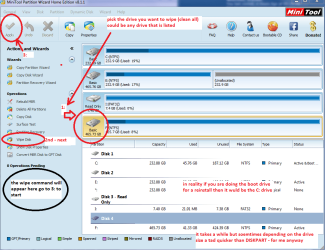
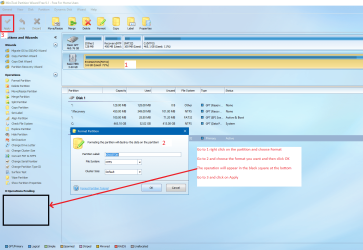
I am next going to turn this unuseable volume of 0B into a "healthy" on of 14GB just by adding a primary partition, and then I will use the Minitool to wipe the disk:
----------------------------------------------------------------------------------------------------
DISKPART> cre par pri
DiskPart succeeded in creating the specified partition.
DISKPART> lis vol
Volume ### Ltr Label Fs Type Size Status Info
---------- --- ----------- ----- ---------- ------- --------- --------
Volume 0 D Audio CD CDFS DVD-ROM 432 MB Healthy
Volume 2 F SYSTEM FAT32 Partition 100 MB Healthy System
Volume 3 Partition 100 MB Healthy Offline
Volume 4 C NTFS Partition 237 GB Healthy Boot
Volume 5 RAW Partition 450 MB Healthy Hidden
Volume 6 G NTFS Partition 465 GB Healthy
Volume 7 E FUTURE SYS FAT32 Partition 99 MB Healthy
Volume 8 I HP-RAID NTFS Partition 409 GB Healthy
* Volume 9 K RAW Removable 14 GB Healthy
---------------------------------------------------------------------------------------------------
Bottom line: if you get 'access denied' while trying to CLEAN a disk, check if you have no partition. If not, use create partition primary to make a partition, and then you can do CLEAN. But it might be better to make the primary partition, and then use a better tool (such as the minitool partition wizard) to wipe the disk.