Long black screen during boot after reinstalling Windows 7 on SSD

trexiic

New member
Local time
9:12 AM
Messages
49
Hi,

Sorry for my bad English, I speak French.

I have a laptop (NP355V4C-S01CA) that had a HDD with Windows 7 on it: It was working fine.
I updated to Windows 10: It was still working fine.
I upgraded to an SSD (still on Windows 10): It was still working fine.
Now I reinstalled Windows 7 on it, and I have a problem.

When I boot my computer, I see the Windows 7 boot screen logo, then everything goes black for 1-2 minutes (which is way longer than it used to take to boot, even on the HDD, then the logon screen appears and everything works fine.

For those who want to watch a black screen for 2 minutes: Windows 7 black screen - YouTube

I tried:

  • Reinstalling Windows 7 several times, both with my original disk and the online ISO.

  • CHKDSK reported no errors.

  • Safe mode is working fine, no black screen.

  • I installed every drivers for every inputs (USB, SD, DVD, etc...)

  • In the BIOS, I disabled everything on the boot order tab except the SSD.

  • I ran MalwareBytes and there are no viruses.

  • I ran Autoruns and there is nothing there either.

Can somebody help me?

Thanks!
 

My Computer My Computer

At a glance

windows 7 64 bitsa10-4600m6gb7670m 1gb + 7660g
Computer type
Laptop
Computer Manufacturer/Model Number
samsung
OS
windows 7 64 bits
CPU
a10-4600m
Motherboard
sdbsfb
Memory
6gb
Graphics Card(s)
7670m 1gb + 7660g
Hard Drives
750go
Antivirus
avira
Browser
chrome
When you say "Win 7 Original Disk", where did it come from? Is it a copy of what you had before or is it a Disk you purchased in a store? == You might have some files incorrect. Can you post an image of your Disk Management from this. Disk Management - Post a Screen Capture Image
 

My Computer My Computer

At a glance

Windows 7 Home Premium 32-Bit - Build 7600 SP1Intel Core i3-2120 3.30GhzKingston 4 GB DDR3 1333 mhzAMD Radeon HD6670
Computer type
PC/Desktop
Computer Manufacturer/Model Number
Custom Build
OS
Windows 7 Home Premium 32-Bit - Build 7600 SP1
CPU
Intel Core i3-2120 3.30Ghz
Motherboard
Asus P8Z68-V LX Intel Z68 Socket H2 ATX
Memory
Kingston 4 GB DDR3 1333 mhz
Graphics Card(s)
AMD Radeon HD6670
Sound Card
Sound Blaster Audigy SE 24-Bit
Monitor(s) Displays
Asus VE228
Screen Resolution
1440 X 900
Hard Drives
OCZ Vertex 3 120 GB Sata 3 SSD ==
Kingston SH103/S3 120 G Hyper X 120 GB SSD ==
Western Digital 500 GB Caviar Green 7200 RPM ==
PSU
Corsair CX600M == 600 Watt
Case
NZXT Apollo - Silver with Clear Side Panel
Cooling
Three 120 mm Fans
Keyboard
Microsoft Natural 4000
Mouse
Microsoft Custom Optical 3000
Internet Speed
AT&T Fiber Optic Wireless Network
Antivirus
Microsoft Security Essentials
Browser
Chrome
Other Info
120 mm Blue LED Fan -- Three Blue LED Lazer Light Sticks
When installing win 7 did you do a clean install, deleting all partitions?
Did you used a Samsung recovery disk or a MS with the COA key?

If it boots normally on safe mode is a wrong driver or a program.
Open Device manager and look if there is a one with a yellow alert.
Run msconfig and disable all non MS start up programs and services.
 

My Computers My Computers

  • At a glance

    Windows 7 HP 64i5 6600K - 800MHz to 4200MHz4+4G GSkill DDR4 3000IG - Intel 530
    Computer type
    PC/Desktop
    Computer Manufacturer/Model Number
    custom build
    OS
    Windows 7 HP 64
    CPU
    i5 6600K - 800MHz to 4200MHz
    Motherboard
    GA-Z170-HD3P
    Memory
    4+4G GSkill DDR4 3000
    Graphics Card(s)
    IG - Intel 530
    Monitor(s) Displays
    Samsung 226BW
    Screen Resolution
    1680x1050
    Hard Drives
    (1) -1 SM951 – 128GB M.2 AHCI PCIe SSD drive for Windows 7 and Lubuntu
    (2) -1 WD SATA 3 - 1T for Data
    (3) -1 WD SATA 3 - 1T for backup
    PSU
    Thermaltake 450W TR2 gold
    Keyboard
    Old and good Chicony mechanical keyboard
    Mouse
    Logitech mX performance - 9 buttons (had to disable some)
    Internet Speed
    500Mb/s
    Browser
    Firefox 64
    Other Info
    TinyWall firewall
  • At a glance

    Windows 7 Proi7-4500U 800MHz to 3.0GHz(4+4)G DDR3 1600IG intel 4400 + NVIDIA GeForce GT 745M
    Computer type
    Laptop
    System Manufacturer/Model Number
    Asus Q550LF
    OS
    Windows 7 Pro
    CPU
    i7-4500U 800MHz to 3.0GHz
    Motherboard
    Asus Q550LF
    Memory
    (4+4)G DDR3 1600
    Graphics Card(s)
    IG intel 4400 + NVIDIA GeForce GT 745M
    Sound Card
    Realtek
    Monitor(s) Displays
    LG Display LP156WF4-SPH1
    Screen Resolution
    1920 x 1080
    Hard Drives
    BX500 120G SSD for Windows and programs +
    1T HDD for data
    Internet Speed
    500 Mb/s
    Browser
    Firefox
    Other Info
    TinyWall firewall
Thanks for the replies!

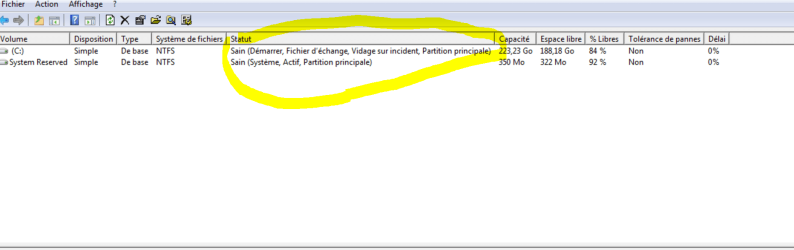
1482271252-disk-management.png

bigmck:
This is the Disk Management window. It's in French, if you need something translated, tell me.
I made a backup just after purchasing my laptop (there was a tutorial on this website), but now it's running on an ISO from the Microsoft's website. Both installs have the same problem

Megahertz07:
I deleted every partitions, so I had only one empty disk showing up during the install, and I installed it on this one.
The second time it was on Microsoft's website using the key.
I opened Device manager and there was one with a yellow alert: Ethernet. I installed my LAN drivers and rebooted, but the problem still occurs. I downloaded my other drivers from Samsung's and AMD's website.
1482272969-services.png

These are the only non-MS services showing up on msconfig, and after disabling them the problem still occurs.

The laptop has the same problem with sleep mode too. If I wake it up, the screen will stay black for a minute, then the lock screen will appears.

Any other suggestions?
 

My Computer My Computer

At a glance

windows 7 64 bitsa10-4600m6gb7670m 1gb + 7660g
Computer type
Laptop
Computer Manufacturer/Model Number
samsung
OS
windows 7 64 bits
CPU
a10-4600m
Motherboard
sdbsfb
Memory
6gb
Graphics Card(s)
7670m 1gb + 7660g
Hard Drives
750go
Antivirus
avira
Browser
chrome
trexiic, could you supply a screen shot of Start Up which is the Demarrage tab in msconfig on your computer.

This will tell us what is being loaded when Windows starts.

You will need to find out what is causing your Ethernet problem. Check what driver you have for it & then search the web for the right one if necessary.
 

My Computer My Computer

At a glance

Windows 7 Home Premium 64 bit sp1Intel i5 3570 3.4Ghz Ivy Bridge SKT 1155 quad...G-Skill Rip Jaws 16Gb (8x2) DDR3 -1600 PC3 12...Gigabyte NVIDIA GT610 1Gb DDR3 810/1200 PCI-E...
Computer type
PC/Desktop
Computer Manufacturer/Model Number
Self built using existing case
OS
Windows 7 Home Premium 64 bit sp1
CPU
Intel i5 3570 3.4Ghz Ivy Bridge SKT 1155 quad core
Motherboard
Gigabyte Z77-HD3 SKT 1155 2xSata 3, 4x USB 3.0
Memory
G-Skill Rip Jaws 16Gb (8x2) DDR3 -1600 PC3 12800 CL 10 red
Graphics Card(s)
Gigabyte NVIDIA GT610 1Gb DDR3 810/1200 PCI-E 2.0 Silent
Sound Card
NVIDIA High Definition & Realtech High Definition Audio
Monitor(s) Displays
2 x Philips 226V4L 16:9 aspect ratio
Screen Resolution
1920 x 1080 HD
Hard Drives
Samsung 840 Pro 256gb SSD, SATA 3.
Hitachi Touro Portable 1tb, USB 3.0 HDD used for image b/ups.
PSU
Corsair VS450
Case
Codeng
Cooling
PSU fan & CPU fan
Keyboard
Logitech
Mouse
Logitech Wireless trackball M570
Internet Speed
Wireless 3G. 3mg down & 550kb up.
Antivirus
Bitdefender Internet Security 2020
Browser
Opera (Current Version) & Firefox
Other Info
MS Office 2013 Pro. Davis weather station software. MGE Nova 600 avr UPS.
Ranger4: The start up tab is completely empty, and I fix the Ethernet problem by download the needed drivers.
 

My Computer My Computer

At a glance

windows 7 64 bitsa10-4600m6gb7670m 1gb + 7660g
Computer type
Laptop
Computer Manufacturer/Model Number
samsung
OS
windows 7 64 bits
CPU
a10-4600m
Motherboard
sdbsfb
Memory
6gb
Graphics Card(s)
7670m 1gb + 7660g
Hard Drives
750go
Antivirus
avira
Browser
chrome
Glad you got the Ethernet fixed. == On your Disk Management, tell me in English what the circled part says.
 

Attachments

  • Capture.PNG
    Capture.PNG
    36.9 KB · Views: 4

My Computer My Computer

At a glance

Windows 7 Home Premium 32-Bit - Build 7600 SP1Intel Core i3-2120 3.30GhzKingston 4 GB DDR3 1333 mhzAMD Radeon HD6670
Computer type
PC/Desktop
Computer Manufacturer/Model Number
Custom Build
OS
Windows 7 Home Premium 32-Bit - Build 7600 SP1
CPU
Intel Core i3-2120 3.30Ghz
Motherboard
Asus P8Z68-V LX Intel Z68 Socket H2 ATX
Memory
Kingston 4 GB DDR3 1333 mhz
Graphics Card(s)
AMD Radeon HD6670
Sound Card
Sound Blaster Audigy SE 24-Bit
Monitor(s) Displays
Asus VE228
Screen Resolution
1440 X 900
Hard Drives
OCZ Vertex 3 120 GB Sata 3 SSD ==
Kingston SH103/S3 120 G Hyper X 120 GB SSD ==
Western Digital 500 GB Caviar Green 7200 RPM ==
PSU
Corsair CX600M == 600 Watt
Case
NZXT Apollo - Silver with Clear Side Panel
Cooling
Three 120 mm Fans
Keyboard
Microsoft Natural 4000
Mouse
Microsoft Custom Optical 3000
Internet Speed
AT&T Fiber Optic Wireless Network
Antivirus
Microsoft Security Essentials
Browser
Chrome
Other Info
120 mm Blue LED Fan -- Three Blue LED Lazer Light Sticks
The first line says: Healthy (Boot, Page File, Crash Dump, Main Partition)
The second line says : Healthy (System, Active, Main Partition)
 

My Computer My Computer

At a glance

windows 7 64 bitsa10-4600m6gb7670m 1gb + 7660g
Computer type
Laptop
Computer Manufacturer/Model Number
samsung
OS
windows 7 64 bits
CPU
a10-4600m
Motherboard
sdbsfb
Memory
6gb
Graphics Card(s)
7670m 1gb + 7660g
Hard Drives
750go
Antivirus
avira
Browser
chrome

My Computers My Computers

  • At a glance

    Windows 7 HP 64i5 6600K - 800MHz to 4200MHz4+4G GSkill DDR4 3000IG - Intel 530
    Computer type
    PC/Desktop
    Computer Manufacturer/Model Number
    custom build
    OS
    Windows 7 HP 64
    CPU
    i5 6600K - 800MHz to 4200MHz
    Motherboard
    GA-Z170-HD3P
    Memory
    4+4G GSkill DDR4 3000
    Graphics Card(s)
    IG - Intel 530
    Monitor(s) Displays
    Samsung 226BW
    Screen Resolution
    1680x1050
    Hard Drives
    (1) -1 SM951 – 128GB M.2 AHCI PCIe SSD drive for Windows 7 and Lubuntu
    (2) -1 WD SATA 3 - 1T for Data
    (3) -1 WD SATA 3 - 1T for backup
    PSU
    Thermaltake 450W TR2 gold
    Keyboard
    Old and good Chicony mechanical keyboard
    Mouse
    Logitech mX performance - 9 buttons (had to disable some)
    Internet Speed
    500Mb/s
    Browser
    Firefox 64
    Other Info
    TinyWall firewall
  • At a glance

    Windows 7 Proi7-4500U 800MHz to 3.0GHz(4+4)G DDR3 1600IG intel 4400 + NVIDIA GeForce GT 745M
    Computer type
    Laptop
    System Manufacturer/Model Number
    Asus Q550LF
    OS
    Windows 7 Pro
    CPU
    i7-4500U 800MHz to 3.0GHz
    Motherboard
    Asus Q550LF
    Memory
    (4+4)G DDR3 1600
    Graphics Card(s)
    IG intel 4400 + NVIDIA GeForce GT 745M
    Sound Card
    Realtek
    Monitor(s) Displays
    LG Display LP156WF4-SPH1
    Screen Resolution
    1920 x 1080
    Hard Drives
    BX500 120G SSD for Windows and programs +
    1T HDD for data
    Internet Speed
    500 Mb/s
    Browser
    Firefox
    Other Info
    TinyWall firewall
Boot times can also be extended by your BIOS set-up
Reset it to default values, and make sure the ssd is the primary option.
(dualbooting and changes to graphic card registry entries also extends it)

Roy
 

My Computer My Computer

At a glance

W7 home premium 32bit/W7HP 64bit/w10 tp insid...E5300 dual core3gbNvidia Geforce 7100 Nforce 630i
Computer type
PC/Desktop
Computer Manufacturer/Model Number
medionl/Aspire 6930G/acer x55a
OS
W7 home premium 32bit/W7HP 64bit/w10 tp insider ring
CPU
E5300 dual core
Motherboard
medion MS7366
Memory
3gb
Graphics Card(s)
Nvidia Geforce 7100 Nforce 630i
Monitor(s) Displays
avixc
Internet Speed
n (isp resticted to 72)
Antivirus
mse/pands
Browser
palemoon
Other Info
Belkin Fd7050 n USB using Railink RT2870 drivers, more upto date
Here is the log.

torchwood: The bios is on default settings, I also tried disabling everything except my SSD in the boot order tab. The problem also occurs when waking up the device (sleep mode).
 

Attachments

My Computer My Computer

At a glance

windows 7 64 bitsa10-4600m6gb7670m 1gb + 7660g
Computer type
Laptop
Computer Manufacturer/Model Number
samsung
OS
windows 7 64 bits
CPU
a10-4600m
Motherboard
sdbsfb
Memory
6gb
Graphics Card(s)
7670m 1gb + 7660g
Hard Drives
750go
Antivirus
avira
Browser
chrome
Was the laptop originally equipped with the SSD?

If you replaced the original drive with the SSD, check that the data and power connectors are properly seated (i.e. check that the SSD is properly connected).
 

My Computer My Computer

At a glance

W7 Ultimate SP1, LM19.2 MATE, W10 Home 1703, ...AMD Phenom II x6 1100T, 3.3 GHz12GB DDR3 1333 G-Skill (4GB x 2), G-Skill (2G...NVIDIA GeForce GTX 660
Computer type
PC/Desktop
Computer Manufacturer/Model Number
n/a
OS
W7 Ultimate SP1, LM19.2 MATE, W10 Home 1703, W10 Pro 1703 VM, #All 64 bit
CPU
AMD Phenom II x6 1100T, 3.3 GHz
Motherboard
ASUS M4A88T-M/USB3 (AM3)
Memory
12GB DDR3 1333 G-Skill (4GB x 2), G-Skill (2GB x 2)
Graphics Card(s)
NVIDIA GeForce GTX 660
Sound Card
Realtek?
Monitor(s) Displays
Samsung S23B350
Screen Resolution
1920x1080
Hard Drives
WD Green 2TB (SATA), WD Green 3TB (SATA), WD Blue 4TB (SATA), WD Blue 6TB (SATA)
PSU
Cooler Master
Case
Antec GX300 Tower
Cooling
3x Antec TRICOOL 120mm Fans
Mouse
Wired Optical
Internet Speed
DSL
Antivirus
Avast
Browser
Pale Moon (64 bit)
Other Info
2018-12-27 Upgraded HDDs
2015-12-10 Upgraded case, graphics card, storage
2015-08-15 Upgraded motherboard & RAM
2015-07-15 Upgraded LM17.1 to LM17.2
lehnerus2000:

I replaced the HDD for an SSD after installing Windows 10, and it was working fine. Then I reinstalled Windows 7 and the problem started happening.
 

My Computer My Computer

At a glance

windows 7 64 bitsa10-4600m6gb7670m 1gb + 7660g
Computer type
Laptop
Computer Manufacturer/Model Number
samsung
OS
windows 7 64 bits
CPU
a10-4600m
Motherboard
sdbsfb
Memory
6gb
Graphics Card(s)
7670m 1gb + 7660g
Hard Drives
750go
Antivirus
avira
Browser
chrome
It sounds to me that the problem is not with the SSD replacement but with the change from Win 10 to Win 7. At this point you have had some good guys give you information and nothing yet. I would install Win 7 again except this time go Step by Step with the Tutorial. Clean Install Windows 7 Please understand that when you do this all of your files will be lost so you need to have backup files. You will also have to reinstall your Programs again. Let us know if you need additional help.
 

My Computer My Computer

At a glance

Windows 7 Home Premium 32-Bit - Build 7600 SP1Intel Core i3-2120 3.30GhzKingston 4 GB DDR3 1333 mhzAMD Radeon HD6670
Computer type
PC/Desktop
Computer Manufacturer/Model Number
Custom Build
OS
Windows 7 Home Premium 32-Bit - Build 7600 SP1
CPU
Intel Core i3-2120 3.30Ghz
Motherboard
Asus P8Z68-V LX Intel Z68 Socket H2 ATX
Memory
Kingston 4 GB DDR3 1333 mhz
Graphics Card(s)
AMD Radeon HD6670
Sound Card
Sound Blaster Audigy SE 24-Bit
Monitor(s) Displays
Asus VE228
Screen Resolution
1440 X 900
Hard Drives
OCZ Vertex 3 120 GB Sata 3 SSD ==
Kingston SH103/S3 120 G Hyper X 120 GB SSD ==
Western Digital 500 GB Caviar Green 7200 RPM ==
PSU
Corsair CX600M == 600 Watt
Case
NZXT Apollo - Silver with Clear Side Panel
Cooling
Three 120 mm Fans
Keyboard
Microsoft Natural 4000
Mouse
Microsoft Custom Optical 3000
Internet Speed
AT&T Fiber Optic Wireless Network
Antivirus
Microsoft Security Essentials
Browser
Chrome
Other Info
120 mm Blue LED Fan -- Three Blue LED Lazer Light Sticks
I replaced the HDD for an SSD after installing Windows 10, and it was working fine. Then I reinstalled Windows 7 and the problem started happening.
It sounds to me that the problem is not with the SSD replacement but with the change from Win 10 to Win 7.
I would've thought that a relatively new SSD should be OK.

The reason I asked was if it was a replacement drive, is that it's possible the connectors didn't seat properly when the SSD was installed.

I had a dodgy power connection connected to one of my DVD drives and it caused boot issues.
 

My Computer My Computer

At a glance

W7 Ultimate SP1, LM19.2 MATE, W10 Home 1703, ...AMD Phenom II x6 1100T, 3.3 GHz12GB DDR3 1333 G-Skill (4GB x 2), G-Skill (2G...NVIDIA GeForce GTX 660
Computer type
PC/Desktop
Computer Manufacturer/Model Number
n/a
OS
W7 Ultimate SP1, LM19.2 MATE, W10 Home 1703, W10 Pro 1703 VM, #All 64 bit
CPU
AMD Phenom II x6 1100T, 3.3 GHz
Motherboard
ASUS M4A88T-M/USB3 (AM3)
Memory
12GB DDR3 1333 G-Skill (4GB x 2), G-Skill (2GB x 2)
Graphics Card(s)
NVIDIA GeForce GTX 660
Sound Card
Realtek?
Monitor(s) Displays
Samsung S23B350
Screen Resolution
1920x1080
Hard Drives
WD Green 2TB (SATA), WD Green 3TB (SATA), WD Blue 4TB (SATA), WD Blue 6TB (SATA)
PSU
Cooler Master
Case
Antec GX300 Tower
Cooling
3x Antec TRICOOL 120mm Fans
Mouse
Wired Optical
Internet Speed
DSL
Antivirus
Avast
Browser
Pale Moon (64 bit)
Other Info
2018-12-27 Upgraded HDDs
2015-12-10 Upgraded case, graphics card, storage
2015-08-15 Upgraded motherboard & RAM
2015-07-15 Upgraded LM17.1 to LM17.2
If anyone opens ntbtlog.txt that OP posted above, you will see that a lot of drivers that can't be loaded and keep trying over and over.
What you have to do is to install the appropriate driver.
On the Samsung site NP355V4C-S01CA I found a program that searches for the laptop updates. http://orcaservice.samsungmobile.com/SWUpdate.aspx
Download, install and run it.
 

My Computers My Computers

  • At a glance

    Windows 7 HP 64i5 6600K - 800MHz to 4200MHz4+4G GSkill DDR4 3000IG - Intel 530
    Computer type
    PC/Desktop
    Computer Manufacturer/Model Number
    custom build
    OS
    Windows 7 HP 64
    CPU
    i5 6600K - 800MHz to 4200MHz
    Motherboard
    GA-Z170-HD3P
    Memory
    4+4G GSkill DDR4 3000
    Graphics Card(s)
    IG - Intel 530
    Monitor(s) Displays
    Samsung 226BW
    Screen Resolution
    1680x1050
    Hard Drives
    (1) -1 SM951 – 128GB M.2 AHCI PCIe SSD drive for Windows 7 and Lubuntu
    (2) -1 WD SATA 3 - 1T for Data
    (3) -1 WD SATA 3 - 1T for backup
    PSU
    Thermaltake 450W TR2 gold
    Keyboard
    Old and good Chicony mechanical keyboard
    Mouse
    Logitech mX performance - 9 buttons (had to disable some)
    Internet Speed
    500Mb/s
    Browser
    Firefox 64
    Other Info
    TinyWall firewall
  • At a glance

    Windows 7 Proi7-4500U 800MHz to 3.0GHz(4+4)G DDR3 1600IG intel 4400 + NVIDIA GeForce GT 745M
    Computer type
    Laptop
    System Manufacturer/Model Number
    Asus Q550LF
    OS
    Windows 7 Pro
    CPU
    i7-4500U 800MHz to 3.0GHz
    Motherboard
    Asus Q550LF
    Memory
    (4+4)G DDR3 1600
    Graphics Card(s)
    IG intel 4400 + NVIDIA GeForce GT 745M
    Sound Card
    Realtek
    Monitor(s) Displays
    LG Display LP156WF4-SPH1
    Screen Resolution
    1920 x 1080
    Hard Drives
    BX500 120G SSD for Windows and programs +
    1T HDD for data
    Internet Speed
    500 Mb/s
    Browser
    Firefox
    Other Info
    TinyWall firewall
Back
Top