Can't access 1 website which I've been on 1000's of times

Keithuk

New member
Member
VIP
Local time
9:02 AM
Messages
186
Hi guys.

I've searched on here but nothing useful shows up.

I've had this problem all week. I can't access only one web site which I've been on 1000's of times.

VW Forum - #1 Volkswagen Forum for UK & International Drivers

There is another site from the same owner Skoda Forum - International Car Forum for Skoda’s I thought their server could be down.

I emailed the other admin if he has had any problems he says no.

I'm on loads of forums its only this one I can't access. I've checked the Firewall settings and nothing is blocked for this site. I've even turned the Firewall off just the test. I've done a system restore back to 2016 and its still the same, so I undid that. I'm using IE11 and FireFox and neither will access the site.

I done a Malwarebytes Anti-Malware scan and Avast all clear.

Just see if this link works on your browsers?

Any suggestions?
 
Last edited:

My Computer My Computer

At a glance

Windows 7 Professional 32bit SP1, Windows 10 ...Intel Pentium B970 @ 2.30GHz, DELL DELL Intel...8GBNVIDIA GeForce MX230 (Dell)
Computer type
Laptop
Computer Manufacturer/Model Number
Samsung won't charge Now Dell Inspiron 17 3793
OS
Windows 7 Professional 32bit SP1, Windows 10 Home 64-bit at the moment
CPU
Intel Pentium B970 @ 2.30GHz, DELL DELL Intel 3793 Core i5 1
Motherboard
DELL 0C9WH2
Memory
8GB
Graphics Card(s)
NVIDIA GeForce MX230 (Dell)
Sound Card
Realtek High Definition Audio
Monitor(s) Displays
17.3" HD+ LED Display
Screen Resolution
1920x1040
Hard Drives
99GB (RAID SHIT SSD), Seagate 1TB SATA III DATA

Seagate ST1000LM048-2E7172 (SATA III)
Mouse
USB remote
Antivirus
Avast Free Antivirus 20.10.2442
Browser
Internet Explorer 11, FireFox
Other Info
DELL shit Its the worst laptop design ever made the laptop battery is inbuilt who the hell makes a laptop battery inbuilt DELL shit does, can't wait until the 1TB HDD is replaced and RAID shit is removed
I was able to access the site.

Try the following solutions
Boot your computer
Reset your router (turn it off wait and then turn back on)
Run CCleaner to clear your cookies.
Try a different browser (this is the solution that I think has the most potential)
Temporarily disable your antivirus
 

My Computer My Computer

At a glance

Windows 10, Home Clean InstallIntel Core2 processsor Q8200(2.33Ghz 1333FSB)...6 gbATI Radeon 256MB HD3650
Computer type
PC/Desktop
Computer Manufacturer/Model Number
Dell XPS 420
OS
Windows 10, Home Clean Install
CPU
Intel Core2 processsor Q8200(2.33Ghz 1333FSB) Quad Core Tech
Motherboard
Dell
Memory
6 gb
Graphics Card(s)
ATI Radeon 256MB HD3650
Sound Card
Intergrated 7.1 Channel Audio
Monitor(s) Displays
Dell SP2009W 20"
Hard Drives
640 GB Serial ATA Hard drive
Cooling
Fan
Keyboard
Dell USB Keyboard
Mouse
Dell Premium Optical USB
Internet Speed
DSL 2.85

My Computer My Computer

At a glance

Win-7-Pro64bit 7-H-Prem-64biti7-5930K 2nd i9-9940x both water blocked VRM'...Trident-z 3200C14 2nd Trident-z 3600C16EVGA 1080ti ftw3 2nd Titan Xp both water blocked
Computer type
PC/Desktop
Computer Manufacturer/Model Number
Custom assembled by me :}
OS
Win-7-Pro64bit 7-H-Prem-64bit
CPU
i7-5930K 2nd i9-9940x both water blocked VRM's too
Motherboard
ASUS SABERTOOTH X99 2nd ASUS x299 Apex
Memory
Trident-z 3200C14 2nd Trident-z 3600C16
Graphics Card(s)
EVGA 1080ti ftw3 2nd Titan Xp both water blocked
Sound Card
Built-in Realtek
Monitor(s) Displays
1-AOC G2460PG 24"G-Sync 144Hz/ 2nd 1-ASUS VG248QE 24" 144Hz
Screen Resolution
1920 x 1080 144Hz
Hard Drives
2-Samsung M.2 Evo & Evo Plus
2-Samsung 850 EVO 500GB SSD's/ 3-2.5 W.D. Black 1tb-&3-1tb/3-3.5 WD Black 1tb hdd's
PSU
EVGA SuperNOVA 1000-P2 2nd 1200-P2
Case
2-Corsair Obsidian Series 450D Black ATX Mid Tower
Cooling
Custom water loops
Keyboard
Logitech G710+/ 2nd Logitech G910
Mouse
2-RedDragon M901 Perdition 16400 dpi Gaming mouse = wired
Internet Speed
Comcast Ping 19ms 89.31mbps download speed 6.12mbps upload
Antivirus
Malwarebytes Pro/ Superantispyware Pro
Browser
FireFox & Pale moon
Other Info
2nd ASUS X299 Apex/Intel i9-9940x with Custom water loop/7H-Prem-x64/Corsair 450D case/Ram Trident-z 3600C16 4x8gb / Samsung970Evo plus 500gb SSD/Dual ssd EZ swap evo/PSU EVGA SuperNova 1200w-P2 80+Platinum/GPU Titan Xp /8-ML-140 on push-pull on 2-280GTX rads
Since ut affects more than one browser I suspect a DNS Lookup issue. You can test in a few ways but if you like you can use the add on mentioned in Posts #5 and #9 in this thread:

1 website (only) seems to have gone rogue and won't load properly

If you don't want to install in Firefox - grab a copy of either Palemoon Portable or Cyberfox Portable for test puroposes and run your choice of the two and install the add on. Reason - those browsers both use their own profile independent of Firefox.

Also read this; Pages take a long time and unresponsive-all browsers

If site works when using the add on change DNS:

Paypal login returns "obsolete cipher suite" error then freezes
 

My Computer My Computer

At a glance

Microsoft Windows 7 Home Premium 64-bit 7601 ...AMD C-60 APU with Radeon(tm) HD Graphics4.00 GBAMD Radeon HD 6290 Graphics
Computer type
Laptop
Computer Manufacturer/Model Number
ASUS
OS
Microsoft Windows 7 Home Premium 64-bit 7601 Multiprocessor Free Service Pack 1
CPU
AMD C-60 APU with Radeon(tm) HD Graphics
Motherboard
ASUSTeK COMPUTER INC. X501U
Memory
4.00 GB
Graphics Card(s)
AMD Radeon HD 6290 Graphics
Sound Card
(1) AMD High Definition Audio Device (2) Realtek High Defi
Screen Resolution
1366 x 768 x 32 bits (4294967296 colors) @ 60 Hz
Hard Drives
Hitachi HTS545050A7E380 SATA Disk Device
Antivirus
Comodo CIS & FW, SecureAplus App Whitelisting, Threatfire
Browser
Cyberfox 64bit, Opera 64bit, Airfox
Other Info
Spy-The-Spy, HitmanPro.Alert, Norton Connect Safe, MJRegWatcher, BitDefender TrafficLight, Voodoo Shield, Zemana AntiMalware
Since ut affects more than one browser I suspect a DNS Lookup issue. You can test in a few ways but if you like you can use the add on mentioned in Posts #5 and #9 in this thread:

Thanks for the replies guys.

I don't see post #5 or #9 are only 4 posts in this thread. As I've said I use IE11 (the default browser) and FireFox as a backup and they won't access this site.

My laptop is restarted every day so a restart doesn't help.

Considering all other sites works without a problem I curious why its only these 2 sites listed. I use the first site 5 or 6 times a day without a problem.

http://www.volkswagenforum.co.uk/

My admin friend I emailed about this problem I think he uses Google Chrome. It you search for this on Filehippo it shows the file but you can't save it only install it which is a pain because I backup all files in case I need them sometime.
 

My Computer My Computer

At a glance

Windows 7 Professional 32bit SP1, Windows 10 ...Intel Pentium B970 @ 2.30GHz, DELL DELL Intel...8GBNVIDIA GeForce MX230 (Dell)
Computer type
Laptop
Computer Manufacturer/Model Number
Samsung won't charge Now Dell Inspiron 17 3793
OS
Windows 7 Professional 32bit SP1, Windows 10 Home 64-bit at the moment
CPU
Intel Pentium B970 @ 2.30GHz, DELL DELL Intel 3793 Core i5 1
Motherboard
DELL 0C9WH2
Memory
8GB
Graphics Card(s)
NVIDIA GeForce MX230 (Dell)
Sound Card
Realtek High Definition Audio
Monitor(s) Displays
17.3" HD+ LED Display
Screen Resolution
1920x1040
Hard Drives
99GB (RAID SHIT SSD), Seagate 1TB SATA III DATA

Seagate ST1000LM048-2E7172 (SATA III)
Mouse
USB remote
Antivirus
Avast Free Antivirus 20.10.2442
Browser
Internet Explorer 11, FireFox
Other Info
DELL shit Its the worst laptop design ever made the laptop battery is inbuilt who the hell makes a laptop battery inbuilt DELL shit does, can't wait until the 1TB HDD is replaced and RAID shit is removed
set your dns to open dns see if that solves it Use OpenDNS
 

My Computer My Computer

At a glance

win 8 32 bit
Computer type
PC/Desktop
OS
win 8 32 bit
I don't see post #5 or #9 are only 4 posts in this thread. As I've said I use IE11 (the default browser) and FireFox as a backup and they won't access this site.

This thread means the one linked in blue below.

Since it affects more than one browser I suspect a DNS Lookup issue. You can test in a few ways but if you like you can use the add on mentioned in Posts #5 and #9 in this thread:

1 website (only) seems to have gone rogue and won't load properly

If you don't want to install in Firefox - grab a copy of either Palemoon Portable or Cyberfox Portable for test puroposes and run your choice of the two and install the add on. Reason - those browsers both use their own profile independent of Firefox.
 

My Computer My Computer

At a glance

Microsoft Windows 7 Home Premium 64-bit 7601 ...AMD C-60 APU with Radeon(tm) HD Graphics4.00 GBAMD Radeon HD 6290 Graphics
Computer type
Laptop
Computer Manufacturer/Model Number
ASUS
OS
Microsoft Windows 7 Home Premium 64-bit 7601 Multiprocessor Free Service Pack 1
CPU
AMD C-60 APU with Radeon(tm) HD Graphics
Motherboard
ASUSTeK COMPUTER INC. X501U
Memory
4.00 GB
Graphics Card(s)
AMD Radeon HD 6290 Graphics
Sound Card
(1) AMD High Definition Audio Device (2) Realtek High Defi
Screen Resolution
1366 x 768 x 32 bits (4294967296 colors) @ 60 Hz
Hard Drives
Hitachi HTS545050A7E380 SATA Disk Device
Antivirus
Comodo CIS & FW, SecureAplus App Whitelisting, Threatfire
Browser
Cyberfox 64bit, Opera 64bit, Airfox
Other Info
Spy-The-Spy, HitmanPro.Alert, Norton Connect Safe, MJRegWatcher, BitDefender TrafficLight, Voodoo Shield, Zemana AntiMalware
Thanks for the replies.

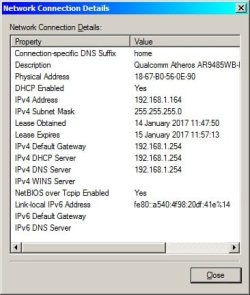
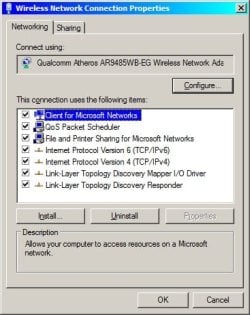
I looked at the Network Connection but I don't see anywhere to change the DNS settings.

I don't know why it says:

Lease Obtained 14 January 2017
Lease Expires 15 January 2017

Maybe its because I did a system restore yesterday.
 

Attachments

  • Network.jpg
    Network.jpg
    28.5 KB · Views: 45
  • Network2.jpg
    Network2.jpg
    29.6 KB · Views: 46

My Computer My Computer

At a glance

Windows 7 Professional 32bit SP1, Windows 10 ...Intel Pentium B970 @ 2.30GHz, DELL DELL Intel...8GBNVIDIA GeForce MX230 (Dell)
Computer type
Laptop
Computer Manufacturer/Model Number
Samsung won't charge Now Dell Inspiron 17 3793
OS
Windows 7 Professional 32bit SP1, Windows 10 Home 64-bit at the moment
CPU
Intel Pentium B970 @ 2.30GHz, DELL DELL Intel 3793 Core i5 1
Motherboard
DELL 0C9WH2
Memory
8GB
Graphics Card(s)
NVIDIA GeForce MX230 (Dell)
Sound Card
Realtek High Definition Audio
Monitor(s) Displays
17.3" HD+ LED Display
Screen Resolution
1920x1040
Hard Drives
99GB (RAID SHIT SSD), Seagate 1TB SATA III DATA

Seagate ST1000LM048-2E7172 (SATA III)
Mouse
USB remote
Antivirus
Avast Free Antivirus 20.10.2442
Browser
Internet Explorer 11, FireFox
Other Info
DELL shit Its the worst laptop design ever made the laptop battery is inbuilt who the hell makes a laptop battery inbuilt DELL shit does, can't wait until the 1TB HDD is replaced and RAID shit is removed
Thanks for the replies.

I looked at the Network Connection but I don't see anywhere to change the DNS settings.

I don't know why it says:

Lease Obtained 14 January 2017
Lease Expires 15 January 2017

Maybe its because I did a system restore yesterday.

Click TCP / IPv4

Steps 1 to 5 in this picture. Ignore step 6

386409d1462816681-help-albireo-virus-screenshot001.jpg


"Use Followwing DNS Server" - enter address and apply.

Sometimes router needs to be switched off / on and machine rebooted.

It's easier to use QuickSetDNS.
 
Last edited:

My Computer My Computer

At a glance

Microsoft Windows 7 Home Premium 64-bit 7601 ...AMD C-60 APU with Radeon(tm) HD Graphics4.00 GBAMD Radeon HD 6290 Graphics
Computer type
Laptop
Computer Manufacturer/Model Number
ASUS
OS
Microsoft Windows 7 Home Premium 64-bit 7601 Multiprocessor Free Service Pack 1
CPU
AMD C-60 APU with Radeon(tm) HD Graphics
Motherboard
ASUSTeK COMPUTER INC. X501U
Memory
4.00 GB
Graphics Card(s)
AMD Radeon HD 6290 Graphics
Sound Card
(1) AMD High Definition Audio Device (2) Realtek High Defi
Screen Resolution
1366 x 768 x 32 bits (4294967296 colors) @ 60 Hz
Hard Drives
Hitachi HTS545050A7E380 SATA Disk Device
Antivirus
Comodo CIS & FW, SecureAplus App Whitelisting, Threatfire
Browser
Cyberfox 64bit, Opera 64bit, Airfox
Other Info
Spy-The-Spy, HitmanPro.Alert, Norton Connect Safe, MJRegWatcher, BitDefender TrafficLight, Voodoo Shield, Zemana AntiMalware
Click on internet protocol version 6 and click on properties. select use this dns server address option and enter 8.8.8.8 in first box and 8.8.4.4 in second one.click ok.repeat the same wuth ipv4
 

My Computer My Computer

At a glance

Windows 7 home basics x64intel core i5 2430M @2.40GHz4gb samsung/hynixintel integrated hd graphics 3000
Computer type
PC/Desktop
Computer Manufacturer/Model Number
Fujitsu
OS
Windows 7 home basics x64
CPU
intel core i5 2430M @2.40GHz
Motherboard
fujitsu
Memory
4gb samsung/hynix
Graphics Card(s)
intel integrated hd graphics 3000
Sound Card
realtek HD audio
Monitor(s) Displays
lcd
Hard Drives
seagate momentus thin 250gb @5400rpm
Cooling
air cooling
Keyboard
QWERTY
Mouse
synaptic touchpad and wireless LOGITECH mouse
Internet Speed
upto 2MBps
Antivirus
kaspersky
Browser
mozilla
RE: internet protocol version 6 - no need to worry about those settings unless your ISP supports IPv6.
 
Last edited:

My Computer My Computer

At a glance

Microsoft Windows 7 Home Premium 64-bit 7601 ...AMD C-60 APU with Radeon(tm) HD Graphics4.00 GBAMD Radeon HD 6290 Graphics
Computer type
Laptop
Computer Manufacturer/Model Number
ASUS
OS
Microsoft Windows 7 Home Premium 64-bit 7601 Multiprocessor Free Service Pack 1
CPU
AMD C-60 APU with Radeon(tm) HD Graphics
Motherboard
ASUSTeK COMPUTER INC. X501U
Memory
4.00 GB
Graphics Card(s)
AMD Radeon HD 6290 Graphics
Sound Card
(1) AMD High Definition Audio Device (2) Realtek High Defi
Screen Resolution
1366 x 768 x 32 bits (4294967296 colors) @ 60 Hz
Hard Drives
Hitachi HTS545050A7E380 SATA Disk Device
Antivirus
Comodo CIS & FW, SecureAplus App Whitelisting, Threatfire
Browser
Cyberfox 64bit, Opera 64bit, Airfox
Other Info
Spy-The-Spy, HitmanPro.Alert, Norton Connect Safe, MJRegWatcher, BitDefender TrafficLight, Voodoo Shield, Zemana AntiMalware
Click on internet protocol version 6 and click on properties. select use this dns server address option and enter 8.8.8.8 in first box and 8.8.4.4 in second one.click ok.repeat the same wuth ipv4

I tried those numbers but it says they are invalid. The same thing happens on my Windows XP computer.

I've reset the router. Its very strange its only 1 site or 2 if you count the Skoda forum from the same site admin that has this problem.

The Windows 7 diagnostic says:

Windows Network Diagnostics
Publisher details
Issues found

Your computer appears to be correctly configured, but the device or resource (www.volkswagenforum.co.uk) is not responding

Detected
Contact your network administrator or Internet service provider (ISP)
Completed

Problem with wireless adapter or access point

Detected
Reset the wireless adapter
Completed

Investigate router or access point issues
Not run

Refer to Windows Help and Support for more information about wireless connectivity problems
Not run

Issues found
Detection details

5
Your computer appears to be correctly configured, but the device or resource (www.volkswagenforum.co.uk) is not responding Detected
Contact your network administrator or Internet service provider (ISP)Completed
Windows can't communicate with the device or resource (www.volkswagenforum.co.uk). The computer or service you are trying to reach might be temporarily unavailable.

5
Problem with wireless adapter or access point Detected
Reset the wireless adapter Completed

Network Diagnostics Log
File Name: 74C81CE5-D15E-4ABF-8D15-E85FAB435960.Repair.Admin.1.etl Investigate router or access point issues Not run

If you're connected to a hotspot or domain network, contact the network administrator. Otherwise: 1. Unplug or turn off the device. 2. After all the lights on the device are off, wait at least 10 seconds. 3. Turn the device back on or plug it back into the power outlet. To restart a router or access point that has a built-in battery, press and quickly release the Reset button.
Refer to Windows Help and Support for more information about wireless connectivity problemsNot run
Windows cannot resolve your wireless connectivity issue.

Detection details

Diagnostics Information (Network Adapter)
Details about network adapter diagnosis: Network adapter Wireless Network Connection driver information:

Description . . . . . . . . . . : Qualcomm Atheros AR9485WB-EG Wireless Network Adapter Manufacturer . . . . . . . . . : Atheros Communications Inc. Provider . . . . . . . . . . . : Atheros Communications Inc. Version . . . . . . . . . . . : 9.2.0.470 Inf File Name . . . . . . . . . : C:\Windows\INF\oem8.inf Inf File Date . . . . . . . . . : 23 December 2011 18:53:56 Section Name . . . . . . . . . : ATHR_DEV_OS61_3119s.ndi Hardware ID . . . . . . . . . . : pci\ven_168c&dev_0032&subsys_4105144d Instance Status Flags . . . . . : 0x180200a Device Manager Status Code . . : 0 IfType . . . . . . . . . . . . : 71 Physical Media Type . . . . . . : 9
Diagnostics Information (Wireless Connectivity)
Details about wireless connectivity diagnosis: Information for connection being diagnosed Interface GUID: 0c0ecb23-ada9-423f-990d-1c56683ba33d Interface name: Qualcomm Atheros AR9485WB-EG Wireless Network Adapter Interface type: Native WiFiConnection incident diagnosed Auto Configuration ID: 1 Connection ID: 1Connection status summary Connection started at: 2017-01-15 13:20:04-302 Profile match: Success Pre-Association: Success Association: Success Security and Authentication: SuccessList of visible access point(s): 5 item(s) total, 5 item(s) displayed BSSID BSS Type PHY Signal(dB) Chnl/freq SSID-------------------------------------------------------------------------E0-A3-AC-A3-77-7A Infra <unknown> -73 6 Mats WiFi72-DC-96-68-05-04 Infra <unknown> -76 1 BTWifi-X72-DC-96-68-05-03 Infra <unknown> -76 1 BTWifi-with-FON5C-DC-96-68-05-02 Infra <unknown> -77 1 BTHub5-KGFPD0-2D-B3-5D-DC-F4 Infra <unknown> -88 1 TALKTALK-5DDCECConnection History Information for Auto Configuration ID 1 List of visible networks: 5 item(s) total, 5 item(s) displayed BSS Type PHY Security Signal(RSSI) Compatible SSID ------------------------------------------------------------------------------ Infra <unknown> Yes 68 Yes Mats WiFi Infra <unknown> Yes 48 Yes BTWifi-X Infra <unknown> No 48 Yes BTWifi-with-FON Infra <unknown> Yes 44 Yes BTHub5-KGFP Infra <unknown> Yes 36 Yes TALKTALK-5DDCEC List of preferred networks: 2 item(s) Profile: BTHub5-KGFP SSID: BTHub5-KGFP SSID length: 11 Connection mode: Infra Security: Yes Set by group policy: No Connect even if network is not broadcasting: No Connectable: Yes Profile: BTHomeHub2-5JRR SSID: BTHomeHub2-5JRR SSID length: 15 Connection mode: Infra Security: Yes Set by group policy: No Connect even if network is not broadcasting: No Connectable: No Reason: 0x00028002 Information for Connection ID 1 Connection started at: 2017-01-15 13:20:04-302 Auto Configuration ID: 1 Profile: BTHub5-KGFP SSID: BTHub5-KGFP SSID length: 11 Connection mode: Infra Security: Yes Pre-Association and Association Connectivity settings provided by hardware manufacturer (IHV): No Security settings provided by hardware manufacturer (IHV): No Profile matches network requirements: Success Pre-association status: Success Association status: Success Last AP: 5c-dc-96-68-05-02 Security and Authentication Configured security type: WPA2-PSK Configured encryption type: CCMP(AES) 802.1X protocol: No Key exchange initiated: Yes Unicast key received: Yes Multicast key received: Yes Number of security packets received: 0 Number of security packets sent: 0 Security attempt status: Success Connectivity Packet statistics Ndis Rx: 17386 Ndis Tx: 14389 Unicast decrypt success: 601 Multicast decrypt success: 0 Unicast decrypt failure: 0 Multicast decrypt failure: 0 Rx success: 727 Rx failure: 2529 Tx success: 1291 Tx failure: 0 Tx retry: 42 Tx multiple retry: 15 Tx max lifetime exceeded: 0 Tx ACK failure: 5986 Roaming history: 0 item(s)

Diagnostics Information (Wireless Connectivity)
Details about wireless connectivity diagnosis: For complete information about this session see the wireless connectivity information event.Helper Class: Auto Configuration Initialize status: SuccessInformation for connection being diagnosed Interface GUID: 0c0ecb23-ada9-423f-990d-1c56683ba33d Interface name: Qualcomm Atheros AR9485WB-EG Wireless Network Adapter Interface type: Native WiFiResult of diagnosis: There may be problem

Network Diagnostics Log
File Name: 74C81CE5-D15E-4ABF-8D15-E85FAB435960.Diagnose.Admin.0.etl

Other Networking Configuration and Logs
File Name: NetworkConfiguration.cab Collection information Computer Name: SAMSUNG-LAPTOP Windows Version:6.1
Architecture:x86
Time: Sunday, January 15, 2017 1:56:36 PM

Publisher details

Windows Network Diagnostics Detects problems with network connectivity. Package Version: 1.0
Publisher: Microsoft Windows

 

My Computer My Computer

At a glance

Windows 7 Professional 32bit SP1, Windows 10 ...Intel Pentium B970 @ 2.30GHz, DELL DELL Intel...8GBNVIDIA GeForce MX230 (Dell)
Computer type
Laptop
Computer Manufacturer/Model Number
Samsung won't charge Now Dell Inspiron 17 3793
OS
Windows 7 Professional 32bit SP1, Windows 10 Home 64-bit at the moment
CPU
Intel Pentium B970 @ 2.30GHz, DELL DELL Intel 3793 Core i5 1
Motherboard
DELL 0C9WH2
Memory
8GB
Graphics Card(s)
NVIDIA GeForce MX230 (Dell)
Sound Card
Realtek High Definition Audio
Monitor(s) Displays
17.3" HD+ LED Display
Screen Resolution
1920x1040
Hard Drives
99GB (RAID SHIT SSD), Seagate 1TB SATA III DATA

Seagate ST1000LM048-2E7172 (SATA III)
Mouse
USB remote
Antivirus
Avast Free Antivirus 20.10.2442
Browser
Internet Explorer 11, FireFox
Other Info
DELL shit Its the worst laptop design ever made the laptop battery is inbuilt who the hell makes a laptop battery inbuilt DELL shit does, can't wait until the 1TB HDD is replaced and RAID shit is removed
I tried those numbers but it says they are invalid. The same thing happens on my Windows XP computer.

I've reset the router.

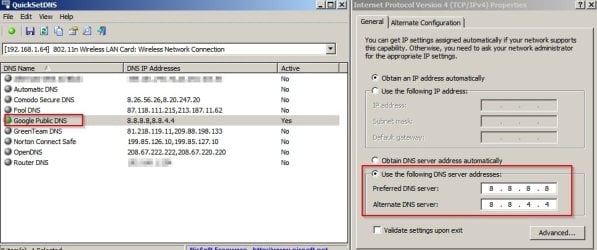
Don't know why it says they're invalid. Check the screenshot and confirm that you see the same. Also try one of the other DNS providers shown.

Internet Protocol Version 4 (TCP_IPv4) Properties.jpg
 

My Computer My Computer

At a glance

Microsoft Windows 7 Home Premium 64-bit 7601 ...AMD C-60 APU with Radeon(tm) HD Graphics4.00 GBAMD Radeon HD 6290 Graphics
Computer type
Laptop
Computer Manufacturer/Model Number
ASUS
OS
Microsoft Windows 7 Home Premium 64-bit 7601 Multiprocessor Free Service Pack 1
CPU
AMD C-60 APU with Radeon(tm) HD Graphics
Motherboard
ASUSTeK COMPUTER INC. X501U
Memory
4.00 GB
Graphics Card(s)
AMD Radeon HD 6290 Graphics
Sound Card
(1) AMD High Definition Audio Device (2) Realtek High Defi
Screen Resolution
1366 x 768 x 32 bits (4294967296 colors) @ 60 Hz
Hard Drives
Hitachi HTS545050A7E380 SATA Disk Device
Antivirus
Comodo CIS & FW, SecureAplus App Whitelisting, Threatfire
Browser
Cyberfox 64bit, Opera 64bit, Airfox
Other Info
Spy-The-Spy, HitmanPro.Alert, Norton Connect Safe, MJRegWatcher, BitDefender TrafficLight, Voodoo Shield, Zemana AntiMalware
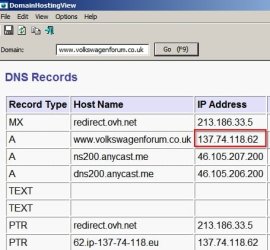
Okay strange stuff is going on here:

If I type the site's ip address into a browser address bar I can't access it.

DNS Records show: http://137.74.118.62/

DomainHostingView.jpg

So if you type 216.58.198.163 into your browser address bar you should get Google.

Google

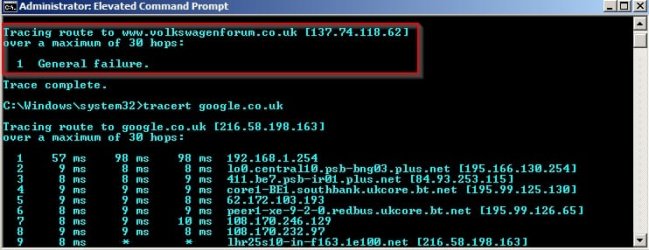
Tracert command fails for your problem website but works okay for Google.

Tracert.jpg

I reckon the problem is with the server or there's some strange redirect. However I can access the site okay.
 

My Computer My Computer

At a glance

Microsoft Windows 7 Home Premium 64-bit 7601 ...AMD C-60 APU with Radeon(tm) HD Graphics4.00 GBAMD Radeon HD 6290 Graphics
Computer type
Laptop
Computer Manufacturer/Model Number
ASUS
OS
Microsoft Windows 7 Home Premium 64-bit 7601 Multiprocessor Free Service Pack 1
CPU
AMD C-60 APU with Radeon(tm) HD Graphics
Motherboard
ASUSTeK COMPUTER INC. X501U
Memory
4.00 GB
Graphics Card(s)
AMD Radeon HD 6290 Graphics
Sound Card
(1) AMD High Definition Audio Device (2) Realtek High Defi
Screen Resolution
1366 x 768 x 32 bits (4294967296 colors) @ 60 Hz
Hard Drives
Hitachi HTS545050A7E380 SATA Disk Device
Antivirus
Comodo CIS & FW, SecureAplus App Whitelisting, Threatfire
Browser
Cyberfox 64bit, Opera 64bit, Airfox
Other Info
Spy-The-Spy, HitmanPro.Alert, Norton Connect Safe, MJRegWatcher, BitDefender TrafficLight, Voodoo Shield, Zemana AntiMalware
Okay strange stuff is going on here:

If I type the site's ip address into a browser address bar I can't access it.

DNS Records show: http://137.74.118.62/
So if you type 216.58.198.163 into your browser address bar you should get Google.

Tracert command fails for your problem website but works okay for Google.

I reckon the problem is with the server or there's some strange redirect. However I can access the site okay.


I downloaded QuickSetDNS 1.15 and DomainHostingView 1.75

QuickSetDNS shows:

Automatic DNS, active
Google Public DNS, "8.8.8.8,8.8.4.4", not active
Router DNS, "192.168.1.254", not active

I set Google Public DNS and Router DNS to active but it still wouldn't access the site.

DomainHostingView shows different results to yours.

DNS Records


Record Type Host Name IP Address More Data Section
NS ns12.dnsmadeeasy.com 208.80.126.4 Answer
NS ns15.dnsmadeeasy.com 208.94.149.4 Answer
NS ns14.dnsmadeeasy.com 208.80.127.4 Answer
NS ns13.dnsmadeeasy.com 208.80.125.4 Answer
NS ns11.dnsmadeeasy.com 208.80.124.4 Answer
NS ns10.dnsmadeeasy.com 208.94.148.4 Answer
A volkswagenforum.co.uk 137.74.118.62 Answer
SOA ns10.dnsmadeeasy.com 208.94.148.4 Admin: dns.dnsmadeeasy.com, Default TTL: 180, Expire: 1209600, Refresh: 43200, Retry: 3600, Serial: 2009010116 Answer
TEXT v=spf1 include:sendgrid.net ~all Answer
PTR ns12.dnsmadeeasy.com 208.80.126.4 Answer
PTR ns15.dnsmadeeasy.com 208.94.149.4 Answer
PTR ns14.dnsmadeeasy.com 208.80.127.4 Answer
PTR ns13.dnsmadeeasy.com 208.80.125.4 Answer
PTR ns11.dnsmadeeasy.com 208.80.124.4 Answer
PTR ns10.dnsmadeeasy.com 208.94.148.4 Answer
PTR 62.ip-137-74-118.eu 137.74.118.62
 

My Computer My Computer

At a glance

Windows 7 Professional 32bit SP1, Windows 10 ...Intel Pentium B970 @ 2.30GHz, DELL DELL Intel...8GBNVIDIA GeForce MX230 (Dell)
Computer type
Laptop
Computer Manufacturer/Model Number
Samsung won't charge Now Dell Inspiron 17 3793
OS
Windows 7 Professional 32bit SP1, Windows 10 Home 64-bit at the moment
CPU
Intel Pentium B970 @ 2.30GHz, DELL DELL Intel 3793 Core i5 1
Motherboard
DELL 0C9WH2
Memory
8GB
Graphics Card(s)
NVIDIA GeForce MX230 (Dell)
Sound Card
Realtek High Definition Audio
Monitor(s) Displays
17.3" HD+ LED Display
Screen Resolution
1920x1040
Hard Drives
99GB (RAID SHIT SSD), Seagate 1TB SATA III DATA

Seagate ST1000LM048-2E7172 (SATA III)
Mouse
USB remote
Antivirus
Avast Free Antivirus 20.10.2442
Browser
Internet Explorer 11, FireFox
Other Info
DELL shit Its the worst laptop design ever made the laptop battery is inbuilt who the hell makes a laptop battery inbuilt DELL shit does, can't wait until the 1TB HDD is replaced and RAID shit is removed
Okay Tracert command works for me now.

I used to be responsible for blocking spammers from a forum which was part of one of my employer's websites. I can tell you that it is possible to block an entire ip address range (or ranges) rather than a single ip address and also block particular servers.

I'm not saying that this is what has happened in your case - just that it is possible.

They may take the view that they block every connection from a particular ISP of ip address range due to previous problems from troublemakers. Or maybe it's something else.

Suggest contacting the website's admin.
 

My Computer My Computer

At a glance

Microsoft Windows 7 Home Premium 64-bit 7601 ...AMD C-60 APU with Radeon(tm) HD Graphics4.00 GBAMD Radeon HD 6290 Graphics
Computer type
Laptop
Computer Manufacturer/Model Number
ASUS
OS
Microsoft Windows 7 Home Premium 64-bit 7601 Multiprocessor Free Service Pack 1
CPU
AMD C-60 APU with Radeon(tm) HD Graphics
Motherboard
ASUSTeK COMPUTER INC. X501U
Memory
4.00 GB
Graphics Card(s)
AMD Radeon HD 6290 Graphics
Sound Card
(1) AMD High Definition Audio Device (2) Realtek High Defi
Screen Resolution
1366 x 768 x 32 bits (4294967296 colors) @ 60 Hz
Hard Drives
Hitachi HTS545050A7E380 SATA Disk Device
Antivirus
Comodo CIS & FW, SecureAplus App Whitelisting, Threatfire
Browser
Cyberfox 64bit, Opera 64bit, Airfox
Other Info
Spy-The-Spy, HitmanPro.Alert, Norton Connect Safe, MJRegWatcher, BitDefender TrafficLight, Voodoo Shield, Zemana AntiMalware
I downloaded QuickSetDNS 1.15 and DomainHostingView 1.75

QuickSetDNS shows:

Automatic DNS, active
Google Public DNS, "8.8.8.8,8.8.4.4", not active
Router DNS, "192.168.1.254", not active

I set Google Public DNS and Router DNS to active but it still wouldn't access the site.

You just set the active DNS Lookup and leave Router DNS as default without changing the numbers for Router DNS or setting Router DNS active. The only active item in the window should be Google DNS.
 

My Computer My Computer

At a glance

Microsoft Windows 7 Home Premium 64-bit 7601 ...AMD C-60 APU with Radeon(tm) HD Graphics4.00 GBAMD Radeon HD 6290 Graphics
Computer type
Laptop
Computer Manufacturer/Model Number
ASUS
OS
Microsoft Windows 7 Home Premium 64-bit 7601 Multiprocessor Free Service Pack 1
CPU
AMD C-60 APU with Radeon(tm) HD Graphics
Motherboard
ASUSTeK COMPUTER INC. X501U
Memory
4.00 GB
Graphics Card(s)
AMD Radeon HD 6290 Graphics
Sound Card
(1) AMD High Definition Audio Device (2) Realtek High Defi
Screen Resolution
1366 x 768 x 32 bits (4294967296 colors) @ 60 Hz
Hard Drives
Hitachi HTS545050A7E380 SATA Disk Device
Antivirus
Comodo CIS & FW, SecureAplus App Whitelisting, Threatfire
Browser
Cyberfox 64bit, Opera 64bit, Airfox
Other Info
Spy-The-Spy, HitmanPro.Alert, Norton Connect Safe, MJRegWatcher, BitDefender TrafficLight, Voodoo Shield, Zemana AntiMalware
Have you tried accessing the site via a VPN from another location.
 

My Computer My Computer

At a glance

Windows 7 home basics x64intel core i5 2430M @2.40GHz4gb samsung/hynixintel integrated hd graphics 3000
Computer type
PC/Desktop
Computer Manufacturer/Model Number
Fujitsu
OS
Windows 7 home basics x64
CPU
intel core i5 2430M @2.40GHz
Motherboard
fujitsu
Memory
4gb samsung/hynix
Graphics Card(s)
intel integrated hd graphics 3000
Sound Card
realtek HD audio
Monitor(s) Displays
lcd
Hard Drives
seagate momentus thin 250gb @5400rpm
Cooling
air cooling
Keyboard
QWERTY
Mouse
synaptic touchpad and wireless LOGITECH mouse
Internet Speed
upto 2MBps
Antivirus
kaspersky
Browser
mozilla

My Computer My Computer

At a glance

Microsoft Windows 7 Home Premium 64-bit 7601 ...AMD C-60 APU with Radeon(tm) HD Graphics4.00 GBAMD Radeon HD 6290 Graphics
Computer type
Laptop
Computer Manufacturer/Model Number
ASUS
OS
Microsoft Windows 7 Home Premium 64-bit 7601 Multiprocessor Free Service Pack 1
CPU
AMD C-60 APU with Radeon(tm) HD Graphics
Motherboard
ASUSTeK COMPUTER INC. X501U
Memory
4.00 GB
Graphics Card(s)
AMD Radeon HD 6290 Graphics
Sound Card
(1) AMD High Definition Audio Device (2) Realtek High Defi
Screen Resolution
1366 x 768 x 32 bits (4294967296 colors) @ 60 Hz
Hard Drives
Hitachi HTS545050A7E380 SATA Disk Device
Antivirus
Comodo CIS & FW, SecureAplus App Whitelisting, Threatfire
Browser
Cyberfox 64bit, Opera 64bit, Airfox
Other Info
Spy-The-Spy, HitmanPro.Alert, Norton Connect Safe, MJRegWatcher, BitDefender TrafficLight, Voodoo Shield, Zemana AntiMalware
Don't know why it says they're invalid. Check the screenshot and confirm that you see the same. Also try one of the other DNS providers shown.

When I entered 8.8.8.8,8.8.4.4 in Preferred DNS server it says network address entered invalid.

Your picture shows 8.8.8.8 in Preferred DNS server and 8.8.4.4 in Alternative DNS server that's invalid as well.

I used Internet Protocol Version 6 (TCP/v6). I looked in Internet Protocol Version 4 (TCP/v4) and its set the same as your picture as default.

Preferred DNS server: 8.8.8.8 and in Alternative DNS server: 8.8.4.4
 
Last edited:

My Computer My Computer

At a glance

Windows 7 Professional 32bit SP1, Windows 10 ...Intel Pentium B970 @ 2.30GHz, DELL DELL Intel...8GBNVIDIA GeForce MX230 (Dell)
Computer type
Laptop
Computer Manufacturer/Model Number
Samsung won't charge Now Dell Inspiron 17 3793
OS
Windows 7 Professional 32bit SP1, Windows 10 Home 64-bit at the moment
CPU
Intel Pentium B970 @ 2.30GHz, DELL DELL Intel 3793 Core i5 1
Motherboard
DELL 0C9WH2
Memory
8GB
Graphics Card(s)
NVIDIA GeForce MX230 (Dell)
Sound Card
Realtek High Definition Audio
Monitor(s) Displays
17.3" HD+ LED Display
Screen Resolution
1920x1040
Hard Drives
99GB (RAID SHIT SSD), Seagate 1TB SATA III DATA

Seagate ST1000LM048-2E7172 (SATA III)
Mouse
USB remote
Antivirus
Avast Free Antivirus 20.10.2442
Browser
Internet Explorer 11, FireFox
Other Info
DELL shit Its the worst laptop design ever made the laptop battery is inbuilt who the hell makes a laptop battery inbuilt DELL shit does, can't wait until the 1TB HDD is replaced and RAID shit is removed
Back
Top