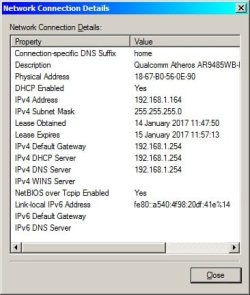
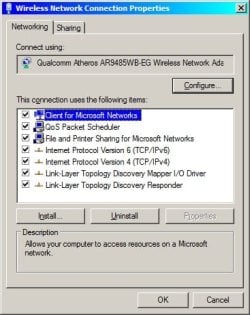
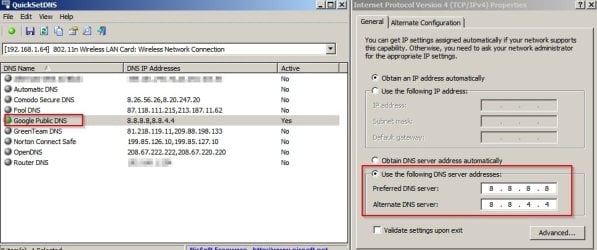
Click on internet protocol version 6 and click on properties. select use this dns server address option and enter 8.8.8.8 in first box and 8.8.4.4 in second one.click ok.repeat the same wuth ipv4
I tried those numbers but it says they are invalid. The same thing happens on my Windows XP computer.
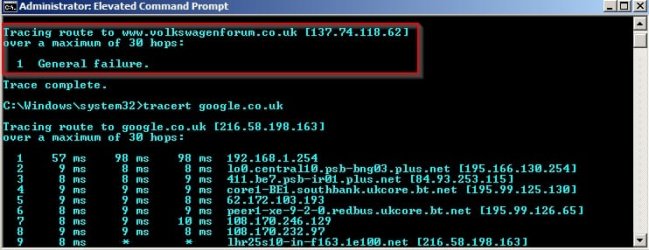
I've reset the router. Its very strange its only 1 site or 2 if you count the Skoda forum from the same site admin that has this problem.
The Windows 7 diagnostic says:
Windows Network Diagnostics
Publisher details
Issues found
Your computer appears to be correctly configured, but the device or resource (
www.volkswagenforum.co.uk) is not responding
Detected
Contact your network administrator or Internet service provider (ISP)
Completed
Problem with wireless adapter or access point
Detected
Reset the wireless adapter
Completed
Investigate router or access point issues
Not run
Refer to Windows Help and Support for more information about wireless connectivity problems
Not run
Issues found
Detection details
5
Your computer appears to be correctly configured, but the device or resource (
www.volkswagenforum.co.uk) is not responding Detected
Contact your network administrator or Internet service provider (ISP)Completed
Windows can't communicate with the device or resource (
www.volkswagenforum.co.uk). The computer or service you are trying to reach might be temporarily unavailable.
5
Problem with wireless adapter or access point Detected
Reset the wireless adapter Completed
Network Diagnostics Log
File Name:
74C81CE5-D15E-4ABF-8D15-E85FAB435960.Repair.Admin.1.etl Investigate router or access point issues Not run
If you're connected to a hotspot or domain network, contact the network administrator. Otherwise: 1. Unplug or turn off the device. 2. After all the lights on the device are off, wait at least 10 seconds. 3. Turn the device back on or plug it back into the power outlet. To restart a router or access point that has a built-in battery, press and quickly release the Reset button.
Refer to Windows Help and Support for more information about wireless connectivity problemsNot run
Windows cannot resolve your wireless connectivity issue.
Detection details
Diagnostics Information (Network Adapter)
Details about network adapter diagnosis: Network adapter Wireless Network Connection driver information:
Description . . . . . . . . . . : Qualcomm Atheros AR9485WB-EG Wireless Network Adapter Manufacturer . . . . . . . . . : Atheros Communications Inc. Provider . . . . . . . . . . . : Atheros Communications Inc. Version . . . . . . . . . . . : 9.2.0.470 Inf File Name . . . . . . . . . : C:\Windows\INF\oem8.inf Inf File Date . . . . . . . . . : 23 December 2011 18:53:56 Section Name . . . . . . . . . : ATHR_DEV_OS61_3119s.ndi Hardware ID . . . . . . . . . . : pci\ven_168c&dev_0032&subsys_4105144d Instance Status Flags . . . . . : 0x180200a Device Manager Status Code . . : 0 IfType . . . . . . . . . . . . : 71 Physical Media Type . . . . . . : 9
Diagnostics Information (Wireless Connectivity)
Details about wireless connectivity diagnosis: Information for connection being diagnosed Interface GUID: 0c0ecb23-ada9-423f-990d-1c56683ba33d Interface name: Qualcomm Atheros AR9485WB-EG Wireless Network Adapter Interface type: Native WiFiConnection incident diagnosed Auto Configuration ID: 1 Connection ID: 1Connection status summary Connection started at: 2017-01-15 13:20:04-302 Profile match: Success Pre-Association: Success Association: Success Security and Authentication: SuccessList of visible access point(s): 5 item(s) total, 5 item(s) displayed BSSID BSS Type PHY Signal(dB) Chnl/freq SSID-------------------------------------------------------------------------E0-A3-AC-A3-77-7A Infra <unknown> -73 6 Mats WiFi72-DC-96-68-05-04 Infra <unknown> -76 1 BTWifi-X72-DC-96-68-05-03 Infra <unknown> -76 1 BTWifi-with-FON5C-DC-96-68-05-02 Infra <unknown> -77 1 BTHub5-KGFPD0-2D-B3-5D-DC-F4 Infra <unknown> -88 1 TALKTALK-5DDCECConnection History Information for Auto Configuration ID 1 List of visible networks: 5 item(s) total, 5 item(s) displayed BSS Type PHY Security Signal(RSSI) Compatible SSID ------------------------------------------------------------------------------ Infra <unknown> Yes 68 Yes Mats WiFi Infra <unknown> Yes 48 Yes BTWifi-X Infra <unknown> No 48 Yes BTWifi-with-FON Infra <unknown> Yes 44 Yes BTHub5-KGFP Infra <unknown> Yes 36 Yes TALKTALK-5DDCEC List of preferred networks: 2 item(s) Profile: BTHub5-KGFP SSID: BTHub5-KGFP SSID length: 11 Connection mode: Infra Security: Yes Set by group policy: No Connect even if network is not broadcasting: No Connectable: Yes Profile: BTHomeHub2-5JRR SSID: BTHomeHub2-5JRR SSID length: 15 Connection mode: Infra Security: Yes Set by group policy: No Connect even if network is not broadcasting: No Connectable: No Reason: 0x00028002 Information for Connection ID 1 Connection started at: 2017-01-15 13:20:04-302 Auto Configuration ID: 1 Profile: BTHub5-KGFP SSID: BTHub5-KGFP SSID length: 11 Connection mode: Infra Security: Yes Pre-Association and Association Connectivity settings provided by hardware manufacturer (IHV): No Security settings provided by hardware manufacturer (IHV): No Profile matches network requirements: Success Pre-association status: Success Association status: Success Last AP: 5c-dc-96-68-05-02 Security and Authentication Configured security type: WPA2-PSK Configured encryption type: CCMP(AES) 802.1X protocol: No Key exchange initiated: Yes Unicast key received: Yes Multicast key received: Yes Number of security packets received: 0 Number of security packets sent: 0 Security attempt status: Success Connectivity Packet statistics Ndis Rx: 17386 Ndis Tx: 14389 Unicast decrypt success: 601 Multicast decrypt success: 0 Unicast decrypt failure: 0 Multicast decrypt failure: 0 Rx success: 727 Rx failure: 2529 Tx success: 1291 Tx failure: 0 Tx retry: 42 Tx multiple retry: 15 Tx max lifetime exceeded: 0 Tx ACK failure: 5986 Roaming history: 0 item(s)
Diagnostics Information (Wireless Connectivity)
Details about wireless connectivity diagnosis: For complete information about this session see the wireless connectivity information event.Helper Class: Auto Configuration Initialize status: SuccessInformation for connection being diagnosed Interface GUID: 0c0ecb23-ada9-423f-990d-1c56683ba33d Interface name: Qualcomm Atheros AR9485WB-EG Wireless Network Adapter Interface type: Native WiFiResult of diagnosis: There may be problem
Network Diagnostics Log
File Name:
74C81CE5-D15E-4ABF-8D15-E85FAB435960.Diagnose.Admin.0.etl
Other Networking Configuration and Logs
File Name:
NetworkConfiguration.cab Collection information Computer Name: SAMSUNG-LAPTOP Windows Version:6.1
Architecture:x86
Time: Sunday, January 15, 2017 1:56:36 PM
Publisher details
Windows Network Diagnostics Detects problems with network connectivity. Package Version: 1.0
Publisher: Microsoft Windows