Solved No sound from speakers/ Asus Xonar /Realtek after GPU driver install

desertdubu

New member
Local time
3:45 AM
Messages
22
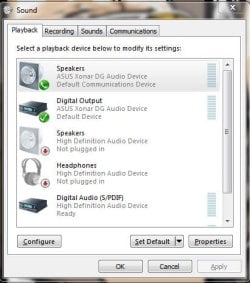
Hello, I am not able to get any sound out of my speakers since installing the newest driver for my Geforce GTX960. I tried going into Device Manager, uninstalling every audio driver under "sound, video & game controllers" including the Asus Xonar from my soundcard, the Realtek drivers, and the ones installed by Nvidia with the GPU driver, then rebooting, having M$ install the automatic one, still no luck. Any help is appreciated. I attached a screen of my playback devices tab to show what's going on. Thank you.
 

Attachments
  • Capture.JPG
    Capture.JPG
    37.2 KB · Views: 7

My Computer My Computer

At a glance

Windows 7 Ultimate x64AMD Phenom(tm) II X4 955 Processor, 3200 Mhz,...4096 MBGeforece GTX 460
Computer type
PC/Desktop
OS
Windows 7 Ultimate x64
CPU
AMD Phenom(tm) II X4 955 Processor, 3200 Mhz, 4 Co
Motherboard
MSI 870A-G54 (MS-7599)
Memory
4096 MB
Graphics Card(s)
Geforece GTX 460
Antivirus
AVG Free
well in that screenshot you have 2 devices selected.. do you use the Optical outs to a receiver on your setup?? IF not disable the Optical one and make sure your device was listed in Device manager..

I know with my sound blaster you boot up after installing the soundcard then Windows finds devices some generic like High Defintion device then you can install the drivers..

Also make sure your speakers are not on mute in the config there..
 

My Computer My Computer

At a glance

Win 7 Home Premium 64bitIntel i5 3570KCorsair 16gb 1600mhzevga 980GTX
Computer type
PC/Desktop
Computer Manufacturer/Model Number
Asus HomeBuilt
OS
Win 7 Home Premium 64bit
CPU
Intel i5 3570K
Motherboard
Asus P8Z68-V Gen3
Memory
Corsair 16gb 1600mhz
Graphics Card(s)
evga 980GTX
Hard Drives
Samsung Evo 500GB
Browser
Firefox
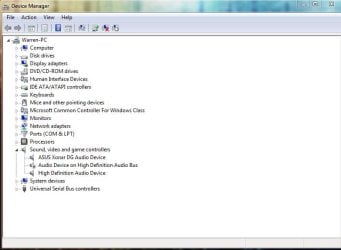
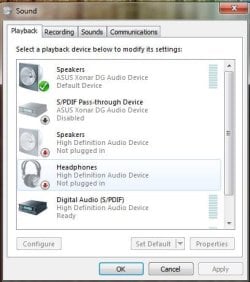
Tried disabling the Optical, still no luck. Here is what my Device Manager and Playback tab's are now showing.
 

Attachments

  • DM.JPG
    DM.JPG
    43.3 KB · Views: 0
  • Playback.JPG
    Playback.JPG
    35.9 KB · Views: 6

My Computer My Computer

At a glance

Windows 7 Ultimate x64AMD Phenom(tm) II X4 955 Processor, 3200 Mhz,...4096 MBGeforece GTX 460
Computer type
PC/Desktop
OS
Windows 7 Ultimate x64
CPU
AMD Phenom(tm) II X4 955 Processor, 3200 Mhz, 4 Co
Motherboard
MSI 870A-G54 (MS-7599)
Memory
4096 MB
Graphics Card(s)
Geforece GTX 460
Antivirus
AVG Free
what is that device you disabled the audio bus in Device manager it maybe part of the audio chain try enabling it.. also goto your Sound menu in your first post there and then highlight your speakers then goto Properties then goto the Levels tab is the speaker muted there the little speaker next to the volume is it red slash there.

IF you uninstalled all the devices then renabled them you may have to reinitialize your sound card.. check your Soundcrads installation instructions..
 

My Computer My Computer

At a glance

Win 7 Home Premium 64bitIntel i5 3570KCorsair 16gb 1600mhzevga 980GTX
Computer type
PC/Desktop
Computer Manufacturer/Model Number
Asus HomeBuilt
OS
Win 7 Home Premium 64bit
CPU
Intel i5 3570K
Motherboard
Asus P8Z68-V Gen3
Memory
Corsair 16gb 1600mhz
Graphics Card(s)
evga 980GTX
Hard Drives
Samsung Evo 500GB
Browser
Firefox
I just tried un-installing the Xonar driver from my Control Panel, rebooted, and tried re-installing from the original CD that came with the sound card, when it was almost finished installing it gave me the error message "please plug-in Xonar Audio device", and I had to cancel the installation. My sound card is already installed and I haven't changed any of my hardware since it stopped working, only installed that Nvidia driver.
 

My Computer My Computer

At a glance

Windows 7 Ultimate x64AMD Phenom(tm) II X4 955 Processor, 3200 Mhz,...4096 MBGeforece GTX 460
Computer type
PC/Desktop
OS
Windows 7 Ultimate x64
CPU
AMD Phenom(tm) II X4 955 Processor, 3200 Mhz, 4 Co
Motherboard
MSI 870A-G54 (MS-7599)
Memory
4096 MB
Graphics Card(s)
Geforece GTX 460
Antivirus
AVG Free
I just tried un-installing the Xonar driver from my Control Panel, rebooted, and tried re-installing from the original CD that came with the sound card, when it was almost finished installing it gave me the error message "please plug-in Xonar Audio device", and I had to cancel the installation. My sound card is already installed and I haven't changed any of my hardware since it stopped working, only installed that Nvidia driver.


Hi Yes that will happen because you said in your First post you uninstalled all the sound devices in the Device Manager.. If you did that you need to get Windows to redetect the sound card before installing the drivers..

So go into windows Device Manager and uninstall all the sound devices, then get device manager to scan for devices it should detect a Multimedia Audio Device if it does try reinstalling the drivers you may also need to reboot after installing the drivers..

IF Windows does not detect the audio device try reseating the Sound card.. is it a PCIex1 slot?? make sure you turn OFF the PC and unplug the PSU then turn on PC to drain the capacitors then remove the Sound card and reseat it or try another PCIe slot..

Not sure why the video drivers did this but next time just try too disable that driver in Device Manager..
 

My Computer My Computer

At a glance

Win 7 Home Premium 64bitIntel i5 3570KCorsair 16gb 1600mhzevga 980GTX
Computer type
PC/Desktop
Computer Manufacturer/Model Number
Asus HomeBuilt
OS
Win 7 Home Premium 64bit
CPU
Intel i5 3570K
Motherboard
Asus P8Z68-V Gen3
Memory
Corsair 16gb 1600mhz
Graphics Card(s)
evga 980GTX
Hard Drives
Samsung Evo 500GB
Browser
Firefox
EDIT: worked! I think it was my BIOS that was the problem, had it re-set it and then had to move the wires that went from my sound card to my speakers. Thanks a lot for your help.
 

My Computer My Computer

At a glance

Windows 7 Ultimate x64AMD Phenom(tm) II X4 955 Processor, 3200 Mhz,...4096 MBGeforece GTX 460
Computer type
PC/Desktop
OS
Windows 7 Ultimate x64
CPU
AMD Phenom(tm) II X4 955 Processor, 3200 Mhz, 4 Co
Motherboard
MSI 870A-G54 (MS-7599)
Memory
4096 MB
Graphics Card(s)
Geforece GTX 460
Antivirus
AVG Free
EDIT: worked! I think it was my BIOS that was the problem, had it re-set it and then had to move the wires that went from my sound card to my speakers. Thanks a lot for your help.


Hi Great I am glad you got it sorted.. Enjoy ;)
 

My Computer My Computer

At a glance

Win 7 Home Premium 64bitIntel i5 3570KCorsair 16gb 1600mhzevga 980GTX
Computer type
PC/Desktop
Computer Manufacturer/Model Number
Asus HomeBuilt
OS
Win 7 Home Premium 64bit
CPU
Intel i5 3570K
Motherboard
Asus P8Z68-V Gen3
Memory
Corsair 16gb 1600mhz
Graphics Card(s)
evga 980GTX
Hard Drives
Samsung Evo 500GB
Browser
Firefox
Back
Top