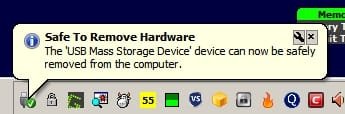
Solved Did an update cause the safe to remove hardware message to go away?

I still get Safe to Remove message on my Windows 10 HP laptop. This is after Windows Defender definitions update just a while ago. So WD is uptodate and it hasn't broken anything as MSE did in Windows 7.
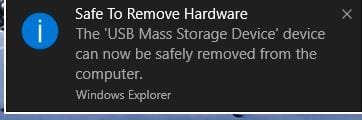
safe2remove.JPG

However as indicated in my earlier post atleast one user has reported that the above notification message has failed to appear on his Windows 10 PC all of a sudden.
 

My Computer My Computer

At a glance

Windows 7 Home Premium 32 bit
OS
Windows 7 Home Premium 32 bit
Attachments

  • Capture.JPG
    Capture.JPG
    69.7 KB · Views: 1
Last edited:

My Computer My Computer

At a glance

Windows 10 Pro x64Intel Core i7 6700KGSkill TridentZ RGB 16GB 3600 16-16-16-36EVGA GTX 980 Ti SC x2
Computer type
PC/Desktop
Computer Manufacturer/Model Number
Skylake Special #666
OS
Windows 10 Pro x64
CPU
Intel Core i7 6700K
Motherboard
Asus Sabertooth Z170 Mark 1
Memory
GSkill TridentZ RGB 16GB 3600 16-16-16-36
Graphics Card(s)
EVGA GTX 980 Ti SC x2
Sound Card
Realtek High Definition
Monitor(s) Displays
AOC G2460PG
Screen Resolution
1920 x 1080 144Hz
Hard Drives
Samsung 860 Pro 256GB, Seagate Barracuda 4TB x2
PSU
EVGA 1000 P2, EVGA White Custom Braided Cables
Case
Corsair Vengeance C70 Gunmetal Black
Cooling
Corsair H100i v2, Corsair ML120 x2, Thermal Grizzly Kryonaut
Keyboard
Logitech G910 Orion Spectrum
Mouse
Logitech G700s
Internet Speed
Verizon Fios Quantum Gateway 75/75
Antivirus
Windows Defender, Malwarebytes Free 3.8.3
Browser
Chrome
Other Info
Corsair SP120 x4, LG Blu-ray Drive, Durabrand HT-395 100 Watt Dolby Digital Amp, Corsair H2100 Wireless 7.1 Headset
You did it.

Safe to remove hardware message no longer shows in Windows 10 - Microsoft Community

In this also it was an user-induced fault condition.

"The setting for Turn off all balloon notifications was already set to Not Configured...

But your request reminded me of something I had turned off...

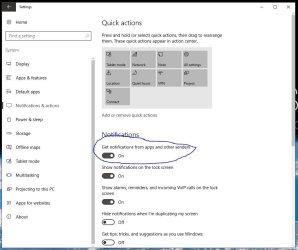
In Notifications... All Settings.. System... Notifications and Actions.., I had turned off "Show App Notifications" because a couple of my apps were driving me nuts with notifications...

I turned it back on, and the Safely Remove message now works...

Too bad I can't still have access to the Safely Remove message, and still turn the other stuff off...

Thanks... at least now I know the reason for the error..."

So atleast now you know the reason for not getting that notification so far.:)
 

My Computer My Computer

At a glance

Windows 7 Home Premium 32 bit
OS
Windows 7 Home Premium 32 bit
I have two profiles local accounts under windows 7. Same issue. I have notice that the problem is now on & off but most of the time it doesn't show the balloon.

Despite what that site said, I don't believe its a 3 party software issue.

I believe the cause for some is the definition updates for Windows 10 defender & Windows 7 Microsoft Security Essentials.

As I said earlier
I have always show all icons and notification on the taskbar checked in windows 7 sp1
 
Last edited:

My Computer My Computer

At a glance

W10 32 bit, XUbuntu 18.xx 64 bitIntel(R) Celeron(R) CPU G1620T @ 2.40GHz, 240...4GBIntel HD graphics
Computer type
PC/Desktop
Computer Manufacturer/Model Number
Dell All in one Inspiron 2020
OS
W10 32 bit, XUbuntu 18.xx 64 bit
CPU
Intel(R) Celeron(R) CPU G1620T @ 2.40GHz, 2400 Mhz
Motherboard
Dell
Memory
4GB
Graphics Card(s)
Intel HD graphics
Sound Card
High Definition Audio Device
Monitor(s) Displays
20 inch Screen
Screen Resolution
W7=1280 x 720 & Linux Mint Xfce=1360 x 768
Hard Drives
500 GB hard drive
Keyboard
Usb
Mouse
Usb
Internet Speed
High-Speed
Antivirus
MSE
Browser
Main Browser Firefox
Other Info
I have done a clean install of Windows 7 using Dell re-installation disk (Dell sent me one). I also use Free Macrium reflect backup and restore.
My post #21 and 23 were for AddRAM on the same issue on Windows 10. On Windows 7 the issue persists and no fix from Microsoft so far.
 

My Computer My Computer

At a glance

Windows 7 Home Premium 32 bit
OS
Windows 7 Home Premium 32 bit
Hi,
I prefer to just right click the device I want to remove from the computer screen :p
Otherwise I just shutdown for an external enclosure disconnection.
 

My Computer My Computer

At a glance

Win-7-Pro64bit 7-H-Prem-64biti7-5930K 2nd i9-9940x both water blocked VRM'...Trident-z 3200C14 2nd Trident-z 3600C16EVGA 1080ti ftw3 2nd Titan Xp both water blocked
Computer type
PC/Desktop
Computer Manufacturer/Model Number
Custom assembled by me :}
OS
Win-7-Pro64bit 7-H-Prem-64bit
CPU
i7-5930K 2nd i9-9940x both water blocked VRM's too
Motherboard
ASUS SABERTOOTH X99 2nd ASUS x299 Apex
Memory
Trident-z 3200C14 2nd Trident-z 3600C16
Graphics Card(s)
EVGA 1080ti ftw3 2nd Titan Xp both water blocked
Sound Card
Built-in Realtek
Monitor(s) Displays
1-AOC G2460PG 24"G-Sync 144Hz/ 2nd 1-ASUS VG248QE 24" 144Hz
Screen Resolution
1920 x 1080 144Hz
Hard Drives
2-Samsung M.2 Evo & Evo Plus
2-Samsung 850 EVO 500GB SSD's/ 3-2.5 W.D. Black 1tb-&3-1tb/3-3.5 WD Black 1tb hdd's
PSU
EVGA SuperNOVA 1000-P2 2nd 1200-P2
Case
2-Corsair Obsidian Series 450D Black ATX Mid Tower
Cooling
Custom water loops
Keyboard
Logitech G710+/ 2nd Logitech G910
Mouse
2-RedDragon M901 Perdition 16400 dpi Gaming mouse = wired
Internet Speed
Comcast Ping 19ms 89.31mbps download speed 6.12mbps upload
Antivirus
Malwarebytes Pro/ Superantispyware Pro
Browser
FireFox & Pale moon
Other Info
2nd ASUS X299 Apex/Intel i9-9940x with Custom water loop/7H-Prem-x64/Corsair 450D case/Ram Trident-z 3600C16 4x8gb / Samsung970Evo plus 500gb SSD/Dual ssd EZ swap evo/PSU EVGA SuperNova 1200w-P2 80+Platinum/GPU Titan Xp /8-ML-140 on push-pull on 2-280GTX rads
^ When you click on Safely remove icon and click on Eject , the drive gets removed and the safely remove icon vanishes. So everything works fine as before except that the Notification " Safe to Remove Hardware" does not appear. Why all of a sudden such notification which we always used to get has now disappeared is what is being discussed. We are not saying the drive is not getting removed to look for alternate methods of safely ejecting it..
 
Last edited:

My Computer My Computer

At a glance

Windows 7 Home Premium 32 bit
OS
Windows 7 Home Premium 32 bit
Okay I get this:

Eject.jpg

Then this (balloon that others report is missing)

Eject 2.jpg

WD is disabled. I don't have MSE. If you want to know which updates are installed let me know.
 

My Computer My Computer

At a glance

Microsoft Windows 7 Home Premium 64-bit 7601 ...AMD C-60 APU with Radeon(tm) HD Graphics4.00 GBAMD Radeon HD 6290 Graphics
Computer type
Laptop
Computer Manufacturer/Model Number
ASUS
OS
Microsoft Windows 7 Home Premium 64-bit 7601 Multiprocessor Free Service Pack 1
CPU
AMD C-60 APU with Radeon(tm) HD Graphics
Motherboard
ASUSTeK COMPUTER INC. X501U
Memory
4.00 GB
Graphics Card(s)
AMD Radeon HD 6290 Graphics
Sound Card
(1) AMD High Definition Audio Device (2) Realtek High Defi
Screen Resolution
1366 x 768 x 32 bits (4294967296 colors) @ 60 Hz
Hard Drives
Hitachi HTS545050A7E380 SATA Disk Device
Antivirus
Comodo CIS & FW, SecureAplus App Whitelisting, Threatfire
Browser
Cyberfox 64bit, Opera 64bit, Airfox
Other Info
Spy-The-Spy, HitmanPro.Alert, Norton Connect Safe, MJRegWatcher, BitDefender TrafficLight, Voodoo Shield, Zemana AntiMalware
it has arready been ascertained that the MSE update killed that notification balloon.( In my case I hadn't made any Windows updates. Only MSE definitions updates regularly. Therefore I had determined that it is only MSE updates that killed the notification. Groze has confirmed it. He uninstalled MSE and the notification returned.)
 

My Computer My Computer

At a glance

Windows 7 Home Premium 32 bit
OS
Windows 7 Home Premium 32 bit
Strange, my balloon pops up fine and I have MSE fully updated on W7.
 

My Computer My Computer

At a glance

Windows 10 Pro x64Intel Core i7 6700KGSkill TridentZ RGB 16GB 3600 16-16-16-36EVGA GTX 980 Ti SC x2
Computer type
PC/Desktop
Computer Manufacturer/Model Number
Skylake Special #666
OS
Windows 10 Pro x64
CPU
Intel Core i7 6700K
Motherboard
Asus Sabertooth Z170 Mark 1
Memory
GSkill TridentZ RGB 16GB 3600 16-16-16-36
Graphics Card(s)
EVGA GTX 980 Ti SC x2
Sound Card
Realtek High Definition
Monitor(s) Displays
AOC G2460PG
Screen Resolution
1920 x 1080 144Hz
Hard Drives
Samsung 860 Pro 256GB, Seagate Barracuda 4TB x2
PSU
EVGA 1000 P2, EVGA White Custom Braided Cables
Case
Corsair Vengeance C70 Gunmetal Black
Cooling
Corsair H100i v2, Corsair ML120 x2, Thermal Grizzly Kryonaut
Keyboard
Logitech G910 Orion Spectrum
Mouse
Logitech G700s
Internet Speed
Verizon Fios Quantum Gateway 75/75
Antivirus
Windows Defender, Malwarebytes Free 3.8.3
Browser
Chrome
Other Info
Corsair SP120 x4, LG Blu-ray Drive, Durabrand HT-395 100 Watt Dolby Digital Amp, Corsair H2100 Wireless 7.1 Headset
jumanji. I occasionally get some update problems with MSE so I uninstall it & download a new copy & install it. Then of course it has to get all the latest definition updates which can take awhile & then do a full scan, but it's worth it in the long run.

So you might give that a go & see if it fixes your problem.
 

My Computer My Computer

At a glance

Windows 7 Home Premium 64 bit sp1Intel i5 3570 3.4Ghz Ivy Bridge SKT 1155 quad...G-Skill Rip Jaws 16Gb (8x2) DDR3 -1600 PC3 12...Gigabyte NVIDIA GT610 1Gb DDR3 810/1200 PCI-E...
Computer type
PC/Desktop
Computer Manufacturer/Model Number
Self built using existing case
OS
Windows 7 Home Premium 64 bit sp1
CPU
Intel i5 3570 3.4Ghz Ivy Bridge SKT 1155 quad core
Motherboard
Gigabyte Z77-HD3 SKT 1155 2xSata 3, 4x USB 3.0
Memory
G-Skill Rip Jaws 16Gb (8x2) DDR3 -1600 PC3 12800 CL 10 red
Graphics Card(s)
Gigabyte NVIDIA GT610 1Gb DDR3 810/1200 PCI-E 2.0 Silent
Sound Card
NVIDIA High Definition & Realtech High Definition Audio
Monitor(s) Displays
2 x Philips 226V4L 16:9 aspect ratio
Screen Resolution
1920 x 1080 HD
Hard Drives
Samsung 840 Pro 256gb SSD, SATA 3.
Hitachi Touro Portable 1tb, USB 3.0 HDD used for image b/ups.
PSU
Corsair VS450
Case
Codeng
Cooling
PSU fan & CPU fan
Keyboard
Logitech
Mouse
Logitech Wireless trackball M570
Internet Speed
Wireless 3G. 3mg down & 550kb up.
Antivirus
Bitdefender Internet Security 2020
Browser
Opera (Current Version) & Firefox
Other Info
MS Office 2013 Pro. Davis weather station software. MGE Nova 600 avr UPS.
I have the same problem with 2 out of three of my PCs. They all run Win7 Professional and are identically updated ie fully updated with Microsoft etc.
The difference is that the PC that has USB safe Removal message working correctly is 64 bit system.
The two 32 bit systems have the USB safe removal problem ie No "Safe To Remove Hardware" pop up.
On both PCs if I disable "Real Time Protection" in MSE set up the USB safe removal tool functions correctly.
So in my opinion the problem is with the MSE definition file.
The must be a signature that sees USB safe Removal tool system as bad.
Why it only occurs on the 32bit systems and not the 64 bit systems is above my pay grade.
 

My Computer My Computer

At a glance

Win 7 Professional 32 bitIntel Core i74 gigAsus silent
Computer type
PC/Desktop
Computer Manufacturer/Model Number
Custom
OS
Win 7 Professional 32 bit
CPU
Intel Core i7
Motherboard
Gigabyte
Memory
4 gig
Graphics Card(s)
Asus silent
Hard Drives
Samsung Pro
Antivirus
AVG Free
Browser
Explorer 11
Technically the notification not appearing is not a problem. The device still gets removed. That is why I did not want to break my head on it. :)

As suggested by Ranger 4 , I uninstalled MSE. After that " Safe to remove Hardware" appeared. Reinstalled MSE and then checked. That notification has disappeared. Does not appear anylonger.

As indicated by newcomer Robboj - Welcome to Seven Forums @ Robboj - may be this anamoly appears only in 32bit systems.
 

My Computer My Computer

At a glance

Windows 7 Home Premium 32 bit
OS
Windows 7 Home Premium 32 bit
It was worth trying, but it does seem that it's only in 32 bit Windows, as indicated by Robboj. I cannot suggest anything else.
 

My Computer My Computer

At a glance

Windows 7 Home Premium 64 bit sp1Intel i5 3570 3.4Ghz Ivy Bridge SKT 1155 quad...G-Skill Rip Jaws 16Gb (8x2) DDR3 -1600 PC3 12...Gigabyte NVIDIA GT610 1Gb DDR3 810/1200 PCI-E...
Computer type
PC/Desktop
Computer Manufacturer/Model Number
Self built using existing case
OS
Windows 7 Home Premium 64 bit sp1
CPU
Intel i5 3570 3.4Ghz Ivy Bridge SKT 1155 quad core
Motherboard
Gigabyte Z77-HD3 SKT 1155 2xSata 3, 4x USB 3.0
Memory
G-Skill Rip Jaws 16Gb (8x2) DDR3 -1600 PC3 12800 CL 10 red
Graphics Card(s)
Gigabyte NVIDIA GT610 1Gb DDR3 810/1200 PCI-E 2.0 Silent
Sound Card
NVIDIA High Definition & Realtech High Definition Audio
Monitor(s) Displays
2 x Philips 226V4L 16:9 aspect ratio
Screen Resolution
1920 x 1080 HD
Hard Drives
Samsung 840 Pro 256gb SSD, SATA 3.
Hitachi Touro Portable 1tb, USB 3.0 HDD used for image b/ups.
PSU
Corsair VS450
Case
Codeng
Cooling
PSU fan & CPU fan
Keyboard
Logitech
Mouse
Logitech Wireless trackball M570
Internet Speed
Wireless 3G. 3mg down & 550kb up.
Antivirus
Bitdefender Internet Security 2020
Browser
Opera (Current Version) & Firefox
Other Info
MS Office 2013 Pro. Davis weather station software. MGE Nova 600 avr UPS.
The only thing that I want to still popup is if its unsafe to eject. My windows 7 is 32-bit clean install as well.
 

My Computer My Computer

At a glance

W10 32 bit, XUbuntu 18.xx 64 bitIntel(R) Celeron(R) CPU G1620T @ 2.40GHz, 240...4GBIntel HD graphics
Computer type
PC/Desktop
Computer Manufacturer/Model Number
Dell All in one Inspiron 2020
OS
W10 32 bit, XUbuntu 18.xx 64 bit
CPU
Intel(R) Celeron(R) CPU G1620T @ 2.40GHz, 2400 Mhz
Motherboard
Dell
Memory
4GB
Graphics Card(s)
Intel HD graphics
Sound Card
High Definition Audio Device
Monitor(s) Displays
20 inch Screen
Screen Resolution
W7=1280 x 720 & Linux Mint Xfce=1360 x 768
Hard Drives
500 GB hard drive
Keyboard
Usb
Mouse
Usb
Internet Speed
High-Speed
Antivirus
MSE
Browser
Main Browser Firefox
Other Info
I have done a clean install of Windows 7 using Dell re-installation disk (Dell sent me one). I also use Free Macrium reflect backup and restore.
Technically the notification not appearing is not a problem. The device still gets removed. That is why I did not want to break my head on it. :)

Sure if you go to "Computer" and the usb device is gone no problem!
Alternatively you could navigate to Computer Management and select Device Management, then check to see if the usb device has a yellow mark which indicates that usb device has been marked for safe removal.
The problem for me is that if you just rely on usb item being made ready for removal you can come unstuck.

ie if the usb device is still being using by an application then no warning is given, device stays in "computer" and nothing is marked in Device manager as ready for removal.
Its a pain to have to manually check the status. :p
 

My Computer My Computer

At a glance

Win 7 Professional 32 bitIntel Core i74 gigAsus silent
Computer type
PC/Desktop
Computer Manufacturer/Model Number
Custom
OS
Win 7 Professional 32 bit
CPU
Intel Core i7
Motherboard
Gigabyte
Memory
4 gig
Graphics Card(s)
Asus silent
Hard Drives
Samsung Pro
Antivirus
AVG Free
Browser
Explorer 11
This morning all seems to be Ok.
Updated MSE to latest signatures (1.235.996.0 created on 23.01.17 2:30 AM).
Took Microsoft long enough to fix.
Guess they don't give a rats about the large number of Win7 32 bit users that have been stressing over the last few weeks trying everything they can to fix their PCs.
Typical Micro$oft. Product Testing, err whats that?
Just look at their new update strategy with monthly roll ups and Intel USB updates that have been causing problems or are a complete mystery.

PS Watch out people for the next GWX type malware that Micro$oft is about to roll out.
Yep they still want us all on Win10.
Hmm No thanks! Not until after Jan 2020! AND even then there will have to major changes made to Win10 (no snooping) or it will be Linux Systems for me.:confused:
 
Last edited:

My Computer My Computer

At a glance

Win 7 Professional 32 bitIntel Core i74 gigAsus silent
Computer type
PC/Desktop
Computer Manufacturer/Model Number
Custom
OS
Win 7 Professional 32 bit
CPU
Intel Core i7
Motherboard
Gigabyte
Memory
4 gig
Graphics Card(s)
Asus silent
Hard Drives
Samsung Pro
Antivirus
AVG Free
Browser
Explorer 11
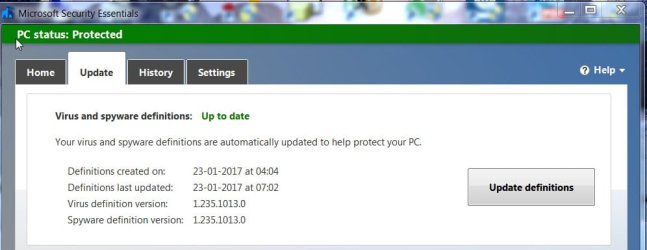
Yes, confirmed. With the recent MSE Virus and Spyware Definition update 1.235.1013.0, the " Safe to remove hardware"notification is back.

23-01-2017 22-41-25.jpg
 
Last edited:

My Computer My Computer

At a glance

Windows 7 Home Premium 32 bit
OS
Windows 7 Home Premium 32 bit
Back
Top