Mysterious Win 7 Pro 64 Slowdown - Maybe Underclocking Itself?

Based on this thread plus your symptoms I think its fair to say the slow mode switch is faulty.

MSI Gaming 7 Z97 Slow Mode Issue

The question is, is the switch a master override to all bios settings, or is it dependent on thermal management. To find out, try disabling intel adaptive thermal monitor in bios. If this fixes the issue you can stick with that as a solution, knowing that if your cpu fan fails, your cpu will fry. The good news is the fan is unlikely to fail. Desktop cpus have been around for almost 40 years and thermal management protection has been with us for maybe 10, so while thermal management is good its not the end of the world to run without it.

It can't hurt to reach out to MSI, just say you lost your receipt, maybe they'll give you an RMA anyway because they know this is a pretty lame failure on their part. But IF they say no to an rma AND disabling TMP as above does not fix it AND you are out of options, I'd find a way to disable the switch. Play with it in different positions. Unscrew the motherboard and take apart the switch. It depends on your appetite for risk, your level of desperation, and your electronic aptitude.
 

My Computer My Computer

At a glance

Win7 pro x64stock i7 7700kCorsair Vengeance LPX 16GB (2x8GB) DDR4 @ 320...integrated Intel HD 630
Computer type
PC/Desktop
Computer Manufacturer/Model Number
diy
OS
Win7 pro x64
CPU
stock i7 7700k
Motherboard
Gigabyte Z270N-WIFI mini-ITX
Memory
Corsair Vengeance LPX 16GB (2x8GB) DDR4 @ 3200MHz
Graphics Card(s)
integrated Intel HD 630
Sound Card
onboard Realtek ALC1220
Monitor(s) Displays
two vertically mounted samsung 55" 4k un55mu8000
Screen Resolution
1920x1280
Hard Drives
256GB Samsung EVO 960 M.2 pci-e NVMe SSD
PSU
SilverStone Nightjar ST45NF 450Watt Fanless
Case
No case. Motherboard is mounted directly onto power supply
Cooling
Evercool low profile 815EP with Panaflow 12L fan at 7v
Keyboard
Ortek MCK-86 mini
Mouse
Belkin 5-button USB
Internet Speed
spectrum 400mbps
John, TDK,
I don't think there is something wrong with the MoBo.
I think that is the MB that is putting the multiplier a low value when idle. It's normal and should be that way.
 

My Computers My Computers

  • At a glance

    Windows 7 HP 64i5 6600K - 800MHz to 4200MHz4+4G GSkill DDR4 3000IG - Intel 530
    Computer type
    PC/Desktop
    Computer Manufacturer/Model Number
    custom build
    OS
    Windows 7 HP 64
    CPU
    i5 6600K - 800MHz to 4200MHz
    Motherboard
    GA-Z170-HD3P
    Memory
    4+4G GSkill DDR4 3000
    Graphics Card(s)
    IG - Intel 530
    Monitor(s) Displays
    Samsung 226BW
    Screen Resolution
    1680x1050
    Hard Drives
    (1) -1 SM951 – 128GB M.2 AHCI PCIe SSD drive for Windows 7 and Lubuntu
    (2) -1 WD SATA 3 - 1T for Data
    (3) -1 WD SATA 3 - 1T for backup
    PSU
    Thermaltake 450W TR2 gold
    Keyboard
    Old and good Chicony mechanical keyboard
    Mouse
    Logitech mX performance - 9 buttons (had to disable some)
    Internet Speed
    500Mb/s
    Browser
    Firefox 64
    Other Info
    TinyWall firewall
  • At a glance

    Windows 7 Proi7-4500U 800MHz to 3.0GHz(4+4)G DDR3 1600IG intel 4400 + NVIDIA GeForce GT 745M
    Computer type
    Laptop
    System Manufacturer/Model Number
    Asus Q550LF
    OS
    Windows 7 Pro
    CPU
    i7-4500U 800MHz to 3.0GHz
    Motherboard
    Asus Q550LF
    Memory
    (4+4)G DDR3 1600
    Graphics Card(s)
    IG intel 4400 + NVIDIA GeForce GT 745M
    Sound Card
    Realtek
    Monitor(s) Displays
    LG Display LP156WF4-SPH1
    Screen Resolution
    1920 x 1080
    Hard Drives
    BX500 120G SSD for Windows and programs +
    1T HDD for data
    Internet Speed
    500 Mb/s
    Browser
    Firefox
    Other Info
    TinyWall firewall
Hi Folks. Here’s an update before I have to head out.

Got the side panel off the box. Surprisingly clean on the inside; no clogged cooling fins and barely any dust. I worked the Slow switch back-n-forth a handful of times: it feels mechanically sound like a new switch. I left it in the ‘other’ direction (toward the front of the case). Booted to BIOS and no speed change: 0.8 GHz. Tried the center position but booted to Windows instead of BIOS. It started at 4.2 GHz. I think that’s a turbo mode or the like as shouldn’t it be at 4 GHz?

A little weirdness here. I lost all my front panel lights. My on/off switch lights up with a blue LED, but now no light, for example. When I turned it on, I didn’t know it turned on except for the mouse lit up as did my USB volume control. I would assume if the light(s) didn’t work, then the on/off switch wouldn’t work, if I unplugged something. The front panel header is pretty much behind the power supply, so I’ll have to figure out how to get to it without taking it apart…

It ran at 4.2 GHz for a couple of hours, mostly. It was fluctuating a lot, however, as it would drop to 800 MHz then bounce back to 4.2 GHz. I paid close attention to my wife’s computer and it’s power down/energy saving function. At idle it drops to around 1500 MHz but goes to 3300 instantly when in use. My test was running a MalewareBytes scan. After opening the program it dropped to idle, but jumped to full bore when I hit the scan button. On my computer it stayed at 800 MHz during the scan.

I learned a lot in that I discovered in Power Options, there’s a section on the percentage of slow down you can allow the system to run at. I also Googled and learned what EIST in BIOS is. I turned it off, as suggested, in my box and the Processor Power Management option to control this is gone. I turned it back on and set this option to 25%, but the system was still running at 800 MHz. At 25% it shouldn’t drop any more than to 1050 MHz if my thinking is correct.

So last night and this morning so far, it is bouncing from 800 to 4200 MHz quite frequently instead of staying one way or the other for extended periods like before.

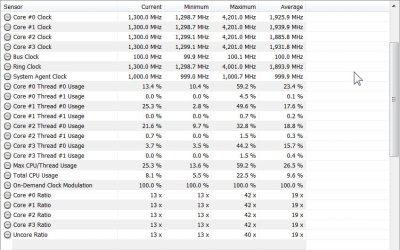
This may be good news: HWiNFO64 is now showing Core Clock Maximum speed as 4203.1 MHz instead of 800 MHz!

Oh, and disabling Intel adaptive thermal monitor made no difference.

Got to run...
.
 

My Computer My Computer

At a glance

Win 7 Pro 64 SP1i7 6700K SkyLake32 GBnVidia GTX 970
Computer type
PC/Desktop
Computer Manufacturer/Model Number
home built
OS
Win 7 Pro 64 SP1
CPU
i7 6700K SkyLake
Motherboard
MSI Gaming M7
Memory
32 GB
Graphics Card(s)
nVidia GTX 970
Sound Card
onboard
Monitor(s) Displays
DELL U2711
Screen Resolution
2560x1440
Hard Drives
1 SSD OS, 2 WD Black Caviar data harddrives
PSU
EVGA Super Nova 850W G2 'Gold'
Case
Thermaltake Soprano Snow Edition
Cooling
Cooler Master Hyper 212 evo
Keyboard
Logitech K350
Mouse
Mad Kats RATT
Antivirus
Avast
Browser
Firefox
If your system power light has suddenly become disabled, that points to a circuitry issue on the motherboard. Most gaming boards allow you to control the LED lights in bios just for fun, but you would have to check if that extends to your power light, so check your manual on that. Sounds like a problem to me. And inasmuch as both your led power pins and your slow mode switch are on the same edge of the board, I wonder if there is something metal that is touching the underside of your board. You may have to remove the board to find out. It could be causing both issues, slow mode and power lights.

Your board has a physical switch called Hot_Key1. If you switch it to ON it enables some hotkeys, one of which is PrtSc-F8 which toggles your slow mode state while you are in windows. Try switching it to ON with the machine off, and then hitting PrtSc-F8 anytime your machine slows down while in windows. Not a real good permanent fix, but it would be cool if this worked.

Another way to do the same thing is to run the MSI Command Center tool. Check it out, as it allows you to set cpu speed while in windows.

Support For Z170A GAMING M7 | Motherboard - The world leader in motherboard design | MSI USA

btw 4.2ghz is normal because of intel turboboost. All good there.

Since your cpu max was 4.2ghz your machine must have been in non-slow-mode state at some point. When operating normally your machine will be at 800mhz a lot because of intel thermal management. You were smart to run malwarebytes on both machines and noted that your machine stayed at 800mhz but the other machine did not. An even more certain way to check if your machine is locked into slow mode or not is to briefly run a program like hyper-pi. Running it should make all your cpu cores leap immediately to 4.2ghz. If so, you are in good shape, if not, you are stuck in friggin slow mode and should hit PrtSc-F8 then try hyper-pi again. Running at 800mhz is not in itself a problem though, as you know.

Virgilio Borges

There was a guy in that thread I linked earlier whose machine ran at 0.8ghz at all times, unless he put the slow mode switch in the middle which fixed it sometimes. Obviously a board malfunction that sure looks like yours.
 

My Computer My Computer

At a glance

Win7 pro x64stock i7 7700kCorsair Vengeance LPX 16GB (2x8GB) DDR4 @ 320...integrated Intel HD 630
Computer type
PC/Desktop
Computer Manufacturer/Model Number
diy
OS
Win7 pro x64
CPU
stock i7 7700k
Motherboard
Gigabyte Z270N-WIFI mini-ITX
Memory
Corsair Vengeance LPX 16GB (2x8GB) DDR4 @ 3200MHz
Graphics Card(s)
integrated Intel HD 630
Sound Card
onboard Realtek ALC1220
Monitor(s) Displays
two vertically mounted samsung 55" 4k un55mu8000
Screen Resolution
1920x1280
Hard Drives
256GB Samsung EVO 960 M.2 pci-e NVMe SSD
PSU
SilverStone Nightjar ST45NF 450Watt Fanless
Case
No case. Motherboard is mounted directly onto power supply
Cooling
Evercool low profile 815EP with Panaflow 12L fan at 7v
Keyboard
Ortek MCK-86 mini
Mouse
Belkin 5-button USB
Internet Speed
spectrum 400mbps
Intel thermal management is to protect your CPU from overheating. It lows the clock when CPU is at VERY high temperatures (130ºC).
As your temperatures are / were low, it wasn't it that was setting your clock at 800 MHz.
This is for protection and should be enabled.
On BIOS, the CPU fan and temperature alarm should also be set.
 

My Computers My Computers

  • At a glance

    Windows 7 HP 64i5 6600K - 800MHz to 4200MHz4+4G GSkill DDR4 3000IG - Intel 530
    Computer type
    PC/Desktop
    Computer Manufacturer/Model Number
    custom build
    OS
    Windows 7 HP 64
    CPU
    i5 6600K - 800MHz to 4200MHz
    Motherboard
    GA-Z170-HD3P
    Memory
    4+4G GSkill DDR4 3000
    Graphics Card(s)
    IG - Intel 530
    Monitor(s) Displays
    Samsung 226BW
    Screen Resolution
    1680x1050
    Hard Drives
    (1) -1 SM951 – 128GB M.2 AHCI PCIe SSD drive for Windows 7 and Lubuntu
    (2) -1 WD SATA 3 - 1T for Data
    (3) -1 WD SATA 3 - 1T for backup
    PSU
    Thermaltake 450W TR2 gold
    Keyboard
    Old and good Chicony mechanical keyboard
    Mouse
    Logitech mX performance - 9 buttons (had to disable some)
    Internet Speed
    500Mb/s
    Browser
    Firefox 64
    Other Info
    TinyWall firewall
  • At a glance

    Windows 7 Proi7-4500U 800MHz to 3.0GHz(4+4)G DDR3 1600IG intel 4400 + NVIDIA GeForce GT 745M
    Computer type
    Laptop
    System Manufacturer/Model Number
    Asus Q550LF
    OS
    Windows 7 Pro
    CPU
    i7-4500U 800MHz to 3.0GHz
    Motherboard
    Asus Q550LF
    Memory
    (4+4)G DDR3 1600
    Graphics Card(s)
    IG intel 4400 + NVIDIA GeForce GT 745M
    Sound Card
    Realtek
    Monitor(s) Displays
    LG Display LP156WF4-SPH1
    Screen Resolution
    1920 x 1080
    Hard Drives
    BX500 120G SSD for Windows and programs +
    1T HDD for data
    Internet Speed
    500 Mb/s
    Browser
    Firefox
    Other Info
    TinyWall firewall
Hi Folks. Thanks for the catch on the Temp Alarm being off. Don’t know how I missed that; it’s on now. And it’s good to know 4.2 GHz is OK.

Before I get into an update, I discovered another bit of weirdness. VLC has been pixelating when viewing some of my ‘home movies,’ but just for the first few seconds. I never thought much about it. However, when viewing one on my wife’s computer during this slowdown problem, VLC worked fine. Now that this box is running at a max of 4.2 GHz, that’s gone away!?! Maybe VLC was somehow choking when this was running at 4.5 GHz? Makes me wonder what else was a little wonky at 4.5…

Yesterday it was still running at 4.2 GHz every time I used it. I wanted to wait until today to give an update as at night I shut it off instead of putting it to sleep. This morning on a full boot, it fired up at 4.2 GHz and has been there all day (I did put it to sleep for a while).

A clarification: I’m good with this thing slowing down at idle. I only mentioned how it never did that before to help diagnose the problem. Hopefully I didn’t sound I wanted it running full bore all the time. So, now knowing what EIST is, I turned it back on in BIOS, hoping it did mess anything up.

So far so good as the CPU has been fluctuating up and down on demand, but never staying slow. Screenshot below. I still have it at 25% in the Power Options for testing (I wanted to make sure a legitimate slowdown didn’t hit 800 GHz and throw us off).

On my wife’s machine it’s set at 5%. Any recommendations on a good level? (I don’t know if it comes back to life faster with a higher setting or not…)

I got back into the case and did not find anything unplugged. I was able to make sure all the headers are fully seating by using a flat-tipped screwdriver.

I have to admit I’m ‘scared’ to experiment with the switch anymore, or much else for that matter. I was halfway thinking of moving it back and see if the ‘on’ light comes back or not. I just need this box to run fast at this time to risk getting stuck in slow mode again. Maybe the different circuitry used in the 3 positions could cause it…?

Before I take this box out to the storage shed and pull the motherboard, I’m thinking maybe I should try MSI, as suggested above, for a replacement board as all indications seem to point that way. Not to sound like a whiner, it’s a lot of work for me to set up a work area out there, and my Better Half won’t let me do it inside the house (no room).

I’m going to give it another day or two to make sure things keep running ‘fast.’
.
 

Attachments

  • HWE info 64 - 2017-04-04_11-35-11.jpg
    HWE info 64 - 2017-04-04_11-35-11.jpg
    76.3 KB · Views: 0

My Computer My Computer

At a glance

Win 7 Pro 64 SP1i7 6700K SkyLake32 GBnVidia GTX 970
Computer type
PC/Desktop
Computer Manufacturer/Model Number
home built
OS
Win 7 Pro 64 SP1
CPU
i7 6700K SkyLake
Motherboard
MSI Gaming M7
Memory
32 GB
Graphics Card(s)
nVidia GTX 970
Sound Card
onboard
Monitor(s) Displays
DELL U2711
Screen Resolution
2560x1440
Hard Drives
1 SSD OS, 2 WD Black Caviar data harddrives
PSU
EVGA Super Nova 850W G2 'Gold'
Case
Thermaltake Soprano Snow Edition
Cooling
Cooler Master Hyper 212 evo
Keyboard
Logitech K350
Mouse
Mad Kats RATT
Antivirus
Avast
Browser
Firefox
It takes microseconds for the cpu to speed up from 800mhz to 4200mhz.

You are probably correct that the vlc issue was related to the cpu speed issue.

I do not see a reason to use a setting other than 5% as the minimum processor state.

When a physical switch becomes faulty yet as you said "feels solid", it usually means one of the two metal contacts within the switch has become loose and is just sort of dangling. When the two pieces of metal touch, the switch is on, and when they're not touching, the switch is off. So any further movement of the switch or even moving the computer puts you at risk of having them come back into contact with each other, putting you back into slow mode. So you are right to be afraid.

It appears that when your slow mode gets activated several random bios settings get adjusted too. For instance for your power light, it turns out your board does indeed allow you to turn it off. "On board LED Control [On]" is the bios setting you want. I recommend just resetting bios to default values anytime something is amiss. Bios defaults are fine for 99% of us. That will reset the power light, cpu thermal management, everything, back to defaults. Since your power light is indeed bios adjustable I no longer suspect that you have something touching the underside of your motherboard.

If your machine falls back into slow mode, I'm curious if the PRtSC-F8 hotkey idea in my previous post fixes it.
 
Last edited:

My Computer My Computer

At a glance

Win7 pro x64stock i7 7700kCorsair Vengeance LPX 16GB (2x8GB) DDR4 @ 320...integrated Intel HD 630
Computer type
PC/Desktop
Computer Manufacturer/Model Number
diy
OS
Win7 pro x64
CPU
stock i7 7700k
Motherboard
Gigabyte Z270N-WIFI mini-ITX
Memory
Corsair Vengeance LPX 16GB (2x8GB) DDR4 @ 3200MHz
Graphics Card(s)
integrated Intel HD 630
Sound Card
onboard Realtek ALC1220
Monitor(s) Displays
two vertically mounted samsung 55" 4k un55mu8000
Screen Resolution
1920x1280
Hard Drives
256GB Samsung EVO 960 M.2 pci-e NVMe SSD
PSU
SilverStone Nightjar ST45NF 450Watt Fanless
Case
No case. Motherboard is mounted directly onto power supply
Cooling
Evercool low profile 815EP with Panaflow 12L fan at 7v
Keyboard
Ortek MCK-86 mini
Mouse
Belkin 5-button USB
Internet Speed
spectrum 400mbps
It takes microseconds for the cpu to speed up from 800mhz to 4200mhz.

You are probably correct that the vlc issue was related to the cpu speed issue.

I do not see a reason to use a setting other than 5% as the minimum processor state.
Hi johnhoh. Sounds good, I’ll give 5% a try. Thanks.

When a physical switch becomes faulty yet as you said "feels solid", it usually means one of the two metal contacts within the switch has become loose and is just sort of dangling. When the two pieces of metal touch, the switch is on, and when they're not touching, the switch is off. So any further movement of the switch or even moving the computer puts you at risk of having them come back into contact with each other, putting you back into slow mode. So you are right to be afraid.
Yeah, I’ll leave it alone :)

It appears that when your slow mode gets activated several random bios settings get adjusted too. For instance for your power light, it turns out your board does indeed allow you to turn it off. "On board LED Control [On]" is the bios setting you want. I recommend just resetting bios to default values anytime something is amiss. Bios defaults are fine for 99% of us. That will reset the power light, cpu thermal management, everything, back to defaults. Since your power light is indeed bios adjustable I no longer suspect that you have something touching the underside of your motherboard.

If your machine falls back into slow mode, I'm curious if the PRtSC-F8 hotkey idea in my previous post fixes it.
I did notice the LED Control option, and I *thought* I tuned it on. I’ll have to double check as I’ve been known to miss such things.

Hopefully I won’t have to, but if I ever need to give the Prtscn+F8 key trick a try, I’ll let you know.
 

My Computer My Computer

At a glance

Win 7 Pro 64 SP1i7 6700K SkyLake32 GBnVidia GTX 970
Computer type
PC/Desktop
Computer Manufacturer/Model Number
home built
OS
Win 7 Pro 64 SP1
CPU
i7 6700K SkyLake
Motherboard
MSI Gaming M7
Memory
32 GB
Graphics Card(s)
nVidia GTX 970
Sound Card
onboard
Monitor(s) Displays
DELL U2711
Screen Resolution
2560x1440
Hard Drives
1 SSD OS, 2 WD Black Caviar data harddrives
PSU
EVGA Super Nova 850W G2 'Gold'
Case
Thermaltake Soprano Snow Edition
Cooling
Cooler Master Hyper 212 evo
Keyboard
Logitech K350
Mouse
Mad Kats RATT
Antivirus
Avast
Browser
Firefox
Hi Folks. Things have been working just fine, and I was going to post that this morning… However, and I don’t know if this is a coincidence or not, but this morning I when into BIOS first, to check my network settings (more on that below) and it booted at 800 MHz. This is the first time it booted slow since my last post.

OK, a good time to try the Prtscn+F8 trick. I located the switch on the motherboard and it was already set to on. But the Prtscn key fires up my screen capture program, SnagIt, so I disabled that, and still nothing. Then I realized I missed Step 1 and didn’t have my keyboard plugged into the correct USB port (it’s a wireless keybrd so I had it in the front panel port). Dooh!

1. Connect your keyboard directly to the HOTKEY port on the rear I/O panel
Now done (after my ops mistake).

2. Turn HOT_KEY1 to On position
Already on (default).

3. Press Ctrl + ←Backspace to activate HOTKEY function, the HOTKEY LED turns on.
I get no response. I find no additional LEDs on; I figured maybe the switch would light up, but it doesn’t. I searched the PDF manual and didn’t find a reference to it.

I tried a couple of other Hot Keys, and no response to anything. So I’m wondering if it’s because it’s a wireless keybrd. I’m sure I have a wired USB keybrd out in the storage shed somewhere, so I’ll try and dig one up and try again.

Is something supposed to popup on screen saying it's in Hotkey function?

~~~~~~~~~~~~~~~~~~~~~~~~~~~~~~~~~~~~~~~~~~

I did see something new. (Or maybe I’m just watching more closely…) Two nights in a row, with the system Off, I saw the orange/yellow LAN blink once. I watched for a moment but it didn’t come back on.

Then yesterday, with the system in Sleep mode, the light was flashing a lot for a while, as if I was accessing something online. I double checked and the mouse and monitor were still off so I can only assume it was still in Sleep mode. (I couldn’t check the On LED, which blinks when it’s asleep, as it’s not working.)

And that’s why I went into BIOS first thing this morning. I couldn’t find anything unusual, but do have a question.

I have Onboard LAN controller turned ON.

I have LAN Option ROM turned OFF, as my guess is this allowed a Wake On LAN function, which I don't want.

My question is on the Network Stack, currently turned OFF. It’s description is:

Sets UEFI network stack for optimizing IPv4 / IPv6 function

Seems like I should have this turned ON??

~~~~~~~~~~~~~~~~~~~~~~~~~~~~~~~~~

And finally, for giggles, I went to MSI’s Web site yesterday to see what it took to contact them. Boy-howdy is their contact form long! I could open a line of credit easier than filling out that thing, LOL. They want an awful lot of info that I would have to dig up.

So I’m thinking I’ll try their Forum first.

Good idea??
.
 

My Computer My Computer

At a glance

Win 7 Pro 64 SP1i7 6700K SkyLake32 GBnVidia GTX 970
Computer type
PC/Desktop
Computer Manufacturer/Model Number
home built
OS
Win 7 Pro 64 SP1
CPU
i7 6700K SkyLake
Motherboard
MSI Gaming M7
Memory
32 GB
Graphics Card(s)
nVidia GTX 970
Sound Card
onboard
Monitor(s) Displays
DELL U2711
Screen Resolution
2560x1440
Hard Drives
1 SSD OS, 2 WD Black Caviar data harddrives
PSU
EVGA Super Nova 850W G2 'Gold'
Case
Thermaltake Soprano Snow Edition
Cooling
Cooler Master Hyper 212 evo
Keyboard
Logitech K350
Mouse
Mad Kats RATT
Antivirus
Avast
Browser
Firefox
I have read through this thread several times. A lot of trial and error.

I would suggest doing some basic again.

1. Plug your mouse and keyboard into the motherboard usb 2.0 on the back of the computer.
2. Don't use sleep or hibernation until all other problems are solved.
3. Set your bios to 'Default' and leave it that way until all other problems are solved.
4. Verify that the needed proper USB 3.0 drivers are installed.

Note.
All needed drivers and chip-set are included on your motherboard DVD.
They will not need updated to work properly.
If needed for what ever reason you can do that later.

If one doesn't start off with the proper basics all the tinkering in the world will not help a lot.

Jack
 

My Computer My Computer

At a glance

Windows 10 Pro. 64/ version 1709 Windows 7 Pr...Intel i7-6800K @ 4.3Corsair Platinum 16 gig @2400EVGA GTX 1070 OC
Computer type
PC/Desktop
Computer Manufacturer/Model Number
Home made Desktop
OS
Windows 10 Pro. 64/ version 1709 Windows 7 Pro/64
CPU
Intel i7-6800K @ 4.3
Motherboard
ASUS X-99 Deluxe II
Memory
Corsair Platinum 16 gig @2400
Graphics Card(s)
EVGA GTX 1070 OC
Monitor(s) Displays
Asus 27" LED LCD/VE278Q
Screen Resolution
1920-1080 or 1280-720 HDMI
Hard Drives
INTEL SSD 730-240 Gb Sata 3.0/
PSU
EVGA Platium 1200W
Case
Phanteks Luxe Tempered Glass 8 fans/ one radiator
Cooling
XSPC/ Water Cooled CPU
Keyboard
Das 4 Professional
Mouse
Logitech M705/MX Anywhere 2-S
Internet Speed
100 mbits
Antivirus
Microsoft Security Essentials/ Malwarebytes Premium 3.0/ SAS
Browser
I.E. 11 default/Firefox/ ISP Time Warner Cable/Spectrum
Other Info
LG BluRay Burner/
Sound system-KLipsch-THX/
Icy Dock ssd Hot Swap bays.
(Jack - a broken slow mode switch is a common issue with his board and he has all the symptoms. The solution is an RMA but since he bought the board a while back he's trying to figure out a way around that)

TDK -
not sure about your hotkey but I'd guess you are right, you need a basic usb keyboard

anytime you are "stuck" on 800mhz I recommend this procedure:

1) reset bios to default settings, then save

2) turn off machine and play with slow mode switch position. E.g. Move it left, move it right, return it to middle.

3) reboot, check frequency when running hyper-pi

4) If freq=4ghz you're good, if freq=800mhz return to step 1

figuring out all the changes made to bios by a slow mode switch malfunction is going to be a nightmare, so its easiest to just get used to living with the bios default settings

to disable wake on lan within windows even though its enabled in bios, do start > run > devmgmt.msc > enter, click on network adapter section, right click on your lan adapter, properties, power management, then uncheck "allow this device to wake the computer". Anytime you reset bios, you may need to need re-do this step.

I have better luck with motherboard companies by calling them. You have to wait on hold for 45 minutes, but after that its easy. You may not need to post on the forum as the issue has been discussed at length, here are some posts, maybe you can pick up some tips.

MSI Z170A Gaming M3 - problem with stock CPU - need to know what is this LED

MSI Gaming M7 +6700K running at 800mhz - Potential Solution?

MSI Gaming 970 FX8350 CPU limited to 1400 MHZ

i7 6700K in Z170A Stuck at .8 Ghz

MSI Z170A Gaming M5, multiplier stuck at 8x!!!

CPU speeds stuck in slow mode?
 

My Computer My Computer

At a glance

Win7 pro x64stock i7 7700kCorsair Vengeance LPX 16GB (2x8GB) DDR4 @ 320...integrated Intel HD 630
Computer type
PC/Desktop
Computer Manufacturer/Model Number
diy
OS
Win7 pro x64
CPU
stock i7 7700k
Motherboard
Gigabyte Z270N-WIFI mini-ITX
Memory
Corsair Vengeance LPX 16GB (2x8GB) DDR4 @ 3200MHz
Graphics Card(s)
integrated Intel HD 630
Sound Card
onboard Realtek ALC1220
Monitor(s) Displays
two vertically mounted samsung 55" 4k un55mu8000
Screen Resolution
1920x1280
Hard Drives
256GB Samsung EVO 960 M.2 pci-e NVMe SSD
PSU
SilverStone Nightjar ST45NF 450Watt Fanless
Case
No case. Motherboard is mounted directly onto power supply
Cooling
Evercool low profile 815EP with Panaflow 12L fan at 7v
Keyboard
Ortek MCK-86 mini
Mouse
Belkin 5-button USB
Internet Speed
spectrum 400mbps
The switch very well might be one of the problems.

The first thing the hotline is going to ask, is if the system is set to default. No tweaks.

Jack
 

My Computer My Computer

At a glance

Windows 10 Pro. 64/ version 1709 Windows 7 Pr...Intel i7-6800K @ 4.3Corsair Platinum 16 gig @2400EVGA GTX 1070 OC
Computer type
PC/Desktop
Computer Manufacturer/Model Number
Home made Desktop
OS
Windows 10 Pro. 64/ version 1709 Windows 7 Pro/64
CPU
Intel i7-6800K @ 4.3
Motherboard
ASUS X-99 Deluxe II
Memory
Corsair Platinum 16 gig @2400
Graphics Card(s)
EVGA GTX 1070 OC
Monitor(s) Displays
Asus 27" LED LCD/VE278Q
Screen Resolution
1920-1080 or 1280-720 HDMI
Hard Drives
INTEL SSD 730-240 Gb Sata 3.0/
PSU
EVGA Platium 1200W
Case
Phanteks Luxe Tempered Glass 8 fans/ one radiator
Cooling
XSPC/ Water Cooled CPU
Keyboard
Das 4 Professional
Mouse
Logitech M705/MX Anywhere 2-S
Internet Speed
100 mbits
Antivirus
Microsoft Security Essentials/ Malwarebytes Premium 3.0/ SAS
Browser
I.E. 11 default/Firefox/ ISP Time Warner Cable/Spectrum
Other Info
LG BluRay Burner/
Sound system-KLipsch-THX/
Icy Dock ssd Hot Swap bays.
Hi johnhoh. I’ve got to run out and do my ‘errands,’ so I’ll do the top part of your post later.

… snip…
to disable wake on lan within windows even though its enabled in bios, do start > run > devmgmt.msc > enter, click on network adapter section, right click on your lan adapter, properties, power management, then uncheck "allow this device to wake the computer". Anytime you reset bios, you may need to need re-do this step.

I have better luck with motherboard companies by calling them. You have to wait on hold for 45 minutes, but after that its easy. You may not need to post on the forum as the issue has been discussed at length, here are some posts, maybe you can pick up some tips.
The disable trick worked, thanks. Good idea trying to call MSI; I hadn’t thought of that. Yeah, starting all over on the MSI forum would be a pain for such.

Gotta run…
 

My Computer My Computer

At a glance

Win 7 Pro 64 SP1i7 6700K SkyLake32 GBnVidia GTX 970
Computer type
PC/Desktop
Computer Manufacturer/Model Number
home built
OS
Win 7 Pro 64 SP1
CPU
i7 6700K SkyLake
Motherboard
MSI Gaming M7
Memory
32 GB
Graphics Card(s)
nVidia GTX 970
Sound Card
onboard
Monitor(s) Displays
DELL U2711
Screen Resolution
2560x1440
Hard Drives
1 SSD OS, 2 WD Black Caviar data harddrives
PSU
EVGA Super Nova 850W G2 'Gold'
Case
Thermaltake Soprano Snow Edition
Cooling
Cooler Master Hyper 212 evo
Keyboard
Logitech K350
Mouse
Mad Kats RATT
Antivirus
Avast
Browser
Firefox
I have read through this thread several times. A lot of trial and error.

I would suggest doing some basic again.

1. Plug your mouse and keyboard into the motherboard usb 2.0 on the back of the computer.
Hi Jack. Thanks for the tips. The keybrd and mouse are currently in the back of the computer. The mouse has always been there. Originally I had my PS2 hooked up but about 5-6 months ago I got this slightly curved wireless keybrd by Logitech. I prefer corded keybrds and mice (my mouse is corded) but this was the only keybrd that had a gentle curve; the MS keybrds were too radical for me to try. (I have trouble typing and figured the curve would help. It does, but only slightly.)

Please note that I built this box over a year ago and has worked great until this problem. I think it was Jan. or Feb. of 2016 when I got it together.

2. Don't use sleep or hibernation until all other problems are solved.
I have been in the habit for a while now to turn it off at night. During the day, when I step away for 2-4 hours is a different story; I usually have too much running to ‘start all over again,’ so I put it to sleep during the day. I have had better success in sleep mode when it is running ‘fast’ as it comes back ‘fast.’ It’s a lot more iffy on fresh boot.

3. Set your bios to 'Default' and leave it that way until all other problems are solved.
It’s been set to default numerous times, no change, and a fresh BIOS flash, too. It’s current at default and is still running at 800 MHz.

4. Verify that the needed proper USB 3.0 drivers are installed.
I installed the drivers on the motherboard’s CD and all USB devices have worked just fine. I have no idea how verify if they are ‘proper’ or not…

I did note, however, when I got the latest BIOS, they (MSI) has a ‘fast USB’ utility available. I did not d/l or install this as I don’t know what it is.

Note.
All needed drivers and chip-set are included on your motherboard DVD.
They will not need updated to work properly.
If needed for what ever reason you can do that later.

If one doesn't start off with the proper basics all the tinkering in the world will not help a lot.

Jack
Yes, I installed the CD’s drivers and the like when I built this, so it’s all MSI stuff.
 

My Computer My Computer

At a glance

Win 7 Pro 64 SP1i7 6700K SkyLake32 GBnVidia GTX 970
Computer type
PC/Desktop
Computer Manufacturer/Model Number
home built
OS
Win 7 Pro 64 SP1
CPU
i7 6700K SkyLake
Motherboard
MSI Gaming M7
Memory
32 GB
Graphics Card(s)
nVidia GTX 970
Sound Card
onboard
Monitor(s) Displays
DELL U2711
Screen Resolution
2560x1440
Hard Drives
1 SSD OS, 2 WD Black Caviar data harddrives
PSU
EVGA Super Nova 850W G2 'Gold'
Case
Thermaltake Soprano Snow Edition
Cooling
Cooler Master Hyper 212 evo
Keyboard
Logitech K350
Mouse
Mad Kats RATT
Antivirus
Avast
Browser
Firefox
Well we have something in common. I also tried the curved keyboards because of cramping in my hands and forearms. It didn't help. I hope it works for you.
I tried many keyboards. Most I gave away and I still have about 6 tucked away.


The keyboard and mouse that solved my problem is in (My System Specs).


I know nothing about MSI motherboards or bios so I will leave that of those that do.
Reading through the thread again, johnhoh idea about the 'slow switch' looks better and better.

Jack
 

My Computer My Computer

At a glance

Windows 10 Pro. 64/ version 1709 Windows 7 Pr...Intel i7-6800K @ 4.3Corsair Platinum 16 gig @2400EVGA GTX 1070 OC
Computer type
PC/Desktop
Computer Manufacturer/Model Number
Home made Desktop
OS
Windows 10 Pro. 64/ version 1709 Windows 7 Pro/64
CPU
Intel i7-6800K @ 4.3
Motherboard
ASUS X-99 Deluxe II
Memory
Corsair Platinum 16 gig @2400
Graphics Card(s)
EVGA GTX 1070 OC
Monitor(s) Displays
Asus 27" LED LCD/VE278Q
Screen Resolution
1920-1080 or 1280-720 HDMI
Hard Drives
INTEL SSD 730-240 Gb Sata 3.0/
PSU
EVGA Platium 1200W
Case
Phanteks Luxe Tempered Glass 8 fans/ one radiator
Cooling
XSPC/ Water Cooled CPU
Keyboard
Das 4 Professional
Mouse
Logitech M705/MX Anywhere 2-S
Internet Speed
100 mbits
Antivirus
Microsoft Security Essentials/ Malwarebytes Premium 3.0/ SAS
Browser
I.E. 11 default/Firefox/ ISP Time Warner Cable/Spectrum
Other Info
LG BluRay Burner/
Sound system-KLipsch-THX/
Icy Dock ssd Hot Swap bays.
... snip...
anytime you are "stuck" on 800mhz I recommend this procedure:

1) reset bios to default settings, then save

2) turn off machine and play with slow mode switch position. E.g. Move it left, move it right, return it to middle.

3) reboot, check frequency when running hyper-pi

4) If freq=4ghz you're good, if freq=800mhz return to step 1

figuring out all the changes made to bios by a slow mode switch malfunction is going to be a nightmare, so its easiest to just get used to living with the bios default settings

...snip...

CPU speeds stuck in slow mode?
Hi johnhoh. I ran out of time yesterday, but did (re)apply your tips again this morning. No joy as I’m still at a painful 800 MHz.

So far I’ve only had time to check out one of your links. I picked the bottom one at random. In it, it suggest manually setting the CPU Ratio manually. I right-clicked on this setting in BIOS, but all I get is several “Favorite” choices. So I looked at the PDF manual and all it says is:

“[FONT=&quot]▶[/FONT]CPU Ratio [Auto]
Sets the CPU ratio that is used to determine CPU clock speed. This item can only be
changed if the processor supports this function.

So I guess I’m stuck not being able to try to manually set it to 40 or 42…
.
 

My Computer My Computer

At a glance

Win 7 Pro 64 SP1i7 6700K SkyLake32 GBnVidia GTX 970
Computer type
PC/Desktop
Computer Manufacturer/Model Number
home built
OS
Win 7 Pro 64 SP1
CPU
i7 6700K SkyLake
Motherboard
MSI Gaming M7
Memory
32 GB
Graphics Card(s)
nVidia GTX 970
Sound Card
onboard
Monitor(s) Displays
DELL U2711
Screen Resolution
2560x1440
Hard Drives
1 SSD OS, 2 WD Black Caviar data harddrives
PSU
EVGA Super Nova 850W G2 'Gold'
Case
Thermaltake Soprano Snow Edition
Cooling
Cooler Master Hyper 212 evo
Keyboard
Logitech K350
Mouse
Mad Kats RATT
Antivirus
Avast
Browser
Firefox
Hi Jack. I hope you find a keybrd that works for you, or is the "Das 4 Professional" working well enough? Choices seem to be limited in ‘curved’ units so I'll Google it and take a look.

I have read through this thread several times. A lot of trial and error.

I would suggest doing some basic again.

…snip…
2. Don't use sleep or hibernation until all other problems are solved.
…snip…

Jack
I’m glad I don’t claim to be too bright. I just thought of another interpretation on Step 2 above. Until this thing is fixed for real, if it ever comes back on at 4 or 4.2 GHz, I’m just not going to turn it Off or put it to Sleep, LOL.
.
 
Last edited:

My Computer My Computer

At a glance

Win 7 Pro 64 SP1i7 6700K SkyLake32 GBnVidia GTX 970
Computer type
PC/Desktop
Computer Manufacturer/Model Number
home built
OS
Win 7 Pro 64 SP1
CPU
i7 6700K SkyLake
Motherboard
MSI Gaming M7
Memory
32 GB
Graphics Card(s)
nVidia GTX 970
Sound Card
onboard
Monitor(s) Displays
DELL U2711
Screen Resolution
2560x1440
Hard Drives
1 SSD OS, 2 WD Black Caviar data harddrives
PSU
EVGA Super Nova 850W G2 'Gold'
Case
Thermaltake Soprano Snow Edition
Cooling
Cooler Master Hyper 212 evo
Keyboard
Logitech K350
Mouse
Mad Kats RATT
Antivirus
Avast
Browser
Firefox
The "Das 4 Professional" solved my keyboard problem. I have two system and two "Das 4 Professional" keyboards.

I'm writing a book and I have been typing for hours today without pain.
That is something I couldn't do before with other keyboards.
Using a mouse and keyboard should not be painful.

Jack
 

My Computer My Computer

At a glance

Windows 10 Pro. 64/ version 1709 Windows 7 Pr...Intel i7-6800K @ 4.3Corsair Platinum 16 gig @2400EVGA GTX 1070 OC
Computer type
PC/Desktop
Computer Manufacturer/Model Number
Home made Desktop
OS
Windows 10 Pro. 64/ version 1709 Windows 7 Pro/64
CPU
Intel i7-6800K @ 4.3
Motherboard
ASUS X-99 Deluxe II
Memory
Corsair Platinum 16 gig @2400
Graphics Card(s)
EVGA GTX 1070 OC
Monitor(s) Displays
Asus 27" LED LCD/VE278Q
Screen Resolution
1920-1080 or 1280-720 HDMI
Hard Drives
INTEL SSD 730-240 Gb Sata 3.0/
PSU
EVGA Platium 1200W
Case
Phanteks Luxe Tempered Glass 8 fans/ one radiator
Cooling
XSPC/ Water Cooled CPU
Keyboard
Das 4 Professional
Mouse
Logitech M705/MX Anywhere 2-S
Internet Speed
100 mbits
Antivirus
Microsoft Security Essentials/ Malwarebytes Premium 3.0/ SAS
Browser
I.E. 11 default/Firefox/ ISP Time Warner Cable/Spectrum
Other Info
LG BluRay Burner/
Sound system-KLipsch-THX/
Icy Dock ssd Hot Swap bays.

My Computer My Computer

At a glance

Win7 pro x64stock i7 7700kCorsair Vengeance LPX 16GB (2x8GB) DDR4 @ 320...integrated Intel HD 630
Computer type
PC/Desktop
Computer Manufacturer/Model Number
diy
OS
Win7 pro x64
CPU
stock i7 7700k
Motherboard
Gigabyte Z270N-WIFI mini-ITX
Memory
Corsair Vengeance LPX 16GB (2x8GB) DDR4 @ 3200MHz
Graphics Card(s)
integrated Intel HD 630
Sound Card
onboard Realtek ALC1220
Monitor(s) Displays
two vertically mounted samsung 55" 4k un55mu8000
Screen Resolution
1920x1280
Hard Drives
256GB Samsung EVO 960 M.2 pci-e NVMe SSD
PSU
SilverStone Nightjar ST45NF 450Watt Fanless
Case
No case. Motherboard is mounted directly onto power supply
Cooling
Evercool low profile 815EP with Panaflow 12L fan at 7v
Keyboard
Ortek MCK-86 mini
Mouse
Belkin 5-button USB
Internet Speed
spectrum 400mbps
The "Das 4 Professional" solved my keyboard problem. I have two system and two "Das 4 Professional" keyboards.

I'm writing a book and I have been typing for hours today without pain.
That is something I couldn't do before with other keyboards.
Using a mouse and keyboard should not be painful.

Jack
That's a nice looking keybrd, Jack. I use to love mechanical keybrds and did not like the soft and/or chicklet keybrds when they came out. I'm glad to hear it's doing you good! My Logitech K350 has firm keys, not mushy, but they're not mechanical. I just Googled it and couldn't find the key switch specs at several places.

If you don't mind me asking, what kind of book? I've known a few writers and got a feel for how it's not easy at all like a lot of folks think. Two have 'self-published' and one is still writing many years later.
.
 

My Computer My Computer

At a glance

Win 7 Pro 64 SP1i7 6700K SkyLake32 GBnVidia GTX 970
Computer type
PC/Desktop
Computer Manufacturer/Model Number
home built
OS
Win 7 Pro 64 SP1
CPU
i7 6700K SkyLake
Motherboard
MSI Gaming M7
Memory
32 GB
Graphics Card(s)
nVidia GTX 970
Sound Card
onboard
Monitor(s) Displays
DELL U2711
Screen Resolution
2560x1440
Hard Drives
1 SSD OS, 2 WD Black Caviar data harddrives
PSU
EVGA Super Nova 850W G2 'Gold'
Case
Thermaltake Soprano Snow Edition
Cooling
Cooler Master Hyper 212 evo
Keyboard
Logitech K350
Mouse
Mad Kats RATT
Antivirus
Avast
Browser
Firefox
Back
Top