- Local time
- 2:56 AM
- Messages
- 1,363
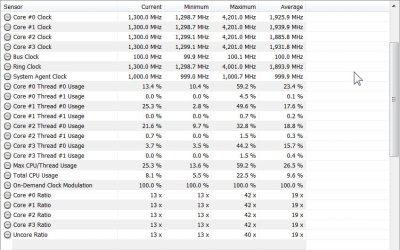
Based on this thread plus your symptoms I think its fair to say the slow mode switch is faulty.
MSI Gaming 7 Z97 Slow Mode Issue
The question is, is the switch a master override to all bios settings, or is it dependent on thermal management. To find out, try disabling intel adaptive thermal monitor in bios. If this fixes the issue you can stick with that as a solution, knowing that if your cpu fan fails, your cpu will fry. The good news is the fan is unlikely to fail. Desktop cpus have been around for almost 40 years and thermal management protection has been with us for maybe 10, so while thermal management is good its not the end of the world to run without it.
It can't hurt to reach out to MSI, just say you lost your receipt, maybe they'll give you an RMA anyway because they know this is a pretty lame failure on their part. But IF they say no to an rma AND disabling TMP as above does not fix it AND you are out of options, I'd find a way to disable the switch. Play with it in different positions. Unscrew the motherboard and take apart the switch. It depends on your appetite for risk, your level of desperation, and your electronic aptitude.
MSI Gaming 7 Z97 Slow Mode Issue
The question is, is the switch a master override to all bios settings, or is it dependent on thermal management. To find out, try disabling intel adaptive thermal monitor in bios. If this fixes the issue you can stick with that as a solution, knowing that if your cpu fan fails, your cpu will fry. The good news is the fan is unlikely to fail. Desktop cpus have been around for almost 40 years and thermal management protection has been with us for maybe 10, so while thermal management is good its not the end of the world to run without it.
It can't hurt to reach out to MSI, just say you lost your receipt, maybe they'll give you an RMA anyway because they know this is a pretty lame failure on their part. But IF they say no to an rma AND disabling TMP as above does not fix it AND you are out of options, I'd find a way to disable the switch. Play with it in different positions. Unscrew the motherboard and take apart the switch. It depends on your appetite for risk, your level of desperation, and your electronic aptitude.
My Computer
At a glance
Win7 pro x64stock i7 7700kCorsair Vengeance LPX 16GB (2x8GB) DDR4 @ 320...integrated Intel HD 630
- Computer type
- PC/Desktop
- Computer Manufacturer/Model Number
- diy
- OS
- Win7 pro x64
- CPU
- stock i7 7700k
- Motherboard
- Gigabyte Z270N-WIFI mini-ITX
- Memory
- Corsair Vengeance LPX 16GB (2x8GB) DDR4 @ 3200MHz
- Graphics Card(s)
- integrated Intel HD 630
- Sound Card
- onboard Realtek ALC1220
- Monitor(s) Displays
- two vertically mounted samsung 55" 4k un55mu8000
- Screen Resolution
- 1920x1280
- Hard Drives
- 256GB Samsung EVO 960 M.2 pci-e NVMe SSD
- PSU
- SilverStone Nightjar ST45NF 450Watt Fanless
- Case
- No case. Motherboard is mounted directly onto power supply
- Cooling
- Evercool low profile 815EP with Panaflow 12L fan at 7v
- Keyboard
- Ortek MCK-86 mini
- Mouse
- Belkin 5-button USB
- Internet Speed
- spectrum 400mbps