Solved Erasing desktop icons

americancritic2

americancritic2
Power User
VIP
Local time
5:01 PM
Messages
396
Location
Glendale, AZ
Hello and I know I am very young, so please don't hold that against me but is there a way to only leave one icon on your desktop instead of all of them.
 

My Computer My Computer

At a glance

Windows 7 Home Premium 64-Bit SP1Intel Core i7 26008.00 GB Dual-Channel DDR31024MB GeForce GT 420
Computer type
PC/Desktop
Computer Manufacturer/Model Number
Lenovo
OS
Windows 7 Home Premium 64-Bit SP1
CPU
Intel Core i7 2600
Motherboard
Lenovo
Memory
8.00 GB Dual-Channel DDR3
Graphics Card(s)
1024MB GeForce GT 420
Sound Card
Intergrated Realtex ALC888S
Monitor(s) Displays
LG W40 series Widescreen
Screen Resolution
1920 by 1080 widescreen
Hard Drives
932GB Hitachi HDS TB
External drive 640 GB also
PSU
300W
Case
Tower
Cooling
yes came installed
Keyboard
Lenovo
Mouse
Laser wirless 5000
Antivirus
MBAM / Superantispyware pro paid for.
Browser
Google /
Other Info
PLDS DVD-RW DH16ABSH
Have you tried right clicking on each one, then left clicking on delete?

Don't be ashamed of your age. We all were young once, even us flatulent geriatrics (who wish we were young again but still know what we know now). ;)
 

My Computer My Computer

At a glance

Win 7 Ultimate 64 bitIntel i7-3930KKingston HyperX Genesis 32GB Kit (8x4GB Modul...MSI R7850 Twin Frozr 2GD5/OC Radeon HD 7850 2...
Computer type
PC/Desktop
Computer Manufacturer/Model Number
Custom Build
OS
Win 7 Ultimate 64 bit
CPU
Intel i7-3930K
Motherboard
ASUS P9X79 WS
Memory
Kingston HyperX Genesis 32GB Kit (8x4GB Modules) 1600MHz DDR
Graphics Card(s)
MSI R7850 Twin Frozr 2GD5/OC Radeon HD 7850 2GB 256-bit GDDR
Sound Card
Asus Xonar Essence STX
Monitor(s) Displays
3x Asus VG248QE 24", Vizio 32" TV
Screen Resolution
1920 x 1080, ?
Hard Drives
Samsung 128GB 840 Pro SSD (1),
Samsung 4TB 850 EVO SSDs (4)
Samsung 4TB 850 EVO SSDs (16) external backup drives used in 2.5" hot swap bays in the computer.
PSU
Corsair HX750w
Case
Antec Two Hundred v2 (modified)
Cooling
Cooler Master GeminII S524 120mm (fan replaced with a 140mm)
Keyboard
Logitech G510s
Mouse
Logitech M525 (two in use)
Internet Speed
=< 32Mbps down, 8Mbps up
Antivirus
AVAST!, MBAM, SAS, Spybot S&D (all but MBAM free) Glary Util
Browser
IE11
Other Info
LSI 9211-8i HBA card (8 SATA III ports), 2.5" & 3.5" Hot Swap Bays, HooToo HT-CR001 PCI-E to USB 3.0 Internal Hub + 6 Slot Card Reader, and LG Model CH12LS28 BD-ROM Optical Drive. Also, ScanSnap S1500 ADF duplexing scanner, Canon 9000F flat bed scanner, Corsair SP2500 2.1 speakers, Samsung CLP 415nw laser color printer, Cyberpower PP2200SW UPS
You could also just drag and drop them in the Recycle Bin. Check everything to make sure things work as you want. Reboot a couple of times and then empty the Recycle Bin.

Jack
 

My Computer My Computer

At a glance

Windows 10 Pro. 64/ version 1709 Windows 7 Pr...Intel i7-6800K @ 4.3Corsair Platinum 16 gig @2400EVGA GTX 1070 OC
Computer type
PC/Desktop
Computer Manufacturer/Model Number
Home made Desktop
OS
Windows 10 Pro. 64/ version 1709 Windows 7 Pro/64
CPU
Intel i7-6800K @ 4.3
Motherboard
ASUS X-99 Deluxe II
Memory
Corsair Platinum 16 gig @2400
Graphics Card(s)
EVGA GTX 1070 OC
Monitor(s) Displays
Asus 27" LED LCD/VE278Q
Screen Resolution
1920-1080 or 1280-720 HDMI
Hard Drives
INTEL SSD 730-240 Gb Sata 3.0/
PSU
EVGA Platium 1200W
Case
Phanteks Luxe Tempered Glass 8 fans/ one radiator
Cooling
XSPC/ Water Cooled CPU
Keyboard
Das 4 Professional
Mouse
Logitech M705/MX Anywhere 2-S
Internet Speed
100 mbits
Antivirus
Microsoft Security Essentials/ Malwarebytes Premium 3.0/ SAS
Browser
I.E. 11 default/Firefox/ ISP Time Warner Cable/Spectrum
Other Info
LG BluRay Burner/
Sound system-KLipsch-THX/
Icy Dock ssd Hot Swap bays.
Then what would I do to get them back when and if I need them.
 

My Computer My Computer

At a glance

Windows 7 Home Premium 64-Bit SP1Intel Core i7 26008.00 GB Dual-Channel DDR31024MB GeForce GT 420
Computer type
PC/Desktop
Computer Manufacturer/Model Number
Lenovo
OS
Windows 7 Home Premium 64-Bit SP1
CPU
Intel Core i7 2600
Motherboard
Lenovo
Memory
8.00 GB Dual-Channel DDR3
Graphics Card(s)
1024MB GeForce GT 420
Sound Card
Intergrated Realtex ALC888S
Monitor(s) Displays
LG W40 series Widescreen
Screen Resolution
1920 by 1080 widescreen
Hard Drives
932GB Hitachi HDS TB
External drive 640 GB also
PSU
300W
Case
Tower
Cooling
yes came installed
Keyboard
Lenovo
Mouse
Laser wirless 5000
Antivirus
MBAM / Superantispyware pro paid for.
Browser
Google /
Other Info
PLDS DVD-RW DH16ABSH
Then what would I do to get them back when and if I need them.

The easiest way I can think of would be to right click on an empty spot on the desktop, move the mouse pointer to New, then on the menu that drops down, left click on Folder. Right click on the folder, left click on Rename, then give that folder whatever name you want, such as Unused Icons. Drag and drop the icons you want to get rid of into the folder, then drag the folder somewhere out of your way, mayhap a corner. To get an icon back, just open the folder, then drag it from the folder back to the desktop.
 

My Computer My Computer

At a glance

Win 7 Ultimate 64 bitIntel i7-3930KKingston HyperX Genesis 32GB Kit (8x4GB Modul...MSI R7850 Twin Frozr 2GD5/OC Radeon HD 7850 2...
Computer type
PC/Desktop
Computer Manufacturer/Model Number
Custom Build
OS
Win 7 Ultimate 64 bit
CPU
Intel i7-3930K
Motherboard
ASUS P9X79 WS
Memory
Kingston HyperX Genesis 32GB Kit (8x4GB Modules) 1600MHz DDR
Graphics Card(s)
MSI R7850 Twin Frozr 2GD5/OC Radeon HD 7850 2GB 256-bit GDDR
Sound Card
Asus Xonar Essence STX
Monitor(s) Displays
3x Asus VG248QE 24", Vizio 32" TV
Screen Resolution
1920 x 1080, ?
Hard Drives
Samsung 128GB 840 Pro SSD (1),
Samsung 4TB 850 EVO SSDs (4)
Samsung 4TB 850 EVO SSDs (16) external backup drives used in 2.5" hot swap bays in the computer.
PSU
Corsair HX750w
Case
Antec Two Hundred v2 (modified)
Cooling
Cooler Master GeminII S524 120mm (fan replaced with a 140mm)
Keyboard
Logitech G510s
Mouse
Logitech M525 (two in use)
Internet Speed
=< 32Mbps down, 8Mbps up
Antivirus
AVAST!, MBAM, SAS, Spybot S&D (all but MBAM free) Glary Util
Browser
IE11
Other Info
LSI 9211-8i HBA card (8 SATA III ports), 2.5" & 3.5" Hot Swap Bays, HooToo HT-CR001 PCI-E to USB 3.0 Internal Hub + 6 Slot Card Reader, and LG Model CH12LS28 BD-ROM Optical Drive. Also, ScanSnap S1500 ADF duplexing scanner, Canon 9000F flat bed scanner, Corsair SP2500 2.1 speakers, Samsung CLP 415nw laser color printer, Cyberpower PP2200SW UPS
start > run > rundll32.exe shell32.dll,Control_RunDLL desk.cpl,,0 > enter

then check to keep icon or uncheck to remove icon, press apply
 

My Computer My Computer

At a glance

Win7 pro x64stock i7 7700kCorsair Vengeance LPX 16GB (2x8GB) DDR4 @ 320...integrated Intel HD 630
Computer type
PC/Desktop
Computer Manufacturer/Model Number
diy
OS
Win7 pro x64
CPU
stock i7 7700k
Motherboard
Gigabyte Z270N-WIFI mini-ITX
Memory
Corsair Vengeance LPX 16GB (2x8GB) DDR4 @ 3200MHz
Graphics Card(s)
integrated Intel HD 630
Sound Card
onboard Realtek ALC1220
Monitor(s) Displays
two vertically mounted samsung 55" 4k un55mu8000
Screen Resolution
1920x1280
Hard Drives
256GB Samsung EVO 960 M.2 pci-e NVMe SSD
PSU
SilverStone Nightjar ST45NF 450Watt Fanless
Case
No case. Motherboard is mounted directly onto power supply
Cooling
Evercool low profile 815EP with Panaflow 12L fan at 7v
Keyboard
Ortek MCK-86 mini
Mouse
Belkin 5-button USB
Internet Speed
spectrum 400mbps
The easiest way I can think of would be to right click on an empty spot on the desktop, move the mouse pointer to New, then on the menu that drops down, left click on Folder. Right click on the folder, left click on Rename, then give that folder whatever name you want, such as Unused Icons. Drag and drop the icons you want to get rid of into the folder, then drag the folder somewhere out of your way, mayhap a corner. To get an icon back, just open the folder, then drag it from the folder back to the desktop.

That idea works quite well also. I have a folder that I call Goodies that I slip things into.

Jack
 

My Computer My Computer

At a glance

Windows 10 Pro. 64/ version 1709 Windows 7 Pr...Intel i7-6800K @ 4.3Corsair Platinum 16 gig @2400EVGA GTX 1070 OC
Computer type
PC/Desktop
Computer Manufacturer/Model Number
Home made Desktop
OS
Windows 10 Pro. 64/ version 1709 Windows 7 Pro/64
CPU
Intel i7-6800K @ 4.3
Motherboard
ASUS X-99 Deluxe II
Memory
Corsair Platinum 16 gig @2400
Graphics Card(s)
EVGA GTX 1070 OC
Monitor(s) Displays
Asus 27" LED LCD/VE278Q
Screen Resolution
1920-1080 or 1280-720 HDMI
Hard Drives
INTEL SSD 730-240 Gb Sata 3.0/
PSU
EVGA Platium 1200W
Case
Phanteks Luxe Tempered Glass 8 fans/ one radiator
Cooling
XSPC/ Water Cooled CPU
Keyboard
Das 4 Professional
Mouse
Logitech M705/MX Anywhere 2-S
Internet Speed
100 mbits
Antivirus
Microsoft Security Essentials/ Malwarebytes Premium 3.0/ SAS
Browser
I.E. 11 default/Firefox/ ISP Time Warner Cable/Spectrum
Other Info
LG BluRay Burner/
Sound system-KLipsch-THX/
Icy Dock ssd Hot Swap bays.
start > run > rundll32.exe shell32.dll,Control_RunDLL desk.cpl,,0 > enter

then check to keep icon or uncheck to remove icon, press apply

It would be better to keep things simple for a newbie.
 

My Computer My Computer

At a glance

Win 7 Ultimate 64 bitIntel i7-3930KKingston HyperX Genesis 32GB Kit (8x4GB Modul...MSI R7850 Twin Frozr 2GD5/OC Radeon HD 7850 2...
Computer type
PC/Desktop
Computer Manufacturer/Model Number
Custom Build
OS
Win 7 Ultimate 64 bit
CPU
Intel i7-3930K
Motherboard
ASUS P9X79 WS
Memory
Kingston HyperX Genesis 32GB Kit (8x4GB Modules) 1600MHz DDR
Graphics Card(s)
MSI R7850 Twin Frozr 2GD5/OC Radeon HD 7850 2GB 256-bit GDDR
Sound Card
Asus Xonar Essence STX
Monitor(s) Displays
3x Asus VG248QE 24", Vizio 32" TV
Screen Resolution
1920 x 1080, ?
Hard Drives
Samsung 128GB 840 Pro SSD (1),
Samsung 4TB 850 EVO SSDs (4)
Samsung 4TB 850 EVO SSDs (16) external backup drives used in 2.5" hot swap bays in the computer.
PSU
Corsair HX750w
Case
Antec Two Hundred v2 (modified)
Cooling
Cooler Master GeminII S524 120mm (fan replaced with a 140mm)
Keyboard
Logitech G510s
Mouse
Logitech M525 (two in use)
Internet Speed
=< 32Mbps down, 8Mbps up
Antivirus
AVAST!, MBAM, SAS, Spybot S&D (all but MBAM free) Glary Util
Browser
IE11
Other Info
LSI 9211-8i HBA card (8 SATA III ports), 2.5" & 3.5" Hot Swap Bays, HooToo HT-CR001 PCI-E to USB 3.0 Internal Hub + 6 Slot Card Reader, and LG Model CH12LS28 BD-ROM Optical Drive. Also, ScanSnap S1500 ADF duplexing scanner, Canon 9000F flat bed scanner, Corsair SP2500 2.1 speakers, Samsung CLP 415nw laser color printer, Cyberpower PP2200SW UPS
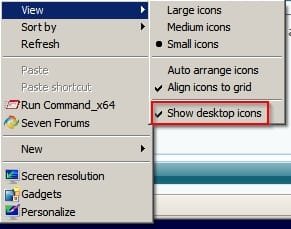
Maybe you should explain why you want to remove the icons. In any case you can just hide/ unhide them by right clicking on a blank part of your desktop and you should see the option to hide them in the context menu. Unhiding them is the same method.

Desktop Icons.jpg

You could just pint the one you want to keep handy to the taskbar.
 

My Computer My Computer

At a glance

Microsoft Windows 7 Home Premium 64-bit 7601 ...AMD C-60 APU with Radeon(tm) HD Graphics4.00 GBAMD Radeon HD 6290 Graphics
Computer type
Laptop
Computer Manufacturer/Model Number
ASUS
OS
Microsoft Windows 7 Home Premium 64-bit 7601 Multiprocessor Free Service Pack 1
CPU
AMD C-60 APU with Radeon(tm) HD Graphics
Motherboard
ASUSTeK COMPUTER INC. X501U
Memory
4.00 GB
Graphics Card(s)
AMD Radeon HD 6290 Graphics
Sound Card
(1) AMD High Definition Audio Device (2) Realtek High Defi
Screen Resolution
1366 x 768 x 32 bits (4294967296 colors) @ 60 Hz
Hard Drives
Hitachi HTS545050A7E380 SATA Disk Device
Antivirus
Comodo CIS & FW, SecureAplus App Whitelisting, Threatfire
Browser
Cyberfox 64bit, Opera 64bit, Airfox
Other Info
Spy-The-Spy, HitmanPro.Alert, Norton Connect Safe, MJRegWatcher, BitDefender TrafficLight, Voodoo Shield, Zemana AntiMalware
Then what would I do to get them back when and if I need them.

What I do is create a new user profile to give me two user profiles. I give them different names, but they are just me; a pre-cursor to the virtual desktop!!!!!

You could, as you request, use one profile for all the desktop icons, while the other you'd use for the minimum set of icons.
 

My Computer My Computer

At a glance

Windows 7 x64, Vista x64, 8.1 smartphoneIntel E8400 65W 64-bitDDR2 2 x 2GB, 1GB x 2XFX Radeon HD5750
Computer type
PC/Desktop
OS
Windows 7 x64, Vista x64, 8.1 smartphone
CPU
Intel E8400 65W 64-bit
Motherboard
Gigabyte EP45-UD3LR
Memory
DDR2 2 x 2GB, 1GB x 2
Graphics Card(s)
XFX Radeon HD5750
Sound Card
AMD High Definition Audio; Realtek High Definition Audio
Monitor(s) Displays
iiyama prolite X2377HDS
Screen Resolution
1920 x 1080
Hard Drives
500GB 7200 rpm Seagate ST3500413AS 16MB, 500GB 5400 rpm Toshiba MQ02ABF050H 32MB, 200GB 7200 rpm Seagate ST3200820AS 8MB, 2TB 7200 rpm Western Digital WD20EZRX 64MB
PSU
Enermax Liberty Modular
Case
Antec P193 Midi Tower
Keyboard
Mionix ZIBAL 60
Mouse
Razer USB 2.0 Diamondback Mouse or Huion Graphics Tablet
Browser
Internet Explorer, Lunascape, Firefox, Opera, Avast Safezone
Hello everyone thank you all so very much for your opinions, The easiest way for me to was create a new folder and place them all in that folder then just move it around the desktop and not have to worry about just hiding then all the time.

I just wanted the art wallpaper to look it's nicest by getting rid of the clutter. At 17 and never using the computer like most kids, I would say this was the right way for me.

So Thank you Lady Fitzgerald I took your suggestion.
 

My Computer My Computer

At a glance

Windows 7 Home Premium 64-Bit SP1Intel Core i7 26008.00 GB Dual-Channel DDR31024MB GeForce GT 420
Computer type
PC/Desktop
Computer Manufacturer/Model Number
Lenovo
OS
Windows 7 Home Premium 64-Bit SP1
CPU
Intel Core i7 2600
Motherboard
Lenovo
Memory
8.00 GB Dual-Channel DDR3
Graphics Card(s)
1024MB GeForce GT 420
Sound Card
Intergrated Realtex ALC888S
Monitor(s) Displays
LG W40 series Widescreen
Screen Resolution
1920 by 1080 widescreen
Hard Drives
932GB Hitachi HDS TB
External drive 640 GB also
PSU
300W
Case
Tower
Cooling
yes came installed
Keyboard
Lenovo
Mouse
Laser wirless 5000
Antivirus
MBAM / Superantispyware pro paid for.
Browser
Google /
Other Info
PLDS DVD-RW DH16ABSH
Back
Top