Can't restore Win 7 through USB3.0 from my external HD

Themr

New member
Local time
4:19 PM
Messages
3
I have backed up my Win 7 form Backup/Restore option from windows to my External HD
but when i tried to restore it the restore system can't find my External HD as all USB ports are USB3.0
So, can any one help me to restore this win

Thanks
 

My Computer My Computer

At a glance

win 7 x64
Computer type
PC/Desktop
OS
win 7 x64
Install the usb 3 drivers into winre.wim.
 

My Computers My Computers

  • At a glance

    7 X64i5 84002x8gb 3200mhz
    Computer type
    PC/Desktop
    OS
    7 X64
    CPU
    i5 8400
    Motherboard
    gigabyte b365m ds3h
    Memory
    2x8gb 3200mhz
    Hard Drives
    various
    PSU
    pure power 11 400w cm
    Case
    Coolermaster
    Cooling
    cryorig m9i
  • At a glance

    7x64g54008gb ddr4 2400
    Computer type
    PC/Desktop
    OS
    7x64
    CPU
    g5400
    Motherboard
    ga b365m ds3h
    Memory
    8gb ddr4 2400
    PSU
    xfx pro 450w
I have backed up my Win 7 form Backup/Restore option from windows to my External HD
but when i tried to restore it the restore system can't find my External HD as all USB ports are USB3.0
So, can any one help me to restore this win

Thanks

If you have a CD drive, you can download the drivers from your MB Manf. and burn them to a CD disc. Then after booting with the recovery CD (Image Repair Disc) just change the CD to the one with the USB drivers on it and go through and Load Drivers. Load each one until you see your Ext. Drive with the image file on it.

Hope that works for you.
 

My Computer My Computer

At a glance

Windows 7 64 bitI3-6100Corsair 16GBIntel 530
Computer type
PC/Desktop
Computer Manufacturer/Model Number
Custom
OS
Windows 7 64 bit
CPU
I3-6100
Motherboard
Asus Z170 Pro
Memory
Corsair 16GB
Graphics Card(s)
Intel 530
Hard Drives
Intel 535 240GB SSD
WD 4TB Gold Data Center
Antivirus
MSE
Browser
IE 11

My Computer My Computer

At a glance

win 7 x64
Computer type
PC/Desktop
OS
win 7 x64
If you have a CD drive, you can download the drivers from your MB Manf. and burn them to a CD disc. Then after booting with the recovery CD (Image Repair Disc) just change the CD to the one with the USB drivers on it and go through and Load Drivers. Load each one until you see your Ext. Drive with the image file on it.

Hope that works for you.

even
the windows recovery environment need to recognize USB3.0
Am I right?
 

My Computer My Computer

At a glance

win 7 x64
Computer type
PC/Desktop
OS
win 7 x64
even
the windows recovery environment need to recognize USB3.0
Am I right?

That is why you load the USB3 drivers from the CD after Booting from the Repair(Recovery) Disc. The USB3 drivers will then be loaded and your ext. HD should be recognized.

1) Boot with recovery disc. Remove Disc.
2) Insert CD with USB3 drivers on it.
3) Load USB3 drivers using LOAD DRIVERS, then find the drivers on the CD and load each one of them (should be several of them listed)

After I loaded a few of the USB3 drivers, the Image on the EXt. Drive appeared, as I had the window open where you would normally expect it to be.

I have used this procedure and it does work for a fact. (At Least in my Case)
 

My Computer My Computer

At a glance

Windows 7 64 bitI3-6100Corsair 16GBIntel 530
Computer type
PC/Desktop
Computer Manufacturer/Model Number
Custom
OS
Windows 7 64 bit
CPU
I3-6100
Motherboard
Asus Z170 Pro
Memory
Corsair 16GB
Graphics Card(s)
Intel 530
Hard Drives
Intel 535 240GB SSD
WD 4TB Gold Data Center
Antivirus
MSE
Browser
IE 11
thanks for your reply
but could you please tell me how

Drivers need to be extracted into a folder.

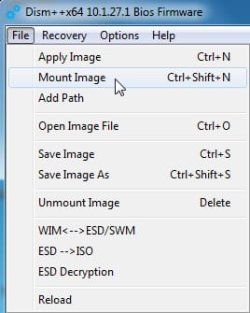
Mount winre.wim ( image 1 as it only contains one image). Can mount into any empty folder, or just create a mount folder.

dism++mount.jpg

When it has mounted:

Click "Open Session". In left pane click "Drivers". Then at bottom right click "Add" and browse to driver folder.

Save image. Unmount image.

Dism++x86/x64

Dism++ | New Windows Utility
 

My Computers My Computers

  • At a glance

    7 X64i5 84002x8gb 3200mhz
    Computer type
    PC/Desktop
    OS
    7 X64
    CPU
    i5 8400
    Motherboard
    gigabyte b365m ds3h
    Memory
    2x8gb 3200mhz
    Hard Drives
    various
    PSU
    pure power 11 400w cm
    Case
    Coolermaster
    Cooling
    cryorig m9i
  • At a glance

    7x64g54008gb ddr4 2400
    Computer type
    PC/Desktop
    OS
    7x64
    CPU
    g5400
    Motherboard
    ga b365m ds3h
    Memory
    8gb ddr4 2400
    PSU
    xfx pro 450w
While you use Windows inbuilt system imaging, manually installing the usb3 drivers as described above is the easiest way to go. That's what I do.
If you want to try the very popular (free) Macrium Reflect then it will guide you through the very straightforward process of making a USB 3 compatible restore CD/USB. I use this almost exclusively now since it is far superior to Windows inbuilt imaging.
 

My Computer My Computer

At a glance

Windows 7x64 Home Premium SP1Intel i7 2600kG.Skill Ripjaws (DDR3-1600) 2x4GBNvidia GeForce GTS 450; Intel HD Graphics 300...
Computer type
PC/Desktop
Computer Manufacturer/Model Number
Own build
OS
Windows 7x64 Home Premium SP1
CPU
Intel i7 2600k
Motherboard
ASUS P8Z68 Deluxe
Memory
G.Skill Ripjaws (DDR3-1600) 2x4GB
Graphics Card(s)
Nvidia GeForce GTS 450; Intel HD Graphics 3000(GT2+)
Monitor(s) Displays
Dell Ultrasharp IPS panel U2311H, Samsung SyncMaster P2350
Screen Resolution
1920x1080
Hard Drives
Samsung 850 Pro SSD 256GB, Samsung SSD 840 120GB, Seagates 1TB Barracuda ST31000528AS x2
PSU
Seasonic M12II 520W
Case
Lian Li Lancool PC-K60
Cooling
Case: 1x120mm, 3x140mm CPU: Hyper 212+
Keyboard
Logitech MK520 (wireless)
Mouse
Logitech MK520
Internet Speed
6-7 Mbps
Antivirus
Norton Security Premium, Malwarebytes on 2 (MSE on 3rd PC)
Browser
FireFox
Other Info
Audio: Logitech Z523 2.1
Back
Top