Solved Strange Internet Explorer updates from year 2014 now appered 6.5.2017

TheOwner

New member
Local time
8:48 PM
Messages
18
Strange Internet Explorer updates from year 2014 now appeared 6.5.2017

Hello,
Windows updates found 3 important updates for my IE today. It is strange bacause on other PC i have no updates available. It is found one by one, so i added one to exclusion, it finds another one. So i added all 3 to my exclusion list. What is wrong?
 

Attachments

  • IE updates.JPG
    IE updates.JPG
    23.1 KB · Views: 7
Last edited:

My Computer My Computer

At a glance

Windows 7 Home Premium 64bitIntel Core i5-4690k8 GBNvidia GTX 770
Computer type
PC/Desktop
OS
Windows 7 Home Premium 64bit
CPU
Intel Core i5-4690k
Motherboard
Asus Maximus VII Ranger
Memory
8 GB
Graphics Card(s)
Nvidia GTX 770
Monitor(s) Displays
Dell P2414H
Screen Resolution
1920x1080
Hard Drives
Crucial M550 128 GB
WD EZEX 1TB
PSU
Seasonic SS-660XP2 F3 Platinum 660W
Case
Fractal Design Define R4
Cooling
3x 140mm fans at 5V
Mouse
Logitech G5 Laser mouse
Antivirus
Avast Free Antivirus
Browser
Google Chrome
I experienced the same thing this morning when I checked Windows Update. It seems there are older updates that are being sent down the WU pipe dating back to 2012-2014 patches (security and non-security) for .NET 3.5.1 and cumulative updates for Internet Explorer 11. If you hide the most recent IE11 (Dec 2014) update, IE11 (Nov 2014) will appear and so on and so on. This is happening on multiple machines.

I wouldn't bother hiding those updates as there might be a cascade of other older updates appearing as a result. Hopefully this is just a glitch, and MS provides a solution if this turns out to be a wide-scale problem affecting other W7 users.
 
Last edited:

My Computer My Computer

At a glance

Windows 7 Home 64-bit
Computer type
PC/Desktop
OS
Windows 7 Home 64-bit
Thanks for answer. So i cannot do nothing and just wait for Microsoft fix this? What happen if some user install this? Those updates are marked "important" so they can be installed automaticaly. So they broke things?
 

My Computer My Computer

At a glance

Windows 7 Home Premium 64bitIntel Core i5-4690k8 GBNvidia GTX 770
Computer type
PC/Desktop
OS
Windows 7 Home Premium 64bit
CPU
Intel Core i5-4690k
Motherboard
Asus Maximus VII Ranger
Memory
8 GB
Graphics Card(s)
Nvidia GTX 770
Monitor(s) Displays
Dell P2414H
Screen Resolution
1920x1080
Hard Drives
Crucial M550 128 GB
WD EZEX 1TB
PSU
Seasonic SS-660XP2 F3 Platinum 660W
Case
Fractal Design Define R4
Cooling
3x 140mm fans at 5V
Mouse
Logitech G5 Laser mouse
Antivirus
Avast Free Antivirus
Browser
Google Chrome
I would just hold off or ignore Windows Updates until this issue is fixed. This might be fixed by the time Patch Tuesday (May 9, 2017) rolls around, but I would use caution until then.

I don't know what would happen if someone downloaded and installed those old updates, in particular KB3008923, as that update when it first appeared created some problems for a lot of W7 users.
 

My Computer My Computer

At a glance

Windows 7 Home 64-bit
Computer type
PC/Desktop
OS
Windows 7 Home 64-bit
Ok, i will ignore this. But is here any way how report this to Microsoft? They maybe don't know about this.
 

My Computer My Computer

At a glance

Windows 7 Home Premium 64bitIntel Core i5-4690k8 GBNvidia GTX 770
Computer type
PC/Desktop
OS
Windows 7 Home Premium 64bit
CPU
Intel Core i5-4690k
Motherboard
Asus Maximus VII Ranger
Memory
8 GB
Graphics Card(s)
Nvidia GTX 770
Monitor(s) Displays
Dell P2414H
Screen Resolution
1920x1080
Hard Drives
Crucial M550 128 GB
WD EZEX 1TB
PSU
Seasonic SS-660XP2 F3 Platinum 660W
Case
Fractal Design Define R4
Cooling
3x 140mm fans at 5V
Mouse
Logitech G5 Laser mouse
Antivirus
Avast Free Antivirus
Browser
Google Chrome
I'm sure MS will eventually become aware, if there aren't already, of the problem. Until then I would just sit tight and let those updates sit where they are.
 

My Computer My Computer

At a glance

Windows 7 Home 64-bit
Computer type
PC/Desktop
OS
Windows 7 Home 64-bit
Thank you, good to know problem is not in my PC.
 

My Computer My Computer

At a glance

Windows 7 Home Premium 64bitIntel Core i5-4690k8 GBNvidia GTX 770
Computer type
PC/Desktop
OS
Windows 7 Home Premium 64bit
CPU
Intel Core i5-4690k
Motherboard
Asus Maximus VII Ranger
Memory
8 GB
Graphics Card(s)
Nvidia GTX 770
Monitor(s) Displays
Dell P2414H
Screen Resolution
1920x1080
Hard Drives
Crucial M550 128 GB
WD EZEX 1TB
PSU
Seasonic SS-660XP2 F3 Platinum 660W
Case
Fractal Design Define R4
Cooling
3x 140mm fans at 5V
Mouse
Logitech G5 Laser mouse
Antivirus
Avast Free Antivirus
Browser
Google Chrome
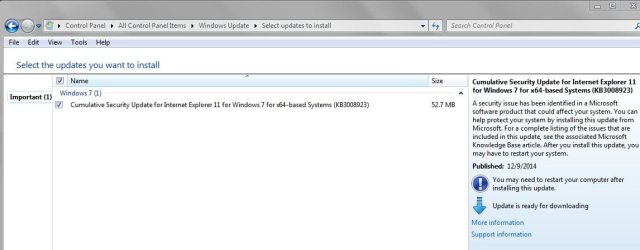
Same thing here... KB3008923 (December 2014 IE Cumulative Update) asked by WU :confused:
wtf1.JPG
 

My Computer My Computer

At a glance

Win 10 Pro x64, Win 7 Pro x64Intel Core i7-6700HQ Skylake16gb Crucial DDR4NVIDIA GeForce GTX 960M 2 GB
Computer type
Laptop
Computer Manufacturer/Model Number
MSI PE60 6QE
OS
Win 10 Pro x64, Win 7 Pro x64
CPU
Intel Core i7-6700HQ Skylake
Motherboard
MSI MS-16J5
Memory
16gb Crucial DDR4
Graphics Card(s)
NVIDIA GeForce GTX 960M 2 GB
Screen Resolution
1920 x 1080
Hard Drives
Samsung 850 EVO 250 GB M.2 SSD (MZ-N5E250BW)
HGST 1TB @7200 RPM HTS721010A9E630
Case
Plastic
Keyboard
Got one...
Mouse
Yep, one of those too.
Internet Speed
FIOS 75/75
Antivirus
Defender
Browser
Chrome/FFox/Ex-PLODE-r/(L)Edge
Other Info
Defender, Custom Hosts, uBlock, regular backups w/ Macrium (Free)
Then this is Microsoft problem which we cannot fix, so this thread is pointless now and also marked as solved.
 

My Computer My Computer

At a glance

Windows 7 Home Premium 64bitIntel Core i5-4690k8 GBNvidia GTX 770
Computer type
PC/Desktop
OS
Windows 7 Home Premium 64bit
CPU
Intel Core i5-4690k
Motherboard
Asus Maximus VII Ranger
Memory
8 GB
Graphics Card(s)
Nvidia GTX 770
Monitor(s) Displays
Dell P2414H
Screen Resolution
1920x1080
Hard Drives
Crucial M550 128 GB
WD EZEX 1TB
PSU
Seasonic SS-660XP2 F3 Platinum 660W
Case
Fractal Design Define R4
Cooling
3x 140mm fans at 5V
Mouse
Logitech G5 Laser mouse
Antivirus
Avast Free Antivirus
Browser
Google Chrome

My Computer My Computer

At a glance

Microsoft Windows 7 Home Premium 64-bit 7601 ...AMD C-60 APU with Radeon(tm) HD Graphics4.00 GBAMD Radeon HD 6290 Graphics
Computer type
Laptop
Computer Manufacturer/Model Number
ASUS
OS
Microsoft Windows 7 Home Premium 64-bit 7601 Multiprocessor Free Service Pack 1
CPU
AMD C-60 APU with Radeon(tm) HD Graphics
Motherboard
ASUSTeK COMPUTER INC. X501U
Memory
4.00 GB
Graphics Card(s)
AMD Radeon HD 6290 Graphics
Sound Card
(1) AMD High Definition Audio Device (2) Realtek High Defi
Screen Resolution
1366 x 768 x 32 bits (4294967296 colors) @ 60 Hz
Hard Drives
Hitachi HTS545050A7E380 SATA Disk Device
Antivirus
Comodo CIS & FW, SecureAplus App Whitelisting, Threatfire
Browser
Cyberfox 64bit, Opera 64bit, Airfox
Other Info
Spy-The-Spy, HitmanPro.Alert, Norton Connect Safe, MJRegWatcher, BitDefender TrafficLight, Voodoo Shield, Zemana AntiMalware

My Computer My Computer

At a glance

Win 10 Pro x64, Win 7 Pro x64Intel Core i7-6700HQ Skylake16gb Crucial DDR4NVIDIA GeForce GTX 960M 2 GB
Computer type
Laptop
Computer Manufacturer/Model Number
MSI PE60 6QE
OS
Win 10 Pro x64, Win 7 Pro x64
CPU
Intel Core i7-6700HQ Skylake
Motherboard
MSI MS-16J5
Memory
16gb Crucial DDR4
Graphics Card(s)
NVIDIA GeForce GTX 960M 2 GB
Screen Resolution
1920 x 1080
Hard Drives
Samsung 850 EVO 250 GB M.2 SSD (MZ-N5E250BW)
HGST 1TB @7200 RPM HTS721010A9E630
Case
Plastic
Keyboard
Got one...
Mouse
Yep, one of those too.
Internet Speed
FIOS 75/75
Antivirus
Defender
Browser
Chrome/FFox/Ex-PLODE-r/(L)Edge
Other Info
Defender, Custom Hosts, uBlock, regular backups w/ Macrium (Free)
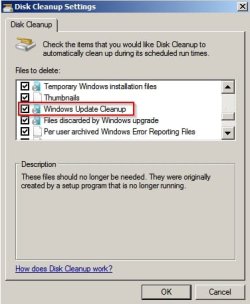
In that case it's possible that disk cleanup removed some needed files from WINSXS. Re-installing the update should fix it.

EDIT: I stopped running advanced disk cleanup every month (to include windows update cleanup) after experiencing weird issues like being offered IE10 by WU even though IE11 has been installed for ages. Bottom line was - force a rescan for installed/ missing updates then apply payches if needed. Then avoid this option when running disk cleanup:

Disk Cleanup Settings.jpg
 
Last edited:

My Computer My Computer

At a glance

Microsoft Windows 7 Home Premium 64-bit 7601 ...AMD C-60 APU with Radeon(tm) HD Graphics4.00 GBAMD Radeon HD 6290 Graphics
Computer type
Laptop
Computer Manufacturer/Model Number
ASUS
OS
Microsoft Windows 7 Home Premium 64-bit 7601 Multiprocessor Free Service Pack 1
CPU
AMD C-60 APU with Radeon(tm) HD Graphics
Motherboard
ASUSTeK COMPUTER INC. X501U
Memory
4.00 GB
Graphics Card(s)
AMD Radeon HD 6290 Graphics
Sound Card
(1) AMD High Definition Audio Device (2) Realtek High Defi
Screen Resolution
1366 x 768 x 32 bits (4294967296 colors) @ 60 Hz
Hard Drives
Hitachi HTS545050A7E380 SATA Disk Device
Antivirus
Comodo CIS & FW, SecureAplus App Whitelisting, Threatfire
Browser
Cyberfox 64bit, Opera 64bit, Airfox
Other Info
Spy-The-Spy, HitmanPro.Alert, Norton Connect Safe, MJRegWatcher, BitDefender TrafficLight, Voodoo Shield, Zemana AntiMalware
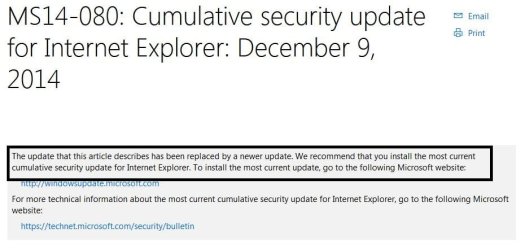
It's strange why IE11 cumulative KB3008923 would be offered again when it's outdated and superseded by last month's rollup.
 

My Computer My Computer

At a glance

Windows 7 Home 64-bit
Computer type
PC/Desktop
OS
Windows 7 Home 64-bit
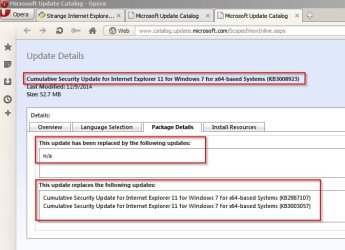
I see this info:

KB3008923 MS Update Catalog.jpg
 

My Computer My Computer

At a glance

Microsoft Windows 7 Home Premium 64-bit 7601 ...AMD C-60 APU with Radeon(tm) HD Graphics4.00 GBAMD Radeon HD 6290 Graphics
Computer type
Laptop
Computer Manufacturer/Model Number
ASUS
OS
Microsoft Windows 7 Home Premium 64-bit 7601 Multiprocessor Free Service Pack 1
CPU
AMD C-60 APU with Radeon(tm) HD Graphics
Motherboard
ASUSTeK COMPUTER INC. X501U
Memory
4.00 GB
Graphics Card(s)
AMD Radeon HD 6290 Graphics
Sound Card
(1) AMD High Definition Audio Device (2) Realtek High Defi
Screen Resolution
1366 x 768 x 32 bits (4294967296 colors) @ 60 Hz
Hard Drives
Hitachi HTS545050A7E380 SATA Disk Device
Antivirus
Comodo CIS & FW, SecureAplus App Whitelisting, Threatfire
Browser
Cyberfox 64bit, Opera 64bit, Airfox
Other Info
Spy-The-Spy, HitmanPro.Alert, Norton Connect Safe, MJRegWatcher, BitDefender TrafficLight, Voodoo Shield, Zemana AntiMalware
Thanks, Callender.

Will still hold off from installing above mentioned update. Certainly defeats the purpose of categorizing IE 11 updates as "cumulative" if previous updates are still required.

It probably wouldn't cause much problems installing it again, as long as one makes sure they download the patch that fixes the bug that existed in that particular update. But if MS simply hasn't labeled that update obsolete or expired, as some of speculated, I see no rush in downloading it. I think I'll wait for additional info.

Thanks again.
 

My Computer My Computer

At a glance

Windows 7 Home 64-bit
Computer type
PC/Desktop
OS
Windows 7 Home 64-bit

My Computer My Computer

At a glance

Win 10 Pro x64, Win 7 Pro x64Intel Core i7-6700HQ Skylake16gb Crucial DDR4NVIDIA GeForce GTX 960M 2 GB
Computer type
Laptop
Computer Manufacturer/Model Number
MSI PE60 6QE
OS
Win 10 Pro x64, Win 7 Pro x64
CPU
Intel Core i7-6700HQ Skylake
Motherboard
MSI MS-16J5
Memory
16gb Crucial DDR4
Graphics Card(s)
NVIDIA GeForce GTX 960M 2 GB
Screen Resolution
1920 x 1080
Hard Drives
Samsung 850 EVO 250 GB M.2 SSD (MZ-N5E250BW)
HGST 1TB @7200 RPM HTS721010A9E630
Case
Plastic
Keyboard
Got one...
Mouse
Yep, one of those too.
Internet Speed
FIOS 75/75
Antivirus
Defender
Browser
Chrome/FFox/Ex-PLODE-r/(L)Edge
Other Info
Defender, Custom Hosts, uBlock, regular backups w/ Macrium (Free)
Okay it's a mystery to me.

Microsoft Update Catalog


Cumulative Security Update for Internet Explorer 11 for Windows 7 for x64-based Systems (KB4014661)
Last Modified: 4/7/2017
This update replaces the following updates:
Cumulative Security Update for Internet Explorer 11 for Windows 7 for x64-based Systems (KB3032359)
Cumulative Security Update for Internet Explorer 11 for Windows 7 for x64-based Systems (KB3038314)
Cumulative Security Update for Internet Explorer 11 for Windows 7 for x64-based Systems (KB3049563)
Cumulative Security Update for Internet Explorer 11 for Windows 7 for x64-based Systems (KB3058515)
Cumulative Security Update for Internet Explorer 11 for Windows 7 for x64-based Systems (KB3065822)
Cumulative Security Update for Internet Explorer 11 for Windows 7 for x64-based Systems (KB3078071)
Cumulative Security Update for Internet Explorer 11 for Windows 7 for x64-based Systems (KB3087038)
Cumulative Security Update for Internet Explorer 11 for Windows 7 for x64-based Systems (KB3093983)
Cumulative Security Update for Internet Explorer 11 for Windows 7 for x64-based Systems (KB3100773)
Cumulative Security Update for Internet Explorer 11 for Windows 7 for x64-based Systems (KB3104002)
Cumulative Security Update for Internet Explorer 11 for Windows 7 for x64-based Systems (KB3124275)
Cumulative Security Update for Internet Explorer 11 for Windows 7 for x64-based Systems (KB3134814)
Cumulative Security Update for Internet Explorer 11 for Windows 7 for x64-based Systems (KB3139929)
Cumulative Security Update for Internet Explorer 11 for Windows 7 for x64-based Systems (KB3148198)
Cumulative Security Update for Internet Explorer 11 for Windows 7 for x64-based Systems (KB3154070)
Cumulative Security Update for Internet Explorer 11 for Windows 7 for x64-based Systems (KB3160005)
Cumulative Security Update for Internet Explorer 11 for Windows 7 for x64-based Systems (KB3170106)
Cumulative Security Update for Internet Explorer 11 for Windows 7 for x64-based Systems (KB3175443)
Cumulative Security Update for Internet Explorer 11 for Windows 7 for x64-based Systems (KB3185319)
Cumulative Security Update for Internet Explorer 11 for Windows 7 for x64-based Systems (KB4012204)
Security Update for Internet Explorer 11 for Windows 7 for x64-based Systems (KB3087985)
Update for Internet Explorer 11 for Windows 7 for x64-based Systems (KB3192665)
Update for Internet Explorer 11 for Windows 7 for x64-based Systems (KB3199375)
Update for Internet Explorer 11 for Windows 7 for x64-based Systems (KB3210694)
Update for Internet Explorer 11 for Windows 7 for x64-based Systems (KB4016446)


I guess it's possible to look through all of those and see if any are mentioned as a replacement for KB3008923 but that would take some effort.

https://support.microsoft.com/en-gb/help/4014661/cumulative-security-update-for-internet-explorer-april-11-2017

Now I don't have KB4014661 installed and it is not being offered by WU.

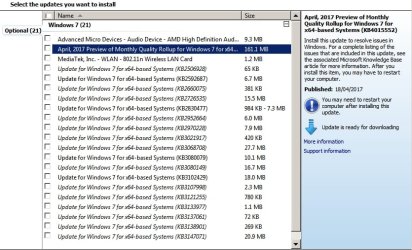
WU offers 21 optional updates only including stuff like DST fix for Chile.

Windows Update.jpg

Windows Update 2.jpg

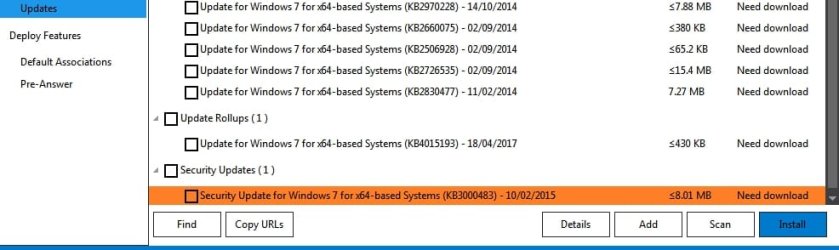
Dism++ also reports 21 available updates but the list does not exactly match the one offered by WU.

Neither of them suggest that KB4014661 Cumulative Security Update for Internet Explorer 11 for Windows 7 for x64-based Systems needs installation.

expert mode-Dism++x64_1.jpg

expert mode-Dism++x64_2.jpg

I spent some time today uninstalling EMET and re-enabling DEP (it was greyed out) do I reckon at some point this week I'll make a system image backup and then install everything and see what happens.
 

My Computer My Computer

At a glance

Microsoft Windows 7 Home Premium 64-bit 7601 ...AMD C-60 APU with Radeon(tm) HD Graphics4.00 GBAMD Radeon HD 6290 Graphics
Computer type
Laptop
Computer Manufacturer/Model Number
ASUS
OS
Microsoft Windows 7 Home Premium 64-bit 7601 Multiprocessor Free Service Pack 1
CPU
AMD C-60 APU with Radeon(tm) HD Graphics
Motherboard
ASUSTeK COMPUTER INC. X501U
Memory
4.00 GB
Graphics Card(s)
AMD Radeon HD 6290 Graphics
Sound Card
(1) AMD High Definition Audio Device (2) Realtek High Defi
Screen Resolution
1366 x 768 x 32 bits (4294967296 colors) @ 60 Hz
Hard Drives
Hitachi HTS545050A7E380 SATA Disk Device
Antivirus
Comodo CIS & FW, SecureAplus App Whitelisting, Threatfire
Browser
Cyberfox 64bit, Opera 64bit, Airfox
Other Info
Spy-The-Spy, HitmanPro.Alert, Norton Connect Safe, MJRegWatcher, BitDefender TrafficLight, Voodoo Shield, Zemana AntiMalware
Is it possible that Microsoft is just retiring a bunch of updates from W7 IE? If it is the case and you have hidden an update the scan by WU would send any update that is not installed (that is if they are doing a cleanup).
 

My Computer My Computer

At a glance

W7Pro/64
Computer type
PC/Desktop
Computer Manufacturer/Model Number
Custom build
OS
W7Pro/64
I don't have any hidden updates. The thing is that for me KB3008923 (December 2014 IE Cumulative Update) is installed but other members are only just being offered it now. More puzzling is that KB4014661 (April 2017 IE Cumulative Update) is not installed and not offered by Windows Update.

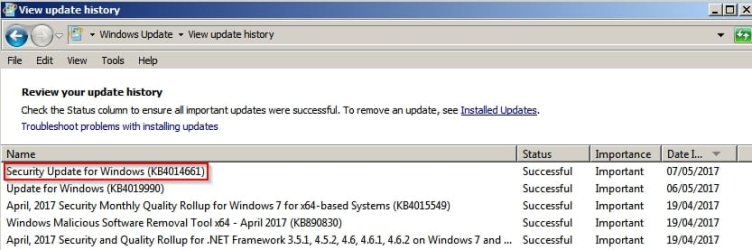
EDIT: Just installed KB4014661 anyway.

View update history.jpg
 
Last edited:

My Computer My Computer

At a glance

Microsoft Windows 7 Home Premium 64-bit 7601 ...AMD C-60 APU with Radeon(tm) HD Graphics4.00 GBAMD Radeon HD 6290 Graphics
Computer type
Laptop
Computer Manufacturer/Model Number
ASUS
OS
Microsoft Windows 7 Home Premium 64-bit 7601 Multiprocessor Free Service Pack 1
CPU
AMD C-60 APU with Radeon(tm) HD Graphics
Motherboard
ASUSTeK COMPUTER INC. X501U
Memory
4.00 GB
Graphics Card(s)
AMD Radeon HD 6290 Graphics
Sound Card
(1) AMD High Definition Audio Device (2) Realtek High Defi
Screen Resolution
1366 x 768 x 32 bits (4294967296 colors) @ 60 Hz
Hard Drives
Hitachi HTS545050A7E380 SATA Disk Device
Antivirus
Comodo CIS & FW, SecureAplus App Whitelisting, Threatfire
Browser
Cyberfox 64bit, Opera 64bit, Airfox
Other Info
Spy-The-Spy, HitmanPro.Alert, Norton Connect Safe, MJRegWatcher, BitDefender TrafficLight, Voodoo Shield, Zemana AntiMalware
My understanding is that if you select an update that you already have installed, trustedinstaller will reject it. I've seen it with a manual install - guess it works the same with a sent WU.
 

My Computer My Computer

At a glance

W7Pro/64
Computer type
PC/Desktop
Computer Manufacturer/Model Number
Custom build
OS
W7Pro/64
Back
Top