Solved Cannot repair to update a disabled system

ineuw

New member
Member
VIP
Local time
5:59 PM
Messages
152
I provide free maintenance support to the retired, elderly neighbours in my building. With the appearance of the new (possibly North Korean) ransomware, one of them asked to help him update his Windows 7 SP1 32bit Professional desktop, which turned out to be a secondhand HP with a valid Win 7 Pro license in which the Windows Update was completely disabled by some software.

Is there a way to reactivate Windows Update?
 

My Computer My Computer

Computer type
PC/Desktop
Computer Manufacturer/Model Number
Custom built
OS
Microsoft Windows 10 Pro 64-bit
CPU
8th generation Intel(R) Pentium G5600 3.9GHz
Motherboard
ASRock B360 Pro 4 8th Generation
Memory
16 GB DDR4 Kingston HyperX
Graphics Card(s)
On board Intel UHD Graphics 1GB shared
Sound Card
On board Realtek HD ALC892
Monitor(s) Displays
LG 22 in LCD
Screen Resolution
1536 x 864 x 32 bits (4294967296 colors) @ 59 Hz
Hard Drives
(1) SanDisk SDSSDHII120G ATA Device
(2) ST1000DM003-1SB10C ATA Device
(3) ST500DM002-1BD142 ATA Device
PSU
Antec 650 Watt PSU
Case
Antec mid size tower
Cooling
120mm fan
Keyboard
Generic 105 keys
Mouse
Generic JeTech
Internet Speed
50 megabits
Antivirus
Avast and daily Malwarebytes scan
Browser
Cyberfox 52.9.1
Is the Windows Update service enabled? You can also use a reg hack to forcibly enable Windows Update. Open Regedit and go to:
HKEY_LOCAL_MACHINE / SOFTWARE / Microsoft / Windows / CurrentVersion / WindowsUpdate.
Click Auto Update. Right click "NoAutoUpdate" from the right pane and then select Modify from the context menu. “Note” If "NoAutoUpdate" is not in the list of values, click Edit select New and select "DWORD (32-bit) Value." Name the value NoAutoUpdate and change the value to 0 and click "OK" to enable Windows Update. Restart the computer.

Just my two cents...
 

My Computer My Computer

Computer type
PC/Desktop
Computer Manufacturer/Model Number
Custom Built By Me.
OS
Windows 10 Pro 64 bit
CPU
AMD FX 9590 8 Core Black Edition
Motherboard
MSI 990FXA GAMING (MS-7893)
Memory
Corsair Vengeance 16GB DDR3
Graphics Card(s)
AMD Radeon (TM) R9 380 Gaming Series
Sound Card
AMD High Definition
Monitor(s) Displays
Samsung 32" 60Hz 4ms Curved PLS LED
Screen Resolution
1920 X 1080
Hard Drives
C: 223 GB SSD = E: 465 GB HDD = F: 931 GB HDD = G: 149 GB HDD = H: 931 GB HDD
PSU
EVGA Supernova NEX750B 750W ATX EPS12V 80PLUS Bronze
Case
Cool Master
Cooling
Noctua NH-D15 Premium Cooler with 2x NF-A15 PWM 140mm Fan
Internet Speed
Fiber Optic: Download 332.7 Mbps / Upload 331.5 Mbps
Antivirus
Windows Defender
Browser
Slimjet (64bit)
Lance1, thanks for your reply. I did as you instructed, the service is up and running on Automatic start, and I rebooted, but it doesn't work.

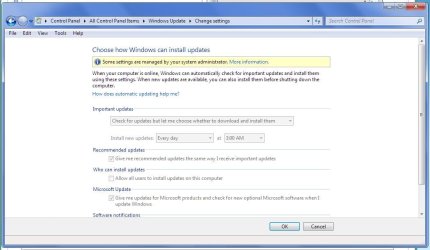
I am attaching the contents of the Auto Update key as well as the Update control display. The yellow banded message appears on all screens related to Update.

(Your advice is worth a lot more than two cents.)
 

Attachments

  • autoupdate.reg
    autoupdate.reg
    2.5 KB · Views: 2
  • update control screen.jpg
    update control screen.jpg
    62.7 KB · Views: 4

My Computer My Computer

Computer type
PC/Desktop
Computer Manufacturer/Model Number
Custom built
OS
Microsoft Windows 10 Pro 64-bit
CPU
8th generation Intel(R) Pentium G5600 3.9GHz
Motherboard
ASRock B360 Pro 4 8th Generation
Memory
16 GB DDR4 Kingston HyperX
Graphics Card(s)
On board Intel UHD Graphics 1GB shared
Sound Card
On board Realtek HD ALC892
Monitor(s) Displays
LG 22 in LCD
Screen Resolution
1536 x 864 x 32 bits (4294967296 colors) @ 59 Hz
Hard Drives
(1) SanDisk SDSSDHII120G ATA Device
(2) ST1000DM003-1SB10C ATA Device
(3) ST500DM002-1BD142 ATA Device
PSU
Antec 650 Watt PSU
Case
Antec mid size tower
Cooling
120mm fan
Keyboard
Generic 105 keys
Mouse
Generic JeTech
Internet Speed
50 megabits
Antivirus
Avast and daily Malwarebytes scan
Browser
Cyberfox 52.9.1
You mentioned that your neighbour's PC is a second hand one. Did it come from the company that they worked at, or has been given to them by someone else. The reason I am asking is that in your screen shot the yellow band says that "Some settings are handled by your system administrator". If it was originally a company computer Updates may have been handled by the companies IT section.
 

My Computer My Computer

Computer type
PC/Desktop
Computer Manufacturer/Model Number
Self built using existing case
OS
Windows 7 Home Premium 64 bit sp1
CPU
Intel i5 3570 3.4Ghz Ivy Bridge SKT 1155 quad core
Motherboard
Gigabyte Z77-HD3 SKT 1155 2xSata 3, 4x USB 3.0
Memory
G-Skill Rip Jaws 16Gb (8x2) DDR3 -1600 PC3 12800 CL 10 red
Graphics Card(s)
Gigabyte NVIDIA GT610 1Gb DDR3 810/1200 PCI-E 2.0 Silent
Sound Card
NVIDIA High Definition & Realtech High Definition Audio
Monitor(s) Displays
2 x Philips 226V4L 16:9 aspect ratio
Screen Resolution
1920 x 1080 HD
Hard Drives
Samsung 840 Pro 256gb SSD, SATA 3.
Hitachi Touro Portable 1tb, USB 3.0 HDD used for image b/ups.
PSU
Corsair VS450
Case
Codeng
Cooling
PSU fan & CPU fan
Keyboard
Logitech
Mouse
Logitech Wireless trackball M570
Internet Speed
Wireless 3G. 3mg down & 550kb up.
Antivirus
Bitdefender Internet Security 2020
Browser
Opera (Current Version) & Firefox
Other Info
MS Office 2013 Pro. Davis weather station software. MGE Nova 600 avr UPS.
The PC was sold by a bona fide rebuilder of second hand PC's, but who is no longer in business. I suspect that some friend of the owner tampered with the Windows update with some software. I couldn't get a straight answer, and I don't want to delve on the truth, because it's useless.
 

My Computer My Computer

Computer type
PC/Desktop
Computer Manufacturer/Model Number
Custom built
OS
Microsoft Windows 10 Pro 64-bit
CPU
8th generation Intel(R) Pentium G5600 3.9GHz
Motherboard
ASRock B360 Pro 4 8th Generation
Memory
16 GB DDR4 Kingston HyperX
Graphics Card(s)
On board Intel UHD Graphics 1GB shared
Sound Card
On board Realtek HD ALC892
Monitor(s) Displays
LG 22 in LCD
Screen Resolution
1536 x 864 x 32 bits (4294967296 colors) @ 59 Hz
Hard Drives
(1) SanDisk SDSSDHII120G ATA Device
(2) ST1000DM003-1SB10C ATA Device
(3) ST500DM002-1BD142 ATA Device
PSU
Antec 650 Watt PSU
Case
Antec mid size tower
Cooling
120mm fan
Keyboard
Generic 105 keys
Mouse
Generic JeTech
Internet Speed
50 megabits
Antivirus
Avast and daily Malwarebytes scan
Browser
Cyberfox 52.9.1

My Computers My Computers

System One System Two

  • Computer type
    PC/Desktop
    Computer Manufacturer/Model Number
    custom build
    OS
    Windows 7 HP 64
    CPU
    i5 6600K - 800MHz to 4200MHz
    Motherboard
    GA-Z170-HD3P
    Memory
    4+4G GSkill DDR4 3000
    Graphics Card(s)
    IG - Intel 530
    Monitor(s) Displays
    Samsung 226BW
    Screen Resolution
    1680x1050
    Hard Drives
    (1) -1 SM951 – 128GB M.2 AHCI PCIe SSD drive for Windows 7 and Lubuntu
    (2) -1 WD SATA 3 - 1T for Data
    (3) -1 WD SATA 3 - 1T for backup
    PSU
    Thermaltake 450W TR2 gold
    Keyboard
    Old and good Chicony mechanical keyboard
    Mouse
    Logitech mX performance - 9 buttons (had to disable some)
    Internet Speed
    500Mb/s
    Browser
    Firefox 64
    Other Info
    TinyWall firewall
  • Computer type
    Laptop
    System Manufacturer/Model Number
    Asus Q550LF
    OS
    Windows 7 Pro
    CPU
    i7-4500U 800MHz to 3.0GHz
    Motherboard
    Asus Q550LF
    Memory
    (4+4)G DDR3 1600
    Graphics Card(s)
    IG intel 4400 + NVIDIA GeForce GT 745M
    Sound Card
    Realtek
    Monitor(s) Displays
    LG Display LP156WF4-SPH1
    Screen Resolution
    1920 x 1080
    Hard Drives
    BX500 120G SSD for Windows and programs +
    1T HDD for data
    Internet Speed
    500 Mb/s
    Browser
    Firefox
    Other Info
    TinyWall firewall
Megahertz07, thanks for the download links and the instructions. Yes, I can install MSU files. I tested it with a KB from my collection. I will post here tomorrow when I completed the update.
 

My Computer My Computer

Computer type
PC/Desktop
Computer Manufacturer/Model Number
Custom built
OS
Microsoft Windows 10 Pro 64-bit
CPU
8th generation Intel(R) Pentium G5600 3.9GHz
Motherboard
ASRock B360 Pro 4 8th Generation
Memory
16 GB DDR4 Kingston HyperX
Graphics Card(s)
On board Intel UHD Graphics 1GB shared
Sound Card
On board Realtek HD ALC892
Monitor(s) Displays
LG 22 in LCD
Screen Resolution
1536 x 864 x 32 bits (4294967296 colors) @ 59 Hz
Hard Drives
(1) SanDisk SDSSDHII120G ATA Device
(2) ST1000DM003-1SB10C ATA Device
(3) ST500DM002-1BD142 ATA Device
PSU
Antec 650 Watt PSU
Case
Antec mid size tower
Cooling
120mm fan
Keyboard
Generic 105 keys
Mouse
Generic JeTech
Internet Speed
50 megabits
Antivirus
Avast and daily Malwarebytes scan
Browser
Cyberfox 52.9.1
Lance1, thanks for your reply. I did as you instructed, the service is up and running on Automatic start, and I rebooted, but it doesn't work.

I am attaching the contents of the Auto Update key as well as the Update control display. The yellow banded message appears on all screens related to Update.

(Your advice is worth a lot more than two cents.)

If you are still looking for help. In the screen shot in your Post #3, under "Who can install updates," try ticking the box that says "Allow all users to install updates on this computer."
 

My Computer My Computer

Computer type
PC/Desktop
Computer Manufacturer/Model Number
Self built using existing case
OS
Windows 7 Home Premium 64 bit sp1
CPU
Intel i5 3570 3.4Ghz Ivy Bridge SKT 1155 quad core
Motherboard
Gigabyte Z77-HD3 SKT 1155 2xSata 3, 4x USB 3.0
Memory
G-Skill Rip Jaws 16Gb (8x2) DDR3 -1600 PC3 12800 CL 10 red
Graphics Card(s)
Gigabyte NVIDIA GT610 1Gb DDR3 810/1200 PCI-E 2.0 Silent
Sound Card
NVIDIA High Definition & Realtech High Definition Audio
Monitor(s) Displays
2 x Philips 226V4L 16:9 aspect ratio
Screen Resolution
1920 x 1080 HD
Hard Drives
Samsung 840 Pro 256gb SSD, SATA 3.
Hitachi Touro Portable 1tb, USB 3.0 HDD used for image b/ups.
PSU
Corsair VS450
Case
Codeng
Cooling
PSU fan & CPU fan
Keyboard
Logitech
Mouse
Logitech Wireless trackball M570
Internet Speed
Wireless 3G. 3mg down & 550kb up.
Antivirus
Bitdefender Internet Security 2020
Browser
Opera (Current Version) & Firefox
Other Info
MS Office 2013 Pro. Davis weather station software. MGE Nova 600 avr UPS.
Run this command (Start> Run dialog box) and post a screenshot:

%windir%\explorer.exe shell:::{36eef7db-88ad-4e81-ad49-0e313f0c35f8}

IWith the appearance of the new (possibly North Korean) ransomware, one of them asked to help him update his Windows 7 SP1 32bit Professional desktop, which turned out to be a secondhand HP with a valid Win 7 Pro license in which the Windows Update was completely disabled by some software.

From your screenshot:

Some settings are managed by your administrator is not the same as Windows Update was completely disabled by some software

See thread here and read through Posts#1, #8, #13, #14 and finally #16

Settings are managed by your administrator - PC was part of a Domain Solved - Windows 7 Help Forums
 
Last edited:

My Computer My Computer

Computer type
Laptop
Computer Manufacturer/Model Number
ASUS
OS
Microsoft Windows 7 Home Premium 64-bit 7601 Multiprocessor Free Service Pack 1
CPU
AMD C-60 APU with Radeon(tm) HD Graphics
Motherboard
ASUSTeK COMPUTER INC. X501U
Memory
4.00 GB
Graphics Card(s)
AMD Radeon HD 6290 Graphics
Sound Card
(1) AMD High Definition Audio Device (2) Realtek High Defi
Screen Resolution
1366 x 768 x 32 bits (4294967296 colors) @ 60 Hz
Hard Drives
Hitachi HTS545050A7E380 SATA Disk Device
Antivirus
Comodo CIS & FW, SecureAplus App Whitelisting, Threatfire
Browser
Cyberfox 64bit, Opera 64bit, Airfox
Other Info
Spy-The-Spy, HitmanPro.Alert, Norton Connect Safe, MJRegWatcher, BitDefender TrafficLight, Voodoo Shield, Zemana AntiMalware

My Computers My Computers

System One System Two

  • Computer type
    PC/Desktop
    Computer Manufacturer/Model Number
    custom build
    OS
    Windows 7 HP 64
    CPU
    i5 6600K - 800MHz to 4200MHz
    Motherboard
    GA-Z170-HD3P
    Memory
    4+4G GSkill DDR4 3000
    Graphics Card(s)
    IG - Intel 530
    Monitor(s) Displays
    Samsung 226BW
    Screen Resolution
    1680x1050
    Hard Drives
    (1) -1 SM951 – 128GB M.2 AHCI PCIe SSD drive for Windows 7 and Lubuntu
    (2) -1 WD SATA 3 - 1T for Data
    (3) -1 WD SATA 3 - 1T for backup
    PSU
    Thermaltake 450W TR2 gold
    Keyboard
    Old and good Chicony mechanical keyboard
    Mouse
    Logitech mX performance - 9 buttons (had to disable some)
    Internet Speed
    500Mb/s
    Browser
    Firefox 64
    Other Info
    TinyWall firewall
  • Computer type
    Laptop
    System Manufacturer/Model Number
    Asus Q550LF
    OS
    Windows 7 Pro
    CPU
    i7-4500U 800MHz to 3.0GHz
    Motherboard
    Asus Q550LF
    Memory
    (4+4)G DDR3 1600
    Graphics Card(s)
    IG intel 4400 + NVIDIA GeForce GT 745M
    Sound Card
    Realtek
    Monitor(s) Displays
    LG Display LP156WF4-SPH1
    Screen Resolution
    1920 x 1080
    Hard Drives
    BX500 120G SSD for Windows and programs +
    1T HDD for data
    Internet Speed
    500 Mb/s
    Browser
    Firefox
    Other Info
    TinyWall firewall
Unfortunately, none of the above solutions worked so I couldn't repair Microsoft Update. Someone destroyed it with some program or a script . . . so I found out. I advised the neighbor to take the PC to a PC re-seller, and have them reinstall a new copy of Windows and guard the product key.

Sincerely, thank you all for the time taken trying to help.
 

My Computer My Computer

Computer type
PC/Desktop
Computer Manufacturer/Model Number
Custom built
OS
Microsoft Windows 10 Pro 64-bit
CPU
8th generation Intel(R) Pentium G5600 3.9GHz
Motherboard
ASRock B360 Pro 4 8th Generation
Memory
16 GB DDR4 Kingston HyperX
Graphics Card(s)
On board Intel UHD Graphics 1GB shared
Sound Card
On board Realtek HD ALC892
Monitor(s) Displays
LG 22 in LCD
Screen Resolution
1536 x 864 x 32 bits (4294967296 colors) @ 59 Hz
Hard Drives
(1) SanDisk SDSSDHII120G ATA Device
(2) ST1000DM003-1SB10C ATA Device
(3) ST500DM002-1BD142 ATA Device
PSU
Antec 650 Watt PSU
Case
Antec mid size tower
Cooling
120mm fan
Keyboard
Generic 105 keys
Mouse
Generic JeTech
Internet Speed
50 megabits
Antivirus
Avast and daily Malwarebytes scan
Browser
Cyberfox 52.9.1
Thank you for updating us on what is happening.
 

My Computer My Computer

Computer type
PC/Desktop
Computer Manufacturer/Model Number
Self built using existing case
OS
Windows 7 Home Premium 64 bit sp1
CPU
Intel i5 3570 3.4Ghz Ivy Bridge SKT 1155 quad core
Motherboard
Gigabyte Z77-HD3 SKT 1155 2xSata 3, 4x USB 3.0
Memory
G-Skill Rip Jaws 16Gb (8x2) DDR3 -1600 PC3 12800 CL 10 red
Graphics Card(s)
Gigabyte NVIDIA GT610 1Gb DDR3 810/1200 PCI-E 2.0 Silent
Sound Card
NVIDIA High Definition & Realtech High Definition Audio
Monitor(s) Displays
2 x Philips 226V4L 16:9 aspect ratio
Screen Resolution
1920 x 1080 HD
Hard Drives
Samsung 840 Pro 256gb SSD, SATA 3.
Hitachi Touro Portable 1tb, USB 3.0 HDD used for image b/ups.
PSU
Corsair VS450
Case
Codeng
Cooling
PSU fan & CPU fan
Keyboard
Logitech
Mouse
Logitech Wireless trackball M570
Internet Speed
Wireless 3G. 3mg down & 550kb up.
Antivirus
Bitdefender Internet Security 2020
Browser
Opera (Current Version) & Firefox
Other Info
MS Office 2013 Pro. Davis weather station software. MGE Nova 600 avr UPS.
Back
Top