Removal of delayed start of program

mdoc

New member
Local time
4:34 PM
Messages
10
Long ago, I learned to implement a method by which a program (onenote, in this case) starts up about 1 minute after windows loads. I've forgotten it, but I know it isn't in msconfig because it isn't listed in there. I need help to remove this.

I do remember that it's something to do with startup configuration similar to msconfig. Or task scheduler? Anyhow, I need help here.
 

My Computer My Computer

At a glance

Win7 64bitAMD Athlon 64 x2 5200+4GB DDR2Radeon X1300
Computer type
PC/Desktop
Computer Manufacturer/Model Number
Gateway Select 1300 PC
OS
Win7 64bit
CPU
AMD Athlon 64 x2 5200+
Motherboard
Elitegroup MCP61P
Memory
4GB DDR2
Graphics Card(s)
Radeon X1300
Hard Drives
SSD 193GB (windows startup)
HDD 465GB
Antivirus
Norton Security
Browser
IE11 32bit, FF 53.0.3 64bit, Ggl Chrome 58.0.3029.110 64bit
A program is by task scheduler.
A Service is by Services.
 

My Computers My Computers

  • At a glance

    Windows 7 HP 64i5 6600K - 800MHz to 4200MHz4+4G GSkill DDR4 3000IG - Intel 530
    Computer type
    PC/Desktop
    Computer Manufacturer/Model Number
    custom build
    OS
    Windows 7 HP 64
    CPU
    i5 6600K - 800MHz to 4200MHz
    Motherboard
    GA-Z170-HD3P
    Memory
    4+4G GSkill DDR4 3000
    Graphics Card(s)
    IG - Intel 530
    Monitor(s) Displays
    Samsung 226BW
    Screen Resolution
    1680x1050
    Hard Drives
    (1) -1 SM951 – 128GB M.2 AHCI PCIe SSD drive for Windows 7 and Lubuntu
    (2) -1 WD SATA 3 - 1T for Data
    (3) -1 WD SATA 3 - 1T for backup
    PSU
    Thermaltake 450W TR2 gold
    Keyboard
    Old and good Chicony mechanical keyboard
    Mouse
    Logitech mX performance - 9 buttons (had to disable some)
    Internet Speed
    500Mb/s
    Browser
    Firefox 64
    Other Info
    TinyWall firewall
  • At a glance

    Windows 7 Proi7-4500U 800MHz to 3.0GHz(4+4)G DDR3 1600IG intel 4400 + NVIDIA GeForce GT 745M
    Computer type
    Laptop
    System Manufacturer/Model Number
    Asus Q550LF
    OS
    Windows 7 Pro
    CPU
    i7-4500U 800MHz to 3.0GHz
    Motherboard
    Asus Q550LF
    Memory
    (4+4)G DDR3 1600
    Graphics Card(s)
    IG intel 4400 + NVIDIA GeForce GT 745M
    Sound Card
    Realtek
    Monitor(s) Displays
    LG Display LP156WF4-SPH1
    Screen Resolution
    1920 x 1080
    Hard Drives
    BX500 120G SSD for Windows and programs +
    1T HDD for data
    Internet Speed
    500 Mb/s
    Browser
    Firefox
    Other Info
    TinyWall firewall

My Computer My Computer

At a glance

Win7 pro x64stock i7 7700kCorsair Vengeance LPX 16GB (2x8GB) DDR4 @ 320...integrated Intel HD 630
Computer type
PC/Desktop
Computer Manufacturer/Model Number
diy
OS
Win7 pro x64
CPU
stock i7 7700k
Motherboard
Gigabyte Z270N-WIFI mini-ITX
Memory
Corsair Vengeance LPX 16GB (2x8GB) DDR4 @ 3200MHz
Graphics Card(s)
integrated Intel HD 630
Sound Card
onboard Realtek ALC1220
Monitor(s) Displays
two vertically mounted samsung 55" 4k un55mu8000
Screen Resolution
1920x1280
Hard Drives
256GB Samsung EVO 960 M.2 pci-e NVMe SSD
PSU
SilverStone Nightjar ST45NF 450Watt Fanless
Case
No case. Motherboard is mounted directly onto power supply
Cooling
Evercool low profile 815EP with Panaflow 12L fan at 7v
Keyboard
Ortek MCK-86 mini
Mouse
Belkin 5-button USB
Internet Speed
spectrum 400mbps

My Computer My Computer

At a glance

Microsoft Windows 7 Home Premium 64-bit 7601 ...AMD C-60 APU with Radeon(tm) HD Graphics4.00 GBAMD Radeon HD 6290 Graphics
Computer type
Laptop
Computer Manufacturer/Model Number
ASUS
OS
Microsoft Windows 7 Home Premium 64-bit 7601 Multiprocessor Free Service Pack 1
CPU
AMD C-60 APU with Radeon(tm) HD Graphics
Motherboard
ASUSTeK COMPUTER INC. X501U
Memory
4.00 GB
Graphics Card(s)
AMD Radeon HD 6290 Graphics
Sound Card
(1) AMD High Definition Audio Device (2) Realtek High Defi
Screen Resolution
1366 x 768 x 32 bits (4294967296 colors) @ 60 Hz
Hard Drives
Hitachi HTS545050A7E380 SATA Disk Device
Antivirus
Comodo CIS & FW, SecureAplus App Whitelisting, Threatfire
Browser
Cyberfox 64bit, Opera 64bit, Airfox
Other Info
Spy-The-Spy, HitmanPro.Alert, Norton Connect Safe, MJRegWatcher, BitDefender TrafficLight, Voodoo Shield, Zemana AntiMalware
TaskSTRun crashed when run after installation. AutoRun installed successfully. I found some yellow lines indicating missing files; I deleted them all. I also found entries for OneNote, but they are not related to delayed startup at all. Just OneNote add-in entries in the registry.

The OneNote problem remains, but it appears TaskSTRun crashed because Task Scheduler, when run, shows error messages relating to corrupted task images:

task-image-corrupted_zpsqjihhx5x.jpg
 

My Computer My Computer

At a glance

Win7 64bitAMD Athlon 64 x2 5200+4GB DDR2Radeon X1300
Computer type
PC/Desktop
Computer Manufacturer/Model Number
Gateway Select 1300 PC
OS
Win7 64bit
CPU
AMD Athlon 64 x2 5200+
Motherboard
Elitegroup MCP61P
Memory
4GB DDR2
Graphics Card(s)
Radeon X1300
Hard Drives
SSD 193GB (windows startup)
HDD 465GB
Antivirus
Norton Security
Browser
IE11 32bit, FF 53.0.3 64bit, Ggl Chrome 58.0.3029.110 64bit
I solved the corrupted task image issue with a program designed to correct them. The corrupted task images are the result from reverting to Win7 from Win10 after I discovered Win10 doesn't support dual monitor setup.


Repair Tasks - Download Repair Tasks v3.3


The delayed startup (after a minute from system bootup) of OneNote is still an issue.
 

My Computer My Computer

At a glance

Win7 64bitAMD Athlon 64 x2 5200+4GB DDR2Radeon X1300
Computer type
PC/Desktop
Computer Manufacturer/Model Number
Gateway Select 1300 PC
OS
Win7 64bit
CPU
AMD Athlon 64 x2 5200+
Motherboard
Elitegroup MCP61P
Memory
4GB DDR2
Graphics Card(s)
Radeon X1300
Hard Drives
SSD 193GB (windows startup)
HDD 465GB
Antivirus
Norton Security
Browser
IE11 32bit, FF 53.0.3 64bit, Ggl Chrome 58.0.3029.110 64bit
TaskSTRun crashed when run after installation. AutoRun installed successfully. I found some yellow lines indicating missing files; I deleted them all.

RE: Yellow Lines. You should not delete anything because AutoRuns cannot parse (read) all files and may report missing files when in fact files and paths are valid. This needs manual confirmation by navigation to the location of the file and you might need to view hidden files to confirm.


I also found entries for OneNote, but they are not related to delayed startup at all. Just OneNote add-in entries in the registry.

Is OneNote the problem program?

Refer to the list of Startup Locations here:

Windows Automatic Startup Locations

Check those in AutoRuns and try finding the entry for the delayed startup program.

Also check for batch files or scripts here:

C:\Users\Username\AppData\Roaming\Microsoft\Windows\Start Menu\Programs\Startup

I just mention it because I've used batch files in that location to launch programs delayed on boot in the past.

The OneNote problem remains, but it appears TaskSTRun crashed because Task Scheduler, when run, shows error messages relating to corrupted task images:

task-image-corrupted_zpsqjihhx5x.jpg

Not sure if that's why it crashed. You should right click the executable and choose "Run as administrator" from the context menu. Same goes for AutoRuns. Plus check if any security software might affect the program.

RE: Corrupt tasks. See Post #8 in this thread:

My long list of Task Scheduler corrupt or tampered with tasks!! Solved - Windows 7 Help Forums
 
Last edited:

My Computer My Computer

At a glance

Microsoft Windows 7 Home Premium 64-bit 7601 ...AMD C-60 APU with Radeon(tm) HD Graphics4.00 GBAMD Radeon HD 6290 Graphics
Computer type
Laptop
Computer Manufacturer/Model Number
ASUS
OS
Microsoft Windows 7 Home Premium 64-bit 7601 Multiprocessor Free Service Pack 1
CPU
AMD C-60 APU with Radeon(tm) HD Graphics
Motherboard
ASUSTeK COMPUTER INC. X501U
Memory
4.00 GB
Graphics Card(s)
AMD Radeon HD 6290 Graphics
Sound Card
(1) AMD High Definition Audio Device (2) Realtek High Defi
Screen Resolution
1366 x 768 x 32 bits (4294967296 colors) @ 60 Hz
Hard Drives
Hitachi HTS545050A7E380 SATA Disk Device
Antivirus
Comodo CIS & FW, SecureAplus App Whitelisting, Threatfire
Browser
Cyberfox 64bit, Opera 64bit, Airfox
Other Info
Spy-The-Spy, HitmanPro.Alert, Norton Connect Safe, MJRegWatcher, BitDefender TrafficLight, Voodoo Shield, Zemana AntiMalware
RE: Yellow Lines. You should not delete anything because AutoRuns cannot parse (read) all files and may report missing files when in fact files and paths are valid. This needs manual confirmation by navigation to the location of the file and you might need to view hidden files to confirm.

Already checked, no valid filenames or paths, including hidden. As to the rest of your replies, I'll get back to you. Thanks.

Edit: The only yellow entry I didn't delete is the Crypkey License, which says the file crypserv.exe was not found, but I found it in c:\windows\system32. Also found the Crypkey License service running. Weird report in Autoruns.
 
Last edited:

My Computer My Computer

At a glance

Win7 64bitAMD Athlon 64 x2 5200+4GB DDR2Radeon X1300
Computer type
PC/Desktop
Computer Manufacturer/Model Number
Gateway Select 1300 PC
OS
Win7 64bit
CPU
AMD Athlon 64 x2 5200+
Motherboard
Elitegroup MCP61P
Memory
4GB DDR2
Graphics Card(s)
Radeon X1300
Hard Drives
SSD 193GB (windows startup)
HDD 465GB
Antivirus
Norton Security
Browser
IE11 32bit, FF 53.0.3 64bit, Ggl Chrome 58.0.3029.110 64bit
Would also suggest grabbing a copy of this:

Task Scheduler Viewer for Windows 10/7/8/Vista

You'd need the 64bit version. Download link near bottom of page. It's portable and runs without installation.

Right click and run as admin. Use Edit> Find (or Ctrl+F) and search tasks for the name of the program or "delay" to see if anything shows up.
 

My Computer My Computer

At a glance

Microsoft Windows 7 Home Premium 64-bit 7601 ...AMD C-60 APU with Radeon(tm) HD Graphics4.00 GBAMD Radeon HD 6290 Graphics
Computer type
Laptop
Computer Manufacturer/Model Number
ASUS
OS
Microsoft Windows 7 Home Premium 64-bit 7601 Multiprocessor Free Service Pack 1
CPU
AMD C-60 APU with Radeon(tm) HD Graphics
Motherboard
ASUSTeK COMPUTER INC. X501U
Memory
4.00 GB
Graphics Card(s)
AMD Radeon HD 6290 Graphics
Sound Card
(1) AMD High Definition Audio Device (2) Realtek High Defi
Screen Resolution
1366 x 768 x 32 bits (4294967296 colors) @ 60 Hz
Hard Drives
Hitachi HTS545050A7E380 SATA Disk Device
Antivirus
Comodo CIS & FW, SecureAplus App Whitelisting, Threatfire
Browser
Cyberfox 64bit, Opera 64bit, Airfox
Other Info
Spy-The-Spy, HitmanPro.Alert, Norton Connect Safe, MJRegWatcher, BitDefender TrafficLight, Voodoo Shield, Zemana AntiMalware
Is OneNote the problem program?
Not OneNote, but the delayed start up configuration.


Refer to the list of Startup Locations here:

Windows Automatic Startup Locations

Check those in AutoRuns and try finding the entry for the delayed startup program.
Nothing there except two unrelated OneNote entries having nothing to do with delayed start.


Also check for batch files or scripts here:

C:\Users\Username\AppData\Roaming\Microsoft\Windows\Start Menu\Programs\Startup

I just mention it because I've used batch files in that location to launch programs delayed on boot in the past.
Nothing there except 2 entries for HDD APM and TP-LINK utilities unrelated to OneNote. No batch files.


Not sure if that's why it crashed. You should right click the executable and choose "Run as administrator" from the context menu. Same goes for AutoRuns. Plus check if any security software might affect the program.

RE: Corrupt tasks. See Post #8 in this thread:

My long list of Task Scheduler corrupt or tampered with tasks!! Solved - Windows 7 Help Forums
I earlier today solved this problem with a program designed to clean up the corruptions:
Repair Tasks - Download Repair Tasks v3.3

After the repair, I ran TaskSTRun again. Results are different in that there is no crash, but there is an unhandled exception:

unhandled%20exception_zps8vcowfwo.jpg


If I continue, this is the result:


TaskSTRunBox_zpssrnqv7em.jpg


Nothing is displayed.
 

My Computer My Computer

At a glance

Win7 64bitAMD Athlon 64 x2 5200+4GB DDR2Radeon X1300
Computer type
PC/Desktop
Computer Manufacturer/Model Number
Gateway Select 1300 PC
OS
Win7 64bit
CPU
AMD Athlon 64 x2 5200+
Motherboard
Elitegroup MCP61P
Memory
4GB DDR2
Graphics Card(s)
Radeon X1300
Hard Drives
SSD 193GB (windows startup)
HDD 465GB
Antivirus
Norton Security
Browser
IE11 32bit, FF 53.0.3 64bit, Ggl Chrome 58.0.3029.110 64bit
Would also suggest grabbing a copy of this:

Task Scheduler Viewer for Windows 10/7/8/Vista

You'd need the 64bit version. Download link near bottom of page. It's portable and runs without installation.

Right click and run as admin. Use Edit> Find (or Ctrl+F) and search tasks for the name of the program or "delay" to see if anything shows up.
Wow, lotta information, extends beyond even my dual monitors! No OneNote entry, though.
 

My Computer My Computer

At a glance

Win7 64bitAMD Athlon 64 x2 5200+4GB DDR2Radeon X1300
Computer type
PC/Desktop
Computer Manufacturer/Model Number
Gateway Select 1300 PC
OS
Win7 64bit
CPU
AMD Athlon 64 x2 5200+
Motherboard
Elitegroup MCP61P
Memory
4GB DDR2
Graphics Card(s)
Radeon X1300
Hard Drives
SSD 193GB (windows startup)
HDD 465GB
Antivirus
Norton Security
Browser
IE11 32bit, FF 53.0.3 64bit, Ggl Chrome 58.0.3029.110 64bit
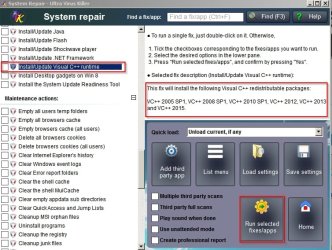
Okay I think you are either missing or need to update a missing Visual C++ redistributable package. If I remember correctly I've seen those errors on my own machine.


EDIT: Corrected image.

The easy way to update is grab a copy of UVK and run it (right click and run as admin)

On the System Repair tab use the following fix:

UVK VC++ updates.jpg

A reboot will be needed. If that doesn't help you might need to uninstall all versions of VC++ and reinstall them.

It wouldn't hurt to launch the Autoruns tab in UVK and see what shows up.

Anyway at least you've found out that there's no scheduled task causing the problem.
 
Last edited:

My Computer My Computer

At a glance

Microsoft Windows 7 Home Premium 64-bit 7601 ...AMD C-60 APU with Radeon(tm) HD Graphics4.00 GBAMD Radeon HD 6290 Graphics
Computer type
Laptop
Computer Manufacturer/Model Number
ASUS
OS
Microsoft Windows 7 Home Premium 64-bit 7601 Multiprocessor Free Service Pack 1
CPU
AMD C-60 APU with Radeon(tm) HD Graphics
Motherboard
ASUSTeK COMPUTER INC. X501U
Memory
4.00 GB
Graphics Card(s)
AMD Radeon HD 6290 Graphics
Sound Card
(1) AMD High Definition Audio Device (2) Realtek High Defi
Screen Resolution
1366 x 768 x 32 bits (4294967296 colors) @ 60 Hz
Hard Drives
Hitachi HTS545050A7E380 SATA Disk Device
Antivirus
Comodo CIS & FW, SecureAplus App Whitelisting, Threatfire
Browser
Cyberfox 64bit, Opera 64bit, Airfox
Other Info
Spy-The-Spy, HitmanPro.Alert, Norton Connect Safe, MJRegWatcher, BitDefender TrafficLight, Voodoo Shield, Zemana AntiMalware
Also RE: Nothing showing up in TaskSTRun. It can take a while before the screen populates but not usually longer than a minute or so.
 

My Computer My Computer

At a glance

Microsoft Windows 7 Home Premium 64-bit 7601 ...AMD C-60 APU with Radeon(tm) HD Graphics4.00 GBAMD Radeon HD 6290 Graphics
Computer type
Laptop
Computer Manufacturer/Model Number
ASUS
OS
Microsoft Windows 7 Home Premium 64-bit 7601 Multiprocessor Free Service Pack 1
CPU
AMD C-60 APU with Radeon(tm) HD Graphics
Motherboard
ASUSTeK COMPUTER INC. X501U
Memory
4.00 GB
Graphics Card(s)
AMD Radeon HD 6290 Graphics
Sound Card
(1) AMD High Definition Audio Device (2) Realtek High Defi
Screen Resolution
1366 x 768 x 32 bits (4294967296 colors) @ 60 Hz
Hard Drives
Hitachi HTS545050A7E380 SATA Disk Device
Antivirus
Comodo CIS & FW, SecureAplus App Whitelisting, Threatfire
Browser
Cyberfox 64bit, Opera 64bit, Airfox
Other Info
Spy-The-Spy, HitmanPro.Alert, Norton Connect Safe, MJRegWatcher, BitDefender TrafficLight, Voodoo Shield, Zemana AntiMalware
Okay I think you are either missing or need to update a missing Visual C++ redistributable package. If I remember correctly I've seen those errors on my own machine.
EDIT: Corrected image.

The easy way to update is grab a copy of UVK and run it (right click and run as admin)

On the System Repair tab use the following fix:
A reboot will be needed. If that doesn't help you might need to uninstall all versions of VC++ and reinstall them.

It wouldn't hurt to launch the Autoruns tab in UVK and see what shows up.

Anyway at least you've found out that there's no scheduled task causing the problem.
This solved the problem. TaskSTRun runs and displays properly. Forgot to run UVK as administrator and didn't reboot. Below are the affected dist. C++ files (dated 6/5/17):
MVCppDistFiles2After_zpsyxwbwufv.jpg
 

My Computer My Computer

At a glance

Win7 64bitAMD Athlon 64 x2 5200+4GB DDR2Radeon X1300
Computer type
PC/Desktop
Computer Manufacturer/Model Number
Gateway Select 1300 PC
OS
Win7 64bit
CPU
AMD Athlon 64 x2 5200+
Motherboard
Elitegroup MCP61P
Memory
4GB DDR2
Graphics Card(s)
Radeon X1300
Hard Drives
SSD 193GB (windows startup)
HDD 465GB
Antivirus
Norton Security
Browser
IE11 32bit, FF 53.0.3 64bit, Ggl Chrome 58.0.3029.110 64bit
It wouldn't hurt to launch the Autoruns tab in UVK and see what shows up.
Think you mean Autorun Manager in UVK. Did that, there are three OneNote entries:

1) one in Global folder context menu (HKCR\Directory) (entered as OneNote.Open)
2) two in recently run programs (HKU\S-1-5-21-2096204309-1533785969-211776700029-1001\Software\Settings\Software\Microsoft\Windows]Shell\MuiCache) (as OneNote)

Still the same OneNote delayed start up happens, and I can see it happen in Task Manager.

BTW, running TaskSTRun is unreliable: sometimes the same unhandle exception occurs, the only difference is it takes longer for the error message to pop up.

And OneNote did not show up under the Auto Start tab. I'm convinced I'm barking up the wrong tree, I remember using a little-known (perhaps an .msc program) to configure for delayed start of OneNote.
 
Last edited:

My Computer My Computer

At a glance

Win7 64bitAMD Athlon 64 x2 5200+4GB DDR2Radeon X1300
Computer type
PC/Desktop
Computer Manufacturer/Model Number
Gateway Select 1300 PC
OS
Win7 64bit
CPU
AMD Athlon 64 x2 5200+
Motherboard
Elitegroup MCP61P
Memory
4GB DDR2
Graphics Card(s)
Radeon X1300
Hard Drives
SSD 193GB (windows startup)
HDD 465GB
Antivirus
Norton Security
Browser
IE11 32bit, FF 53.0.3 64bit, Ggl Chrome 58.0.3029.110 64bit
Back
Top