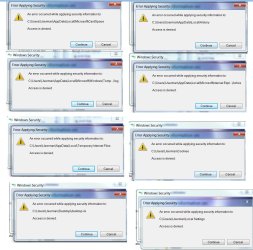
Taking Ownership of folders Does Not Work - Win 7 Ultimate

EmKal

New member
Local time
6:10 PM
Messages
16
Hi,
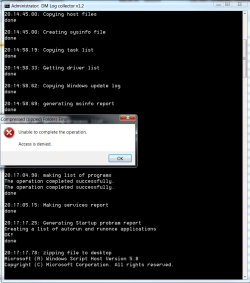
I have been solving this issue for days on end, I tried all possible ways of taking ownership of windows minidump folder and other system folders (please see the print screen) It does show my user name as the owner, but does not grant me full access to the file. Thus I cannot run the DM LOG COLLECTOR to create a usable .zip file that I can then open. Thus I cannot upload the zip file here and cannot get the help I need for my BSOD problem.

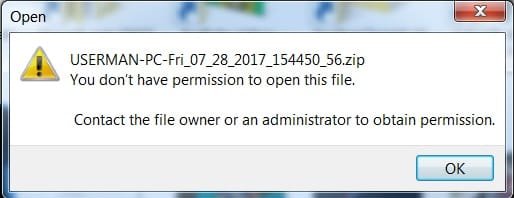
I recently upgraded from Win 7 Home Premium to Win 7 Ultimate in order to use more memory. Now I get driver relate BSODs which I cannot get help for. I do not have a parallel operating system running on my machine, the upgrade was done through Microsoft official tool, without needing a clean reinstall. I did try creating an elevated permission full admin account and run the DM LOG Collector from that account. Nothing worked. I still get access denied error when trying to access the zip file created by DM Log Collector.

I also tried opening the xml file created during the last BSOD using MS Excel, the same thing, don't have the permission to open the file despite trying every ownership combination.

Please help.
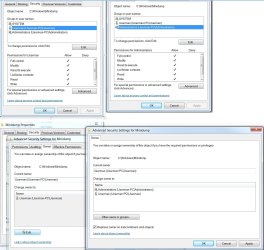

OwnershipUser.jpg

DMLogError.png

MiniDump upload error.jpg

PermissionXML.jpg

PermissionXMLOw.jpg
 

My Computer My Computer

At a glance

Windows 7 Ultimate x64Intel Core i7 2700K @ 3.50GHz24.0GB Dual-Channel DDR3 @ 668MHz (9-9-9-24)3071MB NVIDIA GeForce GTX 660 Ti (ASUStek Com...
Computer type
PC/Desktop
Computer Manufacturer/Model Number
Custom
OS
Windows 7 Ultimate x64
CPU
Intel Core i7 2700K @ 3.50GHz
Motherboard
ASUSTeK COMPUTER INC. P8Z77-V LK (LGA1155)
Memory
24.0GB Dual-Channel DDR3 @ 668MHz (9-9-9-24)
Graphics Card(s)
3071MB NVIDIA GeForce GTX 660 Ti (ASUStek Computer Inc)
Hard Drives
233GB Samsung SSD 850 EVO 250GB ATA Device (SSD)
1863GB Western Digital WDC WD20EARS-00MVWB0 ATA Device (SATA)
Antivirus
Malwarebytes Premium 3.1.2 plus Avast free 17.5.2303
Browser
Chrome
Hi Emkal,

Dont know why but its in a hidden system folder -- Appdata

Change its permissions

You could also try send to desktop.


Roy
 

My Computer My Computer

At a glance

W7 home premium 32bit/W7HP 64bit/w10 tp insid...E5300 dual core3gbNvidia Geforce 7100 Nforce 630i
Computer type
PC/Desktop
Computer Manufacturer/Model Number
medionl/Aspire 6930G/acer x55a
OS
W7 home premium 32bit/W7HP 64bit/w10 tp insider ring
CPU
E5300 dual core
Motherboard
medion MS7366
Memory
3gb
Graphics Card(s)
Nvidia Geforce 7100 Nforce 630i
Monitor(s) Displays
avixc
Internet Speed
n (isp resticted to 72)
Antivirus
mse/pands
Browser
palemoon
Other Info
Belkin Fd7050 n USB using Railink RT2870 drivers, more upto date
Hi Emkal,

Dont know why but its in a hidden system folder -- Appdata

Change its permissions

You could also try send to desktop.


Roy

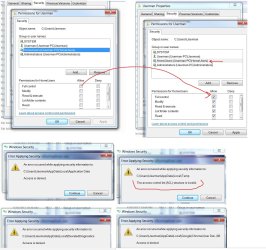
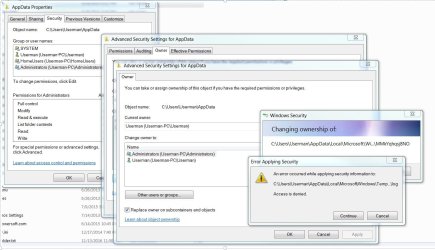
Thanks for the quick reply. Just tried it, got some "access denied" errors trying to change ownership of Appdata folder (see the last photo below). Was able to open the .xml file in excel oonce I copied it to desktop. I did previously try sending .dmp files to desktop as well, it does work, but it makes no difference in terms of running DM LOG Collector tool (I assume it looks for information in the standard windows folders) and so I still get access denied error. Is the file created by DM LOG Collector tool (required by the BSOD thread) different from simply zipping some .dmp files from the minidump folder (which I can do once I copy them to the desktop)? Can somebody please look at my attached minidumps files if that is an acceptable format?

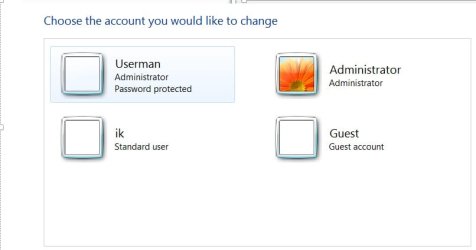
There is a new thing that I noticed. When I look at the list of users in control panel, I only see one user named "USERMAN" - my main password-protected account (Please see the picture).
Control Panel Users.jpg

When I look at at security tab of the C:\Users\Userman folder, a new user account shows up called
HomeUsers (Userman-PC\HomeUsers) - this account has almost no permissions,

in addition to:
Administrators (Userman-PC\Administrators) - full permission
Userman (Userman-PC\Userman) - full permission

I assume all of this was created when upgrading to Windows 7 Ultimate? When I try to add full control permission to the HomeUser account, I get many "access denied" errors as can be seen in the pictures. Could this be the root of the problem? How do I fix it?

Many thanks in advance!
Emilia

AddedHomeUser.jpg

ErrorAddingFullControl.jpg

ErrorAppDataPermissions.jpg
 

My Computer My Computer

At a glance

Windows 7 Ultimate x64Intel Core i7 2700K @ 3.50GHz24.0GB Dual-Channel DDR3 @ 668MHz (9-9-9-24)3071MB NVIDIA GeForce GTX 660 Ti (ASUStek Com...
Computer type
PC/Desktop
Computer Manufacturer/Model Number
Custom
OS
Windows 7 Ultimate x64
CPU
Intel Core i7 2700K @ 3.50GHz
Motherboard
ASUSTeK COMPUTER INC. P8Z77-V LK (LGA1155)
Memory
24.0GB Dual-Channel DDR3 @ 668MHz (9-9-9-24)
Graphics Card(s)
3071MB NVIDIA GeForce GTX 660 Ti (ASUStek Computer Inc)
Hard Drives
233GB Samsung SSD 850 EVO 250GB ATA Device (SSD)
1863GB Western Digital WDC WD20EARS-00MVWB0 ATA Device (SATA)
Antivirus
Malwarebytes Premium 3.1.2 plus Avast free 17.5.2303
Browser
Chrome
First, may I ask.....How did you try to take ownership of a file or folder?

I only use the program "Grant Admin Full Control" to make myself the OWNER of any file or folder.
When I still can't do what I want, like delete a file, I 'Right Click' on that file and then click on "Properties".

Then if the file is marked 'Read Only' I just remove that setting, save and exit Properties and I can then usually delete or rename the file or whatever I need to do.

Just a thought, and Good Luck!
TechnoMage :cool:
 

My Computer My Computer

At a glance

Win 7 Pro, SP1, x86, Win-11/Pro/64AMD8GB CrucialVarious
Computer type
PC/Desktop
Computer Manufacturer/Model Number
Various
OS
Win 7 Pro, SP1, x86, Win-11/Pro/64
CPU
AMD
Motherboard
Various
Memory
8GB Crucial
Graphics Card(s)
Various
Sound Card
OnBoard
Monitor(s) Displays
Acer 21.5"
Hard Drives
Crucial SSD, 500 GB
PSU
OEM
Case
SFF Slim Line Case
Cooling
OEM
Keyboard
eMachines
Mouse
Logitech Wireless
Internet Speed
varies
Antivirus
Windows Defender/Super Anti-Spyware
Browser
Firefox
Back
Top