
Solved Black Screen After Logon - explorer.exe and task manager crashes

BoszxJanela

New member
Local time
12:51 PM
Messages
8
I am using Windows 7 Home Premium (x64)
Toshiba L650-102

After Logon, I only see Black Screen :(

- I can open Ctrl+Alt+Delete and the task manager, but when i run a new task, Task Manager Crashes
- explorer.exe crashes at startup and i can't run it since Task manager crashes
- I tried System Restore, Same problem
- "Repair My Computer" won't detect my problem
- Safe Mode also has the same problem, Crashing Task Manager, No Explorer

What should i do? :shock: :cry: I am not using my PC for weeks...
THANKS FOR REPLYING
 

My Computer My Computer

Computer type
PC/Desktop
Computer Manufacturer/Model Number
Toshiba
OS
Windows 7 Home Premium, Windows 10 Pro, Windows 8
I see you are running Windows 7, 8 & 10. How have you got these set up, are they on separate hard drives or on separate partitions on the one drive.

It would be helpful if you supplied a screen shot of Disc Management as well.
 

My Computer My Computer

Computer type
PC/Desktop
Computer Manufacturer/Model Number
Self built using existing case
OS
Windows 7 Home Premium 64 bit sp1
CPU
Intel i5 3570 3.4Ghz Ivy Bridge SKT 1155 quad core
Motherboard
Gigabyte Z77-HD3 SKT 1155 2xSata 3, 4x USB 3.0
Memory
G-Skill Rip Jaws 16Gb (8x2) DDR3 -1600 PC3 12800 CL 10 red
Graphics Card(s)
Gigabyte NVIDIA GT610 1Gb DDR3 810/1200 PCI-E 2.0 Silent
Sound Card
NVIDIA High Definition & Realtech High Definition Audio
Monitor(s) Displays
2 x Philips 226V4L 16:9 aspect ratio
Screen Resolution
1920 x 1080 HD
Hard Drives
Samsung 840 Pro 256gb SSD, SATA 3.
Hitachi Touro Portable 1tb, USB 3.0 HDD used for image b/ups.
PSU
Corsair VS450
Case
Codeng
Cooling
PSU fan & CPU fan
Keyboard
Logitech
Mouse
Logitech Wireless trackball M570
Internet Speed
Wireless 3G. 3mg down & 550kb up.
Antivirus
Bitdefender Internet Security 2020
Browser
Opera (Current Version) & Firefox
Other Info
MS Office 2013 Pro. Davis weather station software. MGE Nova 600 avr UPS.
hi

While you are in safe mode, open task manager and open a new task , type 'cmd' to open the command prompt with administrative privileges.

1. run sfc /scannow.... See if this resolve this issue. if not i will advice you on the next step.
 

My Computer My Computer

Computer Manufacturer/Model Number
Nothing specific....what ever the clients provide for Repair
OS
Windows 7 ultimate x64
Its still not fixed :(
I hope this has a solution
 

My Computer My Computer

Computer type
PC/Desktop
Computer Manufacturer/Model Number
Toshiba
OS
Windows 7 Home Premium, Windows 10 Pro, Windows 8
I see you are running Windows 7, 8 & 10. How have you got these set up, are they on separate hard drives or on separate partitions on the one drive.

It would be helpful if you supplied a screen shot of Disc Management as well.

Nope, i have seperate computers ;)
 

My Computer My Computer

Computer type
PC/Desktop
Computer Manufacturer/Model Number
Toshiba
OS
Windows 7 Home Premium, Windows 10 Pro, Windows 8
hi

While you are in safe mode, open task manager and open a new task , type 'cmd' to open the command prompt with administrative privileges.

1. run sfc /scannow.... See if this resolve this issue. if not i will advice you on the next step.

In safe mode, Task Manager also crashes when running new tasks. Also there is so ecplorer.exe, i might think about upgrading to Windows 8 later if i can back up my files. Or maybe i can fix this problem!

Btw i tried sfc /scannow earlier, but it didn't fix it. But thanks for replying! ;)
 

My Computer My Computer

Computer type
PC/Desktop
Computer Manufacturer/Model Number
Toshiba
OS
Windows 7 Home Premium, Windows 10 Pro, Windows 8
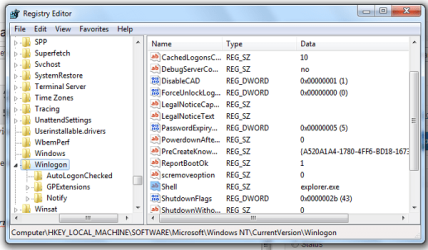
All right

of to the second solution

open regedit and navigate to the following :

HKLM\SOFTWARE\Microsoft\Windows NT\CurrentVersion\Winlogon

Winlogon.png

In Winlogon, on the right side, you should notice a value called “Shell“. In the RHS Pane, ensure that the default string value of Shell is explorer.exe.

Double-click this value. Make sure only ‘explorer.exe‘ is given the value of Shell. If you see anything else there, simply delete it and leave only ‘explorer.exe’ .

Exit the Registry Editor.

Restart the computer for the changes to take effect.
 

My Computer My Computer

Computer Manufacturer/Model Number
Nothing specific....what ever the clients provide for Repair
OS
Windows 7 ultimate x64
All right

of to the second solution

open regedit and navigate to the following :

HKLM\SOFTWARE\Microsoft\Windows NT\CurrentVersion\Winlogon

View attachment 400275

In Winlogon, on the right side, you should notice a value called “Shell“. In the RHS Pane, ensure that the default string value of Shell is explorer.exe.

Double-click this value. Make sure only ‘explorer.exe‘ is given the value of Shell. If you see anything else there, simply delete it and leave only ‘explorer.exe’ .

Exit the Registry Editor.

Restart the computer for the changes to take effect.

Thanks again! This might work ;)
 

My Computer My Computer

Computer type
PC/Desktop
Computer Manufacturer/Model Number
Toshiba
OS
Windows 7 Home Premium, Windows 10 Pro, Windows 8
Back
Top