septimus
New member
- Local time
- 2:38 PM
- Messages
- 11
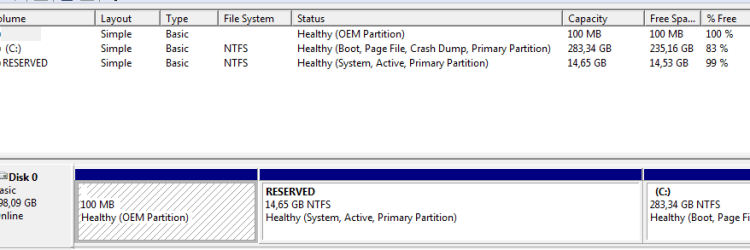
There are three partitions currently on my disk.
I know that 100Mb section is for boot files and a reserved section (14Gb, really???) is for recovery. But I would prefer to have just one solid partition with all boot files on it and with no extra partitions. I understand I can do it only during the installation process using the command line or formatting/deleting partitions. Could someone give me a step-by-step procedure? Or direct me to the tutorial?
I do not plan to use the bit-locker or the dual boot, so I assume having one full 300Gb partition would be better than having 14Gb on a separate reserve. 100MB OEM partition does not look usefull to me either.
I know that 100Mb section is for boot files and a reserved section (14Gb, really???) is for recovery. But I would prefer to have just one solid partition with all boot files on it and with no extra partitions. I understand I can do it only during the installation process using the command line or formatting/deleting partitions. Could someone give me a step-by-step procedure? Or direct me to the tutorial?
I do not plan to use the bit-locker or the dual boot, so I assume having one full 300Gb partition would be better than having 14Gb on a separate reserve. 100MB OEM partition does not look usefull to me either.
Attachments
My Computer
At a glance
W7 x64 Home BasicIntel Core i5-2520M 2,50 GHz4GBInternal ATI Mobile Intel HD Graphics
- Computer type
- Laptop
- Computer Manufacturer/Model Number
- Dell Vostro 3550
- OS
- W7 x64 Home Basic
- CPU
- Intel Core i5-2520M 2,50 GHz
- Memory
- 4GB
- Graphics Card(s)
- Internal ATI Mobile Intel HD Graphics