Solved Unknown issue - Either faulty HDD, Memory or interference with my PS4.

deusx18

New member
Local time
4:15 PM
Messages
14
I'm posting it here because I have a feeling it's my HDD acting up.

Ever since I changed my room looking, I put my ps4 on top of my pc, which has been having hard time booting and lags a ton while doing simple tasks with basically nothing running in the background. Here are my issues so far, listed:

1. Booting up takes 5 to 10 minutes. Sometimes it's stuck on the flashing bar, sometimes it's stuck on starting w7 logo and sometimes there no logo at all and just ''Starting up.
2. Rebooting doesn't fix it.
3. After that waiting time and fully loaded into my desktop, I encounter some weird type of lags:
-CPU lag spikes while doing almost nothing (graph shows multiple spikes at random times).
-Programs, even tiny ones, are taking forever to load or sometimes won't at all and gives me strange .exe error.
4. Anti-virus didn't detect anything.
5. Removed any kind of useless programs.
6. Disk-Defragmented
7. I run a chkdsk and unfortunally it was stuck on 12% for couple minutes so I rebooted. (I'll probably run one over night next time)
8. Memory test didn't detect anything.
9. Graphs don't show anything weird other than those spikes. Memory, CPU usage and temps are completely fine.

-Test with ps4 on/off results in my pc booting up perfectly. Lag is still present, though. See below.
-Test with ps4 off and completely away from my pc results in my pc booting up perfectly and lag basically gone.

Now to see if that fixed the issue entirely, but if not, what could be the cause? Faulty HDD? Damaged memory? I have no clue, but what I know is that it's not acting like it should.
 

My Computer My Computer

At a glance

w7 64b
OS
w7 64b
I have read reports of the game Destiny causing havoc with people's home internet. One user got a different router (Linksys WRT1900AC Dual-Band Wireless-AC Router), and that fixed it.

That doesn't seem to be entirely consistent with your situation. The fact that there is some apparent connection between the two devices, along with what I read about online gaming with the PS4, tells me that you should turn off all connectivity in the PS4, and then see if that solved the problem. Then turn connectivity back on in the PS4, to see if the problem comes back.

Finally, you could run MSCONFIG in your computer, go to the Services tab, hide all Microsoft services, then disable all of the remaining services (the non-Microsoft ones). Then reboot. If this solves the problem, then it may not have had anything to do with the PS4. If this fixed it, then you should go back into MSCONFIG and re-enable one service at a time, rebooting after each re-enable, then using the computer a bit as a test. Once the computer slows back down, you will know which service was the culprit; disable that one service in MSCONFIG. Continue re-enabling one service at a time till all are re-enabled, unless you find others which are also slowing things down.

Good luck.
 

My Computer My Computer

At a glance

Linux Mint 18.2 xfce 64-bit (VMWare host) / W...Haswell4 GB
Computer type
PC/Desktop
Computer Manufacturer/Model Number
Dell
OS
Linux Mint 18.2 xfce 64-bit (VMWare host) / Windows 8.1 Pro 32-bit (VMWare guest)
CPU
Haswell
Memory
4 GB
Monitor(s) Displays
Acer 23"
Screen Resolution
1920 x 1080
Hard Drives
Two hard drives, 1TB each: One for Linux, one for my data.
Keyboard
IBM Model M
Antivirus
Sophos (Linux), Trend Micro (Windows)
Browser
Firefox, Opera
Other Info
I use Samba to share my data drive with the other computers at my house and with my guest session in VMWare Workstation Player.
I have read reports of the game Destiny causing havoc with people's home internet. One user got a different router (Linksys WRT1900AC Dual-Band Wireless-AC Router), and that fixed it.

That doesn't seem to be entirely consistent with your situation. The fact that there is some apparent connection between the two devices, along with what I read about online gaming with the PS4, tells me that you should turn off all connectivity in the PS4, and then see if that solved the problem. Then turn connectivity back on in the PS4, to see if the problem comes back.

Finally, you could run MSCONFIG in your computer, go to the Services tab, hide all Microsoft services, then disable all of the remaining services (the non-Microsoft ones). Then reboot. If this solves the problem, then it may not have had anything to do with the PS4. If this fixed it, then you should go back into MSCONFIG and re-enable one service at a time, rebooting after each re-enable, then using the computer a bit as a test. Once the computer slows back down, you will know which service was the culprit; disable that one service in MSCONFIG. Continue re-enabling one service at a time till all are re-enabled, unless you find others which are also slowing things down.

Good luck.

Thanks man. By lag, I didn't mean internet lag, just real annoying PC lag, huge spikes and such. I'll try out the services way and give you news.
 

My Computer My Computer

At a glance

w7 64b
OS
w7 64b
Updates:

I've done a disk clean up, had about 100gb used up that I cleaned. A lot of temp files. I also disabled services as mentionned above and huge improvements has followed. In the services, I saw that one of the programs I uninstalled still had a service running up, which was probably the issue.

Semi-fixed for now.
 

My Computer My Computer

At a glance

w7 64b
OS
w7 64b
Updates: None of the above fixed everything entirely. My game froze and crashed for no reason, so i took off one memory stick and not a single lag anywhere. I think i've damaged my memory by over using it the other day (97%).
 

My Computer My Computer

At a glance

w7 64b
OS
w7 64b
I'm posting it here because I have a feeling it's my HDD acting up.


7. I run a chkdsk and unfortunally it was stuck on 12% for couple minutes so I rebooted. (I'll probably run one over night next time)

Please edit your profile and add ALL your system specs.

Is your computer a Laptop or desktop?

Everything is saying that you have a failing disk.
Boot from Win 7 installation disk, go to Repair and launch a CMD window
Type
chkdsk c: /f

Don't abort it. It can take minutes (healthy drive) or a day (failing drive)

Pay attention on the results. If it finds bad blocks or bad clusters, your disk is dying. Backup your data and replace your HDD ASAP. Better, buy a SSD.
 

My Computers My Computers

  • At a glance

    Windows 7 HP 64i5 6600K - 800MHz to 4200MHz4+4G GSkill DDR4 3000IG - Intel 530
    Computer type
    PC/Desktop
    Computer Manufacturer/Model Number
    custom build
    OS
    Windows 7 HP 64
    CPU
    i5 6600K - 800MHz to 4200MHz
    Motherboard
    GA-Z170-HD3P
    Memory
    4+4G GSkill DDR4 3000
    Graphics Card(s)
    IG - Intel 530
    Monitor(s) Displays
    Samsung 226BW
    Screen Resolution
    1680x1050
    Hard Drives
    (1) -1 SM951 – 128GB M.2 AHCI PCIe SSD drive for Windows 7 and Lubuntu
    (2) -1 WD SATA 3 - 1T for Data
    (3) -1 WD SATA 3 - 1T for backup
    PSU
    Thermaltake 450W TR2 gold
    Keyboard
    Old and good Chicony mechanical keyboard
    Mouse
    Logitech mX performance - 9 buttons (had to disable some)
    Internet Speed
    500Mb/s
    Browser
    Firefox 64
    Other Info
    TinyWall firewall
  • At a glance

    Windows 7 Proi7-4500U 800MHz to 3.0GHz(4+4)G DDR3 1600IG intel 4400 + NVIDIA GeForce GT 745M
    Computer type
    Laptop
    System Manufacturer/Model Number
    Asus Q550LF
    OS
    Windows 7 Pro
    CPU
    i7-4500U 800MHz to 3.0GHz
    Motherboard
    Asus Q550LF
    Memory
    (4+4)G DDR3 1600
    Graphics Card(s)
    IG intel 4400 + NVIDIA GeForce GT 745M
    Sound Card
    Realtek
    Monitor(s) Displays
    LG Display LP156WF4-SPH1
    Screen Resolution
    1920 x 1080
    Hard Drives
    BX500 120G SSD for Windows and programs +
    1T HDD for data
    Internet Speed
    500 Mb/s
    Browser
    Firefox
    Other Info
    TinyWall firewall
Updates: None of the above fixed everything entirely. My game froze and crashed for no reason, so i took off one memory stick and not a single lag anywhere. I think i've damaged my memory by over using it the other day (97%).

Excellent. Sounds like you have eliminated the problem. You may have also eliminated something that wasn't a problem, but at least you have your computer back.

How old is your hard drive? Pay attention to what Megahertz said about the hard drive, because it could be time to replace it.
 

My Computer My Computer

At a glance

Linux Mint 18.2 xfce 64-bit (VMWare host) / W...Haswell4 GB
Computer type
PC/Desktop
Computer Manufacturer/Model Number
Dell
OS
Linux Mint 18.2 xfce 64-bit (VMWare host) / Windows 8.1 Pro 32-bit (VMWare guest)
CPU
Haswell
Memory
4 GB
Monitor(s) Displays
Acer 23"
Screen Resolution
1920 x 1080
Hard Drives
Two hard drives, 1TB each: One for Linux, one for my data.
Keyboard
IBM Model M
Antivirus
Sophos (Linux), Trend Micro (Windows)
Browser
Firefox, Opera
Other Info
I use Samba to share my data drive with the other computers at my house and with my guest session in VMWare Workstation Player.
Please edit your profile and add ALL your system specs.

Is your computer a Laptop or desktop?

Everything is saying that you have a failing disk.
Boot from Win 7 installation disk, go to Repair and launch a CMD window
Type
chkdsk c: /f

Don't abort it. It can take minutes (healthy drive) or a day (failing drive)

Pay attention on the results. If it finds bad blocks or bad clusters, your disk is dying. Backup your data and replace your HDD ASAP. Better, buy a SSD.

That's what I'm expecting. I actually did a sfc /scannow and it found corrupted files and I'm going to reboot in a bit. chkdsk is supposed to come up on reboot as well. Question though, does chkdsk automatically fixes errors like I read here and there? Also I can copy paste the logs from sfc.

Excellent. Sounds like you have eliminated the problem. You may have also eliminated something that wasn't a problem, but at least you have your computer back.

How old is your hard drive? Pay attention to what Megahertz said about the hard drive, because it could be time to replace it.

Unfortunately today, when I came back from work and pc shutdown for hours, the issue still came back. This time it was worst. It took 30 minutes and I didn't even make it fully to the desktop screen. explorer.exe wouldn't load fully/properly so I just rebooted, changed plugs of my HDD and it somehow loaded straight in without any delay. I don't exactly know what's causing this but I'm gonna back up my stuff and think of buying a SSD soon.

Edit: This is a retail pc bought in stores, i7 3397 with a 270 W PSU (I think) with 16 gb ram, my gfx card blew up years ago and I haven't changed anything on it since I bought it (2012 I think). It's quite old so I can expect the HDD to be dying.
 

My Computer My Computer

At a glance

w7 64b
OS
w7 64b
I wonder if you are having electrical issues in your house. Do you have any kind of surge protection?

If big electrical fluctuations are causing your issues, then a good surge protector might solve this for you. It will certainly make your equipment last longer.
 

My Computer My Computer

At a glance

Linux Mint 18.2 xfce 64-bit (VMWare host) / W...Haswell4 GB
Computer type
PC/Desktop
Computer Manufacturer/Model Number
Dell
OS
Linux Mint 18.2 xfce 64-bit (VMWare host) / Windows 8.1 Pro 32-bit (VMWare guest)
CPU
Haswell
Memory
4 GB
Monitor(s) Displays
Acer 23"
Screen Resolution
1920 x 1080
Hard Drives
Two hard drives, 1TB each: One for Linux, one for my data.
Keyboard
IBM Model M
Antivirus
Sophos (Linux), Trend Micro (Windows)
Browser
Firefox, Opera
Other Info
I use Samba to share my data drive with the other computers at my house and with my guest session in VMWare Workstation Player.
Did you tested the disk?

Everything is saying that you have a failing disk.
Boot from Win 7 installation disk, go to Repair and launch a CMD window
Type
chkdsk c: /f
 

My Computers My Computers

  • At a glance

    Windows 7 HP 64i5 6600K - 800MHz to 4200MHz4+4G GSkill DDR4 3000IG - Intel 530
    Computer type
    PC/Desktop
    Computer Manufacturer/Model Number
    custom build
    OS
    Windows 7 HP 64
    CPU
    i5 6600K - 800MHz to 4200MHz
    Motherboard
    GA-Z170-HD3P
    Memory
    4+4G GSkill DDR4 3000
    Graphics Card(s)
    IG - Intel 530
    Monitor(s) Displays
    Samsung 226BW
    Screen Resolution
    1680x1050
    Hard Drives
    (1) -1 SM951 – 128GB M.2 AHCI PCIe SSD drive for Windows 7 and Lubuntu
    (2) -1 WD SATA 3 - 1T for Data
    (3) -1 WD SATA 3 - 1T for backup
    PSU
    Thermaltake 450W TR2 gold
    Keyboard
    Old and good Chicony mechanical keyboard
    Mouse
    Logitech mX performance - 9 buttons (had to disable some)
    Internet Speed
    500Mb/s
    Browser
    Firefox 64
    Other Info
    TinyWall firewall
  • At a glance

    Windows 7 Proi7-4500U 800MHz to 3.0GHz(4+4)G DDR3 1600IG intel 4400 + NVIDIA GeForce GT 745M
    Computer type
    Laptop
    System Manufacturer/Model Number
    Asus Q550LF
    OS
    Windows 7 Pro
    CPU
    i7-4500U 800MHz to 3.0GHz
    Motherboard
    Asus Q550LF
    Memory
    (4+4)G DDR3 1600
    Graphics Card(s)
    IG intel 4400 + NVIDIA GeForce GT 745M
    Sound Card
    Realtek
    Monitor(s) Displays
    LG Display LP156WF4-SPH1
    Screen Resolution
    1920 x 1080
    Hard Drives
    BX500 120G SSD for Windows and programs +
    1T HDD for data
    Internet Speed
    500 Mb/s
    Browser
    Firefox
    Other Info
    TinyWall firewall
No I haven't checked disk yet because it takes time. I'll do when I sleep. And I don't think i've got any electrical issues. Just wanna say that the lag spikes are pretty much gone for now. Good sign.
 

My Computer My Computer

At a glance

w7 64b
OS
w7 64b
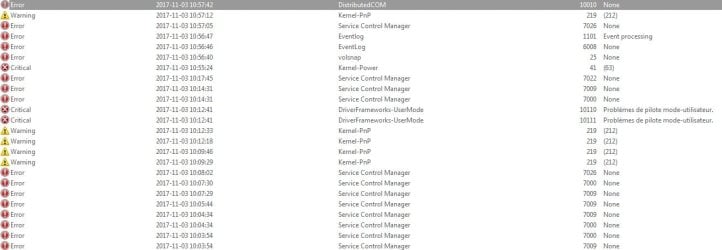
Ok I had a look in event viewer just now. This was right when I booted up after coming back from work, pc shut down for hours. This is when it took forever to log on and didn't work. It's mostly timeout errors, one is about cdrom, rest about multiple programs like Kaspersky, Skype updater, Malwarebytes and such.
 

Attachments

  • Screenshot_7.jpg
    Screenshot_7.jpg
    52.6 KB · Views: 3

My Computer My Computer

At a glance

w7 64b
OS
w7 64b
Full summary:

-tested a clean user account
-disabled services on startup
-removed useless programs
-Defrag
-chkdsk
-scannow
-checked event viewer and logs of chkdsk = couple errors that doesn't seem related to my problem + chkdsk logs didn't find anything
-ccleaner full scan + clean up
-malwarebytes scan
-kaspersky scan
-hitmanpro scan
-removed RAM bars to see if one was faulty
-unplugged my 2nd HDD
-changed plugs of my main HDD
-changed couple things in BIOS


Things to be done: Windows Repair and/or wipe the HDD, reinstall (last resort).

But for now, my pc runs normally, in fact a lot faster than before all of those events. If the problem comes back, I'm going to do what I mentioned above. I am just completely pissed that all of it is gone...entirely and for no reason.
 
Last edited:

My Computer My Computer

At a glance

w7 64b
OS
w7 64b
SOLVED:

Everything got worse after my last reply on here. I changed hardrive, lucky me I had a spare one, that is also better than what I had :P. Turns out, I still had my pc lagging hardcore even after a fresh install. So I figured it was not a w7 problem. I went into bios, resetted the settings to optimized, but then my w7 would crash and I was stuck in a boot loop. Anyway, I reinstalled windows but ended up getting hardware error. I went back into bios, changed sata mode to AHCI and it worked. Lag was still semi present, so it was neither my hardrive, windows 7 or bios. Leaves me only one more option, my RAM.

Although ram test showed nothing, neither the graphs, I removed one of my ram sticks and strangely, all of the lag, freezing, ''not responding'' is entirely gone. I guess the stick was partially damaged. Like I said, i did push it to 97% usage at one point.

Anyways, solved!
 

My Computer My Computer

At a glance

w7 64b
OS
w7 64b
Back
Top