Install Windows7 on a new Hard Drive without a Windows CD?

anken

New member
Local time
1:48 PM
Messages
3
Hi, I'm glad to have found this forum and hope to find an answer to my question.

I have to replace the hard drive on my Toshiba Satellite. It had Windows 10 on HDD before it died.
My Satellite originally had Win7 on it, before Microsoft made me change it.
Since I will have to start from scratch, I prefer Win7, which has the product key on the bottom of my laptop. Win7 came pre-installed and I don't have the CD for it.
I know that I have to format the new drive first and then I should change the boot sequence in Bios.
My question: How do I download Win7 when I probably can't go online until Windows is installed?
I made a set of 5 Recover CD's when I first got this laptop many years ago but I would prefer just to get some kind of start up and download Windows from there without all of the other stuff on those Recover CD's'
Is there a way change the boot up and download Windows 7 on a brand new hard drive?
Thank you in advance for any suggestions you might have.
 

My Computer My Computer

Computer type
Laptop
OS
Windows 7 Home Premium 64
Hi anken,

Here's a link to Microsoft download page for a Windows 7 ISO click here. You'll have to have your 25 character product key to download. Attached is a VB script that will locate that on your machine. After you run it, you can copy and paste your product key it finds into notepad and print it for safekeeping.

Here's a link to Microsoft Download tool. You'll need product key here too. You can download Windows 7 ISO and burn it to a CD or USB. Slower than above but simpler for you to use.

Remember to obtain and store your 25 character product key in a safe place prior to attempting to install Windows 7

Here's a link to installing Clean Install Windows 7 - Windows 7 Help Forums - Seven Forums
 

Attachments

My Computer My Computer

Computer type
PC/Desktop
Computer Manufacturer/Model Number
HP Desktop & Compaq Laptop
OS
Win 10 x64, Linux Lite, Win 7 x64, BlackArch, & Kali
Hard Drives
Samsung 850 Pro 256Gb,
Hitachi HDD 1Tb,
Crucial MX SSD 250Gb
Segate 3Tb USB 3.0 Ext. Backup HDD
Internet Speed
150Mbps dn, 20Mbps up
Antivirus
Avast Free, Malwarebytes Anti-Exploit & Anti-Ransomware
Browser
Firefox, Chrome, Opera, & VPN

My Computers My Computers

System One System Two

  • Computer type
    PC/Desktop
    OS
    7 X64
    CPU
    i5 8400
    Motherboard
    gigabyte b365m ds3h
    Memory
    2x8gb 3200mhz
    Hard Drives
    various
    PSU
    pure power 11 400w cm
    Case
    Coolermaster
    Cooling
    cryorig m9i
  • Computer type
    PC/Desktop
    OS
    7x64
    CPU
    g5400
    Motherboard
    ga b365m ds3h
    Memory
    8gb ddr4 2400
    PSU
    xfx pro 450w
The Microsoft Link given in reply #2 will not work to download an Iso file because you have an OEM key.

You have to go to another computer that has internet service to download the Iso file, use this site to get the W7 version you want.

Every Way to Download Windows 7 ISOs, Legally and for Free | PCsteps.com

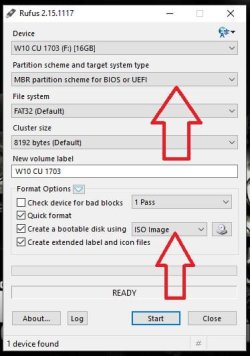
Windows does not fit on a cd, you need a blank dvd and a dvd burner, or use at least a 4GB flash drive and a simple program like Rufus to create a W7 usb installer.

Rufus - Create bootable USB drives the easy way

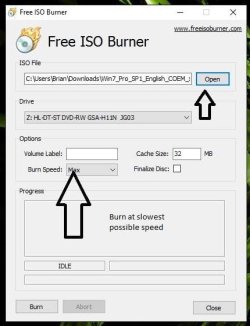
And a simple program like Free Iso Burner to burn the Iso file to dvd. Burn the dvd at the slowest possible speed given, use the drop down menu to change the speed once you have the Iso file chosen and the blank dvd in the tray. (very important or you may end up with a corrupt install dvd) usually x8 speed depending on the dvd burner.

Free ISO Burner

No you can't change the bootup and download a new W7, you have to install W7.

After you create a W7 installer, insert it in the dvd tray or usb 2.0 slot and restart the PC. Then start pressing the (F8) key to bring up the 1 time boot menu (not the Bios) then choose either the dvd installer or usb installer you created to start the install, there's no need to make any changes in the Bios.

Clean Install Windows 7 - Windows 7 Help Forums
 

Attachments

  • Rufus.JPG
    Rufus.JPG
    37 KB · Views: 53
  • FreeIsoBurner.JPG
    FreeIsoBurner.JPG
    36.5 KB · Views: 53
Last edited:

My Computer My Computer

Computer type
PC/Desktop
Computer Manufacturer/Model Number
Skylake Special #666
OS
Windows 10 Pro x64
CPU
Intel Core i7 6700K
Motherboard
Asus Sabertooth Z170 Mark 1
Memory
GSkill TridentZ RGB 16GB 3600 16-16-16-36
Graphics Card(s)
EVGA GTX 980 Ti SC x2
Sound Card
Realtek High Definition
Monitor(s) Displays
AOC G2460PG
Screen Resolution
1920 x 1080 144Hz
Hard Drives
Samsung 860 Pro 256GB, Seagate Barracuda 4TB x2
PSU
EVGA 1000 P2, EVGA White Custom Braided Cables
Case
Corsair Vengeance C70 Gunmetal Black
Cooling
Corsair H100i v2, Corsair ML120 x2, Thermal Grizzly Kryonaut
Keyboard
Logitech G910 Orion Spectrum
Mouse
Logitech G700s
Internet Speed
Verizon Fios Quantum Gateway 75/75
Antivirus
Windows Defender, Malwarebytes Free 3.8.3
Browser
Chrome
Other Info
Corsair SP120 x4, LG Blu-ray Drive, Durabrand HT-395 100 Watt Dolby Digital Amp, Corsair H2100 Wireless 7.1 Headset

My Computers My Computers

System One System Two

  • Computer type
    PC/Desktop
    Computer Manufacturer/Model Number
    custom build
    OS
    Windows 7 HP 64
    CPU
    i5 6600K - 800MHz to 4200MHz
    Motherboard
    GA-Z170-HD3P
    Memory
    4+4G GSkill DDR4 3000
    Graphics Card(s)
    IG - Intel 530
    Monitor(s) Displays
    Samsung 226BW
    Screen Resolution
    1680x1050
    Hard Drives
    (1) -1 SM951 – 128GB M.2 AHCI PCIe SSD drive for Windows 7 and Lubuntu
    (2) -1 WD SATA 3 - 1T for Data
    (3) -1 WD SATA 3 - 1T for backup
    PSU
    Thermaltake 450W TR2 gold
    Keyboard
    Old and good Chicony mechanical keyboard
    Mouse
    Logitech mX performance - 9 buttons (had to disable some)
    Internet Speed
    500Mb/s
    Browser
    Firefox 64
    Other Info
    TinyWall firewall
  • Computer type
    Laptop
    System Manufacturer/Model Number
    Asus Q550LF
    OS
    Windows 7 Pro
    CPU
    i7-4500U 800MHz to 3.0GHz
    Motherboard
    Asus Q550LF
    Memory
    (4+4)G DDR3 1600
    Graphics Card(s)
    IG intel 4400 + NVIDIA GeForce GT 745M
    Sound Card
    Realtek
    Monitor(s) Displays
    LG Display LP156WF4-SPH1
    Screen Resolution
    1920 x 1080
    Hard Drives
    BX500 120G SSD for Windows and programs +
    1T HDD for data
    Internet Speed
    500 Mb/s
    Browser
    Firefox
    Other Info
    TinyWall firewall

My Computer My Computer

Computer type
PC/Desktop
Computer Manufacturer/Model Number
Skylake Special #666
OS
Windows 10 Pro x64
CPU
Intel Core i7 6700K
Motherboard
Asus Sabertooth Z170 Mark 1
Memory
GSkill TridentZ RGB 16GB 3600 16-16-16-36
Graphics Card(s)
EVGA GTX 980 Ti SC x2
Sound Card
Realtek High Definition
Monitor(s) Displays
AOC G2460PG
Screen Resolution
1920 x 1080 144Hz
Hard Drives
Samsung 860 Pro 256GB, Seagate Barracuda 4TB x2
PSU
EVGA 1000 P2, EVGA White Custom Braided Cables
Case
Corsair Vengeance C70 Gunmetal Black
Cooling
Corsair H100i v2, Corsair ML120 x2, Thermal Grizzly Kryonaut
Keyboard
Logitech G910 Orion Spectrum
Mouse
Logitech G700s
Internet Speed
Verizon Fios Quantum Gateway 75/75
Antivirus
Windows Defender, Malwarebytes Free 3.8.3
Browser
Chrome
Other Info
Corsair SP120 x4, LG Blu-ray Drive, Durabrand HT-395 100 Watt Dolby Digital Amp, Corsair H2100 Wireless 7.1 Headset
Thank you so much for everybody who has taken the time to answer my question.
In the meantime I got my new replacement hdd shipped and it turned out that it doesn't fit.
The very last digit on a long serial number was incorrect. Will have to send it back for replacement...When the new hdd comes in, I'm going to try some of your suggestions. MS does not recognize the OEM product key. Got in touch with Toshiba and they claim not to have the specific product key. I can buy the startup disk from them...for $35.00 ):
 

My Computer My Computer

Computer type
Laptop
OS
Windows 7 Home Premium 64
ABSOLUTELY NO REASON TO PAY

SIW2 gave you a link in his earlier post

create a bootable USB and import the download onto it.

once you've got your new BLANK drive just fire it up.


Roy
 

My Computer My Computer

Computer type
PC/Desktop
Computer Manufacturer/Model Number
medionl/Aspire 6930G/acer x55a
OS
W7 home premium 32bit/W7HP 64bit/w10 tp insider ring
CPU
E5300 dual core
Motherboard
medion MS7366
Memory
3gb
Graphics Card(s)
Nvidia Geforce 7100 Nforce 630i
Monitor(s) Displays
avixc
Internet Speed
n (isp resticted to 72)
Antivirus
mse/pands
Browser
palemoon
Other Info
Belkin Fd7050 n USB using Railink RT2870 drivers, more upto date
Please explain

In the meantime I got my new replacement hdd shipped and it turned out that it doesn't fit.

The new HDD didn't fit the Laptop Disk bay?

The very last digit on a long serial number was incorrect. Will have to send it back for replacement...When the new hdd comes in, I'm going to try some of your suggestions.

What are you sending back, the new hdd? The serial number on the COA sticker has nothing to do with the HDD. Did you buy a Win 7 installation disk?

MS does not recognize the OEM product key. Got in touch with Toshiba and they claim not to have the specific product key. I can buy the startup disk from them...for $35.00

Is the product key the one on the COA sticker?
 

My Computers My Computers

System One System Two

  • Computer type
    PC/Desktop
    Computer Manufacturer/Model Number
    custom build
    OS
    Windows 7 HP 64
    CPU
    i5 6600K - 800MHz to 4200MHz
    Motherboard
    GA-Z170-HD3P
    Memory
    4+4G GSkill DDR4 3000
    Graphics Card(s)
    IG - Intel 530
    Monitor(s) Displays
    Samsung 226BW
    Screen Resolution
    1680x1050
    Hard Drives
    (1) -1 SM951 – 128GB M.2 AHCI PCIe SSD drive for Windows 7 and Lubuntu
    (2) -1 WD SATA 3 - 1T for Data
    (3) -1 WD SATA 3 - 1T for backup
    PSU
    Thermaltake 450W TR2 gold
    Keyboard
    Old and good Chicony mechanical keyboard
    Mouse
    Logitech mX performance - 9 buttons (had to disable some)
    Internet Speed
    500Mb/s
    Browser
    Firefox 64
    Other Info
    TinyWall firewall
  • Computer type
    Laptop
    System Manufacturer/Model Number
    Asus Q550LF
    OS
    Windows 7 Pro
    CPU
    i7-4500U 800MHz to 3.0GHz
    Motherboard
    Asus Q550LF
    Memory
    (4+4)G DDR3 1600
    Graphics Card(s)
    IG intel 4400 + NVIDIA GeForce GT 745M
    Sound Card
    Realtek
    Monitor(s) Displays
    LG Display LP156WF4-SPH1
    Screen Resolution
    1920 x 1080
    Hard Drives
    BX500 120G SSD for Windows and programs +
    1T HDD for data
    Internet Speed
    500 Mb/s
    Browser
    Firefox
    Other Info
    TinyWall firewall
Thank you. I had to leave suddenly and couldn't finish my post.Sorry...
I have tried the link to the download,but it didn't work for me. It loaded a "search.hloginnow" instead. Have not been able to get rid of it yet. Couldn't find it in the registry either... Must have done something wrong. Will try again when the correct hard drive comes in.
The MS Windows COA Sticker on the bottom of laptop is the one that Microsoft will not honor because it's an OEM key. Toshiba will only "sell" me start up disk. Very disappointing.
Anyway, thank you for the link. I will try it again. Most of all, thank you to everybody!
 

My Computer My Computer

Computer type
Laptop
OS
Windows 7 Home Premium 64
I told you in reply #4 the Microsoft site will not let you download an Iso file because you have an OEM key.

There is a link you can use to download the Iso file in reply #3 and I also gave you a link in repy #4

Let us know when you have the Iso file downloaded :)

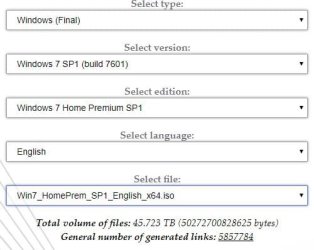
TechBench by WZT (v4.1.1)

Use Internet Explorer to open the link. Then choose the Windows 7 version, language, and correct bit version you want.

Then save it to your Download folder so you know where it is.

The size should be 3,243,070 KB when it's done.

Example:
 

Attachments

  • Capture.JPG
    Capture.JPG
    31 KB · Views: 12

My Computer My Computer

Computer type
PC/Desktop
Computer Manufacturer/Model Number
Skylake Special #666
OS
Windows 10 Pro x64
CPU
Intel Core i7 6700K
Motherboard
Asus Sabertooth Z170 Mark 1
Memory
GSkill TridentZ RGB 16GB 3600 16-16-16-36
Graphics Card(s)
EVGA GTX 980 Ti SC x2
Sound Card
Realtek High Definition
Monitor(s) Displays
AOC G2460PG
Screen Resolution
1920 x 1080 144Hz
Hard Drives
Samsung 860 Pro 256GB, Seagate Barracuda 4TB x2
PSU
EVGA 1000 P2, EVGA White Custom Braided Cables
Case
Corsair Vengeance C70 Gunmetal Black
Cooling
Corsair H100i v2, Corsair ML120 x2, Thermal Grizzly Kryonaut
Keyboard
Logitech G910 Orion Spectrum
Mouse
Logitech G700s
Internet Speed
Verizon Fios Quantum Gateway 75/75
Antivirus
Windows Defender, Malwarebytes Free 3.8.3
Browser
Chrome
Other Info
Corsair SP120 x4, LG Blu-ray Drive, Durabrand HT-395 100 Watt Dolby Digital Amp, Corsair H2100 Wireless 7.1 Headset
Back
Top