Sorry this is Vague: Need help with Laptop Please

TDKMate

New member
Member
VIP
Local time
9:59 PM
Messages
335
Sorry the title is vague but I don’t have much to go on. I have a relative coming over on Mother’s Day and he wants me to fix his Toshiba laptop (PSLY5U-00Q01T) because “it’s running slow.” That’s all l have to work with.

My biggest problem is I don’t ‘fix’ computers and I know nothing about laptops in particular. I Googled the specs for it and apparently the thing doesn’t even have a USB port (!?) but is suppose to have an optical drive.

I need help on helping him please. I imagine I should burn some kind of ‘rescue’ disk so I can run some diagnostics, but what do I put on it? I can think of MalwareBytes and CCleaner but I’m not sure I should install stuff on his laptop, it may complicate things. How about some sort of antivirus scanner? And I’m sure I’ll find tons of junk on it that’s useless and messing things up…

I appreciate any tips and tricks you have!
 

My Computer My Computer

At a glance

Win 7 Pro 64 SP1i7 6700K SkyLake32 GBnVidia GTX 970
Computer type
PC/Desktop
Computer Manufacturer/Model Number
home built
OS
Win 7 Pro 64 SP1
CPU
i7 6700K SkyLake
Motherboard
MSI Gaming M7
Memory
32 GB
Graphics Card(s)
nVidia GTX 970
Sound Card
onboard
Monitor(s) Displays
DELL U2711
Screen Resolution
2560x1440
Hard Drives
1 SSD OS, 2 WD Black Caviar data harddrives
PSU
EVGA Super Nova 850W G2 'Gold'
Case
Thermaltake Soprano Snow Edition
Cooling
Cooler Master Hyper 212 evo
Keyboard
Logitech K350
Mouse
Mad Kats RATT
Antivirus
Avast
Browser
Firefox
first job is run msconfig and see whats running at startup
 

My Computer My Computer

At a glance

win 8 32 bit
Computer type
PC/Desktop
OS
win 8 32 bit
WinDirStat can can help you visualize what's taking up space on the hard drive, and delete it. Download WinDirStat

Disk Cleanup is also a good start - run it as an administrator to clean up more stuff.

You could also uninstall any software they are no longer using that is taking up space.

CCleaner is a good idea.

Scanning the laptop with Malwarebytes will help you remove any malware and PUPs, so also a good idea.

Like @samuria said in his post - using the MSCONFIG utility will allow you to see what programs run at startup and disable unnecessary ones

If the laptop has no USB ports, you could use the optical drive to transfer files onto it. Any utilities that you install, can be easily uninstalled after you have finished.

Hope that helps
 

My Computer My Computer

At a glance

Windows 7 x64
OS
Windows 7 x64
Hi All. Some good tips! Thanks. Any good AV programs that could run from the CD/DVD?
 

My Computer My Computer

At a glance

Win 7 Pro 64 SP1i7 6700K SkyLake32 GBnVidia GTX 970
Computer type
PC/Desktop
Computer Manufacturer/Model Number
home built
OS
Win 7 Pro 64 SP1
CPU
i7 6700K SkyLake
Motherboard
MSI Gaming M7
Memory
32 GB
Graphics Card(s)
nVidia GTX 970
Sound Card
onboard
Monitor(s) Displays
DELL U2711
Screen Resolution
2560x1440
Hard Drives
1 SSD OS, 2 WD Black Caviar data harddrives
PSU
EVGA Super Nova 850W G2 'Gold'
Case
Thermaltake Soprano Snow Edition
Cooling
Cooler Master Hyper 212 evo
Keyboard
Logitech K350
Mouse
Mad Kats RATT
Antivirus
Avast
Browser
Firefox
Hi All. Some good tips! Thanks. Any good AV programs that could run from the CD/DVD?
Hi TDKMate,
mcAfee stinger runs DVD drive is good to try. It can detect and remove malware and viruses. I don't use it yet, but I think the tech are using this kind of program for their job. Make sure you download the latest version in a clean PC.
 

My Computer My Computer

At a glance

Windows 7 guest, Debian hostAMD FX-6100DDR3/16384 MBytes/2000.6MHzAMD Radeon HD 5500 Series
Computer type
PC/Desktop
Computer Manufacturer/Model Number
MSI
OS
Windows 7 guest, Debian host
CPU
AMD FX-6100
Motherboard
880GMS-E41(FX)(MS-7641)
Memory
DDR3/16384 MBytes/2000.6MHz
Graphics Card(s)
AMD Radeon HD 5500 Series
Sound Card
Built-in
Monitor(s) Displays
Samsung SyncMaster S23B300
Screen Resolution
1920x1080
Hard Drives
ST1000DM003-9YN162 ATA Device
WDC WD5000AAKX-00ERMAQ ATA Device
PSU
500W NAXN
Case
APOLLO
Cooling
XY
Keyboard
Logitech
Mouse
Samsung
Internet Speed
.79Mbps/1.71Mbps
Antivirus
Microsoft Security Essentials
Browser
Google Chrome/FireFox/Internet Explorer
Other Info
3in1 creative speaker
Hi TDKMate,
mcAfee stinger runs DVD drive is good to try. It can detect and remove malware and viruses. I don't use it yet, but I think the tech are using this kind of program for their job. Make sure you download the latest version in a clean PC.

"I don't use it yet", "I think the tech are using this kind of program" then I would suggest that you do not recommend it, not to mention it's a McAfee product.

welp now I feel bad lol sorry, I just have a strong dislike for McAfee in general
 
Last edited:

My Computer My Computer

At a glance

Windows 7 x64
OS
Windows 7 x64
"I don't use it yet", "I think the tech are using this kind of program" then I would suggest that you do not recommend it, not to mention it's a McAfee product.

That's completely fine. It just a word I used had nothing more to say, so don't take it literal. Clearly, the bolded words implies a suggestion not a recommendation. But, thanks for clarifying, my English is suck.

Personally, I used comodo rescue disk but the advantage of stinger is a standalone free tools ready to scan and remove the threats no need to update the virus definition each time you run it. MajorGeeks has a video and recommend it.:cool:
 

My Computer My Computer

At a glance

Windows 7 guest, Debian hostAMD FX-6100DDR3/16384 MBytes/2000.6MHzAMD Radeon HD 5500 Series
Computer type
PC/Desktop
Computer Manufacturer/Model Number
MSI
OS
Windows 7 guest, Debian host
CPU
AMD FX-6100
Motherboard
880GMS-E41(FX)(MS-7641)
Memory
DDR3/16384 MBytes/2000.6MHz
Graphics Card(s)
AMD Radeon HD 5500 Series
Sound Card
Built-in
Monitor(s) Displays
Samsung SyncMaster S23B300
Screen Resolution
1920x1080
Hard Drives
ST1000DM003-9YN162 ATA Device
WDC WD5000AAKX-00ERMAQ ATA Device
PSU
500W NAXN
Case
APOLLO
Cooling
XY
Keyboard
Logitech
Mouse
Samsung
Internet Speed
.79Mbps/1.71Mbps
Antivirus
Microsoft Security Essentials
Browser
Google Chrome/FireFox/Internet Explorer
Other Info
3in1 creative speaker
Hi All. My out of town relative finally brought over the laptop. I spent a few hours on it on Mother's day, and he had to leave. He left the unit with me, though. I had time last night to work on it some more.

It turns out he got it from friend who got rid of it because it ran so slow. It's about 10 years old and hasn't been updated in years. It took so long on first boot that I thought it was broken for good. I ran msconfig but didn't really find much. But it did have a ton of what I figured was conflicting stuff. I installed MalwareBytes, CCleaner and surprisingly they came up clean as did MS MRT.

So I started uninstalling all the junk he had on there, started with the 3 year old AVG, figuring it was trying to phone home. And down the long list of software that potentially was doing the same. I used Revo Free to do so and totally wiped it, running CCleaner after each uninstall.

Oh, it was painfully slow process... I kept Task Manager open on the Processes tab and noticed that one, of many, svchost would use 88-98% CPU cycles. Not sure if I should, I ended that one task and things, obviously got faster. Being an old 2 core AMD CPU, it's just not fast anyway.

I lost count on programs I uninstalled, but it had to be at least 15-20 (multiple video editors, multiple email clients [he uses gmail], Skype, card readers, and more).

So now it'll boot in less than 3 minutes, but shortly after, I still have the svchost problem pop back up. At least that's a little better as before all the uninstalls, the svchost problem started right when the computer did.

So I'm thinking the next step will be to install Avast AV then hook it up to the internet and let it do all the outstanding updates. With the svchost problem, it might take a day or two, though, as I don't have the time to watch and keep canceling the task...

Any other ideas or suggestions?
.
 

My Computer My Computer

At a glance

Win 7 Pro 64 SP1i7 6700K SkyLake32 GBnVidia GTX 970
Computer type
PC/Desktop
Computer Manufacturer/Model Number
home built
OS
Win 7 Pro 64 SP1
CPU
i7 6700K SkyLake
Motherboard
MSI Gaming M7
Memory
32 GB
Graphics Card(s)
nVidia GTX 970
Sound Card
onboard
Monitor(s) Displays
DELL U2711
Screen Resolution
2560x1440
Hard Drives
1 SSD OS, 2 WD Black Caviar data harddrives
PSU
EVGA Super Nova 850W G2 'Gold'
Case
Thermaltake Soprano Snow Edition
Cooling
Cooler Master Hyper 212 evo
Keyboard
Logitech K350
Mouse
Mad Kats RATT
Antivirus
Avast
Browser
Firefox
Last edited:

My Computer My Computer

At a glance

Win 10 x64, Linux Lite, Win 7 x64, BlackArch,...
Computer type
PC/Desktop
Computer Manufacturer/Model Number
HP Desktop & Compaq Laptop
OS
Win 10 x64, Linux Lite, Win 7 x64, BlackArch, & Kali
Hard Drives
Samsung 850 Pro 256Gb,
Hitachi HDD 1Tb,
Crucial MX SSD 250Gb
Segate 3Tb USB 3.0 Ext. Backup HDD
Internet Speed
150Mbps dn, 20Mbps up
Antivirus
Avast Free, Malwarebytes Anti-Exploit & Anti-Ransomware
Browser
Firefox, Chrome, Opera, & VPN
Defrag his hard drive - now that you have deleted a lot of junk from the hard drive, it is a good time to defrag the drive. If it is badly fragmented, it will run slow.
  • Restart the computer into Safe Mode - defrag runs a lot faster in Safe Mode, because not much else is running in the background.
  • Open File Explorer. Right-click on C: and choose Properties.
  • Click on the Tools tab.
  • There should be an option for Defrag or for Optimize. That will get you to Defrag.
  • Run Defrag a few times, till the drive is as defragmented as it will get.
  • Restart into normal mode.
Another thing you can check: How much memory does the computer have? Typically, the more the better. However, if he has 32-bit Windows, the maximum useful amount of memory is 4 GB. (Actually, a bit less than that.) If he has 32-bit Windows, and less than 4 GB, suggest to him that he increase it to 4 GB. If he has 64-bit Windows, increase the memory to 8 GB, if he doesn't already have that much. Lots of memory can make a noticeable difference, especially if he has 64-bit Windows.

To check the amount of memory, and whether or not his Windows is 32-bit or 64-bit, open File Explorer, and right-click on Computer. Choose Properties. This will show you a screen which will answer both of these questions.
 

My Computer My Computer

At a glance

Linux Mint 18.2 xfce 64-bit (VMWare host) / W...Haswell4 GB
Computer type
PC/Desktop
Computer Manufacturer/Model Number
Dell
OS
Linux Mint 18.2 xfce 64-bit (VMWare host) / Windows 8.1 Pro 32-bit (VMWare guest)
CPU
Haswell
Memory
4 GB
Monitor(s) Displays
Acer 23"
Screen Resolution
1920 x 1080
Hard Drives
Two hard drives, 1TB each: One for Linux, one for my data.
Keyboard
IBM Model M
Antivirus
Sophos (Linux), Trend Micro (Windows)
Browser
Firefox, Opera
Other Info
I use Samba to share my data drive with the other computers at my house and with my guest session in VMWare Workstation Player.
1.What is the make and model of the laptop?

2. What edition and bit version of windows is it running?

3. What version of windows did it come with originally?

4. Does it have a COA key somewhere on the laptop. If so, what version and edition of windows is the COA key for?

5. Is there a recovery partition on the hard drive? What does it contain?

6. Please post a screenshot of disk management.
 

My Computers My Computers

  • At a glance

    7 X64i5 84002x8gb 3200mhz
    Computer type
    PC/Desktop
    OS
    7 X64
    CPU
    i5 8400
    Motherboard
    gigabyte b365m ds3h
    Memory
    2x8gb 3200mhz
    Hard Drives
    various
    PSU
    pure power 11 400w cm
    Case
    Coolermaster
    Cooling
    cryorig m9i
  • At a glance

    7x64g54008gb ddr4 2400
    Computer type
    PC/Desktop
    OS
    7x64
    CPU
    g5400
    Motherboard
    ga b365m ds3h
    Memory
    8gb ddr4 2400
    PSU
    xfx pro 450w
[FONT=&quot]
Defrag his hard drive - now that you have deleted a lot of junk from the hard drive, it is a good time to defrag the drive. If it is badly fragmented, it will run slow.
[/FONT]
[FONT=&quot] snip[/FONT][FONT=&quot]

[/FONT][FONT=&quot]Another thing you can check: How much memory does the computer have? Typically, the more the better. However, if he has 32-bit Windows, the maximum useful amount of memory is 4 GB. (Actually, a bit less than that.) If he has 32-bit Windows, and less than 4 GB, suggest to him that he increase it to 4 GB. If he has 64-bit Windows, increase the memory to 8 GB, if he doesn't already have that much. Lots of memory can make a noticeable difference, especially if he has 64-bit Windows.

To check the amount of memory, and whether or not his Windows is 32-bit or 64-bit, open File Explorer, and right-click on Computer. Choose Properties. This will show you a screen which will answer both of these questions.[/FONT]
[FONT=&quot]
[/FONT][FONT=&quot]Hi mrjimphelps. I ran defrag as suggested. I was surprised that defrag said it was only 4% fragmented. I was also surprised in that it did six passes and took only about 1 hour.[/FONT]
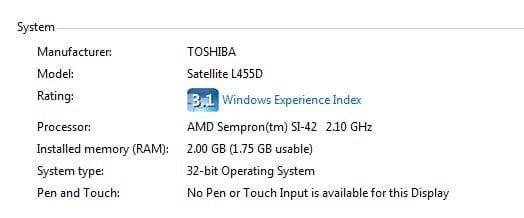
[FONT=&quot]Yes, it’s only 32 bit and only 2GB ram. Since I dabble in photo editing, yeah, the more memory the better.[/FONT]
[FONT=&quot].[/FONT]
 

Attachments

  • mark sys spec.JPG
    mark sys spec.JPG
    19.6 KB · Views: 27

My Computer My Computer

At a glance

Win 7 Pro 64 SP1i7 6700K SkyLake32 GBnVidia GTX 970
Computer type
PC/Desktop
Computer Manufacturer/Model Number
home built
OS
Win 7 Pro 64 SP1
CPU
i7 6700K SkyLake
Motherboard
MSI Gaming M7
Memory
32 GB
Graphics Card(s)
nVidia GTX 970
Sound Card
onboard
Monitor(s) Displays
DELL U2711
Screen Resolution
2560x1440
Hard Drives
1 SSD OS, 2 WD Black Caviar data harddrives
PSU
EVGA Super Nova 850W G2 'Gold'
Case
Thermaltake Soprano Snow Edition
Cooling
Cooler Master Hyper 212 evo
Keyboard
Logitech K350
Mouse
Mad Kats RATT
Antivirus
Avast
Browser
Firefox
1.What is the make and model of the laptop?

2. What edition and bit version of windows is it running?

3. What version of windows did it come with originally?

4. Does it have a COA key somewhere on the laptop. If so, what version and edition of windows is the COA key for?

5. Is there a recovery partition on the hard drive? What does it contain?

6. Please post a screenshot of disk management.
#1 & 2: please see the above attachment.

#3: I assume what is has on it now.

#4 & 5: I’ll have to check. Windows does say it’s active so I’m assuming it’s legit.

#6: I’ll take a screenshot the next time I fire it up (it’s put away at the moment ).


Edit: ops, sorry, I just notice the Windows version isn't on the above attachment: Win 7 Home 32 bit.
 

My Computer My Computer

At a glance

Win 7 Pro 64 SP1i7 6700K SkyLake32 GBnVidia GTX 970
Computer type
PC/Desktop
Computer Manufacturer/Model Number
home built
OS
Win 7 Pro 64 SP1
CPU
i7 6700K SkyLake
Motherboard
MSI Gaming M7
Memory
32 GB
Graphics Card(s)
nVidia GTX 970
Sound Card
onboard
Monitor(s) Displays
DELL U2711
Screen Resolution
2560x1440
Hard Drives
1 SSD OS, 2 WD Black Caviar data harddrives
PSU
EVGA Super Nova 850W G2 'Gold'
Case
Thermaltake Soprano Snow Edition
Cooling
Cooler Master Hyper 212 evo
Keyboard
Logitech K350
Mouse
Mad Kats RATT
Antivirus
Avast
Browser
Firefox
dup post: delete me...
 

My Computer My Computer

At a glance

Win 7 Pro 64 SP1i7 6700K SkyLake32 GBnVidia GTX 970
Computer type
PC/Desktop
Computer Manufacturer/Model Number
home built
OS
Win 7 Pro 64 SP1
CPU
i7 6700K SkyLake
Motherboard
MSI Gaming M7
Memory
32 GB
Graphics Card(s)
nVidia GTX 970
Sound Card
onboard
Monitor(s) Displays
DELL U2711
Screen Resolution
2560x1440
Hard Drives
1 SSD OS, 2 WD Black Caviar data harddrives
PSU
EVGA Super Nova 850W G2 'Gold'
Case
Thermaltake Soprano Snow Edition
Cooling
Cooler Master Hyper 212 evo
Keyboard
Logitech K350
Mouse
Mad Kats RATT
Antivirus
Avast
Browser
Firefox
If you have a Hard Drive, not SSD, Windows defrags by default!
 

My Computer My Computer

At a glance

Win 10 x64, Linux Lite, Win 7 x64, BlackArch,...
Computer type
PC/Desktop
Computer Manufacturer/Model Number
HP Desktop & Compaq Laptop
OS
Win 10 x64, Linux Lite, Win 7 x64, BlackArch, & Kali
Hard Drives
Samsung 850 Pro 256Gb,
Hitachi HDD 1Tb,
Crucial MX SSD 250Gb
Segate 3Tb USB 3.0 Ext. Backup HDD
Internet Speed
150Mbps dn, 20Mbps up
Antivirus
Avast Free, Malwarebytes Anti-Exploit & Anti-Ransomware
Browser
Firefox, Chrome, Opera, & VPN
You definitely need to go to 4GB of RAM. 2GB is simply not enough for Windows 7 to run well. It is very easy to add memory, and it won't take you long to do this, so this is a good thing to try first.

Try out the computer with the additional memory. If you still aren't happy with the performance, you could replace the hard drive with an SSD (solid state drive). To do this, you will need to transfer everything from the hard drive to the SSD; you'll then need to make sure that TRIM is active on the SSD.

In my experience, you get more of a performance boost by adding memory than you do by installing an SSD; also, it is a lot easier to add memory than it is to install an SSD. So that's why I recommend that you add the memory and then test the machine to see if it is good enough. I believe you will be happy with the performance when all you have done is add the memory.
 

My Computer My Computer

At a glance

Linux Mint 18.2 xfce 64-bit (VMWare host) / W...Haswell4 GB
Computer type
PC/Desktop
Computer Manufacturer/Model Number
Dell
OS
Linux Mint 18.2 xfce 64-bit (VMWare host) / Windows 8.1 Pro 32-bit (VMWare guest)
CPU
Haswell
Memory
4 GB
Monitor(s) Displays
Acer 23"
Screen Resolution
1920 x 1080
Hard Drives
Two hard drives, 1TB each: One for Linux, one for my data.
Keyboard
IBM Model M
Antivirus
Sophos (Linux), Trend Micro (Windows)
Browser
Firefox, Opera
Other Info
I use Samba to share my data drive with the other computers at my house and with my guest session in VMWare Workstation Player.

My Computer My Computer

At a glance

Linux Mint 18.2 xfce 64-bit (VMWare host) / W...Haswell4 GB
Computer type
PC/Desktop
Computer Manufacturer/Model Number
Dell
OS
Linux Mint 18.2 xfce 64-bit (VMWare host) / Windows 8.1 Pro 32-bit (VMWare guest)
CPU
Haswell
Memory
4 GB
Monitor(s) Displays
Acer 23"
Screen Resolution
1920 x 1080
Hard Drives
Two hard drives, 1TB each: One for Linux, one for my data.
Keyboard
IBM Model M
Antivirus
Sophos (Linux), Trend Micro (Windows)
Browser
Firefox, Opera
Other Info
I use Samba to share my data drive with the other computers at my house and with my guest session in VMWare Workstation Player.
You have got some very good advice.

When it comes to adding ram, make sure you get a match set of ram (2 x 2 gigs) or 1 4 gig memory module. Check the manufactures specs for ram.


Because your laptop came with a very slow hard drive (5400 rpm), a ssd will do marvelous things to speed things up.
Before transferring things to the ssd, I recommend making sure the system is clean from all junk/infections.
A little free programs I use is Malwarebytes and Eset on line scans.


Download Tools and Utilities ESET

Free Antivirus Replacement & Anti-Malware Tool | Malwarebytes


Let us know how things work.


Note:
Get permission from the owner to do such things.


Jack
 

My Computer My Computer

At a glance

Windows 10 Pro. 64/ version 1709 Windows 7 Pr...Intel i7-6800K @ 4.3Corsair Platinum 16 gig @2400EVGA GTX 1070 OC
Computer type
PC/Desktop
Computer Manufacturer/Model Number
Home made Desktop
OS
Windows 10 Pro. 64/ version 1709 Windows 7 Pro/64
CPU
Intel i7-6800K @ 4.3
Motherboard
ASUS X-99 Deluxe II
Memory
Corsair Platinum 16 gig @2400
Graphics Card(s)
EVGA GTX 1070 OC
Monitor(s) Displays
Asus 27" LED LCD/VE278Q
Screen Resolution
1920-1080 or 1280-720 HDMI
Hard Drives
INTEL SSD 730-240 Gb Sata 3.0/
PSU
EVGA Platium 1200W
Case
Phanteks Luxe Tempered Glass 8 fans/ one radiator
Cooling
XSPC/ Water Cooled CPU
Keyboard
Das 4 Professional
Mouse
Logitech M705/MX Anywhere 2-S
Internet Speed
100 mbits
Antivirus
Microsoft Security Essentials/ Malwarebytes Premium 3.0/ SAS
Browser
I.E. 11 default/Firefox/ ISP Time Warner Cable/Spectrum
Other Info
LG BluRay Burner/
Sound system-KLipsch-THX/
Icy Dock ssd Hot Swap bays.
I would backup all data on an external disk and launch a Factory Recover. It will format the C: drive and install Windows from an image on the recovery partition.

If svchost is running at high rates, it's probably Win update trying to find updates or even has a problem. Try to turn it to never check on WU page and to manual under Services.
 

My Computers My Computers

  • At a glance

    Windows 7 HP 64i5 6600K - 800MHz to 4200MHz4+4G GSkill DDR4 3000IG - Intel 530
    Computer type
    PC/Desktop
    Computer Manufacturer/Model Number
    custom build
    OS
    Windows 7 HP 64
    CPU
    i5 6600K - 800MHz to 4200MHz
    Motherboard
    GA-Z170-HD3P
    Memory
    4+4G GSkill DDR4 3000
    Graphics Card(s)
    IG - Intel 530
    Monitor(s) Displays
    Samsung 226BW
    Screen Resolution
    1680x1050
    Hard Drives
    (1) -1 SM951 – 128GB M.2 AHCI PCIe SSD drive for Windows 7 and Lubuntu
    (2) -1 WD SATA 3 - 1T for Data
    (3) -1 WD SATA 3 - 1T for backup
    PSU
    Thermaltake 450W TR2 gold
    Keyboard
    Old and good Chicony mechanical keyboard
    Mouse
    Logitech mX performance - 9 buttons (had to disable some)
    Internet Speed
    500Mb/s
    Browser
    Firefox 64
    Other Info
    TinyWall firewall
  • At a glance

    Windows 7 Proi7-4500U 800MHz to 3.0GHz(4+4)G DDR3 1600IG intel 4400 + NVIDIA GeForce GT 745M
    Computer type
    Laptop
    System Manufacturer/Model Number
    Asus Q550LF
    OS
    Windows 7 Pro
    CPU
    i7-4500U 800MHz to 3.0GHz
    Motherboard
    Asus Q550LF
    Memory
    (4+4)G DDR3 1600
    Graphics Card(s)
    IG intel 4400 + NVIDIA GeForce GT 745M
    Sound Card
    Realtek
    Monitor(s) Displays
    LG Display LP156WF4-SPH1
    Screen Resolution
    1920 x 1080
    Hard Drives
    BX500 120G SSD for Windows and programs +
    1T HDD for data
    Internet Speed
    500 Mb/s
    Browser
    Firefox
    Other Info
    TinyWall firewall
In regards to ram, Crucial has a tool, Compatible Memory - RAM & SSD Advisor Tool | Crucial.com, which will scan your system and provide recommendations. It doesn't have to be the same manufacturer, just identical type. I have two different manufacture's ram in one of my laptops, exact same type, works flawlessly!

My recommended AV’s, malware scanner, adware scanner, pup scanners
Avast Free this is what I use, Anti-virus.
BitDefender Free Edition don’t use but highly recommend
Malwarebytes Premium (it’s a free 30-day trial) If you utilize the free trial, it includes MB anti-exploit & MB anti-ransomware & will remove the standalone versions that you can obtain and install through the below links.
Malwarebytes Free this is what I use, one of the best all-around scanners, period.
BitDefender free, don’t use, but highly recommend, there is also a paid version.
SuperAntiSpyware free, this is what I use, there is also a paid version that runs real-time.
ADWCleaner Malwarebytes recently purchased from Tools.lib, available on both websites
HitmanProx32 scan is free, and one time trial virus removal, you can use Revo Uninstaller
to remove it and trial cookies if it finds malware to remove, then you can use the trial again.
HitmanProx64 scan is free, and one time trial virus removal, you can use Revo Uninstaller to remove it and trial cookies if it finds malware to remove, then you can use the trial again.
Malwarebytes Anti-Exploit this is what I use, real-time exploit protection, drive-bys, ssl injection, etc.
Malwarebytes Anti-Ransomware this is what I use, real-time ransomware protection.
TDSSkiller this is what I use, rootkit scanner.
VirusTotal online multi-AV scanner. If you download the app, it adds entry to right-click context menu. You can right-click on the file you wish to scan, and a couple clicks sends the file to them for analysis.

Nic
 

My Computer My Computer

At a glance

Win 10 x64, Linux Lite, Win 7 x64, BlackArch,...
Computer type
PC/Desktop
Computer Manufacturer/Model Number
HP Desktop & Compaq Laptop
OS
Win 10 x64, Linux Lite, Win 7 x64, BlackArch, & Kali
Hard Drives
Samsung 850 Pro 256Gb,
Hitachi HDD 1Tb,
Crucial MX SSD 250Gb
Segate 3Tb USB 3.0 Ext. Backup HDD
Internet Speed
150Mbps dn, 20Mbps up
Antivirus
Avast Free, Malwarebytes Anti-Exploit & Anti-Ransomware
Browser
Firefox, Chrome, Opera, & VPN
Back
Top