
Windows 7 will Shutdown but not auto Restart

subyroo

New member
Power User
VIP
Local time
3:45 AM
Messages
107
Location
Sunshine Coast - Australia
My wife's PC will Shutdown but not auto Restart when you choose Restart, you either have to turn it off completely via the power button for 4 secs. or by using the Restart button on the case.

I have searched the net but haven't found a solution to date, can anybody assist me please.

Regards,
 

My Computer My Computer

At a glance

Windows 7 Ultimate 64 bit SP1DualCore Intel Pentium D 820, 2800 MHz (14 x ...Kingston DDR3 (PC3-10700H) 6.0GBAMD Radeon HD 6450
Computer type
PC/Desktop
Computer Manufacturer/Model Number
Homebuild
OS
Windows 7 Ultimate 64 bit SP1
CPU
DualCore Intel Pentium D 820, 2800 MHz (14 x 200)
Motherboard
Gigabyte EX58-UD3R
Memory
Kingston DDR3 (PC3-10700H) 6.0GB
Graphics Card(s)
AMD Radeon HD 6450
Sound Card
Realtek ALC882/D/M
Monitor(s) Displays
Samsung SyncMaster 2233SW
Screen Resolution
1920 x 1080
Hard Drives
Drive #1 - WDC WD2500JB-22REA0 (232 GB)
Drive #2 - WDC WD6400AAKS-65A7B0 (596 GB)
PSU
EVGA Supernova 750w G2 Gold
Cooling
5 x 80mm Generic Fans
Keyboard
Microsoft Comfort Curve 2000
Mouse
SteelSeries IKARI 62001-1 Laser or Microsoft Laser 6000
Internet Speed
1500/256
Antivirus
NOD32 v10.1.235.0
Browser
FireFox 59.0.2 X64bit
Other Info
Telstra Technicolor TG799vac Modem
LG HL-DT-ST DVDRAM GH20NS15 ATA Device
16X52X32X52 COMBO SCSI CDRom Device
Logitech Wave Keyboard
Microsoft 6000 Laser Mouse
You've not done your "DO's" as to what PC, what make and model, what OS, etc. ???

How do you normally shut down that PC?

For years I've had just ONE way to shut down any of my 20 PC's and the PC's of my 100+ customers.

I put a shortcut to the Windows Shutdown command, on the desktop, for ease of use.

For Windows 7, for instance, since you've posted in the Windows 7 forum, I use the shortcut with the syntax, %windir%\System32\shutdown.exe /s /t 1

If you'd like to use this shortcut on your own PC, just copy and paste the above blue line into a new desktop shortcut.

Please fill in the blanks, as I've outlined above, so we can better help you.
Cheers Mate!
:cool:
 

My Computer My Computer

At a glance

Win 7 Pro, SP1, x86, Win-11/Pro/64AMD8GB CrucialVarious
Computer type
PC/Desktop
Computer Manufacturer/Model Number
Various
OS
Win 7 Pro, SP1, x86, Win-11/Pro/64
CPU
AMD
Motherboard
Various
Memory
8GB Crucial
Graphics Card(s)
Various
Sound Card
OnBoard
Monitor(s) Displays
Acer 21.5"
Hard Drives
Crucial SSD, 500 GB
PSU
OEM
Case
SFF Slim Line Case
Cooling
OEM
Keyboard
eMachines
Mouse
Logitech Wireless
Internet Speed
varies
Antivirus
Windows Defender/Super Anti-Spyware
Browser
Firefox
To clarify, when you choose "Shut down" from the start menu, the computer shuts down just fine?

However, when you choose "Restart", what happens?

When "restarting" the computer is supposed to shut down, and start right up again and boot into Windows. What does yours do instead?

There are no physical "restart" buttons on your computer case. There is the power button, which when held down for a few seconds will abruptly shut down the machine (not good, only to be used when the computer freezes completely) and sometimes a reset button, that will reset the machine and make it re-boot.
 

My Computer My Computer

At a glance

Windows 7 x64
OS
Windows 7 x64
You've not done your "DO's" as to what PC, what make and model, what OS, etc. ???

How do you normally shut down that PC?

For years I've had just ONE way to shut down any of my 20 PC's and the PC's of my 100+ customers.

I put a shortcut to the Windows Shutdown command, on the desktop, for ease of use.

For Windows 7, for instance, since you've posted in the Windows 7 forum, I use the shortcut with the syntax, %windir%\System32\shutdown.exe /s /t 1

If you'd like to use this shortcut on your own PC, just copy and paste the above blue line into a new desktop shortcut.

Please fill in the blanks, as I've outlined above, so we can better help you.
Cheers Mate!
:cool:

I use the same Shutdown shortcut except that I use: /s /t 00 instead and I use -r -t 00 for my Restart shortcut.
Now it doesn't matter whether I am Restarting (reboot) using this shortcut or following a MS window after an update etc., the PC will shutdown but will not Reboot back into Win 7.

Motherboard - P35-DS3L
CPU - Core 2 Duo E6550 @2.35GHz
Memory - 4GB DDR2 (PC2-5300)
OS - Windows 7 Ultimate x64 Service Pack 1
 

My Computer My Computer

At a glance

Windows 7 Ultimate 64 bit SP1DualCore Intel Pentium D 820, 2800 MHz (14 x ...Kingston DDR3 (PC3-10700H) 6.0GBAMD Radeon HD 6450
Computer type
PC/Desktop
Computer Manufacturer/Model Number
Homebuild
OS
Windows 7 Ultimate 64 bit SP1
CPU
DualCore Intel Pentium D 820, 2800 MHz (14 x 200)
Motherboard
Gigabyte EX58-UD3R
Memory
Kingston DDR3 (PC3-10700H) 6.0GB
Graphics Card(s)
AMD Radeon HD 6450
Sound Card
Realtek ALC882/D/M
Monitor(s) Displays
Samsung SyncMaster 2233SW
Screen Resolution
1920 x 1080
Hard Drives
Drive #1 - WDC WD2500JB-22REA0 (232 GB)
Drive #2 - WDC WD6400AAKS-65A7B0 (596 GB)
PSU
EVGA Supernova 750w G2 Gold
Cooling
5 x 80mm Generic Fans
Keyboard
Microsoft Comfort Curve 2000
Mouse
SteelSeries IKARI 62001-1 Laser or Microsoft Laser 6000
Internet Speed
1500/256
Antivirus
NOD32 v10.1.235.0
Browser
FireFox 59.0.2 X64bit
Other Info
Telstra Technicolor TG799vac Modem
LG HL-DT-ST DVDRAM GH20NS15 ATA Device
16X52X32X52 COMBO SCSI CDRom Device
Logitech Wave Keyboard
Microsoft 6000 Laser Mouse
To clarify, when you choose "Shut down" from the start menu, the computer shuts down just fine?

However, when you choose "Restart", what happens?

When "restarting" the computer is supposed to shut down, and start right up again and boot into Windows. What does yours do instead?

There are no physical "restart" buttons on your computer case. There is the power button, which when held down for a few seconds will abruptly shut down the machine (not good, only to be used when the computer freezes completely) and sometimes a reset button, that will reset the machine and make it re-boot.

When I "restart" the PC it shutdowns and remains in that mode, it does not start right back again, I have to press the Reset button on the front of the case.

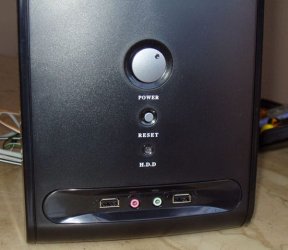
There are 2 buttons on the front of this case - 1 Lge one - Power and 1 Sml one - Reset (Reboot), similar to the picture below.
 

Attachments

  • computer-case-outside-front-01.jpg
    computer-case-outside-front-01.jpg
    61.3 KB · Views: 32

My Computer My Computer

At a glance

Windows 7 Ultimate 64 bit SP1DualCore Intel Pentium D 820, 2800 MHz (14 x ...Kingston DDR3 (PC3-10700H) 6.0GBAMD Radeon HD 6450
Computer type
PC/Desktop
Computer Manufacturer/Model Number
Homebuild
OS
Windows 7 Ultimate 64 bit SP1
CPU
DualCore Intel Pentium D 820, 2800 MHz (14 x 200)
Motherboard
Gigabyte EX58-UD3R
Memory
Kingston DDR3 (PC3-10700H) 6.0GB
Graphics Card(s)
AMD Radeon HD 6450
Sound Card
Realtek ALC882/D/M
Monitor(s) Displays
Samsung SyncMaster 2233SW
Screen Resolution
1920 x 1080
Hard Drives
Drive #1 - WDC WD2500JB-22REA0 (232 GB)
Drive #2 - WDC WD6400AAKS-65A7B0 (596 GB)
PSU
EVGA Supernova 750w G2 Gold
Cooling
5 x 80mm Generic Fans
Keyboard
Microsoft Comfort Curve 2000
Mouse
SteelSeries IKARI 62001-1 Laser or Microsoft Laser 6000
Internet Speed
1500/256
Antivirus
NOD32 v10.1.235.0
Browser
FireFox 59.0.2 X64bit
Other Info
Telstra Technicolor TG799vac Modem
LG HL-DT-ST DVDRAM GH20NS15 ATA Device
16X52X32X52 COMBO SCSI CDRom Device
Logitech Wave Keyboard
Microsoft 6000 Laser Mouse
Thanks for clarifying. Very interesting. Has it always done this, or did this start happening after some recent windows updates or other changes?
 

My Computer My Computer

At a glance

Windows 7 x64
OS
Windows 7 x64
Since I'm new here and people have been very helpful on the thread I posted, I'm going to cautiously dip my toe in here.
My immediate thoughts when I read this were ATX Power supply problem. I was building PC's before ATX was even a thing, and I seem to remember encountering a similar problem on a build when ATX first came out.

Waaaay back in the the days of W95 (and obvioulsy prior) you had to use the power button to turn off after selecting shut down. Anyone else remember the "It is now safe to turn off your computer" screen?! When ATX came out it did away with this and as I remember it that was its main distinction from previous PSU's. Do you have another PSU you can swap out with?

Apologies to the professionals here if I'm way off base, don't want to give anyone bad advice but this hit me as a potential cause of the problem.
 

My Computer My Computer

At a glance

10 Home 64 BitCore i7 3610QM @ 2.3GHz16GB
Computer type
Laptop
Computer Manufacturer/Model Number
Toshiba
OS
10 Home 64 Bit
CPU
Core i7 3610QM @ 2.3GHz
Memory
16GB
Hard Drives
Crucial SSD (x2)
Thanks for clarifying. Very interesting. Has it always done this, or did this start happening after some recent windows updates or other changes?

No it is not a recent thing, it has been like this for a couple of months now. It doesn't bother my wife much but it annoys the hell out of me though.

I ran a startup repair from the Win 7 Disk yesterday and that did fix something in the startup area, but
not the problem we are discussing.
I have Googled myself out trying to find an answer to the problem, I cannot even remember if it happened after an update, it has been that long.
 
Last edited:

My Computer My Computer

At a glance

Windows 7 Ultimate 64 bit SP1DualCore Intel Pentium D 820, 2800 MHz (14 x ...Kingston DDR3 (PC3-10700H) 6.0GBAMD Radeon HD 6450
Computer type
PC/Desktop
Computer Manufacturer/Model Number
Homebuild
OS
Windows 7 Ultimate 64 bit SP1
CPU
DualCore Intel Pentium D 820, 2800 MHz (14 x 200)
Motherboard
Gigabyte EX58-UD3R
Memory
Kingston DDR3 (PC3-10700H) 6.0GB
Graphics Card(s)
AMD Radeon HD 6450
Sound Card
Realtek ALC882/D/M
Monitor(s) Displays
Samsung SyncMaster 2233SW
Screen Resolution
1920 x 1080
Hard Drives
Drive #1 - WDC WD2500JB-22REA0 (232 GB)
Drive #2 - WDC WD6400AAKS-65A7B0 (596 GB)
PSU
EVGA Supernova 750w G2 Gold
Cooling
5 x 80mm Generic Fans
Keyboard
Microsoft Comfort Curve 2000
Mouse
SteelSeries IKARI 62001-1 Laser or Microsoft Laser 6000
Internet Speed
1500/256
Antivirus
NOD32 v10.1.235.0
Browser
FireFox 59.0.2 X64bit
Other Info
Telstra Technicolor TG799vac Modem
LG HL-DT-ST DVDRAM GH20NS15 ATA Device
16X52X32X52 COMBO SCSI CDRom Device
Logitech Wave Keyboard
Microsoft 6000 Laser Mouse
Since I'm new here and people have been very helpful on the thread I posted, I'm going to cautiously dip my toe in here.
My immediate thoughts when I read this were ATX Power supply problem. I was building PC's before ATX was even a thing, and I seem to remember encountering a similar problem on a build when ATX first came out.

Waaaay back in the the days of W95 (and obvioulsy prior) you had to use the power button to turn off after selecting shut down. Anyone else remember the "It is now safe to turn off your computer" screen?! When ATX came out it did away with this and as I remember it that was its main distinction from previous PSU's. Do you have another PSU you can swap out with?

Apologies to the professionals here if I'm way off base, don't want to give anyone bad advice but this hit me as a potential cause of the problem.

SD60659, Thanks for your input, anything is possible when it comes to PC's. :D
I'll take the side off and have a look at the PSU brand tomorrow sometime.
 

My Computer My Computer

At a glance

Windows 7 Ultimate 64 bit SP1DualCore Intel Pentium D 820, 2800 MHz (14 x ...Kingston DDR3 (PC3-10700H) 6.0GBAMD Radeon HD 6450
Computer type
PC/Desktop
Computer Manufacturer/Model Number
Homebuild
OS
Windows 7 Ultimate 64 bit SP1
CPU
DualCore Intel Pentium D 820, 2800 MHz (14 x 200)
Motherboard
Gigabyte EX58-UD3R
Memory
Kingston DDR3 (PC3-10700H) 6.0GB
Graphics Card(s)
AMD Radeon HD 6450
Sound Card
Realtek ALC882/D/M
Monitor(s) Displays
Samsung SyncMaster 2233SW
Screen Resolution
1920 x 1080
Hard Drives
Drive #1 - WDC WD2500JB-22REA0 (232 GB)
Drive #2 - WDC WD6400AAKS-65A7B0 (596 GB)
PSU
EVGA Supernova 750w G2 Gold
Cooling
5 x 80mm Generic Fans
Keyboard
Microsoft Comfort Curve 2000
Mouse
SteelSeries IKARI 62001-1 Laser or Microsoft Laser 6000
Internet Speed
1500/256
Antivirus
NOD32 v10.1.235.0
Browser
FireFox 59.0.2 X64bit
Other Info
Telstra Technicolor TG799vac Modem
LG HL-DT-ST DVDRAM GH20NS15 ATA Device
16X52X32X52 COMBO SCSI CDRom Device
Logitech Wave Keyboard
Microsoft 6000 Laser Mouse
Just for whatever it's worth to whomsoever gives a hoot....

I just got through fixing a neighbors eMachine that would not boot up.
I had just cleaned it out and installed a new CMOS battery less than two weeks ago, and the PSU checked out AOK with my digital PSU tester, so that didn't leave a lot to look at.

It had/has two 2GB DDR2 ram sticks in it, so I just pulled them both out and hit the ON switch. The motherboard beeped loudly, to denote a RAM failure.
So I took both ram sticks into my little shop and thoroughly cleaned the gold edge connectors.
I first polished them up nice and shiny with an eraser and then cleaned them (the edge connectors) off with a rag soaked in lacquer thinner.

When I reinstalled the ram and hit the power button, the 9 yr old PC came right UP!
I then ran several scans and tests and it worked perfectly. So when ram is the last thing to suspect that's causing a problem, I always take it out and polish up the gold edge connectors.

Cheers Mates!
TechnoMage :cool:
 

My Computer My Computer

At a glance

Win 7 Pro, SP1, x86, Win-11/Pro/64AMD8GB CrucialVarious
Computer type
PC/Desktop
Computer Manufacturer/Model Number
Various
OS
Win 7 Pro, SP1, x86, Win-11/Pro/64
CPU
AMD
Motherboard
Various
Memory
8GB Crucial
Graphics Card(s)
Various
Sound Card
OnBoard
Monitor(s) Displays
Acer 21.5"
Hard Drives
Crucial SSD, 500 GB
PSU
OEM
Case
SFF Slim Line Case
Cooling
OEM
Keyboard
eMachines
Mouse
Logitech Wireless
Internet Speed
varies
Antivirus
Windows Defender/Super Anti-Spyware
Browser
Firefox
Back
Top