Virtual XP mode.. how to become Administrator?

musiclover7

New member
Power User
Local time
10:42 AM
Messages
210
Location
Stoughton, WI
Tinkering with Virtual XP.. as I have a program that as yet have been un-able to run properly in Windows 7. I have my virtual xp machine up, but I am logged in as xpmuser, which I thought was the only option. However, the program I am trying to run, requires admin priviledges to work correctly. I cannot seem to turn myself into an administrator. Any advice appreciated..
 

My Computer My Computer

Computer Manufacturer/Model Number
Custom
OS
Windows 7 Ultimate
CPU
Amd 5400+ dual core overclocked to 3.0 ghz
Motherboard
EVGA 590 sli aM2
Memory
8gb 5-5-5-5-15 g-skill
Graphics Card(s)
Nvidia 9800gt 512mb
Sound Card
M-Audio Delta 2496
Monitor(s) Displays
Acer 22 inch lcd
Screen Resolution
1680 x 1050
Hard Drives
Hmm

4.0 terabytes total..
PSU
650 watts
Case
Antec Sonata II
Cooling
Zallmen Xpu cooler
Keyboard
some rubbish I found in my garage
Mouse
logitech
Internet Speed
caps at about 650kb down, 50kb up . Gigabit local network.
Boot the XP VM with an ISO of Winternals ERD or Ophcrack.
 

My Computer My Computer

OS
Windows Vista Business / Windows 7 Ultimate
I have the same problem, I loaded the ISO as the DVD drive, but I don't know how to make Virtual PC boot from it.
 

My Computer My Computer

Computer Manufacturer/Model Number
Custom
OS
Windows 7 x64
CPU
AMD Phenom 9950 Quad Core
Motherboard
Asus M3N78-VM
Memory
4G Kingston HyperX DDR2
Graphics Card(s)
Nvidia GeForce 9600 GT
Sound Card
Onboard Via 1708B
Monitor(s) Displays
Toshiba 26" 720p display
Screen Resolution
720p
Hard Drives
300G Sata II with NCQ and AHCI mode enabled in BIOS
PSU
Enermax 750W
Case
Alien Ware knock off
Cooling
Stock
Internet Speed
3 MB/s Down, 1MB/s Up
Tinkering with Virtual XP.. as I have a program that as yet have been un-able to run properly in Windows 7. I have my virtual xp machine up, but I am logged in as xpmuser, which I thought was the only option. However, the program I am trying to run, requires admin priviledges to work correctly. I cannot seem to turn myself into an administrator. Any advice appreciated..

You just add XPMuser to the Administrator's group. It shoudl be easy unless they did something funky with VXPM.
 

My Computer My Computer

OS
W7RC1
I have the same problem, I loaded the ISO as the DVD drive, but I don't know how to make Virtual PC boot from it.

You have to completely shut down the VPC and then go into Settings/CD&DVD. There you can set the CD/DVD drive as an ISO.
 

My Computer My Computer

OS
W7RC1
I have the same problem, I loaded the ISO as the DVD drive, but I don't know how to make Virtual PC boot from it.

You have to completely shut down the VPC and then go into Settings/CD&DVD. There you can set the CD/DVD drive as an ISO.

Please read my reply fully, I have already done this; it just simply won't boot anything but XP.
 

My Computer My Computer

Computer Manufacturer/Model Number
Custom
OS
Windows 7 x64
CPU
AMD Phenom 9950 Quad Core
Motherboard
Asus M3N78-VM
Memory
4G Kingston HyperX DDR2
Graphics Card(s)
Nvidia GeForce 9600 GT
Sound Card
Onboard Via 1708B
Monitor(s) Displays
Toshiba 26" 720p display
Screen Resolution
720p
Hard Drives
300G Sata II with NCQ and AHCI mode enabled in BIOS
PSU
Enermax 750W
Case
Alien Ware knock off
Cooling
Stock
Internet Speed
3 MB/s Down, 1MB/s Up
I have the same problem, I loaded the ISO as the DVD drive, but I don't know how to make Virtual PC boot from it.

You have to completely shut down the VPC and then go into Settings/CD&DVD. There you can set the CD/DVD drive as an ISO.

Please read my reply fully, I have already done this; it just simply won't boot anything but XP.

Did you go into the virtual bios and check the boot order?
 

My Computer My Computer

OS
W7RC1
I'm lead to believe the if your XPMuser is in the administrators group than it means it has admin rights, this is XP remember not W7. If you want to log in as the root administrator, just enabled this account in Users, Start/logoff and then login as that.
 

My Computer My Computer

Computer Manufacturer/Model Number
Lenovo ThinkPad T60
OS
Windows 7 Ultimate 64Bit
CPU
GenuineIntel Intel(R) Core(TM) DuoCore T2400 @ 1.83GHz
Motherboard
Intel(R) 82801G (ICH7 Family)
Memory
2.00 GB
Graphics Card(s)
Mobile Intel(R) 945 Express Chipset
Sound Card
SoundMAX Integrated Digital HD Audio
Monitor(s) Displays
ThinkPad Display
Screen Resolution
1400x1050
Hard Drives
100Gb SATA
Keyboard
Standard Keyboard
Mouse
HID-compliant Mouse
Internet Speed
Cable Broadband - 54Mbps
Other Info
Intel(R) PRO/1000 PL Network Connection
11a/b/g Wireless LAN Mini PCI Express Adapter
I'm lead to believe the if your XPMuser is in the administrators group than it means it has admin rights, this is XP remember not W7. If you want to log in as the root administrator, just enabled this account in Users, Start/logoff and then login as that.
That's strange, the XPMuser is in the Admin group, but my application is asking for admin rights. It could be because the files I'm trying to access are network shares, but I never had this issue in normal XP.:sarc:
 

My Computer My Computer

Computer Manufacturer/Model Number
Custom
OS
Windows 7 x64
CPU
AMD Phenom 9950 Quad Core
Motherboard
Asus M3N78-VM
Memory
4G Kingston HyperX DDR2
Graphics Card(s)
Nvidia GeForce 9600 GT
Sound Card
Onboard Via 1708B
Monitor(s) Displays
Toshiba 26" 720p display
Screen Resolution
720p
Hard Drives
300G Sata II with NCQ and AHCI mode enabled in BIOS
PSU
Enermax 750W
Case
Alien Ware knock off
Cooling
Stock
Internet Speed
3 MB/s Down, 1MB/s Up
I went to User Accounts. Then removed the pasword for XPMuser. Now, it won't let me log in. When I run XP Mode, it takes me to the login screen. I tried to login as XPMuser. I tried Administrator which I had already activated in "Local Users and Groups". I tried logging in with no password. I tried loggin in with a password.

I installed XP Mode.
On my first run, I activated Administrator in "Local Users and Groups".
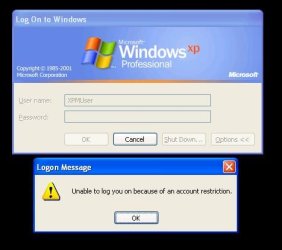
Then I logged off, and tried to log in as Administrator. It gave me this error.
So I logged back in as XPMUser by entering my password.
Then I went to User Accounts, and removed the password.
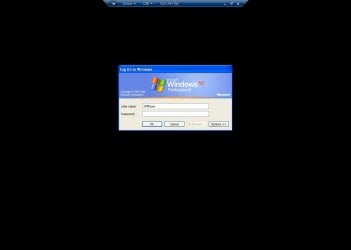
Then I switched to full screen, and it took me to the logon screen.
Now it is giving me the same error that it did earlier when I tried to logon as Administrator.
I get this same error whether I try to login as XPMUser or Administrator:

Capture.JPG

What happen?
 

My Computer My Computer

OS
Windows 7 Retail
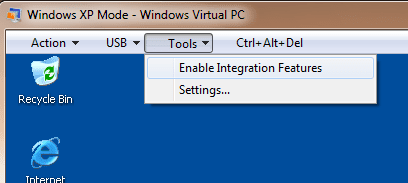
@crimson, to login in to Windows XP, the integration features is using Remote Desktop and to log into a Windows machine from the network there must be a password unless..."Accounts: Limit local account use of blank passwords to console logon only" is set to disabled. You will need to turn off integration though the Tools menu. The Administration account probably does not have, "Allow log on through Remote Desktop Services" permissions. Turning off integration will use a more conventional virtual machine means.
 

My Computer My Computer

Computer type
PC/Desktop
Computer Manufacturer/Model Number
Alienware Aurora ALX R4
OS
Windows 10 Pro (x64)
CPU
Intel Core i7-3930K (3.2GHz - 4.5GHz)
Motherboard
Alienware Aurora-R4 x79
Memory
4x Samsung 4GB PC3-12800 DDR3 (16GB 1600MHz)
Graphics Card(s)
Nvidia Geforce GTX 690
Sound Card
SteelSeries Siberia Elite
Monitor(s) Displays
Dell UltraSharp U3011
Screen Resolution
2560x1600
Hard Drives
Samsung 850 Pro 256 GB, Seagate 1TB Desktop Hybrid HDD, 2x Western Digital 4TB Green HDD
PSU
875W Some Dell PSU <.<
Case
Alienware Aurora ALX
Cooling
Custom Liquid Cooling (EK CPU & GPU blocks) dual EK 480RAD
Keyboard
Logitech G710+ Mechanical
Mouse
Logitech G700s
Internet Speed
Verizon Fios (50 mbps average)
Other Info
Server: Intel NUC D54250WYK: i5-4250U, 16GB, 256 GB mSATA, Windows Server 2012 R2
@crimson, to login in to Windows XP, the integration features is using Remote Desktop and to log into a Windows machine from the network there must be a password unless..."Accounts: Limit local account use of blank passwords to console logon only" is set to disabled. You will need to turn off integration though the Tools menu. The Administration account probably does not have, "Allow log on through Remote Desktop Services" permissions. Turning off integration will use a more conventional virtual machine means.
What do you mean? How do I set that "Accounts:" thing to disabled, and how do I turn of integration? There is no tools menu. What do I have to do?
 

My Computer My Computer

OS
Windows 7 Retail
You do not have, Tools > Disable|Enable Integration Features?
Image below...
 

Attachments

  • Untitled.png
    Untitled.png
    7.3 KB · Views: 6

My Computer My Computer

Computer type
PC/Desktop
Computer Manufacturer/Model Number
Alienware Aurora ALX R4
OS
Windows 10 Pro (x64)
CPU
Intel Core i7-3930K (3.2GHz - 4.5GHz)
Motherboard
Alienware Aurora-R4 x79
Memory
4x Samsung 4GB PC3-12800 DDR3 (16GB 1600MHz)
Graphics Card(s)
Nvidia Geforce GTX 690
Sound Card
SteelSeries Siberia Elite
Monitor(s) Displays
Dell UltraSharp U3011
Screen Resolution
2560x1600
Hard Drives
Samsung 850 Pro 256 GB, Seagate 1TB Desktop Hybrid HDD, 2x Western Digital 4TB Green HDD
PSU
875W Some Dell PSU <.<
Case
Alienware Aurora ALX
Cooling
Custom Liquid Cooling (EK CPU & GPU blocks) dual EK 480RAD
Keyboard
Logitech G710+ Mechanical
Mouse
Logitech G700s
Internet Speed
Verizon Fios (50 mbps average)
Other Info
Server: Intel NUC D54250WYK: i5-4250U, 16GB, 256 GB mSATA, Windows Server 2012 R2
No there is no menu for that. What are you using?
I'm using the download from Windows:
Download Windows XP Mode

Here is what it looks like fullscreen:
Capture.JPG
 

My Computer My Computer

OS
Windows 7 Retail
I'm using Windows Virtual PC, I installed it before I installed "XP Mode" however.
Are you using the latest version?
 

My Computer My Computer

Computer type
PC/Desktop
Computer Manufacturer/Model Number
Alienware Aurora ALX R4
OS
Windows 10 Pro (x64)
CPU
Intel Core i7-3930K (3.2GHz - 4.5GHz)
Motherboard
Alienware Aurora-R4 x79
Memory
4x Samsung 4GB PC3-12800 DDR3 (16GB 1600MHz)
Graphics Card(s)
Nvidia Geforce GTX 690
Sound Card
SteelSeries Siberia Elite
Monitor(s) Displays
Dell UltraSharp U3011
Screen Resolution
2560x1600
Hard Drives
Samsung 850 Pro 256 GB, Seagate 1TB Desktop Hybrid HDD, 2x Western Digital 4TB Green HDD
PSU
875W Some Dell PSU <.<
Case
Alienware Aurora ALX
Cooling
Custom Liquid Cooling (EK CPU & GPU blocks) dual EK 480RAD
Keyboard
Logitech G710+ Mechanical
Mouse
Logitech G700s
Internet Speed
Verizon Fios (50 mbps average)
Other Info
Server: Intel NUC D54250WYK: i5-4250U, 16GB, 256 GB mSATA, Windows Server 2012 R2
crimson, you are in Full Screen Mode..

Just click the middle button between the the "X" button and the Minizme button it is called "exit full screen"
exit full.jpg

(it will put XP Mode in a window instead of full screen) .then you should have the tools drop down menu..

Hope this Helps..
 

My Computer My Computer

Computer Manufacturer/Model Number
HP Pavilion dv5 Notebook PC
OS
Windows Seven x64
CPU
2.2 GHz Dual Core
Motherboard
Quanta 3600
Memory
4GB
Graphics Card(s)
ATI Mobility RADEON HD 3470
Sound Card
ATI
Monitor(s) Displays
Laptop
Hard Drives
ATA Hitachi HTS543215 (5400RPM)
Case
Laptop
Cooling
Fan
Internet Speed
Basic DSL 1.5 up and Down
It won't do anything when I click it. It just stays in fullscreen. How do I get out of fullscreen?
 

My Computer My Computer

OS
Windows 7 Retail
Back
Top