Some updates wont install even when tried manually

angiesluck

New member
Member
VIP
Local time
5:07 AM
Messages
172
Location
Manchester UK
Dell laptop windows 7 sp1 x64.
Been trying all sorts to try and get this rectified.

Had RegSvr32 error when running troubleshooter saying [ The module "Msvcr110_clr0400.dll" was loaded but the entry-point DllRegisterServer was not found. Make sure that "Msvcr110_clr0400.dll" is a valid DLL or OCX file and then try again.

Had error 0x80070641 when trying to install Microsoft Visual C++2015 Redistributable (x64) - 14.0.23026

Windows Update troubleshooting was unable to fix 0x80070057
another time I ran it said unable to fix 0x80070005

Did startup repair which came back with [System Disk = \Device\Hardisk0
Windows directory = C:\Windows
Autochk Run = 0
Number of root causes = 1

I have ran virus checks which came back fine the malware checks had some stuff but got them removed and ran again and now clear. But still having the issue. Computer seems to be running fine just not able to update the updates it says are ready to install as they just keep reappearing and even when they say successfully installed they are not and they recome back up when you run check for updates again.

The ones that keep coming back are KB4457144/KB3046269/KB3184143/KB2952664 and can not get any further to check for any more until these are installed.
I checked what updates have installed on my partners computer and gone through doing those manually and the ones that were applicable to my computer installed when I did them manually via microsoft update catologue but these others that my computer says are ready to be installed wont install.

Help to resolve this would be appreciated guys.
 

My Computer My Computer

Computer Manufacturer/Model Number
Samsung R519
OS
windows 7 home premium 32bit
Hi angiesluck,

The new monthly rollup requires a Servicing Stack Update that was published nearly two years ago, and without it, the update is not possible. Somewhat surprising is that Windows Update can’t download the pre-requisites on its own, so you have to manually download and install update KB3177467

Nic
 

My Computer My Computer

Computer type
PC/Desktop
Computer Manufacturer/Model Number
HP Desktop & Compaq Laptop
OS
Win 10 x64, Linux Lite, Win 7 x64, BlackArch, & Kali
Hard Drives
Samsung 850 Pro 256Gb,
Hitachi HDD 1Tb,
Crucial MX SSD 250Gb
Segate 3Tb USB 3.0 Ext. Backup HDD
Internet Speed
150Mbps dn, 20Mbps up
Antivirus
Avast Free, Malwarebytes Anti-Exploit & Anti-Ransomware
Browser
Firefox, Chrome, Opera, & VPN
Hi angiesluck,

The new monthly rollup requires a Servicing Stack Update that was published nearly two years ago, and without it, the update is not possible. Somewhat surprising is that Windows Update can’t download the pre-requisites on its own, so you have to manually download and install update KB3177467

To check if you already have the Windows Update [KB3177467] that Snick has mentioned do the following.
Click Start > Control Panel > Windows Updates > View update history.
Browse through the list to see if it is there.

I hope this helps!
 

My Computer My Computer

Computer type
Laptop
Computer Manufacturer/Model Number
Fujitsu LIFEBOOK
OS
Win 7 HP SP1 64-bit Vista HB SP2 32-bit Linux Mint 18.3
CPU
Intel(R) Pentium(R) CPU P6200 @ 2.13GHz
Motherboard
FUJITSU FJNBB06
Memory
4.00 GB
Graphics Card(s)
Intel(R) Graphics Media Accelerator HD
Sound Card
[1] Realtek High Definition Audio [2] Intel(R) Display Audio
Screen Resolution
1366 x 768 x 32 bits (4294967296 colors) @ 59 Hz
Hard Drives
TOSHIBA MK5076GSX
Antivirus
AVG FREE
Hi I have checked and can not see it in update history so went to do it manually but it justs say not applicable to this computer when I go to install!
 

My Computer My Computer

Computer Manufacturer/Model Number
Samsung R519
OS
windows 7 home premium 32bit
Hi angiesluck,

Hi I have checked and can not see it in update history so went to do it manually but it justs say not applicable to this computer when I go to install!

This could mean that the update has either been superceded or your system doesn't actually need it!

I hope this helps!
 

My Computer My Computer

Computer type
Laptop
Computer Manufacturer/Model Number
Fujitsu LIFEBOOK
OS
Win 7 HP SP1 64-bit Vista HB SP2 32-bit Linux Mint 18.3
CPU
Intel(R) Pentium(R) CPU P6200 @ 2.13GHz
Motherboard
FUJITSU FJNBB06
Memory
4.00 GB
Graphics Card(s)
Intel(R) Graphics Media Accelerator HD
Sound Card
[1] Realtek High Definition Audio [2] Intel(R) Display Audio
Screen Resolution
1366 x 768 x 32 bits (4294967296 colors) @ 59 Hz
Hard Drives
TOSHIBA MK5076GSX
Antivirus
AVG FREE
so how do I find what update that I may need that has superceded that one as I need to get the update to install others as that is what is required nic said
 

My Computer My Computer

Computer Manufacturer/Model Number
Samsung R519
OS
windows 7 home premium 32bit
angiesluck,

KB3177467
update is the latest service stack which supersedes the previous one (KB3020369)

I provided the kb link that matches your specs x32 or x86 one in the same ( I just check the link that I provided in a previous post and it is for x86/x32). If you are running x64 Windows that link is incorrect and you will receive the "not applicable" message.

Here's the link for the x64 KB3177467 and the link to the Microsoft Catalog Page. If you peruse the M$ cat page the 64 bit version has x64 the x32/x86 does not. Product column Windows 7 versions not the others.

Nic
 

My Computer My Computer

Computer type
PC/Desktop
Computer Manufacturer/Model Number
HP Desktop & Compaq Laptop
OS
Win 10 x64, Linux Lite, Win 7 x64, BlackArch, & Kali
Hard Drives
Samsung 850 Pro 256Gb,
Hitachi HDD 1Tb,
Crucial MX SSD 250Gb
Segate 3Tb USB 3.0 Ext. Backup HDD
Internet Speed
150Mbps dn, 20Mbps up
Antivirus
Avast Free, Malwarebytes Anti-Exploit & Anti-Ransomware
Browser
Firefox, Chrome, Opera, & VPN
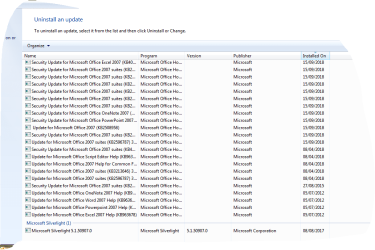
hi still it will not let me update using that KB...it still says not applicable...here is what is installed and that's all i can see.[/ATTACH][/ATTACH]
 

Attachments

  • Capture 1.PNG
    Capture 1.PNG
    22.4 KB · Views: 1
  • Capture 2.PNG
    Capture 2.PNG
    19.9 KB · Views: 0

My Computer My Computer

Computer Manufacturer/Model Number
Samsung R519
OS
windows 7 home premium 32bit
Hi angiesluck,

Here is what is installed and that's all I can see.
It would make it much clearer if you could expand the Name column. Just double-click the title line in between the Name and Program columns.

I hope this helps!
 

My Computer My Computer

Computer type
Laptop
Computer Manufacturer/Model Number
Fujitsu LIFEBOOK
OS
Win 7 HP SP1 64-bit Vista HB SP2 32-bit Linux Mint 18.3
CPU
Intel(R) Pentium(R) CPU P6200 @ 2.13GHz
Motherboard
FUJITSU FJNBB06
Memory
4.00 GB
Graphics Card(s)
Intel(R) Graphics Media Accelerator HD
Sound Card
[1] Realtek High Definition Audio [2] Intel(R) Display Audio
Screen Resolution
1366 x 768 x 32 bits (4294967296 colors) @ 59 Hz
Hard Drives
TOSHIBA MK5076GSX
Antivirus
AVG FREE
[/ATTACH][/ATTACH]

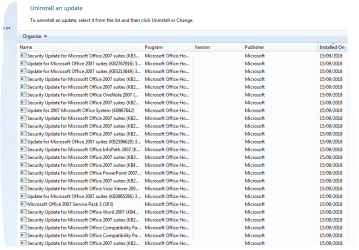
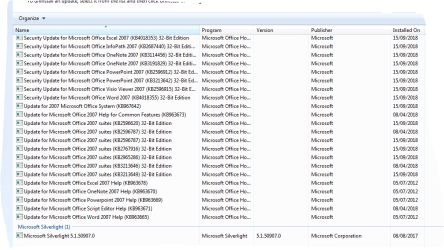
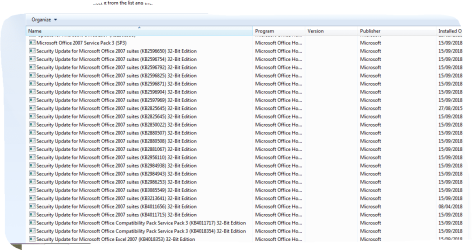
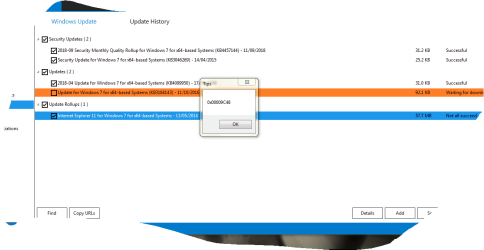
Just had another go at doing some updates and again it says done but it hasnt
 

Attachments

  • Capture 4.PNG
    Capture 4.PNG
    18.5 KB · Views: 2
  • Capture 5.PNG
    Capture 5.PNG
    19.5 KB · Views: 1

My Computer My Computer

Computer Manufacturer/Model Number
Samsung R519
OS
windows 7 home premium 32bit
Hi angiesluck,

Have you recently clean installed Windows?
I notice that there is both Microsoft Office 2007 and Microsoft Office 2010.
Most of the updates that you have listed have been done in the last few days!

I hope this helps!
 

My Computer My Computer

Computer type
Laptop
Computer Manufacturer/Model Number
Fujitsu LIFEBOOK
OS
Win 7 HP SP1 64-bit Vista HB SP2 32-bit Linux Mint 18.3
CPU
Intel(R) Pentium(R) CPU P6200 @ 2.13GHz
Motherboard
FUJITSU FJNBB06
Memory
4.00 GB
Graphics Card(s)
Intel(R) Graphics Media Accelerator HD
Sound Card
[1] Realtek High Definition Audio [2] Intel(R) Display Audio
Screen Resolution
1366 x 768 x 32 bits (4294967296 colors) @ 59 Hz
Hard Drives
TOSHIBA MK5076GSX
Antivirus
AVG FREE
yes i renamed directory to see if that helped but not.
 

My Computer My Computer

Computer Manufacturer/Model Number
Samsung R519
OS
windows 7 home premium 32bit
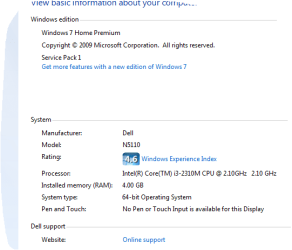
Dell laptop windows 7 sp1 x64.
Been trying all sorts to try and get this rectified.
System Manufacturer/Model Number Samsung R519
OS windows 7 home premium 32bit

Well, I re-read this entire thread and your system specs say x32 but your original post indicates x64. Now your screenshots say x32? What's up with that??????????????????

Which is it x32 or x64 are we working with please?
 

My Computer My Computer

Computer type
PC/Desktop
Computer Manufacturer/Model Number
HP Desktop & Compaq Laptop
OS
Win 10 x64, Linux Lite, Win 7 x64, BlackArch, & Kali
Hard Drives
Samsung 850 Pro 256Gb,
Hitachi HDD 1Tb,
Crucial MX SSD 250Gb
Segate 3Tb USB 3.0 Ext. Backup HDD
Internet Speed
150Mbps dn, 20Mbps up
Antivirus
Avast Free, Malwarebytes Anti-Exploit & Anti-Ransomware
Browser
Firefox, Chrome, Opera, & VPN
At this point, I believe you have additional issues with Win Update.

Have you run sfc /scannow from administrative CMD to check your system files?

Just a thought, try running DISM++ which is a 3rd party Win Update program. It's much faster and through than M$ WinUpdate. You can click on either executable x86/x32 or x64(.exe) it will not run the inappropriate one. Click on Updates, click on Scan, it will take a few minutes to scan your computer. You will be provided a list of Updates, you can choose what you want to install. You can choose all of the updates, and DISM++ will tell you if there have been any issue with the updates. Pick and choose as you wish, then click Install Updates. You don't have to reboot between installations, and it doesn't install any updates that have been superseded as WinUpdate does.
Yes, look for KB4457144, KB3046269, KB3184143, & KB2952664 that won't install on your machine and make sure they are checked. You most likely will have errors, again, I believe you have other WinUpdate issues.

Here's the links to
Direct download DISM++.zip
Website Dism++ | New Windows Utility

Yea, some of the text is Chinese!!

Then, please run the System Update Readiness Tool, links provided for both x32 and x64 (choose the one for the system we are supposed to be working on) and post the CheckSUR.log, which is a temporary file located at: C:\Windows\Logs\CBS and WindowsUpdate.log located at C:\Windows

System Update Readiness Tool for Windows 7 x32

System Update Readiness Tool for Windows 7 x64

Nic
 
Last edited:

My Computer My Computer

Computer type
PC/Desktop
Computer Manufacturer/Model Number
HP Desktop & Compaq Laptop
OS
Win 10 x64, Linux Lite, Win 7 x64, BlackArch, & Kali
Hard Drives
Samsung 850 Pro 256Gb,
Hitachi HDD 1Tb,
Crucial MX SSD 250Gb
Segate 3Tb USB 3.0 Ext. Backup HDD
Internet Speed
150Mbps dn, 20Mbps up
Antivirus
Avast Free, Malwarebytes Anti-Exploit & Anti-Ransomware
Browser
Firefox, Chrome, Opera, & VPN
I think your looking at my previous threads from years ago on my other laptop....but this is another of ours and this is the system in question.....................Capture 7.PNG
 

My Computer My Computer

Computer Manufacturer/Model Number
Samsung R519
OS
windows 7 home premium 32bit
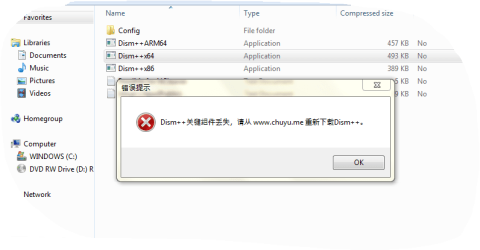
yes sfc came back no violations.......test just came back with this when i clicked to run it...when I clicked on x64 it said about extracting all other files in case required but I just clicked to run x64 like you said Capture 8.PNG
 

My Computer My Computer

Computer Manufacturer/Model Number
Samsung R519
OS
windows 7 home premium 32bit
Hi angiesluck,

When i clicked to run it...when I clicked on x64 it said about extracting all other files in case required but I just clicked to run x64 like you said View attachment 405360

It appears that you didn't extract the zip file.

You can unzip [extract] the contents of the DISM++ zip file using something like > 7-Zip.

Then you right-click the zip file > 7-Zip > Extract files... > choose where you want the extracted files saved to > click OK > click OK.

Then right-click on the Dism++x64 and Run as administrator.

The Dism++x64 should be about 1,153KB in size if this is done correctly.

I hope this helps!
 

My Computer My Computer

Computer type
Laptop
Computer Manufacturer/Model Number
Fujitsu LIFEBOOK
OS
Win 7 HP SP1 64-bit Vista HB SP2 32-bit Linux Mint 18.3
CPU
Intel(R) Pentium(R) CPU P6200 @ 2.13GHz
Motherboard
FUJITSU FJNBB06
Memory
4.00 GB
Graphics Card(s)
Intel(R) Graphics Media Accelerator HD
Sound Card
[1] Realtek High Definition Audio [2] Intel(R) Display Audio
Screen Resolution
1366 x 768 x 32 bits (4294967296 colors) @ 59 Hz
Hard Drives
TOSHIBA MK5076GSX
Antivirus
AVG FREE
I did not do one as it said it was only an update to remove windows 10 free install but this laptop was not compatible with windows 10 anyway so left that un ticked as not needed.......[/attach]
 

Attachments

  • Capture 9.PNG
    Capture 9.PNG
    26.3 KB · Views: 1

My Computer My Computer

Computer Manufacturer/Model Number
Samsung R519
OS
windows 7 home premium 32bit
Hi angiesluck,

The update KB3184143 is to remove the software related to the Windows 10 free upgrade offer. You can tick this if you are going to stick with Windows 7.

More information here > Remove software related to the Windows 10 free upgrade offer.

I assume that you don't use IE?

I hope this helps!
 

My Computer My Computer

Computer type
Laptop
Computer Manufacturer/Model Number
Fujitsu LIFEBOOK
OS
Win 7 HP SP1 64-bit Vista HB SP2 32-bit Linux Mint 18.3
CPU
Intel(R) Pentium(R) CPU P6200 @ 2.13GHz
Motherboard
FUJITSU FJNBB06
Memory
4.00 GB
Graphics Card(s)
Intel(R) Graphics Media Accelerator HD
Sound Card
[1] Realtek High Definition Audio [2] Intel(R) Display Audio
Screen Resolution
1366 x 768 x 32 bits (4294967296 colors) @ 59 Hz
Hard Drives
TOSHIBA MK5076GSX
Antivirus
AVG FREE
I did not tick one as you can see as it just said that this file does not need to be installed as it was an update to just remove the free windows 10 update...[/ATTACH]
 

Attachments

  • Capture 10.PNG
    Capture 10.PNG
    19.3 KB · Views: 1

My Computer My Computer

Computer Manufacturer/Model Number
Samsung R519
OS
windows 7 home premium 32bit
Back
Top