
Solved Using 2FA to verify a Visa online transaction cuts off the Internet

Clairvaux

New member
Pro User
VIP
Local time
2:29 PM
Messages
247
I have had this problem for months. In my country and with my bank, many online transactions made with a Visa credit card must comply with the Verified by Visa system, which adds a 2FA step on top of the card number and CVV number.

A one-time code is transmitted by vocal message through a designated phone number (landline, in my case), and typing it in the Verified by Visa window is the last required authorisation step.

This has worked for me flawlessly for months, until at some point, my Internet connection began to cut off when I clicked OK in the Verified by Visa window, after typing the 2FA code.

Attempted workarounds which failed :

  • Using a different browser (Firefox, Opera, Vivaldi, Chrome, Internet Explorer 11).
  • Changing antivirus. Formerly : Avast Free, now Microsoft Security Essentials. Also installed : IBM Trusteer Rapport (specific to banking, recommended by my bank), Microsoft EMET.
  • Reducing security level in the browser. Such as : deactivating uMatrix, selecting less secure options in Settings. At one point, I thought I found the culprit : in Firefox, changing Options / Privacy & Security / Block Dangerous & Deceptive Content from Yes to No allowed the transaction to go through. Ditto in Opera, with Protect me from Malicious Sites set to No. However, after a brief period, the connection started cutting off again.
  • Deactivating Microsoft Firewall.
  • Asking my bank technical hotline (they can't figure it out).

Disconnection also happens when I attempt to use the one-time credit card numbers application provided by Visa and my bank. In this case, the Verified by Visa system kicks in just after login (username + password), so I can't even launch the program.

Most of the time, the disconnection, after OK'ing Verified by Visa, would happen across the board. No other site could be reached. However, in some rare cases, only the connection between the specific banking site used at the time by the application was broken, and other sites could be browsed normally.

Possibly related trouble :


My Internet connection periodically cuts off without any obvious cause. This might happen once a day, or every other day. The Windows icon monitoring the connection, in the System Tray (see attachment), switches from the "on" state to the "problem" state (warning black and yellow sign, with exclamation mark).

At that point, the connection is reset successfully by one of the following means :

Running Windows Network Diagnostics (run as admin). Either it finds a DNS issue, or it does not find anything. In both cases, despite no repairs being applied, just closing the Diagnostics box reopens the connection.

Sometimes, this would not work, and I would need to switch the router off, and on again. I some cases, Windows Network Diagnostics would still need to be run after this, and then the connection would be back again.

I'm using my own router, TP-Link TD-W 8960 N, through Ethernet. I'm supposed to use my ISP specific "box" instead, but I replaced it after many years when my connection failed, and I was told I would have to rent an expensive new box. I prefer the (unsupported by my ISP) TP-Link, because it's a one-time expenditure, and it gives me much greater control.

I'm at the end of my wits, and any help would be greatly appreciated.
 

Attachments

  • Windows connection icon.png
    Windows connection icon.png
    287 bytes · Views: 47

My Computer My Computer

At a glance

Windows 7 Home Premium 64-bit (OEM)AMD Athlon II X4 640 (3 GHz, 4 cores)Patriot 16Gb DDR3 1600 (2 kits of 2)ATI Radeon HD 4290 (integrated)
Computer type
PC/Desktop
Computer Manufacturer/Model Number
Custom build
OS
Windows 7 Home Premium 64-bit (OEM)
CPU
AMD Athlon II X4 640 (3 GHz, 4 cores)
Motherboard
Asus M4A 89 GTD Pro/USB3
Memory
Patriot 16Gb DDR3 1600 (2 kits of 2)
Graphics Card(s)
ATI Radeon HD 4290 (integrated)
Sound Card
AMD + Realtek HD Audio (integrated)
Monitor(s) Displays
Hewlett-Packard ZR2440w (24")
Screen Resolution
1920 x 1200
Hard Drives
Internal : Samsung SSD 860 EVO 250 Gb (system), Seagate Barrcuda 1 Tb (data), Western Digital Caviar Blue 500 Gb (archives).
External (USB) : 2 x 1 Tb 2,5" Seagate Barracuda (backups).
PSU
Corsair VX 450 W
Case
Antec Solo
Cooling
Cooler Master Hyper 212 Plus, 2 Nexus Real Silent Case fans
Keyboard
Cherry KC 1000
Mouse
Logitech M 90
Internet Speed
Fiber, 300 Mbit/s down, 200 Mbit/s up
Antivirus
Microsoft Security Essentials
Browser
Vivaldi, Tor
Other Info
BIOS Date: 07/18/11 Ver: 08.00.15.
Modem-router : provided by ISP
I prefer the (unsupported by my ISP) TP-Link, because it's a one-time expenditure, and it gives me much greater control.

This may in fact be your issue.

Is this a DSL or cable connection? You just have a router or a router and modem?
 

My Computer My Computer

At a glance

Windows 7 Ultimate x64
Computer type
PC/Desktop
OS
Windows 7 Ultimate x64
It is a DSL connection, and the only device that stands between my computer and my phone line is that TP-Link TD-W 8960 N, which is a modem-router.
 

My Computer My Computer

At a glance

Windows 7 Home Premium 64-bit (OEM)AMD Athlon II X4 640 (3 GHz, 4 cores)Patriot 16Gb DDR3 1600 (2 kits of 2)ATI Radeon HD 4290 (integrated)
Computer type
PC/Desktop
Computer Manufacturer/Model Number
Custom build
OS
Windows 7 Home Premium 64-bit (OEM)
CPU
AMD Athlon II X4 640 (3 GHz, 4 cores)
Motherboard
Asus M4A 89 GTD Pro/USB3
Memory
Patriot 16Gb DDR3 1600 (2 kits of 2)
Graphics Card(s)
ATI Radeon HD 4290 (integrated)
Sound Card
AMD + Realtek HD Audio (integrated)
Monitor(s) Displays
Hewlett-Packard ZR2440w (24")
Screen Resolution
1920 x 1200
Hard Drives
Internal : Samsung SSD 860 EVO 250 Gb (system), Seagate Barrcuda 1 Tb (data), Western Digital Caviar Blue 500 Gb (archives).
External (USB) : 2 x 1 Tb 2,5" Seagate Barracuda (backups).
PSU
Corsair VX 450 W
Case
Antec Solo
Cooling
Cooler Master Hyper 212 Plus, 2 Nexus Real Silent Case fans
Keyboard
Cherry KC 1000
Mouse
Logitech M 90
Internet Speed
Fiber, 300 Mbit/s down, 200 Mbit/s up
Antivirus
Microsoft Security Essentials
Browser
Vivaldi, Tor
Other Info
BIOS Date: 07/18/11 Ver: 08.00.15.
Modem-router : provided by ISP
What I would do is check your ISP's website for compatible third-party routers and buy one of those based on good reviews. Or you'll just have to buy or lease a router from your ISP.
 

My Computer My Computer

At a glance

Windows 7 Ultimate x64
Computer type
PC/Desktop
OS
Windows 7 Ultimate x64
There is no such thing as approved third-party routers where I live ! All the ISP's marketing is based on their own routers, so they won't tell you anything about other companies' equipment. However, the software on my TP-Link router does have pre-set settings for my ISP, so I believe they must have tested it.

What makes you think the router is the culprit ? I was able to use Verified by Visa for a very long time, with no problem at all, with that router. And that specific application is the only one which cuts off the connection. Has anyone ever seen anything like that ? How is it even possible that clicking on an OK button would cut off an Internet connection ?
 

My Computer My Computer

At a glance

Windows 7 Home Premium 64-bit (OEM)AMD Athlon II X4 640 (3 GHz, 4 cores)Patriot 16Gb DDR3 1600 (2 kits of 2)ATI Radeon HD 4290 (integrated)
Computer type
PC/Desktop
Computer Manufacturer/Model Number
Custom build
OS
Windows 7 Home Premium 64-bit (OEM)
CPU
AMD Athlon II X4 640 (3 GHz, 4 cores)
Motherboard
Asus M4A 89 GTD Pro/USB3
Memory
Patriot 16Gb DDR3 1600 (2 kits of 2)
Graphics Card(s)
ATI Radeon HD 4290 (integrated)
Sound Card
AMD + Realtek HD Audio (integrated)
Monitor(s) Displays
Hewlett-Packard ZR2440w (24")
Screen Resolution
1920 x 1200
Hard Drives
Internal : Samsung SSD 860 EVO 250 Gb (system), Seagate Barrcuda 1 Tb (data), Western Digital Caviar Blue 500 Gb (archives).
External (USB) : 2 x 1 Tb 2,5" Seagate Barracuda (backups).
PSU
Corsair VX 450 W
Case
Antec Solo
Cooling
Cooler Master Hyper 212 Plus, 2 Nexus Real Silent Case fans
Keyboard
Cherry KC 1000
Mouse
Logitech M 90
Internet Speed
Fiber, 300 Mbit/s down, 200 Mbit/s up
Antivirus
Microsoft Security Essentials
Browser
Vivaldi, Tor
Other Info
BIOS Date: 07/18/11 Ver: 08.00.15.
Modem-router : provided by ISP
What makes you think the router is the culprit?


Because you said this:

My Internet connection periodically cuts off without any obvious cause. This might happen once a day, or every other day.
Maybe the router is going South or needs a firmware update. Perhaps it's even been hacked.

Something is failing at the DNS side from what it looks like.

Have you tried a simple reset? You have to do this in the router. Not turning it off and on again. You'll lose all your settings in the process. So the router should have a backup config. option.

The other vector could be your computer. Try resetting the TCP/IP stack.

Open a command prompt window as Admin. Run the following commands individually:

netsh winsock reset catalog
netsh int ipv4 reset reset.log
netsh int ipv6 reset reset.log


Restart the computer.

You can also run Adwcleaner and go to the settings and turn on; reset firewall, reset IPSec, reset proxy, reset IE polices, reset winsock, reset TCP/IP, reset hosts files.

AdwCleaner - Free Adware Cleaner & Removal Tool | Malwarebytes

Since DSL uses the phone line, the probability of ingress is great with older lines. To confirm this, turn on the ICMP echo ping allow in your router and try Smokeping.

3 SmokePing Tools FAQ | DSLReports, ISP Information

Speed tests, ping tests and bandwidth tools | DSLReports, ISP Information
 

My Computer My Computer

At a glance

Windows 7 Ultimate x64
Computer type
PC/Desktop
OS
Windows 7 Ultimate x64
Thank you. I will do that and report back.
 

My Computer My Computer

At a glance

Windows 7 Home Premium 64-bit (OEM)AMD Athlon II X4 640 (3 GHz, 4 cores)Patriot 16Gb DDR3 1600 (2 kits of 2)ATI Radeon HD 4290 (integrated)
Computer type
PC/Desktop
Computer Manufacturer/Model Number
Custom build
OS
Windows 7 Home Premium 64-bit (OEM)
CPU
AMD Athlon II X4 640 (3 GHz, 4 cores)
Motherboard
Asus M4A 89 GTD Pro/USB3
Memory
Patriot 16Gb DDR3 1600 (2 kits of 2)
Graphics Card(s)
ATI Radeon HD 4290 (integrated)
Sound Card
AMD + Realtek HD Audio (integrated)
Monitor(s) Displays
Hewlett-Packard ZR2440w (24")
Screen Resolution
1920 x 1200
Hard Drives
Internal : Samsung SSD 860 EVO 250 Gb (system), Seagate Barrcuda 1 Tb (data), Western Digital Caviar Blue 500 Gb (archives).
External (USB) : 2 x 1 Tb 2,5" Seagate Barracuda (backups).
PSU
Corsair VX 450 W
Case
Antec Solo
Cooling
Cooler Master Hyper 212 Plus, 2 Nexus Real Silent Case fans
Keyboard
Cherry KC 1000
Mouse
Logitech M 90
Internet Speed
Fiber, 300 Mbit/s down, 200 Mbit/s up
Antivirus
Microsoft Security Essentials
Browser
Vivaldi, Tor
Other Info
BIOS Date: 07/18/11 Ver: 08.00.15.
Modem-router : provided by ISP
I made some of the recommended maneuvers, which temporarily solved the problem. Then Visa began to disconnect me again. Then I did some more, and I got access again. However I'm doubtful it will last. Meanwhile, another, possibly related Internet problem occurred (more on that later).

But here are the attempted steps and their effects :

  • Upgrade the router's firmware (includes router reset) > Problem not solved.
  • Reset the TCP/IP stack (and other things) through those instructions (not yours). I researched "resetting the TCP/IP stack", and was surprised to find several different variants for what is supposed to be the same command. > Problem not solved.
  • Reset the TCP/IP stack and Winsock through relevant menu items of TCP Optimizer 4 > Problem solved for a while, then situation back to "normal".
  • ADW Cleaner scan with the recommended settings > Problem solved for now.

Before that ASW Cleaner scan with assorted resets, I had a strange problem with Tutanota mail (which is an encrypted webmail service). I was unable to send a mail with a few attached files, way smaller than the provider's limit. The client software threw an error message saying I was probably "disconnected from the server", and indeed I had to login again. The Internet connection itself, however, was not cut off. Sending the files one by one was possible.

Tutanota assistance told me that maybe my Internet connection was not "strong enough" (whatever that means), because the encryption process challenges that "strength".

Phone line DSL test :


I haven't done the other test because it takes 24 hours, and also it requires allowing something in the router which might be a security risk. But I know my phone line is not very good, generally speaking. I'm still at a loss...
 
Last edited:

My Computer My Computer

At a glance

Windows 7 Home Premium 64-bit (OEM)AMD Athlon II X4 640 (3 GHz, 4 cores)Patriot 16Gb DDR3 1600 (2 kits of 2)ATI Radeon HD 4290 (integrated)
Computer type
PC/Desktop
Computer Manufacturer/Model Number
Custom build
OS
Windows 7 Home Premium 64-bit (OEM)
CPU
AMD Athlon II X4 640 (3 GHz, 4 cores)
Motherboard
Asus M4A 89 GTD Pro/USB3
Memory
Patriot 16Gb DDR3 1600 (2 kits of 2)
Graphics Card(s)
ATI Radeon HD 4290 (integrated)
Sound Card
AMD + Realtek HD Audio (integrated)
Monitor(s) Displays
Hewlett-Packard ZR2440w (24")
Screen Resolution
1920 x 1200
Hard Drives
Internal : Samsung SSD 860 EVO 250 Gb (system), Seagate Barrcuda 1 Tb (data), Western Digital Caviar Blue 500 Gb (archives).
External (USB) : 2 x 1 Tb 2,5" Seagate Barracuda (backups).
PSU
Corsair VX 450 W
Case
Antec Solo
Cooling
Cooler Master Hyper 212 Plus, 2 Nexus Real Silent Case fans
Keyboard
Cherry KC 1000
Mouse
Logitech M 90
Internet Speed
Fiber, 300 Mbit/s down, 200 Mbit/s up
Antivirus
Microsoft Security Essentials
Browser
Vivaldi, Tor
Other Info
BIOS Date: 07/18/11 Ver: 08.00.15.
Modem-router : provided by ISP
That is a very, VERY slow connection and it's no wonder you have so many issues.

Check if there are any LSP hooks. LSP-Fix - a free program to repair damaged Winsock 2 stacks

Go into safe mode with networking and try your software again. Does it work? Try your secure mail, etc.

Smokeping needs to ping your router. That's why I told you that you need to go into your router and allow pings. You only do this for 24 hours, then you can block pings once again. It's really not so much of a problem you need to worry about in terms of being "hacked." It's just a ICMP packet sent to your router and your router responds back. The great thing about Smokeping is it will indicate whether you have a bad line or not.

Did ADWcleaner find any ADware?

If you want great secure email, I recommend Protonmail. And with their paid option you can use it with the Thunderbird email client. They also have an App.


To put your Internet connection speed into perspective, your download rate is only around 246 KB per second. That was the equivalent of 3G cell data speed about 10 or so years ago.
 

My Computer My Computer

At a glance

Windows 7 Ultimate x64
Computer type
PC/Desktop
OS
Windows 7 Ultimate x64
That is a very, VERY slow connection and it's no wonder you have so many issues.

The funny thing is, it does not feel slow. I browse intensively, and it seems good enough. Except when it breaks, of course. Now it has reverted to its "normal", failed state, where OK'ing Verified by Visa closes the connection.

I checked the router's own diagnostics, and indeed some important figures are much worse than when I first installed it two years ago.

  • Rate (downstream) = 2 427 Kbps (used to be 4 928 Kbps)
  • SNR margin (downstream) = 6.3 dB (formerly 27 dB)
  • SNR margin (upstream) = 18.7 dB (formerly 25 dB)
  • Attenuation (downstream) = 34.5 dB (formerly 13 dB)
  • Attenuation (upstream) = 29.1 dB (formerly 8.5 dB)
I started a Smoke Ping test.

Check if there are any LSP hooks. LSP-Fix - a free program to repair damaged Winsock 2 stacks

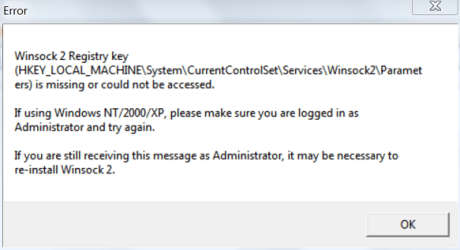
LSP Fix gives that error message :

LSP Fix error message 2 - 12 oct 18.png

That's strange. I have just "reset" Winsock three times. Once with those instructions, then with TCP Optimizer 4, and finally with ADW Cleaner.

Did ADWcleaner find any ADware?

Here are the logs :

***** [ Registry ] *****

Adware.Elex HKLM\Software\Wow6432Node\MICROSOFT\WINDOWS\CURRENTVERSION\POLICIES\EXPLORER|ENABLESHELLEXECUTEHOOKS
Adware.Elex HKLM\SOFTWARE\MICROSOFT\WINDOWS\CURRENTVERSION\POLICIES\EXPLORER|ENABLESHELLEXECUTEHOOKS
PUP.Optional.Legacy HKU\S-1-5-21-3431112999-1532402041-566182517-1001\Software\b1.org
PUP.Optional.Legacy HKLM\Software\Wow6432Node\Classes\AppID\OverlayIcon.DLL
PUP.Optional.Legacy HKLM\SOFTWARE\Classes\AppID\OverlayIcon.DLL
PUP.Optional.Legacy HKLM\Software\Wow6432Node\Classes\TypeLib\{ADF1FA2A-6EAA-4A97-A55F-3C8B92843EF5}
PUP.Optional.Legacy HKLM\Software\Classes\TypeLib\{ADF1FA2A-6EAA-4A97-A55F-3C8B92843EF5}
PUP.Optional.Legacy HKLM\Software\Wow6432Node\Classes\Interface\{7BCA6879-A9F8-47DE-AE05-F5CE7EA3A474}
PUP.Optional.Legacy HKLM\Software\Classes\Interface\{7BCA6879-A9F8-47DE-AE05-F5CE7EA3A474}
PUP.Optional.Legacy HKLM\Software\Classes\OverlayIcon.MyOverlayIcon

***** [ Registry ] *****

Deleted HKLM\Software\Wow6432Node\MICROSOFT\WINDOWS\CURRENTVERSION\POLICIES\EXPLORER|ENABLESHELLEXECUTEHOOKS
Deleted HKLM\SOFTWARE\MICROSOFT\WINDOWS\CURRENTVERSION\POLICIES\EXPLORER|ENABLESHELLEXECUTEHOOKS
Deleted HKU\S-1-5-21-3431112999-1532402041-566182517-1001\Software\b1.org
Deleted HKLM\Software\Wow6432Node\Classes\AppID\OverlayIcon.DLL
Deleted HKLM\SOFTWARE\Classes\AppID\OverlayIcon.DLL
Deleted HKLM\Software\Wow6432Node\Classes\TypeLib\{ADF1FA2A-6EAA-4A97-A55F-3C8B92843EF5}
Deleted HKLM\Software\Classes\TypeLib\{ADF1FA2A-6EAA-4A97-A55F-3C8B92843EF5}
Deleted HKLM\Software\Wow6432Node\Classes\Interface\{7BCA6879-A9F8-47DE-AE05-F5CE7EA3A474}
Deleted HKLM\Software\Classes\Interface\{7BCA6879-A9F8-47DE-AE05-F5CE7EA3A474}
Deleted HKLM\Software\Classes\OverlayIcon.MyOverlayIcon

If you want great secure email, I recommend Protonmail.

I prefer Tutanota. Contrary to Protonmail, you can register and use it completely anonymously, and the subject field is encrypted. Also, the paid plan is very cheap, while Protonmail's is quite expensive. Protonmail is more feature-rich, and it probably has a bigger team and more money. But anonymity trumps features anytime for me.
 

My Computer My Computer

At a glance

Windows 7 Home Premium 64-bit (OEM)AMD Athlon II X4 640 (3 GHz, 4 cores)Patriot 16Gb DDR3 1600 (2 kits of 2)ATI Radeon HD 4290 (integrated)
Computer type
PC/Desktop
Computer Manufacturer/Model Number
Custom build
OS
Windows 7 Home Premium 64-bit (OEM)
CPU
AMD Athlon II X4 640 (3 GHz, 4 cores)
Motherboard
Asus M4A 89 GTD Pro/USB3
Memory
Patriot 16Gb DDR3 1600 (2 kits of 2)
Graphics Card(s)
ATI Radeon HD 4290 (integrated)
Sound Card
AMD + Realtek HD Audio (integrated)
Monitor(s) Displays
Hewlett-Packard ZR2440w (24")
Screen Resolution
1920 x 1200
Hard Drives
Internal : Samsung SSD 860 EVO 250 Gb (system), Seagate Barrcuda 1 Tb (data), Western Digital Caviar Blue 500 Gb (archives).
External (USB) : 2 x 1 Tb 2,5" Seagate Barracuda (backups).
PSU
Corsair VX 450 W
Case
Antec Solo
Cooling
Cooler Master Hyper 212 Plus, 2 Nexus Real Silent Case fans
Keyboard
Cherry KC 1000
Mouse
Logitech M 90
Internet Speed
Fiber, 300 Mbit/s down, 200 Mbit/s up
Antivirus
Microsoft Security Essentials
Browser
Vivaldi, Tor
Other Info
BIOS Date: 07/18/11 Ver: 08.00.15.
Modem-router : provided by ISP
My Computer My Computer

At a glance

Windows 7 Ultimate x64
Computer type
PC/Desktop
OS
Windows 7 Ultimate x64
Okay, can we try to put a bit of order here, and eliminate a few hypotheses one by one ?


1. Router troubles

I have now reset the router, and upgraded the firmware. Doesn't that eliminate the "hacked router" hypothesis ? I mean, even if it had been hacked, it's now un-hacked, right ?

"Router going South" : what does that mean ? A router is a miniature computer with no moving parts, right ? So either there's a software problem with it (and it has been corrected with the step above, right ?), either it's not working at all, correct ? How can mere usage of the router degrade the quality of the DSL connection over time ? Bear in mind this is a spanking new device (2 years old, that's spanking new in my book), it's ventilated, and it gives off almost no heat at all.

Can we rule out the router ?


2. Malware search

Herd Protect turned up a few alleged PUPs in stored software I never use. To give you a hint, one of them was the https extension for Pale Moon. Most probably, all of these were false positives. I nevertheless deleted the bunch.

One file remained "to be analysed" in the cloud, but Herd Protect never got to "analyse" it, despite multiple runs.

I made a Microsoft Security Essentials full scan a few days ago. It took 20 hours, and found nothing.

ADW Cleaner by Malwarebytes turned up some unsignificant things, possibly false positives as well, deleted as well anyway.

Can we now eliminate the malware hypothesis ?


3. DNS troubles

My beloved Windows Network Diagnostics utility keeps throwing the stupid The DNS Server is not Responding line, when I summon it to restore the Internet connection that Verified by Visa has just shut off ; but isn't that just another way of saying : it does not work, and it might be a DNS problem, or a million other things ? Also, the split second it throws that message is precisely the time when it restores the connection, so that "error message" is not really reliable, right ?

Can we rule out DNS issues ?

Before that problem arose, I had planned to change my DNS server. Might that help ?


4. Quality of the DSL phone line

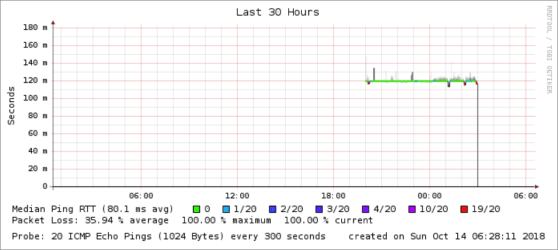
Here are some more data :

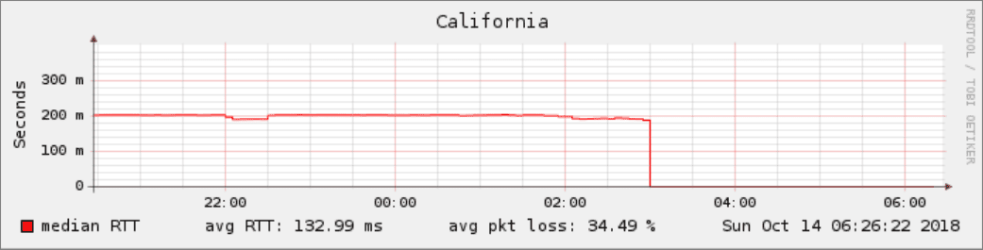
Smokeping from California

Smokeping California overview - 15 oct 18.png

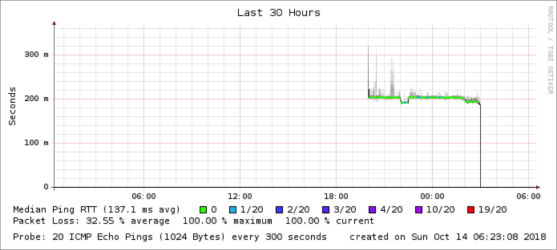
Smokeping California detail - 15 oct 18.png

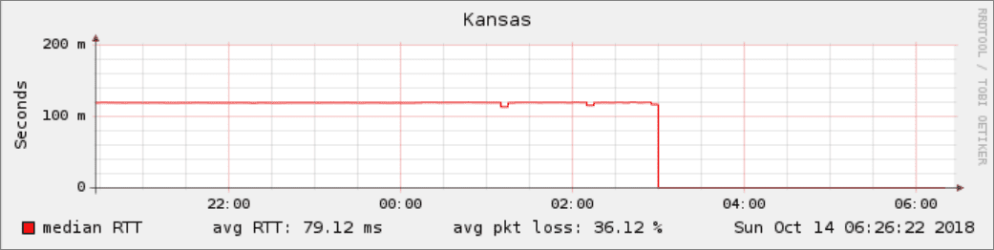
Smokeping from Kansas (or Virginia -- says both)

Smokeping Kansas overview - 15 oct 18.png

Smokeping Kansas detail - 15 oct 18.png

I don't have the slightest idea what the above means, but we know my phone line is not very good.

The media in my country just reported that all the private ISPs complained about the state operator neglecting the maintenance of the copper phone network on which it has a monopoly. Now that might explain the fall in figures I wrote about.

However, it remains to be told how 6 miserly ASCII characters, pertaining to a 2FA code, can overwhelm a so-so DSL connection to the point of shutting it off, while huuuge websites can be browsed with no particular sluggishness.

What lies behind that tiny click on the OK button of Verified by Visa, which is sooo difficult for the Internet connection to manage ?


5. Winsock troubles and associated Windows malarkey

I went through the Microsoft Support link you gave me. This Samhrutha G guy there points the OP to another thread, which has a manual diagnostic for Winsock integrity, and remedial actions.

The remedial action is the famed netsh winsock reset command, which I have already applied countless times.

I nevertheless went through the diagnostic steps. The diagnostic failed (if the advice is correct !), but the remedial action did nothing, just as it did nothing before (nothing durable, anyway).

The alleged Winsock corruption diagnostic comes from a list of items under System Information / Components / Network / Protocol being incomplete. The list should allegedly have 10 items or more, but I have only 8. This is bad, according to the Microsoft Support article (which does not pertain to Windows 7).

However, another poster (an MVP, no less) says his Windows 7 64-bit has the same 8-item list as me, and everything is normal (I'm on 64-bit, too). Added to the fact this is a piece of advice referring to another piece of advice, given by someone else, and that it's in fact meant for Vista, not 7, but it's just supposed to work as well for 7, according to the guy Samhrutha G who did not give the advice in the first place, I'm inclined to take the whole thing with a huge dollop of salt.

My Windows install is not in a nice shape, that's for sure. It misbehaves in all sorts of ways (slowness, etc), but then that's the nature of a not-just-made Windows install, isn't it ?

Any ideas ?
 

My Computer My Computer

At a glance

Windows 7 Home Premium 64-bit (OEM)AMD Athlon II X4 640 (3 GHz, 4 cores)Patriot 16Gb DDR3 1600 (2 kits of 2)ATI Radeon HD 4290 (integrated)
Computer type
PC/Desktop
Computer Manufacturer/Model Number
Custom build
OS
Windows 7 Home Premium 64-bit (OEM)
CPU
AMD Athlon II X4 640 (3 GHz, 4 cores)
Motherboard
Asus M4A 89 GTD Pro/USB3
Memory
Patriot 16Gb DDR3 1600 (2 kits of 2)
Graphics Card(s)
ATI Radeon HD 4290 (integrated)
Sound Card
AMD + Realtek HD Audio (integrated)
Monitor(s) Displays
Hewlett-Packard ZR2440w (24")
Screen Resolution
1920 x 1200
Hard Drives
Internal : Samsung SSD 860 EVO 250 Gb (system), Seagate Barrcuda 1 Tb (data), Western Digital Caviar Blue 500 Gb (archives).
External (USB) : 2 x 1 Tb 2,5" Seagate Barracuda (backups).
PSU
Corsair VX 450 W
Case
Antec Solo
Cooling
Cooler Master Hyper 212 Plus, 2 Nexus Real Silent Case fans
Keyboard
Cherry KC 1000
Mouse
Logitech M 90
Internet Speed
Fiber, 300 Mbit/s down, 200 Mbit/s up
Antivirus
Microsoft Security Essentials
Browser
Vivaldi, Tor
Other Info
BIOS Date: 07/18/11 Ver: 08.00.15.
Modem-router : provided by ISP
Okay, your router is most likely fine, if it was hacked it's gone, no malware it seems. So moving forward I'd say your Windows installation is corrupt in some fashion. Have you tried a sfc /scannow in an elevated command prompt? If it fails to fix anything, you may need to do a repair install which means you need a Windows 7 disk for the current version of Windows 7 you have. Especially troubling is that you now say there is slowness and what have you which is defiantly not normal.

Your smokeping results show packet loss to your router which does indeed mean you have a bad line. Whether this is the reason to your 2FA issue I don't know. I do have my doubts.


1) What does safe mode with networking do?
2) Do a sfc /scannow in an elevated command prompt. If fails, repair install.
 

My Computer My Computer

At a glance

Windows 7 Ultimate x64
Computer type
PC/Desktop
OS
Windows 7 Ultimate x64
Solved - Internet cabling was bad

I wanted to report back on the situation, and thank you, F22 Simpilot, for your help. The issue has now been solved, and the Internet connection was at fault.

Incidentally, I ran scannow, and everything is fine on that side. Tutanota disconnecting itself, when I was trying to send mail with only tiny attachments, had nothing to do with my side. Tutanota assistance finally told me that it was a bug on their side, and that it has been corrected.

I did two things :

1. Sent my router away from my desk, to the other side of the house, next to the phone plug, and replaced the 15 meter, unidentified phone cable running the distance, by a certified, Cat-5e, 100 % copper Ethernet cable by Monoprice. The ADSL filter moved away from my desk to the wall phone plug.

This put an end to Verified by Visa disconnecting the computer from the Internet. It also increased the connection speed, as shown in various measurements, although it wasn't yet perceptible.

2. Changed my DNS server from default (presumably, my ISP's) to Cloudflare 1.1.1.1. This boosted speed a step further, and this time, the difference was obvious to the naked eye (and it was reflected in figures, too).
 

My Computer My Computer

At a glance

Windows 7 Home Premium 64-bit (OEM)AMD Athlon II X4 640 (3 GHz, 4 cores)Patriot 16Gb DDR3 1600 (2 kits of 2)ATI Radeon HD 4290 (integrated)
Computer type
PC/Desktop
Computer Manufacturer/Model Number
Custom build
OS
Windows 7 Home Premium 64-bit (OEM)
CPU
AMD Athlon II X4 640 (3 GHz, 4 cores)
Motherboard
Asus M4A 89 GTD Pro/USB3
Memory
Patriot 16Gb DDR3 1600 (2 kits of 2)
Graphics Card(s)
ATI Radeon HD 4290 (integrated)
Sound Card
AMD + Realtek HD Audio (integrated)
Monitor(s) Displays
Hewlett-Packard ZR2440w (24")
Screen Resolution
1920 x 1200
Hard Drives
Internal : Samsung SSD 860 EVO 250 Gb (system), Seagate Barrcuda 1 Tb (data), Western Digital Caviar Blue 500 Gb (archives).
External (USB) : 2 x 1 Tb 2,5" Seagate Barracuda (backups).
PSU
Corsair VX 450 W
Case
Antec Solo
Cooling
Cooler Master Hyper 212 Plus, 2 Nexus Real Silent Case fans
Keyboard
Cherry KC 1000
Mouse
Logitech M 90
Internet Speed
Fiber, 300 Mbit/s down, 200 Mbit/s up
Antivirus
Microsoft Security Essentials
Browser
Vivaldi, Tor
Other Info
BIOS Date: 07/18/11 Ver: 08.00.15.
Modem-router : provided by ISP
Back
Top