Solved My Brother printer cuts off the right margin...

Adela

New member
Member
Local time
5:56 PM
Messages
92
I have Brother Monochrome Laser printer HL2240 plus: [Dell Inspiron 560 desktop; MS Windows 7 Home Premium SP1 64bit; Windows Live Mail 2012; MS Word Pro 2003; Mozilla Firefox 22.0]

No matter what margins I make, the right margin always prints to the right edge of the paper and all lines are cut off at the ends! After over 2 hours and 15 prints(!!!) I'm giving up. I went to “Properties” and the system reinstalled everything, drivers, updates, I re-checked the paper size, position, etc. and the problem persists.

In the past I was able to reduce the margins on all 4 sides and it was fine. Occasionally a popup message would say something like: "It's out of the printing range", and I'd either print it anyway, or would reduce a bit more on the problem side. But never as persistent to be fixed as now.

I don’t know what else to do. I’d appreciate ever so much any help you can give me.
happy.gif
 

My Computer My Computer

Computer Manufacturer/Model Number
Dell Inspiron 560 Desktop
OS
Windows 7 Home, 64 bit.
Monitor(s) Displays
LCD
Hello Adela now have you double checked the margin settings in the Word program because often it is the settings in those programs that is causing the problem. I often set mine to what I want as the default.

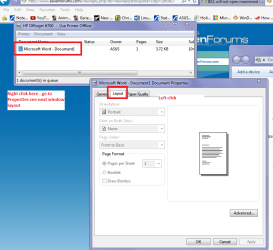
One thing you can do is set a simple document up and tell it to print then go to Start then into Devices and Printers > right click on your default printer and then go to "See what is printing" > right click on the document and go to properties then Layout tab see what is there (in pic)

Another simple thing you could do is run these two sans for starters if you have not done so already
http://www.sevenforums.com/tutorials/139810-sfc-scannow-run-command-prompt-boot.html

http://www.sevenforums.com/tutorials/433-disk-check.html (you may need to run this using the /f and /r "switches" you will see in the tutorial.
 

Attachments

  • PRINTER.PNG
    PRINTER.PNG
    41.4 KB · Views: 1

My Computer My Computer

Computer type
PC/Desktop
Computer Manufacturer/Model Number
Own build (new) Desk1 / Asus ROG Win 7 / Desk2 1st build
OS
Desk1 7 Home Prem / Desk2 10 Pro / Main lap Asus ROG 10 Pro 2 laptop Toshiba 7 Pro Asus P2520 7 & 10
CPU
Desk1 i5 3750K / Laptop i7 GTX 860M / Desk2 i5 2500
Motherboard
Desk1 Asus P877-V / Desk2 Gigabyte H67 UD3H / Laptop ?
Memory
Desk1 8GB (1866) / Desk2 16GB (1333) / Laptop 8Gb DDR3
Graphics Card(s)
Desk 1& 2NVidia GTX 650 & Laptops on board Intel
Sound Card
Desk 1 & 2 -XONAR DG Realtek High Def audio Laptop
Monitor(s) Displays
Desk 1 Benq HD 2450 / Desk2 Philips 24" / Laptop 17.5"
Screen Resolution
1920x1080 D1 & D2 & Laptop 1
Hard Drives
Desk1 Samsung 120GB 830 SSD
Asus ROG 256GB 850 Pro SSD
Desk2 Samsung 840 256 SSD
Toshiba 120GB EVO
PSU
Desk 1 Corsair HX 1050/ Laptop ? / Desk 2 Corsair HX 650
Case
Desk 1 Cooler HAF XM ? Toshiba laptop / Desk2 Coolermaster
Cooling
Fans on all Desk1 -2 Desk2 - all Coolermasters 5 Laptop ?
Keyboard
Desk 1 MS Sidewinder X6 Desk 2 MS Sidewinder X 4
Mouse
Desk 1&2 - Gigabyte MS 900 gamer - laptop - Logitec wireless
Internet Speed
ADSL2+
Other Info
One other Desktop (tester) and spare Toshba laptop both with SSD's
Running Kaspersky 2016 ISS on all machines config'd identically
Logitec audio stereo systems on each machine (x3)
Canon MG5250MFC
Router/modem TP-Link running WPA2SK
Hello ICIT2LOL and thank you so much for the useful 2 scans and the screenshots which you so kindly sent me!

Just as I was reading your instructions and getting ready to try them, I thought I’d give another try to the margins because I really needed to mail that letter. I customized the margins in such a way that finally my letter was nicely centered and I was able to send it out. But one shouldn’t have to do all of that customization. For years I never had this problem, I’d just use the same on all 4 sides or occasionally I’d customize slightly and in only seconds!

But I intend to follow all your good instructions as it never hurts to clean and “disinfect” one’s computer, and may I ask you for help again if I get stuck while trying to do the scanning and cleaning?

Thanks again so much!
 

My Computer My Computer

Computer Manufacturer/Model Number
Dell Inspiron 560 Desktop
OS
Windows 7 Home, 64 bit.
Monitor(s) Displays
LCD
No problems Adela glad it worked out I just set the page layout as I need it then save as the default so it always opens up in that format. I like to keep things like letterheads for example as "document" so it is ready to go and all you need to do is type in the date etc.

Now two little tips / programs that you might like too to make the machine more efficient and faster are these. Most of us sue the CCleaner and as long as you are careful of picking the cookies out that are pass worded to sites you like it de-clutters your machine very efficiently.
To do that see the tutorial and when the Analyse is done go to Options > Cookies > highlight the cookies you want to save > click the arrow to the right and it will not be removed when you return to the cleaner and run it. It save a lot of junk being stored on the machine which gets loaded each time you power it up and which are stored in the memory eating away at your RAM space.

http://www.sevenforums.com/tutorials/306648-ccleaner-delete-junk-files.html

This tutorial will help you save a lot of time in powering up and shutting down and in general use of the machine.
http://www.sevenforums.com/tutorials/11728-optimize-windows-7-a.html

If you are not sure of what to do just post back in those tutorials the authours are more than happy to help.

One last thing you have a security suite on the machine and I and many others use these free on call scanners to catch the stuff the main security misses.
https://www.malwarebytes.org/antimalware/ < be sure when you are installing to un-tick the trial version just take it slowly because you can often miss it and it will nag you that the trial version is over when it expires in a month.
SUPERAntiSpyware | Remove Malware | Remove Spyware - AntiMalware, AntiSpyware, AntiAdware! no such issues with tis one and one I run regularly it picks up a fair amount of tracking stuff and Possible Unwanted Programs (PUP's) and they are both free.

Well I hope I haven't overloaded you with info and good luck.
John:)
 

My Computer My Computer

Computer type
PC/Desktop
Computer Manufacturer/Model Number
Own build (new) Desk1 / Asus ROG Win 7 / Desk2 1st build
OS
Desk1 7 Home Prem / Desk2 10 Pro / Main lap Asus ROG 10 Pro 2 laptop Toshiba 7 Pro Asus P2520 7 & 10
CPU
Desk1 i5 3750K / Laptop i7 GTX 860M / Desk2 i5 2500
Motherboard
Desk1 Asus P877-V / Desk2 Gigabyte H67 UD3H / Laptop ?
Memory
Desk1 8GB (1866) / Desk2 16GB (1333) / Laptop 8Gb DDR3
Graphics Card(s)
Desk 1& 2NVidia GTX 650 & Laptops on board Intel
Sound Card
Desk 1 & 2 -XONAR DG Realtek High Def audio Laptop
Monitor(s) Displays
Desk 1 Benq HD 2450 / Desk2 Philips 24" / Laptop 17.5"
Screen Resolution
1920x1080 D1 & D2 & Laptop 1
Hard Drives
Desk1 Samsung 120GB 830 SSD
Asus ROG 256GB 850 Pro SSD
Desk2 Samsung 840 256 SSD
Toshiba 120GB EVO
PSU
Desk 1 Corsair HX 1050/ Laptop ? / Desk 2 Corsair HX 650
Case
Desk 1 Cooler HAF XM ? Toshiba laptop / Desk2 Coolermaster
Cooling
Fans on all Desk1 -2 Desk2 - all Coolermasters 5 Laptop ?
Keyboard
Desk 1 MS Sidewinder X6 Desk 2 MS Sidewinder X 4
Mouse
Desk 1&2 - Gigabyte MS 900 gamer - laptop - Logitec wireless
Internet Speed
ADSL2+
Other Info
One other Desktop (tester) and spare Toshba laptop both with SSD's
Running Kaspersky 2016 ISS on all machines config'd identically
Logitec audio stereo systems on each machine (x3)
Canon MG5250MFC
Router/modem TP-Link running WPA2SK
Oh THANK YOU SO MUCH for all the great info, especially for the tutorials and more info on security!!! Being now free from the most annoying margins problem, I'll try this information at my own pace. I appreciate all your help a lot! :) Adela
 
Last edited:

My Computer My Computer

Computer Manufacturer/Model Number
Dell Inspiron 560 Desktop
OS
Windows 7 Home, 64 bit.
Monitor(s) Displays
LCD
No problems Adela that is what we are all here for:D
 

My Computer My Computer

Computer type
PC/Desktop
Computer Manufacturer/Model Number
Own build (new) Desk1 / Asus ROG Win 7 / Desk2 1st build
OS
Desk1 7 Home Prem / Desk2 10 Pro / Main lap Asus ROG 10 Pro 2 laptop Toshiba 7 Pro Asus P2520 7 & 10
CPU
Desk1 i5 3750K / Laptop i7 GTX 860M / Desk2 i5 2500
Motherboard
Desk1 Asus P877-V / Desk2 Gigabyte H67 UD3H / Laptop ?
Memory
Desk1 8GB (1866) / Desk2 16GB (1333) / Laptop 8Gb DDR3
Graphics Card(s)
Desk 1& 2NVidia GTX 650 & Laptops on board Intel
Sound Card
Desk 1 & 2 -XONAR DG Realtek High Def audio Laptop
Monitor(s) Displays
Desk 1 Benq HD 2450 / Desk2 Philips 24" / Laptop 17.5"
Screen Resolution
1920x1080 D1 & D2 & Laptop 1
Hard Drives
Desk1 Samsung 120GB 830 SSD
Asus ROG 256GB 850 Pro SSD
Desk2 Samsung 840 256 SSD
Toshiba 120GB EVO
PSU
Desk 1 Corsair HX 1050/ Laptop ? / Desk 2 Corsair HX 650
Case
Desk 1 Cooler HAF XM ? Toshiba laptop / Desk2 Coolermaster
Cooling
Fans on all Desk1 -2 Desk2 - all Coolermasters 5 Laptop ?
Keyboard
Desk 1 MS Sidewinder X6 Desk 2 MS Sidewinder X 4
Mouse
Desk 1&2 - Gigabyte MS 900 gamer - laptop - Logitec wireless
Internet Speed
ADSL2+
Other Info
One other Desktop (tester) and spare Toshba laptop both with SSD's
Running Kaspersky 2016 ISS on all machines config'd identically
Logitec audio stereo systems on each machine (x3)
Canon MG5250MFC
Router/modem TP-Link running WPA2SK
Back
Top