
Firefox Still Becoming Slow with Use

debodun

Member
Member
VIP
Local time
3:07 PM
Messages
295
Location
upstate NY
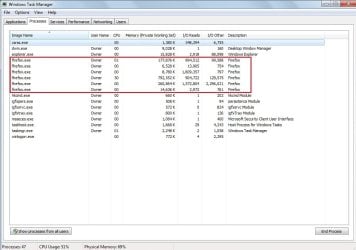
As the day progresses, the Firefox on my system (62.0.3) gets slower and slower to respond. Facebook takes some time to load and I get hesitations on sites that use Flash Player. Sometimes closing the browser and re-starting it helps, but not always, and why should I have to keep doing that? I notice in Task Manager that when Firefox is running, there are 6 processes (see attached screen shot). Is that normal?
 

Attachments
  • firefox TM.jpg
    firefox TM.jpg
    70.7 KB · Views: 0

My Computer My Computer

Computer type
PC/Desktop
Computer Manufacturer/Model Number
refurb in an HP/Compaq case
OS
Windows 7 Ultimate x64
CPU
1.86 GHz Intrel Core 2
Motherboard
HP 0A60h XU1
Memory
3 GB Dual Channel DDR2 @ 3.32 MHz
Graphics Card(s)
Intel Q965/Q963 Express chipset
Monitor(s) Displays
Dell CRT
Hard Drives
977GB Samsung HD 103 SI ATA
Case
HP Compaq DC5800
Mouse
wired optical
Antivirus
Microsoft Security Essentials, MalwareBytes, Spyware Blaster
Browser
Firefox 32-bit

My Computers My Computers

System One System Two

I agree with townsbg regarding your FF profile, in that your FF profile may have become corrupt.
Most, if not all SpeedyFox About:config tweaks are incorporated in FF Quantum. So installing this FF add-on would not improve your issue.

FF Quantum is now Multi-process, which is why you see multiple firefox.exe entries in Task Manager. This may be an issue on your computer.
Firefox Quantum was designed to increased browsing speeds by turning Mozilla’s browser into a multi-process one like Chrome. While this has worked for many people, some have found that Firefox has actually been slower since the big upgrade.
This may be because your PC isn’t handling the demands of multi-process windows very well, in which case you can disable this feature.

To access about:config open a new tab, in that new window, in the address bar, top of browser where the https: is type about:config and press enter, acknowledge that you will be careful in the popup. Copy and paste
browser.tabs.remote.autostart
into search. Double-left click it when it appears to change the value from true to false.
Close window. Restart browser.

CCleaner is a good choice, and I have it installed on my computers. Unless you know what you are doing, leave the settings on default.
You can look at your startup programs to see what you don't need to load at startup. I have only essentials to load as startup.
You can also run disk cleanup extended, which is the extended version of disk cleanup.
Disk Cleanup : Extended - Windows 7 Help Forums

 
Last edited:

My Computer My Computer

Computer type
PC/Desktop
Computer Manufacturer/Model Number
HP Desktop & Compaq Laptop
OS
Win 10 x64, Linux Lite, Win 7 x64, BlackArch, & Kali
Hard Drives
Samsung 850 Pro 256Gb,
Hitachi HDD 1Tb,
Crucial MX SSD 250Gb
Segate 3Tb USB 3.0 Ext. Backup HDD
Internet Speed
150Mbps dn, 20Mbps up
Antivirus
Avast Free, Malwarebytes Anti-Exploit & Anti-Ransomware
Browser
Firefox, Chrome, Opera, & VPN

My Computer My Computer

Computer type
PC/Desktop
Computer Manufacturer/Model Number
refurb in an HP/Compaq case
OS
Windows 7 Ultimate x64
CPU
1.86 GHz Intrel Core 2
Motherboard
HP 0A60h XU1
Memory
3 GB Dual Channel DDR2 @ 3.32 MHz
Graphics Card(s)
Intel Q965/Q963 Express chipset
Monitor(s) Displays
Dell CRT
Hard Drives
977GB Samsung HD 103 SI ATA
Case
HP Compaq DC5800
Mouse
wired optical
Antivirus
Microsoft Security Essentials, MalwareBytes, Spyware Blaster
Browser
Firefox 32-bit
Speedy Fox isn't a add-on it's a standard exe that checks and optimization of the data bases FF uses
 

My Computer My Computer

Computer type
PC/Desktop
OS
win 8 32 bit
Well, actually it's both, two separate programs, one SpeedyFox add-on for Firefox and as samuria
articulated, Speedyfox.exe is an executable program! Which I just downloaded and ran. I'll see if I notice any performance improvements!

Great Day I learned something! Thanks for your input samuria!
 

My Computer My Computer

Computer type
PC/Desktop
Computer Manufacturer/Model Number
HP Desktop & Compaq Laptop
OS
Win 10 x64, Linux Lite, Win 7 x64, BlackArch, & Kali
Hard Drives
Samsung 850 Pro 256Gb,
Hitachi HDD 1Tb,
Crucial MX SSD 250Gb
Segate 3Tb USB 3.0 Ext. Backup HDD
Internet Speed
150Mbps dn, 20Mbps up
Antivirus
Avast Free, Malwarebytes Anti-Exploit & Anti-Ransomware
Browser
Firefox, Chrome, Opera, & VPN
Yes, freeware Speedyfox.exe, according to its' blurb, recompacts the various SQL databases that Firefox uses. I'm now on Firefox 63 beta14 and have used Speedyfox for about 3 weeks now. I did this because Firefox was becoming intolerably slow to load (admittedly I have over 25 tabs open on start - I just can't be bothered readdressing them all over each time) and it *really* has made a difference. Side effects - too early to tell but I can't help feeling that one never gets something for nothing. So far, I tend to run Speedyfox once a week, if I remember.
 

My Computer My Computer

Computer type
Laptop
Computer Manufacturer/Model Number
HP 250 G7
OS
Windows 7 Pro x64
CPU
Intel i5-8265U
Motherboard
Intel Coffee Lake
Memory
8gb
Graphics Card(s)
Intel Iris Plus 655
Sound Card
Realtek HDA
Monitor(s) Displays
Generic
Screen Resolution
1366 x 768
Hard Drives
Crucial P5 NVMe 1Tb internal
WD's 4Tb, 3Tb, 2 x 2Tb external
Mouse
Logi wireless
Internet Speed
45 Mbps
Antivirus
AVG
Browser
Firefox 88, Pale Moon 29, Brave 129
Other Info
Combination of i5-8265U with Crucial P5 achieves Crystal Bench scores > 5000

Iris Plus GPU (Whiskey Lake) driver from BioStar

HP 250 G7 is a budget machine

My Computers My Computers

System One System Two

Back
Top