No audio coming out of HDMI

Gigaflop

New member
Local time
3:55 PM
Messages
3
Going to admit to being a bit of a noob here. Once upon a time I used to build computers and had to deal with insane driver problems and other issues back in the day, but fast forward a few years and now I'm faced with a driver problem and have no clue how to resolve.

I have a Gateway P-6860FX laptop. It has an nVidia 8800M GTS and an HDMI output jack.

I did a full clean install of Windows 7, and no longer get audio output through the HDMI jack. I have spent 2 days trying to resolve this problem, but I'm at my wits end. Mind you, Gateway doesn't even seem to realize that Window 7 is out, considering they have NO mention of it in any of the driver support pages, and after contacting them, I have decided I will never buy a gateway again. They basically said that the laptop is out of warantee and they won't answer the support emails unless I PAY to call them. Awesome.

I know there are a lot of threads about HDMI audio not working, and this whole Realtek business, but I have NO idea if I have a realtek audio card. I can't find any info anywhere telling me what kind of audio chip is in my laptop. I went ahead and assumed it was since everyone seems to mention realtek, but when I installed the drivers... nothing happened. Nothing. Not even an error. It appeared to install... and everything was exactly the same as before. If I try to force windows to update the driver and point it to the realtek folder, it says I've got the latest version of the driver.

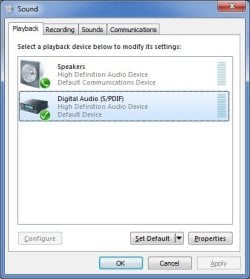
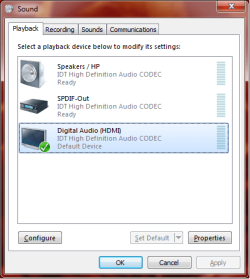
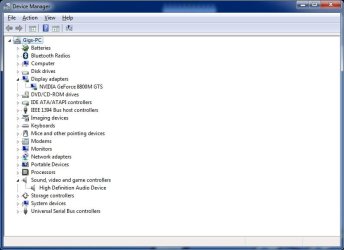
I've attached two screenshots of what I see in the sound control panel and the Device Manager... but no audio coming out of the HDMI. I'm not even sure what the heck S/PDIF is, and it sounds like it's some sort of connection between the sound card and the video card, but considering it is a laptop, I'm not even sure I'm supposed to see this. When I inspect the properties of it, Windows seems to think it's an optical output jack. I've deleted the driver and let windows reinstall it to no avail. Other images I've seen here, people seem to see an HDMI audio device. As can be seen from my images, I don't.

So does anyone have any idea?
 

Attachments
  • DeviceManager-SS.jpg
    DeviceManager-SS.jpg
    40.6 KB · Views: 176
  • Sound-Screenshot.jpg
    Sound-Screenshot.jpg
    26 KB · Views: 127

My Computer My Computer

At a glance

Windows 7Intel Core 2 Duo T5550 / 1.83 GHz4GBNVIDIA GeForce 8800M GTS
Computer Manufacturer/Model Number
Gateway 6860FX
OS
Windows 7
CPU
Intel Core 2 Duo T5550 / 1.83 GHz
Motherboard
Laptop
Memory
4GB
Graphics Card(s)
NVIDIA GeForce 8800M GTS
Sound Card
High Definition Audio (?)
Monitor(s) Displays
17.0 in TFT active matrix 1440 x 900 ( WXGA+ )
Hard Drives
320.0 GB - Serial ATA-300 - 5400.0 rpm
Control panel>whatever your audio device is> set your device output as S/PDIF if you had it working on another OS(and it seems you did) this should fix it...
 

My Computer My Computer

At a glance

Windows 7 Ultimate x64 RTMAMD Athlon II X2 240 @ 3.2Ghz6GB Mushkin DDR3 PC-1333ATI Radeon HD 4200 IGP Hybrid CrossFireX w\ S...
Computer Manufacturer/Model Number
Home Built
OS
Windows 7 Ultimate x64 RTM
CPU
AMD Athlon II X2 240 @ 3.2Ghz
Motherboard
Gigabyte GA-MA785GMT-UD2H
Memory
6GB Mushkin DDR3 PC-1333
Graphics Card(s)
ATI Radeon HD 4200 IGP Hybrid CrossFireX w\ Sapphire HD3450
Sound Card
Onboard Realtek HD audio controller
Monitor(s) Displays
D-SUB: LG W2343T-PF 23" LCD HDMI: LG 32LH20 32" LCD
Screen Resolution
1920*1080
Hard Drives
WD Caviar Green 1TB SATA3
PSU
Cooler Master Elite Power 400W
Case
Cooler Master Elite 360
Cooling
AMD Stock :)
Keyboard
Crappy wirelss logitech
Mouse
crappy wireless logitech
Internet Speed
792k
Control panel>whatever your audio device is> set your device output as S/PDIF if you had it working on another OS(and it seems you did) this should fix it...

I wish I had paid attention to what it looked like in Vista. I, for some reason, am pretty sure there used to be something that said "HDMI" before, but now all I have is this S/PDIF thing.

I'm not sure what you are referring to, I don't have anything specific to my audio device in my control panel. I only have what you see in the photos I posted. (Or am I mistaking what you're saying?)
 

My Computer My Computer

At a glance

Windows 7Intel Core 2 Duo T5550 / 1.83 GHz4GBNVIDIA GeForce 8800M GTS
Computer Manufacturer/Model Number
Gateway 6860FX
OS
Windows 7
CPU
Intel Core 2 Duo T5550 / 1.83 GHz
Motherboard
Laptop
Memory
4GB
Graphics Card(s)
NVIDIA GeForce 8800M GTS
Sound Card
High Definition Audio (?)
Monitor(s) Displays
17.0 in TFT active matrix 1440 x 900 ( WXGA+ )
Hard Drives
320.0 GB - Serial ATA-300 - 5400.0 rpm
I'm assuming you have the HDMI cable plugged in from your laptop to a monitor (TV?). On my Toshiba TV, there is a setting to switch between PC sound in (RCA cables) and digital input (SPDIF via HDMI cable). Just a thought.

Also, on my desktop, which is actually a floortop, the MSI video card came with a little two wire cable to pass the audio from the motherboard SPDIF header to the video card and onto the HDMI cable.
 

My Computer My Computer

At a glance

Windows Vista Home Premium -> Windows 7 Home ...
OS
Windows Vista Home Premium -> Windows 7 Home Premium
Control panel>whatever your audio device is> set your device output as S/PDIF if you had it working on another OS(and it seems you did) this should fix it...

I wish I had paid attention to what it looked like in Vista. I, for some reason, am pretty sure there used to be something that said "HDMI" before, but now all I have is this S/PDIF thing.

I'm not sure what you are referring to, I don't have anything specific to my audio device in my control panel. I only have what you see in the photos I posted. (Or am I mistaking what you're saying?)

Assuming your drivers have been updated to support Windows 7, you will need to right click on the spdif icon and choose "show disabled devices" after that you should be able to choose HDMI then just set as default output device.
 

My Computer My Computer

At a glance

Windows 7 Ult, Windows 8.1 Pro,Q9650-4.275GHz, E8600 4.5GHz, E6750-3.8GHzG.Skill PC2 9600 1200Mhz 5 5 5 15 2TGTX480
Computer type
PC/Desktop
Computer Manufacturer/Model Number
Home built
OS
Windows 7 Ult, Windows 8.1 Pro,
CPU
Q9650-4.275GHz, E8600 4.5GHz, E6750-3.8GHz
Motherboard
Evga 780i FTW
Memory
G.Skill PC2 9600 1200Mhz 5 5 5 15 2T
Graphics Card(s)
GTX480
Sound Card
Asus Xonar D2
Monitor(s) Displays
HannsG
Screen Resolution
1680X1050
Hard Drives
GSkill Phoenix Pro 120GB SSD
PSU
ThermalTake Toughpower 1000Watt modular
Case
ThermalTake XaserV
Cooling
Xigmatek S1283
Keyboard
Logitech G15
Mouse
Logitech G9
Internet Speed
T1
Im having the same issues with the same hardware

I have the same setup as Gigaflop. I have now been trying for two weeks to find a solution to no avail. All preivous post in this forum do not solve the problem of: producing sound over the HDMI cable.

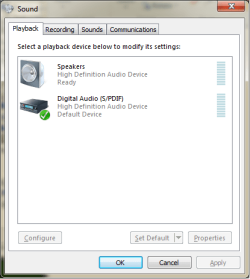
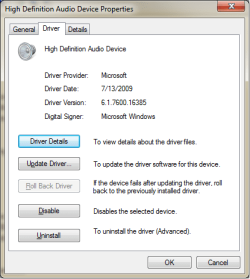
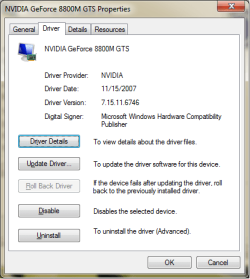
I've attached three screenshots of what I see in the sound control panel(I have the exact same results as gigaflop), Sound Device Driver Details, and Graphics Card Driver Details. The HDMI audio device is missing see attached.

I know the S/PDIF is the device that connects the video card to the sound card to allow ouput over hdmi. However, the HDMI audio device is still missing.

Current failed Attempts not mentioned in the post:

(1) The Gateway P6860 FX has an intel PM65 Chipset as specified here:
?????????????????????????

So I tried Intel PM 65 Chipset drivers. But nothing was installed or updated.

(2) I then saw a post that mentioned you may need to install and update for Nvidia HDMI Audio Driver. It also made no changes to my system.

(3)I tried the vista gateway Chipset Driver with no luck.

(4)I also uninstalled/reinstalled the Windows Driver but it has failed as well.

Im out of ideas. And would really like a solution other then reverting to Vista. That would be a wasted of my windows 7 purchase and I would not be able to utilize the new media center features.
moz-screenshot.png
 

Attachments

  • SoundDevices.png
    SoundDevices.png
    13 KB · Views: 58
  • SounDriverDetails.png
    SounDriverDetails.png
    12.8 KB · Views: 31
  • GeforeDriverDetails.png
    GeforeDriverDetails.png
    15 KB · Views: 30

My Computer My Computer

At a glance

Windows 7Intel Core2 Duo T55504GBGefore 8800M GTS
Computer Manufacturer/Model Number
Gateway P-6860FX
OS
Windows 7
CPU
Intel Core2 Duo T5550
Memory
4GB
Graphics Card(s)
Gefore 8800M GTS

My Computer My Computer

At a glance

Windows 7 Ultimate x64 RTMAMD Athlon II X2 240 @ 3.2Ghz6GB Mushkin DDR3 PC-1333ATI Radeon HD 4200 IGP Hybrid CrossFireX w\ S...
Computer Manufacturer/Model Number
Home Built
OS
Windows 7 Ultimate x64 RTM
CPU
AMD Athlon II X2 240 @ 3.2Ghz
Motherboard
Gigabyte GA-MA785GMT-UD2H
Memory
6GB Mushkin DDR3 PC-1333
Graphics Card(s)
ATI Radeon HD 4200 IGP Hybrid CrossFireX w\ Sapphire HD3450
Sound Card
Onboard Realtek HD audio controller
Monitor(s) Displays
D-SUB: LG W2343T-PF 23" LCD HDMI: LG 32LH20 32" LCD
Screen Resolution
1920*1080
Hard Drives
WD Caviar Green 1TB SATA3
PSU
Cooler Master Elite Power 400W
Case
Cooler Master Elite 360
Cooling
AMD Stock :)
Keyboard
Crappy wirelss logitech
Mouse
crappy wireless logitech
Internet Speed
792k
That Solved the Problem

I want to give a special thanks to the previous poster. My problem is solved and Now I am quite happy.

Here is a screen shot of the drive being there after running the 32bit install from the previous post.
 

Attachments

  • SoundRiverWorking.png
    SoundRiverWorking.png
    16.2 KB · Views: 57

My Computer My Computer

At a glance

Windows 7Intel Core2 Duo T55504GBGefore 8800M GTS
Computer Manufacturer/Model Number
Gateway P-6860FX
OS
Windows 7
CPU
Intel Core2 Duo T5550
Memory
4GB
Graphics Card(s)
Gefore 8800M GTS
Just glad to hear it worked :)
 

My Computer My Computer

At a glance

Windows 7 Ultimate x64 RTMAMD Athlon II X2 240 @ 3.2Ghz6GB Mushkin DDR3 PC-1333ATI Radeon HD 4200 IGP Hybrid CrossFireX w\ S...
Computer Manufacturer/Model Number
Home Built
OS
Windows 7 Ultimate x64 RTM
CPU
AMD Athlon II X2 240 @ 3.2Ghz
Motherboard
Gigabyte GA-MA785GMT-UD2H
Memory
6GB Mushkin DDR3 PC-1333
Graphics Card(s)
ATI Radeon HD 4200 IGP Hybrid CrossFireX w\ Sapphire HD3450
Sound Card
Onboard Realtek HD audio controller
Monitor(s) Displays
D-SUB: LG W2343T-PF 23" LCD HDMI: LG 32LH20 32" LCD
Screen Resolution
1920*1080
Hard Drives
WD Caviar Green 1TB SATA3
PSU
Cooler Master Elite Power 400W
Case
Cooler Master Elite 360
Cooling
AMD Stock :)
Keyboard
Crappy wirelss logitech
Mouse
crappy wireless logitech
Internet Speed
792k
My thanks as well

I too wanted to chime in and say that the driver did indeed work for me as well.

Thank you very much ba5ik. You have saved my sanity.
 

My Computer My Computer

At a glance

Windows 7Intel Core 2 Duo T5550 / 1.83 GHz4GBNVIDIA GeForce 8800M GTS
Computer Manufacturer/Model Number
Gateway 6860FX
OS
Windows 7
CPU
Intel Core 2 Duo T5550 / 1.83 GHz
Motherboard
Laptop
Memory
4GB
Graphics Card(s)
NVIDIA GeForce 8800M GTS
Sound Card
High Definition Audio (?)
Monitor(s) Displays
17.0 in TFT active matrix 1440 x 900 ( WXGA+ )
Hard Drives
320.0 GB - Serial ATA-300 - 5400.0 rpm
Back
Top