- Local time
- 2:21 PM
- Messages
- 186
Hi Guys.
No Audio sound Realtek/NVIDIA on Windows XP Sp3.
I know this is Windows 7 forum but if I wanted to install Window 7 on my Windows XP SP3 it will give the same problem.
I need to install a new 2.TB hard drive.
I've asked about this on a Window XP forum but you don't link links to another forum so I' post the text posted.
For many years I've used my Windows XP SP3 and it works great. A few months ago it wouldn't start up it kept showing the boot menu. That's another long story if anyone is interested.
I put back the original 500GB drive just so I can access emails. The only hard drive was set to the old graphics card. The new graphics card is NVIDIA GeForce GTX 770.
When you insert the CD and install drivers it says it needs internet connection to do so. To me that's total bull, it should install the graphics drivers else what's the point in having a CD. Its a graphics card not a sound card.
Its a Gigabyte motherboard and you insert the CD and install all drivers and updates. It installs Realtek Audio Driver
The install options shows NVIDIA High Definition Audio, physics, GeForce desktop. Its a graphics card why the hell does it force When its restarts there is no audio/sound. Device Manager shows
Other devices
Audio Device on High Definition Audio Bus !!!!
Speccy shows
Audio
Sound Cards
NVIDIA High Definition Audio
Realtek High Definition Audio
Playback Device
Realtek HD Audio Input
Recording Device
Realtek HD Audio output
http://speccy.piriform.com/results/QIn2oJUyqcQBPVUA6gp0VAc
I remember on the last rebuild there was no sound but I sorted that but that was along time ago so I can't remember what I did exactly.
I downloaded and installed Realtek High Definition Audio XP 2.74 XP. from FileHippo but the audio still doesn't work
Before I put the new Seagate Barracuda 2.0TB hard drive in I want to get the audio sorted.
I check Device Manager and it still shows NVIDIA High Definition Audio file version 5.1.2600.5512 (xpsp.080413-2108) and Realtek High Definition Audio with a list of file names. Some are the same on both audio's.
NVIDIA High Definition Audio file version 5.1.2600.5512 (xpsp.080413-2108)
C:\Windows\system32\drivers\drmk.sys
C:\Windows\system32\drivers\nvhda.sys
C:\Windows\system32\drivers\portcls.sys
C:\Windows\system32\drivers\stream.sys
C:\Windows\system32\ksuer.dll
C:\Windows\system32\nvhdagenco3220103.dll
C:\Windows\system32\nvhdap32.dll
C:\Windows\system32\wdmaud.drv
Realtek High Definition Audio file version 1.6.0.2
C:\Windows\ALCMTR.EXE
C:\Windows\ALCWZRD.EXE
C:\Windows\MicCalc.exe
C:\Windows\RTHDCPL.EXE
C:\Windows\RtkAudioServices.exe
C:\Windows\RTLCPL.EXE
C:\Windows\RtlUpd.exe
C:\Windows\SkyTel.exe
C:\Windows\system32\SOUNDMAN.EXE
C:\Windows\system32\ALSNDMGR.CPL
C:\Windows\system32\drivers\Ambfilt.sys
C:\Windows\system32\drivers\drmk.sys
C:\Windows\system32\drivers\Monfilt.sys
C:\Windows\system32\portcls.sys
C:\Windows\system32\RtkHDAud.sys
C:\Windows\system32\stream.sys
C:\Windows\system32\ksuser.dll
C:\Windows\system32\RTCOM\RTCOMDLL.dll
C:\Windows\system32\RTCOM\RTLCPAPI.dll
C:\Windows\system32\RtkColnstXP.dll
C:\Windows\system32\RTSndMgr.CPL
C:\Windows\system32\wdmaud.drv
C:\Windows\vncutil.exe
If I uninstall NVIDIA High Definition Audio and check for any changes if puts it back.
If I uninstall NVIDIA High Definition Audio and check for any changes if puts it back.
If I search the registry for NVIDIA High Definition Audio and try an delete what it shows its says I can't probably because its in use.
Speccy still shows NVIDIA High Definition Audio as the main controller as well as list Realtek High Definition Audio.
Do you know why NVIDIA graphics card has audio built in?
Control Panel
Audio
Realtek HD Audio Input
Sound Recording
Realtek HD Audio Input
Midi music playback
Midi music playback
Microsoft GS Wavetable SW Synth
Voice
Voice playback
Realtek HD Audio Input
Voice recording
Realtek HD Audio Input
Hardware
NVIDA High Definition Audio
Realtek High Definition Audio
The BIOS Audio is set as its always been for year. The Audio played properly on the last hard drive.
If Realtek High Definition Audio is the default why does Speccy show NVIDA High Definition Audio even though both are listed in the spec?
You would have to Google NAVIDA Gigabyte GTX 770 graphics card to find the spec. It doesn't show Audio even though the driver install shows NAVIDA Audio which I never select
https://www.geforce.co.uk/hardware/desktop-gpus/geforce-gtx-770/specifications
It doesn't list on GeForce GTX 770 CD driver install it shows HD Audio Driver v1.3.24.2. If you want a picture let me know?
Speccy still shows NVIDA High Definition Audio
Control Panel shows:
Volume
Realtek HD Audio output
Sound playback
Default Device
Realtek HD Audio output
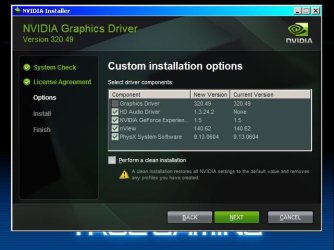
So you believe it installs NVIDA High Definition Audio here is a screen dump of the driver installation.
Which won't add as an 44Kb attachment.
NVIDA graphics driver install
Graphics Driver v3.20.48
HD Audio Driver v1.3.24.2
NVIDA GeForce Experience v1.5
nView v140.62
PhysX System Software v9.13.06.04
Any suggestions will be appreciated.
No Audio sound Realtek/NVIDIA on Windows XP Sp3.
I know this is Windows 7 forum but if I wanted to install Window 7 on my Windows XP SP3 it will give the same problem.
I need to install a new 2.TB hard drive.
I've asked about this on a Window XP forum but you don't link links to another forum so I' post the text posted.
For many years I've used my Windows XP SP3 and it works great. A few months ago it wouldn't start up it kept showing the boot menu. That's another long story if anyone is interested.
I put back the original 500GB drive just so I can access emails. The only hard drive was set to the old graphics card. The new graphics card is NVIDIA GeForce GTX 770.
When you insert the CD and install drivers it says it needs internet connection to do so. To me that's total bull, it should install the graphics drivers else what's the point in having a CD. Its a graphics card not a sound card.
Its a Gigabyte motherboard and you insert the CD and install all drivers and updates. It installs Realtek Audio Driver
The install options shows NVIDIA High Definition Audio, physics, GeForce desktop. Its a graphics card why the hell does it force When its restarts there is no audio/sound. Device Manager shows
Other devices
Audio Device on High Definition Audio Bus !!!!
Speccy shows
Audio
Sound Cards
NVIDIA High Definition Audio
Realtek High Definition Audio
Playback Device
Realtek HD Audio Input
Recording Device
Realtek HD Audio output
http://speccy.piriform.com/results/QIn2oJUyqcQBPVUA6gp0VAc
I remember on the last rebuild there was no sound but I sorted that but that was along time ago so I can't remember what I did exactly.
I downloaded and installed Realtek High Definition Audio XP 2.74 XP. from FileHippo but the audio still doesn't work
Before I put the new Seagate Barracuda 2.0TB hard drive in I want to get the audio sorted.
I check Device Manager and it still shows NVIDIA High Definition Audio file version 5.1.2600.5512 (xpsp.080413-2108) and Realtek High Definition Audio with a list of file names. Some are the same on both audio's.
NVIDIA High Definition Audio file version 5.1.2600.5512 (xpsp.080413-2108)
C:\Windows\system32\drivers\drmk.sys
C:\Windows\system32\drivers\nvhda.sys
C:\Windows\system32\drivers\portcls.sys
C:\Windows\system32\drivers\stream.sys
C:\Windows\system32\ksuer.dll
C:\Windows\system32\nvhdagenco3220103.dll
C:\Windows\system32\nvhdap32.dll
C:\Windows\system32\wdmaud.drv
Realtek High Definition Audio file version 1.6.0.2
C:\Windows\ALCMTR.EXE
C:\Windows\ALCWZRD.EXE
C:\Windows\MicCalc.exe
C:\Windows\RTHDCPL.EXE
C:\Windows\RtkAudioServices.exe
C:\Windows\RTLCPL.EXE
C:\Windows\RtlUpd.exe
C:\Windows\SkyTel.exe
C:\Windows\system32\SOUNDMAN.EXE
C:\Windows\system32\ALSNDMGR.CPL
C:\Windows\system32\drivers\Ambfilt.sys
C:\Windows\system32\drivers\drmk.sys
C:\Windows\system32\drivers\Monfilt.sys
C:\Windows\system32\portcls.sys
C:\Windows\system32\RtkHDAud.sys
C:\Windows\system32\stream.sys
C:\Windows\system32\ksuser.dll
C:\Windows\system32\RTCOM\RTCOMDLL.dll
C:\Windows\system32\RTCOM\RTLCPAPI.dll
C:\Windows\system32\RtkColnstXP.dll
C:\Windows\system32\RTSndMgr.CPL
C:\Windows\system32\wdmaud.drv
C:\Windows\vncutil.exe
If I uninstall NVIDIA High Definition Audio and check for any changes if puts it back.
If I uninstall NVIDIA High Definition Audio and check for any changes if puts it back.
If I search the registry for NVIDIA High Definition Audio and try an delete what it shows its says I can't probably because its in use.
Speccy still shows NVIDIA High Definition Audio as the main controller as well as list Realtek High Definition Audio.
Do you know why NVIDIA graphics card has audio built in?
Control Panel
Audio
Realtek HD Audio Input
Sound Recording
Realtek HD Audio Input
Midi music playback
Midi music playback
Microsoft GS Wavetable SW Synth
Voice
Voice playback
Realtek HD Audio Input
Voice recording
Realtek HD Audio Input
Hardware
NVIDA High Definition Audio
Realtek High Definition Audio
The BIOS Audio is set as its always been for year. The Audio played properly on the last hard drive.
If Realtek High Definition Audio is the default why does Speccy show NVIDA High Definition Audio even though both are listed in the spec?
You would have to Google NAVIDA Gigabyte GTX 770 graphics card to find the spec. It doesn't show Audio even though the driver install shows NAVIDA Audio which I never select
https://www.geforce.co.uk/hardware/desktop-gpus/geforce-gtx-770/specifications
It doesn't list on GeForce GTX 770 CD driver install it shows HD Audio Driver v1.3.24.2. If you want a picture let me know?
Speccy still shows NVIDA High Definition Audio
Control Panel shows:
Volume
Realtek HD Audio output
Sound playback
Default Device
Realtek HD Audio output
So you believe it installs NVIDA High Definition Audio here is a screen dump of the driver installation.
Which won't add as an 44Kb attachment.
NVIDA graphics driver install
Graphics Driver v3.20.48
HD Audio Driver v1.3.24.2
NVIDA GeForce Experience v1.5
nView v140.62
PhysX System Software v9.13.06.04
Any suggestions will be appreciated.
My Computer
At a glance
Windows 7 Professional 32bit SP1, Windows 10 ...Intel Pentium B970 @ 2.30GHz, DELL DELL Intel...8GBNVIDIA GeForce MX230 (Dell)
- Computer type
- Laptop
- Computer Manufacturer/Model Number
- Samsung won't charge Now Dell Inspiron 17 3793
- OS
- Windows 7 Professional 32bit SP1, Windows 10 Home 64-bit at the moment
- CPU
- Intel Pentium B970 @ 2.30GHz, DELL DELL Intel 3793 Core i5 1
- Motherboard
- DELL 0C9WH2
- Memory
- 8GB
- Graphics Card(s)
- NVIDIA GeForce MX230 (Dell)
- Sound Card
- Realtek High Definition Audio
- Monitor(s) Displays
- 17.3" HD+ LED Display
- Screen Resolution
- 1920x1040
- Hard Drives
- 99GB (RAID SHIT SSD), Seagate 1TB SATA III DATA
Seagate ST1000LM048-2E7172 (SATA III)
- Mouse
- USB remote
- Antivirus
- Avast Free Antivirus 20.10.2442
- Browser
- Internet Explorer 11, FireFox
- Other Info
- DELL shit Its the worst laptop design ever made the laptop battery is inbuilt who the hell makes a laptop battery inbuilt DELL shit does, can't wait until the 1TB HDD is replaced and RAID shit is removed