Hacking W7 OS to tweak F11 behavior

iBenny

New member
Local time
3:15 PM
Messages
40
Hi everybody,

I know I know ! it's forbidden to modify the kernel but... it depends what for.

In relation with my old HP G62 laptop, what I want to know is EXACTLY what does the boot F11 key do in the boot process. Next, I would like to tweak something (if it has to be the kernel, so be it) that instruct the F11 procedure where to find the RECOVERY partition when it is no more in the third place in the partition order of the HDD. I indeed moved the Recovery partition at EOD (end of disk) after having split the main Windows partition asunder that renders the boot F11 blind and inoperative. I guess the F11 procedure seeks the RECOVERY partition by it's place in the HDD partition order instead of it's drive letter or it's drive name (to be verified).

Thanks in advance for your involvment,

Best regards
iBenny
 

My Computer My Computer

At a glance

Windows 7 Home Premium 64 bit
Computer type
Laptop
Computer Manufacturer/Model Number
HP G62
OS
Windows 7 Home Premium 64 bit
Or maybe the fact that I mistakenly deleted my HP_TOOL partition have something to do with the boot F11 behavior ?

iBenny
 

My Computer My Computer

At a glance

Windows 7 Home Premium 64 bit
Computer type
Laptop
Computer Manufacturer/Model Number
HP G62
OS
Windows 7 Home Premium 64 bit
Hi Ibenny,

from 2014, see screenshot


Roy
 

Attachments

  • ibenny.PNG
    ibenny.PNG
    15.3 KB · Views: 0

My Computer My Computer

At a glance

W7 home premium 32bit/W7HP 64bit/w10 tp insid...E5300 dual core3gbNvidia Geforce 7100 Nforce 630i
Computer type
PC/Desktop
Computer Manufacturer/Model Number
medionl/Aspire 6930G/acer x55a
OS
W7 home premium 32bit/W7HP 64bit/w10 tp insider ring
CPU
E5300 dual core
Motherboard
medion MS7366
Memory
3gb
Graphics Card(s)
Nvidia Geforce 7100 Nforce 630i
Monitor(s) Displays
avixc
Internet Speed
n (isp resticted to 72)
Antivirus
mse/pands
Browser
palemoon
Other Info
Belkin Fd7050 n USB using Railink RT2870 drivers, more upto date
F11 has nothing. To do with the kernel it acts before windows loads and is in the boot sector other software like acronis sets it to do it's recovery
 

My Computer My Computer

At a glance

win 8 32 bit
Computer type
PC/Desktop
OS
win 8 32 bit
Hi Torchwood and Samurai

Which boot sector are we talking about ? The boot sector of the SYSTEM partition which boots the OS ? I presume. So, all there is to do is to find the starting sector of the displaced RECOVERY partition and tweak the SYSTEM partition boot sector !?

Best regards
iBenny
 

My Computer My Computer

At a glance

Windows 7 Home Premium 64 bit
Computer type
Laptop
Computer Manufacturer/Model Number
HP G62
OS
Windows 7 Home Premium 64 bit
Are you running mbr or uefi and what files are in the recover parition ie does it look likee a bootable parition or does it have a ghost type image
 

My Computer My Computer

At a glance

win 8 32 bit
Computer type
PC/Desktop
OS
win 8 32 bit
Hi iBenny,

I don't have a HP G62, however it is likely you just need to adjust the bcd entry to point at the recovery partition.

It can be done via commands, but will probabaly be easier for you to use Boyans program - visualbcd.

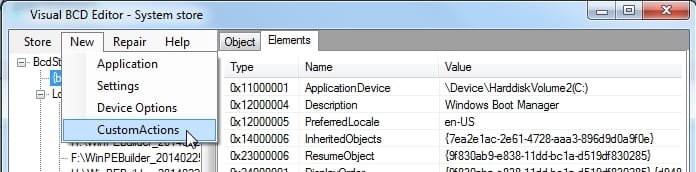
The current F11 entry will be a "custom action", you can find those with visualbcd - delete the existing F11 entry and create a new one pointing at the recovery partition. You could choose a different key/key combination for the new entry if you like.

Click New>CustomAction

visualbcd.jpg

Download Visual BCD

Download visualbcd 0.9.3.0 or 0.9.3.1
 
Last edited:

My Computers My Computers

  • At a glance

    7 X64i5 84002x8gb 3200mhz
    Computer type
    PC/Desktop
    OS
    7 X64
    CPU
    i5 8400
    Motherboard
    gigabyte b365m ds3h
    Memory
    2x8gb 3200mhz
    Hard Drives
    various
    PSU
    pure power 11 400w cm
    Case
    Coolermaster
    Cooling
    cryorig m9i
  • At a glance

    7x64g54008gb ddr4 2400
    Computer type
    PC/Desktop
    OS
    7x64
    CPU
    g5400
    Motherboard
    ga b365m ds3h
    Memory
    8gb ddr4 2400
    PSU
    xfx pro 450w
WOW ! Thanks again SIW2... will try that and report within a week (maybe tomorrow).

Best regards
iBenny
 

My Computer My Computer

At a glance

Windows 7 Home Premium 64 bit
Computer type
Laptop
Computer Manufacturer/Model Number
HP G62
OS
Windows 7 Home Premium 64 bit
Qwick question : if I erase the partition letters of the RECOVERY and the HP_TOOLS partitions to take them out of the explorer, will they still work if invoked by F11 per instance (for the Recovery partition), or if a tool is called by a Start menu link ?

Regards
iBenny
 

My Computer My Computer

At a glance

Windows 7 Home Premium 64 bit
Computer type
Laptop
Computer Manufacturer/Model Number
HP G62
OS
Windows 7 Home Premium 64 bit
will they still work if invoked by F11 per instance

Yes. You can remove the letter after setting the bcd entry. F11 will still work.

It won't work for regular shortcuts.
 

My Computers My Computers

  • At a glance

    7 X64i5 84002x8gb 3200mhz
    Computer type
    PC/Desktop
    OS
    7 X64
    CPU
    i5 8400
    Motherboard
    gigabyte b365m ds3h
    Memory
    2x8gb 3200mhz
    Hard Drives
    various
    PSU
    pure power 11 400w cm
    Case
    Coolermaster
    Cooling
    cryorig m9i
  • At a glance

    7x64g54008gb ddr4 2400
    Computer type
    PC/Desktop
    OS
    7x64
    CPU
    g5400
    Motherboard
    ga b365m ds3h
    Memory
    8gb ddr4 2400
    PSU
    xfx pro 450w
As an alternative, you can access something on an unlettered drive using a symbolic link.

Example:

There is a folder L:\sxs. L is disk0, partition8

Create a symbolic link

Command prompt:

mklink /d C:\MYSHORTCUT \\?\GLOBALROOT\device\harddisk0\partition8\SXS

You can then remove the drive letter L: and still use the link.
 

My Computers My Computers

  • At a glance

    7 X64i5 84002x8gb 3200mhz
    Computer type
    PC/Desktop
    OS
    7 X64
    CPU
    i5 8400
    Motherboard
    gigabyte b365m ds3h
    Memory
    2x8gb 3200mhz
    Hard Drives
    various
    PSU
    pure power 11 400w cm
    Case
    Coolermaster
    Cooling
    cryorig m9i
  • At a glance

    7x64g54008gb ddr4 2400
    Computer type
    PC/Desktop
    OS
    7x64
    CPU
    g5400
    Motherboard
    ga b365m ds3h
    Memory
    8gb ddr4 2400
    PSU
    xfx pro 450w
Hi,

we have some problems here Huston...

First, the main folders in the RECOVERY partition turned pinkish and I can't get into them anymore but just have a ± warning message not to mess with it :

HLwxRKUePOL_Recovery1.jpg


HLxcjmAVL1L_Recovery3.jpg

(english version 4U)

It does the same even in 'super administrator' mode...

Now, about Visual BCD, these are the items pertaining to the recovery function in the BCD :

HLwxZnFDj1L_Visual-BCD.jpg


Are all four entries relevant or should I delete three ?

Finally, the CustomActions window :

HLwx2gemgmL_Custom-Action.jpg


Are you sure they set key call for the Recovery function at bootup ? or to be called within windows ? The key to choose per instance lists many key combo except for... F11 !!!

The 'Action' selection box lists all four Windows Recovery Environment (WRE) pictured above so, if we want it to work, we have to modify one of them, I guess, to point to the new moved RECOVERY partition.

But if we pic one at random, or add a new one, if the new RECOVERY partition is F:\RECOVERY, which line of the elements of that entry should we tweak, and in which way ?

Best regards
iBenny
 
Last edited:

My Computer My Computer

At a glance

Windows 7 Home Premium 64 bit
Computer type
Laptop
Computer Manufacturer/Model Number
HP G62
OS
Windows 7 Home Premium 64 bit
1. First, I would add an entry pointing at the recovery partition (which you say is F)

Then go to custom actions and assign scancode to that entry.

2. The pictures you posted are for the winre file on your windows partition. For a normal windows installation, the F8 key is assigned to that.
 

My Computers My Computers

  • At a glance

    7 X64i5 84002x8gb 3200mhz
    Computer type
    PC/Desktop
    OS
    7 X64
    CPU
    i5 8400
    Motherboard
    gigabyte b365m ds3h
    Memory
    2x8gb 3200mhz
    Hard Drives
    various
    PSU
    pure power 11 400w cm
    Case
    Coolermaster
    Cooling
    cryorig m9i
  • At a glance

    7x64g54008gb ddr4 2400
    Computer type
    PC/Desktop
    OS
    7x64
    CPU
    g5400
    Motherboard
    ga b365m ds3h
    Memory
    8gb ddr4 2400
    PSU
    xfx pro 450w
Many machines need the extended input element added to the bootmgr or the globalsettings object.

Command Prompt:

bcdedit.exe /SET {globalsettings} extendedinput 1

I don't know if that will make visualbcd offer settings higher than F10 - worth a try, it won't do any harm.

If not, then just use any other key from what visualbcd offers.
 

My Computers My Computers

  • At a glance

    7 X64i5 84002x8gb 3200mhz
    Computer type
    PC/Desktop
    OS
    7 X64
    CPU
    i5 8400
    Motherboard
    gigabyte b365m ds3h
    Memory
    2x8gb 3200mhz
    Hard Drives
    various
    PSU
    pure power 11 400w cm
    Case
    Coolermaster
    Cooling
    cryorig m9i
  • At a glance

    7x64g54008gb ddr4 2400
    Computer type
    PC/Desktop
    OS
    7x64
    CPU
    g5400
    Motherboard
    ga b365m ds3h
    Memory
    8gb ddr4 2400
    PSU
    xfx pro 450w
Otherwise, if you desperately want to use F11 rather than F10, you can add the entry via command prompt. But to use F11 you will have to add the extended input element first.
 

My Computers My Computers

  • At a glance

    7 X64i5 84002x8gb 3200mhz
    Computer type
    PC/Desktop
    OS
    7 X64
    CPU
    i5 8400
    Motherboard
    gigabyte b365m ds3h
    Memory
    2x8gb 3200mhz
    Hard Drives
    various
    PSU
    pure power 11 400w cm
    Case
    Coolermaster
    Cooling
    cryorig m9i
  • At a glance

    7x64g54008gb ddr4 2400
    Computer type
    PC/Desktop
    OS
    7x64
    CPU
    g5400
    Motherboard
    ga b365m ds3h
    Memory
    8gb ddr4 2400
    PSU
    xfx pro 450w
You may be getting the HP message because of the recovery partition ID.

You can change it to regular partition ID using DiskGenius ( trial version is the same as free version- the free functions work forever - license is only needed for the extra Pro functions)

All-in-one Solution for Data Recovery, Partition Manager and Data Backup - DiskGenius

Right click the recovery partition, select "modify partition parameters", select 07 NTFS in the dropdown, click OK, then click Save All button on the toolbar.
 

My Computers My Computers

  • At a glance

    7 X64i5 84002x8gb 3200mhz
    Computer type
    PC/Desktop
    OS
    7 X64
    CPU
    i5 8400
    Motherboard
    gigabyte b365m ds3h
    Memory
    2x8gb 3200mhz
    Hard Drives
    various
    PSU
    pure power 11 400w cm
    Case
    Coolermaster
    Cooling
    cryorig m9i
  • At a glance

    7x64g54008gb ddr4 2400
    Computer type
    PC/Desktop
    OS
    7x64
    CPU
    g5400
    Motherboard
    ga b365m ds3h
    Memory
    8gb ddr4 2400
    PSU
    xfx pro 450w
It's already in 07 NTFS.

Just found something...

The RECOVERY partition is no more bootable ! Just found out by not being able to make it 'active'.

This became after having created that partition from the splitting of the mains OS partition. And also it is set as 'logical' partition.

Now, how to make this partition bootable (forgive me for not remembering) ? With a 'diskpart' command ? or something like 'bootsect /nt60 ALL /force /mbr' ?

Thanks
iBenny
 

My Computer My Computer

At a glance

Windows 7 Home Premium 64 bit
Computer type
Laptop
Computer Manufacturer/Model Number
HP G62
OS
Windows 7 Home Premium 64 bit
You can't (officially) make it active unless it is a Primary partition.

The simplest thing is to add a entry to the current bcd store which is on the currently Active partition.

That is what I thought you were doing.


It's already in 07 NTFS.

In that case, the annoyance is probably due to some HP software - commonly called bloatware or crapware.
 

My Computers My Computers

  • At a glance

    7 X64i5 84002x8gb 3200mhz
    Computer type
    PC/Desktop
    OS
    7 X64
    CPU
    i5 8400
    Motherboard
    gigabyte b365m ds3h
    Memory
    2x8gb 3200mhz
    Hard Drives
    various
    PSU
    pure power 11 400w cm
    Case
    Coolermaster
    Cooling
    cryorig m9i
  • At a glance

    7x64g54008gb ddr4 2400
    Computer type
    PC/Desktop
    OS
    7x64
    CPU
    g5400
    Motherboard
    ga b365m ds3h
    Memory
    8gb ddr4 2400
    PSU
    xfx pro 450w
Otherwise, if you desperately want to use F11 rather than F10, you can add the entry via command prompt. But to use F11 you will have to add the extended input element first.
The 'extended' command did not add more options in Visual BCD ! and sticking to F11 is more to be consistent with HP paradigm than else. In principle, using another F is not a concern to me but... if I give back the laptop to its owner, and he comes back to me in couple of years, better than I stick to F11 for I will surely forget the other F I would set.

And, doing so via prompt command is fine with me. As long as you tell me the commands ; )

Regards
iBenny
 

My Computer My Computer

At a glance

Windows 7 Home Premium 64 bit
Computer type
Laptop
Computer Manufacturer/Model Number
HP G62
OS
Windows 7 Home Premium 64 bit
You can't (officially) make it active unless it is a Primary partition.

The simplest thing is to add a entry to the current bcd store which is on the currently Active partition.

That is what I thought you were doing.

In that case, the annoyance is probably due to some HP software - commonly called bloatware or crapware.

I am doing many things at the same time. Sorry for the delay. I tried last week to add an entry in the main SYSTEM BCD to that effect and I failed. Will show you these entry soon after we get the RECOVERY partition strait.

I can only use Three Primary partition for I have some more logical ones to take in account for. One more since an hour ago...

HLxd2t6qncL_G62-partitions.png


There is an annoying 0M partition at the front of the disk that I shouldn't delete for it will mess up the whole SYSTEM and MAIN partition... or... I could delete it without moving the other ones ! That could do the trick ! What do you think ? Doing so will free a Primary that I could assign to the RECOVERY partition !? yes ?

Regards
iBenny
 

My Computer My Computer

At a glance

Windows 7 Home Premium 64 bit
Computer type
Laptop
Computer Manufacturer/Model Number
HP G62
OS
Windows 7 Home Premium 64 bit
Back
Top