Solved Am I the only guy on the internet with this problem?

MichC

New member
Local time
5:52 PM
Messages
16
Hello there.
Windows 7 ultimate x64 MBR on my laptop.
I updated the video driver of my gpu with a lot of precautions since it's always problematic.:geek: Well Windows can't boot anymore since then. :shock:
I reached the "f8 menu". I don't have the entry to run the System Recovery Options. Provisory modes and prompt mode don't work. Other times I solved disabling the dedicated gpu from the bios but this time it didn't work.

So I flashed my win7 iso to my pendrive. I want to use it to go back to a restore point. I clicked on the restore option after having configured language and keyboard. I got the first System Recovery Option screen (https://www.sevenforums.com/attachm...a-drivers-load-windows-recovery-options-2.png)

but here I can't do anything since I can move the cursor but it is continuously in loading mode.:cry: (also the windows installation is not showed here even if present)
I searched on Google for this problem almost everyone just get blank or blue screens at this point. Not a loading cursor...

I also deleted the only linux partition on my hdd and I used the Minitool live iso to use the "rebuild mbr" function, but nothing changed.
Can you help me please?
 

My Computer My Computer

At a glance

Win 7 ultimate x64Amd a108gbAmd
Computer type
Laptop
Computer Manufacturer/Model Number
HP
OS
Win 7 ultimate x64
CPU
Amd a10
Memory
8gb
Graphics Card(s)
Amd
A) Where did you download the driver?


B) In safe mode can you boot into the computer at all? If you can you then will be able to remove the GPU driver with Display Driver Uninstaller. Display Driver Uninstaller Download version 18.0.0.6

Do and answer these two things first and we'll move on from there.
 

My Computer My Computer

At a glance

Windows 7 Ultimate x64
Computer type
PC/Desktop
OS
Windows 7 Ultimate x64
A) Where did you download the driver?


B) In safe mode can you boot into the computer at all? If you can you then will be able to remove the GPU driver with Display Driver Uninstaller. Display Driver Uninstaller Download version 18.0.0.6

Do and answer these two things first and we'll move on from there.
Thanks for the reply.
I updated the driver from my AMD panel. I also chose "clean installation" and waited for the driver to be reported as "stable"
No,the pc can't boot in safe mode
 

My Computer My Computer

At a glance

Win 7 ultimate x64Amd a108gbAmd
Computer type
Laptop
Computer Manufacturer/Model Number
HP
OS
Win 7 ultimate x64
CPU
Amd a10
Memory
8gb
Graphics Card(s)
Amd
Okay, maybe a manual removal of the graphics driver will help. I'm not very versed on this though, and it can be complicated. You can live boot Hirens boot CD and access the hard drive. From there you can navigate to the AMD folder under programs and copy the contents to a USB stick, then delete the files there. But you have to make sure it's where the driver is stored. There are other factors at play here like the registry. You can access the registry hive with Hirens boot CD, but I wouldn't mess with that right now.

I hope you successfully rebuilt the MBR like you indicated. Since you can't even boot in safe mode, something seems like a boot issue here. Hirens boot CD does have a lot of MBR tools. https://www.hiren.info/pages/bootcd
 

My Computer My Computer

At a glance

Windows 7 Ultimate x64
Computer type
PC/Desktop
OS
Windows 7 Ultimate x64
I should mention that, when trying to do a system restore, it can take many minutes for the restore points to come up. Maybe he should wait half an hour or so.
 

My Computer My Computer

At a glance

Windows 7 Pro SP1 64 bit8 GB
Computer type
Laptop
Computer Manufacturer/Model Number
Dell M6500 Precision Work Station
OS
Windows 7 Pro SP1 64 bit
Memory
8 GB
Screen Resolution
1920x
Internet Speed
30 Mbps
Antivirus
Norton Security
Browser
IE 11
MichC, is there an error you get when you boot the computer normally or through safe mode? If so what does it say?
 

My Computer My Computer

At a glance

Windows 7 Ultimate x64
Computer type
PC/Desktop
OS
Windows 7 Ultimate x64
I should mention that, when trying to do a system restore, it can take many minutes for the restore points to come up. Maybe he should wait half an hour or so.
Last time I tryed I waited for about 15 minutes I think
 

My Computer My Computer

At a glance

Win 7 ultimate x64Amd a108gbAmd
Computer type
Laptop
Computer Manufacturer/Model Number
HP
OS
Win 7 ultimate x64
CPU
Amd a10
Memory
8gb
Graphics Card(s)
Amd
Okay, maybe a manual removal of the graphics driver will help. I'm not very versed on this though, and it can be complicated. You can live boot Hirens boot CD and access the hard drive. From there you can navigate to the AMD folder under programs and copy the contents to a USB stick, then delete the files there. But you have to make sure it's where the driver is stored. There are other factors at play here like the registry. You can access the registry hive with Hirens boot CD, but I wouldn't mess with that right now.

I hope you successfully rebuilt the MBR like you indicated. Since you can't even boot in safe mode, something seems like a boot issue here. Hirens boot CD does have a lot of MBR tools. https://www.hiren.info/pages/bootcd
The mbr was rebuilt correctly.
The "C:Amd/" just contains the downloaded installers, the drivers should be located in "Windows/System32/drivers" or "Windows/System32/DRIVERS".
I don't get any error message when I try to boot in safe mode cause I got stuck during the boot process, anyway the last component loaded is exactly an amd driver (amdsomething...) I'll want to backup it and then delete it but I'm afraid that windows will keep "pointing" to that file to load the os... :(

P.S. I am also making a bootable win PE pendrive, I'm going to insert in it some driver utilities to reinstall the driver, but every utility I know just allow to download/install drivers for the currently running OS, so in my case I will be able to just install drivers for my live Win PE OS... Can you help me advicing a driver utility that makes my case?
 

My Computer My Computer

At a glance

Win 7 ultimate x64Amd a108gbAmd
Computer type
Laptop
Computer Manufacturer/Model Number
HP
OS
Win 7 ultimate x64
CPU
Amd a10
Memory
8gb
Graphics Card(s)
Amd
You need to probably get rid of that current AMD driver first. Once that is done you can try updating your drivers.

You could mount the drive and run everything.exe and look for anything related to AMD to help clue you into where the GPU driver is installed. voidtools
 

My Computer My Computer

At a glance

Windows 7 Ultimate x64
Computer type
PC/Desktop
OS
Windows 7 Ultimate x64
Let me reiterate. You really can't install a driver in a non-bootable environment. The installer installs a bunch of dlls and registry values. To do that manually would be a massive task. Though it could technically be done by someone who knows their driver installer.
 

My Computer My Computer

At a glance

Windows 7 Ultimate x64
Computer type
PC/Desktop
OS
Windows 7 Ultimate x64

My Computers My Computers

  • At a glance

    7 X64i5 84002x8gb 3200mhz
    Computer type
    PC/Desktop
    OS
    7 X64
    CPU
    i5 8400
    Motherboard
    gigabyte b365m ds3h
    Memory
    2x8gb 3200mhz
    Hard Drives
    various
    PSU
    pure power 11 400w cm
    Case
    Coolermaster
    Cooling
    cryorig m9i
  • At a glance

    7x64g54008gb ddr4 2400
    Computer type
    PC/Desktop
    OS
    7x64
    CPU
    g5400
    Motherboard
    ga b365m ds3h
    Memory
    8gb ddr4 2400
    PSU
    xfx pro 450w
Dism++ is the answer. It can be used to install/backup/remove drivers.

It is included in my boot media

17514x86.iso


17514x64-v10.iso
Thanks for the links.
The previous user just said there not exist a driver utility that allows to install drivers for another OS... Will dism++ work? Does it have GUI? If not can you help me reinstalling the driver or just giving me information on how to use it?
 

My Computer My Computer

At a glance

Win 7 ultimate x64Amd a108gbAmd
Computer type
Laptop
Computer Manufacturer/Model Number
HP
OS
Win 7 ultimate x64
CPU
Amd a10
Memory
8gb
Graphics Card(s)
Amd
You need to probably get rid of that current AMD driver first. Once that is done you can try updating your drivers.

You could mount the drive and run everything.exe and look for anything related to AMD to help clue you into where the GPU driver is installed. voidtools
Thanks for advicing me this nice tool. I'll be able to remove any AMD related file. Probably the OS won't boot again since AMD registry keys will be still present. Will a bootable registry utility be able to fix these registry keys?
At this point I should get a bootable pc without proprietary driver...
 

My Computer My Computer

At a glance

Win 7 ultimate x64Amd a108gbAmd
Computer type
Laptop
Computer Manufacturer/Model Number
HP
OS
Win 7 ultimate x64
CPU
Amd a10
Memory
8gb
Graphics Card(s)
Amd
Dism++ is the answer. It can be used to install/backup/remove drivers.

It is included in my boot media

17514x86.iso


17514x64-v10.iso


You can do all that with your booatble media without being in a boot environment? I mean actually install/uninstall a driver?
 

My Computer My Computer

At a glance

Windows 7 Ultimate x64
Computer type
PC/Desktop
OS
Windows 7 Ultimate x64
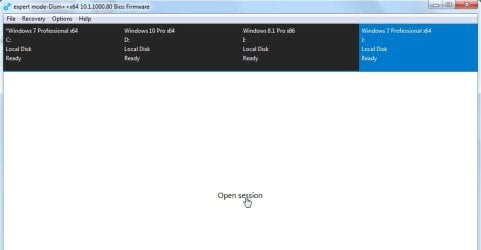
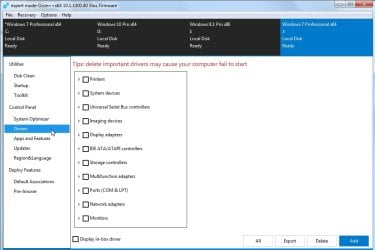
Boot the media. Dism++ shortcut is on the desktop.

Highlight the OS (click it on the top pane and it turns blue)

Click "Open Session"

Click Drivers in the left pane

1..jpg

2.jpg
 

My Computers My Computers

  • At a glance

    7 X64i5 84002x8gb 3200mhz
    Computer type
    PC/Desktop
    OS
    7 X64
    CPU
    i5 8400
    Motherboard
    gigabyte b365m ds3h
    Memory
    2x8gb 3200mhz
    Hard Drives
    various
    PSU
    pure power 11 400w cm
    Case
    Coolermaster
    Cooling
    cryorig m9i
  • At a glance

    7x64g54008gb ddr4 2400
    Computer type
    PC/Desktop
    OS
    7x64
    CPU
    g5400
    Motherboard
    ga b365m ds3h
    Memory
    8gb ddr4 2400
    PSU
    xfx pro 450w
Interesting. I'll have to check this out.
 

My Computer My Computer

At a glance

Windows 7 Ultimate x64
Computer type
PC/Desktop
OS
Windows 7 Ultimate x64
Thanks, this tool was exactly what I needed, but unfortunately I can't reach this screen cause the program is stuck in the "searching OSs" or something like that.
And as I said in the 1st post the Win7live ISO is stuck as well in the screen that lists the installed OSs (https://www.sevenforums.com/attachm...a-drivers-load-windows-recovery-options-2.png)

I don't think my OS is "undetectable". Yes, I can't reach the desktop, but my Windows "boots" I get the loading screen with the windows logo ecc...
I have multiple entries in my bcd configuration but I don't think they can cause problems, moreover I've correctly rebuilt the mbr using mini tool partition wizard...

P.S. Using your iso I also noticed that EasyBCD doesn't work, I double click on it, but it doesn't open at all. The task mananger lists it in the processes tab but not in the programs tab
 

My Computer My Computer

At a glance

Win 7 ultimate x64Amd a108gbAmd
Computer type
Laptop
Computer Manufacturer/Model Number
HP
OS
Win 7 ultimate x64
CPU
Amd a10
Memory
8gb
Graphics Card(s)
Amd
Does Shadowcopyview work?

Icon is on the boot media desktop.
 

My Computers My Computers

  • At a glance

    7 X64i5 84002x8gb 3200mhz
    Computer type
    PC/Desktop
    OS
    7 X64
    CPU
    i5 8400
    Motherboard
    gigabyte b365m ds3h
    Memory
    2x8gb 3200mhz
    Hard Drives
    various
    PSU
    pure power 11 400w cm
    Case
    Coolermaster
    Cooling
    cryorig m9i
  • At a glance

    7x64g54008gb ddr4 2400
    Computer type
    PC/Desktop
    OS
    7x64
    CPU
    g5400
    Motherboard
    ga b365m ds3h
    Memory
    8gb ddr4 2400
    PSU
    xfx pro 450w
Solved

Guys, problem solved!
This is what I have done:
1)I booted a windows 10 iso from a dvd
2)I used diskpart in live prompt mode to assign the C letter to my Windows folder
3)I gave the command "chkdsk :C /f /r"
4)the checkdisk utility froze at this point
Code:
Step 4: (...) Impossible to replace damaged clusters in the SFD6 file named \Windows\System32\amdxc64.dll
so I shut down using the power button and removed the dvd
5)At this point everything seemed useless until I decided to try to re-enable the dedicated gpu from the bios. The situation improved : now Windows 7 could boot in prompt mode and in low resolution 640x480 mode. (By the way "Safe mode" still got stuck when loading "amdkmpdf.sys" :mad:)
6)I booted in prompt mode to try again the chkdsk command also from win7. If I'm not wronge it froze at the same point of the live Windows 10
7)I booted in low resolution mode I normally uninstalled the driver from control panel :D
---------------------------------------------------------------------------------------------------

Now here's my questions for you
A)I haven't understand yet if Windows come back to boot (at least in low-res mode) because of the check disks or because of the re-enabled dedicated GPU... :rolleyes: Usually when I have problems related to video drivers on this laptop the situation improves when I disable the dedicated gpu, not when I enable it! :rolleyes:
B)
Why the "amdkmpdf.sys" file prevent the OS to boot in safe mode?
C)Can you explain the checkdisk report I reported?
D)I was never able to control the brightness of my monitor using the keys combos and after I removed the AMD driver I can't control the brightness even in control panel :confused: can you help me?
 

My Computer My Computer

At a glance

Win 7 ultimate x64Amd a108gbAmd
Computer type
Laptop
Computer Manufacturer/Model Number
HP
OS
Win 7 ultimate x64
CPU
Amd a10
Memory
8gb
Graphics Card(s)
Amd
Does Shadowcopyview work?

Icon is on the boot media desktop.
Thanks anyway SIW2, by the way can you recommend me a tool to create Bootable Win7 PE Isos? I want to make an iso with all my favourite softwares! :D
P.S. Can I ask you what is the difference in terms of performance between a Win7 PE iso and a Win 10 PE iso?
Thanks in advance!
 

My Computer My Computer

At a glance

Win 7 ultimate x64Amd a108gbAmd
Computer type
Laptop
Computer Manufacturer/Model Number
HP
OS
Win 7 ultimate x64
CPU
Amd a10
Memory
8gb
Graphics Card(s)
Amd
Back
Top