Suddenly no sound. "Failed to play test sound" Is this unsolvable?

dinki

New member
Local time
2:42 PM
Messages
10
Suddenly no sound. "Failed to play test sound" Is this unsolvable?

A few days ago we had a power outage. I don't have an UPS on my Win 7 64 bit Professional PC Dell Optiplex 780. When it powered up again I found I had no sound.

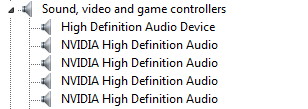
This is what my onboard sound looks like in device manager:
DBqieUT.png


Is it odd to have that many devices?

Here are the things I've tried:

  • Went to Control Panel->Sound->Speakers->Properties. Everything says working fine. Turned on disable all enhancements. No sound. Went to advance. Changed format to DVD. Pressed test and received the "Failed to play test sound"
  • Went to services and restarted Windows Audio. No sound.
  • Ran 'sfc /scannow' from Admin command prompt. Said it found some problems and fixed them. Needed to reboot. Rebooted. No sound. Here's my CBS log file from this try (Dropbox - CBS.log)
  • Run virus/malware scan using AVGFree and Malware Bytes. No threats found. No sound.
  • Uninstall sound drivers, reboot and reinstalled them using the drivers from Dell's website for this model. Still no sound.
  • Booted Win 7 install disc. Chose 'Repair PC'. Windows said it found problems but couldn't fix it.
  • Ran chkdsk with the fix option. Found some files and repaired them. No sound.
  • Windows update . No sound.
  • Bought a cheap USB sound dongle. Installed drivers. No sound. Went into Control Panel->Sound->Speakers->Properties and got "Failed to play test sound" for the new device. You've got to be kidding me!!
  • Ran
    Code:
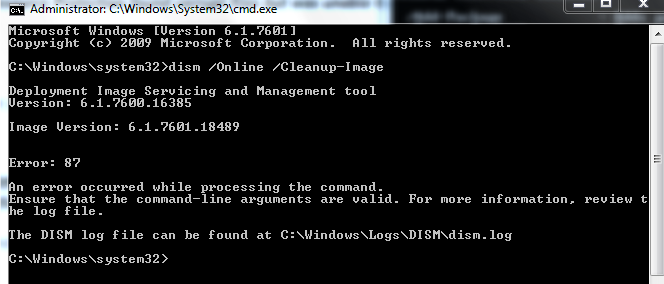
    dism /online /cleanup-image /restorehealth
    but get a error code 87 saying that restorehealth is not recognized in this context


I'm not sure where to go from here. I do not have restore points to go back to. Does anyone have any ideas on how to fix this? My family would be most grateful for your help!
 
Last edited:

My Computer My Computer

At a glance

Windows 7
OS
Windows 7
In addition to a number of other files, the shutdown did a number on audiokse.dll.

I found this from the microsoft fixit-

AUDIOKSE.DLL – Microsoft Support

It doesn't say what to use to scan your registry with and it later suggests downloading and running paretologic. I couldn't get it to run but I only spent a couple of minutes with it.
 

My Computer My Computer

At a glance

Windows 7 Pro SP1 64 bit8 GB
Computer type
Laptop
Computer Manufacturer/Model Number
Dell M6500 Precision Work Station
OS
Windows 7 Pro SP1 64 bit
Memory
8 GB
Screen Resolution
1920x
Internet Speed
30 Mbps
Antivirus
Norton Security
Browser
IE 11
Thanks for this. I did download that registry cleaner and just cleaned up the registry. It did find problems and repaired them. I did this next:

Code:
C:\Windows\system32>sfc /scanfile=C:\Windows\System32\AUDIOKSE.dll

Windows Resource Protection found corrupt files but was unable to fix some of th
em.

So something is definitely no good. I just remembered that I had cloned the original hard drive that this PC came with to the SSD I'm currently using. I'm guessing that the audiokse.dll on the original hard drive is not corrupted. Is it possible/advisable to copy this file over the corrupted one? Will windows even allow me to do this as administrator?
 

My Computer My Computer

At a glance

Windows 7
OS
Windows 7
Hi dinki

You can try DISM again. Only the /restorehealth switch doess not work in Windows 7. Hence your error message.
Try:
Code:
DISM /online /cleanup-image
 

My Computer My Computer

At a glance

Windows 7 x64, Vista x64, 8.1 smartphoneIntel E8400 65W 64-bitDDR2 2 x 2GB, 1GB x 2XFX Radeon HD5750
Computer type
PC/Desktop
OS
Windows 7 x64, Vista x64, 8.1 smartphone
CPU
Intel E8400 65W 64-bit
Motherboard
Gigabyte EP45-UD3LR
Memory
DDR2 2 x 2GB, 1GB x 2
Graphics Card(s)
XFX Radeon HD5750
Sound Card
AMD High Definition Audio; Realtek High Definition Audio
Monitor(s) Displays
iiyama prolite X2377HDS
Screen Resolution
1920 x 1080
Hard Drives
500GB 7200 rpm Seagate ST3500413AS 16MB, 500GB 5400 rpm Toshiba MQ02ABF050H 32MB, 200GB 7200 rpm Seagate ST3200820AS 8MB, 2TB 7200 rpm Western Digital WD20EZRX 64MB
PSU
Enermax Liberty Modular
Case
Antec P193 Midi Tower
Keyboard
Mionix ZIBAL 60
Mouse
Razer USB 2.0 Diamondback Mouse or Huion Graphics Tablet
Browser
Internet Explorer, Lunascape, Firefox, Opera, Avast Safezone
Gave this a try and I could have sworn I was able to run this before:
Code:
C:\Windows\system32>dism /Online /Cleanup-Image

Deployment Image Servicing and Management tool
Version: 6.1.7600.16385

Image Version: 6.1.7601.18489


Error: 87

An error occurred while processing the command.
Ensure that the command-line arguments are valid. For more information, review t
he log file.

The DISM log file can be found at C:\Windows\Logs\DISM\dism.log

C:\Windows\system32>

Here's a link to that log file: Dropbox - dism.log

I can't thank you enough for your guidance and for trying to help!
 

My Computer My Computer

At a glance

Windows 7
OS
Windows 7
Hello dinki,

When you run DISM, do you have admin privileges (elevated command prompt)?
 

My Computer My Computer

At a glance

Windows 7 x64, Vista x64, 8.1 smartphoneIntel E8400 65W 64-bitDDR2 2 x 2GB, 1GB x 2XFX Radeon HD5750
Computer type
PC/Desktop
OS
Windows 7 x64, Vista x64, 8.1 smartphone
CPU
Intel E8400 65W 64-bit
Motherboard
Gigabyte EP45-UD3LR
Memory
DDR2 2 x 2GB, 1GB x 2
Graphics Card(s)
XFX Radeon HD5750
Sound Card
AMD High Definition Audio; Realtek High Definition Audio
Monitor(s) Displays
iiyama prolite X2377HDS
Screen Resolution
1920 x 1080
Hard Drives
500GB 7200 rpm Seagate ST3500413AS 16MB, 500GB 5400 rpm Toshiba MQ02ABF050H 32MB, 200GB 7200 rpm Seagate ST3200820AS 8MB, 2TB 7200 rpm Western Digital WD20EZRX 64MB
PSU
Enermax Liberty Modular
Case
Antec P193 Midi Tower
Keyboard
Mionix ZIBAL 60
Mouse
Razer USB 2.0 Diamondback Mouse or Huion Graphics Tablet
Browser
Internet Explorer, Lunascape, Firefox, Opera, Avast Safezone
Hi dinki,

Welcome to SevenForums!

As iko22 has pointed out, run it from an elevated command prompt:

Click Start.
  • In the search box type cmd.
  • Right-click the cmd icon from the search results under Programs and select Run as administrator.
  • The elevated command prompt window will now open.
I hope this helps!
 

My Computer My Computer

At a glance

Win 7 HP SP1 64-bit Vista HB SP2 32-bit Linux...Intel(R) Pentium(R) CPU P6200 @ 2.13GHz4.00 GBIntel(R) Graphics Media Accelerator HD
Computer type
Laptop
Computer Manufacturer/Model Number
Fujitsu LIFEBOOK
OS
Win 7 HP SP1 64-bit Vista HB SP2 32-bit Linux Mint 18.3
CPU
Intel(R) Pentium(R) CPU P6200 @ 2.13GHz
Motherboard
FUJITSU FJNBB06
Memory
4.00 GB
Graphics Card(s)
Intel(R) Graphics Media Accelerator HD
Sound Card
[1] Realtek High Definition Audio [2] Intel(R) Display Audio
Screen Resolution
1366 x 768 x 32 bits (4294967296 colors) @ 59 Hz
Hard Drives
TOSHIBA MK5076GSX
Antivirus
AVG FREE
Thanks guys. I certainly am using elevated command prompt as Paul Black stated above:

Apu7Cgy.png
 

My Computer My Computer

At a glance

Windows 7
OS
Windows 7
Hi dinki,

I don't know if this will help but might it be worth a try!

Run an Extended Disk Cleanup [with ALL the options checked]. This gets rid of all the superfluous files etc.

I hope this helps!
 

My Computer My Computer

At a glance

Win 7 HP SP1 64-bit Vista HB SP2 32-bit Linux...Intel(R) Pentium(R) CPU P6200 @ 2.13GHz4.00 GBIntel(R) Graphics Media Accelerator HD
Computer type
Laptop
Computer Manufacturer/Model Number
Fujitsu LIFEBOOK
OS
Win 7 HP SP1 64-bit Vista HB SP2 32-bit Linux Mint 18.3
CPU
Intel(R) Pentium(R) CPU P6200 @ 2.13GHz
Motherboard
FUJITSU FJNBB06
Memory
4.00 GB
Graphics Card(s)
Intel(R) Graphics Media Accelerator HD
Sound Card
[1] Realtek High Definition Audio [2] Intel(R) Display Audio
Screen Resolution
1366 x 768 x 32 bits (4294967296 colors) @ 59 Hz
Hard Drives
TOSHIBA MK5076GSX
Antivirus
AVG FREE
Just tried the clean up and didn't make a difference. Sigh... Unsolvable?
 

My Computer My Computer

At a glance

Windows 7
OS
Windows 7
I was going to suggest something else but-

You said you don't have any restore points. However, Windows creates a restore point every time it does updates. I see in the log that you did install updates in early January. Would you check again?
 

My Computer My Computer

At a glance

Windows 7 Pro SP1 64 bit8 GB
Computer type
Laptop
Computer Manufacturer/Model Number
Dell M6500 Precision Work Station
OS
Windows 7 Pro SP1 64 bit
Memory
8 GB
Screen Resolution
1920x
Internet Speed
30 Mbps
Antivirus
Norton Security
Browser
IE 11
I went to 'Backup and Restore' and it tells me that backup has not been set up. I'm open to exploring this further but it seems like I have no backups.

While here I did see the 'Create a system repair disc'. Does that create something I could use or is that something that needs to be run before a problem exists?
 

My Computer My Computer

At a glance

Windows 7
OS
Windows 7
I think the correct procedure is to create a system repair disc BEFORE the problem occurs. That is, I cannot find any information that says you can create such a disk AFTERWARDS.

If it is any consolation, you can use a system repair disc that has created on any Windows 7 computer, so long as it has the same bit-ness.
 

My Computer My Computer

At a glance

Windows 7 x64, Vista x64, 8.1 smartphoneIntel E8400 65W 64-bitDDR2 2 x 2GB, 1GB x 2XFX Radeon HD5750
Computer type
PC/Desktop
OS
Windows 7 x64, Vista x64, 8.1 smartphone
CPU
Intel E8400 65W 64-bit
Motherboard
Gigabyte EP45-UD3LR
Memory
DDR2 2 x 2GB, 1GB x 2
Graphics Card(s)
XFX Radeon HD5750
Sound Card
AMD High Definition Audio; Realtek High Definition Audio
Monitor(s) Displays
iiyama prolite X2377HDS
Screen Resolution
1920 x 1080
Hard Drives
500GB 7200 rpm Seagate ST3500413AS 16MB, 500GB 5400 rpm Toshiba MQ02ABF050H 32MB, 200GB 7200 rpm Seagate ST3200820AS 8MB, 2TB 7200 rpm Western Digital WD20EZRX 64MB
PSU
Enermax Liberty Modular
Case
Antec P193 Midi Tower
Keyboard
Mionix ZIBAL 60
Mouse
Razer USB 2.0 Diamondback Mouse or Huion Graphics Tablet
Browser
Internet Explorer, Lunascape, Firefox, Opera, Avast Safezone
I went to 'Backup and Restore' and it tells me that backup has not been set up. I'm open to exploring this further but it seems like I have no backups.

While here I did see the 'Create a system repair disc'. Does that create something I could use or is that something that needs to be run before a problem exists?

In Control Panel, click on System. Select System Protection. In the System Restore section, click on System Restore. Any restore points should be listed there.
 

My Computer My Computer

At a glance

Windows 7 Pro SP1 64 bit8 GB
Computer type
Laptop
Computer Manufacturer/Model Number
Dell M6500 Precision Work Station
OS
Windows 7 Pro SP1 64 bit
Memory
8 GB
Screen Resolution
1920x
Internet Speed
30 Mbps
Antivirus
Norton Security
Browser
IE 11
If it is any consolation, you can use a system repair disc that has created on any Windows 7 computer, so long as it has the same bit-ness.
1 Hour Ago 10:29

Yeah, if you look at my original post:

  • Booted Win 7 install disc. Chose 'Repair PC'. Windows said it found problems but couldn't fix it.

That said, I have done a few things like cleaning up the registry and such so maybe I'll try the
 

My Computer My Computer

At a glance

Windows 7
OS
Windows 7
In Control Panel, click on System. Select System Protection. In the System Restore section, click on System Restore. Any restore points should be listed there.

Yeah, nothing there ...
 

My Computer My Computer

At a glance

Windows 7
OS
Windows 7
That's strange. The one it set for me when I installed the last set of updates is listed there. When you clicked on system restore, did the screen for Restore system files and settings come up? If so, did you click on Next?
 

My Computer My Computer

At a glance

Windows 7 Pro SP1 64 bit8 GB
Computer type
Laptop
Computer Manufacturer/Model Number
Dell M6500 Precision Work Station
OS
Windows 7 Pro SP1 64 bit
Memory
8 GB
Screen Resolution
1920x
Internet Speed
30 Mbps
Antivirus
Norton Security
Browser
IE 11
Back
Top