the latest windows update cannot be removed

I tried 2 recovery discs that were made with that same laptop. Same result.


This an image of the windows 7 disc from microsoft. Same result


Thanks
 

Attachments

  • windows 7 disk.jpg
    windows 7 disk.jpg
    174.1 KB · Views: 0

My Computer My Computer

Computer type
PC/Desktop
Computer Manufacturer/Model Number
toshiba
OS
windows 7 home premium /64
Other Info
Just an old laptop. Satellite L675 019
Hi Rick33,

I tried 2 recovery discs that were made with that same laptop. Same result.
This an image of the windows 7 disc from microsoft. Same result.

I will say this again, I think the recovery partition is corrupted!

Read these:

[1] How to restore your Toshiba computer/tablet to its factory fresh software condition using system recovery.
[2] How to Do a Clean Install with an Upgrade Windows 7 Version.

If neither of those help, create a new installation media which will put a brand new fresh installation of Win 7 back on your laptop.
 

My Computer My Computer

Computer type
Laptop
Computer Manufacturer/Model Number
Fujitsu LIFEBOOK
OS
Win 7 HP SP1 64-bit Vista HB SP2 32-bit Linux Mint 18.3
CPU
Intel(R) Pentium(R) CPU P6200 @ 2.13GHz
Motherboard
FUJITSU FJNBB06
Memory
4.00 GB
Graphics Card(s)
Intel(R) Graphics Media Accelerator HD
Sound Card
[1] Realtek High Definition Audio [2] Intel(R) Display Audio
Screen Resolution
1366 x 768 x 32 bits (4294967296 colors) @ 59 Hz
Hard Drives
TOSHIBA MK5076GSX
Antivirus
AVG FREE
thanks but is it using the corrupted partition when i use the disk in the picture?
also
system recovery is the bit that is corrupted, as it only shows that page
 

My Computer My Computer

Computer type
PC/Desktop
Computer Manufacturer/Model Number
toshiba
OS
windows 7 home premium /64
Other Info
Just an old laptop. Satellite L675 019
Hi Rick33,

[1] Thanks but is it using the corrupted partition when i use the disk in the picture?
Also...
[2] System recovery is the bit that is corrupted, as it only shows that page.

[1] If the recovery partition is corrupted then you will NOT be able to use it to restore!
[2] System recovery cannot restore from a corrupted recovery partition. You can see that for yourself!

Can you post a screenshot of the Disk Management please?
 

My Computer My Computer

Computer type
Laptop
Computer Manufacturer/Model Number
Fujitsu LIFEBOOK
OS
Win 7 HP SP1 64-bit Vista HB SP2 32-bit Linux Mint 18.3
CPU
Intel(R) Pentium(R) CPU P6200 @ 2.13GHz
Motherboard
FUJITSU FJNBB06
Memory
4.00 GB
Graphics Card(s)
Intel(R) Graphics Media Accelerator HD
Sound Card
[1] Realtek High Definition Audio [2] Intel(R) Display Audio
Screen Resolution
1366 x 768 x 32 bits (4294967296 colors) @ 59 Hz
Hard Drives
TOSHIBA MK5076GSX
Antivirus
AVG FREE
Hi Rick33,

I found on Google that on a Toshiba - You press and hold 0 BEFORE and DURING boot.

Have you tried this?
 

My Computer My Computer

Computer type
Laptop
Computer Manufacturer/Model Number
Fujitsu LIFEBOOK
OS
Win 7 HP SP1 64-bit Vista HB SP2 32-bit Linux Mint 18.3
CPU
Intel(R) Pentium(R) CPU P6200 @ 2.13GHz
Motherboard
FUJITSU FJNBB06
Memory
4.00 GB
Graphics Card(s)
Intel(R) Graphics Media Accelerator HD
Sound Card
[1] Realtek High Definition Audio [2] Intel(R) Display Audio
Screen Resolution
1366 x 768 x 32 bits (4294967296 colors) @ 59 Hz
Hard Drives
TOSHIBA MK5076GSX
Antivirus
AVG FREE
If the recovery partition is corrupted then you will NOT be able to use it to restore! Of course but that is not what i asked.
is it using the corrupted partition when i use the microsoft disk in the picture? i doubt it
never had to press 0 before.
I need to find a way to force it to use the dvd drive.
thanks
 

My Computer My Computer

Computer type
PC/Desktop
Computer Manufacturer/Model Number
toshiba
OS
windows 7 home premium /64
Other Info
Just an old laptop. Satellite L675 019
Hi Rick33,

If the recovery partition is corrupted then you will NOT be able to use it to restore!

Please use the Quote button when replying, it makes it so much easier to understand and follow!

Of course but that is not what I asked.
Is it using the corrupted partition when I use the microsoft disk in the picture?

Please post a screenshot of the Disk Management so we can see if there actually is a recovery partition!

Never had to press 0 before. I need to find a way to force it to use the dvd drive.

When you boot the computer just enter setup and get it to boot from the DVD, or change the boot order in the BIOS!

Where are you from?
 

My Computer My Computer

Computer type
Laptop
Computer Manufacturer/Model Number
Fujitsu LIFEBOOK
OS
Win 7 HP SP1 64-bit Vista HB SP2 32-bit Linux Mint 18.3
CPU
Intel(R) Pentium(R) CPU P6200 @ 2.13GHz
Motherboard
FUJITSU FJNBB06
Memory
4.00 GB
Graphics Card(s)
Intel(R) Graphics Media Accelerator HD
Sound Card
[1] Realtek High Definition Audio [2] Intel(R) Display Audio
Screen Resolution
1366 x 768 x 32 bits (4294967296 colors) @ 59 Hz
Hard Drives
TOSHIBA MK5076GSX
Antivirus
AVG FREE
remember that when i start the laptop it goes to that screen i showed.
i can probably use the F8 key to get to the repair place etc, but whatever i click went to that same screen
thanks
 

My Computer My Computer

Computer type
PC/Desktop
Computer Manufacturer/Model Number
toshiba
OS
windows 7 home premium /64
Other Info
Just an old laptop. Satellite L675 019
You will need SP1 installtion media to run a repair install.
Your installation disc doesn't have SP1 included.
You can get the SP1 installation media using

https://www.heidoc.net/php/Windows ISO Downloader.exe

The installation media comes as an .iso file. It can burned to dvd using an isoburner, or extracted to usb using rufus, or similar.

After repair install you will need to activate - if you have the license key on a sticker on the macine ( often in the battery compartment), that will do.


If you can't find/read your license key, then you need to back up your current activation before you do the repair install

you say "Laptop! Your specs say PC/Desktop! " it says Just an old laptop. Satellite L675 019
laptop came with windows 7. but cannot do a repair except back to factory spec.
hoped the other disk would let me do that repair thingy
thanks
 

My Computers My Computers

System One System Two

  • Computer type
    PC/Desktop
    OS
    7 X64
    CPU
    i5 8400
    Motherboard
    gigabyte b365m ds3h
    Memory
    2x8gb 3200mhz
    Hard Drives
    various
    PSU
    pure power 11 400w cm
    Case
    Coolermaster
    Cooling
    cryorig m9i
  • Computer type
    PC/Desktop
    OS
    7x64
    CPU
    g5400
    Motherboard
    ga b365m ds3h
    Memory
    8gb ddr4 2400
    PSU
    xfx pro 450w
thanks SIW2
i have the exe file on a thumbdrive now.
whatever i do with it will be done on the other (called T-18) win7/64 file.
what do i do with the exe file?

the dud computer, bought in 2010!!, does have SP! on it.

i only have internet access on a loaner chromebook.
the windows key is clear on the dud laptop (T-17)
thanks
 

My Computer My Computer

Computer type
PC/Desktop
Computer Manufacturer/Model Number
toshiba
OS
windows 7 home premium /64
Other Info
Just an old laptop. Satellite L675 019
Hi SIW2,

You will need SP1 installtion media to run a repair install.
Your installation disc doesn't have SP1 included.

I did give him a direct download link [adguard] yesterday for the Win 7 x64-bit ISO he needed, but he didn't download it and it has now expired! I have just deleted the link as it is now invalid.
 

My Computer My Computer

Computer type
Laptop
Computer Manufacturer/Model Number
Fujitsu LIFEBOOK
OS
Win 7 HP SP1 64-bit Vista HB SP2 32-bit Linux Mint 18.3
CPU
Intel(R) Pentium(R) CPU P6200 @ 2.13GHz
Motherboard
FUJITSU FJNBB06
Memory
4.00 GB
Graphics Card(s)
Intel(R) Graphics Media Accelerator HD
Sound Card
[1] Realtek High Definition Audio [2] Intel(R) Display Audio
Screen Resolution
1366 x 768 x 32 bits (4294967296 colors) @ 59 Hz
Hard Drives
TOSHIBA MK5076GSX
Antivirus
AVG FREE
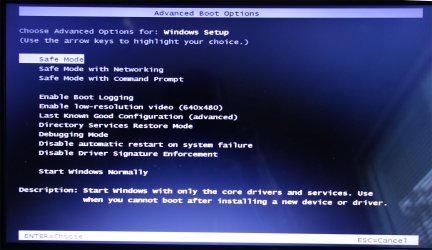
I can get to this screen but then it goes to that fixed screen thing.
is there a way of forcing it to go to the DVD that was made last year when every thing was okay?
thanks guys
 

Attachments

  • f8.jpg
    f8.jpg
    173.4 KB · Views: 0

My Computer My Computer

Computer type
PC/Desktop
Computer Manufacturer/Model Number
toshiba
OS
windows 7 home premium /64
Other Info
Just an old laptop. Satellite L675 019
Hi Rick33,

Right, none of the disks have worked, trying to recover the OS hasn't worked, trying to run repair install hasn't worked, if fact nothing has worked. Seeing you tried more that one disk, it probably isn't the disks, it could be a corrupted recovery partition. If this is the case, then there is NO way you are going to be able to restore the OS from that. If it isn't then it is something else!

The amount of time that has been spent on this [by BOTH of us], you could have created a new installation/repair DVD. Then you could have either repaired the OS, OR, clean installed the OS from the DVD, done all the updates, configured your system the way you like it, and, made a system image so that this sort of thing wouldn't be an issue in the future.

I gave you the direct download link for Win 7 SP1 Home Premium x64 bit yesterday and told you that it was valid for 24 hours. That link has since expired and been deleted. This is exactly the same as what SIW2 has stated that you require below.

You will need SP1 installtion media to run a repair install.
Your installation disc doesn't have SP1 included.
You can get the SP1 installation media using

https://www.heidoc.net/php/Windows%20ISO%20Downloader.exe

The installation media comes as an .iso file. It can burned to dvd using an isoburner, or extracted to usb using rufus, or similar.

SIW2 has told you how to do get your system up and running again, the same as I have numerous times.

Is there any reason that you are not doing what is being suggested!
 

My Computer My Computer

Computer type
Laptop
Computer Manufacturer/Model Number
Fujitsu LIFEBOOK
OS
Win 7 HP SP1 64-bit Vista HB SP2 32-bit Linux Mint 18.3
CPU
Intel(R) Pentium(R) CPU P6200 @ 2.13GHz
Motherboard
FUJITSU FJNBB06
Memory
4.00 GB
Graphics Card(s)
Intel(R) Graphics Media Accelerator HD
Sound Card
[1] Realtek High Definition Audio [2] Intel(R) Display Audio
Screen Resolution
1366 x 768 x 32 bits (4294967296 colors) @ 59 Hz
Hard Drives
TOSHIBA MK5076GSX
Antivirus
AVG FREE
I did not understand the steps involved.

created a new installation/repair DVD.


what is a system image?
thanks
 

My Computer My Computer

Computer type
PC/Desktop
Computer Manufacturer/Model Number
toshiba
OS
windows 7 home premium /64
Other Info
Just an old laptop. Satellite L675 019
Hi Rick33,

I did not understand the steps involved.
You should have said which parts you didn't understand and I could have clarified them for you!

Created a new installation/repair DVD.
Are you saying that you have downloaded the ISO and burnt it to a DVD ready to boot from?

What is a system image?
You don't need to worry about that until you have a fully updated and working OS.
It is basically an exact copy of your OS on the HDD. It makes restoring your OS quick and simple.
 

My Computer My Computer

Computer type
Laptop
Computer Manufacturer/Model Number
Fujitsu LIFEBOOK
OS
Win 7 HP SP1 64-bit Vista HB SP2 32-bit Linux Mint 18.3
CPU
Intel(R) Pentium(R) CPU P6200 @ 2.13GHz
Motherboard
FUJITSU FJNBB06
Memory
4.00 GB
Graphics Card(s)
Intel(R) Graphics Media Accelerator HD
Sound Card
[1] Realtek High Definition Audio [2] Intel(R) Display Audio
Screen Resolution
1366 x 768 x 32 bits (4294967296 colors) @ 59 Hz
Hard Drives
TOSHIBA MK5076GSX
Antivirus
AVG FREE
"Are you saying that you have downloaded the ISO and burnt it to a DVD ready to boot from?"

the exe file is still on the thumb drive. i can copy it to a DVD, is that burning?
thanks

EDIT the file is called a downloader. does that mean i have to connect to the internet to use the file?
 

My Computer My Computer

Computer type
PC/Desktop
Computer Manufacturer/Model Number
toshiba
OS
windows 7 home premium /64
Other Info
Just an old laptop. Satellite L675 019
Is this a wind up?

You have already been informed

You can get the SP1 installation media using

heidoc windows iso downloader

The installation media comes as an .iso file. It can burned to dvd using an isoburner, or extracted to usb using rufus, or similar.

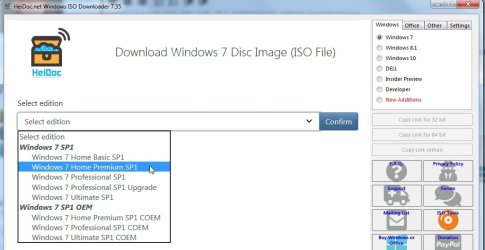
You need to run the Heidoc exe file, then put a dot next to windows 7 - that tells it you want to download windows 7 media.

Next you select the EDITION in the drop down, then click CONFIRM.

heidoc1.jpg

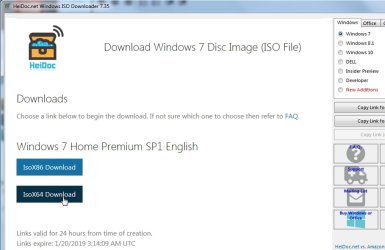
Next you select the LANGUAGE in the drop down, then click CONFIRM

heidoc2.jpg

Next you click the one you want to download

HEIDOC3.jpg
 

My Computers My Computers

System One System Two

  • Computer type
    PC/Desktop
    OS
    7 X64
    CPU
    i5 8400
    Motherboard
    gigabyte b365m ds3h
    Memory
    2x8gb 3200mhz
    Hard Drives
    various
    PSU
    pure power 11 400w cm
    Case
    Coolermaster
    Cooling
    cryorig m9i
  • Computer type
    PC/Desktop
    OS
    7x64
    CPU
    g5400
    Motherboard
    ga b365m ds3h
    Memory
    8gb ddr4 2400
    PSU
    xfx pro 450w
Rick33, AGAIN, please use the QUOTE button when responding!
 

My Computer My Computer

Computer type
Laptop
Computer Manufacturer/Model Number
Fujitsu LIFEBOOK
OS
Win 7 HP SP1 64-bit Vista HB SP2 32-bit Linux Mint 18.3
CPU
Intel(R) Pentium(R) CPU P6200 @ 2.13GHz
Motherboard
FUJITSU FJNBB06
Memory
4.00 GB
Graphics Card(s)
Intel(R) Graphics Media Accelerator HD
Sound Card
[1] Realtek High Definition Audio [2] Intel(R) Display Audio
Screen Resolution
1366 x 768 x 32 bits (4294967296 colors) @ 59 Hz
Hard Drives
TOSHIBA MK5076GSX
Antivirus
AVG FREE
no not a wind up, just a jargon problem

i have the exe file and really do not know the next step!

thanks


400 Bad Request

I do not understand this -"The installation media comes as an .iso file. It can burned to dvd using an isoburner, or extracted to usb using rufus, or similar."

i have a loan of a chromebook for internet and a win 7/64 that does not connect to the internet
 

My Computer My Computer

Computer type
PC/Desktop
Computer Manufacturer/Model Number
toshiba
OS
windows 7 home premium /64
Other Info
Just an old laptop. Satellite L675 019
Hi SIW2,

Is this a wind up?

You have already been informed.

Do you know what, I did think that myself!

If you look back at what I have recommended and suggested, and the amount of times I have said the same thing, I was wondering if I was talking and typing in a different language!
 

My Computer My Computer

Computer type
Laptop
Computer Manufacturer/Model Number
Fujitsu LIFEBOOK
OS
Win 7 HP SP1 64-bit Vista HB SP2 32-bit Linux Mint 18.3
CPU
Intel(R) Pentium(R) CPU P6200 @ 2.13GHz
Motherboard
FUJITSU FJNBB06
Memory
4.00 GB
Graphics Card(s)
Intel(R) Graphics Media Accelerator HD
Sound Card
[1] Realtek High Definition Audio [2] Intel(R) Display Audio
Screen Resolution
1366 x 768 x 32 bits (4294967296 colors) @ 59 Hz
Hard Drives
TOSHIBA MK5076GSX
Antivirus
AVG FREE
Back
Top