Solved Taskkill remove service but then it returns from the dead right after!

yankleber

IT Dinosaur
Member
VIP
Local time
10:26 AM
Messages
212
Location
Home
Recently my bank released an update of their security access module and I was forced to install it onto my computer. The problem is that the crap eats around 25-30% of my CPU even when I am not accessing the bank website (that is 99.99% of time). I tried to kill the service from the CMD window with this:

taskkill pid 1628 /t /f

And then I was granted with the message:

"SUCCESS: The process with PID 1628 has been terminated."

Then when I returned to the task manager to check and realized that the evil thing was back with a new PID.

I can keep doing it the whole day and it still will return the next second with a new PID.

:mad:

How can I manage to resolve this???

Thanks!
 

My Computer My Computer

At a glance

Windows 7 Professional 64bitIntel i5-33308GBOnboard
Computer type
PC/Desktop
Computer Manufacturer/Model Number
Custom
OS
Windows 7 Professional 64bit
CPU
Intel i5-3330
Motherboard
GigaByte B75M-D3H
Memory
8GB
Graphics Card(s)
Onboard
Sound Card
Behringer UCA222
Monitor(s) Displays
Samsung 22.5"
Screen Resolution
1920x1080
Hard Drives
SSD Kingston 120GB
HDD Samsung 320GB
Internet Speed
1M
Antivirus
ZoneAlarm FW + AV Free
Browser
Chrome
There is likely a service running that will start it up again it's finding the service
 

My Computer My Computer

At a glance

win 8 32 bit
Computer type
PC/Desktop
OS
win 8 32 bit
There is likely a service running that will start it up again it's finding the service

I suspected that. So then I would have to find what service is this and kill it first?
 

My Computer My Computer

At a glance

Windows 7 Professional 64bitIntel i5-33308GBOnboard
Computer type
PC/Desktop
Computer Manufacturer/Model Number
Custom
OS
Windows 7 Professional 64bit
CPU
Intel i5-3330
Motherboard
GigaByte B75M-D3H
Memory
8GB
Graphics Card(s)
Onboard
Sound Card
Behringer UCA222
Monitor(s) Displays
Samsung 22.5"
Screen Resolution
1920x1080
Hard Drives
SSD Kingston 120GB
HDD Samsung 320GB
Internet Speed
1M
Antivirus
ZoneAlarm FW + AV Free
Browser
Chrome
If you know what the process is, run msconfig.exe. In the Startup tab, disable the process, if it's shown. Also check for it in the Services tab.
 

My Computer My Computer

At a glance

Windows 7 Pro SP1 64 bit8 GB
Computer type
Laptop
Computer Manufacturer/Model Number
Dell M6500 Precision Work Station
OS
Windows 7 Pro SP1 64 bit
Memory
8 GB
Screen Resolution
1920x
Internet Speed
30 Mbps
Antivirus
Norton Security
Browser
IE 11
Malware will often attempt to shut down security software so it must take active steps to protect itself. I am rather surprised you were able to kill the process at all. It will try to ensure that the process can only be shut down by deliberate action by the user following the established procedure. Security software usually provides such a facility and that would be the most reliable method.
 

My Computer My Computer

At a glance

Windows 7 Pro 64 bitXeon W35208 GBNvidia Geforce 210
Computer type
PC/Desktop
Computer Manufacturer/Model Number
HP
OS
Windows 7 Pro 64 bit
CPU
Xeon W3520
Memory
8 GB
Graphics Card(s)
Nvidia Geforce 210
If you know what the process is, run msconfig.exe. In the Startup tab, disable the process, if it's shown. Also check for it in the Services tab.

It is not in the Startup list. :(

I am thinking in a "solution" that would be to uninstall the module from my computer and then setup a secondary W7 virtual machine with it only to access bank website. So it won't keep wasting my CPU resources all the time. I would have to buy an extra SSD for this though.
 

My Computer My Computer

At a glance

Windows 7 Professional 64bitIntel i5-33308GBOnboard
Computer type
PC/Desktop
Computer Manufacturer/Model Number
Custom
OS
Windows 7 Professional 64bit
CPU
Intel i5-3330
Motherboard
GigaByte B75M-D3H
Memory
8GB
Graphics Card(s)
Onboard
Sound Card
Behringer UCA222
Monitor(s) Displays
Samsung 22.5"
Screen Resolution
1920x1080
Hard Drives
SSD Kingston 120GB
HDD Samsung 320GB
Internet Speed
1M
Antivirus
ZoneAlarm FW + AV Free
Browser
Chrome
Malware will often attempt to shut down security software so it must take active steps to protect itself. I am rather surprised you were able to kill the process at all. It will try to ensure that the process can only be shut down by deliberate action by the user following the established procedure. Security software usually provides such a facility and that would be the most reliable method.

This is a shame that the user/owner of a computer don't have control over it. I wonder what's the point of having administrative rights if you cannot administrate things. This is not the first time that I try to do things on my machine and am not allowed to. One of these days I was trying to share the access of my PC with another computer in my home network and even following all the steps that supposedly would allow me this I was miserably defeated.

:rolleyes:
 

My Computer My Computer

At a glance

Windows 7 Professional 64bitIntel i5-33308GBOnboard
Computer type
PC/Desktop
Computer Manufacturer/Model Number
Custom
OS
Windows 7 Professional 64bit
CPU
Intel i5-3330
Motherboard
GigaByte B75M-D3H
Memory
8GB
Graphics Card(s)
Onboard
Sound Card
Behringer UCA222
Monitor(s) Displays
Samsung 22.5"
Screen Resolution
1920x1080
Hard Drives
SSD Kingston 120GB
HDD Samsung 320GB
Internet Speed
1M
Antivirus
ZoneAlarm FW + AV Free
Browser
Chrome
After some attempts I guess I cannot get rid of this stupid module unless I UNINSTALL it. Since I am going to purchase a second SSD I will just remove it from my main system and set a small VM with W7 just for it. Thanks for helping!
 

My Computer My Computer

At a glance

Windows 7 Professional 64bitIntel i5-33308GBOnboard
Computer type
PC/Desktop
Computer Manufacturer/Model Number
Custom
OS
Windows 7 Professional 64bit
CPU
Intel i5-3330
Motherboard
GigaByte B75M-D3H
Memory
8GB
Graphics Card(s)
Onboard
Sound Card
Behringer UCA222
Monitor(s) Displays
Samsung 22.5"
Screen Resolution
1920x1080
Hard Drives
SSD Kingston 120GB
HDD Samsung 320GB
Internet Speed
1M
Antivirus
ZoneAlarm FW + AV Free
Browser
Chrome
What's curious about that module is, what is it doing that requires a PID when you're not using it? Like samuria said, there's a service running which will start it up again. If you run msconfig.exe and look in Services, is it there?
 

My Computer My Computer

At a glance

Windows 7 Pro SP1 64 bit8 GB
Computer type
Laptop
Computer Manufacturer/Model Number
Dell M6500 Precision Work Station
OS
Windows 7 Pro SP1 64 bit
Memory
8 GB
Screen Resolution
1920x
Internet Speed
30 Mbps
Antivirus
Norton Security
Browser
IE 11
Did you look for it in Services, as I asked in my last post? (I asked you to look in Startup earlier).

I still don't understand what it would be using a PID for. I'm wondering if it installed a security add-on in the browser and it's interacting with something like Windows Defender or Firewall. The smarter people in here might be able to address that.

Yes, it is. Those "security modules" used by bank websites are very common in my country (Brasil) and all of them are a PITA because suck too much resource from CPU and slow down computer. I hate them. Maybe it's an intentional thing to force us to stop using computers and start to access the Internet banking from mobile. Go figure.

:confused:
 
Last edited:

My Computer My Computer

At a glance

Windows 7 Professional 64bitIntel i5-33308GBOnboard
Computer type
PC/Desktop
Computer Manufacturer/Model Number
Custom
OS
Windows 7 Professional 64bit
CPU
Intel i5-3330
Motherboard
GigaByte B75M-D3H
Memory
8GB
Graphics Card(s)
Onboard
Sound Card
Behringer UCA222
Monitor(s) Displays
Samsung 22.5"
Screen Resolution
1920x1080
Hard Drives
SSD Kingston 120GB
HDD Samsung 320GB
Internet Speed
1M
Antivirus
ZoneAlarm FW + AV Free
Browser
Chrome
Did you look for it in Services, as I asked in my last post? (I asked you to look in Startup earlier).

I still don't understand what it would be using a PID for. I'm wondering if it installed a security add-on in the browser and it's interacting with something like Windows Defender or Firewall. The smarter people in here might be able to address that.
 

My Computer My Computer

At a glance

Windows 7 Pro SP1 64 bit8 GB
Computer type
Laptop
Computer Manufacturer/Model Number
Dell M6500 Precision Work Station
OS
Windows 7 Pro SP1 64 bit
Memory
8 GB
Screen Resolution
1920x
Internet Speed
30 Mbps
Antivirus
Norton Security
Browser
IE 11
Probably find it by using 'autoruns'
Art
 

My Computer My Computer

At a glance

Win7 sp1 Pro 64bit / XP sp2 Pro (games only)Intel Core 2 Duo E8400 @ 3.00GHz8.00 GB Dual-Channel DDR2 @ 400MHz (5-5-5-18)1024MB GeForce GTX 560
Computer type
PC/Desktop
Computer Manufacturer/Model Number
Home built
OS
Win7 sp1 Pro 64bit / XP sp2 Pro (games only)
CPU
Intel Core 2 Duo E8400 @ 3.00GHz
Motherboard
Intel Corporation DP35DP (CPU1)
Memory
8.00 GB Dual-Channel DDR2 @ 400MHz (5-5-5-18)
Graphics Card(s)
1024MB GeForce GTX 560
Sound Card
NVIDIA High Definition Audio
Monitor(s) Displays
SyncMaster (2048x1152@60Hz)
Hard Drives
240GB Sandisc Extreme Pro SSD
244GB Seagate ST3250410AS
488GB Seagate ST500DM002-1BD142
931GB Western Digital WDC WD1003FZEX
PSU
Corsair 720
Case
ATX
Keyboard
HID Keyboard Device Logitech
Mouse
HID-compliant mouse Microsoft
Other Info
TSSTcorp CDDVDW SH-S223L

HL-DT-ST BD-RE BH12LS35
Did you look for it in Services, as I asked in my last post? (I asked you to look in Startup earlier).

I still don't understand what it would be using a PID for. I'm wondering if it installed a security add-on in the browser and it's interacting with something like Windows Defender or Firewall. The smarter people in here might be able to address that.

Yes, look my previous answer.

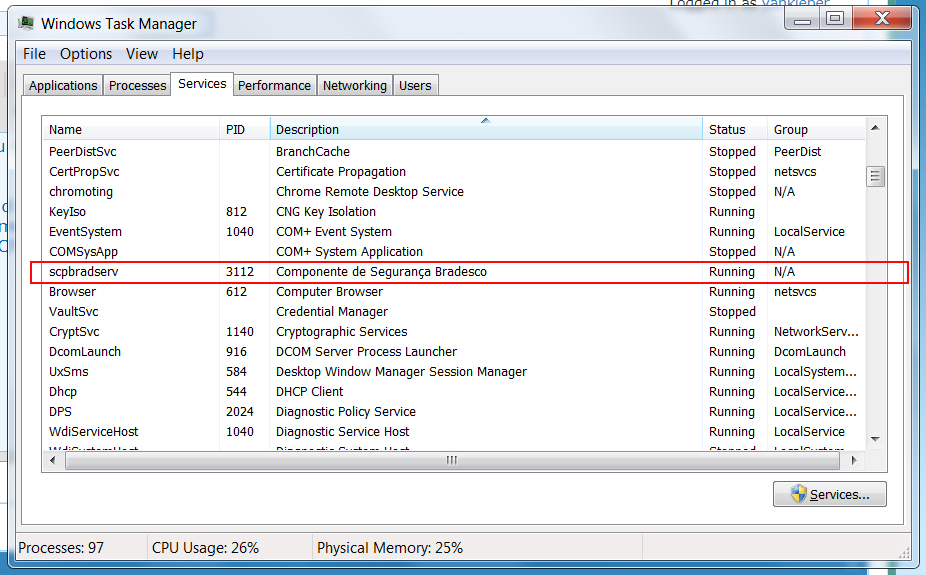
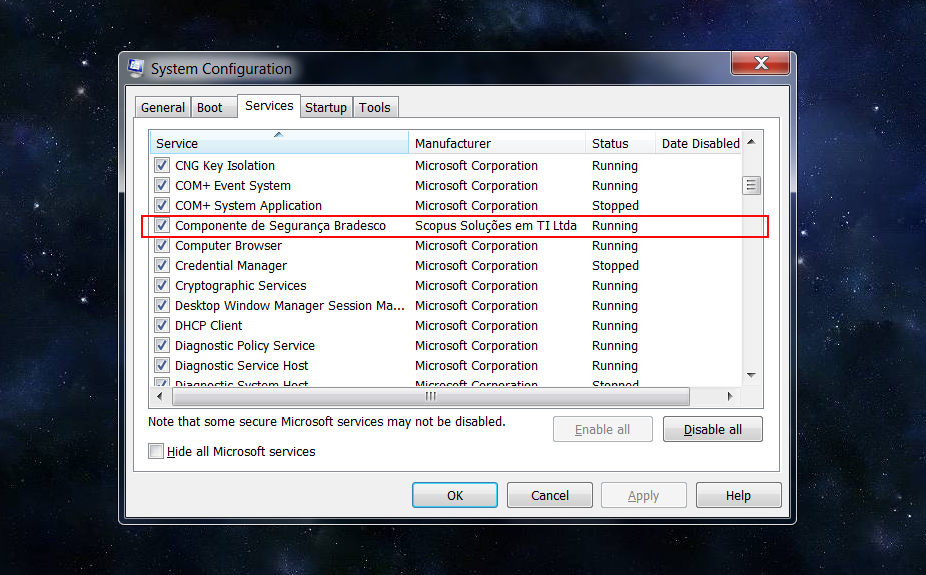
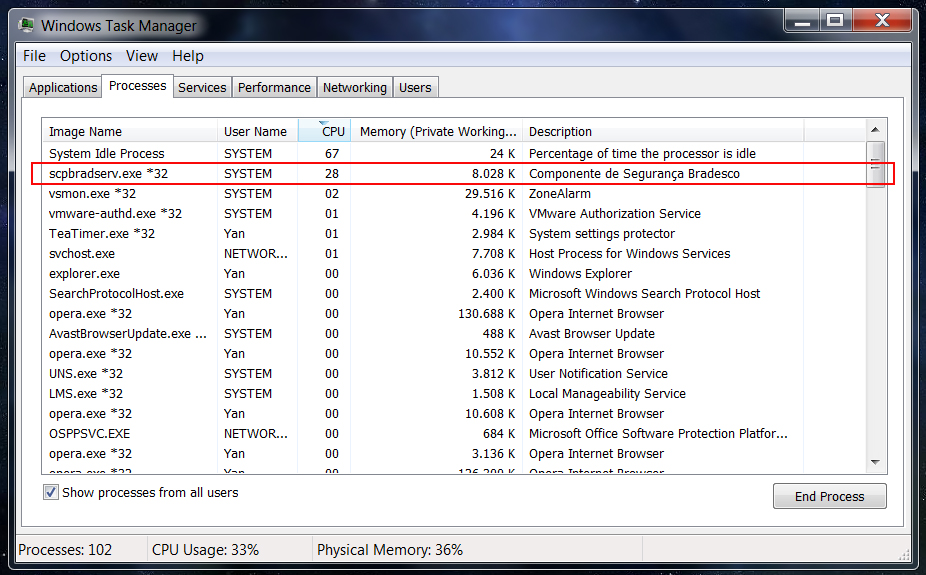
And see below a couple screen shots...

OW0pZGU.jpg


3OMTA1s.jpg


zkh7Y1G.jpg
 

My Computer My Computer

At a glance

Windows 7 Professional 64bitIntel i5-33308GBOnboard
Computer type
PC/Desktop
Computer Manufacturer/Model Number
Custom
OS
Windows 7 Professional 64bit
CPU
Intel i5-3330
Motherboard
GigaByte B75M-D3H
Memory
8GB
Graphics Card(s)
Onboard
Sound Card
Behringer UCA222
Monitor(s) Displays
Samsung 22.5"
Screen Resolution
1920x1080
Hard Drives
SSD Kingston 120GB
HDD Samsung 320GB
Internet Speed
1M
Antivirus
ZoneAlarm FW + AV Free
Browser
Chrome
In that case, I would disable it and apply the change. Then reboot. It should only run when you're using the banking service.
 

My Computer My Computer

At a glance

Windows 7 Pro SP1 64 bit8 GB
Computer type
Laptop
Computer Manufacturer/Model Number
Dell M6500 Precision Work Station
OS
Windows 7 Pro SP1 64 bit
Memory
8 GB
Screen Resolution
1920x
Internet Speed
30 Mbps
Antivirus
Norton Security
Browser
IE 11
In that case, I would disable it and apply the change. Then reboot. It should only run when you're using the banking service.

Trust me, I tried this. In system configuration I unchecked the checkbox aside the service, but as soon I clicked the 'Apply' button it appeared checked again. Then I tried the 'OK' instead 'Apply' and rebooted the computer. Guess what?

:rolleyes:

I am telling you... this thing came directly from Hell.

:devil:

Talking serious now, I think the only way of get rid of it is by uninstalling the app, but then I will not be allowed to login into my bank account. That's why I imagine that to resolve the problem I will have to set a small VM with W7 only for banking. Anyway, I wouldn't mind to keep it there if it bite only 1-2% of my CPU, but, seriously, 28% is way too much.

EDIT: Mostly of what you guys are suggesting me to do I did before to come with this thread. However seems that this darn module doesn't play by the rules.
 

My Computer My Computer

At a glance

Windows 7 Professional 64bitIntel i5-33308GBOnboard
Computer type
PC/Desktop
Computer Manufacturer/Model Number
Custom
OS
Windows 7 Professional 64bit
CPU
Intel i5-3330
Motherboard
GigaByte B75M-D3H
Memory
8GB
Graphics Card(s)
Onboard
Sound Card
Behringer UCA222
Monitor(s) Displays
Samsung 22.5"
Screen Resolution
1920x1080
Hard Drives
SSD Kingston 120GB
HDD Samsung 320GB
Internet Speed
1M
Antivirus
ZoneAlarm FW + AV Free
Browser
Chrome
You showed three entries for it in Services so I assume you tried to disable all three.

Sounds to me like you should be approaching the bank in regards to the problem caused by their software. You are probably not the only one experiencing this problem.
 

My Computer My Computer

At a glance

Windows 7 Pro SP1 64 bit8 GB
Computer type
Laptop
Computer Manufacturer/Model Number
Dell M6500 Precision Work Station
OS
Windows 7 Pro SP1 64 bit
Memory
8 GB
Screen Resolution
1920x
Internet Speed
30 Mbps
Antivirus
Norton Security
Browser
IE 11
You showed three entries for it in Services so I assume you tried to disable all three.
I didn't show three entries. I showed three views of the same entry. Are we in the same page?

Sounds to me like you should be approaching the bank in regards to the problem caused by their software. You are probably not the only one experiencing this problem.
:roflmao:

Sorry. You definitively don't know how the banks behave here in Brasil. The respect to the client is ZERO so I am not going to contact them because certainly they won't give a sh*t for my complain.
 

My Computer My Computer

At a glance

Windows 7 Professional 64bitIntel i5-33308GBOnboard
Computer type
PC/Desktop
Computer Manufacturer/Model Number
Custom
OS
Windows 7 Professional 64bit
CPU
Intel i5-3330
Motherboard
GigaByte B75M-D3H
Memory
8GB
Graphics Card(s)
Onboard
Sound Card
Behringer UCA222
Monitor(s) Displays
Samsung 22.5"
Screen Resolution
1920x1080
Hard Drives
SSD Kingston 120GB
HDD Samsung 320GB
Internet Speed
1M
Antivirus
ZoneAlarm FW + AV Free
Browser
Chrome
My apologies. They are all called different things in the three screen shots and I failed to recognized that all three are not in Services.

I won't ask any questions in regards to what you've tried in each of those screens.

I certainly would contact them if what they do, affects my computer significantly. That's up to you.
 

My Computer My Computer

At a glance

Windows 7 Pro SP1 64 bit8 GB
Computer type
Laptop
Computer Manufacturer/Model Number
Dell M6500 Precision Work Station
OS
Windows 7 Pro SP1 64 bit
Memory
8 GB
Screen Resolution
1920x
Internet Speed
30 Mbps
Antivirus
Norton Security
Browser
IE 11
My apologies. They are all called different things in the three screen shots and I failed to recognized that all three are not in Services.

I won't ask any questions in regards to what you've tried in each of those screens.

I certainly would contact them if what they do, affects my computer significantly. That's up to you.

Thank you Wither!

Yeah, I see your point... happens that I am sick of this bank and I don't know if it worth to chase the resolution of this issue. I was HSBC client for around a decade but then a couple years ago it was terminated in Brasil and this bank (Bradesco) bought the liability meaning that I am an 'inherited client'. HSBC service quality (in all senses) used to be a million years ahead of this other crappy bank.

To help things I live in a small town and in Christmas eve we were "visited" by bank robbers that blasted the vault of three branches, including the only one of my bank. They literally destroyed the branches and they became unusable.

Now, almost two months later my bank opened a new branch that supposedly should replace the blasted one and that is just ridiculous. It's so tiny that people have to form a row in the sidewalk. This week I needed to pick check sheets and looking from outside the glass door I realized that there is not a check printer machine anymore there. As a result tomorrow I will have to travel to another town only to try to find a decent branch where I can at least get INTO and get my checks.

As I said I am really sick of this bank and should move to another one shortly.

PS: Sorry for the rant!

:o
 

My Computer My Computer

At a glance

Windows 7 Professional 64bitIntel i5-33308GBOnboard
Computer type
PC/Desktop
Computer Manufacturer/Model Number
Custom
OS
Windows 7 Professional 64bit
CPU
Intel i5-3330
Motherboard
GigaByte B75M-D3H
Memory
8GB
Graphics Card(s)
Onboard
Sound Card
Behringer UCA222
Monitor(s) Displays
Samsung 22.5"
Screen Resolution
1920x1080
Hard Drives
SSD Kingston 120GB
HDD Samsung 320GB
Internet Speed
1M
Antivirus
ZoneAlarm FW + AV Free
Browser
Chrome
Back
Top