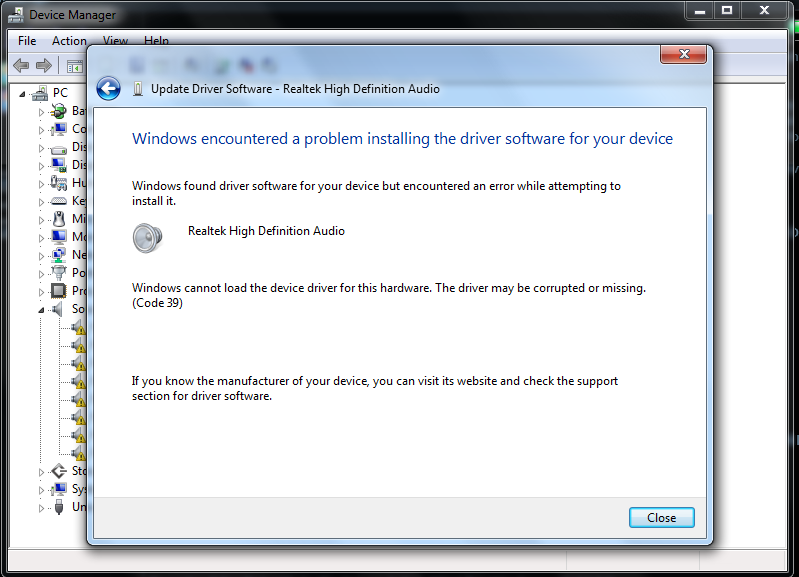
Solved Yellow triangles in Sound, video and game controllers Device Manager

ngudulalase

New member
Local time
2:18 PM
Messages
5
Someone help me :cry:
I uninstalled then restarted but It can be fixed. Sorry for my bad English.
SVoZwtX.png
 

My Computer My Computer

At a glance

Windows 7 Pro 64 bitG46004GB DDR4GeForce GT 1030 AERO ITX 2G OC
Computer type
PC/Desktop
Computer Manufacturer/Model Number
Custom build
OS
Windows 7 Pro 64 bit
CPU
G4600
Motherboard
H110M
Memory
4GB DDR4
Graphics Card(s)
GeForce GT 1030 AERO ITX 2G OC
Sound Card
NVIDIA High Definition Audio / Realtek High Definition Audio
Monitor(s) Displays
Samsung Syncmaster 733 Nw
Screen Resolution
1400x900
PSU
400W
Mouse
Fuhlen G90
Internet Speed
3 Mb/s
Antivirus
Malwarebytes
Browser
Cent Browser / Chrome / Opera / Firefox
Hi ngudulalase,

Welcome to SevenForums!

Someone help me :cry:
I uninstalled then restarted but It can be fixed. Sorry for my bad English.

Have you tried running Windows Update [make a system restore point first though]?
 

My Computer My Computer

At a glance

Win 7 HP SP1 64-bit Vista HB SP2 32-bit Linux...Intel(R) Pentium(R) CPU P6200 @ 2.13GHz4.00 GBIntel(R) Graphics Media Accelerator HD
Computer type
Laptop
Computer Manufacturer/Model Number
Fujitsu LIFEBOOK
OS
Win 7 HP SP1 64-bit Vista HB SP2 32-bit Linux Mint 18.3
CPU
Intel(R) Pentium(R) CPU P6200 @ 2.13GHz
Motherboard
FUJITSU FJNBB06
Memory
4.00 GB
Graphics Card(s)
Intel(R) Graphics Media Accelerator HD
Sound Card
[1] Realtek High Definition Audio [2] Intel(R) Display Audio
Screen Resolution
1366 x 768 x 32 bits (4294967296 colors) @ 59 Hz
Hard Drives
TOSHIBA MK5076GSX
Antivirus
AVG FREE
Hi ngudulalase, and welcome to the Forum!


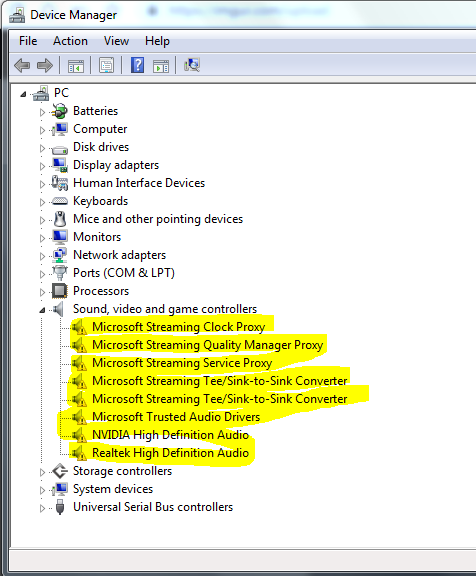
What makes you think that these devices are broken? Oh, I see the yellow triangle (under the marker pen!)

Click on any one of these devices, and it will tell you in the details pane of Device Manager what is the description of the problem.
 

My Computer My Computer

At a glance

Windows 7 x64, Vista x64, 8.1 smartphoneIntel E8400 65W 64-bitDDR2 2 x 2GB, 1GB x 2XFX Radeon HD5750
Computer type
PC/Desktop
OS
Windows 7 x64, Vista x64, 8.1 smartphone
CPU
Intel E8400 65W 64-bit
Motherboard
Gigabyte EP45-UD3LR
Memory
DDR2 2 x 2GB, 1GB x 2
Graphics Card(s)
XFX Radeon HD5750
Sound Card
AMD High Definition Audio; Realtek High Definition Audio
Monitor(s) Displays
iiyama prolite X2377HDS
Screen Resolution
1920 x 1080
Hard Drives
500GB 7200 rpm Seagate ST3500413AS 16MB, 500GB 5400 rpm Toshiba MQ02ABF050H 32MB, 200GB 7200 rpm Seagate ST3200820AS 8MB, 2TB 7200 rpm Western Digital WD20EZRX 64MB
PSU
Enermax Liberty Modular
Case
Antec P193 Midi Tower
Keyboard
Mionix ZIBAL 60
Mouse
Razer USB 2.0 Diamondback Mouse or Huion Graphics Tablet
Browser
Internet Explorer, Lunascape, Firefox, Opera, Avast Safezone
Hi ngudulalase,

Welcome to SevenForums!


Have you tried running Windows Update [make a system restore point first though]?

I got this error @@
AQt88JT.png


Hi ngudulalase, and welcome to the Forum!


What makes you think that these devices are broken? Oh, I see the yellow triangle (under the marker pen!)

Click on any one of these devices, and it will tell you in the details pane of Device Manager what is the description of the problem.
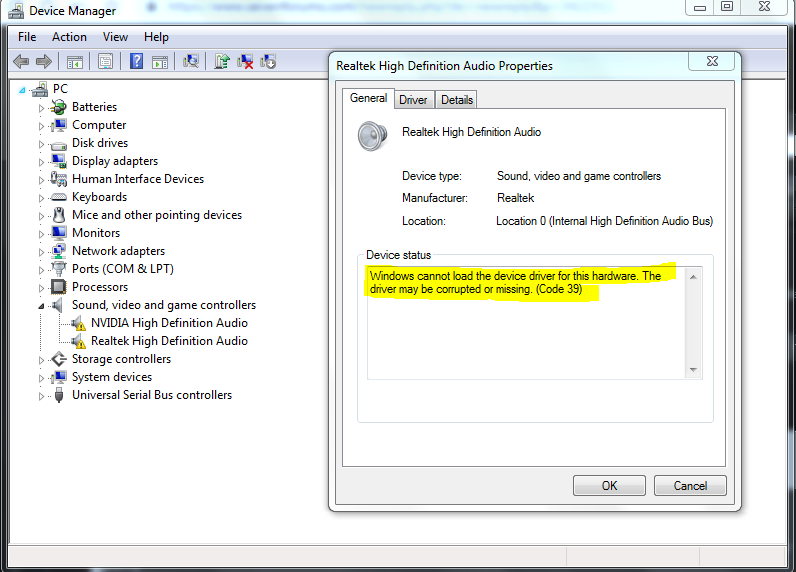
Here
w4wOqCk.png
 

My Computer My Computer

At a glance

Windows 7 Pro 64 bitG46004GB DDR4GeForce GT 1030 AERO ITX 2G OC
Computer type
PC/Desktop
Computer Manufacturer/Model Number
Custom build
OS
Windows 7 Pro 64 bit
CPU
G4600
Motherboard
H110M
Memory
4GB DDR4
Graphics Card(s)
GeForce GT 1030 AERO ITX 2G OC
Sound Card
NVIDIA High Definition Audio / Realtek High Definition Audio
Monitor(s) Displays
Samsung Syncmaster 733 Nw
Screen Resolution
1400x900
PSU
400W
Mouse
Fuhlen G90
Internet Speed
3 Mb/s
Antivirus
Malwarebytes
Browser
Cent Browser / Chrome / Opera / Firefox
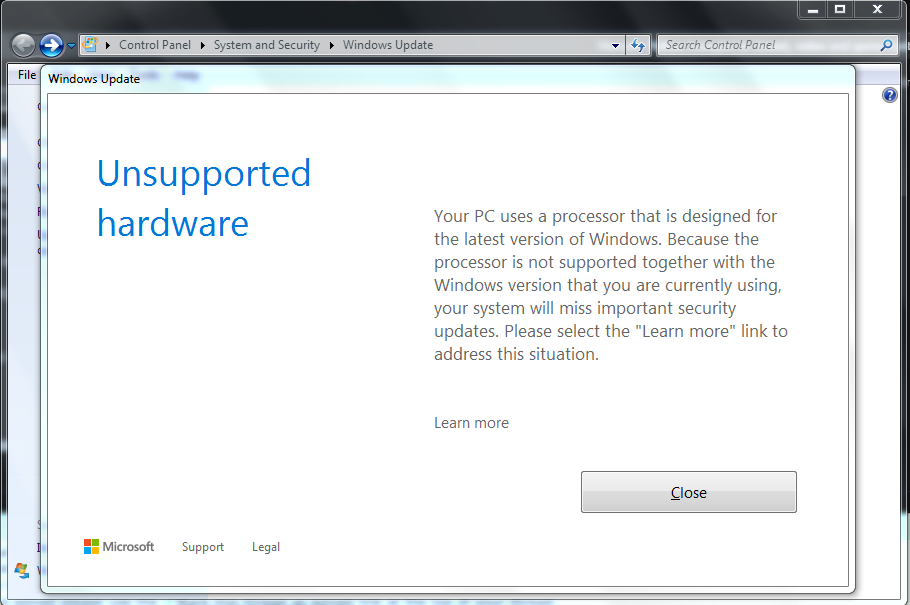
Hello ngudulalase.

You have error message. This message from Microsoft is advising you that the processor Pentium G4600 is not supported on Windows 7.

For more information on this type of error message, please read here: the processor is not supported together with the windows version that you are currently using.

This would mean that your computer would be unable to receive automatic updates from Microsoft, while you use Windows 7 on that computer.

The options available to you are to install Windows 10 on your computer hardware, or, seek to install the drivers manually.
 

My Computer My Computer

At a glance

Windows 7 x64, Vista x64, 8.1 smartphoneIntel E8400 65W 64-bitDDR2 2 x 2GB, 1GB x 2XFX Radeon HD5750
Computer type
PC/Desktop
OS
Windows 7 x64, Vista x64, 8.1 smartphone
CPU
Intel E8400 65W 64-bit
Motherboard
Gigabyte EP45-UD3LR
Memory
DDR2 2 x 2GB, 1GB x 2
Graphics Card(s)
XFX Radeon HD5750
Sound Card
AMD High Definition Audio; Realtek High Definition Audio
Monitor(s) Displays
iiyama prolite X2377HDS
Screen Resolution
1920 x 1080
Hard Drives
500GB 7200 rpm Seagate ST3500413AS 16MB, 500GB 5400 rpm Toshiba MQ02ABF050H 32MB, 200GB 7200 rpm Seagate ST3200820AS 8MB, 2TB 7200 rpm Western Digital WD20EZRX 64MB
PSU
Enermax Liberty Modular
Case
Antec P193 Midi Tower
Keyboard
Mionix ZIBAL 60
Mouse
Razer USB 2.0 Diamondback Mouse or Huion Graphics Tablet
Browser
Internet Explorer, Lunascape, Firefox, Opera, Avast Safezone

My Computer My Computer

At a glance

Win7 pro x64stock i7 7700kCorsair Vengeance LPX 16GB (2x8GB) DDR4 @ 320...integrated Intel HD 630
Computer type
PC/Desktop
Computer Manufacturer/Model Number
diy
OS
Win7 pro x64
CPU
stock i7 7700k
Motherboard
Gigabyte Z270N-WIFI mini-ITX
Memory
Corsair Vengeance LPX 16GB (2x8GB) DDR4 @ 3200MHz
Graphics Card(s)
integrated Intel HD 630
Sound Card
onboard Realtek ALC1220
Monitor(s) Displays
two vertically mounted samsung 55" 4k un55mu8000
Screen Resolution
1920x1280
Hard Drives
256GB Samsung EVO 960 M.2 pci-e NVMe SSD
PSU
SilverStone Nightjar ST45NF 450Watt Fanless
Case
No case. Motherboard is mounted directly onto power supply
Cooling
Evercool low profile 815EP with Panaflow 12L fan at 7v
Keyboard
Ortek MCK-86 mini
Mouse
Belkin 5-button USB
Internet Speed
spectrum 400mbps
to determine what drivers you need to update please post your sound device IDs. You do this by:

clicking start > run > type in CMD

then press enter

that opens a black command prompt window. At the command prompt type in:

wmic sounddev get pnpdeviceid

then press enter.

It will display your sound device IDs. But they are long strings. The quickest way to copy-and-paste them is to instead type in

wmic sounddev get pnpdeviceid>t.t

and press enter

and then type in notepad t.t and press enter

that will send the output into a file called t.t which you then opened with notepad. Just copy the contents and paste them into a post here
 

My Computer My Computer

At a glance

Win7 pro x64stock i7 7700kCorsair Vengeance LPX 16GB (2x8GB) DDR4 @ 320...integrated Intel HD 630
Computer type
PC/Desktop
Computer Manufacturer/Model Number
diy
OS
Win7 pro x64
CPU
stock i7 7700k
Motherboard
Gigabyte Z270N-WIFI mini-ITX
Memory
Corsair Vengeance LPX 16GB (2x8GB) DDR4 @ 3200MHz
Graphics Card(s)
integrated Intel HD 630
Sound Card
onboard Realtek ALC1220
Monitor(s) Displays
two vertically mounted samsung 55" 4k un55mu8000
Screen Resolution
1920x1280
Hard Drives
256GB Samsung EVO 960 M.2 pci-e NVMe SSD
PSU
SilverStone Nightjar ST45NF 450Watt Fanless
Case
No case. Motherboard is mounted directly onto power supply
Cooling
Evercool low profile 815EP with Panaflow 12L fan at 7v
Keyboard
Ortek MCK-86 mini
Mouse
Belkin 5-button USB
Internet Speed
spectrum 400mbps

My Computer My Computer

At a glance

Win7 pro x64stock i7 7700kCorsair Vengeance LPX 16GB (2x8GB) DDR4 @ 320...integrated Intel HD 630
Computer type
PC/Desktop
Computer Manufacturer/Model Number
diy
OS
Win7 pro x64
CPU
stock i7 7700k
Motherboard
Gigabyte Z270N-WIFI mini-ITX
Memory
Corsair Vengeance LPX 16GB (2x8GB) DDR4 @ 3200MHz
Graphics Card(s)
integrated Intel HD 630
Sound Card
onboard Realtek ALC1220
Monitor(s) Displays
two vertically mounted samsung 55" 4k un55mu8000
Screen Resolution
1920x1280
Hard Drives
256GB Samsung EVO 960 M.2 pci-e NVMe SSD
PSU
SilverStone Nightjar ST45NF 450Watt Fanless
Case
No case. Motherboard is mounted directly onto power supply
Cooling
Evercool low profile 815EP with Panaflow 12L fan at 7v
Keyboard
Ortek MCK-86 mini
Mouse
Belkin 5-button USB
Internet Speed
spectrum 400mbps
you can also try nvidia smart scan to automatically update the nvidia driver. You may need to run if from internet explorer

NVIDIA Driver Downloads - Automatically Detect NVIDIA Products

here is a link to the realtek driver

Realtek* Audio Driver for Windows 7* for Desktop Boards

if these work we don't need your deviceID info from my earlier post

It did not work ;-;
Realtek* Audio Driver for Windows 7* for Desktop Boards

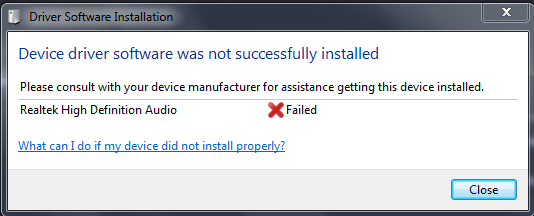
and Driver Software Installation did not work too
GznQTeV.png


to determine what drivers you need to update please post your sound device IDs. You do this by:

clicking start > run > type in CMD

then press enter

that opens a black command prompt window. At the command prompt type in:

wmic sounddev get pnpdeviceid

then press enter.

It will display your sound device IDs. But they are long strings. The quickest way to copy-and-paste them is to instead type in

wmic sounddev get pnpdeviceid>t.t

and press enter

and then type in notepad t.t and press enter

that will send the output into a file called t.t which you then opened with notepad. Just copy the contents and paste them into a post here

here:
PNPDeviceID
HDAUDIO\FUNC_01&VEN_10DE&DEV_0081&SUBSYS_14628C98&REV_1001\5&1018F24F&0&0001
HDAUDIO\FUNC_01&VEN_10EC&DEV_0887&SUBSYS_1849D887&REV_1003\4&81608EC&0&0001
 

My Computer My Computer

At a glance

Windows 7 Pro 64 bitG46004GB DDR4GeForce GT 1030 AERO ITX 2G OC
Computer type
PC/Desktop
Computer Manufacturer/Model Number
Custom build
OS
Windows 7 Pro 64 bit
CPU
G4600
Motherboard
H110M
Memory
4GB DDR4
Graphics Card(s)
GeForce GT 1030 AERO ITX 2G OC
Sound Card
NVIDIA High Definition Audio / Realtek High Definition Audio
Monitor(s) Displays
Samsung Syncmaster 733 Nw
Screen Resolution
1400x900
PSU
400W
Mouse
Fuhlen G90
Internet Speed
3 Mb/s
Antivirus
Malwarebytes
Browser
Cent Browser / Chrome / Opera / Firefox
I'm not clear as to whether or not the nvidia driver installed correctly, since above you only mention realtek. Regardless,

You have two paths to a solution here. The best one is the let windows update solve this. So try the wufuc solution mentioned above, then reboot then run windows update. You may have to do it several times as it catches you up to past updates. It also may make you wait for 5-45 minutes while it searches for updates.

The second solution is the manual one. Using the hardware IDs you posted, we find that your nvidea audio information is here:

NVIDIA High Definition Audio driver Download for 2K,XP,2K3,VISTA,WIN7,WIN8,WIN10/32bits<br>XP,VISTA,WIN7,WIN8,WIN10/64bits - O.E.M O.E.M

and the driver you need is this

HD Audio Driver - 1.3.34.26
Nvidia GeForce 381.89 WHQL - NVIDIA GeForce Drivers - VideoCardz Forums

which can be downloaded here

http://international.download.nvidi...esktop-win8-win7-64bit-international-whql.exe

and your realtek information is here

realtek high definition audio driver Download for VISTA,WIN7,WIN8,WIN10/64bits - To To Be Filled By O.E.M.

and the driver you need is this

realtek high definition audio 6.0.1.7714

which can be downloaded here

Download Realtek HD Audio Driver 6.0.1.7714 for Windows 10 64 bit
 

My Computer My Computer

At a glance

Win7 pro x64stock i7 7700kCorsair Vengeance LPX 16GB (2x8GB) DDR4 @ 320...integrated Intel HD 630
Computer type
PC/Desktop
Computer Manufacturer/Model Number
diy
OS
Win7 pro x64
CPU
stock i7 7700k
Motherboard
Gigabyte Z270N-WIFI mini-ITX
Memory
Corsair Vengeance LPX 16GB (2x8GB) DDR4 @ 3200MHz
Graphics Card(s)
integrated Intel HD 630
Sound Card
onboard Realtek ALC1220
Monitor(s) Displays
two vertically mounted samsung 55" 4k un55mu8000
Screen Resolution
1920x1280
Hard Drives
256GB Samsung EVO 960 M.2 pci-e NVMe SSD
PSU
SilverStone Nightjar ST45NF 450Watt Fanless
Case
No case. Motherboard is mounted directly onto power supply
Cooling
Evercool low profile 815EP with Panaflow 12L fan at 7v
Keyboard
Ortek MCK-86 mini
Mouse
Belkin 5-button USB
Internet Speed
spectrum 400mbps
I'm not clear as to whether or not the nvidia driver installed correctly, since above you only mention realtek. Regardless,

You have two paths to a solution here. The best one is the let windows update solve this. So try the wufuc solution mentioned above, then reboot then run windows update. You may have to do it several times as it catches you up to past updates. It also may make you wait for 5-45 minutes while it searches for updates.

The second solution is the manual one. Using the hardware IDs you posted, we find that your nvidea audio information is here:

NVIDIA High Definition Audio driver Download for 2K,XP,2K3,VISTA,WIN7,WIN8,WIN10/32bits<br>XP,VISTA,WIN7,WIN8,WIN10/64bits - O.E.M O.E.M

and the driver you need is this

HD Audio Driver - 1.3.34.26
Nvidia GeForce 381.89 WHQL - NVIDIA GeForce Drivers - VideoCardz Forums

which can be downloaded here

http://international.download.nvidi...esktop-win8-win7-64bit-international-whql.exe

and your realtek information is here

realtek high definition audio driver Download for VISTA,WIN7,WIN8,WIN10/64bits - To To Be Filled By O.E.M.

and the driver you need is this

realtek high definition audio 6.0.1.7714

which can be downloaded here

Download Realtek HD Audio Driver 6.0.1.7714 for Windows 10 64 bit


I downloaded and installed this version.
Download Realtek HD Audio Driver 6.0.1.7714 for Windows 10 64 bit

But I still got this error :(
5JM3nN3.png


btw I only use Realtek.
 

My Computer My Computer

At a glance

Windows 7 Pro 64 bitG46004GB DDR4GeForce GT 1030 AERO ITX 2G OC
Computer type
PC/Desktop
Computer Manufacturer/Model Number
Custom build
OS
Windows 7 Pro 64 bit
CPU
G4600
Motherboard
H110M
Memory
4GB DDR4
Graphics Card(s)
GeForce GT 1030 AERO ITX 2G OC
Sound Card
NVIDIA High Definition Audio / Realtek High Definition Audio
Monitor(s) Displays
Samsung Syncmaster 733 Nw
Screen Resolution
1400x900
PSU
400W
Mouse
Fuhlen G90
Internet Speed
3 Mb/s
Antivirus
Malwarebytes
Browser
Cent Browser / Chrome / Opera / Firefox
Can you tell us did you run windows update? is the nvidia driver now working? Windows update might fix this.

For the realtek driver, its possible the driver is corrupted but not likely. The audio hardware may have gone bad on you (meaning you now have to buy a pci-e audio card) or you may just have a registry issue. If this problem you're having is fairly recent, one solution is restore windows to an earlier state

System Restore

but first, try this registry fix that corrects many Code 39 errors, which is what you have

How to Fix Code 39 Errors in Windows
 

My Computer My Computer

At a glance

Win7 pro x64stock i7 7700kCorsair Vengeance LPX 16GB (2x8GB) DDR4 @ 320...integrated Intel HD 630
Computer type
PC/Desktop
Computer Manufacturer/Model Number
diy
OS
Win7 pro x64
CPU
stock i7 7700k
Motherboard
Gigabyte Z270N-WIFI mini-ITX
Memory
Corsair Vengeance LPX 16GB (2x8GB) DDR4 @ 3200MHz
Graphics Card(s)
integrated Intel HD 630
Sound Card
onboard Realtek ALC1220
Monitor(s) Displays
two vertically mounted samsung 55" 4k un55mu8000
Screen Resolution
1920x1280
Hard Drives
256GB Samsung EVO 960 M.2 pci-e NVMe SSD
PSU
SilverStone Nightjar ST45NF 450Watt Fanless
Case
No case. Motherboard is mounted directly onto power supply
Cooling
Evercool low profile 815EP with Panaflow 12L fan at 7v
Keyboard
Ortek MCK-86 mini
Mouse
Belkin 5-button USB
Internet Speed
spectrum 400mbps
Can you tell us did you run windows update? is the nvidia driver now working? Windows update might fix this.

For the realtek driver, its possible the driver is corrupted but not likely. The audio hardware may have gone bad on you (meaning you now have to buy a pci-e audio card) or you may just have a registry issue. If this problem you're having is fairly recent, one solution is restore windows to an earlier state

System Restore

but first, try this registry fix that corrects many Code 39 errors, which is what you have

How to Fix Code 39 Errors in Windows
It work.
TY <3 I deleted UpperFilters in registry.
 

My Computer My Computer

At a glance

Windows 7 Pro 64 bitG46004GB DDR4GeForce GT 1030 AERO ITX 2G OC
Computer type
PC/Desktop
Computer Manufacturer/Model Number
Custom build
OS
Windows 7 Pro 64 bit
CPU
G4600
Motherboard
H110M
Memory
4GB DDR4
Graphics Card(s)
GeForce GT 1030 AERO ITX 2G OC
Sound Card
NVIDIA High Definition Audio / Realtek High Definition Audio
Monitor(s) Displays
Samsung Syncmaster 733 Nw
Screen Resolution
1400x900
PSU
400W
Mouse
Fuhlen G90
Internet Speed
3 Mb/s
Antivirus
Malwarebytes
Browser
Cent Browser / Chrome / Opera / Firefox
Back
Top