Solved Report On Multiple Windows Update Failures from Dec 2018 On

malletKATman

New member
Member
Local time
2:16 PM
Messages
51
[FONT=&quot]My Windows 7 PRO SP-1 64-Bit system has been running for nine years on my custom-built PC, the pertinent features of which are documented in the first attached file, with this singularly important distinction. My system now has a 1TB System C: SSD with only the system and application installations and one minor user whose User Profile (the base of all user libraries and other files) is entirely on the C: drive, and two “regular users” whose User Profiles are defined on a 1TB Winchester E: drive. This configuration was chosen in part because nine years ago SSD drives were small and very expensive. I had only an 80GB Windows partition on my original system which could not accommodate regular users’ storage requirements. (On Jan 10 2019 I replaced it with a new 1TB SSD, which necessitated running as the one “C: Only” user to perform the Windows Partition copy.) [/FONT]
[FONT=&quot]On or about December 2018 Windows Update, which had been functioning essentially perfectly up to that point, began to fail on almost every update with various reported hexadecimal codes including: 8050800C, 80073701, 80070002, 80246007, 80600C00, 800F0902 and finally 64C. Usually these would fail in the initial update staging process, but one, the 2019-01 Windows 64-Bit Quality Rollup, failed later after the reboot when attempting to “Configure the Update” during startup.[/FONT]

[FONT=&quot]My first attempt for technical support occurred on Dec 28, 2018, the log from which is included in the 2nd attached file, “Making a Win 7.1 Installation Disk From a Win 7.1 ISO File.docx”. Using that procedure I was able to construct a Win 7 SP-1 64-Bit installation USB memory stick, but I didn’t run it. Instead I found an on-line product that claimed to be able to perform a full Upgrade installation, directly online, that would replace all the system executables from their current library which contains those for Windows 7 PRO SP1 64-Bit: Reimage Limited’s Windows Scan & Repair. I ran this full repair (an hour or more) which claimed to run successfully.[/FONT]

[FONT=&quot]The result of that run produced a bootable system without any change in the E: drive users’ private environments. However, the Reimage libraries were somewhat old, and a subsequent Windows Update run found about 20 important updates. All these issued before the 2018-12 and subsequent updates before were successfully installed, but the same old culprits failed in the same old ways. I was left essentially back where I was when started trying to fix this problem.[/FONT]

[FONT=&quot]Early in February I asked for help again from Microsoft Technical Support, where two separate technicians downloaded a somewhat newer Win 7 PRO SP-1 63-Bit disk image ISO files and converted it to an install folder with a setup.exe file and the installation components, using a Beta-release copy of a product called WinRAR. However, in both attempts, a System Upgrade re-install could not be done because of the following error[/FONT]
[FONT=&quot] [FONT=&quot]To upgrade Windows, the Users, Program Files, and Windows directories need to be on the same partition. Upgrading when these directories are not on the same partition is not supported. Moving these directories so that they are on the same partition is also not supported. You can choose to install a new copy of Windows 7 Professional instead, but this is different from an upgrade, and does not keep your files, settings, and programs. You’ll need to reinstall any programs using the original installation discs or files. To save your files before installing Windows, back them up to an external location such as a CD, DVD, or external hard drive. To install a new copy of Windows 7 Professional, click the Back button in the upper left-hand corner, and select “Custom (advanced)”.[/FONT]
[/FONT]
 

My Computer

Computer type
PC/Desktop
Computer Manufacturer/Model Number
custom build
OS
Windows 7 PRO SP-1 64-Bit
CPU
AMD PHENOM II X6 1090T 6 Core
Motherboard
ASUS M4A88TD-M
Memory
16BG DDR3 DRAM
Hard Drives
Samsung 860 QVO V-NAND SSD 1TB SSD
SATA 3.5 1TB Winchester
Antivirus
WEBROOT SecureAnywhere
Browser
Firefox 65.0.1 (64-bit)
Continuation Of My 1st Report

[FONT=&quot]This is also true if I attempt an Upgrade installation from the bootable memory stick I made back in December.[/FONT]

[FONT=&quot]So now If I want to continue to try to fix this Windows Update problem, I am stuck with blowing away my current system with a full start-over installation, eliminating all the application installs I did over nine years, some of what I can’t replace because I do not have complete original installation media and the application companies no longer exist. That is not a worthwhile price for me to pay for continued Windows 7 updates, and furthermore I’m not convinced that it would succeed in curing this problem and might well introduce more serious problems (such as not being able to run important applications).[/FONT]

[FONT=&quot]I cannot upgrade this system to Windows 10 because I rely on the Windows XP Virtual Machine that was installed at purchase time, which runs only on Windows 7. I use this for a vital database application with a RDBMS that runs only on Windows XP. I have other reasons for not wanting to upgrade to a newer Windows release but those are not pertinent to this discussion. Moreover, various pertinent online forums show that other people are having this same problem, some even on Windows 10.[/FONT]
[FONT=&quot]
[/FONT][FONT=&quot]I find it interesting that the Microsoft technicians were not interested in the contents of my C:\Windows\Logs\CBS folder, which this forum states is required information for help with this problem. (BTW: I have run several Windows partition and system files validity checkers, and they all find my system perfectly intact.)[/FONT]
[FONT=&quot]I'm not really asking for help because I believe I can live without Windows updates. Windows 7 is ten years old and a totally mature OS; no one is enhancing it or fixing bugs, other than plugging malware opportunities. Careful use of my system and robust anti-malware protection software is likely enough protection for my private small system. My purpose in writing this is to emphasize what people also experiencing this problem have concluded on other forums: that Microsoft does not really know what is causing this problem and can’t fix it[/FONT][FONT=&quot][FONT=&quot] when users are defined with User Profiles on other partitions[/FONT], short of the nuclear option of blowing out the Windows partition completely and laying down a virgin copy of Windows 7.[/FONT]
 

My Computer

Computer type
PC/Desktop
Computer Manufacturer/Model Number
custom build
OS
Windows 7 PRO SP-1 64-Bit
CPU
AMD PHENOM II X6 1090T 6 Core
Motherboard
ASUS M4A88TD-M
Memory
16BG DDR3 DRAM
Hard Drives
Samsung 860 QVO V-NAND SSD 1TB SSD
SATA 3.5 1TB Winchester
Antivirus
WEBROOT SecureAnywhere
Browser
Firefox 65.0.1 (64-bit)

My Computer

Computer type
Laptop
Computer Manufacturer/Model Number
Dell M6500 Precision Work Station
OS
Windows 7 Pro SP1 64 bit
Memory
8 GB
Screen Resolution
1920x
Internet Speed
30 Mbps
Antivirus
Norton Security
Browser
IE 11
Reply to wither 2

Thanks, but the documentation PDF and the format of other files implies that these are Linux shell scripts and related programs, I don't have Linux on this computer, or any other for that matter.
 

My Computer

Computer type
PC/Desktop
Computer Manufacturer/Model Number
custom build
OS
Windows 7 PRO SP-1 64-Bit
CPU
AMD PHENOM II X6 1090T 6 Core
Motherboard
ASUS M4A88TD-M
Memory
16BG DDR3 DRAM
Hard Drives
Samsung 860 QVO V-NAND SSD 1TB SSD
SATA 3.5 1TB Winchester
Antivirus
WEBROOT SecureAnywhere
Browser
Firefox 65.0.1 (64-bit)
It's been used by many people to install updates in Win 7 when Windows Update has failed. I wouldn't have suggested it if that isn't the case. It's up to you, whether or not you want to run it.
 

My Computer

Computer type
Laptop
Computer Manufacturer/Model Number
Dell M6500 Precision Work Station
OS
Windows 7 Pro SP1 64 bit
Memory
8 GB
Screen Resolution
1920x
Internet Speed
30 Mbps
Antivirus
Norton Security
Browser
IE 11
Reply to wither 2

Unzipped USUS Offline Updater and ran it. It helped some but did not fix all the Windows Update problems. It was unclear how install the updates that it found and downloaded - the main window just stops after preparing the updates. Had to go to the site FAQ section to get some hints (Update....cmd in the "cmd" sub-folder). Thanks for the help.
 

My Computer

Computer type
PC/Desktop
Computer Manufacturer/Model Number
custom build
OS
Windows 7 PRO SP-1 64-Bit
CPU
AMD PHENOM II X6 1090T 6 Core
Motherboard
ASUS M4A88TD-M
Memory
16BG DDR3 DRAM
Hard Drives
Samsung 860 QVO V-NAND SSD 1TB SSD
SATA 3.5 1TB Winchester
Antivirus
WEBROOT SecureAnywhere
Browser
Firefox 65.0.1 (64-bit)
Did you get all the updates installed?

Sometimes, these kind of programs use Linux scripts to prevent interference from the operating system. It's like, I have a backup program that will let me restore backups of my operating system using a bootable disc. The bootable disc uses Linux because the operating system can't be running (it needs to be locked out) when the restore is in progress.
 

My Computer

Computer type
Laptop
Computer Manufacturer/Model Number
Dell M6500 Precision Work Station
OS
Windows 7 Pro SP1 64 bit
Memory
8 GB
Screen Resolution
1920x
Internet Speed
30 Mbps
Antivirus
Norton Security
Browser
IE 11
Reply to wither 2

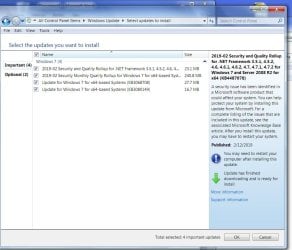
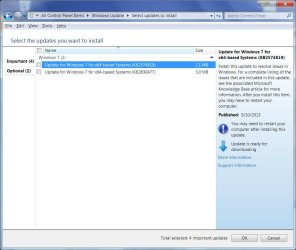
No, unfortunately the same set of 4 Important and 2 Optional updates remain uninstalled. I'm going to try to attach JPGs of both categories, but I'm having trouble getting uploads to a post to work. (I created a thread in the "General" forum about it; haven;t got a response.) This time the uploads worked..
 

Attachments

  • Important.jpg
    Important.jpg
    124.1 KB · Views: 1
  • Optional.jpg
    Optional.jpg
    95.7 KB · Views: 0

My Computer

Computer type
PC/Desktop
Computer Manufacturer/Model Number
custom build
OS
Windows 7 PRO SP-1 64-Bit
CPU
AMD PHENOM II X6 1090T 6 Core
Motherboard
ASUS M4A88TD-M
Memory
16BG DDR3 DRAM
Hard Drives
Samsung 860 QVO V-NAND SSD 1TB SSD
SATA 3.5 1TB Winchester
Antivirus
WEBROOT SecureAnywhere
Browser
Firefox 65.0.1 (64-bit)
If you try to run the quality-roll up by itself (no other updates), does it install?
 

My Computer

Computer type
Laptop
Computer Manufacturer/Model Number
Dell M6500 Precision Work Station
OS
Windows 7 Pro SP1 64 bit
Memory
8 GB
Screen Resolution
1920x
Internet Speed
30 Mbps
Antivirus
Norton Security
Browser
IE 11
No. it fails after the system restart during the startup "configuring updates" phase, reboots and rolls back the changes.

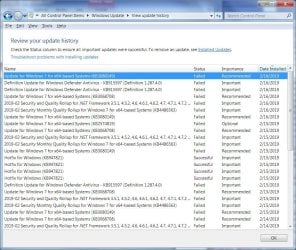
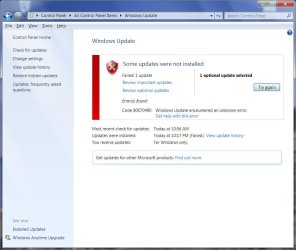
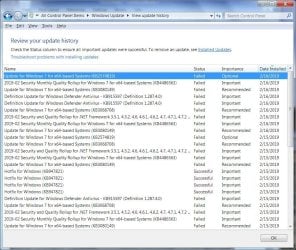
I ran a simpler member of the "gang of six": Update for Windows 7 for x64-Based Systems (KB308149). It failed with an 80070490 error. I will upload two JPGs of the failure screen and the History screen, and hopefully a ZIP file of the %WinDir%\Logs\CBS.log file that show where it failed, somewhere around file record 195. This CBS.log contains only that try (I wiped it out after terminating the TrustedUpdater.exe process and rebooting). It appears that all these update attempts are failing by not finding something the updater wants in the update packages. - ERROR_NOT_FOUND.

I had to truncate the CBS.log file before ZIPping it; otherwise the ZIP file far exceeds the upload space limit of 8.95 MB. Hopefully any truly useful information is still in the file, in case anyone wants to look.Failure Screen.jpg

History Screen.jpg

View attachment 406971
 

My Computer

Computer type
PC/Desktop
Computer Manufacturer/Model Number
custom build
OS
Windows 7 PRO SP-1 64-Bit
CPU
AMD PHENOM II X6 1090T 6 Core
Motherboard
ASUS M4A88TD-M
Memory
16BG DDR3 DRAM
Hard Drives
Samsung 860 QVO V-NAND SSD 1TB SSD
SATA 3.5 1TB Winchester
Antivirus
WEBROOT SecureAnywhere
Browser
Firefox 65.0.1 (64-bit)
Every one of the "gang of six" Windows Updates fails one way or another when run individually. BTW: both "sfc /VERIFYONLY" and "CHKDSK /F" report there is nothing wrong with my Windows partition and nothing wrong with my system files.
 

My Computer

Computer type
PC/Desktop
Computer Manufacturer/Model Number
custom build
OS
Windows 7 PRO SP-1 64-Bit
CPU
AMD PHENOM II X6 1090T 6 Core
Motherboard
ASUS M4A88TD-M
Memory
16BG DDR3 DRAM
Hard Drives
Samsung 860 QVO V-NAND SSD 1TB SSD
SATA 3.5 1TB Winchester
Antivirus
WEBROOT SecureAnywhere
Browser
Firefox 65.0.1 (64-bit)
2019-2 Security - Quality Rollup Only run.

If you try to run the quality-roll up by itself (no other updates), does it install?


It fails during the Reboot Startup Configuring Update phase., so there is no error code posted. The %WinDir%\Logs\CBS\CBS.log is attached in the CBS Log.ZIP file.
View attachment 406974
Note this is how this single update has failed for some time now, after many attempts by MS Support technicians to get it to go.
 

My Computer

Computer type
PC/Desktop
Computer Manufacturer/Model Number
custom build
OS
Windows 7 PRO SP-1 64-Bit
CPU
AMD PHENOM II X6 1090T 6 Core
Motherboard
ASUS M4A88TD-M
Memory
16BG DDR3 DRAM
Hard Drives
Samsung 860 QVO V-NAND SSD 1TB SSD
SATA 3.5 1TB Winchester
Antivirus
WEBROOT SecureAnywhere
Browser
Firefox 65.0.1 (64-bit)
Failed "Update for Windows 7 for x64-based Systems (KB2574819)

This is an example the oldest optional update run from the 6 that continually fail, as a lone update request.
Here are the screen shots for the run.
Failed.jpg
History.jpg


Here are two ZIP files comprising the runs %WinDir%\Logs\CBS\CBS.log file, split into 2 parts to fit under the ZIP file upload limit.

View attachment 406980
View attachment 406981
 

My Computer

Computer type
PC/Desktop
Computer Manufacturer/Model Number
custom build
OS
Windows 7 PRO SP-1 64-Bit
CPU
AMD PHENOM II X6 1090T 6 Core
Motherboard
ASUS M4A88TD-M
Memory
16BG DDR3 DRAM
Hard Drives
Samsung 860 QVO V-NAND SSD 1TB SSD
SATA 3.5 1TB Winchester
Antivirus
WEBROOT SecureAnywhere
Browser
Firefox 65.0.1 (64-bit)
I just took a quick re-read. Were you ever able to install the December and January updates. There was a problem in that Malwarebytes issued an update which caused a problem with installing the December updates. Removing Malwarebytes or reverting to an earlier version, caused the problem to go away. In January, Microsoft screwed the updates up. There was a fix for that but I'd have to try to find it.
 

My Computer

Computer type
Laptop
Computer Manufacturer/Model Number
Dell M6500 Precision Work Station
OS
Windows 7 Pro SP1 64 bit
Memory
8 GB
Screen Resolution
1920x
Internet Speed
30 Mbps
Antivirus
Norton Security
Browser
IE 11
I just took a quick re-read. Were you ever able to install the December and January updates. There was a problem in that Malwarebytes issued an update which caused a problem with installing the December updates. Removing Malwarebytes or reverting to an earlier version, caused the problem to go away. In January, Microsoft screwed the updates up. There was a fix for that but I'd have to try to find it.

Thanks for hanging in there with me, Wither 2. Pardon my ignorance, but what is "Malwarebytes" and where is it located (so I can delete it as suggested)?

It's once again disappointing that in my lengthy telephone interaction with Tier 2 Windows 7 Microsoft Support technicians, they never mentioned anything like this nor ever searched for "Malwarebytes" that I could observe while they were driving via their Remote Console control app. They never mentioned the CBS.log Win Upd tracing log or ever tried to capture an update session log, either.

It's also depressing that the Windows Update process is so unstructured, by E.W. Dijkstra's definition of truly structured programming.

All this has led me to conclude that MS Tech Support really doesn't know what is causing these Dec-2018-and-subsequent Windows Update problems and thus is clueless as to how to fix them short of blowing away all or parts of an existing Windows 7 installation.

To answer your direct question: No, I never was able to install the Dec 2018 or Jan 2019 Security-Quality rollups, nor were the MS Support people able to, either. Even the Windows Defender malware data updates wont install, not that I give a hoot about that. (I use far better malware protection, detection and correction software.)
 
Last edited:

My Computer

Computer type
PC/Desktop
Computer Manufacturer/Model Number
custom build
OS
Windows 7 PRO SP-1 64-Bit
CPU
AMD PHENOM II X6 1090T 6 Core
Motherboard
ASUS M4A88TD-M
Memory
16BG DDR3 DRAM
Hard Drives
Samsung 860 QVO V-NAND SSD 1TB SSD
SATA 3.5 1TB Winchester
Antivirus
WEBROOT SecureAnywhere
Browser
Firefox 65.0.1 (64-bit)
Hi malletKATman,

Malwarebytes is a malware detector/scanner. It is available for free or real-time protection (premium paid version). If you didn't install it, it most likely is not on your computer. You can go to Control Panel > add remove programs and look for it.
Malwarebytes Cybersecurity for Windows, Mac, Android & iOS

Have you run sfc /scannow or System Update Readiness Tool (SURT)? If not, please do so! Be patient as they may take a while to complete. When SURT completes please upload CBS.log, most resent CBSpersist.cab & CheckSUR.log which will be temporary in its original location which is C:\Windows\Logs\CBS and WindowsUpdate.log location C:\Windows.
 
Last edited:

My Computer

Computer type
PC/Desktop
Computer Manufacturer/Model Number
HP Desktop & Compaq Laptop
OS
Win 10 x64, Linux Lite, Win 7 x64, BlackArch, & Kali
Hard Drives
Samsung 850 Pro 256Gb,
Hitachi HDD 1Tb,
Crucial MX SSD 250Gb
Segate 3Tb USB 3.0 Ext. Backup HDD
Internet Speed
150Mbps dn, 20Mbps up
Antivirus
Avast Free, Malwarebytes Anti-Exploit & Anti-Ransomware
Browser
Firefox, Chrome, Opera, & VPN
Hi malletKATman,

Malwarebytes is a malware detector/scanner. Is is available for free or real-time protection (premium paid version). If you didn't install it, it most likely is not on your computer. You can go to Control Panel > add remove programs and look for it.
Malwarebytes Cybersecurity for Windows, Mac, Android & iOS

Have you run sfc /scannow or System Update Readiness Tool (SURT)? If not, please do so! Be patient as they may take a while to complete. When SURT completes please upload CBS.log, most resent CBSpersist.cab & CheckSUR.log which will be temporary in its original location which is C:\Windows\Logs\CBS and WindowsUpdate.log location C:\Windows.

Hi Snick, thanks for responding to my thread.

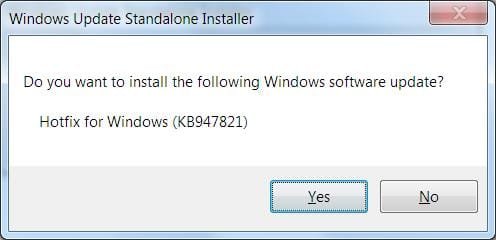
As I have stated in this thread, I have run SFC repeatedly (usually with just the /VERIFYONLY option) and it always finds my system files intact. I also have run CHKDSK /F, which finds my system partition intact. I have tried to run SURT according to the posting rules for this forum, and it is truly weird. It asks it I want install <the update name>, I answer yes, it runs and finishes claiming success, but then I don't find the SURT program or anything else new to run: nothing new in the Programs list, no new desktop icons, etc. I click on "Windows6.1-KB947821-v34-x64.msu" that gets downloaded and I get the following screen:
Screen 1.jpg
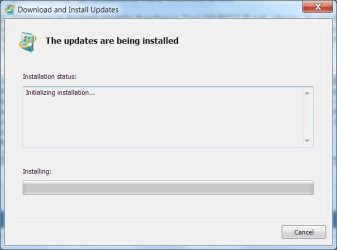
If I answer No, it aborts. If I answer Yes, it runs for a long while with this screen showing
Screen 2.jpg
For some weird reason checksur.exe gets run off my F: USB-connected backup drive instead of from my C: Windows partition or my E: Winchester hard drive where "Windows6.1-KB947821-v34-x64.msu" is stored.

I'm running it now and will post all the logs when it finishes, as you requested.
 

My Computer

Computer type
PC/Desktop
Computer Manufacturer/Model Number
custom build
OS
Windows 7 PRO SP-1 64-Bit
CPU
AMD PHENOM II X6 1090T 6 Core
Motherboard
ASUS M4A88TD-M
Memory
16BG DDR3 DRAM
Hard Drives
Samsung 860 QVO V-NAND SSD 1TB SSD
SATA 3.5 1TB Winchester
Antivirus
WEBROOT SecureAnywhere
Browser
Firefox 65.0.1 (64-bit)
Excellent!

System Update Readiness Tool (SURT) is a Microsoft tool that checks your system files, folders, manifests, & cat/mum files which was initially for upgrade installations of win 8, 8.1 and 10. It doesn't fix anything, it produces logs, CheckSUR.log and CheckSUR.persist.log which will be temporary at C:\Windows\Logs\CBS. It should appear in Windows Update as an Installed Update.

Running sfc /scannow more than once is unnecessary!
 

My Computer

Computer type
PC/Desktop
Computer Manufacturer/Model Number
HP Desktop & Compaq Laptop
OS
Win 10 x64, Linux Lite, Win 7 x64, BlackArch, & Kali
Hard Drives
Samsung 850 Pro 256Gb,
Hitachi HDD 1Tb,
Crucial MX SSD 250Gb
Segate 3Tb USB 3.0 Ext. Backup HDD
Internet Speed
150Mbps dn, 20Mbps up
Antivirus
Avast Free, Malwarebytes Anti-Exploit & Anti-Ransomware
Browser
Firefox, Chrome, Opera, & VPN
Hi malletKATman,

Have you run sfc /scannow or System Update Readiness Tool (SURT)? If not, please do so! Be patient as they may take a while to complete. When SURT completes please upload CBS.log, most resent CBSpersist.cab & CheckSUR.log which will be temporary in its original location which is C:\Windows\Logs\CBS and WindowsUpdate.log location C:\Windows.

The "Installation/System Update Readiness" completes with an "Installation was successful" window: a bizarre way to run a program indented to check for update readiness. The logs you requested seem to show that the run was not a readiness check but rather an attempt to install some windows updates. The attached "SUR-RunLogs.zip" contain the log files you wanted.
View attachment SUR-RunLogs.zip

The only CBSpersist*.cab file I can find anywhere on my Windows partition is in a "C:\ProgramData\Microsoft\Windows\WER\ReportQueue\Critical_6.17601<blah,blah...>" folder, is named "CbsPersist_21090217152748.cab", is already compressed and enormous: 9.59MB. The most aggressive ZIP-like compression I can use reduces that by only 4% and produces a ZIPX - not a ZIP - file, which is not permitted as an upload. The only way I can get that cab file to you is by direct email or Dropbox. For either method I would need your private email address; for Dropbox the address would have to be attached to your dropbox.

As regards Malwarebytes: it is never been on my computer. I use Webroot SecureAnywhere as my malware protection software.

As regards multiple SFC runs: there have been times in this struggle when MS Support technicians have created some corrupt system files on my box while trying to force through updates. The last time it took three consecutive SFC /SCANNOW - Reboot runs to fix it all. So now I tend to run SFC /VERIFYONLY after every Windows Update run to check that something else didn't get corrupted. My trust in Windows Update runs of any form has gone the way of the people's trust in the federal government after Watergate.
 

My Computer

Computer type
PC/Desktop
Computer Manufacturer/Model Number
custom build
OS
Windows 7 PRO SP-1 64-Bit
CPU
AMD PHENOM II X6 1090T 6 Core
Motherboard
ASUS M4A88TD-M
Memory
16BG DDR3 DRAM
Hard Drives
Samsung 860 QVO V-NAND SSD 1TB SSD
SATA 3.5 1TB Winchester
Antivirus
WEBROOT SecureAnywhere
Browser
Firefox 65.0.1 (64-bit)
Thanks for the logs, don't need persist now.
Summary:
Seconds executed: 649
Found 55362 errors
CSI Missing Deployment Key Total count: 2053
CBS MUM Missing Total count: 5
CBS Watchlist Package Missing Total count: 36588
CBS Watchlist Component Missing Total count: 16716

You have a misunderstanding of System Update Readiness Tool, which checks for issues before you upgrade windows. It detects missing, corrupt files/folders or registry issues that you currently have with your computer (55362 errors) It sometimes can repair some issues it finds i.e. below the (f) entry will be a (fix) entry meaning the error was corrected, usually missing files or folders. You have 5 missing mum files which SURT could not find a replacement, thus no (fix).

I could provide the 5 mums but it doesn't address 55000 other errors.
Let me do a little research on the correcting Watchlist Packet and Component errors.
 
Last edited:

My Computer

Computer type
PC/Desktop
Computer Manufacturer/Model Number
HP Desktop & Compaq Laptop
OS
Win 10 x64, Linux Lite, Win 7 x64, BlackArch, & Kali
Hard Drives
Samsung 850 Pro 256Gb,
Hitachi HDD 1Tb,
Crucial MX SSD 250Gb
Segate 3Tb USB 3.0 Ext. Backup HDD
Internet Speed
150Mbps dn, 20Mbps up
Antivirus
Avast Free, Malwarebytes Anti-Exploit & Anti-Ransomware
Browser
Firefox, Chrome, Opera, & VPN
Back
Top