
Solved Video thumbnails showing non media player icons.

SnakeFist

New member
Member
Local time
8:12 AM
Messages
73
Every once in awhile my video thumbnails icon changes. I'm talking about the icon in the lower right hand corner telling you what media player it is associated with. Like sometimes it will change to an icon i use for folders. Or like now it has the fax machine icon on it. If i click on it it will still open and play it in WMP. I'll will have to go in there and right click on a file choose open with and then make it default. But then a little while later the icon will change. It does this for all video types mpg avi mkv mp4 webm. But right now it's only doing it to avi's and mkv's.

I rebuilt my icon file data base using the guide on here. And it's still doing it. I went as far as reinstalling windows and after a few months it starts doing it again. I scanned for viruses and malware and my pc came back spotless. So does anyone have an idea while it's doing this? My up to date PC specs are down below.
 

Attachments
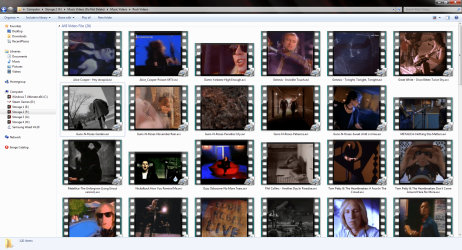
  • media icons changed.png
    media icons changed.png
    454.7 KB · Views: 6

My Computer My Computer

At a glance

Windows 7 Ultimate x64 SP1AMD FX 8350G-Skill Sniper Series 16 GBMSI GTX 970
Computer type
PC/Desktop
Computer Manufacturer/Model Number
Custom Built By Yours Truly.
OS
Windows 7 Ultimate x64 SP1
CPU
AMD FX 8350
Motherboard
Gigabyte 990FXA-UD3
Memory
G-Skill Sniper Series 16 GB
Graphics Card(s)
MSI GTX 970
Monitor(s) Displays
Sony Bravia 40 Inch
Screen Resolution
1920x1080 Full Pixel
Hard Drives
Kingston Hyper X Savage SSD 240GB (OS Drive)
Seagate FireCuda 2TB SSHD
Western Digital Black 2TB
PSU
Antec 900 Watt High Current Gamer
Case
Cooler Master Trooper Full Tower With View Window
Cooling
Noctua D14 Push Pull Air Cooler
Keyboard
Razer Blackwidow Chroma v2
Mouse
Logitech G700s 13 Button Gaming Mouse
Internet Speed
250 mB/s
Antivirus
None
Browser
Firefox
I would suggest reinstalling the media player you use, but it looks like you use Windows Media Player, and Windows programs can be buggy.

I would switch to Daum Pot Player. It is a lot better player than WMP though it might be a little ramp-up to learn the ins and outs of configuring. But if interested, in the install process it will ask what files you want associated with it and after the install is complete, you shouldn't have problems with your media icon switching around on you.
 

My Computer My Computer

At a glance

Win 7 Ultimate 64-bit
OS
Win 7 Ultimate 64-bit
My buddy was having almost the same issue, he's using VLC player now.
 

My Computer My Computer

At a glance

Windows 10 64
Computer type
Laptop
Computer Manufacturer/Model Number
Dell
OS
Windows 10 64
Yes, VLC is another good and popular media player. I used it for many years (and still have it installed), but switched to Daum Pot Player some years back b/c VLC (I found) would often not render a video smoothly, but would be slightly jerky. Updating the codec did not help, maybe b/c VLC doesn't seem to keep their codec db as up to date as Daum.

I've never found a file Daum didn't play smoothly and correctly. The downside is they do have frequent updates (for codecs and fixes), but that can also be seen as a good thing in this case, especially since updating Pot has never caused an issue or 'broken' anything. It's one of the few programs I allow to update whenever it wants. Imho it's a fantastic program.

But using either VLC or Daum Pot Player will almost certainly fix the issue. Any player but WMP. :)
 

My Computer My Computer

At a glance

Win 7 Ultimate 64-bit
OS
Win 7 Ultimate 64-bit
It's weird because them icons in the lower right hand corner of the thumb nail only started around last year. This is the first it has done it in all the years i have been using windows 7 ultimate x64.
 

My Computer My Computer

At a glance

Windows 7 Ultimate x64 SP1AMD FX 8350G-Skill Sniper Series 16 GBMSI GTX 970
Computer type
PC/Desktop
Computer Manufacturer/Model Number
Custom Built By Yours Truly.
OS
Windows 7 Ultimate x64 SP1
CPU
AMD FX 8350
Motherboard
Gigabyte 990FXA-UD3
Memory
G-Skill Sniper Series 16 GB
Graphics Card(s)
MSI GTX 970
Monitor(s) Displays
Sony Bravia 40 Inch
Screen Resolution
1920x1080 Full Pixel
Hard Drives
Kingston Hyper X Savage SSD 240GB (OS Drive)
Seagate FireCuda 2TB SSHD
Western Digital Black 2TB
PSU
Antec 900 Watt High Current Gamer
Case
Cooler Master Trooper Full Tower With View Window
Cooling
Noctua D14 Push Pull Air Cooler
Keyboard
Razer Blackwidow Chroma v2
Mouse
Logitech G700s 13 Button Gaming Mouse
Internet Speed
250 mB/s
Antivirus
None
Browser
Firefox
Some things aren't worth trying to figure out because it could be a very arcane cause that's nearly impossible to uncover. For example, could be an update to W7 a year ago created a conflict/bug in WMP, either isolated, or in combo with other programs you have installed. If is some conflict it could also go away on its own, after whatever is causing it gets changed... like if it is a conflict with another program, if that other program inadvertently gets updated, you might open WMP a year from now and you don't have the issue anymore. Or another update to W7 might replace the problem code with other code that doesn't create the problem anymore... even if MS wasn't intending on fixing it, [b/c it COULD be something obscure that only happens on very few machines, depending]. Again, not worth it... as you would be lucky to discover the cause even after hours and hours of troubleshooting.

Much easier to go with a 3rd party media player. Will have better playback, faster codec updates, and won't have the issue you're having now.
 

My Computer My Computer

At a glance

Win 7 Ultimate 64-bit
OS
Win 7 Ultimate 64-bit
Some things aren't worth trying to figure out because it could be a very arcane cause that's nearly impossible to uncover. For example, could be an update to W7 a year ago created a conflict/bug in WMP, either isolated, or in combo with other programs you have installed. If is some conflict it could also go away on its own, after whatever is causing it gets changed... like if it is a conflict with another program, if that other program inadvertently gets updated, you might open WMP a year from now and you don't have the issue anymore. Or another update to W7 might replace the problem code with other code that doesn't create the problem anymore... even if MS wasn't intending on fixing it, [b/c it COULD be something obscure that only happens on very few machines, depending]. Again, not worth it... as you would be lucky to discover the cause even after hours and hours of troubleshooting.

Much easier to go with a 3rd party media player. Will have better playback, faster codec updates, and won't have the issue you're having now.

Ok thanks for the answers, I'll look at some other audio/video players.
 

My Computer My Computer

At a glance

Windows 7 Ultimate x64 SP1AMD FX 8350G-Skill Sniper Series 16 GBMSI GTX 970
Computer type
PC/Desktop
Computer Manufacturer/Model Number
Custom Built By Yours Truly.
OS
Windows 7 Ultimate x64 SP1
CPU
AMD FX 8350
Motherboard
Gigabyte 990FXA-UD3
Memory
G-Skill Sniper Series 16 GB
Graphics Card(s)
MSI GTX 970
Monitor(s) Displays
Sony Bravia 40 Inch
Screen Resolution
1920x1080 Full Pixel
Hard Drives
Kingston Hyper X Savage SSD 240GB (OS Drive)
Seagate FireCuda 2TB SSHD
Western Digital Black 2TB
PSU
Antec 900 Watt High Current Gamer
Case
Cooler Master Trooper Full Tower With View Window
Cooling
Noctua D14 Push Pull Air Cooler
Keyboard
Razer Blackwidow Chroma v2
Mouse
Logitech G700s 13 Button Gaming Mouse
Internet Speed
250 mB/s
Antivirus
None
Browser
Firefox
Back
Top