Windows Media Center & Media Player icons are missing

Bakmendo

New member
Local time
11:29 PM
Messages
4
When I click Start, All Programs, there are no icons/listings for Windows Media Center or Windows Media Player. How do I get them back? How do I re-install Windows Media Center and Windows Media Player? I am running Windows 7 Home Premium 64bit
 

My Computer My Computer

At a glance

Windows 7 64 bitAMD Phenom 9850 Quad-core 2.5 GHz4 GB of OCZ Reaper HCPAsus ATI Radeon EAH5770
Computer Manufacturer/Model Number
Self Built
OS
Windows 7 64 bit
CPU
AMD Phenom 9850 Quad-core 2.5 GHz
Motherboard
Asus M3A78-T
Memory
4 GB of OCZ Reaper HCP
Graphics Card(s)
Asus ATI Radeon EAH5770
Sound Card
On Board
Monitor(s) Displays
Dell 2408WFP
Case
XBlade
Cooling
4 120 mm case fans and stock CPU cooler
click 'start' then right click a blank area of the start menu and then click 'properties' then click 'customize' and then click 'Use Default Settings' and/or review the settings in this window.

You can also use the search bar (text box in start menu) and just type in Media, when you see the shorcuts, right click on them and send them to your desktop, or pin to taskbar or start menu.

From control panel>programs>turn windows features on or off>media features> check for on, uncheck for off, I suggest leaving it installed (on) and if you do not want to use it just delete the shortcuts.
 
Thanks Swanson Photos.

I recovered the icons by copying the shortcuts from my laptop. The media features were already turned on. Now when I click on the Media Center shortcut, I receive an error message stating “Windows cannot open this program because it has been prevented by a software restriction policy. For more information, contact your system administrator”. Anyone know where I can find these software restrictions?

When I first did a clean install of Win 7, I think I turned off services that WMC needs, figuring that I would never use WMC (this logic has now bit me in the rear!). At the time of the application of this misbegotten logic, I was smart enough to create a file containing all the changes I made. During the last month old age must have crept in, because I can’t remember where I put the file (nor it’s name, nor the creation date). Wish I’d been smart enough to create a file telling me where I put this file.

So if anyone can tell me where I can find the “software restriction policy” and which services WMC needs, I would appreciate it. This whole thing is starting to feel like another clean install.
 

My Computer My Computer

At a glance

Windows 7 64 bitAMD Phenom 9850 Quad-core 2.5 GHz4 GB of OCZ Reaper HCPAsus ATI Radeon EAH5770
Computer Manufacturer/Model Number
Self Built
OS
Windows 7 64 bit
CPU
AMD Phenom 9850 Quad-core 2.5 GHz
Motherboard
Asus M3A78-T
Memory
4 GB of OCZ Reaper HCP
Graphics Card(s)
Asus ATI Radeon EAH5770
Sound Card
On Board
Monitor(s) Displays
Dell 2408WFP
Case
XBlade
Cooling
4 120 mm case fans and stock CPU cooler
Typically, software restrictions are done in a business network environment to stop workers from performing non-work related tasks and often a person can be discharged for even attempting to modify such settings...that being said...

Software Restrictons are found in Group Policy settings. They may be managed by a network admin and you may not have access to them. You also need at least Windows Enterprise or Ultimate to use the group policy editor.

The pre-release versions of W7 were all W7 Ultimate. The RTM versions vary. I'm betting you actually used a common hack to update to W7 RTM and did not actually do a clean install or are actually running a pre-release version.

Is either accurate? In the first case, the settings may have migrated at upgrade but the tool required to change them is not available to you unless your have the proper version installed. In the latter, you can access group policy through the admin links in the start menu or run gpedit.msc and edit software restrictions policy - use extreme care here as it is easy to break things when making changes here.
 
Not accurate. When I received my copies of Windows 7 Home Premium at the end of October, I formatted my hard drive and did a clean install of Windows 7 64bit.

Since this install is Home Premium, I don’t have gpedit.msc. This computer is at my house and is on my home network. The only administrator is me. Not sure how the policies would have been changed. Group policies are one thing I don’t mess with (there’s probably a whole bunch of other things in windows I shouldn’t mess with, but re-installing the OS keeps my little pea brain occupied and helps keep me out of trouble).

I appreciate your taking the time to respond to my post, but I think it’s time to re-install the system. This time after installing Win 7, the first program I installed was Macrium Reflect and I then made a backup image of the C drive. Using this image, it’ll only take about 15 minutes to have a fresh clean install of the OS. I know you’ve already wasted more time than that on your responses.

Once again I thank you
 

My Computer My Computer

At a glance

Windows 7 64 bitAMD Phenom 9850 Quad-core 2.5 GHz4 GB of OCZ Reaper HCPAsus ATI Radeon EAH5770
Computer Manufacturer/Model Number
Self Built
OS
Windows 7 64 bit
CPU
AMD Phenom 9850 Quad-core 2.5 GHz
Motherboard
Asus M3A78-T
Memory
4 GB of OCZ Reaper HCP
Graphics Card(s)
Asus ATI Radeon EAH5770
Sound Card
On Board
Monitor(s) Displays
Dell 2408WFP
Case
XBlade
Cooling
4 120 mm case fans and stock CPU cooler
I hope i catch you before you reinstall W7. You can uninstall WMP & WMC and of course reinstall


40267d1259906120-windows-media-player-not-responding-123.png


It's worth a shot instead of reinstall the whole OS IMO


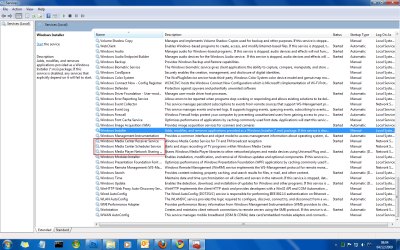
There are also a few services you can check.

04-12-2009 08-04-56.png
 

My Computer My Computer

At a glance

Windows 7 Ultimate x64AMD Turion(tm) 64 X2 Mobile Technology TL-563GB Nanya PC2-6400 DDR2-SDRAM SO-DIM (400MHz)NVIDIA GeForce Go 7600 256MB GDDR3 SDRAM
Computer Manufacturer/Model Number
HP Touchsmart IQ771.uk
OS
Windows 7 Ultimate x64
CPU
AMD Turion(tm) 64 X2 Mobile Technology TL-56
Motherboard
ASUS Pheonix
Memory
3GB Nanya PC2-6400 DDR2-SDRAM SO-DIM (400MHz)
Graphics Card(s)
NVIDIA GeForce Go 7600 256MB GDDR3 SDRAM
Sound Card
High Definition Intergrated NVIDIA MCP51
Monitor(s) Displays
46" Sony Bravia HDTV
Screen Resolution
1600x1200
Hard Drives
1.5TB Samsug
320GB Seagate ST3320820AS - SATA 3Gb/s 8MB
500GB Maxtor Basics STM305003EHD301-RK
Internet Speed
↓6.32 Mb/s ↑0.35 Mb/s ↔26ms
Other Info
BIOS - American Megatrends Inc. 5.07
Ethernet Port - NVIDIA nForce 10/100/1000 Mbps
DVD Drive - TSSTcorp DVDR/RW TS-T632L
Not all version come with Media Center.

Do you have a TV tuner installed.

As for Windows Media Player,. go to Start > Run,. and paste this in the run box optionalfeatures.

Now look under Media Services and check or uncheck Windows Media Player. If it;s not working at all you can uncheck it Ito "uninstalll" it and then go back in and check the box to re-install it.
 

My Computer My Computer

At a glance

Windows 7 Pro & Vista Home PremiumAthlon 64 3800+ (Orleans) 2.40GHz2GB DDR2 RAM DIMMNVIDIA GeForce 8500 GT 512 MB memory HDMI out
Computer Manufacturer/Model Number
Cheap $399.00 E-Machine
OS
Windows 7 Pro & Vista Home Premium
CPU
Athlon 64 3800+ (Orleans) 2.40GHz
Motherboard
Winfast
Memory
2GB DDR2 RAM DIMM
Graphics Card(s)
NVIDIA GeForce 8500 GT 512 MB memory HDMI out
Sound Card
creative X-Fi Exteme 7..1 channel
Monitor(s) Displays
Acer V223W 22" widescreen DVI
Screen Resolution
1680x1050
Hard Drives
WDC WD5 500GB
WDC WD25 250GB
PSU
OCZ 550 watt
Case
Gateway
Cooling
2 fans
Keyboard
Dell
Mouse
Sony Vaio
Internet Speed
18MB/s down - .72MB /s up
I would not attempt to mirror my system and use it to reinstall if I was having system problems...do a full backup of your important files and do a clean install is my advise.

Have you tried creating a new admin account and see if things properly work there?
 
Sorry to take so long to reply to the advice I’m getting here. Had to winterize my motor home since the temps went to below freezing.

rsvr85
Windows Media Center and Media Player are (and were) checked in “Turn Windows features on or off”

Windows Media Center Receiver Service & Windows Media Center Scheduler Service are set to manual. When I try to start either service I get the message “Windows could not start the Windows Media Center Receiver Service service on Local computer. Error 1053: The service did not respond to the start or control request in a timely fashion.”. Windows Media Player Network Sharing Service is set to Automatic and was already started when I checked.

reghakr
Windows 7 Home Premium comes with Media Center and, if I’m correct, is installed by default when Win 7 is installed.
Installing the TV Tuner and wanting to try out Media Center is what started this mess.
“optionalfeatures” is one of the things I checked (see my reply to rsvr85)

Swanson Photos
Already tried the new “Admin” account. No luck. As for “I would not attempt to mirror my system and use it to reinstall if I was having system problems”, it’s no problem and as I said earlier the image I use is a clean install with Macrium Reflect as the only additional installed program. It’s clean and has everything that Win 7 installs by default.

I don’t really think this is a system problem, but a “Idiot Operator” created problem. Any time I install a Windows OS, I clean out all of the Microsoft garbage that I never use (programs, services, etc). This time it bit me in the butt when I decided to try Media Center.

It will only take me a few minutes to re-install from the image (the way I type, by the time I finish this reply, I could have already re-installed Win 7 and all the programs I use).

Once again, I appreciate all the time the three of you have spent giving me advice to help correct my own errors

 

My Computer My Computer

At a glance

Windows 7 64 bitAMD Phenom 9850 Quad-core 2.5 GHz4 GB of OCZ Reaper HCPAsus ATI Radeon EAH5770
Computer Manufacturer/Model Number
Self Built
OS
Windows 7 64 bit
CPU
AMD Phenom 9850 Quad-core 2.5 GHz
Motherboard
Asus M3A78-T
Memory
4 GB of OCZ Reaper HCP
Graphics Card(s)
Asus ATI Radeon EAH5770
Sound Card
On Board
Monitor(s) Displays
Dell 2408WFP
Case
XBlade
Cooling
4 120 mm case fans and stock CPU cooler
When you create a new admin account, the default settings are used...if an issue continues to occur, it is not a user issue, ie, not a setting that was changed that messed stuff up. That tells me the problem is system wide and I would attempt system restore, repair or re-install, then test each step taken afterwards in an attempt to find out how the system was either compromised or changed that is causing the adverse affects. Take only one step at a time and check if the issue has occured again. This should isolate the issue.
 
This can happen if you have Windows Ultimate N - certain less common SKUs of Windows 7 like Ultimate N come without WM player. Probably some European or OEM mandate...
 

My Computer My Computer

At a glance

Windows 7 Ultimate
OS
Windows 7 Ultimate
Reminding a pro that basics count

I too had lost all functionality on my Media Center. Was going to flip this entire platform over the weekend but not now. Something glitched-ate it as it was checked. However--investigating it and clicking OK--Win 7 reloaded.
 

My Computer My Computer

At a glance

Windows 7 UltimateIntel i-980 Extreme8 GigsNvidia GTX 480-Fermi
Computer Manufacturer/Model Number
Polecat
OS
Windows 7 Ultimate
CPU
Intel i-980 Extreme
Motherboard
Asus P6X58-Premeium
Memory
8 Gigs
Graphics Card(s)
Nvidia GTX 480-Fermi
Sound Card
Xonar
Monitor(s) Displays
2x Asus 24
Hard Drives
Intel 160 GiG SSDG
WDC-1 T
PSU
1200-Custom Antex
Case
Cooler Master Cosmos C
Cooling
Custom
Back
Top