Take Ownership Shortcut

Add "Take Ownership" to Context Menu of Files, Folders, and Drives in Windows


   Information
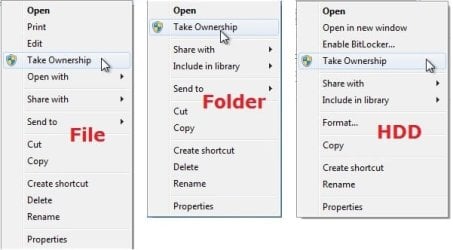
This tutorial will show you how to add Take Ownership to the context menu of all files, folders, and drives for all users in Windows.

This will allow you to be able to instantly take ownership of a file, folder (and all contents), or drive (and all contents) by changing the owner to the current user and grant the Owner_Rights SID (current owner) full access permission.

You must be an administrator to be able to add, remove, and use the "Take Ownership" context menu.

   Note
Application files (ex: EXE, CMD, MSI) will continue to have Run as administrator instead of Take Ownership in their context menu.


When you right click or press and hold on a file, folder, or drive, and click/tap on Take Ownership, you may be prompted by UAC for permission to do so first.

If a user is logged in as an administrator, then the user would just click/tap on Yes to approve and take ownership. The owner of the file, folder, or drive would be changed to the current administrator user account. Permissions would be set to allow the Owner_Rights SID (current owner) full control of the file, folder, or drive.

If a user is logged in as a standard user, then the user would need to enter a selected administrator's password to approve and take ownership. The owner of the file, folder, or drive would be changed to the selected administrator account, and not the standard user. Permissions would be set to allow the Owner_Rights SID (current owner) full control of the file, folder, or drive.


The Take Ownership context menu will not be available when you right click on the C: drive, C:\Program Files folder, C:\Program Files (x86) folder, C:\ProgramData folder, C:\Users folder, and C:\Windows folder. This was done because taking ownership of these system folders can make Windows unstable since it would also take ownership of all the folder's content at the same time.

You will still be able to use the Take Ownership context menu of files inside the folder locations above.

If you would like to have a custom location(s) of your own to not have the context menu, then please feel free to post a request in this tutorial thread. I'll be happy to post back with a custom .reg file for it.

   Warning
This context menu will only work with English Windows installations.

If you have a different language, then please post a reply with what language you have instead. I'll be happy to post back a translated version for you.


EXAMPLE: Take Ownership in Context Menu
example.jpg


Here's How:

1. Do step 2, 3, or 4 below for what you would like to do.


2. To Add "Take Ownership" to Context Menu

   Note
Application files (ex: EXE, CMD, MSI) will still have Run as administrator instead of Take Ownership in the context menu when you use this step.

A) Click/tap on the Download button below to download the file below, and go to step 5 below.

Add_Take_Ownership_to_context_menu


Download


3. To Add "Take Ownership" with Pause to Context Menu

   Note
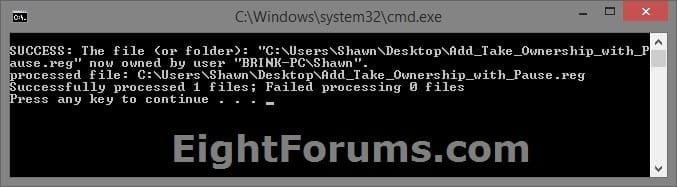
This option pauses the command when you use the "Take Ownership" context menu to be able to see the command results. This can be handy to verify setting ownership and permissions was successful or not.

Application files (ex: EXE, CMD, MSI) will still have Run as administrator instead of Take Ownership in the context menu when you use this step.


Take_Ownership_Pause.jpg


A) Click/tap on the Download button below to download the file below, and go to step 5 below.

Add_Take_Ownership_with_Pause_to_context_menu.reg


Download


4. To Remove "Take Ownership" from Context Menu

   Note
This is the default setting, and will also restore the default Run as administrator for .exe files.


A) Click/tap on the Download button below to download the file below, and go to step 5 below.

Remove_Take_Ownership_from_context_menu.reg


Download


5. Save the .reg file to your Desktop.

6. Double click on the downloaded .reg file to merge it.

7. If prompted, click on Run, Yes (UAC), Yes, and OK to approve the merge.

8. When finished, you can delete the downloaded .reg file if you like.


That's it,
Shawn


Attachments

Last edited:
Wow, Mr. Grim + Brink, thanks sooo much!!!

I pulled my hair out and tried everything to get access because of those weird problems with one folder, now this helped me immediatly! I'm so grateful! :) :party:
 

My Computer My Computer

Computer Manufacturer/Model Number
Self-built
OS
Windows 7 Professional (final) x64
CPU
INTEL Core2 Duo E8500
Motherboard
ASUS P5Q
Memory
OCZ Reaper HPC Edition 4GB PC2-8500U CL5-5-5-18
Graphics Card(s)
NVIDIA GeForce 8800GS
Sound Card
Creative X-Fi Soundblaster Music
Monitor(s) Displays
LG FLATRON W2252TE
Screen Resolution
1680x1050
Hard Drives
1x Intel SSD X25-M 160 GB
1x Samsung HD642JJ 640 GB (SpinPoint F1 DT)
PSU
OCZ ModXStream Pro OCZ500MXSP
Case
Lian Li PC-7F
Cooling
Apack Zerotherm FZ120 Nanoxia Edition
Keyboard
Logitech Media Keyboard Elite (2005 model)
Mouse
Logitech RX-1500 (2008)
Internet Speed
16.000 KB
Other Info
Plantronics GameCom® 377
SteelSeries Siberia In-Ear Headphones (black)
thanks a lot!!
 

My Computer My Computer

Computer Manufacturer/Model Number
Toshiba Satellite Pro A120
OS
Windows 7 Ultimate
CPU
Intel
Help

I have a dual boot system with Vista and 7.
The C drive is the vista drive and some storage
7 is installed on Q

Working in 7 one day, for some reason I decided it would be a good idea to 'take control' of the C (Vista) drive so that I could access some files.

Next time I booted to vista though, I now have huge problems with accessing the C drive. I cant install soem apps; I cant change the security or ownership settings because I dont have access to C and I am starting to get very frustrated.

I have tried the take control download and the command line alternative, but both tell me that I don not have access to the C drive

Can anyone please help.
 

My Computer My Computer

OS
Dual Boot Vista & 7
Hello Andy, and welcome to Seven Forums.

You will need to restore the owner to TrustedInstaller for the Vista partition. You may need to do this from within Windows 7 since you changed the owner in Windows 7 though.

Hope this helps,
Shawn
 

My Computer My Computer

Computer type
PC/Desktop
Computer Manufacturer/Model Number
Self built custom
OS
64-bit Windows 11 Pro for Workstations
CPU
Intel i7-8700K OC'd to 5 GHz
Motherboard
ASUS ROG Maximus XI Formula Z390
Memory
64 GB (4x16GB) G.SKILL TridentZ RGB DDR4 3600 MHz
Graphics Card(s)
ASUS ROG-STRIX-GTX1080TI-O11G-GAMING
Sound Card
Integrated
Monitor(s) Displays
2 x Samsung Odyssey G7 27"
Screen Resolution
2560x1440
Hard Drives
1TB Samsung 990 PRO M.2,
4TB Samsung 990 PRO PRO M.2,
TerraMaster F8 SSD Plus NAS
PSU
Seasonic Prime Titanium 850W
Case
Thermaltake Core P3
Cooling
Corsair Hydro H115i
Keyboard
Logitech wireless K800
Mouse
Logitech MX Master 4
Internet Speed
2 Gb/s Download and 100 Mb/s Upload
Antivirus
Malwarebyte Anti-Malware Premium
Browser
Google Chrome
Other Info
Logitech Z625 speaker system,
Logitech BRIO 4K Pro webcam,
HP Color LaserJet Pro MFP M477fdn,
APC SMART-UPS RT 1000 XL - SURT1000XLI,
Galaxy S23 Plus phone
Thanks

Shawn
Thanks for the suggestion- not tried it out yet - I seem to be busy with work!
May have time tommorrow

Andy
 

My Computer My Computer

OS
Dual Boot Vista & 7
Ok Andy. Please keep us informed of how it went for you. :)
 

My Computer My Computer

Computer type
PC/Desktop
Computer Manufacturer/Model Number
Self built custom
OS
64-bit Windows 11 Pro for Workstations
CPU
Intel i7-8700K OC'd to 5 GHz
Motherboard
ASUS ROG Maximus XI Formula Z390
Memory
64 GB (4x16GB) G.SKILL TridentZ RGB DDR4 3600 MHz
Graphics Card(s)
ASUS ROG-STRIX-GTX1080TI-O11G-GAMING
Sound Card
Integrated
Monitor(s) Displays
2 x Samsung Odyssey G7 27"
Screen Resolution
2560x1440
Hard Drives
1TB Samsung 990 PRO M.2,
4TB Samsung 990 PRO PRO M.2,
TerraMaster F8 SSD Plus NAS
PSU
Seasonic Prime Titanium 850W
Case
Thermaltake Core P3
Cooling
Corsair Hydro H115i
Keyboard
Logitech wireless K800
Mouse
Logitech MX Master 4
Internet Speed
2 Gb/s Download and 100 Mb/s Upload
Antivirus
Malwarebyte Anti-Malware Premium
Browser
Google Chrome
Other Info
Logitech Z625 speaker system,
Logitech BRIO 4K Pro webcam,
HP Color LaserJet Pro MFP M477fdn,
APC SMART-UPS RT 1000 XL - SURT1000XLI,
Galaxy S23 Plus phone
very nice, thanks a lot!
 

My Computer My Computer

OS
windows 7
CPU
intel pentium dual core E2160 3150ghz
Motherboard
albatron pxp35
Memory
2 gig
Graphics Card(s)
ati radeon x1550 256
Sound Card
realtek
Monitor(s) Displays
generic pnp monitor
Hard Drives
WDC WD1600AAJS-00PSA0 ATA Device (149 GB, IDE)
Registered just to thank you for this great hack, really needed this to delete an old WIN7 installation since I've tried everything and no luck.
Thanks again!
 

My Computer My Computer

Computer Manufacturer/Model Number
Myself
OS
Win7 Ultimate x64
CPU
Intel Core2 Duo
Motherboard
Asus Striker Extreme
Memory
4 GB
Graphics Card(s)
eVGA 8800GTX
Sound Card
SB Audigy 2 ZS
Monitor(s) Displays
BENQ FP241W
Hard Drives
2xWD 300GB
1xWD 320GB
PSU
AKASA 1000W
Case
A+ Case
Cooling
Zalman
THIS will removed Windows.old easy way.

Registered just to thank you for this great hack, really needed this to delete an old WIN7 installation since I've tried everything and no luck.
Thanks again!

easy way to remove windows.old

http://www.sevenforums.com/tutorials/19151-windows-old-folder-delete.html

1. my computer
2. right click c:
3. scrowl down to properties
4. disc cleanup
5. clean up system files
6. more options
7. down to system restore and shadow copies.
THIS will removed Windows.old and all othe other unneeded files.
(The Microsoft way.)
8. click cleanup - and away we go....
ENJOY
 
Last edited by a moderator:
You're welcome Badwolve from Mr. Grim (aka: Mark) and me. :)
 

My Computer My Computer

Computer type
PC/Desktop
Computer Manufacturer/Model Number
Self built custom
OS
64-bit Windows 11 Pro for Workstations
CPU
Intel i7-8700K OC'd to 5 GHz
Motherboard
ASUS ROG Maximus XI Formula Z390
Memory
64 GB (4x16GB) G.SKILL TridentZ RGB DDR4 3600 MHz
Graphics Card(s)
ASUS ROG-STRIX-GTX1080TI-O11G-GAMING
Sound Card
Integrated
Monitor(s) Displays
2 x Samsung Odyssey G7 27"
Screen Resolution
2560x1440
Hard Drives
1TB Samsung 990 PRO M.2,
4TB Samsung 990 PRO PRO M.2,
TerraMaster F8 SSD Plus NAS
PSU
Seasonic Prime Titanium 850W
Case
Thermaltake Core P3
Cooling
Corsair Hydro H115i
Keyboard
Logitech wireless K800
Mouse
Logitech MX Master 4
Internet Speed
2 Gb/s Download and 100 Mb/s Upload
Antivirus
Malwarebyte Anti-Malware Premium
Browser
Google Chrome
Other Info
Logitech Z625 speaker system,
Logitech BRIO 4K Pro webcam,
HP Color LaserJet Pro MFP M477fdn,
APC SMART-UPS RT 1000 XL - SURT1000XLI,
Galaxy S23 Plus phone
Many thanks to you Mr GRiM!
 

My Computer My Computer

Computer Manufacturer/Model Number
HP Pavilion dv6815nr Notebook
OS
7 Home Premium x86
CPU
AMD Turion 64 X2 Mobille Technology TL-60 2.0GHz
Memory
3GB
Graphics Card(s)
NVIDIA GeForce 7150M / nForce630M
Sound Card
Conexant High Definition SmartAudio 221
Screen Resolution
1280 x 800
Hard Drives
Samsung 147GB
Mouse
Synaptics TouchPad
Other Info
Norton Security Suite (360)
Just curious as I am wanting to learn about the behaviors of Windows 7 as I never played with Vista prior to this.

How is it that some folders/files get messed up with ownership issues?

For example, I am dual booting win xp and 7 and have another massive partition for files/media. I decided to reformat and install win 7 again. Upon doing so, I had ONE issue with a folder I keep all my music in on the massive partition. my mediamonkey couldn't access the files and when I navigated there I noticed a little lock symbol on the folder. manually I took ownership (I am now going to install this hack!) and this seemed to have fixed the issue.

But how did that happen?

Thanks for this registry tweak btw! great work.
 

My Computer My Computer

OS
Win 7 Ultimate x64
CPU
Intel i7 950 OC'd @ 4.0Ghz (SpeedStep ON)
Motherboard
ASUS P6X58D-E BIOS 0303
Memory
3x2GB Patriot Extreme Viper II Sector 7 DDR3 @ 1600mhz
Graphics Card(s)
ATI MSI 5870 900mhz/1300mhz
Sound Card
Onboard Realtek ALC889
Monitor(s) Displays
2 X 24" BenQ G2412HD
Screen Resolution
1920x1080p
Hard Drives
Intel X25-M 80 GB (SSD)
W.D. Caviar Black 1TB (SATA)
Seagate Barricuda 1TB (SATA)
Seagate Barricuda 80GB (SATA)
PSU
Corsair AX850
Case
Antec 1200
Cooling
Lots and Lots of Air!
Keyboard
Razer Lycosa
Mouse
Microsoft Sidewinder
Internet Speed
25Mbps/1Mbps
nice work Brink, this is very usefull and easy to use...

also i want to ask u this: i want to change my start menu button so i have to take ownership of the entire Windows folder, are there any issues with this action or i can do it with no repercussions in the future ?
 

My Computer My Computer

Computer type
PC/Desktop
Computer Manufacturer/Model Number
2015 Home Made with Great Performance
OS
Windows 8.1 x64 Enterprise
CPU
i5 4690K
Motherboard
Gigabyte GA-Z87X-UD5H
Memory
Corsair 16 GB DDR3 2000Mhz
Graphics Card(s)
Asus GTX760 2GB 256bit
Sound Card
Realtek OnBoard
Monitor(s) Displays
Samsung SyncMaster SA350 + LG 42LA660S
Screen Resolution
1920x1080 Full HD
Hard Drives
1x 640GB Western Digital SATA
1x 4TB Western Digital Green SATA
3x 2TB Western Digital Caviar Green RS SATA
1x 3TB Western Digital Caviar Green SATA
1x 128GB Corsair Force Red SSD
PSU
Corsair CX 600W
Case
Nexus Prominent 5
Cooling
CPU: Artic Cooler Freezer 13 + 5x120mm Case Fans @ 700RPM
Keyboard
Microsoft Wired Keyboard 600
Mouse
Microsoft Wireless Mobile Mouse 1000
Internet Speed
FO 1 Gbit/s
Antivirus
ESET / Malwarebytes
Browser
Opera / Chrome
Other Info
- Fan Controller Aerocool X-Vision 5
- 1x 1TB Hitachi DeskPlus External USB
- 1x 1TB Western Digital Passport External USB3
It is not a HACK!

To A320
For example, I am dual booting win xp and 7 and have another massive partition for files/media. I decided to reformat and install win 7 again. Upon doing so, I had ONE issue with a folder I keep all my music in on the massive partition. my mediamonkey couldn't access the files and when I navigated there I noticed a little lock symbol on the folder. manually I took ownership (I am now going to install this hack!) and this seemed to have fixed the issue.
1st It is not a HACK. it is well documented in Microsoft Scripts.

Open cmd prompt as admin
type TAKEOWN /?
 

My Computer My Computer

Computer type
PC/Desktop
Computer Manufacturer/Model Number
Self built custom
OS
64-bit Windows 11 Pro for Workstations
CPU
Intel i7-8700K OC'd to 5 GHz
Motherboard
ASUS ROG Maximus XI Formula Z390
Memory
64 GB (4x16GB) G.SKILL TridentZ RGB DDR4 3600 MHz
Graphics Card(s)
ASUS ROG-STRIX-GTX1080TI-O11G-GAMING
Sound Card
Integrated
Monitor(s) Displays
2 x Samsung Odyssey G7 27"
Screen Resolution
2560x1440
Hard Drives
1TB Samsung 990 PRO M.2,
4TB Samsung 990 PRO PRO M.2,
TerraMaster F8 SSD Plus NAS
PSU
Seasonic Prime Titanium 850W
Case
Thermaltake Core P3
Cooling
Corsair Hydro H115i
Keyboard
Logitech wireless K800
Mouse
Logitech MX Master 4
Internet Speed
2 Gb/s Download and 100 Mb/s Upload
Antivirus
Malwarebyte Anti-Malware Premium
Browser
Google Chrome
Other Info
Logitech Z625 speaker system,
Logitech BRIO 4K Pro webcam,
HP Color LaserJet Pro MFP M477fdn,
APC SMART-UPS RT 1000 XL - SURT1000XLI,
Galaxy S23 Plus phone
Registered just to thank you for this great hack, really needed this to delete an old WIN7 installation since I've tried everything and no luck.
Thanks again!

easy way to remove windows.old

http://www.sevenforums.com/tutorials/19151-windows-old-folder-delete.html

1. my computer
2. right click c:
3. scrowl down to properties
4. disc cleanup
5. clean up system files
6. more options
7. down to system restore and shadow copies.
THIS will removed Windows.old and all othe other unneeded files.
(The Microsoft way.)
8. click cleanup - and away we go....
ENJOY
thanks..
 

My Computer My Computer

Computer Manufacturer/Model Number
acer 4736
OS
windows 7
CPU
intel core 2 dou
Memory
320 gb
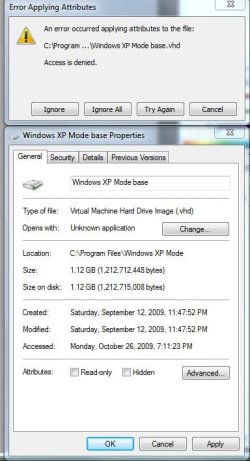
I'm currently trying to remove the read-only attributes for my Windows XP Mode base file so that I can merge the differencing disks in order to import into VMLite. I followed the intructions, but after I take ownership, I get the access denied message and click continue, then I get the Error Applying Attributes message shown below. Any thoughts?
 

Attachments

  • msg.jpg
    msg.jpg
    60.2 KB · Views: 837

My Computer My Computer

Computer Manufacturer/Model Number
Cyberpower, Inc.
OS
Windows 7 Professional (x64)
CPU
AMD Phenom II X4 955 Black Edition
Motherboard
Gigabyte AMD MA770T-UD3P AM3 DDR3 1666+/1333/1066
Memory
6GB (3 x 2GB) Kingston DDR3 1333 SDRAM
Graphics Card(s)
NVIDIA GeForce GTX 260
Sound Card
Onboard 7.1 Sound
Monitor(s) Displays
Samsung 24" SyncMaster 2422
Screen Resolution
1920 x 1200
Hard Drives
500GB Sata II 3.0GB 16MB 7200RPM,
Western Digital 1TB USB 2.0 External Hard Drive
PSU
Kingwin 700 Watt Power Supply
Case
Silver X-Cruiser 2 Mid No Power
Cooling
Asetek 120MM Watercooler
Keyboard
HTK-1001
Mouse
Razer Viper
Internet Speed
Incoming: 2496 kbps, Outgoing: 512 kbps
Hello HughShaw,

You will still need to Allow your account "Full Control" of the file after taking ownership to be able to. Step 17 on in the tutorial below can help show you more on this if needed.

Take Ownership of file - Vista Forums

Hope this helps,
Shawn
 

My Computer My Computer

Computer type
PC/Desktop
Computer Manufacturer/Model Number
Self built custom
OS
64-bit Windows 11 Pro for Workstations
CPU
Intel i7-8700K OC'd to 5 GHz
Motherboard
ASUS ROG Maximus XI Formula Z390
Memory
64 GB (4x16GB) G.SKILL TridentZ RGB DDR4 3600 MHz
Graphics Card(s)
ASUS ROG-STRIX-GTX1080TI-O11G-GAMING
Sound Card
Integrated
Monitor(s) Displays
2 x Samsung Odyssey G7 27"
Screen Resolution
2560x1440
Hard Drives
1TB Samsung 990 PRO M.2,
4TB Samsung 990 PRO PRO M.2,
TerraMaster F8 SSD Plus NAS
PSU
Seasonic Prime Titanium 850W
Case
Thermaltake Core P3
Cooling
Corsair Hydro H115i
Keyboard
Logitech wireless K800
Mouse
Logitech MX Master 4
Internet Speed
2 Gb/s Download and 100 Mb/s Upload
Antivirus
Malwarebyte Anti-Malware Premium
Browser
Google Chrome
Other Info
Logitech Z625 speaker system,
Logitech BRIO 4K Pro webcam,
HP Color LaserJet Pro MFP M477fdn,
APC SMART-UPS RT 1000 XL - SURT1000XLI,
Galaxy S23 Plus phone
Back
Top