How to make an "Up one Level" / "Parent" button?

Marty McFly

New member
Member
VIP
Local time
12:56 PM
Messages
120
Location
UK
For 10 years now, the lack of an "Up" button has really irritated me. Does anyone know any way to add one? Whoever decided it would be a good idea to remove the "Up" button, frankly, wants their head examined!

Yes, there's a keyboard shortcut (Alt+up) but it's an extremely cumbersome shortcut which requires two hands. Most of the time when you've got your hand on the mouse and you're dragging files around, you don't want a keyboard shortcut, you just NEED AN UP BUTTON!

I've read quite a few people saying that an up button is redundant because we have the breadcrumbs menu. I could not disagree more strongly!

Why the Breadcrumbs is NOT a suitable replacement for an "Up" button

The breadcrumbs menu is EXTREMELY cumbersome to use, requiring 3 slow and difficult steps:

  1. First you have to look at the breadcrumbs, read what it says, and try to figure out which portion of text represents the current directory, and which represents the parent directory. This all requires READING which needlessly slows down your brain.
  2. Next, you have to carefully move your mouse over the bit of text representing the parent directory and click on it. That's quite difficult because more often than not, this is a tiny, truncated, nonsensical couple of characters.
  3. Finally, you must start this entire painful process all over again and repeat it the number of levels you're trying to move up. So, if you want to move up three levels, you need to do this process three times. (Yes, there are times when you can jump up multiple levels at once, but this function often unavailable, so you can't rely on it being there.)
In contrast, with an "Up" button, you don't have to read anything. You don't even have to even think at all. You can just click "Up" 3 times and you're exactly where you want to be. Click-click-click. Done.
 

My Computer My Computer

OS
Windows 7 Home Premium 64bit
I don't know the answer to your question but, are you talking about an up button in Windows Explorer or something else?
 

My Computer My Computer

Computer type
Laptop
Computer Manufacturer/Model Number
Dell M6500 Precision Work Station
OS
Windows 7 Pro SP1 64 bit
Memory
8 GB
Screen Resolution
1920x
Internet Speed
30 Mbps
Antivirus
Norton Security
Browser
IE 11
are you talking about an up button in Windows Explorer or something else?
Windows Explorer. (I thought this whole site was exclusively about that?)
 

My Computer My Computer

OS
Windows 7 Home Premium 64bit
If you press F5 while at the bottom of your page it will refresh and go up...might be a bit late to ask MS.

You'll need only one finger, though it doesn't always refresh well...Worth a try!

Or if your mouse have a center Wheel that allow (like mine) to click and hold, you'll just have to move up or down the mouse to quickly go up.
 

My Computer My Computer

Computer type
PC/Desktop
Computer Manufacturer/Model Number
Custom Build
OS
Windows 7 Professional SP1 - x64 [Non-UEFI Boot]
CPU
Ivy Bridge Core i5 3570K (Delidded)
Motherboard
Asus P8Z77-V LE PLUS
Memory
G.Skill "Ares" DDR3 PC3-12800 - 1600MHz (16Gb)
Graphics Card(s)
Asus Dual-RX480-O4G
Sound Card
Creative Sound Blaster Z w/5.1 sound system
Monitor(s) Displays
Asus IPS 23"
Screen Resolution
16/9
Hard Drives
Internal:
500Go Sata 6Gb/s (x2)
500Go Sata 3Gb/s (x2)
SSD 60Go Sata 6Gb/s
PSU
In Win C 900W Series 80+ Platinum
Case
Thermaltake Chaser A71
Cooling
Custom Water Cooling Loop
Keyboard
Cooler Master QuickFire XTi
Mouse
Razer Imperator 2012 (4G)
Antivirus
MSE
Browser
IE 11.0.xxx Rtm
Other Info
"Raid0" with Intel Smart Response Technology (HDD/SSD)
If you press F5 while at the bottom of your page it will refresh and go up...might be a bit late to ask MS.

You'll need only one finger, though it doesn't always refresh well...Worth a try!

Or if your mouse have a center Wheel that allow (like mine) to click and hold, you'll just have to move up or down the mouse to quickly go up.
How strange, neither of those tips worked for me.


Also, what exactly do you mean by "at the bottom of your page"? Could you elaborate? Surely a shortcut should work regardless of where the cursor is?
 

My Computer My Computer

OS
Windows 7 Home Premium 64bit
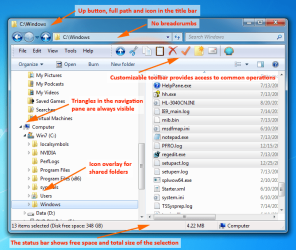
The left pointing arrow at the top left side of the page takes you up one level.

By the way, you're in the General Discussion area of the forum. This forum covers all topics related to Win 7.
 

My Computer My Computer

Computer type
Laptop
Computer Manufacturer/Model Number
Dell M6500 Precision Work Station
OS
Windows 7 Pro SP1 64 bit
Memory
8 GB
Screen Resolution
1920x
Internet Speed
30 Mbps
Antivirus
Norton Security
Browser
IE 11

My Computers My Computers

System One System Two

  • Computer type
    PC/Desktop
    OS
    7 X64
    CPU
    i5 8400
    Motherboard
    gigabyte b365m ds3h
    Memory
    2x8gb 3200mhz
    Hard Drives
    various
    PSU
    pure power 11 400w cm
    Case
    Coolermaster
    Cooling
    cryorig m9i
  • Computer type
    PC/Desktop
    OS
    7x64
    CPU
    g5400
    Motherboard
    ga b365m ds3h
    Memory
    8gb ddr4 2400
    PSU
    xfx pro 450w
The left pointing arrow in the standard Windows Explorer window (such as in your screenshot of Classic Explorer) does the same thing. Perhaps I'm missing something.
 

My Computer My Computer

Computer type
Laptop
Computer Manufacturer/Model Number
Dell M6500 Precision Work Station
OS
Windows 7 Pro SP1 64 bit
Memory
8 GB
Screen Resolution
1920x
Internet Speed
30 Mbps
Antivirus
Norton Security
Browser
IE 11
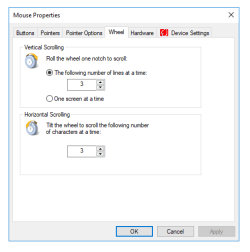
In Control Panel => Mouse Properties => Wheel: try to set up how much vertical lines number you want it to move up or down. So with your mouse center wheel it will scroll very fast.

For exemple, if you set to max 100 vertical lines number, it surely brings you nearly at top or bottom of the page. Default settings is 3 lines. (picked up screenshot on net)
 

Attachments

  • word-image-170.png
    word-image-170.png
    6.5 KB · Views: 31

My Computer My Computer

Computer type
PC/Desktop
Computer Manufacturer/Model Number
Custom Build
OS
Windows 7 Professional SP1 - x64 [Non-UEFI Boot]
CPU
Ivy Bridge Core i5 3570K (Delidded)
Motherboard
Asus P8Z77-V LE PLUS
Memory
G.Skill "Ares" DDR3 PC3-12800 - 1600MHz (16Gb)
Graphics Card(s)
Asus Dual-RX480-O4G
Sound Card
Creative Sound Blaster Z w/5.1 sound system
Monitor(s) Displays
Asus IPS 23"
Screen Resolution
16/9
Hard Drives
Internal:
500Go Sata 6Gb/s (x2)
500Go Sata 3Gb/s (x2)
SSD 60Go Sata 6Gb/s
PSU
In Win C 900W Series 80+ Platinum
Case
Thermaltake Chaser A71
Cooling
Custom Water Cooling Loop
Keyboard
Cooler Master QuickFire XTi
Mouse
Razer Imperator 2012 (4G)
Antivirus
MSE
Browser
IE 11.0.xxx Rtm
Other Info
"Raid0" with Intel Smart Response Technology (HDD/SSD)
The left pointing arrow at the top left side of the page takes you up one level.
No, that's the "back" arrow. It takes you to whatever folder you were in previously. The button is unavailable if this is the first folder you're viewing. It's also unavailable in an application's "Save As" dialog, which is mostly where I'd need an "Up" button.

By the way, you're in the General Discussion area of the forum. This forum covers all topics related to Win 7.
Yes, I am aware of that. I didn't see a relevant sub-forum, and noticed that similar topics were posted to this forum in the past.


classic explorer - part of classic shell can do it.
Classic Shell - Start menu and other Windows enhancements
Thanks! That program certainly looks good, though I am a little nervous about installing it because I already have Windows 7 set up in a highly customized way and don't want any of my changes to be undone by it. I will probably back up the registry then give it a try.


In Control Panel => Mouse Properties => Wheel: try to set up how much vertical lines number you want it to move up or down. So with your mouse center wheel it will scroll very fast.

For exemple, if you set to max 100 vertical lines number, it surely brings you nearly at top or bottom of the page. Default settings is 3 lines.
This has totally confused me. I honestly have no idea what you are talking about. What do you mean by "the bottom of the page"? Explorer windows aren't normally referred to as "pages"? Why would I want to be able to scroll faster, and what does that have to do with an "Up" button? If I want to go to the bottom of a folder, all I need to do is hit the "End" button?
 

My Computer My Computer

OS
Windows 7 Home Premium 64bit
My apologies for being so thick headed. :o I was standing on the back porch this morning having a smoke and, for some reason, I got thinking about this thread. It suddenly dawned on me what you wanted.
 

My Computer My Computer

Computer type
Laptop
Computer Manufacturer/Model Number
Dell M6500 Precision Work Station
OS
Windows 7 Pro SP1 64 bit
Memory
8 GB
Screen Resolution
1920x
Internet Speed
30 Mbps
Antivirus
Norton Security
Browser
IE 11
You only need to install the littlle classic explorer part, the rest you can deselect.

Classic shell has been used by millions.

classicshell.jpg
 

My Computers My Computers

System One System Two

  • Computer type
    PC/Desktop
    OS
    7 X64
    CPU
    i5 8400
    Motherboard
    gigabyte b365m ds3h
    Memory
    2x8gb 3200mhz
    Hard Drives
    various
    PSU
    pure power 11 400w cm
    Case
    Coolermaster
    Cooling
    cryorig m9i
  • Computer type
    PC/Desktop
    OS
    7x64
    CPU
    g5400
    Motherboard
    ga b365m ds3h
    Memory
    8gb ddr4 2400
    PSU
    xfx pro 450w
Confusing, thought you were talking about files in explorer too.. Not only folders. My bad!
 

My Computer My Computer

Computer type
PC/Desktop
Computer Manufacturer/Model Number
Custom Build
OS
Windows 7 Professional SP1 - x64 [Non-UEFI Boot]
CPU
Ivy Bridge Core i5 3570K (Delidded)
Motherboard
Asus P8Z77-V LE PLUS
Memory
G.Skill "Ares" DDR3 PC3-12800 - 1600MHz (16Gb)
Graphics Card(s)
Asus Dual-RX480-O4G
Sound Card
Creative Sound Blaster Z w/5.1 sound system
Monitor(s) Displays
Asus IPS 23"
Screen Resolution
16/9
Hard Drives
Internal:
500Go Sata 6Gb/s (x2)
500Go Sata 3Gb/s (x2)
SSD 60Go Sata 6Gb/s
PSU
In Win C 900W Series 80+ Platinum
Case
Thermaltake Chaser A71
Cooling
Custom Water Cooling Loop
Keyboard
Cooler Master QuickFire XTi
Mouse
Razer Imperator 2012 (4G)
Antivirus
MSE
Browser
IE 11.0.xxx Rtm
Other Info
"Raid0" with Intel Smart Response Technology (HDD/SSD)
You only need to install the littlle classic explorer part, the rest you can deselect.

Classic shell has been used by millions.
Thanks. This definitely seems like a neat program. I tried installing it and it kind of works, kind of doesn't.

There is now an "Up" button in Explorer, which is fantastic! :) But sadly, this button doesn't appear in the "Save As" dialog of any applications - and that's where I really needed it because that's where the window is usually smaller, meaning you can't see the Breadcrumbs.

Also, now I've installed Classic Shell, the Explorer File menu is permanently visible and I can't find a way to hide it. Just a little glitch, I guess.

My apologies for being so thick headed. :o I was standing on the back porch this morning having a smoke and, for some reason, I got thinking about this thread. It suddenly dawned on me what you wanted.
No problem, thanks for trying to help anyway.

Confusing, thought you were talking about files in explorer too.. Not only folders. My bad!
OK, I still have no idea what you mean. Explorer doesn't display files, it only shows you folders containing files?
 

My Computer My Computer

OS
Windows 7 Home Premium 64bit
...Explorer doesn't display files, it only shows you folders containing files?
what do you call it when you're in a folder and viewing it's files?
 

My Computer My Computer

Computer type
PC/Desktop
Computer Manufacturer/Model Number
HP (HP-P6212F)
OS
Microsoft Windows 7 Home Premium 64-bit 7601 Multiprocessor Free Service Pack 1
CPU
Pentium(R) Dual-Core CPU E5300 @ 2.60GHz
Motherboard
PEGATRON CORPORATION Benicia
Memory
6.00 GB
Graphics Card(s)
Intel(R) G33/G31 Express Chipset Family
Sound Card
Realtek High Definition Audio
Monitor(s) Displays
24'' HP WS LCD
Screen Resolution
1920 x 1080 x 32 bits (4294967296 colors) @ 60 Hz
Hard Drives
(1) ATA Hitachi HDT72106 SCSI Disk Device (2) Generic- Compact Flash USB Device (3) Generic- MS/MS-Pro USB Device (4) Generic- SD/MMC USB Device (5) Generic- SM/xD-Picture USB Device (6) Verbatim STORE N GO USB Device
Keyboard
Logitech G510s
Mouse
Logitech Trackball M570
Antivirus
Microsoft Security Essentials / Malwarebytes
Browser
IE / Firefox / Chrome
Off topic: I use one of Mr. Grimm's custom dark themes. Will the Classic Folder interfere with the folder's 'dark' visual?

-thx
 

My Computer My Computer

Computer type
PC/Desktop
Computer Manufacturer/Model Number
HP (HP-P6212F)
OS
Microsoft Windows 7 Home Premium 64-bit 7601 Multiprocessor Free Service Pack 1
CPU
Pentium(R) Dual-Core CPU E5300 @ 2.60GHz
Motherboard
PEGATRON CORPORATION Benicia
Memory
6.00 GB
Graphics Card(s)
Intel(R) G33/G31 Express Chipset Family
Sound Card
Realtek High Definition Audio
Monitor(s) Displays
24'' HP WS LCD
Screen Resolution
1920 x 1080 x 32 bits (4294967296 colors) @ 60 Hz
Hard Drives
(1) ATA Hitachi HDT72106 SCSI Disk Device (2) Generic- Compact Flash USB Device (3) Generic- MS/MS-Pro USB Device (4) Generic- SD/MMC USB Device (5) Generic- SM/xD-Picture USB Device (6) Verbatim STORE N GO USB Device
Keyboard
Logitech G510s
Mouse
Logitech Trackball M570
Antivirus
Microsoft Security Essentials / Malwarebytes
Browser
IE / Firefox / Chrome
what do you call it when you're in a folder and viewing it's files?
I don't suppose what I call it matters. I just don't understand why Non mentioned scrolling or the mouse wheel? What does that have to do with Explorer buttons? The buttons never change, regardless of how far down you've scrolled in a folder. He said it had something to do with viewing files, but when you click on a file in Explorer, it opens in its own application, not in Windows.
 

My Computer My Computer

OS
Windows 7 Home Premium 64bit
So, just to update this in case anyone's interested,

Classic Shell has been superseded and is now Open Shell.
 

My Computer My Computer

OS
Windows 7 Home Premium 64bit
Back
Top