"Windows cannot find '*.exe'. Make sure you typed the name correctly"

Clairvaux

New member
Pro User
VIP
Local time
3:09 AM
Messages
247
"Windows cannot find '*.exe'. Make sure you typed the name correctly"

Problem

I suddenly found this error message popping up, including the path to a program, whenever trying to launch certain programs deeply ingrained in the system. Needless to say, the name was correct, since it was not typed, but the launch was attempted either automatically (at startup, for instance), or by clicking a shortcut. Trying to launch the program directly from the .exe produces the same result. Here are a few samples of programs not working.

Programs refusing to launch and displaying that error message

  • Macrium Reflect
  • Mini Tool Partition Wizard Free
  • Windows cmd
  • Windows disk management
As you can see, repair may be difficult, since Windows will not launch some of its critical tools.

Programs refusing to launch, silently, with no error message

  • Hard Disk Sentinel Pro
  • Macrorit Partition Expert Pro
Program launching, but staying invisible, with no error message

  • Vivaldi (Chromium-based browser : shown as running in Task Manager, but does not appear on screen)
Programs launching normally

  • Word 2003
  • Paint.net
  • Quite RSS
  • Chrome
  • Firefox
  • Tor
  • Outlook
  • Kee Pass
  • Pic Pick
What happened just before

  • Microsoft Security Essentials warned me that its service had been stopped. I relaunched it.
  • I installed the last version of Everything, in a different location and with different parameters than the previous one. I doubt, however, this is the cause, since it happened a few days before the incident.
What is likely not the cause

Some support sites and forums say the anti-virus programs Avast and AVG have been known to produce that problem. However, I have uninstalled them years ago.

What I have tried

  • Restarting the computer.
  • Tried to run sfc /scannow, as recommended by a forum post in such a case. However, as I said, it's impossible to launch Window's cmd.exe (it displays the error message).
  • Restarting in safe mode and attempting to run sfc /scannow produces the same result.
  • When restarting this time, the Windows log-in screen showed only one of my two Windows user accounts : the non-admin one, which I use by default. The other one, which has admin status, was blank, and shown as "Other User". I tried entering the name of the user and the password, but they were refused. Now I fear that I won't be able to do anything which requires admin status. In fact, all the programs which refused to launch (unless I'm mistaken) require admin status (except Vivaldi, which runs invisibly). I was able to log in using my non-admin account.
  • My custom theme had to be reapplied at that point (but this does happen from time to time).
  • A that point, Proton VPN, which is set to launch at start-up, displayed an error message saying "Failed to start ProtonVPN Service. Some applications on your PC might have removed some files or prevented them to be installed successfully. Please repair your installation." Clicking on the provided button attempted to launch cmd.exe, which naturally failed with the error message.
  • Launched a quick scan with Microsoft Security Essentials, which found nothing.
  • Decided to ask the nice folks at Seven Forum, because this is above my grade.
Many thanks for your assistance.
 

My Computer My Computer

At a glance

Windows 7 Home Premium 64-bit (OEM)AMD Athlon II X4 640 (3 GHz, 4 cores)Patriot 16Gb DDR3 1600 (2 kits of 2)ATI Radeon HD 4290 (integrated)
Computer type
PC/Desktop
Computer Manufacturer/Model Number
Custom build
OS
Windows 7 Home Premium 64-bit (OEM)
CPU
AMD Athlon II X4 640 (3 GHz, 4 cores)
Motherboard
Asus M4A 89 GTD Pro/USB3
Memory
Patriot 16Gb DDR3 1600 (2 kits of 2)
Graphics Card(s)
ATI Radeon HD 4290 (integrated)
Sound Card
AMD + Realtek HD Audio (integrated)
Monitor(s) Displays
Hewlett-Packard ZR2440w (24")
Screen Resolution
1920 x 1200
Hard Drives
Internal : Samsung SSD 860 EVO 250 Gb (system), Seagate Barrcuda 1 Tb (data), Western Digital Caviar Blue 500 Gb (archives).
External (USB) : 2 x 1 Tb 2,5" Seagate Barracuda (backups).
PSU
Corsair VX 450 W
Case
Antec Solo
Cooling
Cooler Master Hyper 212 Plus, 2 Nexus Real Silent Case fans
Keyboard
Cherry KC 1000
Mouse
Logitech M 90
Internet Speed
Fiber, 300 Mbit/s down, 200 Mbit/s up
Antivirus
Microsoft Security Essentials
Browser
Vivaldi, Tor
Other Info
BIOS Date: 07/18/11 Ver: 08.00.15.
Modem-router : provided by ISP
does cmd.exe work if you rt click it and select run as adminstrator?

what works in safe mode?
 

My Computers My Computers

  • At a glance

    7 X64i5 84002x8gb 3200mhz
    Computer type
    PC/Desktop
    OS
    7 X64
    CPU
    i5 8400
    Motherboard
    gigabyte b365m ds3h
    Memory
    2x8gb 3200mhz
    Hard Drives
    various
    PSU
    pure power 11 400w cm
    Case
    Coolermaster
    Cooling
    cryorig m9i
  • At a glance

    7x64g54008gb ddr4 2400
    Computer type
    PC/Desktop
    OS
    7x64
    CPU
    g5400
    Motherboard
    ga b365m ds3h
    Memory
    8gb ddr4 2400
    PSU
    xfx pro 450w
I have a funny felling it's Visual C++

You may want to try and uninstall the versions you have from add/remove and run this. Latest Visual C++ Redistributable Runtimes All-in-One Feb 2023 Download | TechPowerUp


Actually, rereading your post it sounds like an environment variable is missing. I'm on my Windows 10 HDD at the moment, but when I get on my 7 HDD I'll see what that is.

- - - Updated - - -

Okay, booted into 7.

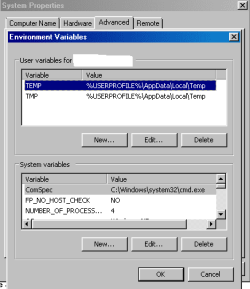
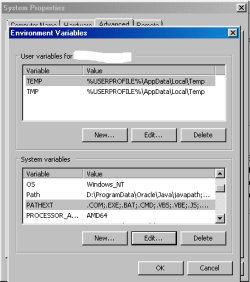
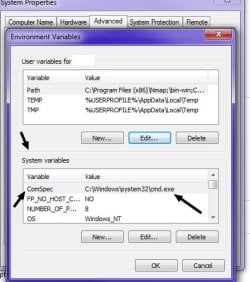
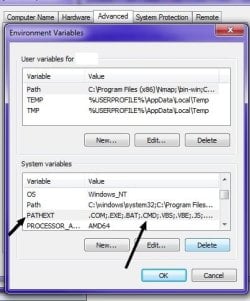
Check the ComSpec and make sure .CMD is in the path. See attached images...


1.jpg


2.jpg

- - - Updated - - -

Actually, it's the same in Windows 10. It's just I had a similar error to yours last year in Windows 7 and I believe I had to add the ComSpec back in.
 

My Computer My Computer

At a glance

Windows 7 Ultimate x64
Computer type
PC/Desktop
OS
Windows 7 Ultimate x64
does regedit work ?
 

My Computers My Computers

  • At a glance

    7 X64i5 84002x8gb 3200mhz
    Computer type
    PC/Desktop
    OS
    7 X64
    CPU
    i5 8400
    Motherboard
    gigabyte b365m ds3h
    Memory
    2x8gb 3200mhz
    Hard Drives
    various
    PSU
    pure power 11 400w cm
    Case
    Coolermaster
    Cooling
    cryorig m9i
  • At a glance

    7x64g54008gb ddr4 2400
    Computer type
    PC/Desktop
    OS
    7x64
    CPU
    g5400
    Motherboard
    ga b365m ds3h
    Memory
    8gb ddr4 2400
    PSU
    xfx pro 450w
Thank you for your suggestions. Please forgive the appearance of my answer. I find it extremely difficult to handle the quoting and answering features of the forum, so readability may not be the best. There seems to be no preview feature at that stage. The forum FAQ does not help.

does cmd.exe work if you rt click it and select run as adminstrator?
does regedit work ?

In fact, I have found that cmd.exe works, as long as I run it without admin rights. It's only if I try to run it with admin rights that I get the error message "Windows cannot find X. Make sure you typed the name correctly, and then try again."

Here are a few Windows tools which behave the same way :

  • Regedit
  • Computer management
  • Windows services
  • Task scheduler (launches, however with another error message specific to it, which I believe is unrelated to the present problem)
  • Windows firewall with advanced security (launches, however with another error message specific to it, which I believe is unrelated to the present problem)
I have verified that, apparently, I can no longer do anything which involves admin rights, which is quite annoying. Trying to clear the UAC and elevate rights systematically triggers the message "Windows cannot find X. Make sure you typed the name correctly, and then try again."

what works in safe mode?

I haven't restarted again for the time being. That's because I have launched a full Microsoft Security Essentials scan, which has been running for 16 hours and has barely reached 1/3 completion. Do you think my problem could be malware-related ? I'm willing to stop the scan if it helps resolution, of course.

I have a funny felling it's Visual C++
You may want to try and uninstall the versions you have from add/remove and run this. Latest Visual C++ Redistributable Runtimes All-in-One Feb 2023 Download | TechPowerUp

Actually, rereading your post it sounds like an environment variable is missing. I'm on my Windows 10 HDD at the moment, but when I get on my 7 HDD I'll see what that is.

- - - Updated - - -

Okay, booted into 7.
Check the ComSpec and make sure .CMD is in the path. See attached images...

- - - Updated - - -
Actually, it's the same in Windows 10. It's just I had a similar error to yours last year in Windows 7 and I believe I had to add the ComSpec back in.

I checked your Visual C++ link, which looks interesting. However, I suppose installing this package would require admin rights, and anything requiring admin rights seems to be impossible at the moment. Also, I usually uninstall through Revo Uninstaller, and just launching it requires admin rights.

As for environment variables and ComSpec, I'm not quite sure how to display those boxes, but this is through Advanced Systems Settings, isn't it ? It requires admin rights as well, so I can't go there.
 
Last edited:

My Computer My Computer

At a glance

Windows 7 Home Premium 64-bit (OEM)AMD Athlon II X4 640 (3 GHz, 4 cores)Patriot 16Gb DDR3 1600 (2 kits of 2)ATI Radeon HD 4290 (integrated)
Computer type
PC/Desktop
Computer Manufacturer/Model Number
Custom build
OS
Windows 7 Home Premium 64-bit (OEM)
CPU
AMD Athlon II X4 640 (3 GHz, 4 cores)
Motherboard
Asus M4A 89 GTD Pro/USB3
Memory
Patriot 16Gb DDR3 1600 (2 kits of 2)
Graphics Card(s)
ATI Radeon HD 4290 (integrated)
Sound Card
AMD + Realtek HD Audio (integrated)
Monitor(s) Displays
Hewlett-Packard ZR2440w (24")
Screen Resolution
1920 x 1200
Hard Drives
Internal : Samsung SSD 860 EVO 250 Gb (system), Seagate Barrcuda 1 Tb (data), Western Digital Caviar Blue 500 Gb (archives).
External (USB) : 2 x 1 Tb 2,5" Seagate Barracuda (backups).
PSU
Corsair VX 450 W
Case
Antec Solo
Cooling
Cooler Master Hyper 212 Plus, 2 Nexus Real Silent Case fans
Keyboard
Cherry KC 1000
Mouse
Logitech M 90
Internet Speed
Fiber, 300 Mbit/s down, 200 Mbit/s up
Antivirus
Microsoft Security Essentials
Browser
Vivaldi, Tor
Other Info
BIOS Date: 07/18/11 Ver: 08.00.15.
Modem-router : provided by ISP
Are you giving the full path when you try and run if you dont and its not in the path it wontfind it
 

My Computer My Computer

At a glance

win 8 32 bit
Computer type
PC/Desktop
OS
win 8 32 bit
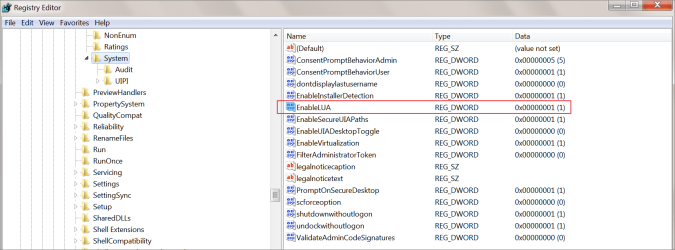
do you have this in your registry :

[HKEY_LOCAL_MACHINE\SOFTWARE\Microsoft\Windows\CurrentVersion\Policies\System]
"EnableLUA"=dword:00000000
 

My Computers My Computers

  • At a glance

    7 X64i5 84002x8gb 3200mhz
    Computer type
    PC/Desktop
    OS
    7 X64
    CPU
    i5 8400
    Motherboard
    gigabyte b365m ds3h
    Memory
    2x8gb 3200mhz
    Hard Drives
    various
    PSU
    pure power 11 400w cm
    Case
    Coolermaster
    Cooling
    cryorig m9i
  • At a glance

    7x64g54008gb ddr4 2400
    Computer type
    PC/Desktop
    OS
    7x64
    CPU
    g5400
    Motherboard
    ga b365m ds3h
    Memory
    8gb ddr4 2400
    PSU
    xfx pro 450w
do you have this in your registry :

[HKEY_LOCAL_MACHINE\SOFTWARE\Microsoft\Windows\CurrentVersion\Policies\System]
"EnableLUA"=dword:00000000
No, the value is different. Please see the screenshot attached, since my knowledge of registry vocabulary is not up to par.

- - - Updated - - -

Are you giving the full path when you try and run if you dont and its not in the path it wontfind it
Actually, I don't give any path at all. The computer is doing it for me.

The problem happens when I double-click on a program to launch it, or when programs which I have set to auto-launch attempt to do it.
 

Attachments

  • regedit.png
    regedit.png
    48.5 KB · Views: 1

My Computer My Computer

At a glance

Windows 7 Home Premium 64-bit (OEM)AMD Athlon II X4 640 (3 GHz, 4 cores)Patriot 16Gb DDR3 1600 (2 kits of 2)ATI Radeon HD 4290 (integrated)
Computer type
PC/Desktop
Computer Manufacturer/Model Number
Custom build
OS
Windows 7 Home Premium 64-bit (OEM)
CPU
AMD Athlon II X4 640 (3 GHz, 4 cores)
Motherboard
Asus M4A 89 GTD Pro/USB3
Memory
Patriot 16Gb DDR3 1600 (2 kits of 2)
Graphics Card(s)
ATI Radeon HD 4290 (integrated)
Sound Card
AMD + Realtek HD Audio (integrated)
Monitor(s) Displays
Hewlett-Packard ZR2440w (24")
Screen Resolution
1920 x 1200
Hard Drives
Internal : Samsung SSD 860 EVO 250 Gb (system), Seagate Barrcuda 1 Tb (data), Western Digital Caviar Blue 500 Gb (archives).
External (USB) : 2 x 1 Tb 2,5" Seagate Barracuda (backups).
PSU
Corsair VX 450 W
Case
Antec Solo
Cooling
Cooler Master Hyper 212 Plus, 2 Nexus Real Silent Case fans
Keyboard
Cherry KC 1000
Mouse
Logitech M 90
Internet Speed
Fiber, 300 Mbit/s down, 200 Mbit/s up
Antivirus
Microsoft Security Essentials
Browser
Vivaldi, Tor
Other Info
BIOS Date: 07/18/11 Ver: 08.00.15.
Modem-router : provided by ISP
As for environment variables and ComSpec, I'm not quite sure how to display those boxes, but this is through Advanced Systems Settings, isn't it ? It requires admin rights as well, so I can't go there.

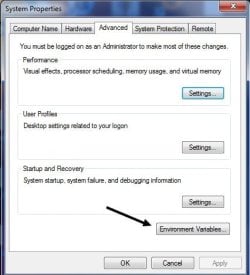
Go to Windows search and enter Edit the system environment variables. See image.

dsvgsdg.jpg


Verify my settings match yours. Specifically ComSpec. Go back to post number 3 and read it all.
 

My Computer My Computer

At a glance

Windows 7 Ultimate x64
Computer type
PC/Desktop
OS
Windows 7 Ultimate x64
Go to Windows search and enter Edit the system environment variables. See image.
Verify my settings match yours. Specifically ComSpec. Go back to post number 3 and read it all.
Thank you, but doing this triggers an UAC prompt. When completed, it triggers once again the message :

Windows cannot find 'C:\Windows\system32\SystemPropertiesAdvanced.exe'. Make sure you typed the name correctly, and then try again.

It really seems anything which requires administrative rights is impossible and triggers that message.

Edit : Now it appears I cannot update Microsoft Security Essentials anymore.

I first made a quick scan with it, which returned nothing, then a full scan, which returned nothing either (but took the better part of two days). Afterwards, I attempted to trigger a manual update of virus definitions. At some point, the progress bar stopped. It's still "downloading" (allegedly). However, I cannot even cancel the update. Doing so requires escalating to admin rights. This triggers an error message :

The update couldn't be cancelled. The system cannot find the file specified. Click Help for more information about this problem. Error code: 0x80070002.

Clicking on the Help button leads to a Microsoft page saying this :

Microsoft Security Essentials reached end of service on January 14, 2020 and is no longer available as a download. Microsoft will continue to release signature updates (including engine) to service systems currently running Microsoft Security Essentials until 2023.

Well, we're still smack in the middle of 2023. Somehow I believe this is linked to my current issue, and not to Microsoft Security Essentials having been disabled from a distance right at the moment I happened to experience another problem.
 
Last edited:

My Computer My Computer

At a glance

Windows 7 Home Premium 64-bit (OEM)AMD Athlon II X4 640 (3 GHz, 4 cores)Patriot 16Gb DDR3 1600 (2 kits of 2)ATI Radeon HD 4290 (integrated)
Computer type
PC/Desktop
Computer Manufacturer/Model Number
Custom build
OS
Windows 7 Home Premium 64-bit (OEM)
CPU
AMD Athlon II X4 640 (3 GHz, 4 cores)
Motherboard
Asus M4A 89 GTD Pro/USB3
Memory
Patriot 16Gb DDR3 1600 (2 kits of 2)
Graphics Card(s)
ATI Radeon HD 4290 (integrated)
Sound Card
AMD + Realtek HD Audio (integrated)
Monitor(s) Displays
Hewlett-Packard ZR2440w (24")
Screen Resolution
1920 x 1200
Hard Drives
Internal : Samsung SSD 860 EVO 250 Gb (system), Seagate Barrcuda 1 Tb (data), Western Digital Caviar Blue 500 Gb (archives).
External (USB) : 2 x 1 Tb 2,5" Seagate Barracuda (backups).
PSU
Corsair VX 450 W
Case
Antec Solo
Cooling
Cooler Master Hyper 212 Plus, 2 Nexus Real Silent Case fans
Keyboard
Cherry KC 1000
Mouse
Logitech M 90
Internet Speed
Fiber, 300 Mbit/s down, 200 Mbit/s up
Antivirus
Microsoft Security Essentials
Browser
Vivaldi, Tor
Other Info
BIOS Date: 07/18/11 Ver: 08.00.15.
Modem-router : provided by ISP
It is available as a download and it receives updates, they are sha2 signed

mse.jpg

Your problem is something else, but I don't know what.

Do you have any backup images, or is there a shadow copy from before the problem started ?

you can borrow my boot media from which you can run various tools ( including mse ) and shadowcopyview to check irf there is a useful shadowcopy

17514x64v30.iso

if you have a useful shadowcopy, it is possible to create a wim image of it which can then be restored
 

My Computers My Computers

  • At a glance

    7 X64i5 84002x8gb 3200mhz
    Computer type
    PC/Desktop
    OS
    7 X64
    CPU
    i5 8400
    Motherboard
    gigabyte b365m ds3h
    Memory
    2x8gb 3200mhz
    Hard Drives
    various
    PSU
    pure power 11 400w cm
    Case
    Coolermaster
    Cooling
    cryorig m9i
  • At a glance

    7x64g54008gb ddr4 2400
    Computer type
    PC/Desktop
    OS
    7x64
    CPU
    g5400
    Motherboard
    ga b365m ds3h
    Memory
    8gb ddr4 2400
    PSU
    xfx pro 450w
It is available as a download and it receives updates, they are sha2 signed

View attachment 422847

Your problem is something else, but I don't know what.

Do you have any backup images, or is there a shadow copy from before the problem started ?

you can borrow my boot media from which you can run various tools ( including mse ) and shadowcopyview to check irf there is a useful shadowcopy

17514x64v30.iso

if you have a useful shadowcopy, it is possible to create a wim image of it which can then be restored

Microsoft Security Essentials now works again !

I made some fresh tests in Safe Mode. Maybe this can suggest solutions. See below for details...

What about that registry key you mentioned ? What is it for ? Would changing the value be of any use ?

Thank you for your boot medium. Yes, I have daily images of my whole computer through Macrium Reflect. I will try this in last resort, because I'm annoyed I can't get to the bottom of this.

In case I do try to restore from my images, I have a question. I have separate, daily images of my C (system) and D (data) disk. The way I would like to do it is restore an image from C previous to the incident (and to another, unrelated one), but leave D untouched (or restore D from a more recent date). The logic being, I would not want to lose any recent documents (or settings).

However, my install is an unusual one. User folders are not where they are supposed to be by default. A lot of things which are usually on C are on D in my setup. I followed the recommendations in this 7 Forums tutorial :

System Preparation Tool - Use to Customize Windows

Could this work ?

I have a funny feeling it's Visual C++
You may want to try and uninstall the versions you have from add/remove and run this. Latest Visual C++ Redistributable Runtimes All-in-One Feb 2023 Download | TechPowerUp

I this still valid advice, or shall we consider it obsolete ?

Check the ComSpec and make sure .CMD is in the path. See attached images...

I have now been able to log into my admin account in Safe Mode, and do several actions I was unable to do before with admin rights, including using cmd.exe.

I was able to display the Environment Variables box. I believe they are correct. Could you please confirm this ? (See screenshots below.) Note that it was not only cmd.exe being able to clear the UAC from my non-admin account.

New actions with my admin account in Safe Mode

  • Restart in Safe Mode.
  • Admin account has lost its avatar and user name, appears only as Other User.
  • Entered correct identifiers this time, logged into admin account.
  • Error message :
C:\Windows\system32\config\systemprofile\Desktop refers to a location that is unavailable. It could be on a hard drive on this computer, or on a network. Check to make sure that the disk is properly inserted, or that you are connected to the Internet or your network, and then try again. It is still cannot be located, the information might have been moved to a different location.
  • Word 2003 launches, however it appears as not activated. Some documents can be opened, but they appear as "locked for editing by another user". Can be opened as read-only.
  • Mini Tool Partition Wizard Free now opens (I could not open it from my non-admin account, because it requires admin rights).
  • Same thing for Hard Disk Sentinel Pro, Macrium Reflect, Chrome and Vivaldi (the latter was able to run, but did not show).
  • The Windows tools which could not be escalated to admin rights from my non-admin account now launch normally : cmd.exe, Disk Management, Power Shell...
  • Restart in normal mode.
  • Now, it's my non-admin, default account which has lost its avatar and user name, and appears as Other User.
  • Log into my non-admin account.
  • Behaviour is same as before, except that Vivaldi now launches and displays normally.
  • Programs requiring elevation to admin rights from within my non-admin account still trigger the "Windows cannot find *.exe" error message.

Any ideas ?
 

Attachments

  • Comspec - Screenshot 2 - 18 mai 23.png
    Comspec - Screenshot 2 - 18 mai 23.png
    5.6 KB · Views: 6
  • Comspec - Screenshot 4 - 18 mai 23.png
    Comspec - Screenshot 4 - 18 mai 23.png
    5.7 KB · Views: 6

My Computer My Computer

At a glance

Windows 7 Home Premium 64-bit (OEM)AMD Athlon II X4 640 (3 GHz, 4 cores)Patriot 16Gb DDR3 1600 (2 kits of 2)ATI Radeon HD 4290 (integrated)
Computer type
PC/Desktop
Computer Manufacturer/Model Number
Custom build
OS
Windows 7 Home Premium 64-bit (OEM)
CPU
AMD Athlon II X4 640 (3 GHz, 4 cores)
Motherboard
Asus M4A 89 GTD Pro/USB3
Memory
Patriot 16Gb DDR3 1600 (2 kits of 2)
Graphics Card(s)
ATI Radeon HD 4290 (integrated)
Sound Card
AMD + Realtek HD Audio (integrated)
Monitor(s) Displays
Hewlett-Packard ZR2440w (24")
Screen Resolution
1920 x 1200
Hard Drives
Internal : Samsung SSD 860 EVO 250 Gb (system), Seagate Barrcuda 1 Tb (data), Western Digital Caviar Blue 500 Gb (archives).
External (USB) : 2 x 1 Tb 2,5" Seagate Barracuda (backups).
PSU
Corsair VX 450 W
Case
Antec Solo
Cooling
Cooler Master Hyper 212 Plus, 2 Nexus Real Silent Case fans
Keyboard
Cherry KC 1000
Mouse
Logitech M 90
Internet Speed
Fiber, 300 Mbit/s down, 200 Mbit/s up
Antivirus
Microsoft Security Essentials
Browser
Vivaldi, Tor
Other Info
BIOS Date: 07/18/11 Ver: 08.00.15.
Modem-router : provided by ISP
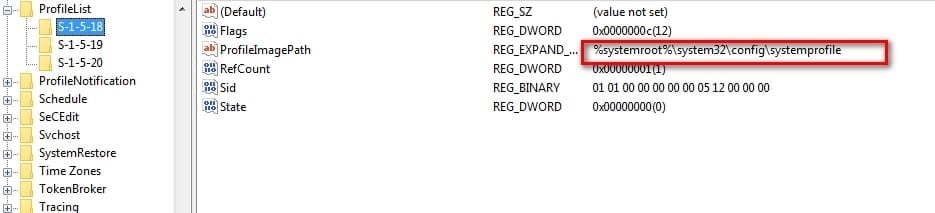
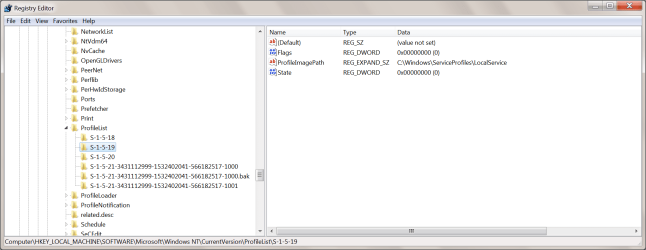
C:\Windows\system32\config\systemprofile\Desktop refers to a location that is unavailable.

that suggests the userprofile is set like this:

HKEY_LOCAL_MACHINE\SOFTWARE\Microsoft\Windows NT\CurrentVersion\ProfileList\

profile-list.jpg

should be pointing at Users\yourusername like this:

profile-list2.jpg
 

My Computers My Computers

  • At a glance

    7 X64i5 84002x8gb 3200mhz
    Computer type
    PC/Desktop
    OS
    7 X64
    CPU
    i5 8400
    Motherboard
    gigabyte b365m ds3h
    Memory
    2x8gb 3200mhz
    Hard Drives
    various
    PSU
    pure power 11 400w cm
    Case
    Coolermaster
    Cooling
    cryorig m9i
  • At a glance

    7x64g54008gb ddr4 2400
    Computer type
    PC/Desktop
    OS
    7x64
    CPU
    g5400
    Motherboard
    ga b365m ds3h
    Memory
    8gb ddr4 2400
    PSU
    xfx pro 450w
that suggests the userprofile is set like this:

HKEY_LOCAL_MACHINE\SOFTWARE\Microsoft\Windows NT\CurrentVersion\ProfileList\

View attachment 422850

should be pointing at Users\yourusername like this:

View attachment 422851
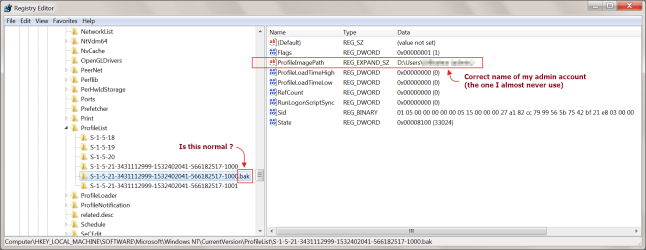
Screenshots below. I probably made too many, but that's just in case. They look similar to yours. Except for that .bak termination on the left panel. Is that normal ?

- - - Updated - - -

All right, I restored from an old Macrium Reflect image, and the problem disappeared. I can now escalate to admin rights normally, and my two user accounts are normally visible again.

I only restored the C: disk (system partition + Windows reserved partition). The D: disk I left untouched. It has my documents, plus the User folders as per Kari's tutorial for unorthodox install here : Windows 7 Image - Customize in Audit Mode with Sysprep

Everything I've checked up to now works correctly, except my Cinta Notes database, which has gone back to the date of the image I have restored from. I have multiple backups, so I'm not worried about this.

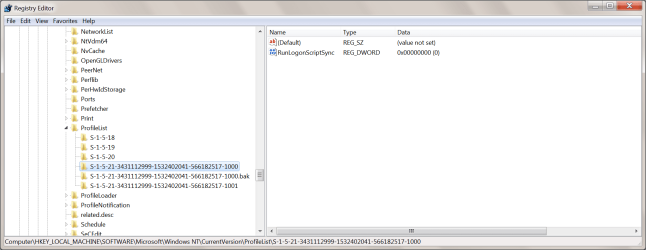
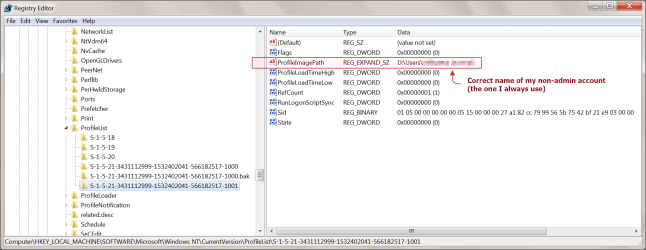
For the sake of auditing the problem, it seems SIW2's advice about HKEY_LOCAL_MACHINE\SOFTWARE\Microsoft\Windows NT\CurrentVersion\ProfileList\ was spot on.

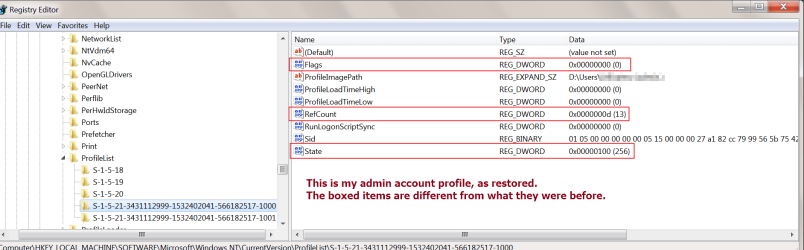
There was an extra profile for my admin account in registry, apparently the result of Windows making a backup, with a name ending in .bak. The other, duplicate profile for my admin account did not seem to have the correct information inside. The .bak profile had different information from the present, restored one which works.

Screenshots of the relevant places below, for those interested. Thank you to all who helped.

EDIT : I'm sorry, but the mechanics of that forum are the devil incarnate. I cannot post this at the end of the thread as it should be. I don't have any more time to attempt this again. The screenshots I intended to post are the last two. They reflect the situation after restoration, with the PC working correctly.
 

Attachments

  • User profile 1 - Regedit - 19 mai 23.png
    User profile 1 - Regedit - 19 mai 23.png
    48.3 KB · Views: 0
  • User profile 2 - Regedit - 19 mai 23.png
    User profile 2 - Regedit - 19 mai 23.png
    46.2 KB · Views: 0
  • User profile 4 - Regedit - 19 mai 23.png
    User profile 4 - Regedit - 19 mai 23.png
    42.8 KB · Views: 0
  • User profile 5 - Regedit - 19 mai 23.png
    User profile 5 - Regedit - 19 mai 23.png
    58.8 KB · Views: 1
  • User profile 6 - Regedit - 19 mai 23.png
    User profile 6 - Regedit - 19 mai 23.png
    56 KB · Views: 1
  • User profile restored 1 - Regedit - 19 mai 23.png
    User profile restored 1 - Regedit - 19 mai 23.png
    44.9 KB · Views: 0
  • User profile restored 2 - Regedit - 19 mai 23.png
    User profile restored 2 - Regedit - 19 mai 23.png
    49.4 KB · Views: 0
Last edited:

My Computer My Computer

At a glance

Windows 7 Home Premium 64-bit (OEM)AMD Athlon II X4 640 (3 GHz, 4 cores)Patriot 16Gb DDR3 1600 (2 kits of 2)ATI Radeon HD 4290 (integrated)
Computer type
PC/Desktop
Computer Manufacturer/Model Number
Custom build
OS
Windows 7 Home Premium 64-bit (OEM)
CPU
AMD Athlon II X4 640 (3 GHz, 4 cores)
Motherboard
Asus M4A 89 GTD Pro/USB3
Memory
Patriot 16Gb DDR3 1600 (2 kits of 2)
Graphics Card(s)
ATI Radeon HD 4290 (integrated)
Sound Card
AMD + Realtek HD Audio (integrated)
Monitor(s) Displays
Hewlett-Packard ZR2440w (24")
Screen Resolution
1920 x 1200
Hard Drives
Internal : Samsung SSD 860 EVO 250 Gb (system), Seagate Barrcuda 1 Tb (data), Western Digital Caviar Blue 500 Gb (archives).
External (USB) : 2 x 1 Tb 2,5" Seagate Barracuda (backups).
PSU
Corsair VX 450 W
Case
Antec Solo
Cooling
Cooler Master Hyper 212 Plus, 2 Nexus Real Silent Case fans
Keyboard
Cherry KC 1000
Mouse
Logitech M 90
Internet Speed
Fiber, 300 Mbit/s down, 200 Mbit/s up
Antivirus
Microsoft Security Essentials
Browser
Vivaldi, Tor
Other Info
BIOS Date: 07/18/11 Ver: 08.00.15.
Modem-router : provided by ISP
"The user profile service failed the logon" -- incident continues

Hi, I'm starting a new thread because :


Unfortunately, I had to switch that former thread back to "unsolved".


After restoring my system drive from a reasonably old backup (April 14 th), I enjoyed a few hours of normal operation. Today, however, launching my computer, I found myself in an even worse predicament.

Entering my Windows user account identifiers, I got the following error message :

The user profile service failed the logon. The logon user profile cannot be loaded.

Clicking OK briefly displays a "Logging off" message, then it's back to log in page. The same thing happens with both my accounts, the admin and the non-admin one.

I managed to start the PC in safe mode with network access, using my admin account. That's the only way I could make this post. Even in safe mode, I cannot log into my non-admin account.

After logging in with my admin account, I get the same error message that I had before I restored from a backup :

C:\Windows [...] \Desktop refers to a location that is unavailable.

At the same time, a tooltip appears on the bottom of the screen :

User profile Service. You have been logged on with the default profile for the system. Contact your administrator, etc.

I would really be grateful for any suggestions. If restoring from a backup does not work, what might ?

I have other, older and newer backups. I make an image everyday.

For the time being, I only restored C: (system), not D: (data). My Windows user folders are installed on D: per Kari's tutorial and sys-prepping (which Kari insists is a "legal" way to install from a Microsoft point of view).

Thank you in advance !
 
Last edited:

My Computer My Computer

At a glance

Windows 7 Home Premium 64-bit (OEM)AMD Athlon II X4 640 (3 GHz, 4 cores)Patriot 16Gb DDR3 1600 (2 kits of 2)ATI Radeon HD 4290 (integrated)
Computer type
PC/Desktop
Computer Manufacturer/Model Number
Custom build
OS
Windows 7 Home Premium 64-bit (OEM)
CPU
AMD Athlon II X4 640 (3 GHz, 4 cores)
Motherboard
Asus M4A 89 GTD Pro/USB3
Memory
Patriot 16Gb DDR3 1600 (2 kits of 2)
Graphics Card(s)
ATI Radeon HD 4290 (integrated)
Sound Card
AMD + Realtek HD Audio (integrated)
Monitor(s) Displays
Hewlett-Packard ZR2440w (24")
Screen Resolution
1920 x 1200
Hard Drives
Internal : Samsung SSD 860 EVO 250 Gb (system), Seagate Barrcuda 1 Tb (data), Western Digital Caviar Blue 500 Gb (archives).
External (USB) : 2 x 1 Tb 2,5" Seagate Barracuda (backups).
PSU
Corsair VX 450 W
Case
Antec Solo
Cooling
Cooler Master Hyper 212 Plus, 2 Nexus Real Silent Case fans
Keyboard
Cherry KC 1000
Mouse
Logitech M 90
Internet Speed
Fiber, 300 Mbit/s down, 200 Mbit/s up
Antivirus
Microsoft Security Essentials
Browser
Vivaldi, Tor
Other Info
BIOS Date: 07/18/11 Ver: 08.00.15.
Modem-router : provided by ISP
Back
Top